


7 Best amoCRM Alternatives Worth Switching To
amoCRM rebranded to Kommo, but the name change didn't fix the problems driving teams away. A 2.4/5 on Trustpilot from 44 reviews and a 4.1/5 on G2 from 49 reviews - that's rough for a CRM asking for a 6-month minimum billing commitment.
The complaints are specific and consistent: a 2,500-lead cap per seat on the Base plan, pipeline automation gated behind the $25/user/mo Advanced tier, and basic WhatsApp features locked behind paywalls. One Trustpilot reviewer put it bluntly: "support... almost non existent." Reddit threads and community feedback echo the same frustrations - support quality and WhatsApp paywalls come up again and again.
We've tested all seven picks below against Kommo's current feature set. Here's what actually earns your pipeline, plus a framework for migrating without losing data.
Our Picks (Quick Version)
- Pipedrive - the most natural switch for pipeline-focused teams. 4.5/5 on Capterra from 3,042 reviews. Starts at $14/user/mo.
- Freshsales - best free plan for budget SMBs. Free for up to 3 users, paid plans from $9/user/mo.
- HubSpot CRM - best if you want marketing and sales under one roof. Free CRM tier, Sales Hub starts at $20/user/mo.
Pricing and Ratings at a Glance
All prices reflect annual billing.
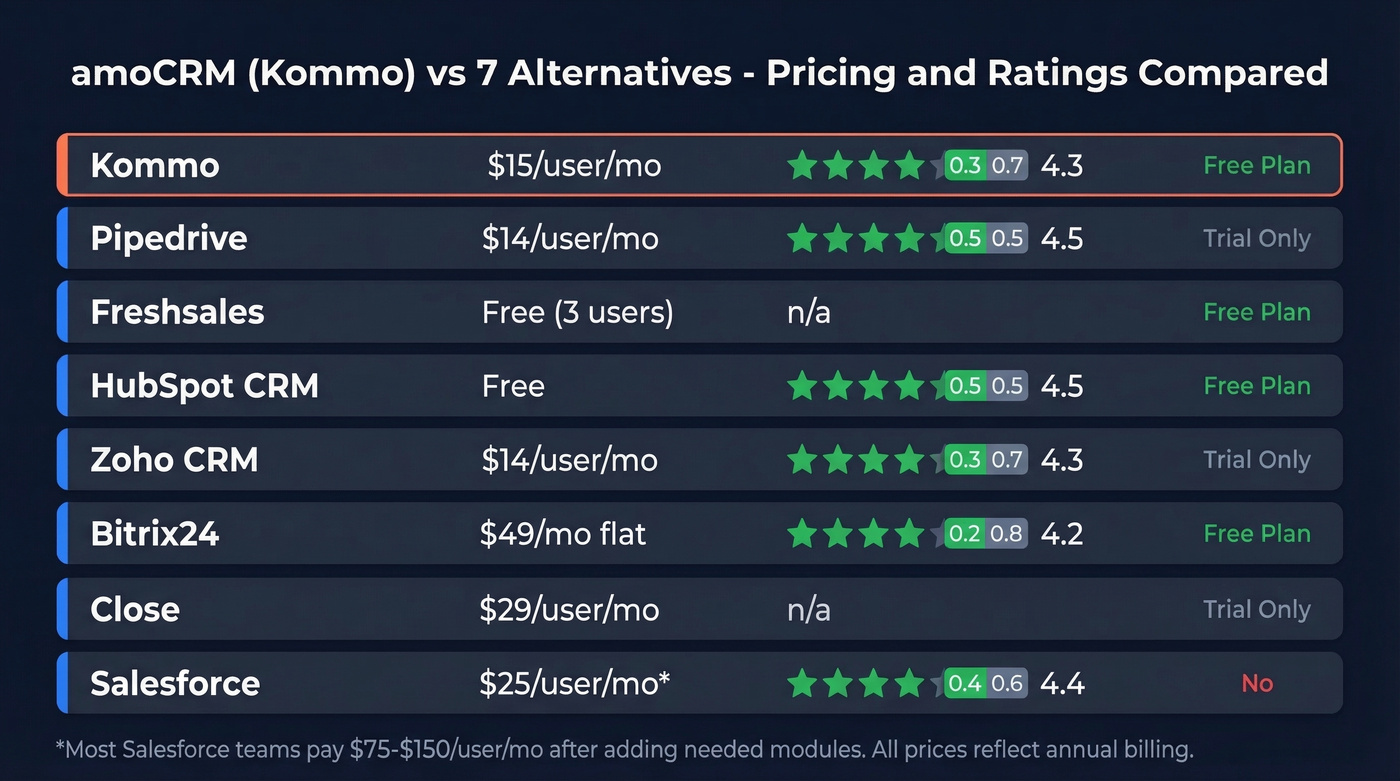
| Tool | Best For | Starting Price | Capterra Rating | Free Plan? |
|---|---|---|---|---|
| Kommo | Messaging CRM | $15/user/mo | 4.3/5 (194) | 14-day trial |
| Pipedrive | Visual pipeline | $14/user/mo | 4.5/5 (3,042) | 14-day trial |
| Freshsales | Budget SMBs | $0 (3 users) | - | Yes |
| HubSpot CRM | Marketing + sales | $0 | 4.5/5 (4,434) | Yes |
| Zoho CRM | Suite ecosystem | $14/user/mo | 4.3/5 (6,961) | Yes |
| Bitrix24 | Large teams | $49/mo flat | 4.2/5 (981) | Yes (unlimited) |
| Close | Inside sales | ~$29/user/mo | - | 14-day trial |
| Salesforce | Enterprise scale | $25/user/mo* | 4.4/5 (18,748) | No |
*Most Salesforce teams land at $75-$150/user/mo once they add what they actually need.

Every CRM on this list is only as good as the contacts inside it. Prospeo enriches your pipeline with 98% verified emails and 125M+ mobile numbers - so the day you migrate from Kommo, your reps dial real buyers, not dead leads.
Start your new CRM right. Verify every contact at $0.01 per email.
The 7 Best Kommo Competitors
Pipedrive
Pipedrive's pipeline-first philosophy is the closest match to Kommo's deal-stage approach, minus the messaging lock-in. In our testing, the drag-and-drop board is genuinely intuitive - it's the one CRM where new reps don't need a training session to start moving deals. The Lite plan at $14/user/mo gives you clean pipeline management without a lead cap that'll bite you at 2,500 contacts per seat.

Where Pipedrive really shines is speed to value: most teams we've talked to had their pipeline rebuilt and reps working within a single afternoon, which is a stark contrast to the multi-week onboarding some CRMs demand. The Growth plan at $39/user/mo adds workflow automation that covers what Kommo gates behind its Advanced tier.
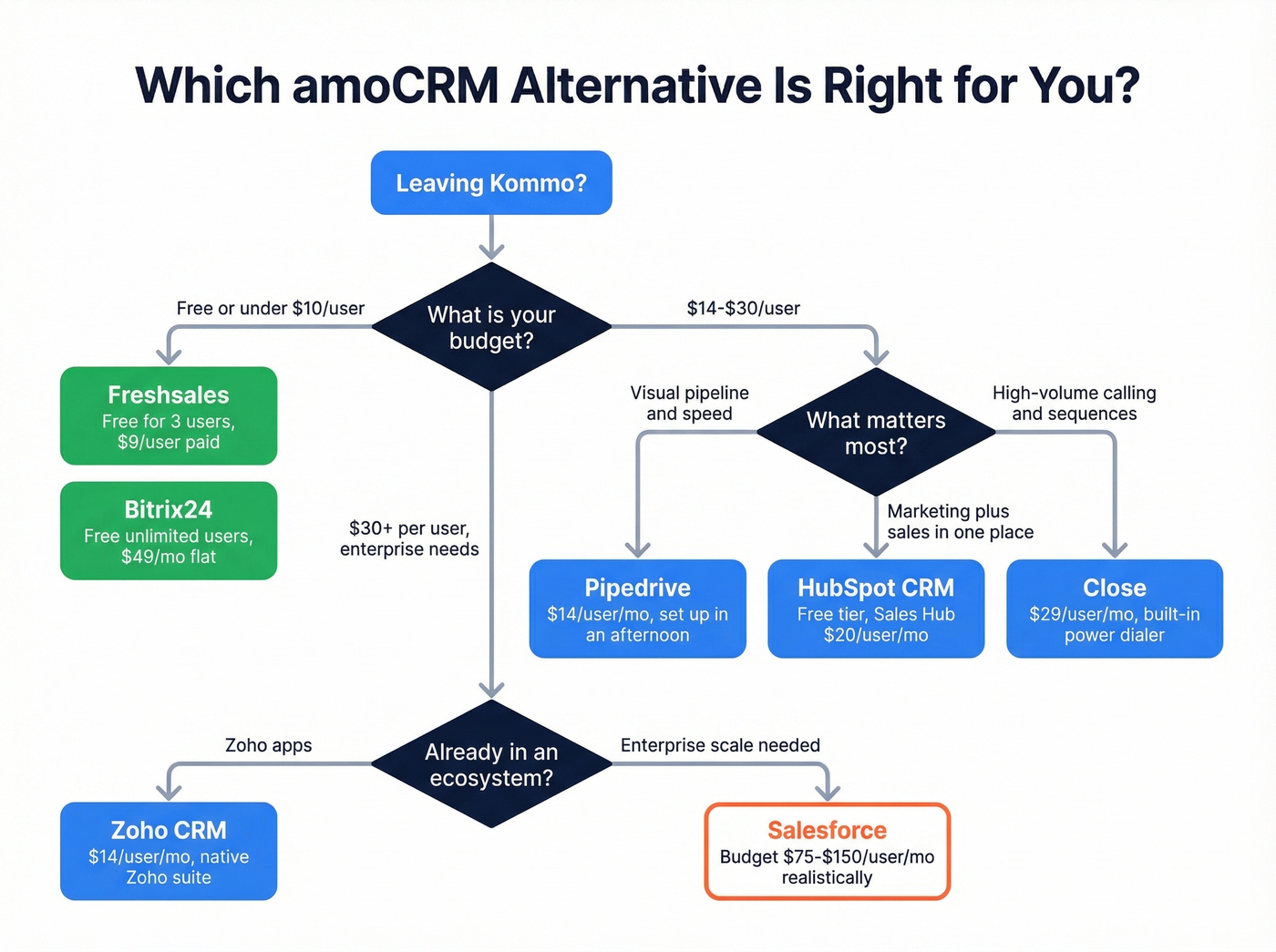
Use it if you're a sales team of 3-25 that lives in the pipeline view and wants clean deal tracking without feature bloat.
Skip it if you need deep marketing automation or a built-in messaging inbox. Pipedrive is a sales CRM, not a messaging platform - and that's by design.
Freshsales
Freshsales wins on price. Full stop. The free plan covers up to 3 users with contact management and deal tracking, and the Growth tier at $9/user/mo is one of the cheapest paid CRM tiers worth recommending. The 21-day trial gives you plenty of time to test it properly.

For a two-person startup or a bootstrapped agency, this is the obvious first stop. You get a functional CRM at zero cost, and the upgrade path is gradual enough that you won't hit a pricing cliff at 10 users.
Skip it if you need advanced AI out of the box. Freddy AI Agent is a paid add-on with session packs, and serious automation means upgrading to Pro ($39/user/mo) or Enterprise ($59/user/mo).
HubSpot CRM
HubSpot's free CRM tier is legitimately useful - contact management, deal tracking, and basic reporting at $0. Sales Hub starts at $20/user/mo.
The real strength is ecosystem. Marketing Hub, Service Hub, and Operations Hub all share the same database, so if you're running inbound alongside outbound, few platforms integrate this cleanly. 4.5/5 on Capterra from 4,434 reviews backs that up.
Skip it if your budget is tight and you'll need advanced features soon. The jump from Starter to Professional is steep, and Enterprise scales to $150+/user/mo. HubSpot's free tier is great; HubSpot's enterprise tier is a different product at a different price.
Zoho CRM
Zoho CRM starts at $14/user/mo. The real draw is the broader Zoho ecosystem - if you're already on Zoho Books, Zoho Desk, or Zoho Projects, the CRM slots in without integration headaches. At 4.3/5 on Capterra from 6,961 reviews, it has one of the largest review bases of any CRM on this list.
The tradeoff: Zoho's UI feels dated compared to Pipedrive or HubSpot, and the learning curve is steeper than it should be. We've seen teams take 2-3 weeks to feel comfortable, where Pipedrive takes an afternoon.
Bitrix24
Bitrix24's pricing model is the outlier - flat-rate per organization, not per user. The free plan supports unlimited users with feature limits, and paid plans run $49-$399/mo depending on user caps and features. For a 15-person team, that math works out significantly cheaper than per-seat CRMs.
Here's the thing: telephony credits are a hidden cost. Calling features can require separate credit purchases, and advanced dialer capabilities are gated to higher tiers. Factor that in before you commit.
Close
Close is built for inside sales teams that want calling, email sequences, and CRM in one place, so reps can work fast without stitching together a separate dialer and a separate sequencing tool. If your team runs high-volume outreach and Kommo's telephony integrations frustrated you, Close is a strong upgrade. Starts at ~$29/user/mo.
It's not the cheapest option on this list, but for teams doing 50+ calls a day, the built-in power dialer alone justifies the price difference. If you're building a repeatable outbound motion, pair it with a tighter cold calling system so reps don't freestyle.
Salesforce
Look - Salesforce starts at $25/user/mo on paper, but most teams land at $75-$150/user/mo once they add the modules they actually need. Implementation costs run $5,000-$50,000+. It's overkill for most teams leaving Kommo. The 4.4/5 on Capterra from 18,748 reviews confirms it's the enterprise standard, not the SMB play.
If your average contract value is under $15k, you don't need Salesforce. You need a CRM that takes 30 minutes to set up, not 30 days.
Fill Your New CRM With Clean Data
Your CRM is only as good as the data inside it. Migrating from Kommo means rebuilding your pipeline, and importing stale contacts from a CSV export is a fast way to tank deliverability on day one.
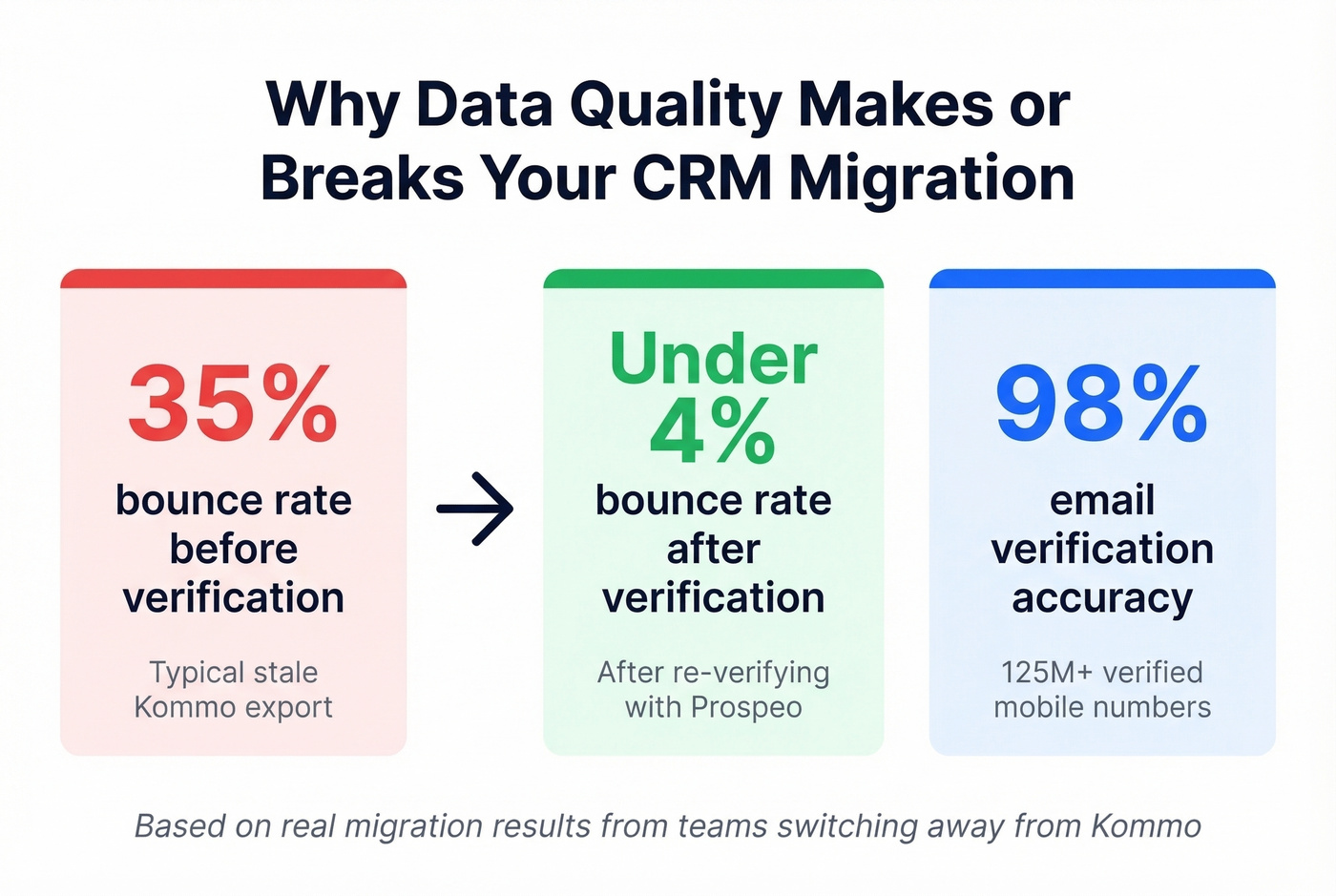
We've seen this play out with our own customers. One agency switching CRMs used Prospeo's enrichment to backfill missing phone numbers and re-verify aging email lists - they cut bounce rates from 35% to under 4% during the migration. With 98% email accuracy, 125M+ verified mobile numbers, and a 7-day data refresh cycle, the data stays current long after the initial import. Native integrations with HubSpot, Salesforce, and Pipedrive mean verified contacts flow straight into your new pipeline without manual CSV wrangling.
If you're comparing vendors, start with a shortlist of data enrichment services and pick the one that matches your CRM + workflow.
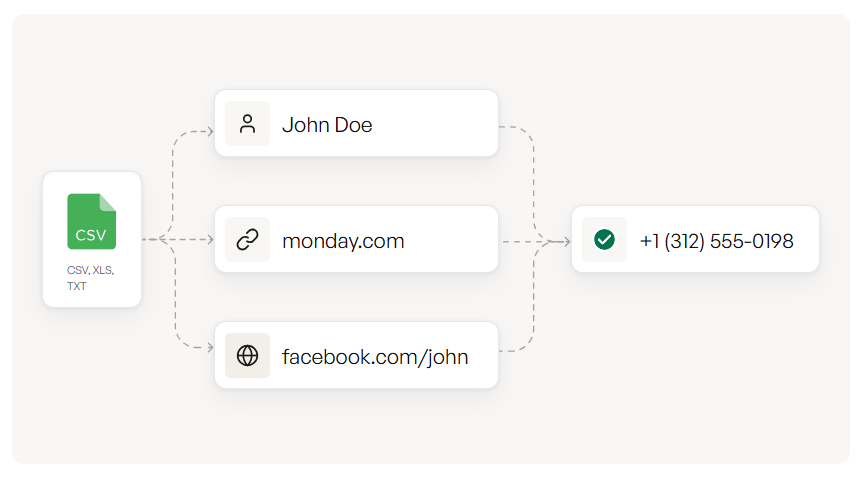
Teams migrating from Kommo cut bounce rates from 35% to under 4% by re-verifying contacts through Prospeo before importing. With 300M+ profiles refreshed every 7 days, your new CRM launches with data you can actually trust.
Don't import garbage into a clean CRM. Verify first.
Switching From Kommo: What to Expect
Migration doesn't have to be painful, but plan for it.
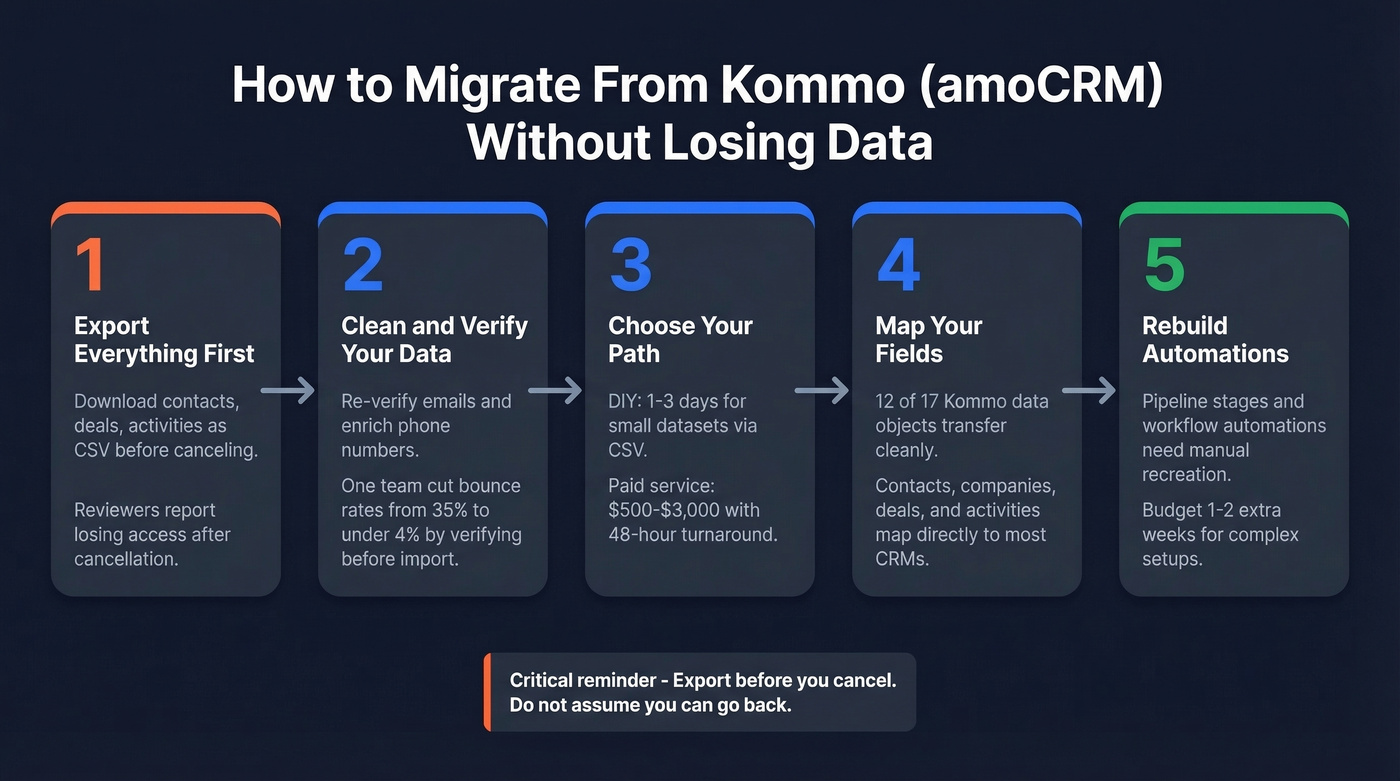
Paid migration services run $500-$3,000 for most Kommo migrations, with 48-hour delivery typical. DIY migration takes 1-3 days for small datasets via CSV, or 1-2 weeks if you're rebuilding automations and pipeline stages. Data compatibility is solid - 12 of 17 data objects transfer cleanly to HubSpot, with contacts, companies, deals, and activities all mapping directly.
One critical step: export before you cancel. Trustpilot reviews flag deletion friction and lost access after cancellation. Download everything first. Don't assume you'll be able to go back.
FAQ
Is Kommo the same as amoCRM?
Yes - amoCRM rebranded to Kommo in 2023. Same product, same team, same codebase. Plans start at $15/user/mo with a 6-month minimum commitment. New rates took effect March 3, 2026.
What's the cheapest alternative to Kommo?
Freshsales offers a free plan for up to 3 users with contact and deal management. Bitrix24's free plan supports unlimited users with feature caps. For teams that need data enrichment alongside their new CRM, Prospeo's free tier includes 75 email credits per month - useful for verifying contacts during migration.
How do I migrate data out of Kommo?
Export all contacts, deals, and activities as CSV before canceling your account - reviewers report losing access post-cancellation. Most CRMs accept direct CSV imports, and paid migration services handle field mapping for $500-$3,000 with 48-hour turnaround.