

B2B Data Cleansing: The Practitioner's Playbook for 2026
You pull up last week's outbound report: 12% hard bounces, 8% soft bounces, and three auto-replies from people who left the company six months ago. Your reps ran 400 sequences, and a quarter of them hit dead air. That's not a campaign problem - it's a data cleansing problem. And [43% of COOs](https://www.ibm.com/think/insights/cost-of-poor-data-quality) now rank data quality as their most significant data priority.
The fix isn't complicated. But it requires a system, not a one-time cleanup sprint.
The Short Version
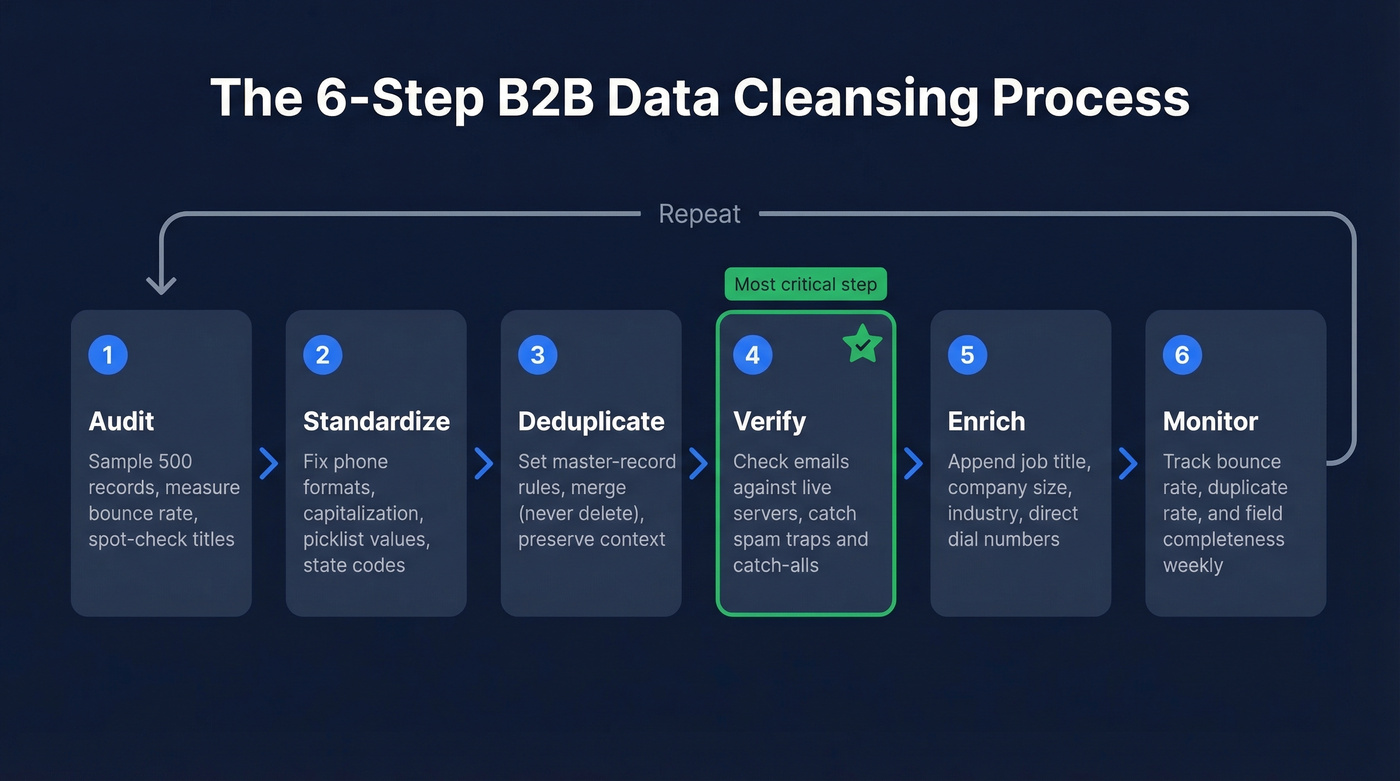
B2B data decays at roughly 22.5% per year. A fifth of your CRM is rotting right now. The fix is a six-step cycle - audit, standardize, deduplicate, verify, enrich, monitor - run on a recurring cadence, not as a weekend project.
Quick-pick toolkit:
- Deduplication: Dedupely or Validity DemandTools
- Upstream prevention: Clay for centralized enrichment before data hits the CRM
What Is B2B Data Cleansing?
B2B data cleansing is the process of identifying and correcting inaccurate, incomplete, duplicate, or outdated records in your business database. It covers everything from fixing phone number formats to purging contacts who left their company two years ago. The goal: a CRM where every record is current, reachable, and structured consistently.
People confuse cleansing with enrichment constantly. They're complementary but distinct:
| Cleansing | Enrichment | |
|---|---|---|
| What it does | Fixes and removes bad data | Adds missing data |
| When you need it | Before any campaign or analysis | After cleansing, to fill gaps |
| Examples | Dedup, format fixes, email verification | Append job title, company size, phone |
Cleanse first. Then enrich. Doing it in reverse means you're enriching records that shouldn't exist.
How Fast Does B2B Data Decay?
The headline number - 22.5% annual decay - is an average. Some fields rot much faster, and understanding the difference changes how you prioritize.
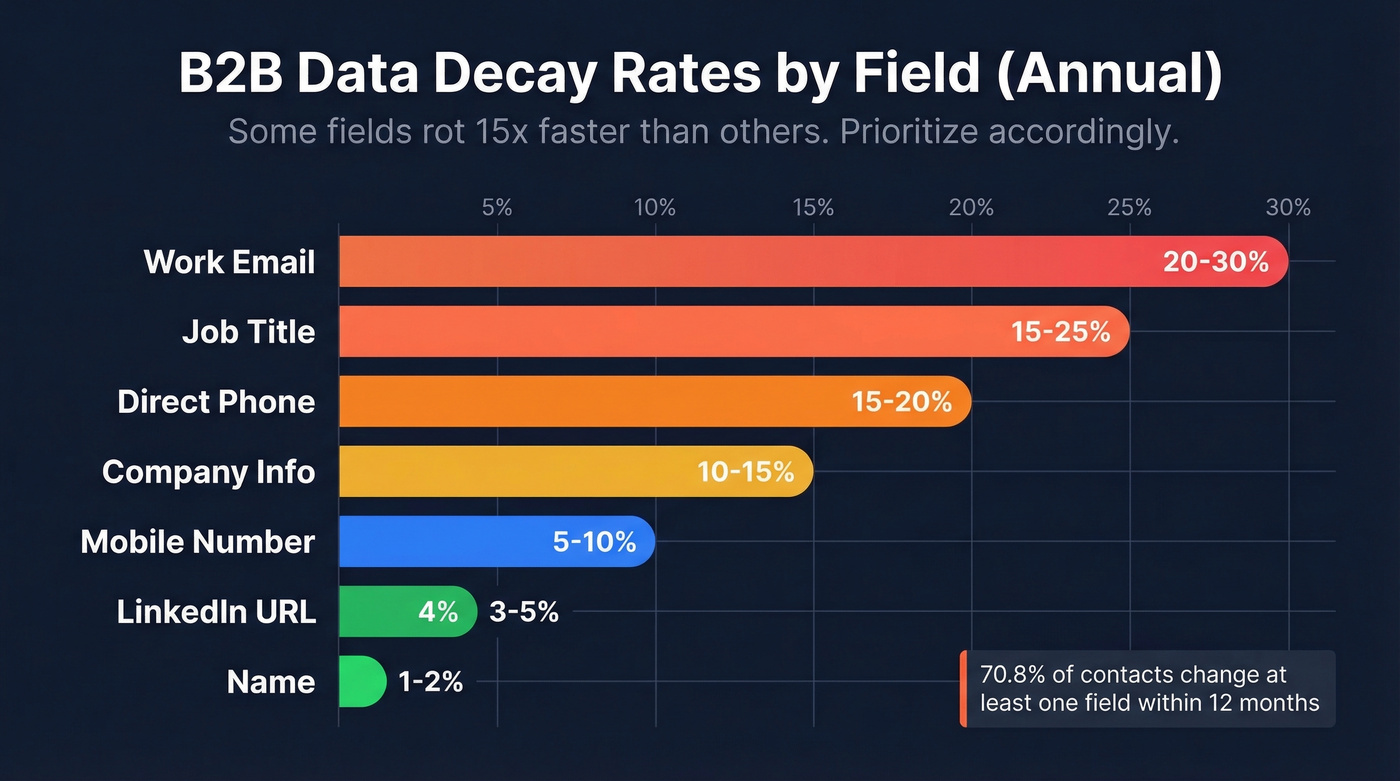
| Field | Annual Decay Rate |
|---|---|
| Work email | 20-30% |
| Job title | 15-25% |
| Direct phone | 15-20% |
| Company info | 10-15% |
| Mobile number | 5-10% |
| LinkedIn URL | 3-5% |
| Name | 1-2% |
The numbers get worse in high-turnover industries. Tech startups can see decay rates approaching 70% annually. Across all sectors, 70.8% of business contacts experience at least one field change within 12 months. Email decay spiked to 3.6% in a single month in late 2024 - nearly double the typical 1.5-2% monthly rate - showing the problem is accelerating, not stabilizing.
Let's put a dollar figure on it. Take a CRM with 50,000 contacts. At 22% annual decay, roughly 11,000 records go stale each year. If each lead represents $50 in pipeline value, that's $550,000 in potential revenue quietly evaporating - not because your reps aren't working, but because they're working contacts who've moved on.
We've seen this pattern across dozens of CRM audits. The teams that think their data is "pretty clean" are usually sitting on 15-20% decay without realizing it, because the rot is invisible until you actually verify.
The Real Cost of Dirty Data
The pipeline math above is just the start.
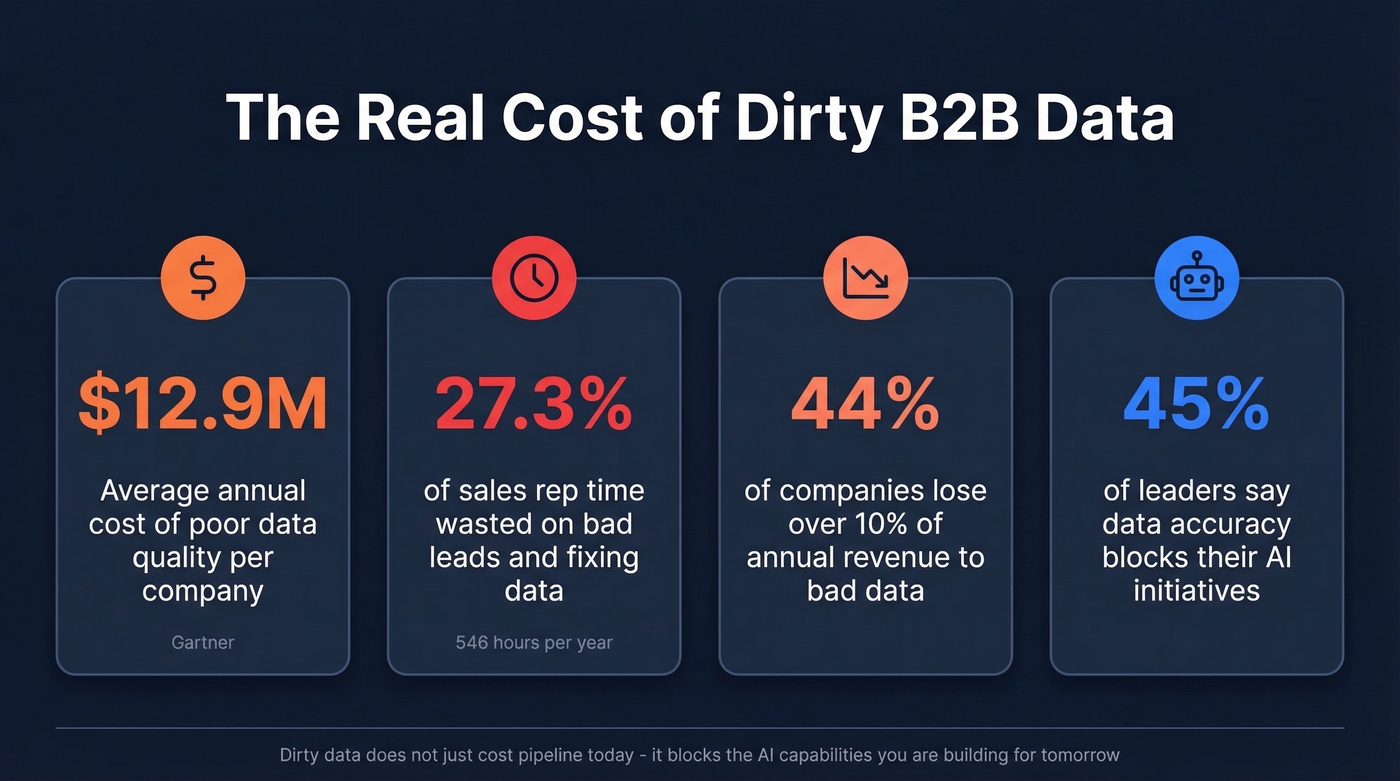
IBM's research found that over 25% of organizations estimate they [lose more than $5 million](https://www.forrester.com/report/millions-lost-in-2023-due-to-poor-data-quality-potential-for-billions-to-be-lost-with-ai-without-intervention/RES181258) annually to poor data quality. Seven percent report losses exceeding $25 million. [Gartner benchmarks](https://www.gartner.com/en/data-analytics/topics/data-quality) put the average around $12.9-$15 million per year. Those aren't typos.
On the revenue side, 44% of companies lose over 10% of annual revenue to bad data. Sales reps waste 27.3% of their time - roughly 546 hours per year - working bad leads and fixing data issues instead of selling. Clean data isn't just about deliverability; it's the foundation of account-based targeting. Segment on bad firmographics and your "personalized" outreach hits the wrong accounts entirely.
This problem is about to get more expensive. AI spending is forecast to surpass $2 trillion in 2026 with 37% year-over-year growth, but 45% of business leaders cite data accuracy as a leading barrier to scaling AI initiatives. You can't train models or run AI-driven outbound on a CRM full of garbage. Dirty data doesn't just cost you pipeline today - it blocks the AI capabilities you're trying to build for tomorrow.
Here's the thing: if your average deal size is under $10K and your CRM has fewer than 20,000 contacts, you don't need a $40K data platform. You need a $50/month dedup tool, a verification service, and the discipline to run the process below every quarter. The tooling is the easy part. The habit is what separates clean CRMs from dumpster fires.
The 6-Step Cleaning Process
1. Audit Your Data
Before you fix anything, measure the damage. Export 500 contacts at random, verify the emails, spot-check phones, and cross-reference job titles against current profiles. That sample gives you a baseline quality score and tells you where the biggest gaps live. If your sample bounces at 15%, your full database is almost certainly worse.
2. Standardize Formats
Inconsistent formatting kills CRM reporting and dedup accuracy. Phone numbers stored as "+1 (555) 123-4567" in one record and "5551234567" in another won't match during deduplication. Same problem with capitalization ("VP of Sales" vs "vp of sales"), state abbreviations, and picklist values.
Set formatting rules once, enforce them on every import, and automate where your CRM allows it. HubSpot and Salesforce both support CRM automation validation rules and workflow-based formatting. A practical shortcut: use an LLM to batch-standardize messy job title fields before import - it handles variations like "Sr. VP Mktg" to "Senior Vice President, Marketing" in seconds.
3. Deduplicate (Merge, Don't Delete)
The classic mistake: same person, two records, but they represent different roles at different companies. Merging them destroys context. Set master-record priority rules before you start - decide which record "wins" based on recency, completeness, or source reliability. Always merge rather than delete so data from both records survives.
4. Verify Emails and Phones
This is where most teams cut corners, and it's the step that matters most. Standardizing and deduplicating a list of dead email addresses just gives you a clean-looking list that still bounces.
Real-time email verification checks addresses against live mail servers, identifies spam traps, removes honeypot addresses, and handles catch-all domains - the ones that accept everything but don't always deliver. Prospeo runs a 5-step verification process covering syntax validation, domain check, mailbox verification, spam-trap removal, and catch-all handling. Upload a CSV, get results in minutes, and know exactly which addresses are safe to send.

5. Enrich Missing Fields
Once your data is clean and verified, fill the gaps. Job titles change, companies get acquired, phone numbers rotate. Enrichment appends the missing pieces - title, company size, industry, direct dial - so reps aren't prospecting blind. (If you're comparing vendors, start with our breakdown of data enrichment tools.)
6. Monitor Ongoing Quality
Set up dashboards tracking three metrics: bounce rate, duplicate rate, and field completeness percentage. If your bounce rate creeps above 2%, something upstream broke. If duplicates spike after an import, your validation rules need tightening.
This isn't a one-time project. It's a habit.

You just read that 22.5% of your CRM goes stale every year. Prospeo refreshes its 300M+ profiles every 7 days - not every 6 weeks like competitors. Our 5-step verification catches spam traps, honeypots, and catch-all domains so you stop wasting sequences on dead addresses.
Stop cleansing data that was dirty on arrival. Start with 98% accuracy.
The Cleansing Cadence
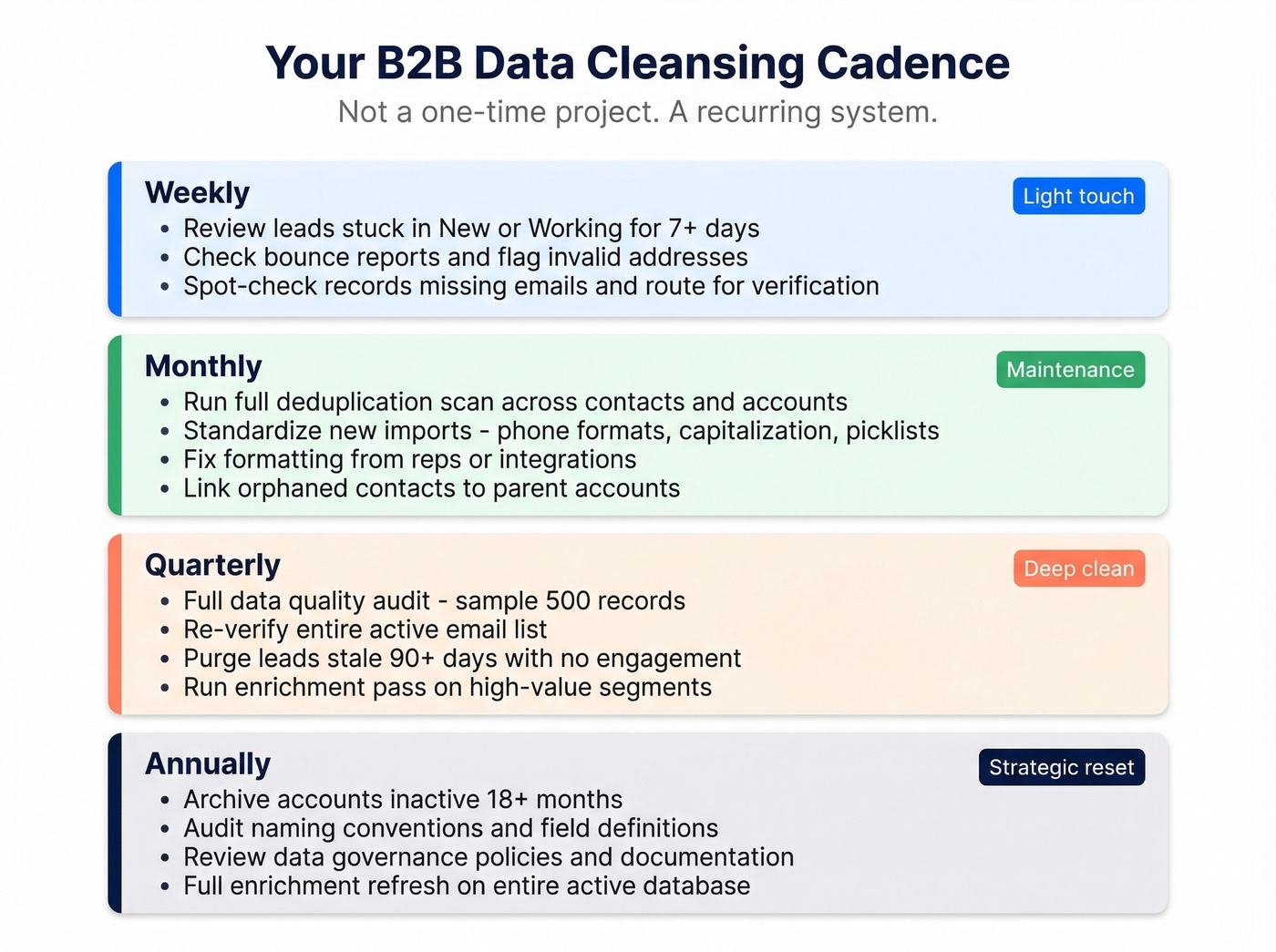
Weekly
- Review leads stuck in "New" or "Working" status for 7+ days
- Check bounce reports from outbound sequences and flag invalid addresses
- Spot-check records missing email addresses and route them for verification
Monthly
- Run a full deduplication scan across contacts and accounts
- Standardize new imports: phone formats, capitalization, picklist values
- Fix formatting inconsistencies introduced by reps or integrations
- Link orphaned contacts to their parent accounts
Quarterly
Run a full data quality audit: sample 500 records, verify emails, check phones. Re-verify your entire active email list. Purge leads stale for 90+ days with no engagement. Run an enrichment pass on high-value segments - contacts that haven't been touched in a quarter almost always need re-verification.
Annually
- Archive accounts inactive for 18+ months
- Audit naming conventions and field definitions across the CRM
- Review data governance policies and update documentation
- Run a full enrichment refresh on your entire active database
Best Tools for B2B Data Cleansing in 2026
| Tool | Category | Best For | Pricing | Integrations |
|---|---|---|---|---|
| Prospeo | Verification + enrichment | Email/phone accuracy | Free tier; ~$0.01/email | Salesforce, HubSpot, Clay, Zapier, Make, + more |
| ZoomInfo | All-in-one platform | Enterprise data quality | $15K-$40K+/yr | Salesforce, HubSpot, 50+ |
| Clay | Data orchestration | Upstream prevention | Free; $149-$800/mo | Salesforce, HubSpot, 100+ |
| Dedupely | Deduplication | CRM dedup for SMBs | From ~$49/mo | Salesforce, HubSpot, Pipedrive |
| DemandTools | Deduplication | Salesforce-native dedup | $1K-$5K/yr | Salesforce |
| Informatica | Enterprise data quality | Large-scale governance | $50K-$200K+/yr | Enterprise stack |
| Melissa | Address/phone validation | Postal + phone data | ~$1K+/yr | API-based |
| Integrate.io | ETL + cleansing | Pipeline-level cleaning | From ~$199/mo | API-based |
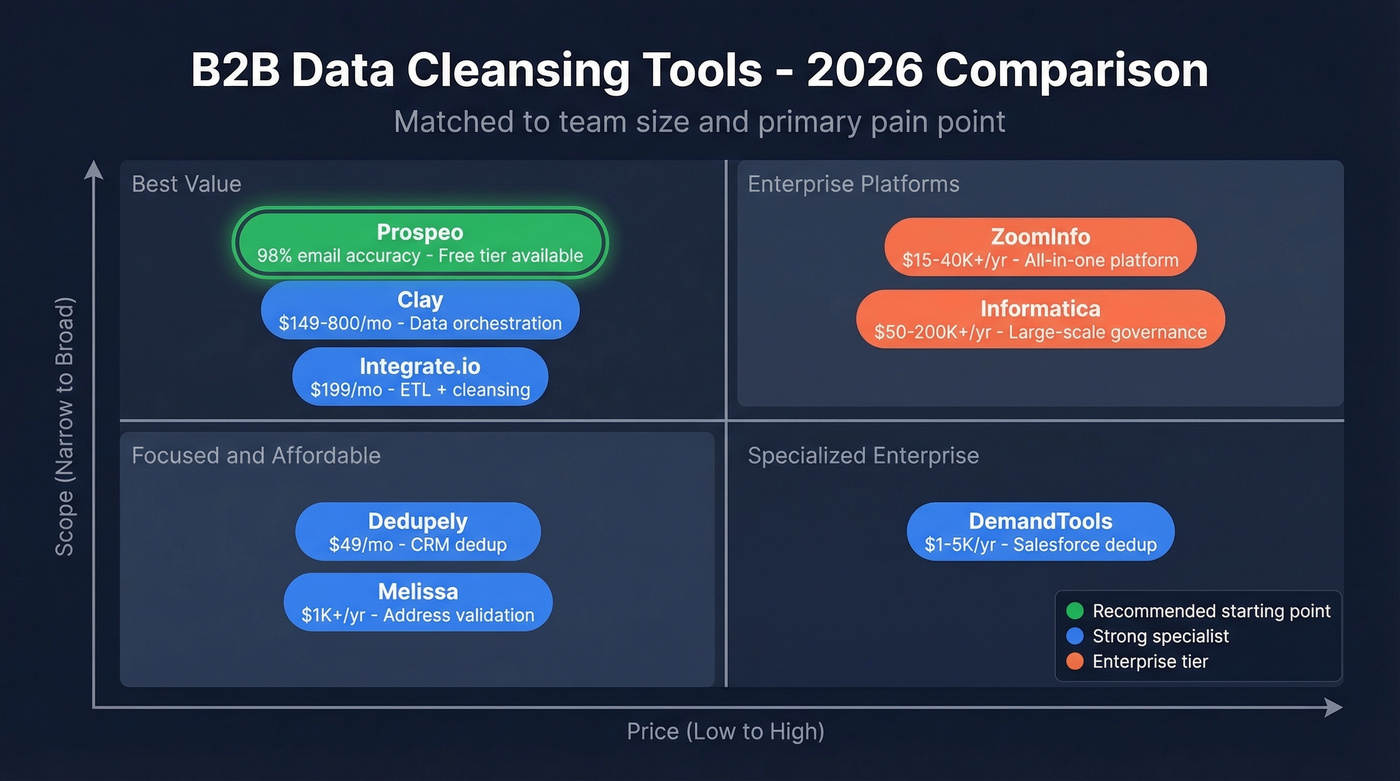
We've tested most of these across client CRMs. Here's what actually moves the needle.
Prospeo covers verification and enrichment - the two areas where real damage happens for most teams. The database spans 300M+ professional profiles with 98% email accuracy and 125M+ verified mobile numbers, and every record refreshes on a 7-day cycle versus the six-week industry average. Free tier gives you 75 emails per month plus 100 Chrome extension credits to test before committing. For teams whose primary pain is bounced emails and dead phone numbers, this is where we'd start.

ZoomInfo is the enterprise default - 500M contacts across 100M companies, with built-in cleansing workflows for deduplication, standardization, validation, and enrichment. The problem is price: a mid-market contract runs $15,000-$40,000+ per year. If you need the full platform, it's hard to beat. If you just need clean data, you're overpaying.
Clay has become the go-to for upstream data orchestration. The consensus on r/SaaS is to centralize enrichment in Clay and push only structured, verified data into HubSpot or Salesforce - preventing dirty data rather than cleaning it after the fact. Free tier available, paid plans from $149/month.
Dedupely does one thing well: CRM deduplication. Simple, affordable at ~$49/month, and integrates with Salesforce, HubSpot, and Pipedrive. For SMBs that don't need DemandTools' Salesforce-native depth, it's the right pick. Validity DemandTools is the Salesforce-native dedup standard at $1,000-$5,000 per year.
Skip the enterprise tools unless you actually need them. Informatica handles data quality for organizations managing millions of records across multiple systems at $50,000-$200,000+/year - overkill for a 30,000-contact CRM. Melissa specializes in address and phone validation around $1,000+/year. Integrate.io handles ETL pipelines with built-in cleansing from $199/month.
If you're evaluating broader data providers like Apollo or Lusha, those are primarily prospecting databases - you'll still want dedicated verification and dedup tools alongside them. If you want a shortlist, start with the best B2B databases and filter by accuracy-first providers.
Dirty data costs the average company $12.9M per year. At $0.01 per verified email, Prospeo lets you verify and enrich your entire CRM for less than the cost of one bounced campaign. Upload a CSV, get 50+ data points back per contact, and hit a 92% match rate.
Cleanse, verify, and enrich in one platform - no enterprise contract required.
Prevention Beats Cleanup
The teams with the cleanest CRMs don't clean more - they prevent dirty data from entering in the first place. This was the strongest theme in a Reddit thread on CRM hygiene: once outbound volume scales, downstream cleanup becomes a weekly fire drill. The fix is centralizing research and enrichment upstream and pushing only clean, structured data into the CRM.
Real talk: if you're scraping web data for B2B contacts, cleaning it before import is non-negotiable. Dumping raw scraped records straight into HubSpot creates the problem you'll spend next quarter fixing. Scraping gets you volume, but it also gets you junk data, formatting chaos, and IP blocks. Verify and standardize before import, not after.
Garbage in, garbage out isn't a cliche - it's your Q3 pipeline.
5 Mistakes That Make Things Worse
- Over-cleansing. Merging records that look like duplicates but represent different roles - same person, different companies - destroys valuable context. Always check before you merge.
- Skipping post-clean verification. You deduped and standardized, but never checked if the emails are still live. Congratulations, you have a beautifully formatted list of dead addresses.
- Cleaning downstream instead of fixing upstream. If dirty data keeps entering your CRM, no amount of quarterly cleanup will save you. Fix the input.
- Treating cleansing as a one-time project. At 22.5% annual decay, a "clean" database is dirty again within months. Build the cadence or accept the rot.
- Ignoring field-level decay rates. Work emails decay at 20-30% annually; names barely change. Prioritize verification spend on the fields that actually move.
Compliance: GDPR, CCPA, and CAN-SPAM
B2B data cleansing isn't just operational hygiene - it's a compliance requirement. Maintaining accurate, up-to-date records is foundational to every major data regulation.
Under GDPR, the lawful basis for B2B prospecting data is typically legitimate interest (Article 6(1)(f)). Recital 47 explicitly supports direct marketing as a legitimate interest. But you need to document a Legitimate Interest Assessment - a 1-3 page document explaining why your processing is necessary and proportionate. It's not optional. (If you're building a policy stack, use this B2B compliance guide as a starting point.)
The penalties are severe: GDPR fines run up to EUR 20 million or 4% of global annual turnover, CCPA penalties range from $2,500 to $7,500 per violation, and CAN-SPAM can hit $51,744 per email. The average data breach costs $4.45 million globally, and maintaining accurate records is a basic control against exposure. A regular cleansing cadence makes compliance easier - you can't honor a suppression request if you've got three duplicate records for the same person across different lists.
FAQ
How often should I cleanse my B2B data?
Weekly spot-checks for bounces and stuck leads, monthly deduplication scans, quarterly full audits with email re-verification, and annual archiving. At 22.5% annual decay, quarterly verification is the minimum. Teams that skip even one quarter typically file deliverability tickets by Q3.
What's the difference between cleansing and enrichment?
Cleansing fixes and removes bad data - duplicates, formatting errors, invalid emails, outdated records. Enrichment adds missing data like job titles, phone numbers, and company details. Always cleanse first, then enrich. Enriching dirty records wastes money and creates false confidence.
How much does bad data actually cost?
Over 25% of organizations lose more than $5 million annually to poor data quality. A 50,000-contact CRM with 22% decay loses roughly $550,000 in pipeline value per year at $50 per lead. The cost scales linearly with database size.
Can I clean my database without enterprise tools?
Absolutely. Prospeo's free tier handles 75 email verifications per month plus 100 Chrome extension credits, Dedupely starts at ~$49/month for deduplication, and a quarterly manual audit covers most SMB needs. You don't need a $40,000 platform - you need a consistent process.
What's the single most important step?
Email verification. Standardization and deduplication are table stakes, but unverified emails destroy sender reputation, waste sequence spend, and poison every downstream metric. One bad send to a spam trap can tank deliverability for weeks. Verify before you send - always.