

B2B Email Appending Services: What They Cost, What to Expect, and When to Skip Them
Most email append vendors won't publish pricing on their website. The ones that do advertise match rates that rarely survive contact with real-world data. Here's what B2B email appending services actually cost, what results look like on messy CRM exports, and when you're better off skipping them entirely.
The Short Version
Got a large postal or CRM list that needs email addresses added as a one-time project? A batch append service works. Melissa is the most transparent on pricing; DataZapp is the cheapest per match. Expect 30-60% match rates on real lists - not the 85% vendors advertise.
What Is B2B Email Appending?
Email appending takes your existing customer records - names, postal addresses, company info - and matches them against a master database to fill in missing email addresses. A widely cited data-quality benchmark puts the average organizational cost of bad data at $12.9M per year, with the annual US economic impact at $3.1T. B2B email append is one way to fight that decay.
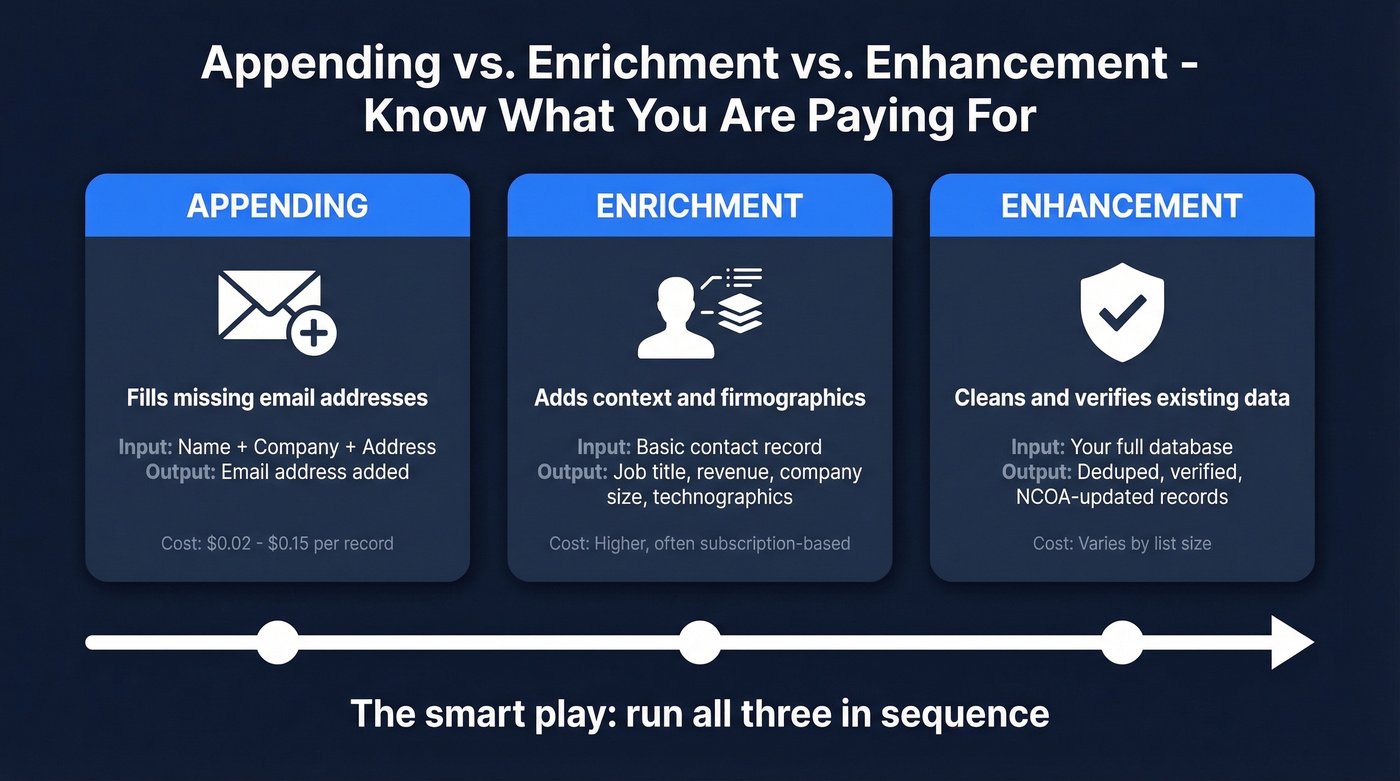
The terminology matters for pricing. Appending fills missing fields: you have a name, you get an email. Enrichment adds context like job title, revenue, or technographics. Enhancement is the hygiene layer - verification, deduplication, NCOA updates. The smart play is running all three in sequence, but most vendors blur these lines in their marketing, so ask exactly what you're getting before you pay. Small business owners on r/smallbusiness increasingly want to append demographics like age and income - that's enrichment, not appending, and the pricing differs.
What Email Appending Actually Costs
Here's what we've found append services actually charge. Most fall between $0.02-$0.15 per record, but the real cost depends on minimums, turnaround, and whether you pay per match or per record submitted.
| Provider | Price/Record | Minimum | Turnaround | Model |
|---|---|---|---|---|
| Melissa | $0.12 (under 100k), $0.10 (100k+) | $300 | 24 hrs (consumer), call for business | Pay-per-match |
| DataZapp | ~$0.02 | None stated | Instant | Prepaid credits |
| Acelerar | $0.02-$0.15 | ~$200 (10k) | 3-5 business days | Project-based |
Melissa is the gold standard for transparency - published pricing, clear minimums, no surprises. DataZapp positions itself as the budget option with rates as low as $0.02 per match and no subscription. Acelerar's project-based model means a 10,000-record business email append typically runs $200-$800.
If you're doing post-append hygiene, AtData is a common pick for email verification. It holds a 4.4/5 rating on G2 across 26 reviews, with batch validation starting at $0.01 for 25,000 inputs.
Realistic Match Rates
Vendors love quoting 85%+ match rates. Acelerar advertises exactly that. In our experience, 30-60% on real B2B lists is closer to reality, and that's with clean input data.
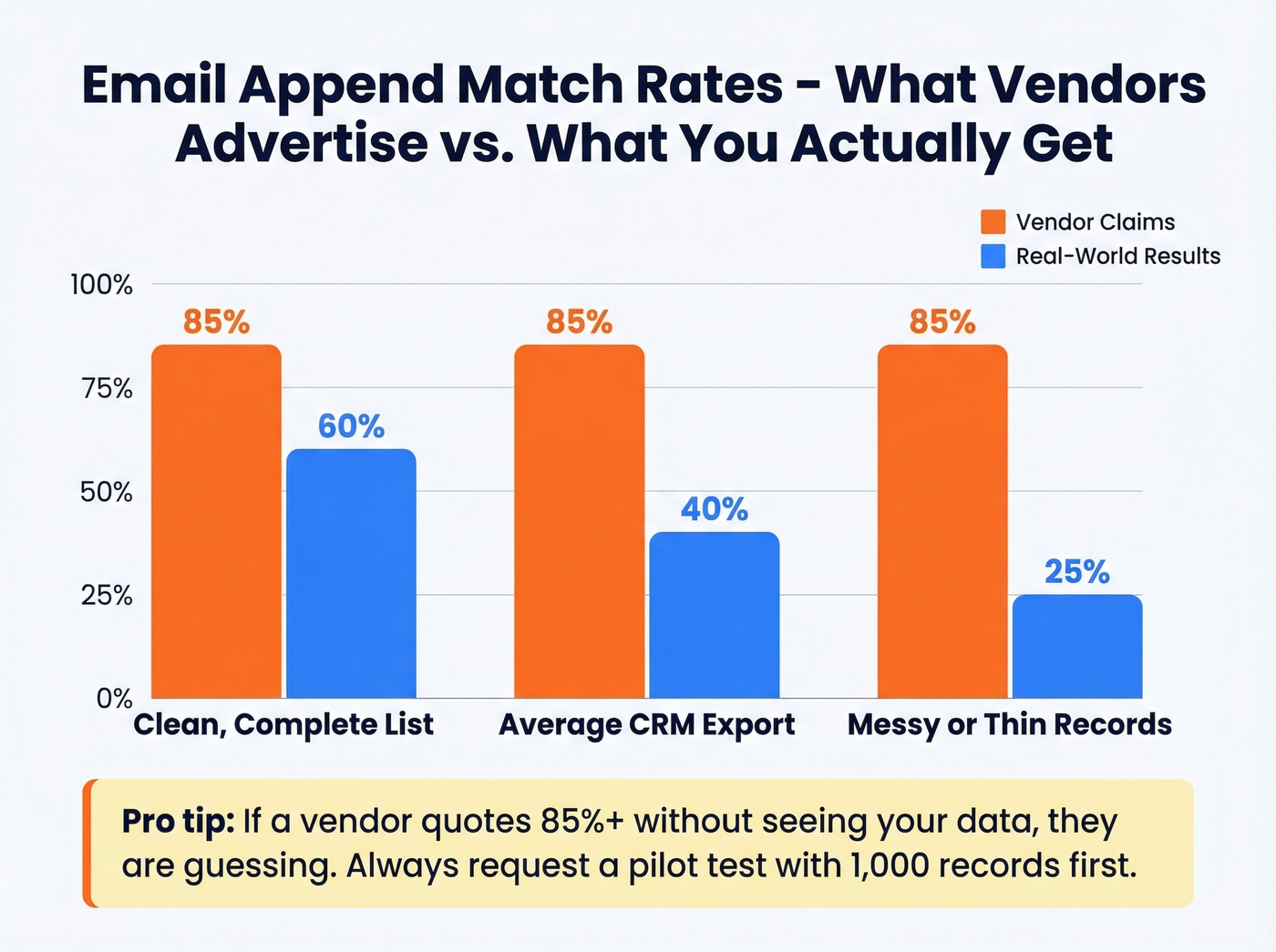
One marketer on r/marketing reported only 25% match rates from a business listing dataset. Not unusual when your input records are thin. Melissa's required fields tell the story: for a business email append, you need contact name, company name, full address, city, state, and five-digit ZIP. Miss any of those and your match rate drops fast.
The 85% number vendors quote assumes complete, clean input data. B2B lists scraped from trade shows, webinars, or CRM exports rarely hit that bar. Plan for 40-60% on a well-maintained list, 25-40% on a messy one.

Batch append services return 30-60% match rates and take days. Prospeo's enrichment API hits a 92% match rate with 98% email accuracy - in real time. At ~$0.01 per email, it costs less than most append services and refreshes every 7 days, not 6 weeks.
Skip the CSV round-trip. Get verified emails instantly.
Batch Append vs. Real-Time Platform
Here's the thing: business email appending is a 2010s solution to a 2020s problem. It still has a place, but that place is narrower than most vendors want you to believe.
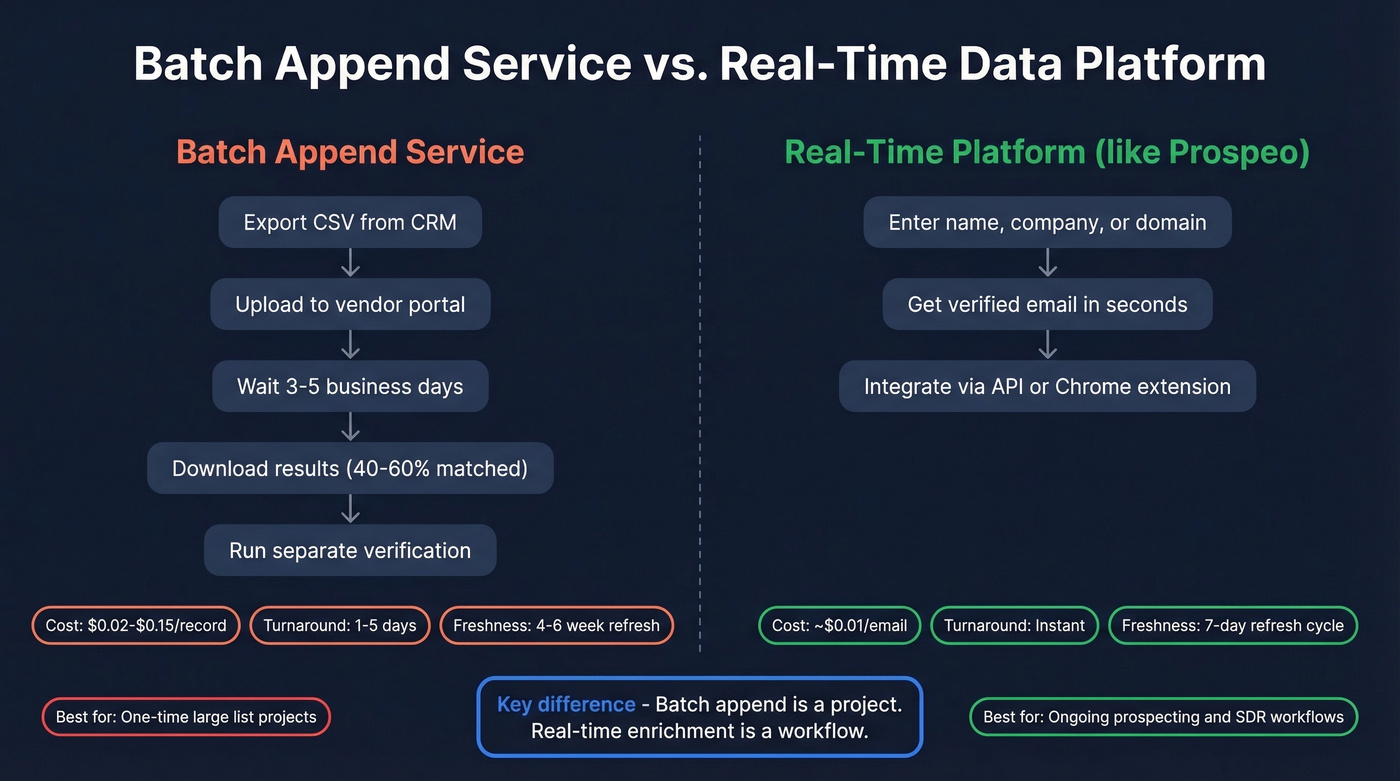
Use an append service if you've got a 50,000-record postal list from a trade show or direct mail campaign and you need emails added once. You'll spend $2,500-$7,500, wait 3-5 days, and get back 40-60% of records with email addresses attached.
Skip append services if your SDR team is burning two hours a day manually finding emails for outreach. That's not an appending problem - it's a B2B prospecting workflow problem, and batch services are the wrong tool. You need real-time email finding, not a CSV round-trip that takes a week.

The article above warns that stale data kills append ROI. Prospeo refreshes 300M+ profiles every 7 days - 6x faster than the industry average. Every email runs through 5-step verification with catch-all handling and spam-trap removal, so your bounce rate stays under control.
Fresh data, verified emails, no contracts. 75 free emails to prove it.
Compliance in 60 Seconds
Appending emails doesn't exempt you from email marketing law.
| Regulation | Consent Model | Max Penalty | Key Requirement |
|---|---|---|---|
| GDPR (EU) | Opt-in required | EUR 20M or 4% revenue | Legal basis before contact |
| CAN-SPAM (US) | Opt-out allowed | $43,280/violation | Unsubscribe + physical address |
| CCPA (CA) | Notice at collection | $7,500/violation | Notice at collection |
Email addresses are personal data under GDPR. If you're appending emails for EU contacts and emailing them without a legal basis, you're exposed - cumulative GDPR fines have hit roughly EUR 5.88B across 2,245 enforcement actions. CAN-SPAM is more forgiving: you can email first, but you must include an unsubscribe mechanism processed within 10 business days and a physical mailing address.
Selling only into the US? CAN-SPAM's opt-out model gives you room to work with appended emails. Selling into Europe? Get legal advice before you append a single record. CCPA applies to businesses with $25M+ revenue or 50,000+ California residents in their database.
Five Mistakes That Kill Append ROI
1. Appending contacts with no existing relationship. Emailing strangers drives spam complaints and tanks deliverability. AtData's own blog warns against this, and we've seen it firsthand - one bad batch can crater a domain's sender reputation for months.
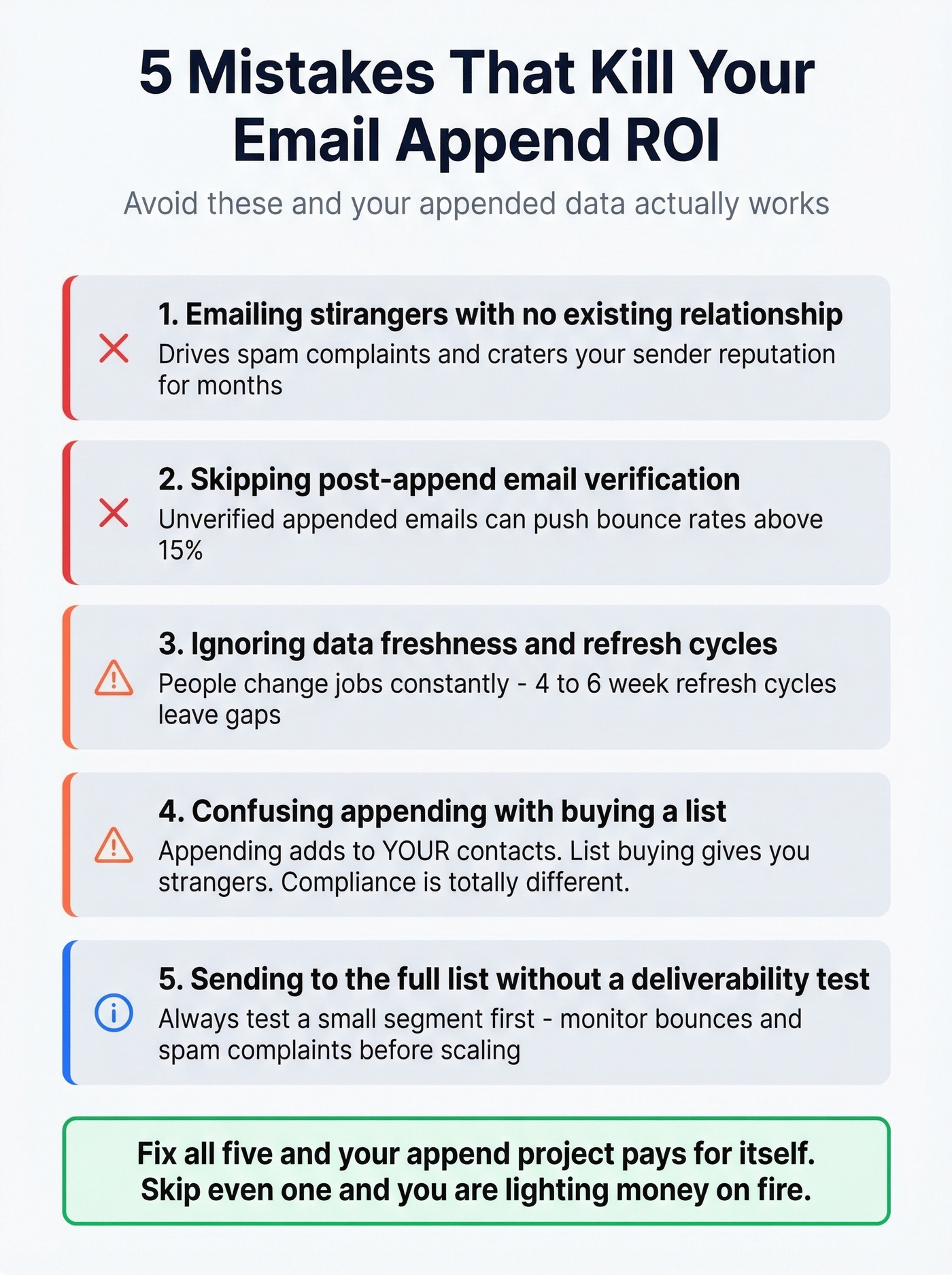
2. Skipping post-append verification. Appended emails aren't verified emails. Run them through a verification service before sending, or expect bounce rates north of 15%.
3. Ignoring data freshness. Many providers refresh on a 4-6 week cycle. People change jobs, domains expire, and your data rots in the gap. This is where ongoing data enrichment outperforms one-time batch appends.
4. Confusing appending with list buying. Appending adds emails to your existing contacts. Buying a list gives you strangers' data. The compliance implications are completely different.
5. Not testing deliverability before a full send. Send to a small segment first. Monitor bounces and spam complaints. Scale only after you've confirmed the data is clean.
How to Evaluate an Append Vendor
Don't just compare price per record. The cheapest append service is worthless if half the emails bounce.
Ask about data refresh frequency - how often the match database updates matters more than most buyers realize. Get match-rate guarantees in writing, and clarify what happens when they miss: refund, credit, or nothing. Confirm whether pricing is per match, per record submitted, or per project, because these models produce wildly different invoices on the same list.
Check for SOC 2 compliance and GDPR DPA availability. Verify their methodology - specifically whether they run SMTP checks on appended emails, since providers that skip this step deliver higher bounce rates. And always ask if you can test with 1,000 records before committing to 50,000. Vendors that refuse a pilot run are usually hiding weak match quality.
FAQ
How long does email appending take?
Batch services deliver in 24 hours to 5 business days depending on list size. Online platforms like DataZapp process instantly. Self-serve data platforms return verified results in real time - no upload-and-wait cycle required.
What fields do I need for a good match rate?
At minimum: full name, company name, and postal address with ZIP code. Name-only lists yield 25-40% matches; full-address lists with company data hit 40-70%.
Is email appending legal?
Yes, but compliance depends on jurisdiction. Under GDPR, you need a legal basis before emailing appended contacts. Under CAN-SPAM, you can email first but must include an unsubscribe link and physical mailing address. Always verify appended data before sending.
What's the difference between appending and enrichment?
Appending fills in a single missing field - the email address - using your existing contact records. Enrichment goes further, layering on firmographic and demographic data like job title, company size, revenue, and technographics. Most teams need both: appending to close the contact gap, then enrichment to prioritize outreach.
Are there free alternatives to batch append services?
Prospeo offers 75 free verified emails per month plus 100 Chrome extension credits - enough to test real-time email finding before committing budget. Hunter provides 25 free searches per month but caps enrichment. For small teams running live campaigns, a free self-serve tier usually outperforms a one-time batch append on cost and freshness.