

The Best AI Tools for Email Writing in 2026
The average professional spends 4.1 hours per day managing email. That's half a workday gone before you've done any real work. Roughly 45% of U.S. employees now use AI on the job, and email drafting is one of the most common use cases - back in 2017, AI-generated smart replies already accounted for 12% of all Gmail communication, and that number has only climbed since.
But here's the thing: reader skepticism has climbed right alongside it. The best AI tools for email writing in 2026 aren't the ones that generate the most text. They're the ones that help you sound like yourself, faster - and make sure your emails actually land in inboxes.
We tested ten of them. Here's what held up.
Our Picks (TL;DR)
- Claude - Best for drafting natural-sounding emails. $20/mo Pro. The most human tone of any LLM we've tested.
- Superhuman - Best inbox-native AI assistant. $30-40/mo depending on tier. You're paying for speed as much as AI.
- Prospeo - Best for making sure outbound emails actually arrive. 98% email accuracy, free tier with 75 emails/month, roughly $0.01/email after that.
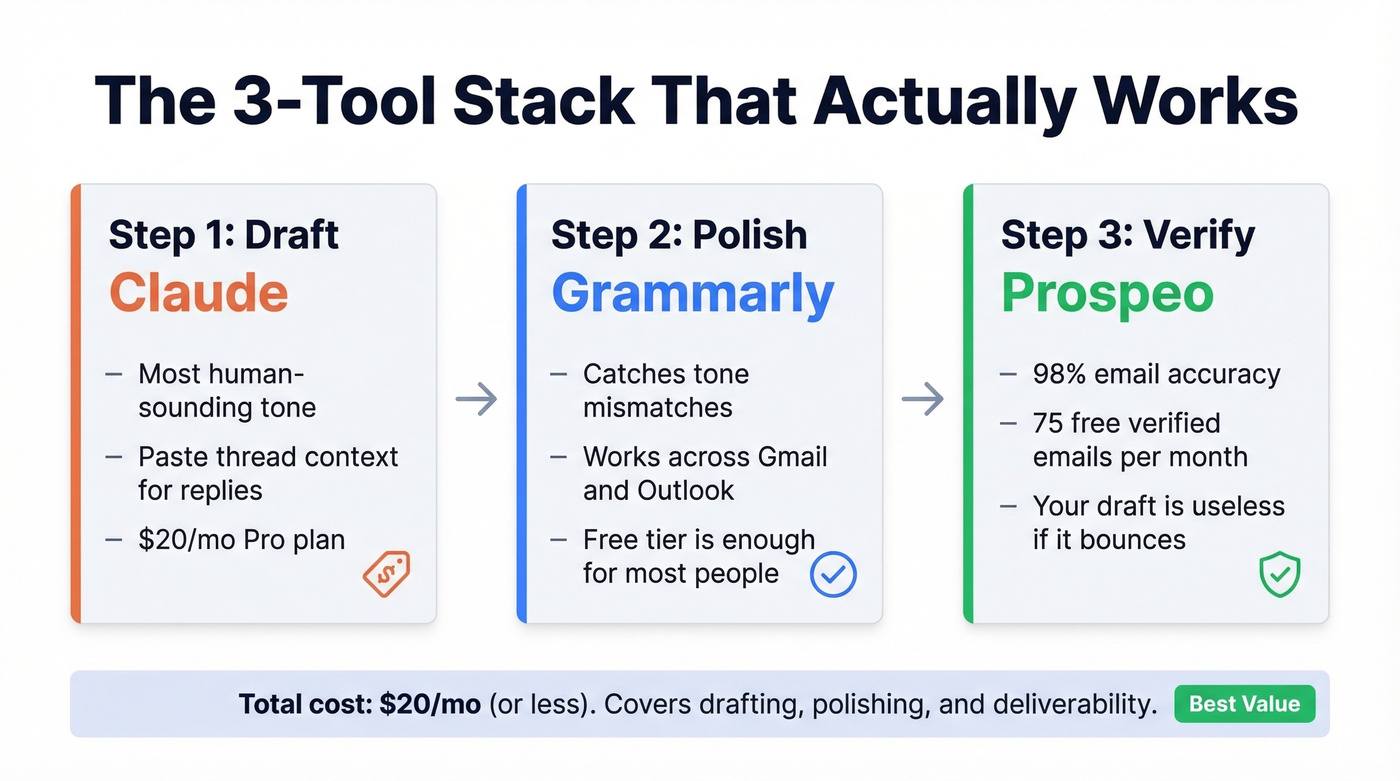
Most people need two or three of these working together, not one silver bullet.
Which Type of Email Tool Do You Actually Need?
Before picking a tool, figure out which category you're shopping in. There are three main types:
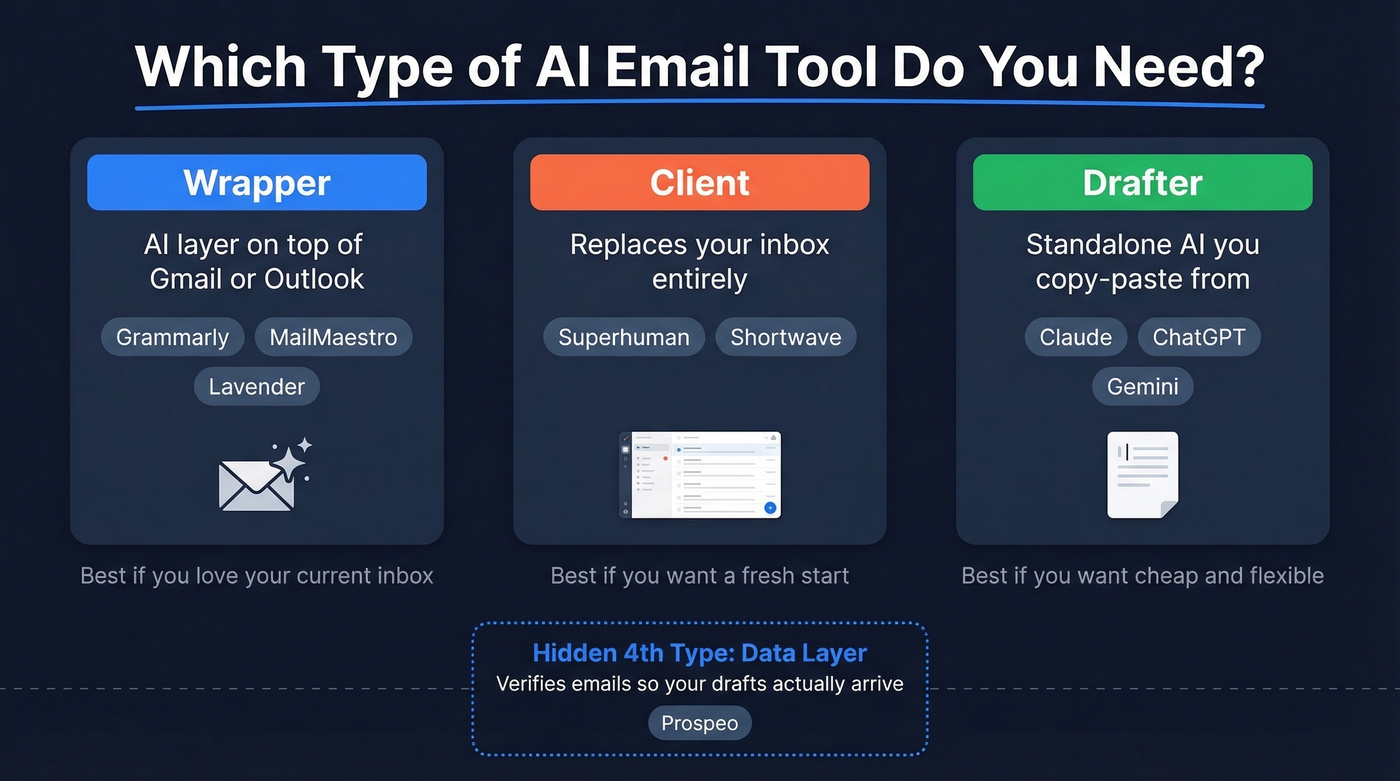
| Type | What It Does | Examples |
|---|---|---|
| Wrapper | AI layer on top of Gmail/Outlook | Grammarly, MailMaestro, Lavender |
| Client | Replaces your inbox entirely | Superhuman, Shortwave |
| Drafter | Standalone AI you copy-paste from | Claude, ChatGPT, Gemini |
Want to stay inside Gmail or Outlook? Pick a wrapper. Want a completely new inbox experience with AI baked into every interaction? Pick a client. Just need better first drafts and don't mind copy-pasting? Use a general-purpose LLM - it's cheaper and more flexible than most dedicated tools.
There's a hidden fourth category that most lists ignore: the data layer. It doesn't matter how polished your AI-drafted cold email is if it bounces. That's where verification tools fit, and it's why we include one on this list alongside the writing tools.
For privacy-conscious users, Proton Scribe is worth a look - it's built for people who don't want their email content floating around a dozen SaaS tools. Too niche for our main list, but if privacy is your top concern, it's one of the few serious options.
Top AI Email Writing Tools Tested
Claude - Best for Natural Drafts
Use this if you write emails that need to sound genuinely human - sales outreach, executive communication, sensitive replies. Claude's tone is the most natural of any major LLM. The Missive comparison confirmed what we've seen in our own testing: Claude follows detailed instructions well and produces drafts that don't scream "AI wrote this." Its 200K token context window means you can paste entire email threads and get replies that actually reference the conversation.
Skip this if you want AI built into your inbox. Claude has no native email integration - you're copying and pasting, or building API workflows. That's fine for high-stakes emails where you'd spend 10 minutes drafting anyway. It's friction for quick replies.
Claude Pro runs $20/mo. The free tier works for occasional use but hits limits fast during a busy email day.
Superhuman - Best Inbox-Native AI
Superhuman's speed is legendary - keyboard shortcuts, split inboxes, instant search. In our testing, the AI features feel more like a layer on top of a fast inbox than the main reason to buy the product. You're paying for the inbox experience first, AI second.
The best AI features - Auto Drafts, Ask AI, plus HubSpot and Salesforce integrations - are locked behind the Business tier at $40/mo. Starter at $30/mo gets you "most Superhuman AI features," but the gap between tiers is real. If you don't need the inbox overhaul, a $20/mo LLM gives you better drafting for less money.
The verdict: Superhuman is worth it if you process 100+ emails daily and value inbox speed above all else. For AI writing alone, you're overpaying.
ChatGPT - The Swiss Army Knife
ChatGPT is the default for a reason. Free tier handles basic email drafting. The $20/mo Plus plan gives you the flagship model and a 128K context window, which is plenty for most email work. It handles every email type - cold outreach, internal updates, customer replies, follow-ups - with decent quality across the board.
The tradeoff is genericness. The most common complaint on r/sales and email marketing communities is that ChatGPT drafts sound like ChatGPT - the "hope this email finds you well" problem. With a good system prompt and a few examples of your voice, it gets significantly better. Without that setup, you'll spend more time editing than you saved.
Pro tip: Write a system prompt that captures your voice, save it, and paste it at the start of every session. That single step eliminates 80% of the "sounds like AI" problem.
Shortwave - Best AI Email Search
Shortwave's AI search is the standout feature - ask it "what did Sarah say about the Q3 budget?" and it pulls the answer from your inbox history. For Gmail power users who want AI that doesn't just write emails but helps find, summarize, and organize them, it's impressive.
The frustration is the usage caps. The Business tier at $24/seat/mo limits you to roughly 150-300 AI requests per day and caps AI search history at 5 years. Even the Max tier at $100/seat/mo limits you to 150 max threads per AI search. For a tool that positions itself as your AI-powered inbox, those caps feel stingy. We burned through a day's allocation by mid-afternoon during testing.
Lavender - Best Sales Email Coach
Lavender doesn't write your emails - it coaches you while you write them. It scores your drafts in real time, flags issues like length, formality, and weak subject lines, then suggests improvements. Think of it as a sales email linter. For SDR teams sending 50+ personalized emails a day, that feedback loop compounds fast.
Pricing reflects the coaching model: free gets you 5 emails/month (barely a taste), Starter at $29/mo unlocks unlimited scoring, and Teams at $69/user/mo adds dashboards and collaboration. It's a coaching layer, not a sending platform - pair it with your actual email tool.
MailMaestro - Best for Outlook Users
MailMaestro is used by 55,000+ teams, and the satisfaction scores reflect it: 4.8/5 on G2 for Outlook, 4.9/5 on the Chrome Web Store with 160+ ratings. The best features - AI Priority Inbox, Email Reminders, and Teams integration - are exclusive to Outlook. Professional plan runs $15/seat/mo, or $12/seat/mo on annual billing.
Gmail users get basic compose and reply features, but the Outlook-exclusive functionality is where the real value lives. If you're on Gmail, you have better options.
Grammarly - Best Polish Layer
Grammarly isn't an email drafter - it's the final pass. Use Claude or ChatGPT to generate your first draft, then let Grammarly catch the tone mismatches, awkward phrasing, and grammar issues that LLMs still produce. The free tier includes 100 AI prompts per month. Paid plans start at $30/mo for 1,000 prompts.
It works across Gmail, Outlook, and your browser, which means it catches issues regardless of where you're composing. Most professionals who use AI for email already run Grammarly in the background, and the free tier is enough to justify it.
Gemini - Best for Long Threads
Gemini's up-to-1M token context window makes it the clear choice for replying to massive email threads. Native Gmail integration via Google One AI Premium means it reads your thread context automatically. $19.99/mo. Best when you need to synthesize a 40-message thread into a coherent reply, weakest when you need punchy short emails.
Jasper - Best for Marketing Campaigns
Jasper starts around $69/mo. It's built for marketing teams producing campaign copy at scale - newsletters, drip sequences, promotional blasts. For individual email writing, it's overkill and overpriced. If you're not running multi-channel marketing campaigns, skip it.

The best AI draft in the world still fails if it bounces. Prospeo verifies emails through a 5-step process that delivers 98% accuracy - compared to 87% at ZoomInfo and 79% at Apollo. Data refreshes every 7 days, not every 6 weeks.
Start with 75 free verified emails. No credit card, no sales call.
Pricing Comparison
| Tool | Best For | Free Tier? | Paid From | Key Limitation |
|---|---|---|---|---|
| Claude | Natural drafts | Yes (limited) | $20/mo | No inbox integration |
| Superhuman | Inbox speed + AI | No | $30/mo | Best AI needs $40/mo |
| Prospeo | Email verification | 75 emails/mo | ~$0.01/email | Not a writing tool |
| ChatGPT | All-purpose drafts | Yes | $20/mo | Generic without prompts |
| Shortwave | AI email search | No | $24/seat/mo | Frustrating usage caps |
| Lavender | Sales coaching | 5 emails/mo | $29/mo | Coaching only, no send |
| MailMaestro | Outlook AI | 3 req/week | $15/seat/mo ($12 annual) | Best features Outlook-only |
| Grammarly | Polish + tone | 100 prompts/mo | $30/mo | Doesn't draft from scratch |
| Gemini | Long threads | Yes (limited) | $19.99/mo | Weaker on short emails |
| Jasper | Marketing copy | Trial available | ~$69/mo | Overkill for 1:1 email |
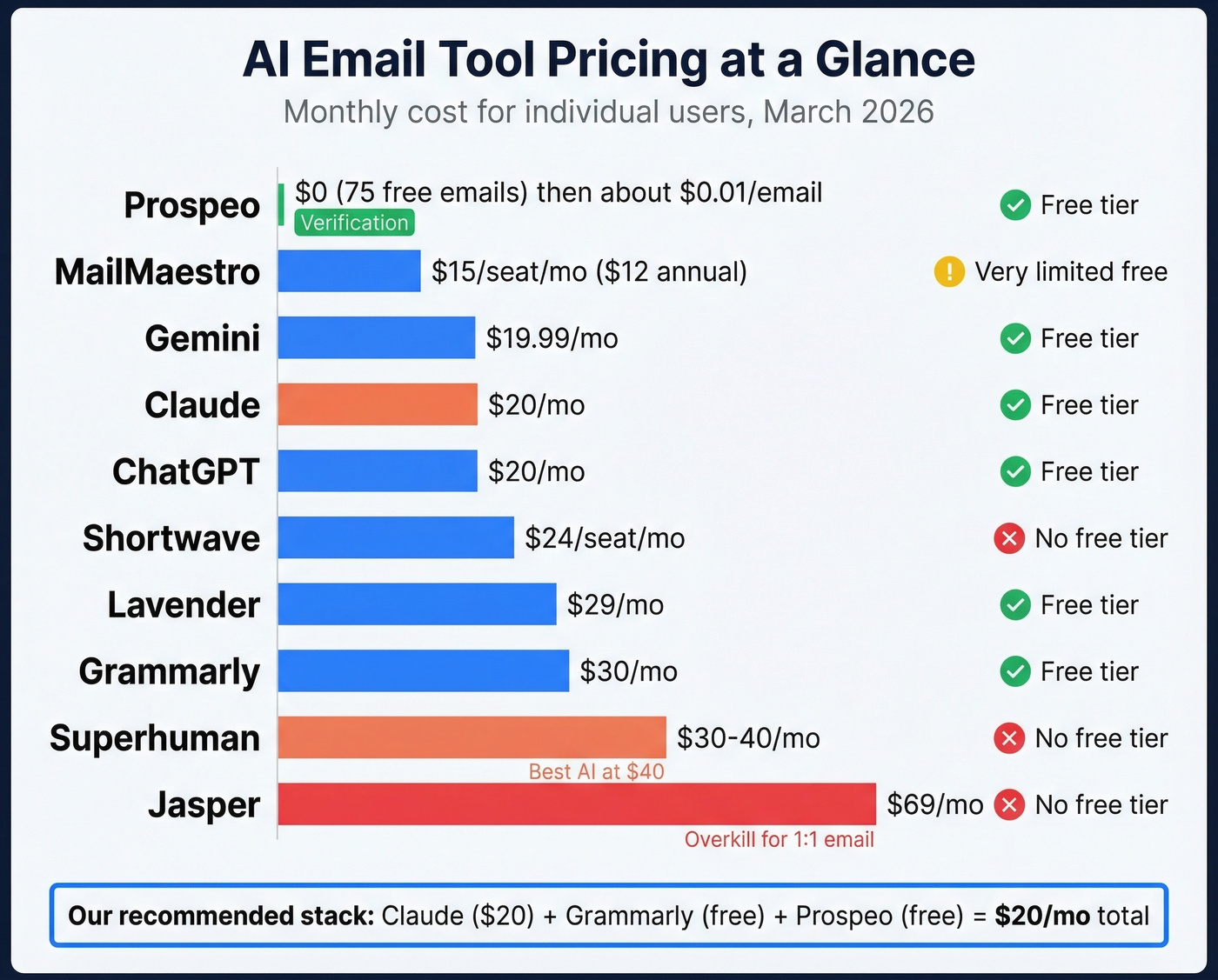
Notable mentions we tested but didn't list: Proton Scribe (privacy-first), Notion Mail (promising but too early), and Copy.ai (better for marketing automation than individual email). None made the main list because they're either too niche or too new to recommend broadly.
Which LLM Actually Writes the Best Emails?
Let's be honest about something: most "AI email assistants" are wrappers around Claude, ChatGPT, or Gemini with a markup. Shortwave literally lists Claude Haiku, Sonnet, and Opus as its underlying models. You're often paying $24-100/mo for a UI layer on top of a $20/mo model.
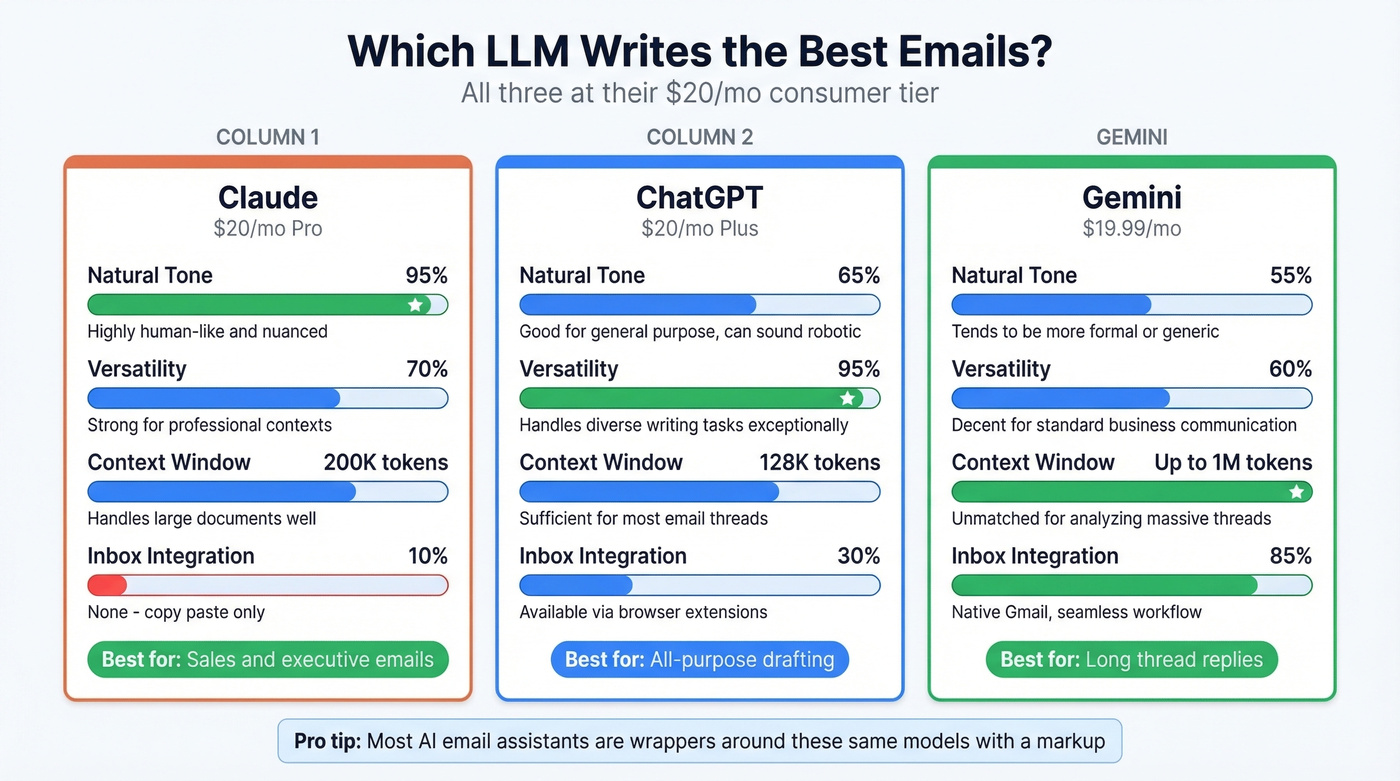
That's not always a bad deal - inbox integration and workflow automation have real value. But if you just need better email drafts, here's how the three major LLMs compare at their $20/mo consumer tiers:
Claude produces the most natural tone. It's the one least likely to generate text that reads as AI-written. For sales emails, executive communication, and anything where authenticity matters, it's the clear winner.
ChatGPT is the most versatile. Better at following complex formatting instructions, handling multiple email types in one session, and adapting to detailed system prompts.
Gemini wins on context length. If you're replying to a 50-message thread and need the AI to understand the full history, Gemini's 1M token window is unmatched.
Here's our take: you don't need a dedicated AI email client. A good LLM and five minutes of prompt setup gets you 80% of what a $30-40/mo email client provides. The consensus on r/sales and r/emailmarketing tracks with this - most people land on ChatGPT or Claude for drafting plus Grammarly for polish. Worth noting: the emerging Model Context Protocol (MCP) standard could change this equation by letting LLMs connect directly to your inbox and CRM, making dedicated clients even less necessary.
AI Email Mistakes That Kill Credibility
Recipients are trained to spot AI tells. These five damage your credibility fastest:
Vocabulary mismatch. If you normally write "hey, quick question" and your AI draft opens with "I trust this message finds you in good spirits," the recipient notices. AI defaults to formal register unless you explicitly train it otherwise.
Hallucinated details. AI will confidently reference a blog post that doesn't exist, a meeting that never happened, or a product feature you don't offer. Always verify specific claims before hitting send.
Generic openers in wrong contexts. "Hope this email finds you well" sent to someone who just posted about a layoff at their company. AI doesn't read the room. You have to.
The prompt iteration trap. What should be a 5-minute task turns into 30 minutes of tweaking prompts, regenerating, editing, regenerating again. If you're spending more time prompting than you would've spent writing, the tool is failing you - switch models or just write it yourself.
Over-polished cold emails. A cold email that's too perfect reads as mass-produced. A slightly rough, clearly human email often outperforms a flawless AI draft because it signals that a real person wrote it for a real reason. This is the one area where AI can actively hurt your results if you don't intervene.
The AI Email Stack That Works
Look, we've all been there: you spend 20 minutes crafting the perfect cold email, hit send, and get a bounce notification. That's the scenario most AI email tool lists ignore - and it's the most common failure mode in outbound.
The stack that actually works has three layers:
Prospeo for verified contacts. Before you write a single word, make sure you're emailing a real, active address. The Chrome extension lets you pull verified emails from any website in one click. One outbound agency - Stack Optimize - cut bounce rates from 35% to under 3% after switching, maintaining 94%+ deliverability across all their clients. When your bounce rate drops that dramatically, every other tool in your stack performs better because your domain reputation stays clean.
Claude or ChatGPT for drafting. Pick based on your priority - natural tone (Claude) or versatility (ChatGPT). Either one at $20/mo handles the writing.
Grammarly for polish. Free tier is enough for most people. Catches the tone issues and awkward phrasing that LLMs still produce.
Total cost: under $40/mo. That's less than a single Superhuman Business seat, and it covers the full pipeline from verified contact to polished send.
You just optimized the writing layer. Now fix the data layer. Prospeo gives you verified emails for roughly $0.01 each, with 143M+ contacts and a 98% accuracy rate that keeps your domain reputation intact.
Stop crafting perfect emails that land in the void.
FAQ: AI Tools for Email Writing
Can AI write cold emails that actually get replies?
AI can draft compelling cold emails, but deliverability matters more than copy quality. If your email bounces, the writing is irrelevant. Pair your AI drafter with an email verification tool to make sure messages reach inboxes - that combination is what separates teams that get replies from teams that get bounce notifications.
Is ChatGPT or Claude better for email writing?
Claude produces more natural-sounding emails with fewer AI tells - it's the better choice for outbound and executive communication. ChatGPT is more versatile and better at following complex formatting instructions. Both cost $20/month at their paid tiers. It comes down to whether you prioritize authentic tone or flexibility.
How much do AI email tools cost?
Free tiers exist for ChatGPT, Claude, Grammarly, and MailMaestro. Paid plans range from $12/month (MailMaestro annual) to $100/month (Shortwave Max). Most professionals spend $20-40/month on a two-tool stack combining a drafter with a polish or verification layer - that covers the full writing-to-sending pipeline without overspending.