

The Best Free Email Finder Tools in 2026 - Tested and Compared
You've got 50 free credits. You run your list. Thirty-one come back "not found," four bounce on the first send, and you're left with 15 usable emails. That's not a free plan - that's a waste of time with extra steps.
Nobody's done the math on what "free" actually yields after find rates and deliverability eat into your credits. We tested 10 free email finder tools side by side, tracking what you'll actually get from each one.
Quick Picks
Hunter - Best for domain search and verification. 50 credits per month, solid Chrome extension, and verification costs just half a credit. The Reddit consensus is that Hunter works better as a verification layer than a primary source - and that's a valid use case on a free plan.
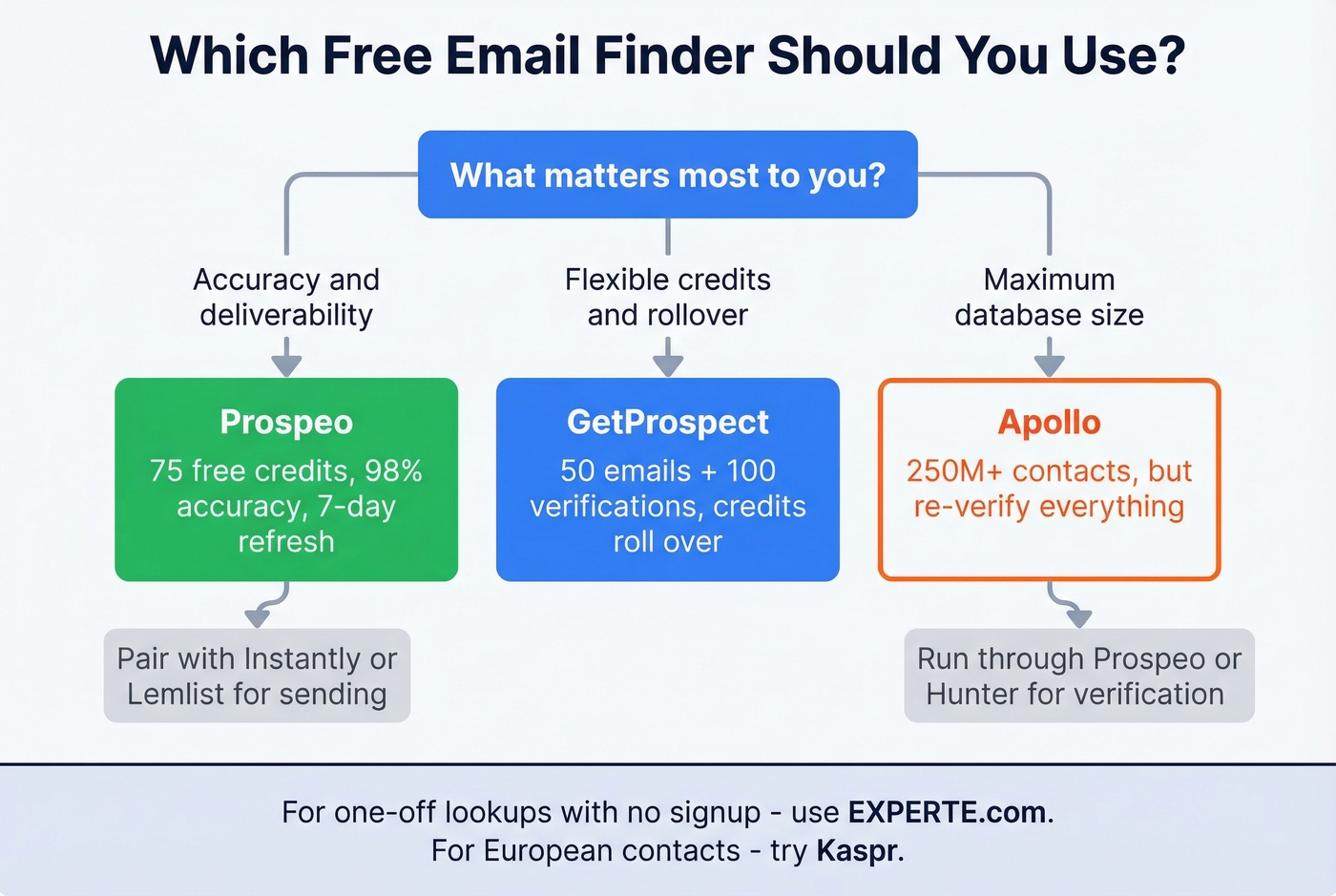
GetProspect - Best credit model. 50 verified emails plus 100 verifications free, and credits roll over up to one month's allowance. The pay-only-for-verified model means you don't burn credits on dead ends.
Runner-up: Apollo, for sheer database size. Accept the bounce risk - older contacts in Apollo's database go stale fast, and the free plan's export limits are tight. But if you need volume and don't mind re-verifying everything, it's worth a slot in your stack.
Free Plan Comparison Table
Not all free plans are equal. Some give you 50 credits that include verification; others charge verification separately. Here's how they break down.
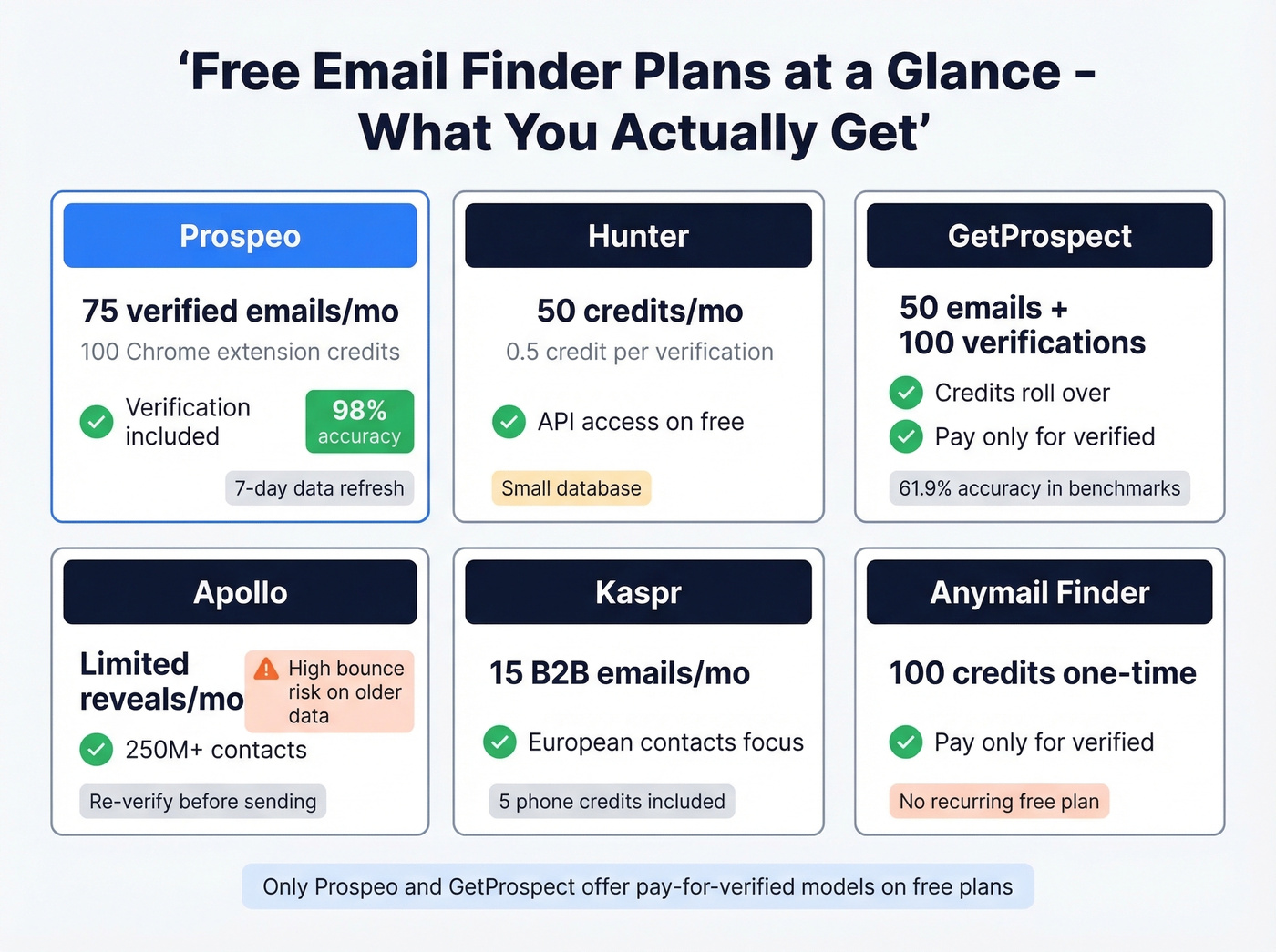
| Tool | Free Credits/Mo | Verification Incl.? | Pay-for-Verified? | Best For |
|---|---|---|---|---|
| Hunter | 50 credits | ✅ (0.5 cr each) | ❌ | Domain pattern search |
| GetProspect | 50 emails + 100 verif. | ✅ | ✅ | Flexible credit usage |
| Apollo | Limited reveals | Partial | ❌ | Raw database volume |
| Snov.io | Small trial only | ✅ | ❌ | International leads |
| Kaspr | 15 B2B emails | ✅ | ❌ | European contacts |
| Anymail Finder | 100 (one-time) | ✅ | ✅ | Budget one-off lookups |
| FindyMail | 10 (one-time) | ✅ | ✅ | Accuracy testing |
| Voila Norbert | 50 (one-time) | ✅ | ❌ | Quick single lookups |
| EXPERTE.com | Unlimited | ❌ | N/A | Zero-commitment checks |
A few things the table can't show: GetProspect is the only tool here with credit rollover on its free plan. Most tools include a Chrome extension. And Prospeo is the only one that publishes its data refresh cycle - 7 days, versus an industry average around 6 weeks. Fresher data means fewer bounces from job changes and role shifts.
We excluded tools like ContactOut and Skrapp.io because this list focuses on the simplest free-to-start experience with enough credits to test workflows end-to-end.
What "Free" Actually Gets You
Most articles about free email lookup tools skip the formula that matters:
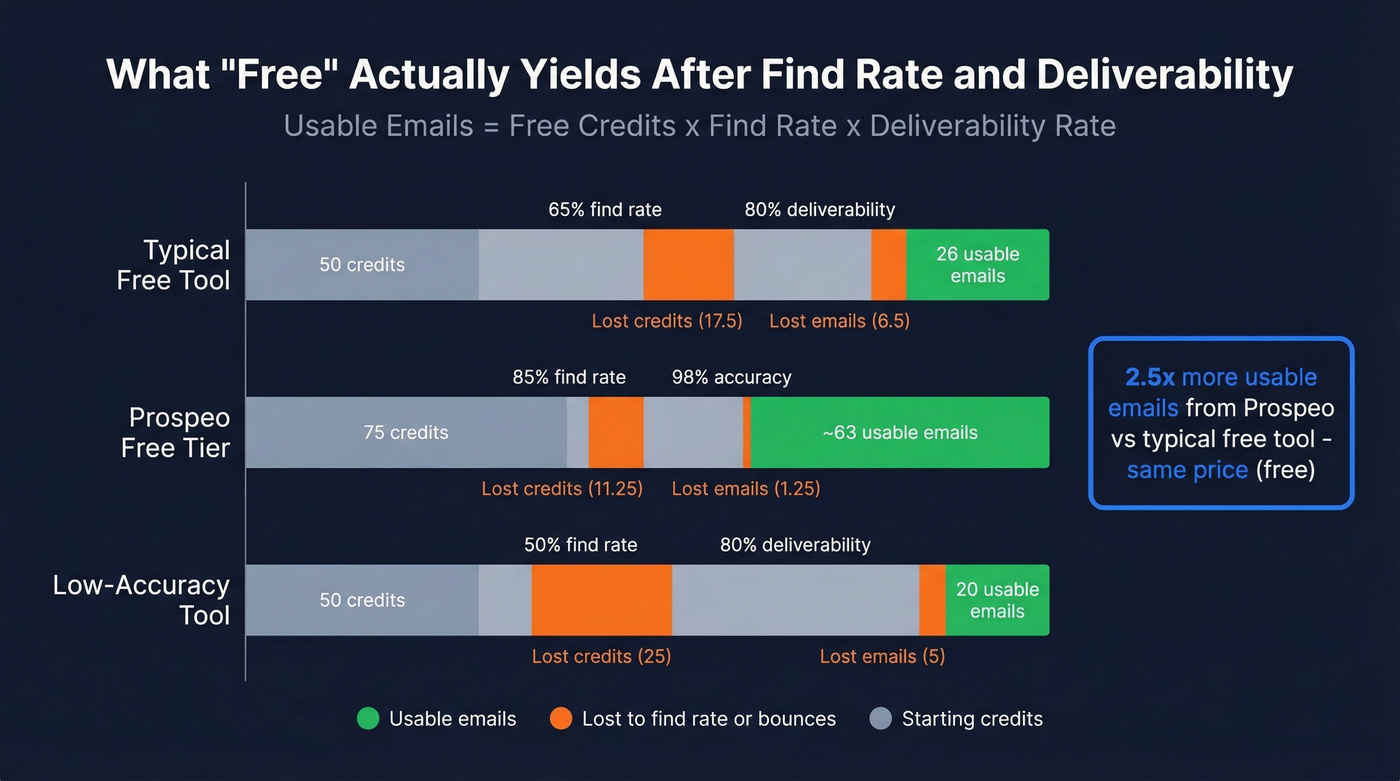
Usable emails = free credits x find rate x deliverability rate
A typical finder with 50 free credits, a 65% find rate, and 80% deliverability gives you: 50 x 0.65 x 0.80 = 26 usable emails. That's the optimistic scenario. In our experience, it lands closer to 15-20.
Now run the same math with Prospeo's free tier: 75 credits at 98% accuracy with verification baked in, and a higher find rate driven by 300M+ professional profiles. Even at a conservative 85% find rate: 75 x 0.85 x 0.98 = roughly 63 usable emails. That's about 2.5x the output from the same type of free plan.

The gap compounds over time. Data decays roughly 2-3% per month - a list that's 95% accurate today drops to about 80% in six months. Tools with longer refresh cycles make this worse. You're not just losing credits to bad find rates; you're losing them to stale data that looked good when it was indexed three months ago.
The Best Free Email Finder Tools Reviewed
Prospeo
Most free email finders give you credits but not accuracy. Prospeo flips this - the free tier includes 75 verified emails and 100 Chrome extension credits per month, all running through a proprietary 5-step verification process with catch-all handling, spam-trap removal, and honeypot filtering. Prospeo runs its own email-finding infrastructure rather than relying on third-party data providers, which is why the accuracy holds up where other tools fall apart.
The database covers 300M+ professional profiles and 143M+ verified emails, refreshed on a 7-day cycle. That refresh cadence matters more than database size for cold outreach - a smaller, fresher list beats a massive stale one every time. Teams using Prospeo as their primary data source book 35% more meetings compared to Apollo-sourced lists, and report bounce rates under 4%, down from 35-40% with previous tools. One agency, Stack Optimize, built from $0 to $1M ARR while maintaining 94%+ deliverability and zero domain flags across all clients.

Use this if: You care about deliverability above all else. You're running cold email and can't afford bounces tanking your domain reputation. You want integrations with Salesforce, HubSpot, Instantly, Lemlist, Zapier, and Make out of the box.
Skip this if: You need a built-in sequencer - pair with a dedicated sending tool like Instantly or Lemlist for the full workflow.
On paid plans, the cost works out to about $0.01 per email. That's the benchmark we measure every other tool against.
Hunter
Hunter's free plan gives you 50 credits per month, with verification costing half a credit each. The Chrome extension is included, and you get API access - unusual for a free tier. CSV exports are capped at 10 emails per domain, which limits bulk use cases.

What you don't get on free: link tracking, reporting, custom tracking domains, automatic lead verification, or the AI writing assistant for sequences. The Starter plan is $49/mo ($34/mo on annual billing) and unlocks most of these.
Use this if: You need a reliable email verification layer more than a primary finder. Hunter's strength is confirming emails you've sourced elsewhere. The domain search pattern detection is genuinely useful for guessing formats at companies where other tools come up empty.
Skip this if: You need a large database. Reddit users consistently flag Hunter's database as "pretty small." It's a precision tool, not a volume tool.
GetProspect
GetProspect's free plan includes 50 valid emails and 100 verifications, with a model that only deducts credits for verified contacts. The rollover feature - credits carry forward up to one month's allowance - is rare and genuinely useful if your prospecting is inconsistent.
The free plan includes more than you'd expect: a browser extension, bulk email finder, CSV enrichment, API access, CRM integrations, reverse email lookup, and a Google Sheets integration all come standard.
Use this if: Your prospecting volume fluctuates month to month and you don't want to lose unused credits.
Skip this if: You need top-tier accuracy. A Tomba benchmark of 5,000 searches put GetProspect at 61.9% overall accuracy - serviceable but not best-in-class. Always re-verify before sending. Starter runs $49/mo if you outgrow free.
Apollo
Apollo has one of the largest databases in this category - around 250M+ contacts - with a generous (if confusing) credit system. The free plan includes limited export and reveal credits, unlimited email sends, and a solid Chrome extension.
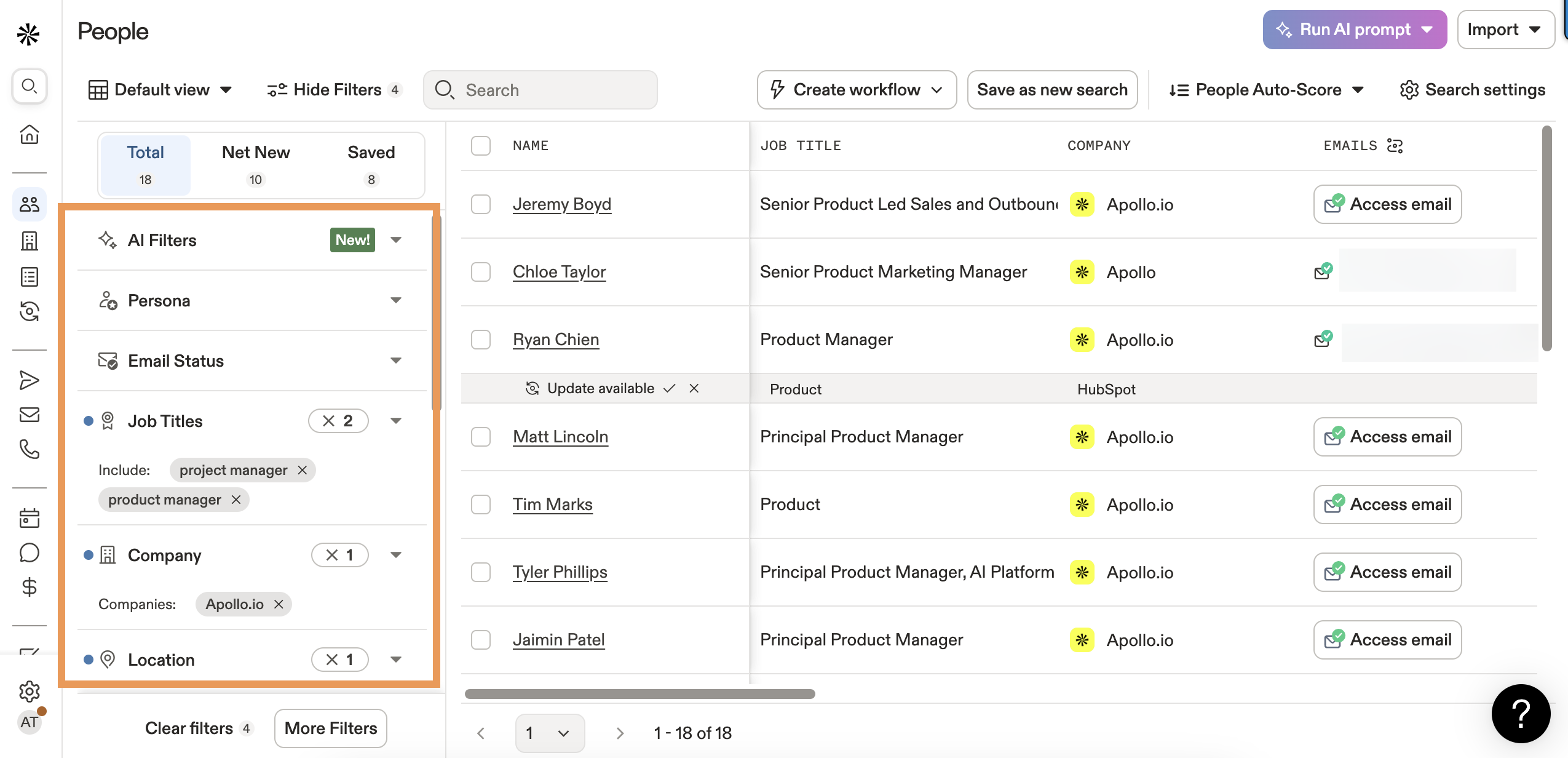
Here's the thing about Apollo: that database size is both its strength and its weakness. Older contacts go stale, and the Reddit sentiment is blunt - "big database but lots of bounces on older contacts." Per-seat pricing scales badly for small teams: Basic is $49/user/month on annual billing ($59 monthly), and Organization is $149/user/month with a three-seat minimum.
Use this if: You need raw volume and you're willing to run everything through an independent email verifier before sending. Apollo as a sourcing layer, verified by another tool, is a legitimate workflow.
Skip this if: You're sending directly from Apollo's data without re-verification. We've seen teams hit 15-20% bounce rates doing this. Your domain reputation isn't worth the shortcut.
Snov.io
Snov.io restructured its plans in July 2025, renaming tiers to Starter, Pro (S/M/L), and Ultra. The free trial is small - enough for testing, not for sustained prospecting. Pro S runs $99/mo with 25,000 recipients. The tool shines for international leads, particularly in markets where US-centric databases have thin coverage. One caveat: a Tomba benchmark measured Snov.io at 20.1% accuracy across 5,000 searches - one of the lowest scores in that test. Verify independently.
Kaspr
Kaspr's free plan gives you 15 B2B email credits, 5 phone credits, and 5 direct email credits per month. It's part of the Cognism Group and built for social-profile-first workflows - the Chrome extension works across profiles, groups, and events. Paid tiers run $49/mo on annual billing ($65 monthly) and unlock unlimited B2B email credits. If you're prospecting European or UK contacts, Kaspr is purpose-built for that motion. The free tier is tight, but it's enough to test data quality before committing.
Anymail Finder
Anymail Finder gives you 100 free credits to try the service - one-time, not monthly. After that, plans start at $14/mo, making it one of the cheaper paid options in this space. The pay-only-for-verified model means you aren't charged for misses. It's a solid budget option for occasional lookups, but the lack of a recurring free tier means it isn't a long-term free solution. Think of it as a trial with a generous credit allotment.
FindyMail
FindyMail offers 10 free finder credits and 10 verifications - one-time. Plans start at $49/mo. The standout data point: a Dropcontact benchmark of 20,000 contacts measured FindyMail at just 1.1% hard bounce rate, which is excellent. The free tier is too small for real prospecting, but if you're evaluating accuracy before buying, those 10 credits will tell you a lot.
Voila Norbert
Voila Norbert gives you 50 free credits on signup, with paid plans starting at $39/mo for 1,000 searches. The interface is clean and straightforward. In 2026, though, it doesn't have a standout differentiator - no unique data source, no verification innovation, no integration edge. Fine for a quick lookup, but there are better options for sustained use.
EXPERTE.com
Completely free, no signup required. EXPERTE.com is useful for one-off email lookups when you need a quick answer and don't want to create another account. No API, no integrations, no bulk capabilities. It's a utility, not a tool.

You just saw the math: 50 credits at 65% find rate and 80% deliverability = 26 usable emails. Prospeo's free tier gives you 75 credits at 98% accuracy, yielding ~63 usable emails. That's 2.5x the output - same price (free).
Stop losing credits to stale data and bad verification.
Accuracy Benchmarks
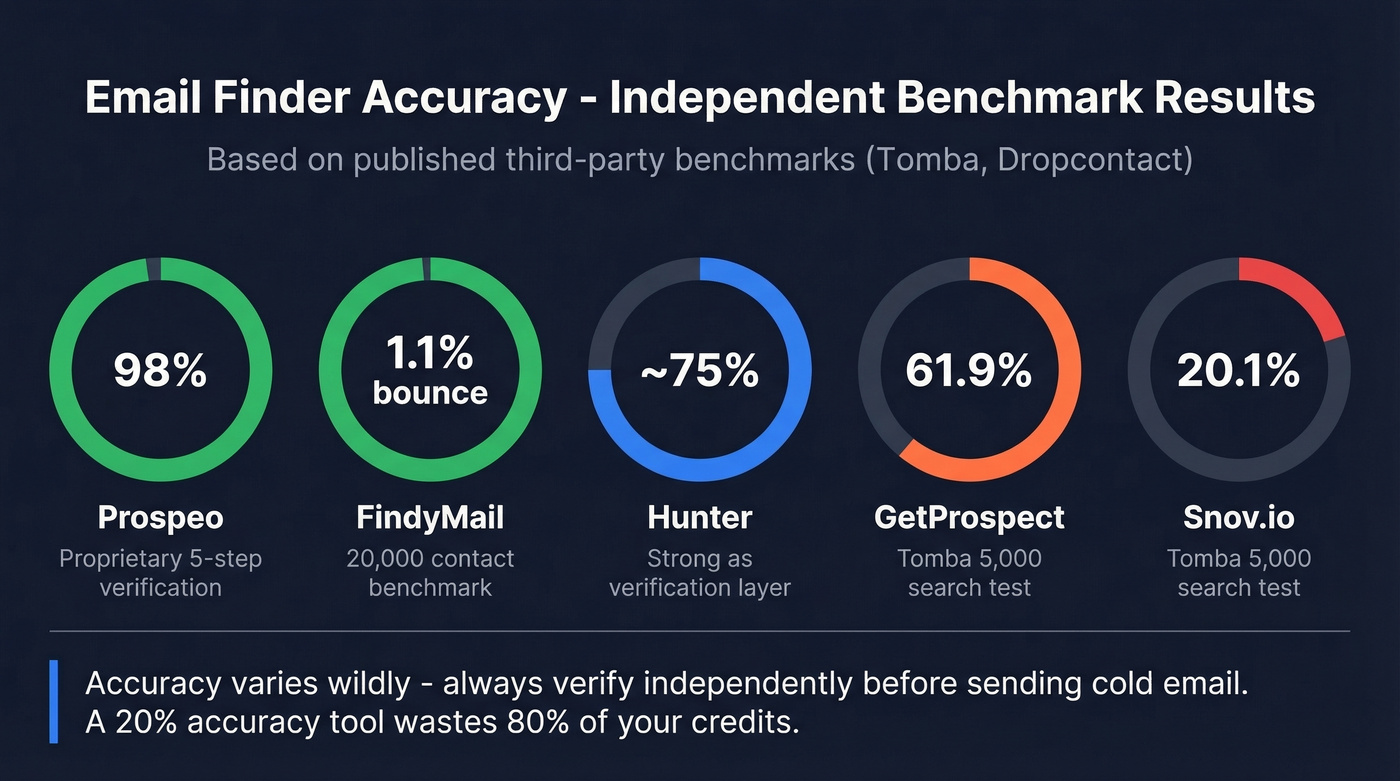
Two vendor-funded benchmarks give us the most detailed methodology available - and they tell different stories.
The Dropcontact benchmark tested 15 tools against 20,000 real contacts using live email delivery, not SMTP simulation. Input was minimal: first name, last name, company name. Hard bounce rates ranged from 0.9% to 3.6%.
| Tool | Hard Bounce Rate |
|---|---|
| Dropcontact | 0.9% |
| FindyMail | 1.1% |
| Enrow | 2.3% |
| Fullenrich | 3.6% |
The Tomba benchmark ran 5,000 searches per tool - 2,500 domain searches and 2,500 company name searches. Results varied wildly.
| Tool | Accuracy |
|---|---|
| Tomba | 80.3% |
| Anymailfinder | 77.5% |
| Findmail | 75.1% |
| GetProspect | 61.9% |
| Hunter | 37.6% |
| Snov.io | 20.1% |
Both benchmarks are vendor-funded - unsurprisingly, Dropcontact and Tomba each won their own tests - but they're the most methodology-detailed data available. The takeaway is consistent: keep hard bounces under 2%, target under 1%, and never trust a "verified" label without independent re-verification. Catch-all domains remain a blind spot for every tool - verifiers can't confirm whether a specific inbox exists on a catch-all server.
Let's be honest: if your average deal size is under $5k, you probably don't need the most expensive email finder on the market. A free tier with 98% accuracy will outperform a $150/month plan with 70% accuracy every single time. Database size is a vanity number. Accuracy is the only metric that matters.
How to Stack Free Tools (Waterfall Method)
The waterfall method is how you squeeze maximum coverage from free plans. Run your prospect list through Tool A, take the contacts that came back "not found," and pass them through Tool B. Then repeat. It's the most effective strategy for anyone relying on free email finders to build a prospecting pipeline without spending a dollar, and it's exactly how we've seen agencies stretch their budgets during early-stage growth.
Here's the stack that works:
- Start with your highest-accuracy tool as the primary layer - 75 free emails at 98% accuracy gives you the highest-confidence results first
- Pass unfound contacts through Hunter - its domain search pattern detection catches emails that database-first tools miss
- Run remaining gaps through Apollo - the largest database picks up stragglers, but re-verify everything Apollo returns
This approach typically improves your overall find rate by 30-40% compared to using a single tool. The key rule: always re-verify before sending, regardless of which tool found the email. Data decays 2-3% per month, and even "verified" results from three weeks ago can bounce.
For standalone verification as a safety net, tools like ZeroBounce offer 100 free verifications per month and NeverBounce gives you 10 free credits - enough to spot-check results from any finder.
Mistakes That Kill Deliverability
Four mistakes that turn a free email finder from useful to dangerous:
Trusting "verified" labels blindly. Every tool calls its results "verified." The word means different things to different vendors. Some run SMTP checks; others just validate the domain exists. Always run a separate verification pass before loading emails into your sequencer.
Ignoring catch-all domains. Catch-all servers accept mail to any address at the domain - so verification tools can't tell you if the specific inbox exists. Treat catch-all results as risky and send to them in small batches.
Using a stale list. A list that was 95% accurate six months ago is roughly 80% accurate today, thanks to that 2-3% monthly decay rate. If you haven't refreshed your data in the last 30 days, re-verify before sending.
Skipping warm-up. Even with perfect data, blasting 500 emails from a cold domain will land you in spam. Warm up your sending domain for 2-3 weeks before running found emails through sequences.
The bounce threshold that matters: keep total bounces under 2%. Top performers target hard bounces under 1%. Anything above 5% and you're actively damaging your sender reputation.
When to Upgrade From Free
Free plans work until they don't. The tipping point is straightforward: if you need more than about 100 usable emails per month, you'll spend more time managing multiple free tools than a single paid plan costs.
Juggling three free accounts, exporting CSVs, re-verifying across tools, and deduplicating results takes 3-4 hours per week. At roughly $0.01 per email on a paid plan, 500 verified emails costs about $5. The math isn't close. Free plans are for testing and low-volume prospecting. Once you're sending consistently, pick one tool and pay for it.
Every tool on this list refreshes data every 4-6 weeks. Prospeo refreshes every 7 days. That's why teams report bounce rates under 4% and book 35% more meetings than Apollo-sourced lists. At $0.01/email on paid plans, it's the benchmark.
Test the accuracy gap yourself - 75 verified emails, no card required.
FAQ
Are free email finders accurate enough for cold outreach?
Most free email finders hover around 60-80% accuracy, which means 20-40% of your sends are wasted or bouncing. The best free email finder tools hit 98% accuracy with built-in verification. Always verify independently before sending and keep your bounce rate under 2% to protect domain reputation.
How many usable emails can I actually get for free each month?
A typical 50-credit free plan yields 15-25 usable emails after find-rate and deliverability losses. Prospeo's free tier produces roughly 63 usable emails from 75 credits - about 2.5x the output of most competitors - because its 98% accuracy means almost every credit converts to a sendable address.
Can I use multiple free email finders at the same time?
Yes - this is the waterfall method, and it boosts your overall find rate by 30-40%. Run your list through the highest-accuracy tool first, then pass unfound contacts to the next. Re-verify everything before sending and avoid contacting the same prospect from different tools.
What's the difference between email finding and email verification?
Finding locates the email address associated with a person and company. Verification confirms that address is deliverable and won't bounce. Some tools bundle both into one credit; others charge separately. Never skip verification - a "found" email isn't the same as a sendable one.
Do free email finders comply with GDPR?
Most B2B email finders operate under legitimate interest provisions for business-to-business communications, but compliance varies by vendor. Check each tool's data processing agreements before use. Look for vendors that are fully GDPR compliant with opt-out enforcement and DPAs available on request - Prospeo, Hunter, and Kaspr all meet this standard.