

The Best Chrome Email Extensions Worth Installing in 2026
Knowledge workers spend 28% of their workweek on email - roughly 11 hours staring at inboxes, composing replies, and hunting for contact info. Chrome owns 71.23% of the browser market. The chrome email extension you install directly shapes whether those 11 hours are productive or wasted.
Most people install too many. You need two, maybe three. Here's how to pick the right ones.
What Kind Do You Actually Need?
Every extension in this category falls into one of three buckets:
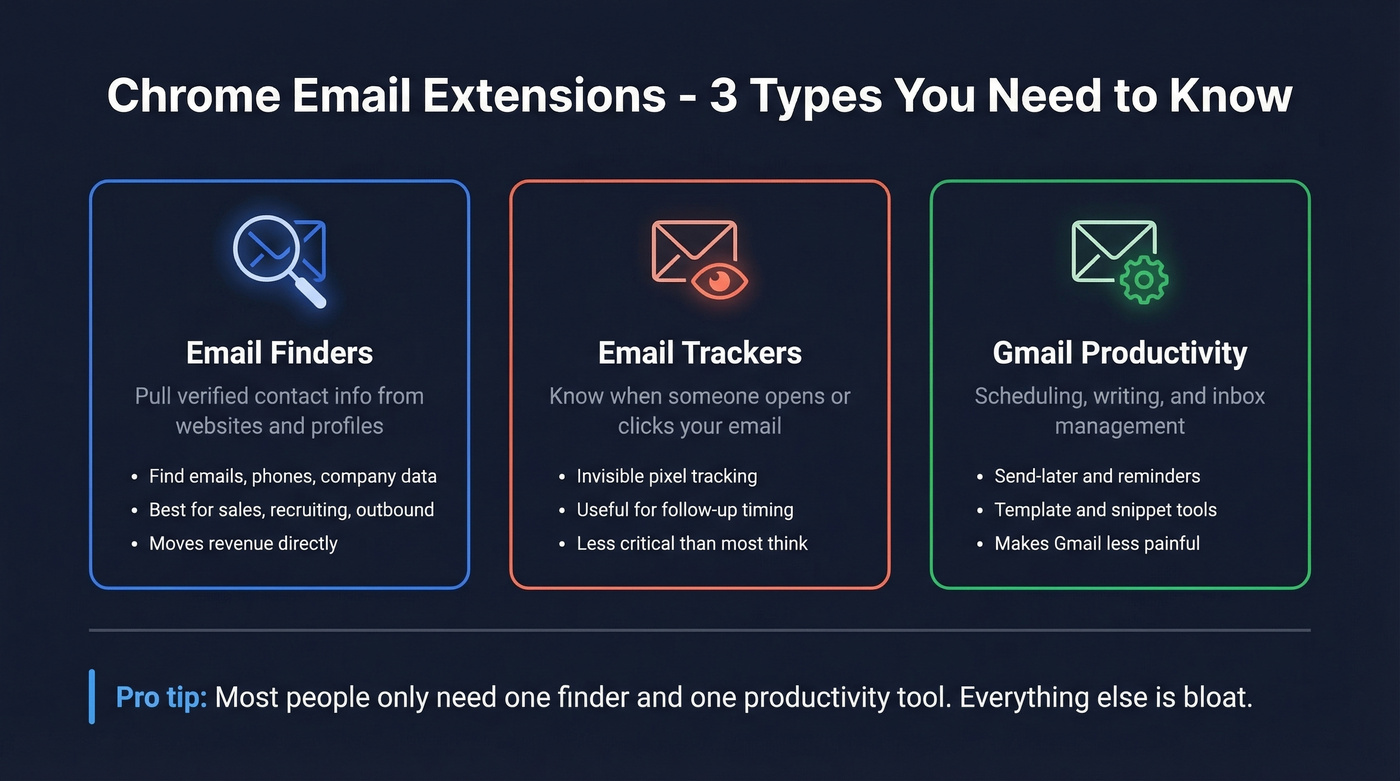
Email finders pull verified contact information - emails, phone numbers, company data - from websites and professional profiles. If you're in sales, recruiting, or outbound marketing, this is the category that moves revenue. A solid email finder Chrome extension can replace hours of manual research on company websites and professional networks. (If you're building a full outbound stack, pair this with proven sales prospecting techniques.)
Email trackers embed invisible pixels in outgoing messages to tell you when someone opens or clicks. Useful for follow-up timing, but less critical than most people think. (If you want the technical deep dive, see email tracking pixels.)
Gmail productivity tools handle scheduling, writing quality, and inbox management. They make Gmail less painful but don't generate pipeline.
Gmail add-ons install inside Google Workspace and follow you across devices - common examples include Trello for Gmail and Zoom for Gmail. Chrome extensions install in the browser and only work in Chrome, but they get broader page access. Per Zapier's breakdown, the security implications differ meaningfully.
Here's the thing: if your average deal size is under five figures, you probably don't need ten extensions and a $500/mo data platform. You need one tool that finds accurate emails and one that helps you write better. Everything else is bloat that slows your browser and expands your attack surface. (If you're comparing broader options, start with free lead generation tools.)
Our Picks at a Glance
| Use Case | Top Pick | Why |
|---|---|---|
| Finding emails | Prospeo | 98% email accuracy, 7-day data refresh, free tier |
| Verifying emails | Hunter | Best-in-class verification layer, generous free plan |
| Gmail productivity | Boomerang | Send-later + follow-up reminders, free plan available |
Short on time? Install Prospeo and Boomerang. That covers prospecting and inbox management.
Best Extensions for Finding Emails
The gap between a good email finder and a mediocre one isn't theoretical - it's the difference between a 4% bounce rate and a 20%+ bounce rate that torches your domain reputation. The #1 complaint on r/coldemail is tools showing "verified" emails that still bounce at 20% or higher. (If you're troubleshooting bounces, see email bounce rate.)
Clearbit Connect is dead. HubSpot acquired Clearbit in December 2023 and folded it into Breeze Intelligence. If the guide you're reading still lists Clearbit Connect as a standalone extension, close the tab - it's outdated.
Prospeo
Use this if: You need verified emails that won't bounce and you're tired of "verified" labels that mean nothing.
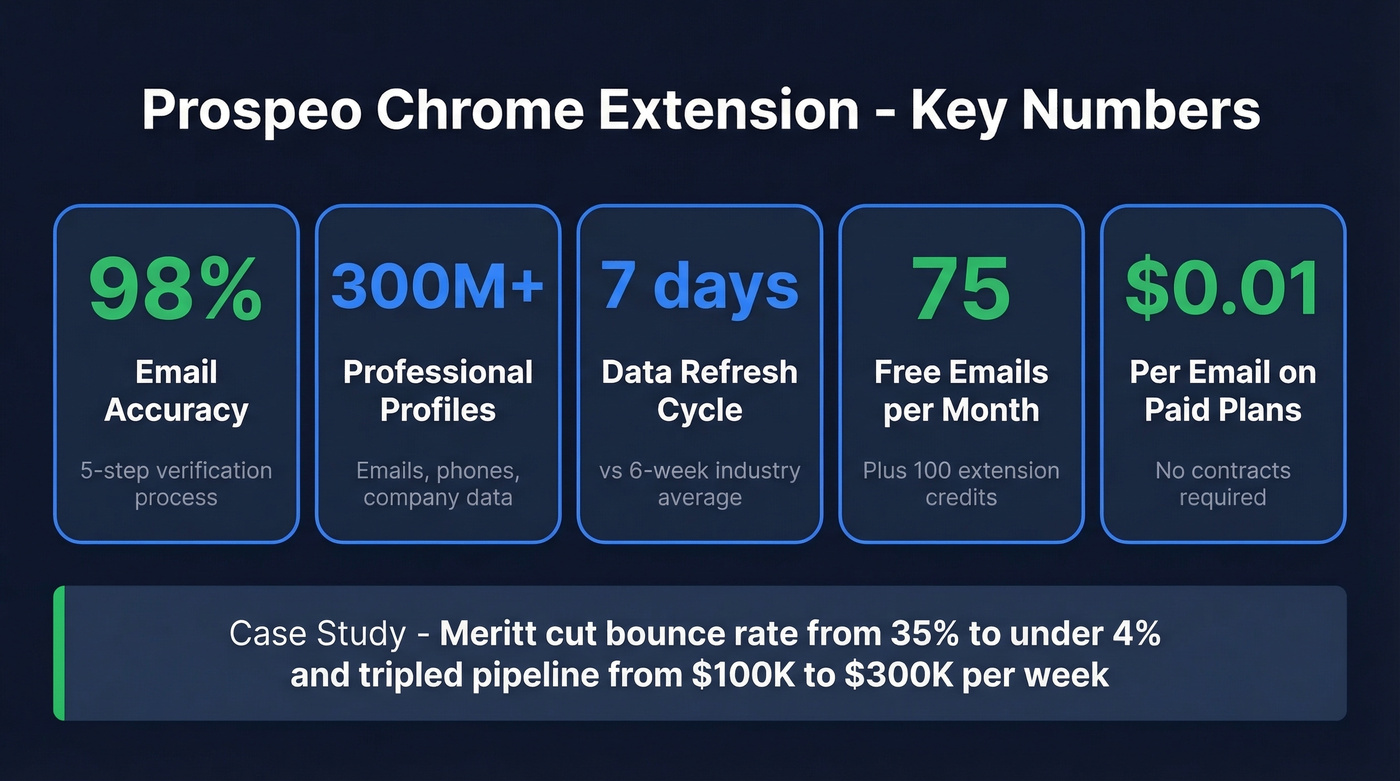
Prospeo's Chrome extension - used by 40,000+ people - finds verified emails and phone numbers from any website or CRM in one click, returning 50+ data points per contact. The database covers 300M+ professional profiles with 143M+ verified emails, all refreshed on a 7-day cycle versus a 6-week industry average. (For a broader view of providers, compare data enrichment services.)

Accuracy is the differentiator. A proprietary 5-step verification process handles catch-all domains, removes spam traps, and filters honeypots - the stuff that causes "verified" emails to bounce elsewhere. The result is 98% email accuracy on returned contacts. Meritt, one of their customers, went from a 35% bounce rate to under 4% after switching, and their pipeline tripled from $100K to $300K per week.
Pricing: the free tier gives you 75 emails and 100 extension credits per month. Paid plans run about $0.01 per email with no contracts.
Hunter
Use this if: You already have emails from another source and need a reliable verification layer before sending. Skip this if: You need a primary email finder with a deep database.
Hunter's strength is verification, not discovery. The Reddit consensus nails it: "solid verification accuracy" but "database is pretty small." Hunter is the tool you run emails through after pulling them from somewhere else. (If you're shopping around, see Hunter alternatives.)

The free tier gives you 50 credits per month. Verification costs 0.5 credits per email, so that's 100 verifications free. Starter runs $49/mo, Growth is $149/mo, Scale hits $299/mo. All plans include unlimited users.
RocketReach
A genuine endorsement on r/coldemail from a user who tested multiple tools: "most accurate so far," noting their bounce rate "dropped a lot." RocketReach works well with limited input - sometimes just a name and company domain surfaces a verified email. Free tier is tiny at 5 lookups/month, and paid starts around $53/mo. Best for targeted, low-volume lookups where accuracy per contact matters more than throughput.
Snov.io
The pick for international leads. Snov.io bundles email finding with built-in automation sequences, saving you from buying a separate outreach tool. Free tier of 50 credits, paid from ~$39/mo. The tradeoff is accuracy: in the Anymail Finder benchmark testing 5,000 contacts, Snov.io posted a 20.1% verified rate - one of the lowest among tested tools. Good for breadth, not precision.
Skrapp
Enrichment-focused email finder with a free tier and paid plans from ~$49/mo. The same benchmark put Skrapp at a 42.8% verified rate - middling. Fine as a supplementary enrichment tool, not a primary email source.
What about Apollo? Apollo's 250M+ database sounds impressive, but Reddit users in the same threads consistently report stale data and bounces on older contacts. The database is big; the data quality is inconsistent. For EU/UK-heavy prospecting, Cognism is worth a look at enterprise-level pricing (~$15k-$30k/year).
Email Finder Comparison
| Tool | Free Tier | Paid From | Accuracy Signal | Best For |
|---|---|---|---|---|
| Prospeo | 75 emails/mo | ~$0.01/email | 98% verified (returned contacts) | Accuracy-first prospecting |
| Hunter | 50 credits/mo | $49/mo | Strong verification | Verifying existing lists |
| RocketReach | 5 lookups/mo | ~$53/mo | User-endorsed | Sparse-info lookups |
| Snov.io | 50 credits/mo | ~$39/mo | 20.1% benchmark | International leads + sequences |
| Skrapp | Yes | ~$49/mo | 42.8% benchmark | Enrichment workflows |

Most Chrome email extensions label contacts as "verified" then bounce at 20%+. Prospeo's 5-step verification - with catch-all handling, spam-trap removal, and honeypot filtering - delivers 98% email accuracy. That's how Meritt cut their bounce rate from 35% to under 4%.
Stop burning your domain on bad data. Get 75 free emails today.
Email Finder Accuracy - What the Data Shows
Database size doesn't equal data quality. This is the single most important thing to understand about email finders. We've tested dozens over the years, and accuracy variance is the biggest factor in campaign performance. (If you're building lists at scale, see how to generate an email list.)
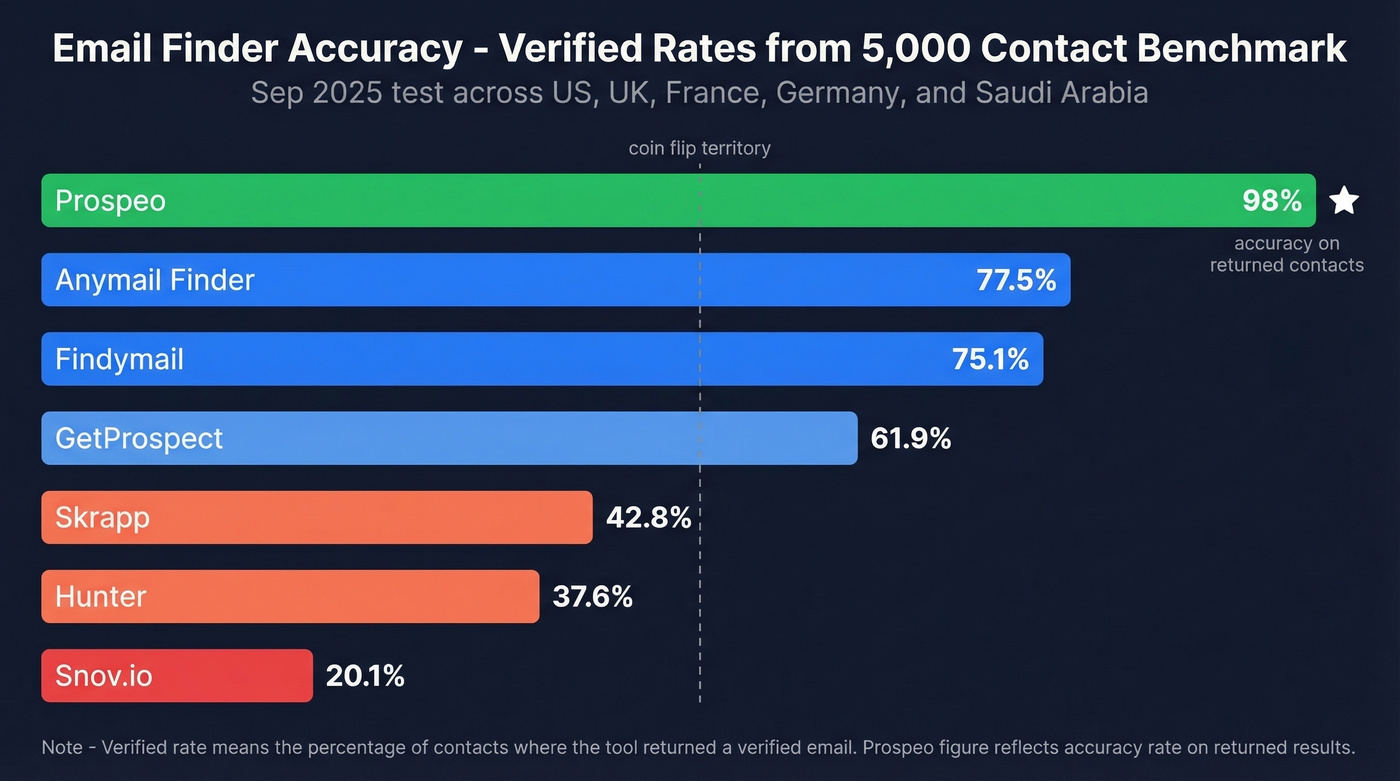
An Anymail Finder benchmark rerun on Sep 30, 2025 tested 5,000 fresh professional contacts across multiple countries including the US, UK, France, Germany, and Saudi Arabia. The verified rates - meaning the percentage of contacts where the tool returned a verified email - varied wildly:
| Tool | Verified Rate |
|---|---|
| Anymail Finder | 77.5% |
| Findymail | 75.1% |
| GetProspect | 61.9% |
| Skrapp | 42.8% |
| Hunter | 37.6% |
| Snov.io | 20.1% |

Why such massive gaps? Some tools rely on pattern matching - guessing formats like firstname.lastname@company.com and hoping for the best. Others do SMTP verification, pinging the mail server to check if the address exists. The best tools combine database lookups with multi-step verification that catches catch-all domains, spam traps, and honeypot addresses. (If you need a step-by-step, see how to check if an email exists.)
Let's be clear about a critical distinction: "verified rate" (what percentage of a cold list a tool can find emails for) is different from "accuracy rate" (what percentage of returned emails are valid). A tool can have a low verified rate while maintaining high accuracy on the results it does return. That's the quality-over-quantity tradeoff. Your domain reputation doesn't care how many contacts a tool claims to have. It cares how many of them bounce. (To protect deliverability, use email reputation tools.)
You don't need ten Chrome extensions slowing your browser. Prospeo's single extension returns verified emails, direct dials, and 50+ data points per contact - refreshed every 7 days, not every 6 weeks. Free tier included, no credit card required.
One extension. 300M+ profiles. Every email verified at $0.01 each.
Best Chrome Extensions for Email Tracking
Before installing a tracker, know this: most email tracking embeds an invisible pixel in your message. When the recipient loads images, the pixel fires. The problem? Many email clients block images by default, privacy tools strip tracking pixels, and tracking pixels can cut reply rates by up to 50%.
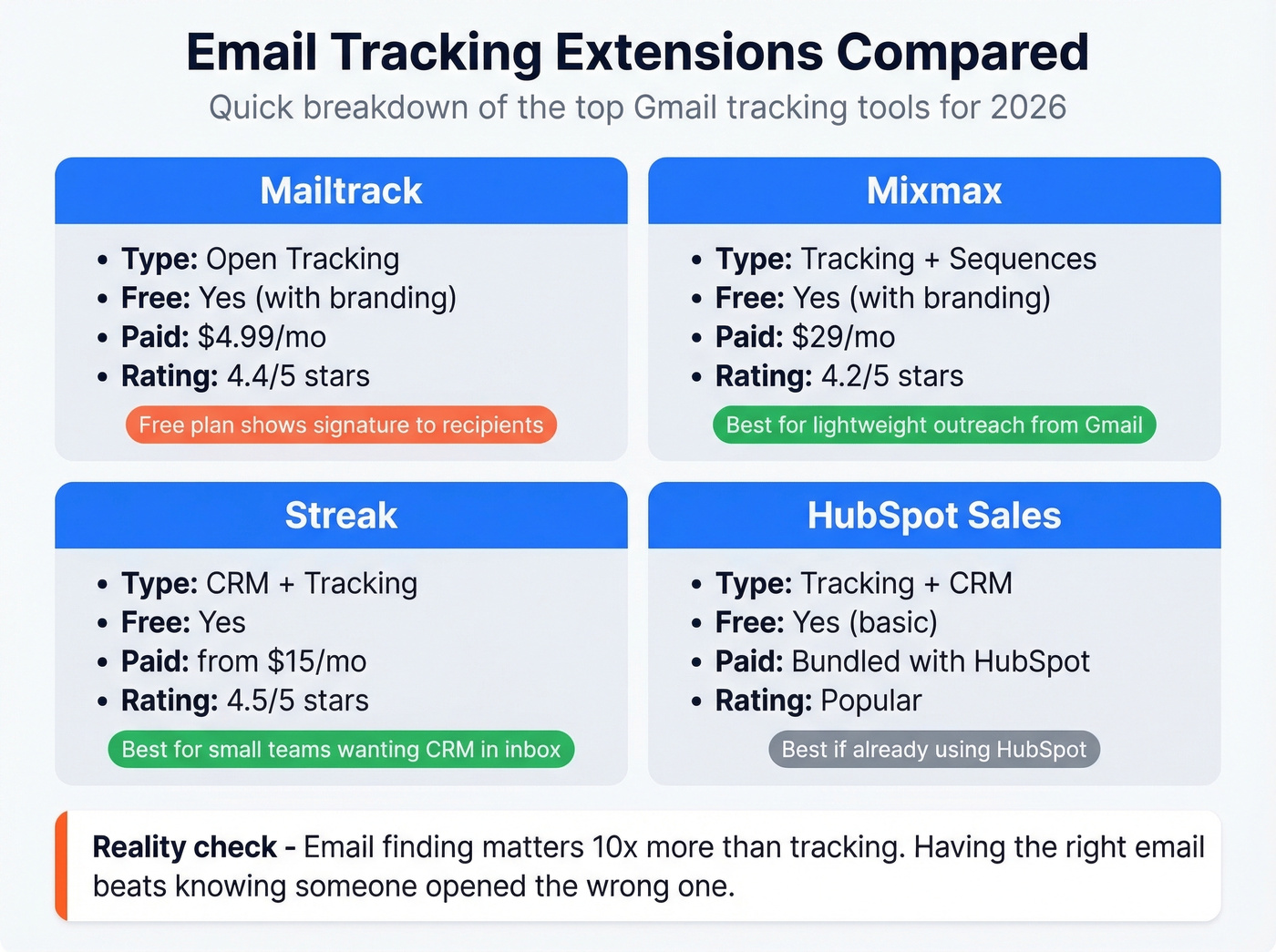
Look - for outbound teams, email finding matters ten times more than email tracking. Knowing someone opened your email is interesting. Having the right email in the first place is essential. If you're choosing between a better finder extension or a fancier tracker, pick the finder every time.
That said, here are the tracking options worth considering.
Mailtrack
The simplest open tracker for Gmail. Free plan stamps a "Sent with Mailtrack" signature on every email - recipients will see it. Pro at $4.99/mo removes branding and adds link tracking. Chrome Web Store rating: 4.4/5. Skip it for cold emails. That signature kills credibility.
Mixmax
Heavier than a pure tracker. Mixmax bundles sequences, templates, and scheduling alongside open/click tracking. Free tier includes branding; SMB plan at $29/mo unlocks the full feature set. Chrome Web Store: 4.2/5. Best for teams wanting lightweight outreach without leaving Gmail. (If you're evaluating options, see Mixmax alternatives.)
Streak
CRM-in-Gmail with tracking built in. Free tier available, paid from ~$15/mo. Streak has 600,000 users and a 4.5/5 Chrome Web Store rating. It's not a dedicated tracker - it's a lightweight CRM that happens to track opens. Best for small teams wanting pipeline management inside their inbox. (If you're comparing CRMs, start with contact management software.)
HubSpot Sales
Free basic email tracking that works if you're already in the HubSpot ecosystem. Full features require Sales Hub at $20+/mo per seat. Chrome Web Store: 3.9/5. Skip this unless your team already runs HubSpot CRM.
Best Gmail Productivity Extensions
These tools solve a different problem entirely. They make your inbox less chaotic. You probably only need one.
Boomerang
The gold standard for send-later scheduling and follow-up reminders. Write an email at 11 PM, schedule it for 8:30 AM. Set a reminder to follow up if you don't hear back in three days. The free tier gives you 10 message credits per month, the Personal plan is $4.98/mo for unlimited messages, Pro is $14.98/mo, and Premium hits $49.98/mo. Every new account gets a 30-day Pro trial with no credit card required. If you send emails outside business hours or forget to follow up, Boomerang pays for itself immediately. (For copy you can reuse, grab these sales follow-up templates.)
Grammarly
Not technically an email tool, but it lives in your browser and catches every typo, awkward phrase, and tone mismatch in your Gmail compose window. Free tier handles grammar and spelling. Premium from $12/mo adds tone detection and clarity suggestions. It works across your entire browser, making it the highest-value productivity extension you can install.
GMass
Cold email campaigns sent directly from Gmail. GMass removed its free plan in January 2024, so you're looking at $25/mo minimum after a trial. Best for solo operators running mail merge campaigns without a dedicated outreach platform. (If you're sending at scale, read best way to send bulk email without getting blacklisted.)
How to Vet Any Email Extension
Be politely paranoid. In February 2026, The Hacker News reported that 32 malicious AI-themed extensions with 260,000+ collective installs were caught siphoning sensitive data. One extension called CL Suite exfiltrated business data including 2FA codes and contact exports. Academic research confirms that Chrome Web Store vetting can be bypassed by determined attackers.
Before installing any extension, run through this checklist:
- Permissions - Does it ask for access to "all websites" or just the ones it needs? An email tracker shouldn't need access to your banking site.
- Publisher - Is the developer a known company with a real website, or an anonymous account with one extension?
- Update history - Extensions not updated in 12+ months may break with Chrome's Manifest V3 migration, and stale code is a security risk.
- Reviews - Skim the one-star reviews. Patterns of "extension stopped working" or "suspicious behavior" are red flags.
- User count - Not definitive, but an extension with 50 users is riskier than one with 40,000+.
Any extension handling business contact data should be transparent about data practices. Look for GDPR compliance, opt-out enforcement, and available DPAs. If a tool can't tell you how it handles your data, don't install it.
Dead Tools to Stop Using
Clearbit Connect is gone - covered above. While you're auditing, check your installed extensions for anything not updated since 2023 or earlier. Extensions like "Gmail Expand All," untouched since 2014, are ticking time bombs that'll break with Chrome updates and may have unpatched vulnerabilities.
FAQ
What's the best chrome email extension?
For email finding, Prospeo delivers 98% accuracy on returned contacts with a free tier of 75 emails per month. For inbox productivity, Boomerang handles scheduling and follow-up reminders. Most people need one of each - not ten extensions competing for browser resources.
What's the difference between a Gmail add-on and a Chrome extension?
Gmail add-ons install inside Google Workspace and follow you across devices with tighter Google-controlled permissions. Chrome extensions install in the browser with broader page access but only work in Chrome. Add-ons are generally safer; extensions are more powerful.
Can Chrome extensions steal my email data?
Yes. In early 2026, researchers discovered 32 malicious extensions with 260,000+ installs exfiltrating sensitive data including 2FA codes. Only install extensions from verified publishers with transparent privacy policies and reasonable permission requests.
How many email extensions should I install?
Two, maximum three. One email finder and one productivity tool like Boomerang or Grammarly. Every additional extension increases RAM usage, slows your browser, and expands your attack surface. Diminishing returns kick in fast.
Is there a free email finder extension worth using?
Prospeo's free tier includes 75 emails and 100 extension credits per month with no credit card required. Hunter offers 50 free credits monthly. Both have transparent publishers, active update histories, and GDPR-compliant data practices - unlike many free alternatives on the Chrome Web Store.