The Best Way to Send Bulk Email Without Getting Blacklisted
One team had SPF, DKIM, and DMARC configured. Four warmed domains. A 50/day cap per inbox. Plain text, no links, custom tracking domain, warm-up running around the clock. Their inbox placement still dropped from 68% to roughly 35% over four months. Authentication and warm-up are table stakes - they won't save you from bad data.
The best way to send bulk email without getting blacklisted requires the full stack: infrastructure, authentication, warm-up, and ruthless list hygiene. Let's break down each piece.
Separate Your Sending Infrastructure
Never send cold outreach from your main domain. One spam complaint poisons transactional emails, marketing, and support replies. Keep cold outreach on separate sending streams.
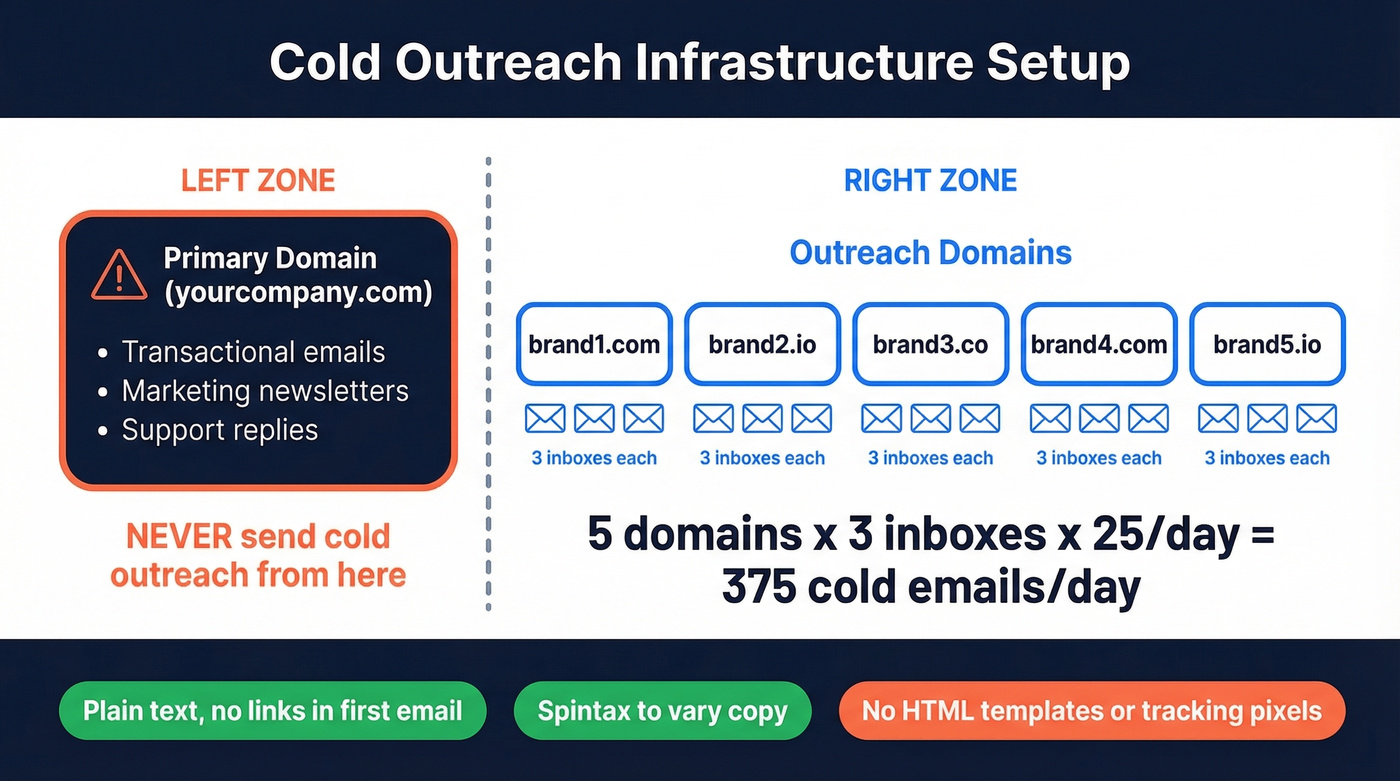
Buy 3-5 outreach domains - variations of your brand name - set up 2-3 inboxes per domain on Google Workspace or Microsoft 365 (typically $6-$12/user/month depending on plan and region), and cap each inbox at 25 emails/day once warmed. Keep bench domains warmed and ready to rotate in. The math: 5 domains x 3 accounts x 25/day = 375 cold emails per day, which is enough for most outbound teams.
Two rules that matter: send plain text with no links in your first email, and use spintax to vary copy across sends. HTML templates and tracking pixels in early touches are deliverability killers.
Here's the thing - if your deal size is under $15K, you probably don't need more than 375 sends/day. The teams getting blacklisted are almost always over-sending into bad lists, not under-resourced on infrastructure.
Authenticate Your Domain
Get SPF, DKIM, and DMARC live before you send anything. Gmail has enforced bulk sender authentication since February 2024, and Outlook.com followed in May 2025.
SPF - one record per domain, because duplicates break everything:
# Google Workspace
v=spf1 include:_spf.google.com ~all

# Microsoft 365
v=spf1 include:spf.protection.outlook.com ~all
Watch the 10 DNS lookup limit. Exceeding it causes a PermError that silently breaks DMARC alignment. If you're on a shared-IP ESP like SendGrid, verify that your DKIM signature domain aligns with your From domain - misalignment is the most common reason DMARC fails even when all three protocols are "configured." (If you want the deeper mechanics, see DMARC alignment.)
DKIM: Publish a TXT record at selector._domainkey.yourdomain.com using 2048-bit keys.
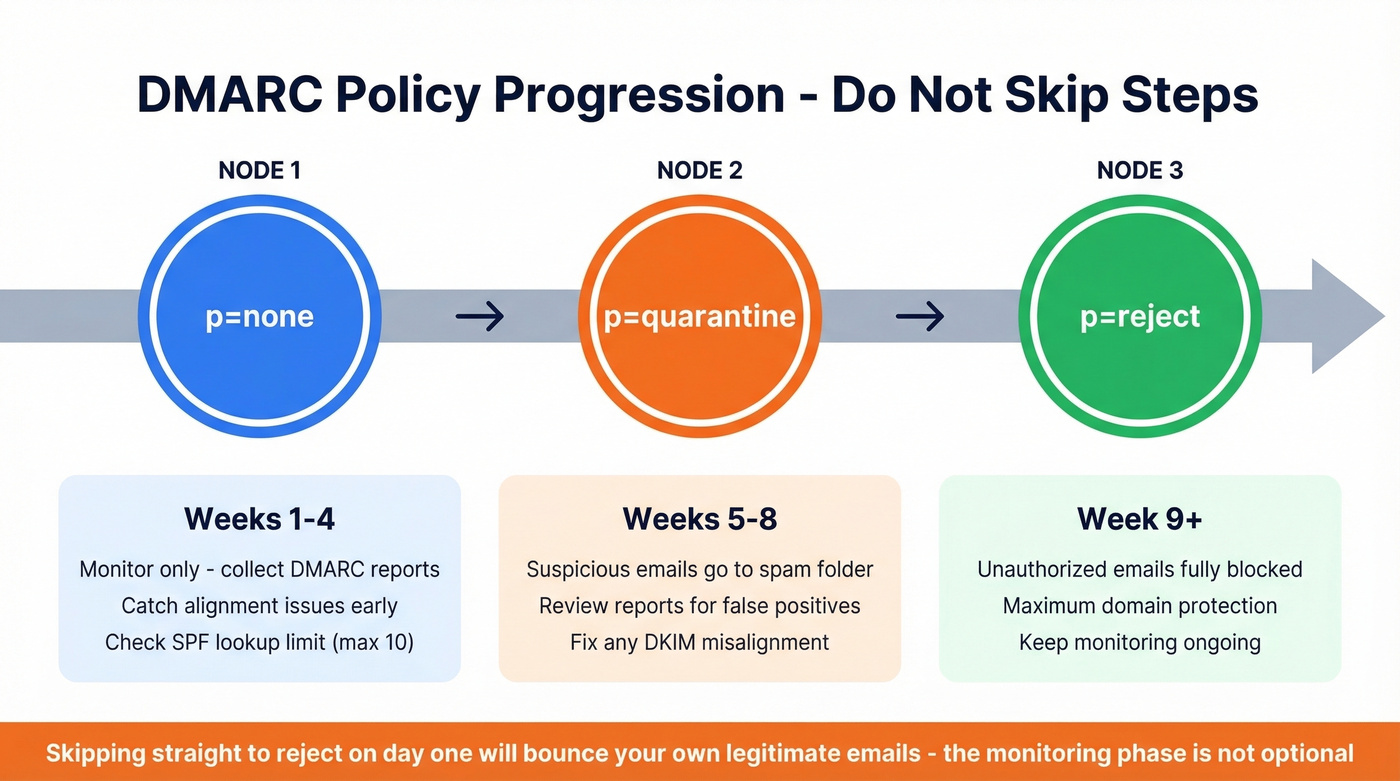
DMARC progression - don't jump straight to reject:
- Weeks 1-4:
v=DMARC1; p=none; rua=mailto:dmarc@yourdomain.com - Weeks 5-8:
p=quarantine - Week 9+:
p=reject
We've seen teams skip straight to p=reject on day one and wonder why half their legitimate email bounces. The monitoring phase isn't optional - it's how you catch alignment issues before they cost you deals.
Warm Up Before You Scale
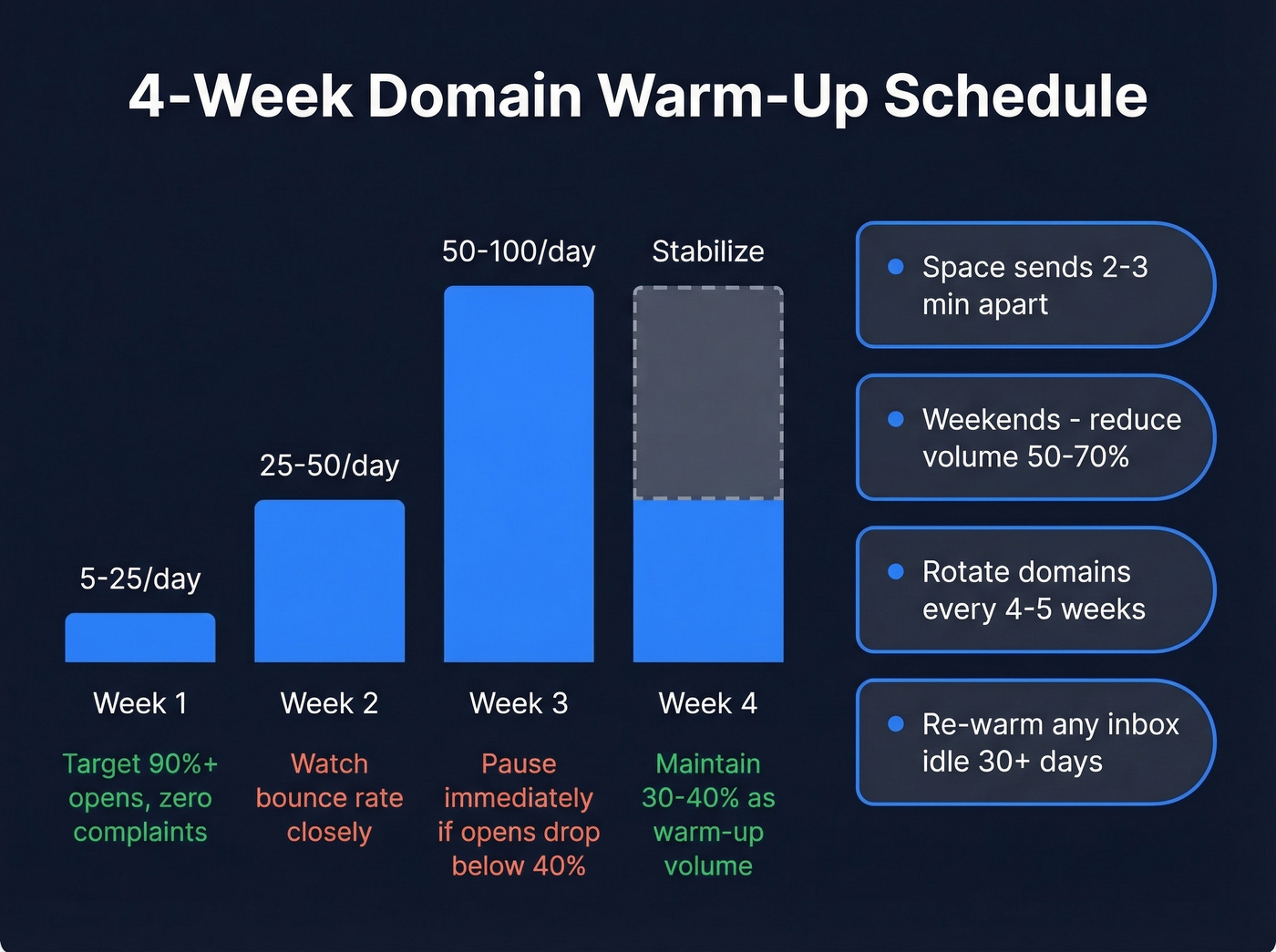
Age new domains 7-14 days before starting warm-up. Then follow this ramp:
| Week | Daily Volume | Key Rule |
|---|---|---|
| 1 | 5 to 25/day | 90%+ opens, zero complaints |
| 2 | 25 to 50/day | Monitor bounce rate closely |
| 3 | 50 to 100/day | Pause if opens drop below 40% |
| 4 | Stabilize | Keep 30-40% as warm-up volume |
Space sends 2-3 minutes apart and vary the intervals. Don't stop entirely on weekends - reduce volume 50-70% instead. Rotate domains every 4-5 weeks to avoid pattern fatigue. If an inbox or sending IP hasn't sent in 30+ days, treat it as cold and re-warm from scratch. (More on safe pacing in email velocity.)

Infrastructure and warm-up won't save you if 5% of your list bounces. Prospeo's 5-step verification - with catch-all handling, spam-trap removal, and honeypot filtering - delivers 98% email accuracy. Stack Optimize built a $1M agency on it with zero domain flags across all clients.
Clean your list before your domain pays the price.
Verify Every Email on Your List
This is where most blacklisting actually happens, and it's the step teams skip most often.
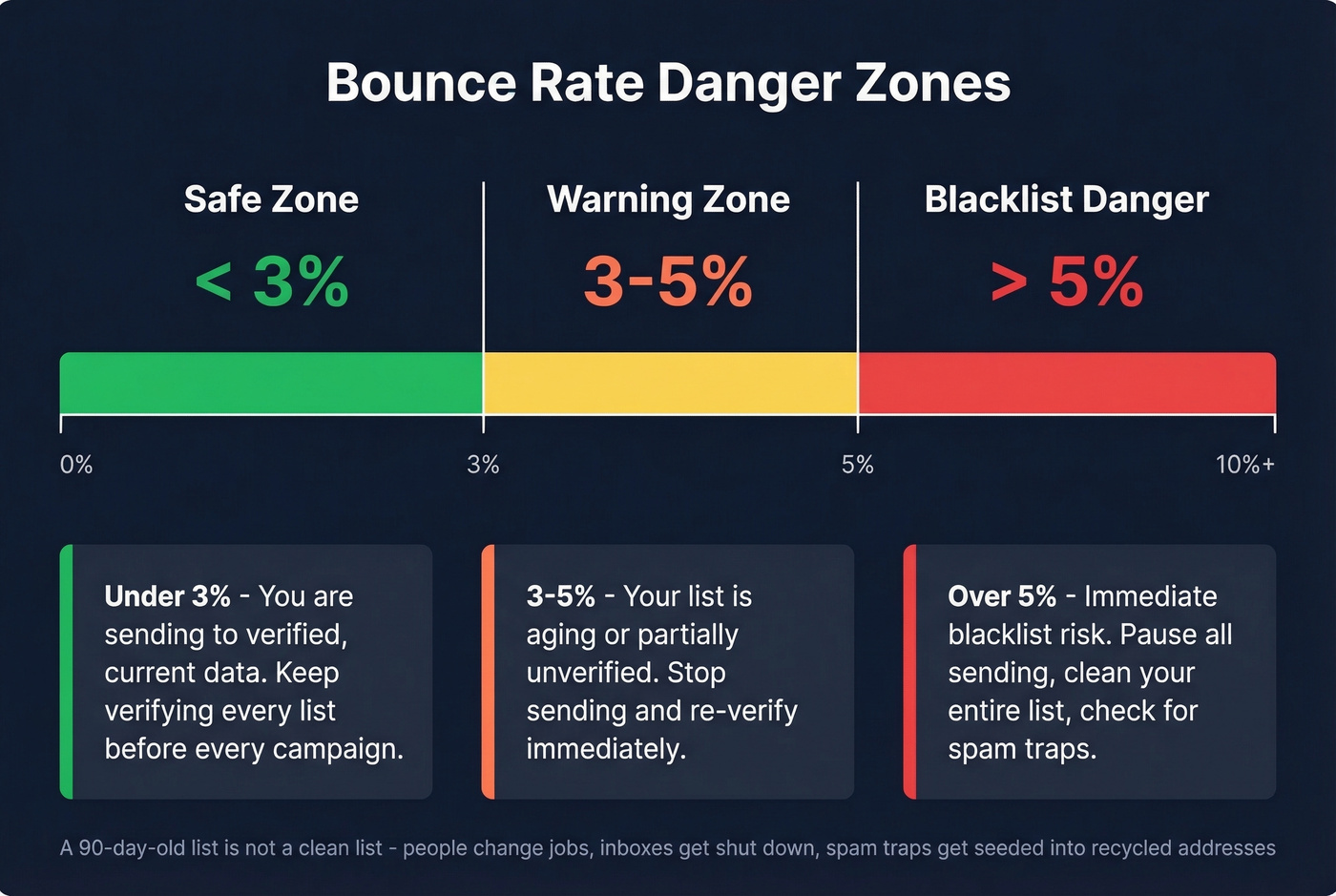
Do this: Double-verify every list before sending. Target a bounce rate under 3%. Remove catch-all domains you can't verify, and scrub for spam traps and honeypots. Prospeo's 5-step verification handles catch-all domain verification, spam-trap removal, and honeypot filtering at 98% accuracy. Stack Optimize built their agency to $1M ARR using it for client list verification, maintaining 94%+ deliverability with zero domain flags across all clients. (If you need a remediation checklist, start with spam trap removal.)
Skip this if: you're trusting "pre-verified" data from a vendor without running your own check. Also skip purchased lists entirely unless you're willing to verify every single address. A three-month-old list isn't clean anymore - people change jobs, companies shut down inboxes, and spam traps get seeded into recycled addresses constantly. If you're sourcing data, compare options in email list providers.
Every address on a 90-day-old list is a blacklist risk. Prospeo refreshes data every 7 days - not the 6-week industry average - so you're always sending to verified, current contacts at ~$0.01/email. No contracts, no surprises.
Stop re-warming domains because your data provider let you down.
Follow Provider Sending Limits
Every major provider enforces hard caps. Exceed them and you're locked out for 1-24 hours.
| Provider | Daily Limit | Notes |
|---|---|---|
| Gmail (free) | 500/day | Rolling 24h window |
| Google Workspace | 2,000/day | Per account |
| Microsoft 365 | 5,000 recipients | 1,000 non-relationship |
Keep spam complaints under 0.3% - set up Gmail Postmaster Tools to monitor this. Include List-Unsubscribe and List-Unsubscribe-Post headers for one-click unsubscribe, since Gmail and Yahoo both require it. Honor unsubscribes within 2 days.
Blacklist Recovery
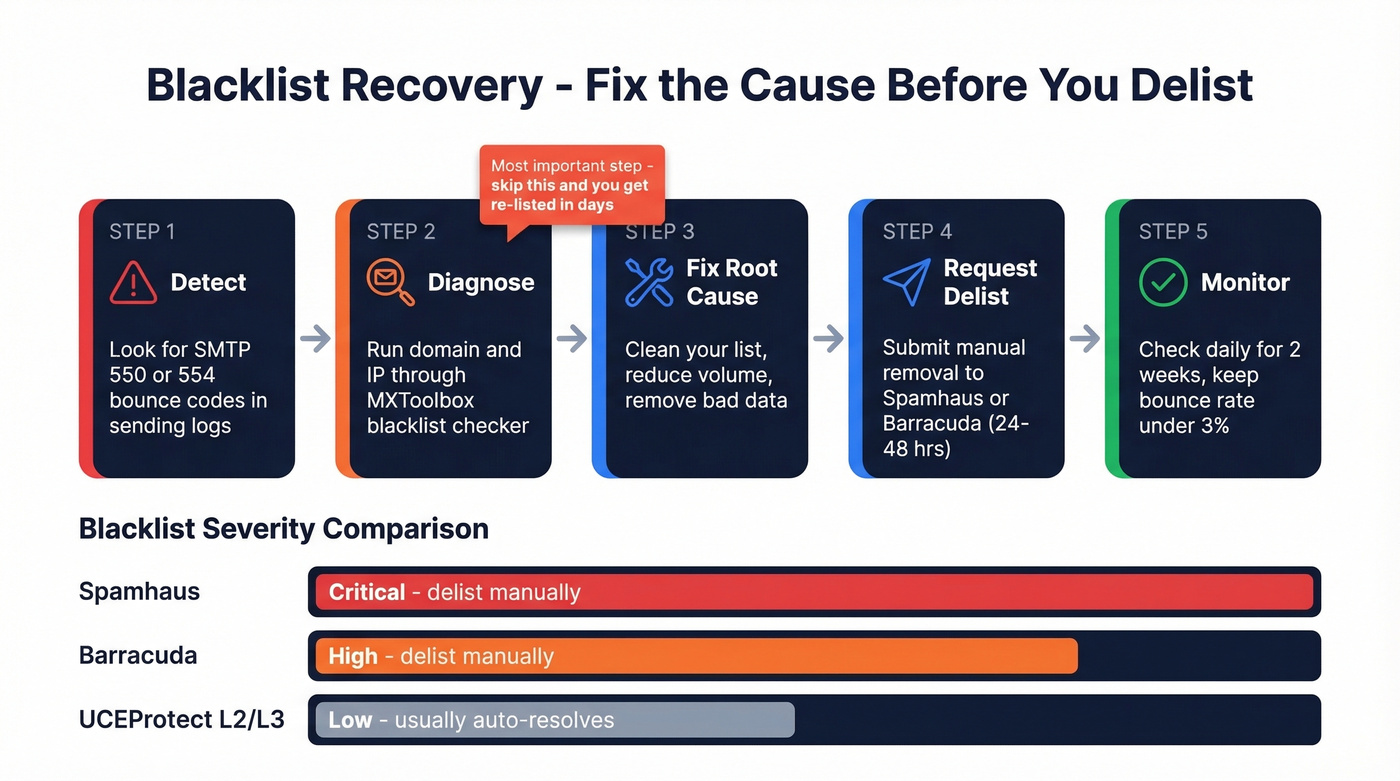
Look for SMTP bounce codes 550 or 554 in your sending logs, then run your domain and IP through MXToolbox. Not all blacklists hit equally hard - Spamhaus and Barracuda are the ones to treat as urgent. UCEProtect L2/L3 listings often resolve on their own. For a step-by-step, see Spamhaus blacklist removal.
| Blacklist | Delist Time | Process |
|---|---|---|
| SpamCop | 24-48 hrs | Automatic |
| Spamhaus | 24-48 hrs | Manual request |
| Barracuda | 12-24 hrs | Manual request |
Fix the root cause before requesting removal. If you delist without fixing the bad data or volume spike that triggered the flag, you'll be back on the list within days. We learned this the hard way watching a client delist from Spamhaus three times in two weeks before finally cleaning their list.
Tools Worth Using
| Tool | Best For | Starting Price |
|---|---|---|
| Prospeo | List verification and enrichment | Free (75/mo), ~$0.01/email |
| GMass | Gmail-based sending | $25/mo |
| Instantly | Warm-up + sending | ~$30/mo |
| Manyreach | Warm-up + sending | ~$49/mo |
| Brevo | Marketing bulk email | $15/mo (10K emails) |
| Amazon SES | High-volume infra | $0.10/1,000 emails |
Manyreach gets strong recommendations on r/EmailProspecting from practitioners running 40K+ emails/month. Amazon SES is unbeatable on cost if you have the technical chops to configure it - but there's no warm-up automation, so you're managing that yourself. If you're evaluating senders, start with AI bulk email senders.
FAQ
How many emails can I send per day without getting blacklisted?
For cold outreach, cap at 25 per inbox per day across multiple warmed inboxes and domains. Five domains with three inboxes each gives you 375 sends/day - enough for most B2B teams. Maxing out a single account is the fastest path to a blacklist.
How do I check if my domain is blacklisted?
Run your domain and sending IP through MXToolbox's blacklist checker. Prioritize Spamhaus and Barracuda listings since those two impact deliverability the most. UCEProtect L2/L3 listings typically auto-resolve within a week.
What's the fastest way to get off an email blacklist?
Fix the root cause first - usually bad data or a sudden volume spike - then submit a manual removal request to Spamhaus or Barracuda. Typical delist time is 24-48 hours. Delisting without fixing the underlying problem gets you re-listed within days.
What bounce rate triggers a blacklist?
Stay under 3% hard bounces per campaign. Anything above 5% puts you in immediate danger. Verify every address before sending - the difference between a clean list and a dirty one is usually the difference between inbox and blacklist.