

The 10 Best Email Finder Extensions for 2026
Your SDR sends 500 cold emails on Monday. By Wednesday, 180 have bounced, your domain reputation is wrecked, and the remaining 320 land in spam. That story plays out every single day - and a benchmark of 15 tools across 20,000 real contacts shows why. The top performer hit just 54.9% real enrichment. Others like Findymail (39.9%) and Fullenrich (48.3%) clustered well below their marketing claims.
The gap between what these tools promise and what they deliver is enormous. We've spent months testing email finder extensions against live outbound campaigns, and the results changed how we think about this entire category.
Our Picks (TL;DR)
| Pick | Tool | Why |
|---|---|---|
| Best overall accuracy | Prospeo | 98% email accuracy, 7-day data refresh, 40,000+ extension users |
| Best domain lookups | Hunter | Transparent domain-based search with confidence scores |
| Best free tier for volume | Apollo | Generous free credits - but verify everything before sending |
If you only need a handful of emails per week, Hunter's free tier (50 credits/month) is enough. If accuracy is non-negotiable, Prospeo's free tier gives you 75 emails plus 100 extension credits per month, no credit card required.
The Accuracy Problem Nobody Talks About
Every email finder extension markets itself as "highly accurate." The numbers tell a different story.
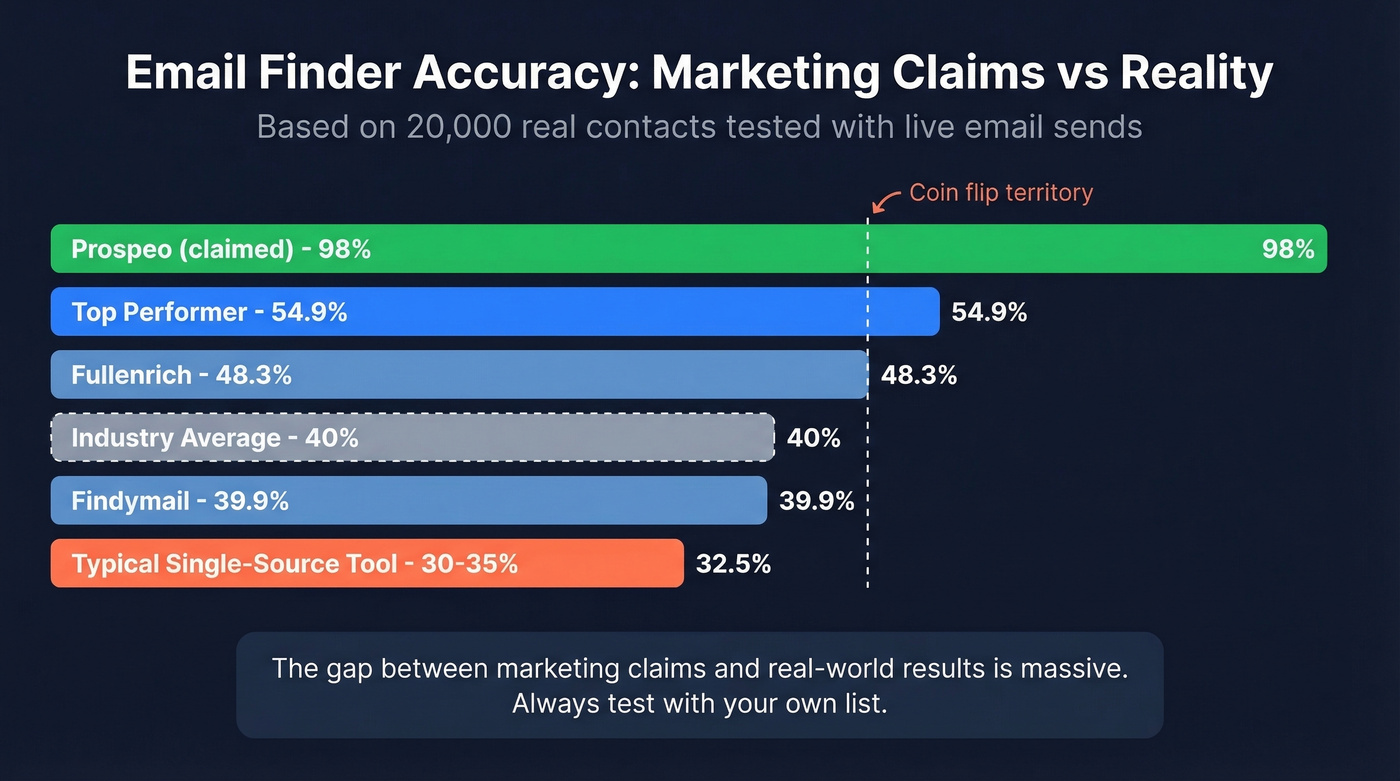
A February 2026 benchmark by Dropcontact tested 15 tools against 20,000 real contacts - 9,800 US, 9,700 European, 500 rest of world. They didn't just ping validators. They sent live emails and measured hard bounces, then manually verified domains to catch wrong-company matches. The best tool hit 54.9% real enrichment. Most clustered between 30% and 45%.

Practitioner reports on Reddit back this up. One user testing Apollo and Lusha across a few thousand enrichments reported roughly 60-70% valid emails, with phone numbers at "50/50 at best." That's the reality for most single-source tools. Some teams now use multi-provider cascade approaches - routing a contact through several data sources sequentially - to push validity rates toward 90%. It works, but adds complexity and cost that most teams don't need if their primary source is accurate enough.
Here's the thing: if your average deal size is under $10K, you don't need ZoomInfo-level data infrastructure. A single high-accuracy email finder extension paired with a verification step will outperform an expensive all-in-one platform that your team only uses at 20% of its capability. Don't trust marketing claims. Test with your own list, measure bounces after sending, and calculate your real cost per usable contact.
What to Look For in an Email Finder Extension
Real-world accuracy, not marketing accuracy. Does the tool verify emails before returning them? A simple MX check catches dead domains, but full SMTP validation with catch-all handling catches the emails that silently destroy your sender reputation. For more on verification options, see our guide to data enrichment services.
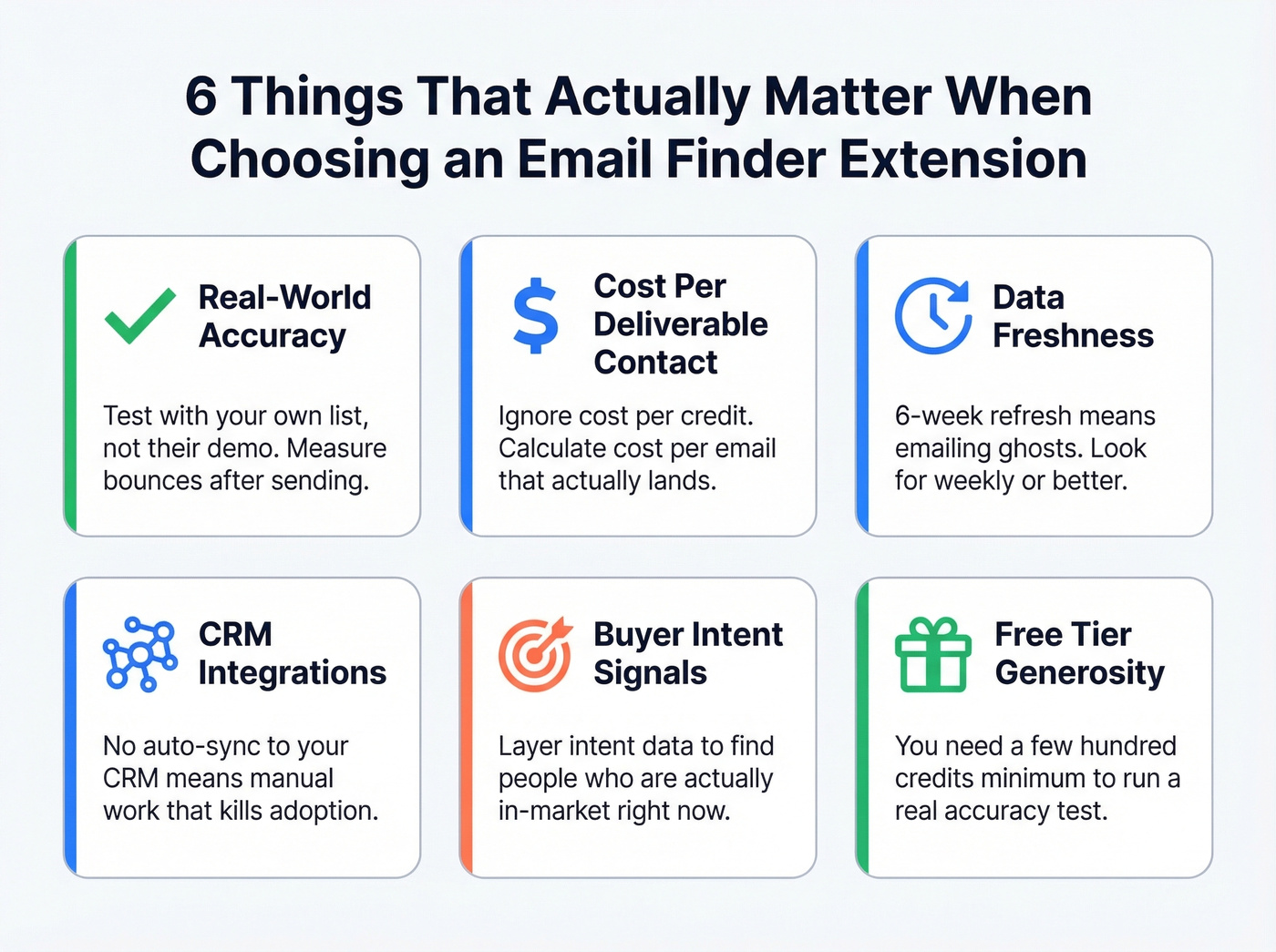
Credit economics. Cost per credit means nothing if half the emails bounce. Calculate cost per verified, deliverable contact instead. (Related: email bounce rate.)
Data freshness. People change jobs constantly. A 6-week refresh cycle means you're emailing ghosts. Weekly or better keeps your data alive.
CRM integrations. If found contacts don't flow into your CRM or sequencer automatically, you're adding manual steps that kill adoption. If you're building a stack, start with an auto sales CRM style checklist: data in, tasks out, no manual copy/paste.
Buyer intent signals. Advanced teams layer intent data - topics prospects are actively researching - on top of contact discovery. This turns a list of emails into a prioritized pipeline of people who are actually in-market. (More: identifying buying signals.)
Free tier generosity. You need enough free credits to genuinely test accuracy before committing budget. Fifty credits isn't a real test; you need a few hundred minimum. If you're bootstrapping, compare options in our roundup of free lead generation tools.
10 Best Email Finder Extensions Ranked
1. Prospeo
Use this if: You need the highest deliverable accuracy available and want self-serve pricing without annual contracts. Prospeo's database covers 300M+ professional profiles with 143M+ verified emails and 125M+ verified mobile numbers. The Chrome extension (40,000+ users) works on company websites, professional profiles, and CRMs - one click returns verified contact data with 50+ data points per contact.
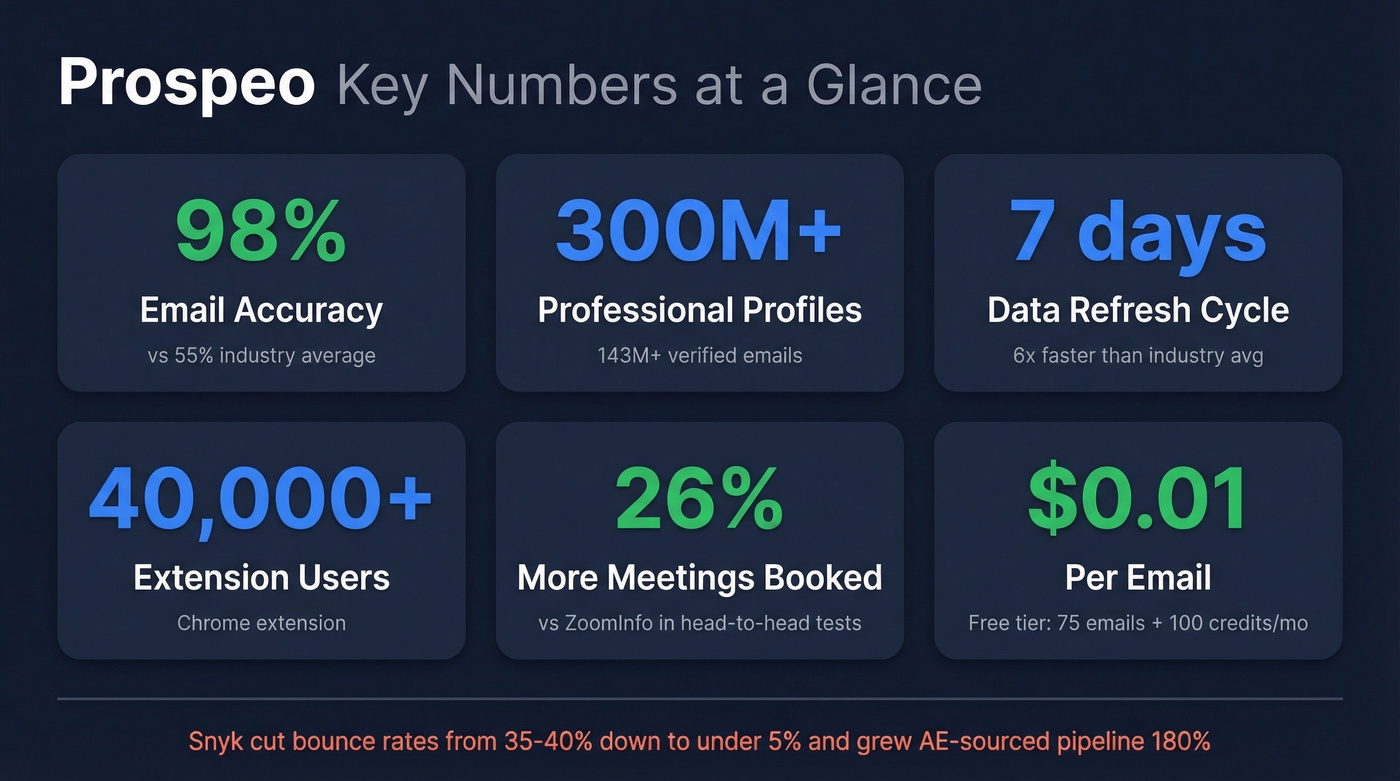
The 5-step verification process runs on proprietary infrastructure - no third-party email providers in the chain. That's how they hit 98% email accuracy while the industry benchmark hovers around 55%.
Data refreshes every 7 days, roughly six times faster than the industry average. Native integrations push contacts directly into HubSpot, Salesforce, Lemlist, Instantly, Smartlead, Clay, Zapier, and Make. In head-to-head comparisons, teams using Prospeo book 26% more meetings than ZoomInfo users and 35% more than Apollo users. Snyk's 50-person AE team dropped bounce rates from 35-40% to under 5% and increased AE-sourced pipeline 180% after switching. Pricing starts free (75 emails + 100 extension credits/month), with paid plans at roughly $0.01 per email. No contracts, cancel anytime.
Best for: SDR teams, outbound agencies, and founders who need enterprise-grade data without enterprise pricing. If you're evaluating the broader stack, start with our list of SDR tools.
2. Hunter
Use this if: You want domain-based email discovery with transparent confidence scores. Hunter's been around for years and does one thing well: you enter a domain, it returns email patterns and addresses it can find, each tagged with a confidence score. Verification costs just 0.5 credits per email.

Pricing is straightforward. Free gets you 50 credits/month. Starter runs $34/month (annual) for 2,000 credits. Growth is $104/month for 10,000 credits. Scale hits $209/month for 25,000 credits. The per-credit cost at Starter works out to about $0.02 per lookup.
Skip this if: You need person-level lookups from profile pages. Hunter is domain-first - you're searching by company, not by individual. If your workflow starts with a list of people rather than a list of companies, you'll find it limiting. If you're comparing similar tools, see our Hunter alternatives.
3. Apollo
Apollo is the tool everyone starts with and most teams eventually outgrow. The free plan gives you access to a massive database, and paid plans run $49-$119/user/month on annual billing. Email credits are technically "unlimited" under a fair-use policy.
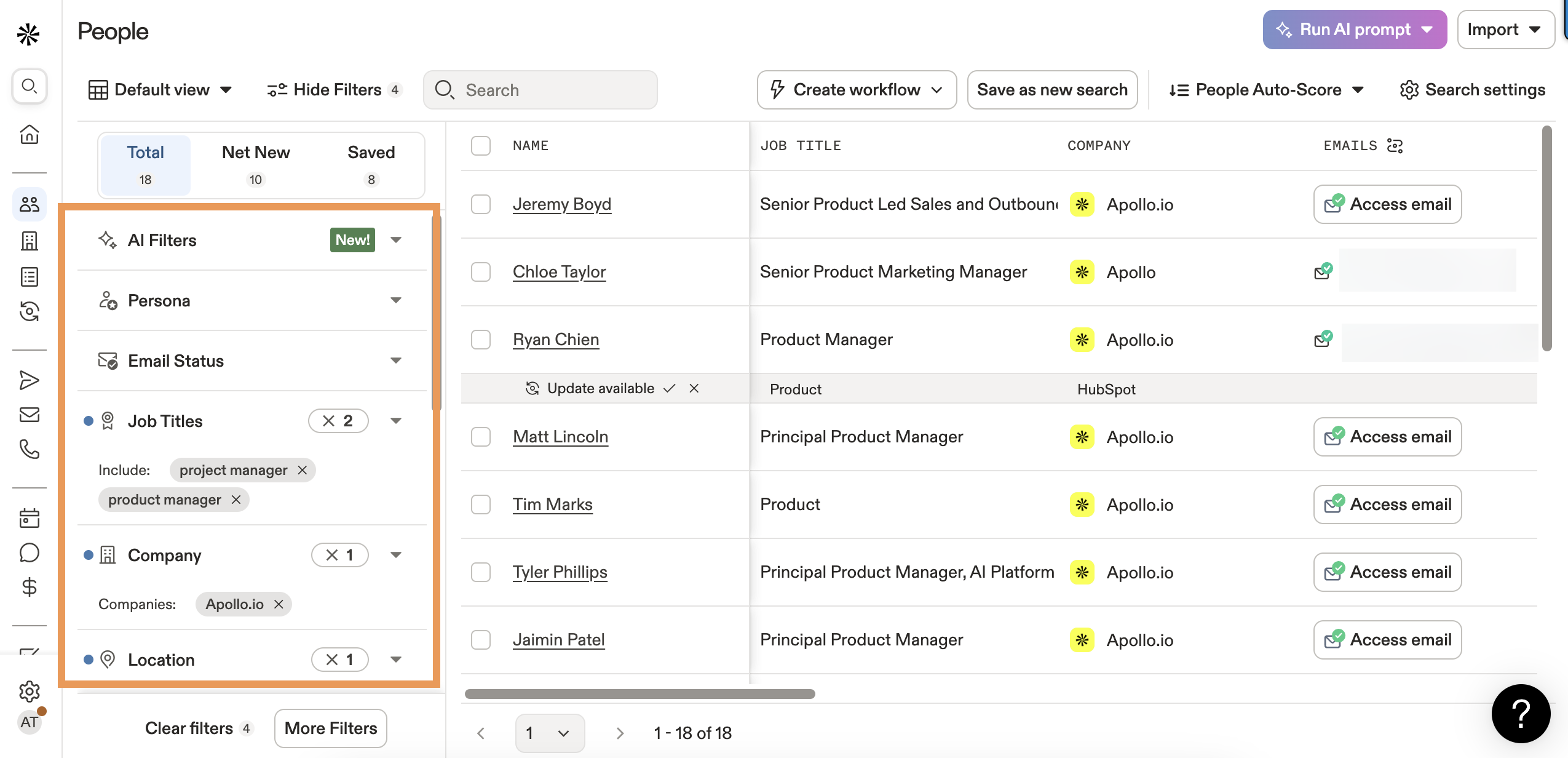
The appeal is obvious: generous free tier, built-in sequencing, and a database that covers seemingly everyone. The problem is equally obvious. Practitioner reports consistently land at 60-70% valid emails, which means roughly a third of what you pull needs scrubbing before sending. Apollo also had two data breaches (2018 and 2021) compromising 130M+ records - worth factoring in if your security team has opinions. The Organization tier requires a minimum of 3 users, which pushes costs up fast for small teams.
Bottom line: Apollo is a great prospecting starting point, but treat its data as a first draft, not a finished product. If you want a deeper comparison, see Coresignal vs Apollo.io.
4. Kaspr
Free tier includes unlimited B2B email credits, but you're still gated by export credits to actually use what you find. The free plan caps exports at 10/month and includes 5 phone credits and 5 direct email credits. Starter ($49/month) bumps you to 1,000 export credits with 100 phone credits. Business ($99/month) gives you 2,500 export credits with 200 phone credits and 200 direct email credits.
The "unlimited B2B emails" framing is misleading - exports, phones, and direct emails are all capped by plan. It also requires a minimum of 20 connections on the professional platform it integrates with.
Best for: Individual reps doing self-serve prospecting who need a quick, affordable Chrome email finder alongside their daily browsing workflow.
5. Snov.io
Snov.io bundles email finding, verification, and outreach sequences into one platform. The trial tier gives you 50 credits, 100 unique recipients, and 1 warm-up slot for free. Starter bumps to 1,000 credits, 5,000 recipients, and 3 warm-up slots. Annual billing saves about 25%.
Let's be honest about the credit system: it's genuinely confusing. Credits cover both prospect search and email verification from the same pool. Recipients are a separate quota. Warm-up slots are yet another limit. Automation on professional networks is a paid add-on. You'll spend 20 minutes just understanding what you're buying.
Best for: Solo operators or small teams who want finding + outreach in one tool and don't mind learning the credit system. If you're building sequences, pair this with proven sales follow-up templates.
6. Lusha
Well-known brand with a clean Chrome extension. Free plan offers 70 credits/month. Email reveals cost 1 credit each. Unused credits roll over up to 2x your monthly cap. CRM integrations are included even on the free tier.
The catch: phone reveals cost 10 credits each, so your 70 free credits buy exactly 7 phone numbers. Paid plan pricing isn't transparent on their site - expect to talk to sales, though community discussions suggest plans start around $36-50/user/month. Practitioner accuracy reports land around 60-70% for emails, which is middling.
Best for: Teams that want a recognizable brand with decent CRM integrations and don't need high-volume phone data.
7. ContactOut
Purpose-built for recruiters, and it shows. G2 rating sits at 4.4/5 across 109 reviews, with users praising accuracy and ease of use. The extension surfaces personal emails alongside work addresses - a big deal for recruiting outreach where work emails often go unanswered.
The Email plan ($49/month annual) markets "unlimited" emails but caps at 2,000/month with 300 exports. That's not unlimited by any definition. Free tier limits you to 5 emails per day.
Best for: Recruiters and talent teams. Skip it if you're doing sales prospecting at scale.
8. RocketReach
Large database with enterprise-leaning pricing. Individual plans run $80-$300/user/month; team plans on annual billing drop to $83-$207/user/month. Per-contact economics make it hard to justify for high-volume outbound unless you're already locked into their ecosystem.
9. GetProspect
Budget-friendly option with a Chrome extension that covers the basics. Free tier gives you 50 credits plus 100 verified emails/month. Starter runs $49/month. Limited independent accuracy data available - we're keeping an eye on it for teams with tight budgets who need something functional without a big commitment.
10. Cognism
Best for EMEA-focused teams that need GDPR compliance baked into every workflow. European data quality and mobile verification beat ZoomInfo in that region; US database depth and self-serve flexibility don't match up. Enterprise pricing typically runs $1,000-$3,000/month with annual contracts required.

The best email finder extension in that benchmark hit 54.9% real enrichment. Prospeo's 5-step proprietary verification delivers 98% accuracy - no third-party email providers, 7-day data refresh, and 40,000+ teams already using the Chrome extension. At $0.01 per email, one bounced campaign costs more than a month of accurate data.
Stop scrubbing bad data. Start with emails that actually deliver.
Pricing Comparison
| Tool | Free Tier | Starting Paid | Credits Included | ~Cost/Email |
|---|---|---|---|---|
| Hunter | 50 credits/mo | $34/mo (annual) | 2,000/mo | ~$0.02 |
| Apollo | Generous free | $49/user/mo (annual) | "Unlimited" emails | Free* |
| Kaspr | 10 exports/mo | $49/user/mo | 1,000 export credits | Varies |
| Snov.io | 50 credits | ~$30/mo | 1,000 searches | Varies |
| Lusha | 70 credits/mo | ~$36-50/user/mo | Varies | ~$0.05+ |
| ContactOut | 5/day | $49/mo (annual) | 2,000/mo cap (300 exports) | ~$0.025 |
| RocketReach | 5 free lookups | $80/user/mo | 125 lookups | ~$0.64 |
| GetProspect | 50 credits/mo | $49/mo | 1,000 emails | ~$0.05 |
| Cognism | None | ~$1,000/mo | Custom | ~$0.15+ |
*Apollo's "unlimited" emails are subject to fair-use caps. The "unlimited" labels from Kaspr and ContactOut both have hard caps buried in their terms. Phone credits vary widely: Kaspr includes 100/month on Starter, Lusha charges 10 credits per phone reveal, and RocketReach bundles phones into its higher tiers.
Cost Per Verified Email
Raw cost per credit is meaningless if half your emails bounce. Here's the math that actually matters.
The formula: (plan cost / credits) / accuracy rate = true cost per usable email. If you want to go deeper on list hygiene, see our guide to email deliverability.

A 10-seat team sending 1,000 emails per rep per month at 65% validity is burning 3,500 emails into the void every month. At scale, that's not a data problem - it's a revenue problem.
Will an Extension Get Your Account Restricted?
This is the question nobody wants to ask until it's too late. Short answer: yes, it can happen.
Professional platforms actively detect and block tools that violate their automation and scraping policies. Detection falls into three categories: policy violations (any automated data extraction violates most platform terms of service), technical detection (platforms identify Chrome extension IDs injected into their pages and flag accounts running them), and rate limiting (exceeding normal action thresholds triggers automated restrictions).
Cloud-based tools that send server-side requests aren't immune either. Those requests often look "incomplete" compared to normal browser traffic, making them detectable through different mechanisms. Standalone modified browsers attempt to mimic human behavior with randomized timing and mouse movements, but nothing is truly undetectable.
Practical guidance: keep volumes low and randomized. Don't run multiple scraping extensions simultaneously. Avoid using the platform in a separate browser while automation runs. Any extension-based scraping carries inherent risk - the goal is managing that risk intelligently, not pretending it doesn't exist. If you're considering scraping as a channel, compare approaches in our web scraping lead generation guide.
How to Choose the Right Tool
Solo founder: Hunter's free tier to start. If you need more volume or higher accuracy, upgrade to a paid plan with built-in verification.
SDR team (5-20 reps): Accuracy-first outbound means fewer bounces, better domain health, and more replies. That's the math that matters at team scale, and it's where tools like Prospeo pay for themselves quickly. For tactics, see our sales prospecting techniques.
Agency: Self-serve onboarding, no contracts, transparent per-credit pricing that's easy to pass through to clients.
Recruiter: ContactOut. It's built for your workflow and surfaces personal emails alongside work addresses.
Budget-constrained: Apollo's free tier plus a separate verification tool. Just don't send unverified. If you need verifier options, see Bouncer alternatives.
EMEA/compliance-first: Cognism. The GDPR infrastructure is real, and the European mobile data is strong.
The right email finder extension depends on your volume, budget, and tolerance for bad data. For most outbound teams, accuracy and deliverability matter more than database size or credit count. We've seen teams cut their tool spend in half by switching from a "big database" provider to a smaller, more accurate one - because they stopped paying to clean up messes.
Snyk's 50 AEs dropped bounce rates from 35-40% to under 5% and grew AE-sourced pipeline 180% - all from switching their email finder. Prospeo's Chrome extension returns 50+ verified data points per contact, pushes them straight into HubSpot, Salesforce, or your sequencer, and costs 90% less than ZoomInfo.
Test it against your current tool with 100 free extension credits.
FAQ
Are email finder extensions legal?
Yes - finding publicly available business email addresses is legal in most jurisdictions. GDPR requires legitimate interest for B2B outreach in the EU, and CAN-SPAM mandates opt-out mechanisms in the US. The extension itself isn't the legal risk; your outreach practices are.
Which email finder extension has the highest accuracy?
Independent benchmarks show most tools deliver 30-55% real enrichment rates against 20,000 real contacts. Prospeo hits 98% accuracy through a proprietary 5-step verification process - significantly above the benchmark average. Always test with your own list before committing.
Can I use multiple email lookup extensions at once?
You can install several, but running them simultaneously on the same platform increases detection risk. Pick one primary tool for discovery and use a second strictly for verification or as a fallback for contacts your primary extension can't find.
How many free emails can I find per month?
Hunter offers 50 credits/month, Lusha gives 70, and Prospeo provides 75 emails plus 100 extension credits - the most generous accuracy-verified free tier available. Combining free plans can cover light prospecting, but anything beyond 200 contacts/month warrants a paid plan.