

The 7 Best Sales CRM Tools in 2026
70% of CRM implementations fail. Not because the software is bad - because teams pick a platform built for 500 people when they have 12. Meanwhile, CRMs return $8.71 for every $1 spent when implemented right. The gap between those two stats tells you everything: finding the best sales CRM tools comes down to fit, not features.
Our Picks (TL;DR)
If you only trial three, start with these. Details and pricing for all seven below.
- Prospeo - Best for CRM data accuracy and enrichment. Your CRM is only as good as the contacts inside it.
- HubSpot Sales Hub - Best free starting point. Generous free tier, fast onboarding, scales with you until the pricing cliff hits.
- Pipedrive - Best for rep adoption. Reps actually use it, which is half the battle.
How to Pick a Sales CRM
Don't start with a feature matrix. Start with what your reps will actually touch every day.
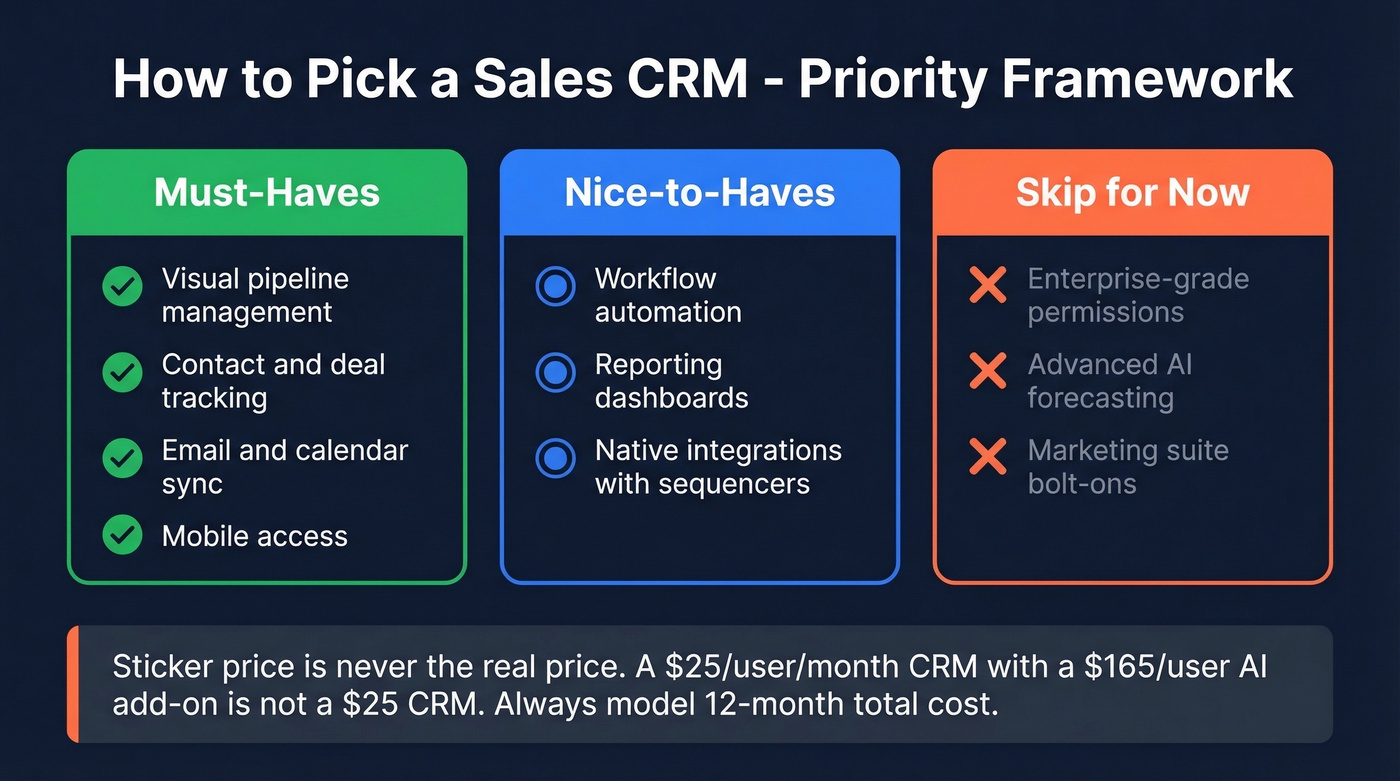
Must-haves: visual pipeline management, contact and deal tracking, email and calendar sync, mobile access. If a CRM doesn't nail these four, nothing else matters.
Nice-to-haves: workflow automation, reporting dashboards, native integrations with your sequencer and data tools.
Skip for now: enterprise-grade permissions, advanced AI forecasting, marketing suite bolt-ons. You can add these later. Buying them upfront is how you end up in the 70% that fails.
Here's the thing most vendors won't tell you: sticker price is never the real price. A $25/user/month CRM that needs a $165/user AI add-on and a consultant to configure it isn't a $25 CRM. Always model 12-month total cost of ownership before you commit.

70% of CRM implementations fail - and bad contact data is the silent killer. Prospeo enriches your CRM with 50+ data points per contact at 98% email accuracy, refreshed every 7 days. Snyk cut their bounce rate from 40% to under 5% and added 200+ opportunities per month.
Stop managing a pipeline full of dead contacts.
The 7 Best CRM Tools for Sales
Prospeo - Best for Data Accuracy
Every CRM on this list manages pipelines and tracks deals competently. The difference between a CRM that drives revenue and one that collects dust is the data inside it.
Prospeo keeps your CRM current automatically. Its database spans 300M+ professional profiles and 143M+ verified emails at 98% accuracy, enriching records with 50+ data points per contact. The 7-day refresh cycle - versus the six-week industry average - means contacts don't go stale between touches. That alone changes the math on outbound.
The proof: Snyk's 50-person AE team went from a 35-40% bounce rate to under 5% after plugging Prospeo into their workflow. AE-sourced pipeline jumped 180%, generating 200+ new opportunities per month. That's not a CRM feature - it's what happens when your CRM data is actually accurate.
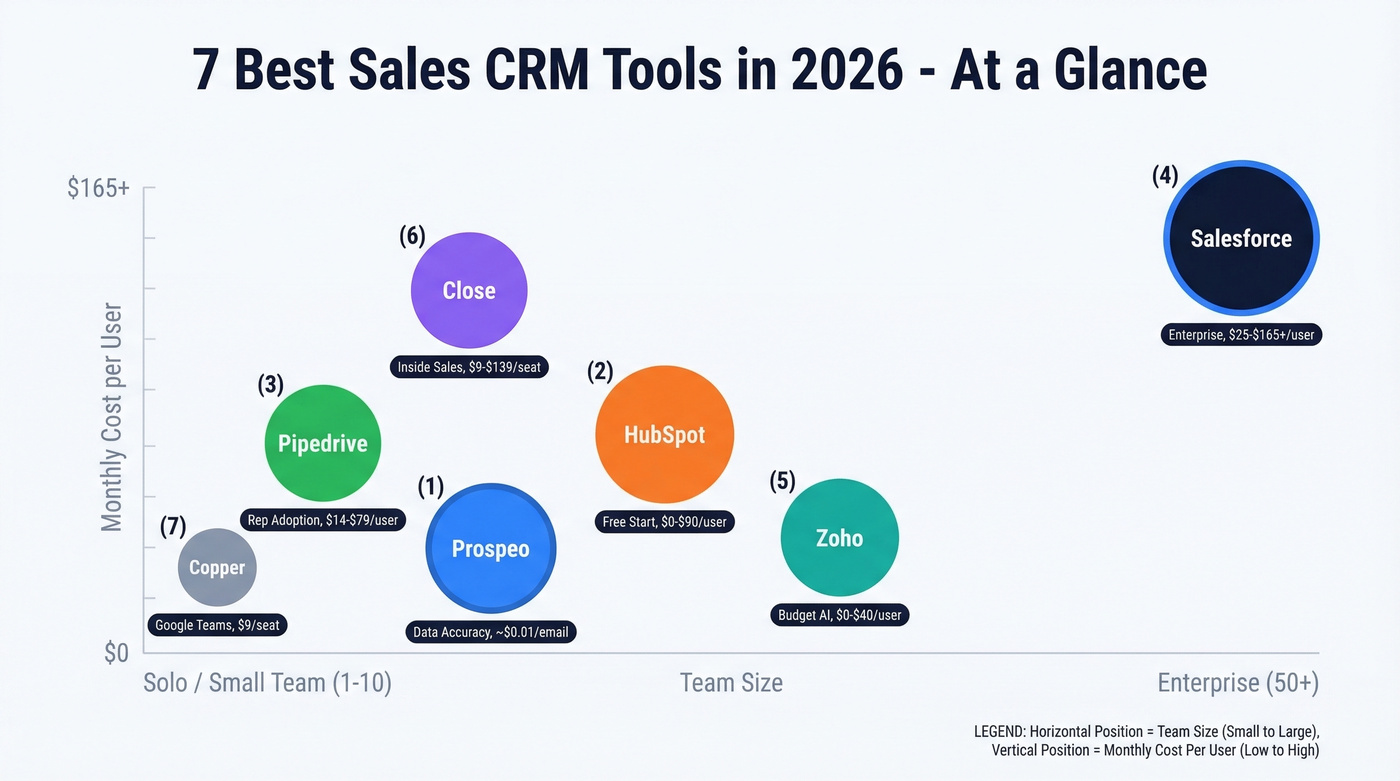
Integrates natively with Salesforce, HubSpot, Lemlist, Instantly, and Clay. Free tier gives you 75 emails and 100 Chrome extension credits per month. Paid plans run about $0.01 per email.
Use this if: your CRM is full of stale contacts and your sequences are bouncing.

HubSpot Sales Hub - Best Free Starting Point
Use this if: you're starting from zero and need a CRM running by Friday. Skip this if: you need deep customization or your team is past 20 reps.
HubSpot's free plan is legitimately strong - contact management, deal tracking, email templates, and meeting scheduling at no cost. For a team of one or two, you can run a real sales process without spending a dollar.
Salesforce and HubSpot hold the #1 and #2 spots on G2's 2026 Best Sales Software Products list, which tracks with what we've seen in practice.
The catch is the pricing cliff. Free to Starter ($20/user/month) is painless. Starter to Professional ($90/user/month) is where it gets real - that's where automation and custom reporting live. A 10-person team on Professional runs $10,800/year before add-ons. We've watched teams hit that jump and scramble to justify the spend, so plan for it early.
Pipedrive - Best for Rep Adoption
We watched a team migrate from Salesforce to Pipedrive last year. Rep CRM usage went from ~40% to over 90% in three weeks. That's Pipedrive's superpower: reps actually open it.
The visual pipeline is the best in the category - drag-and-drop deals, clear stage progression, zero training required. Pipedrive's AI Sales Assistant surfaces deal risks and suggests next steps. Plans start at $14/user/month and scale to $79/user/month. The $39 tier (billed annually) is the sweet spot for teams that want automation without enterprise bloat.
Pipedrive's simplicity is its most-praised trait in CRM forums - and also its ceiling. The consensus on r/sales is pretty clear: if you need advanced reporting depth or marketing automation in the same platform, look elsewhere. Pipedrive is a sales tool, not a GTM suite, and that's a feature, not a bug.

Salesforce Sales Cloud - Best for Enterprise
Salesforce is the CRM everything else gets compared to - 4.4/5 on G2 with 25,000+ reviews. If you can imagine a workflow, Salesforce can build it.
The tradeoff is cost and complexity. A 10-user deployment can hit $37,000+ in year-one costs once you factor in implementation, training, and add-ons. Base pricing starts at $25/user/month, but that number is almost meaningless in isolation because nobody runs vanilla Salesforce.
Einstein AI is often extra on top of your base license: expect $75+/user/month, with some packages priced around $165/user/month. Einstein's strength is deep forecasting and opportunity scoring - powerful if you have the data volume to feed it, wasted if you don't. Practitioners universally agree: Salesforce is admin-heavy. Without a dedicated RevOps person, you'll spend more time configuring than selling.
Use this if: you have 50+ reps and a full-time admin. Skip this if: you don't.
Zoho CRM - Best Budget Option with AI
Zoho is the quiet overachiever. Free for up to 3 users, Standard at $14/user/month, and the AI assistant Zia is available on the Enterprise tier at $40/user/month billed annually - still less than half what Salesforce charges for some Einstein packages. While Einstein focuses on forecasting and opportunity scoring, Zia handles predictive lead scoring, anomaly detection, and best-time-to-contact recommendations. For teams selling under five figures per deal who want AI without the enterprise price tag, Zoho is the obvious pick.
Skip this if you need a massive third-party integration marketplace. Zoho's tool family is strong internally but thinner outside its own walls.
Close - Best for Inside Sales
Close built its CRM around the phone. Built-in calling, SMS, and email in every plan - no third-party dialer needed. For inside sales teams running 50+ calls a day, that's a genuine workflow advantage.
Pricing starts at $9/seat/month (Solo) and scales to $139/seat on the Scale plan. But the add-ons add up: Call Assistant runs $50/month per org plus $0.02/minute, premium phone numbers are $19/line/month, and the Predictive Dialer requires Scale tier. Per one analysis from MarketBetter, add-ons can inflate effective per-user cost by 40-75%.
Use this if: your team lives on the phone. Skip this if: outbound calling isn't central to your motion.
Copper - Best for Google Workspace
Copper is purpose-built for Google Workspace teams. It sits inside Gmail and Google Calendar like a native app, which means zero context-switching for reps who already live in Google. Starts at $9/seat/month billed annually with a 14-day free trial. It's the lightest-weight option on this list, and for small teams that don't want another tab open, that simplicity is the whole point.
CRM Pricing at a Glance
| Tool | Starting Price | Free Tier | AI / Intent | Best For |
|---|---|---|---|---|
| Prospeo | ~$0.01/email | Yes (75/mo) | Intent data included | Data accuracy |
| HubSpot | $20/user/mo | Yes | On higher tiers | Free start |
| Pipedrive | $14/user/mo | No (trial) | Yes | Rep adoption |
| Salesforce | $25/user/mo | No | Extra ($75-165/user) | Enterprise |
| Zoho CRM | $14/user/mo | Yes (3 users) | Yes (Enterprise tier) | Budget AI |
| Close | $9/seat/mo | No | Partial | Inside sales |
| Copper | $9/seat/mo | No (trial) | No | Google teams |
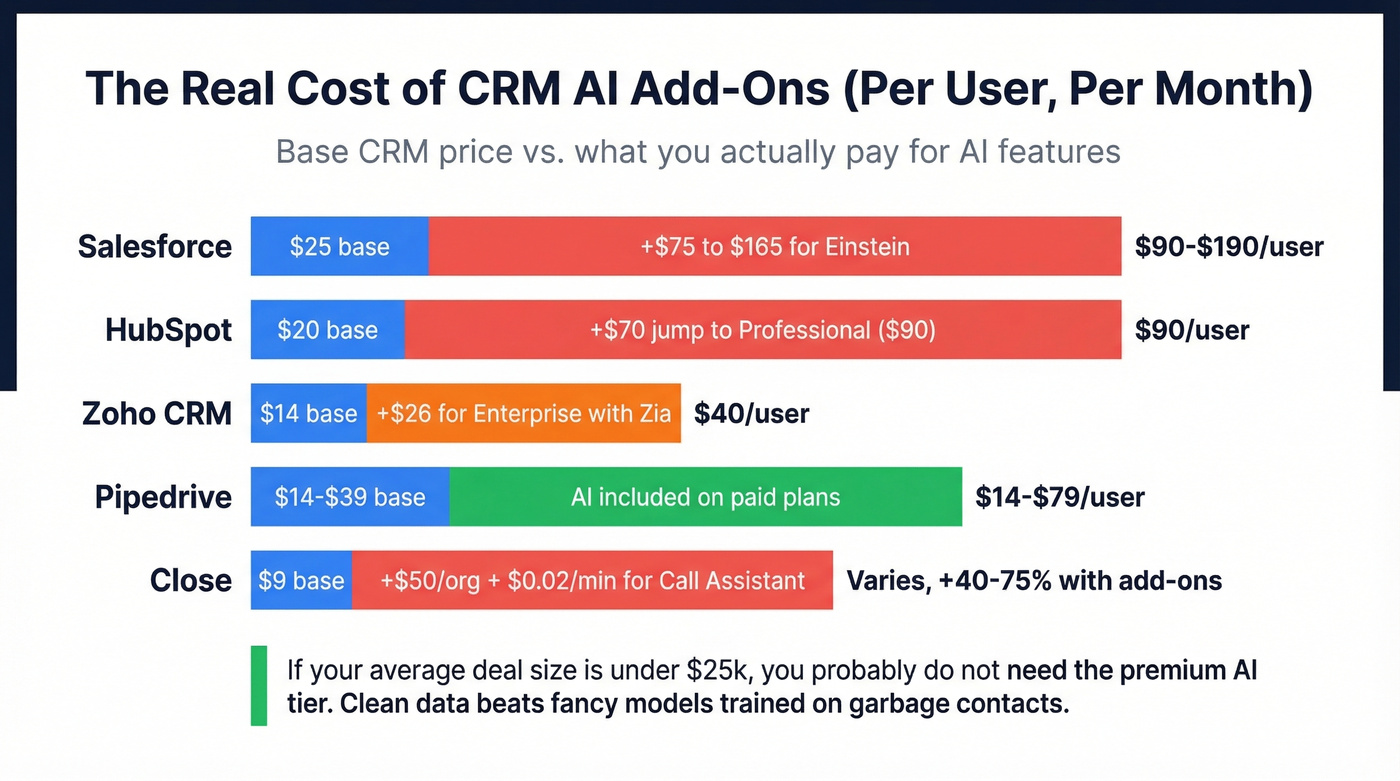
Let's be honest about what's happening in this market: AI is the new upsell lever, and most teams are overpaying for it. Salesforce charges around $165/user/month for some Einstein packages. HubSpot's Professional tier is ~$90/user/month. Zoho's Zia is available at Enterprise for $40/user/month. Pipedrive includes AI assistance on paid plans, which helps teams avoid separate add-ons entirely. If your average deal size is under $25k, you probably don't need the premium AI tier - the base CRM with clean data will outperform a fancy model trained on garbage contacts every time.
Your Data Matters More Than Your CRM
A CRM full of bad emails is an expensive address book.
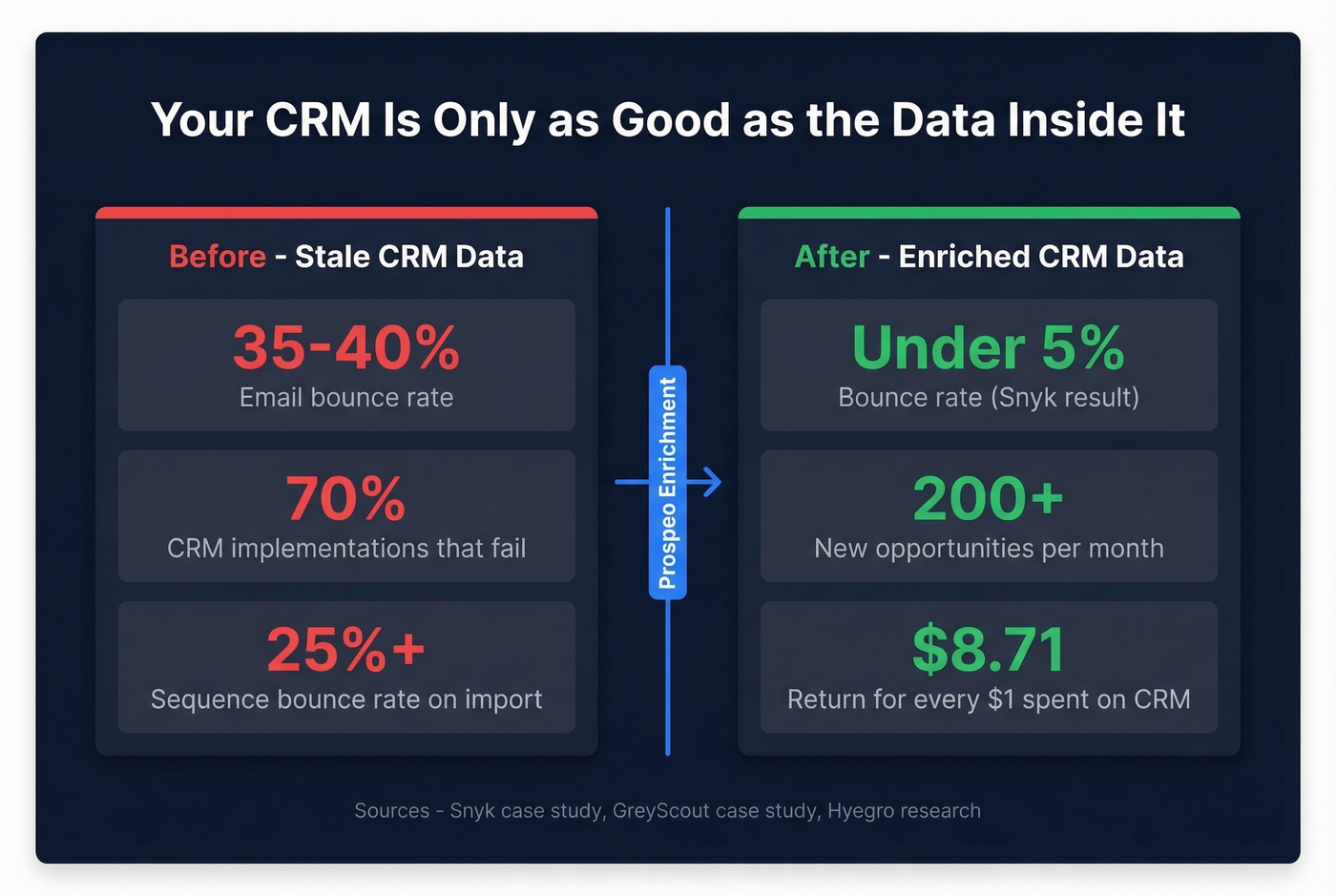
We've seen teams spend months picking the perfect sales CRM, configure every workflow, build every dashboard - then watch sequences bounce at 25% because the contact data was stale on import. GreyScout cut their bounce rate from 38% to under 4% and grew pipeline 140% by layering enrichment into their CRM workflow. The tool matters less than the data quality discipline you build around it. Start with clean data, keep it fresh, and any CRM on this list will perform.
If you're seeing bounces, start by measuring your email bounce rate and fixing email deliverability at the source.

You just spent hours picking the right CRM. Don't fill it with stale data. Prospeo plugs directly into HubSpot and Salesforce, enriching every record with verified emails, direct dials, and intent signals - at $0.01 per email instead of $1.
The best CRM tool is the one with accurate data inside it.
FAQ
What's the best free CRM for sales teams?
HubSpot's free plan gives you contact management, deal tracking, and email templates at no cost. You'll hit paywalls for automation around the $90/user/month Professional jump. Zoho also offers a free tier for up to 3 users with basic pipeline features.
How much should a small team budget for CRM?
For a 5-person team, expect $70-$400/month depending on the platform. Pipedrive and Zoho land on the low end at $14/user/month. HubSpot Professional and Salesforce climb fast with add-ons. Always model 12-month total cost of ownership, including implementation and any AI extras you'll want six months in.
Do I need a separate data enrichment tool?
Yes - especially if bounce rates exceed 5% or reps spend hours manually researching contacts. CRM-native data degrades fast as people change jobs. A dedicated enrichment layer with automated refresh cycles keeps records current without manual work from your reps, which is why teams like Snyk saw bounce rates drop from 35-40% to under 5%.
How do I keep CRM data accurate over time?
CRM data decays at roughly 30% per year as contacts change roles and companies restructure. The most reliable fix is a dedicated enrichment layer with automated refresh cycles - this keeps records current without manual work from your reps. Pair that with duplicate-removal rules and you'll avoid the "expensive address book" trap.