

BIMI Record: The Complete Setup Guide for 2026
Most BIMI guides make it sound like a 15-minute project. The DNS record takes two minutes. Getting DMARC to enforcement often takes months. Getting your SVG to pass validation takes longer than you'd expect. And then Outlook still won't render your logo anyway.
Here's everything you actually need to know about setting up a BIMI record - the prerequisites, the certificate math, the SVG gotchas, and an honest take on whether the investment makes sense for your domain.
What Is a BIMI Record?
A BIMI record is a DNS TXT record published at default._bimi.yourdomain.com that tells mailbox providers where to find your brand's logo. When a recipient's inbox supports BIMI and your email passes authentication checks - SPF, DKIM, DMARC - the provider fetches your logo and displays it next to your message.
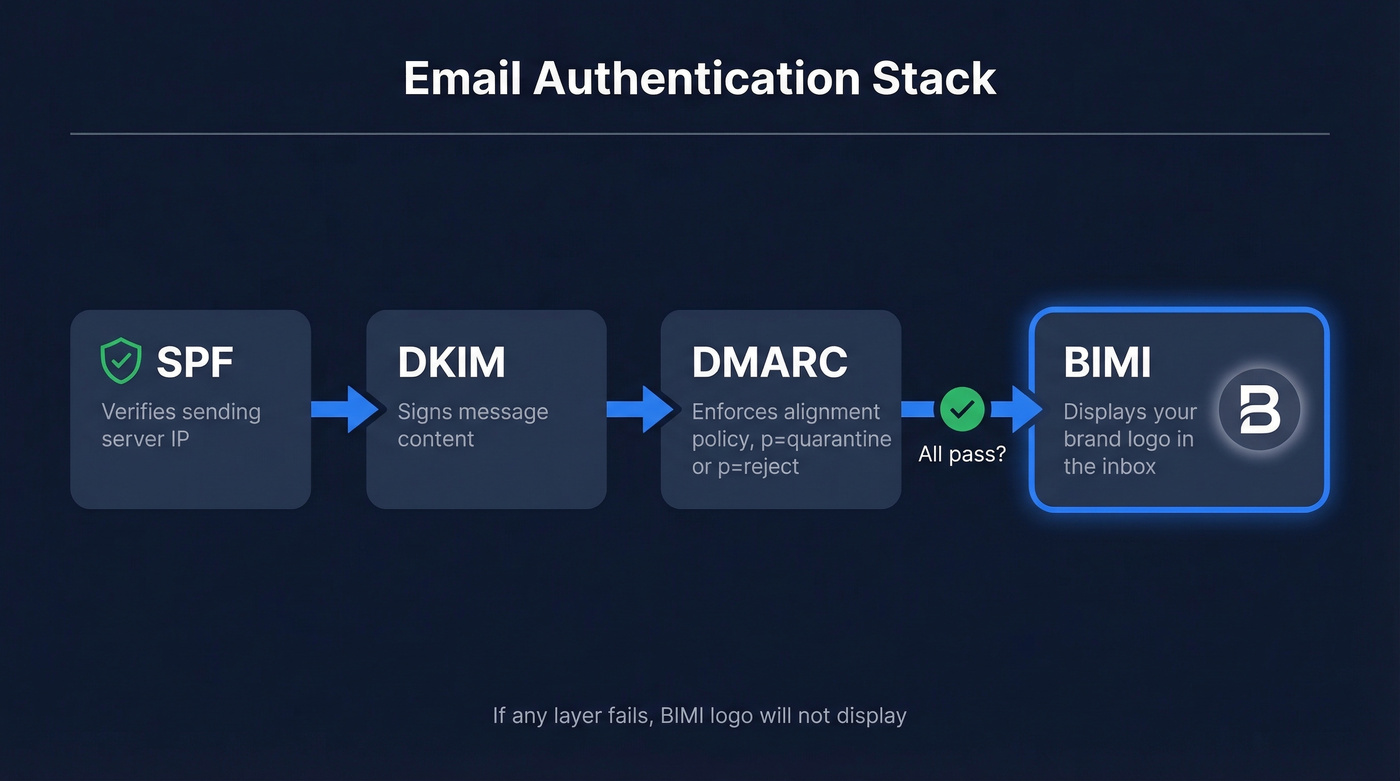
The chain works like this. SPF verifies the sending server. DKIM signs the message content. DMARC ties them together with an enforcement policy, and BIMI sits on top as the visual payoff. Without the first three layers passing, BIMI does nothing.
The engagement numbers are compelling: brands using BIMI see 44% increased brand recall, 39% higher open rates, and a 32% lift in purchase likelihood. Yahoo separately reported a 10% open rate increase for BIMI-enabled senders. A recognizable logo in the inbox builds trust before the subject line does any work.
What You Need (Quick Version)
Before getting into the technical details, here's the decision framework based on your sending volume:
- Sending 50K+ emails/month - Get a VMC ($900-$1,700/yr). You'll unlock the Gmail blue checkmark and the broadest support across BIMI-friendly inboxes.
- Sending 10K-50K/month - [A CMC](https://docs.digicert.com/en/certcentral/manage-certificates/verified-mark-certificates - vmc-/common-mark-certificate - cmc-.html) ($100-$950/yr) gets your logo into Gmail and Yahoo without requiring a registered trademark.
- Sending under 10K/month - Start with self-asserted BIMI ($0). Yahoo, Fastmail, and La Poste will display your logo. Upgrade when volume justifies the spend.
Here's a copy-pasteable record you can adapt right now:
default._bimi.yourdomain.com IN TXT "v=BIMI1; l=https://example.com/logo.svg; a=https://example.com/cert.pem"
v=BIMI1- version identifier, always BIMI1l=- HTTPS URL to your SVG Tiny-PS logoa=- HTTPS URL to your VMC/CMC certificate in .pem format. Leave empty for self-asserted:a=
That's the skeleton. The rest of this guide covers how to make each piece actually work.
Prerequisites Before You Start
BIMI won't function without a solid authentication foundation. Run through this checklist before touching DNS:
- SPF aligned - your sending IPs are authorized and SPF passes alignment (see SPF syntax examples)
- DKIM aligned - messages are signed with a key that aligns to your domain (use this guide to verify DKIM is working)
- DMARC at enforcement - policy set to
p=quarantineorp=rejectwithpct=100(more on DMARC alignment) - Subdomain policy enforced -
sp=nonewill block BIMI on subdomains even if the parent domain is at enforcement - SVG logo hosted at a stable HTTPS URL with a valid TLS certificate
- Clean sender reputation - low bounces, no spam-trap hits (how to improve sender reputation)
That last point trips up more teams than you'd expect. BIMI depends on DMARC enforcement, and DMARC enforcement depends on clean sender reputation. Every bounced email from bad contact data erodes your domain's standing and pushes DMARC aggregate reports toward failure. If you're running outbound at scale, bad data is the fastest way to undermine the authentication chain you just spent months building.
DNS Syntax Explained
Let's break down each component of the record:
default._bimi.yourdomain.com IN TXT "v=BIMI1; l=https://cdn.yourdomain.com/logo.svg; a=https://cdn.yourdomain.com/cert.pem"
| Tag | Value | Notes |
|---|---|---|
v= |
BIMI1 |
Always BIMI1. No other version exists. |
l= |
Logo URL | Must be HTTPS. Must serve SVG Tiny-PS. |
a= |
Certificate URL | .pem file for VMC/CMC. Empty for self-asserted. |
The record lives at the default._bimi subdomain of your sending domain. If you send from marketing.yourdomain.com, the record goes at default._bimi.marketing.yourdomain.com.
For organizations running multiple brands from one domain, BIMI supports custom selectors via the BIMI-Selector email header. Instead of default, you'd use a selector like brand-a._bimi.yourdomain.com and include a BIMI-Selector: v=BIMI1; s=brand-a header in outgoing messages. Most teams won't need this - stick with default unless you're managing distinct brand identities on a shared domain.
Certificates: Self-Asserted vs CMC vs VMC
This is where the money conversation happens. Three tiers of BIMI assertion exist, and the right one depends on your budget, trademark status, and which inboxes matter most to you.
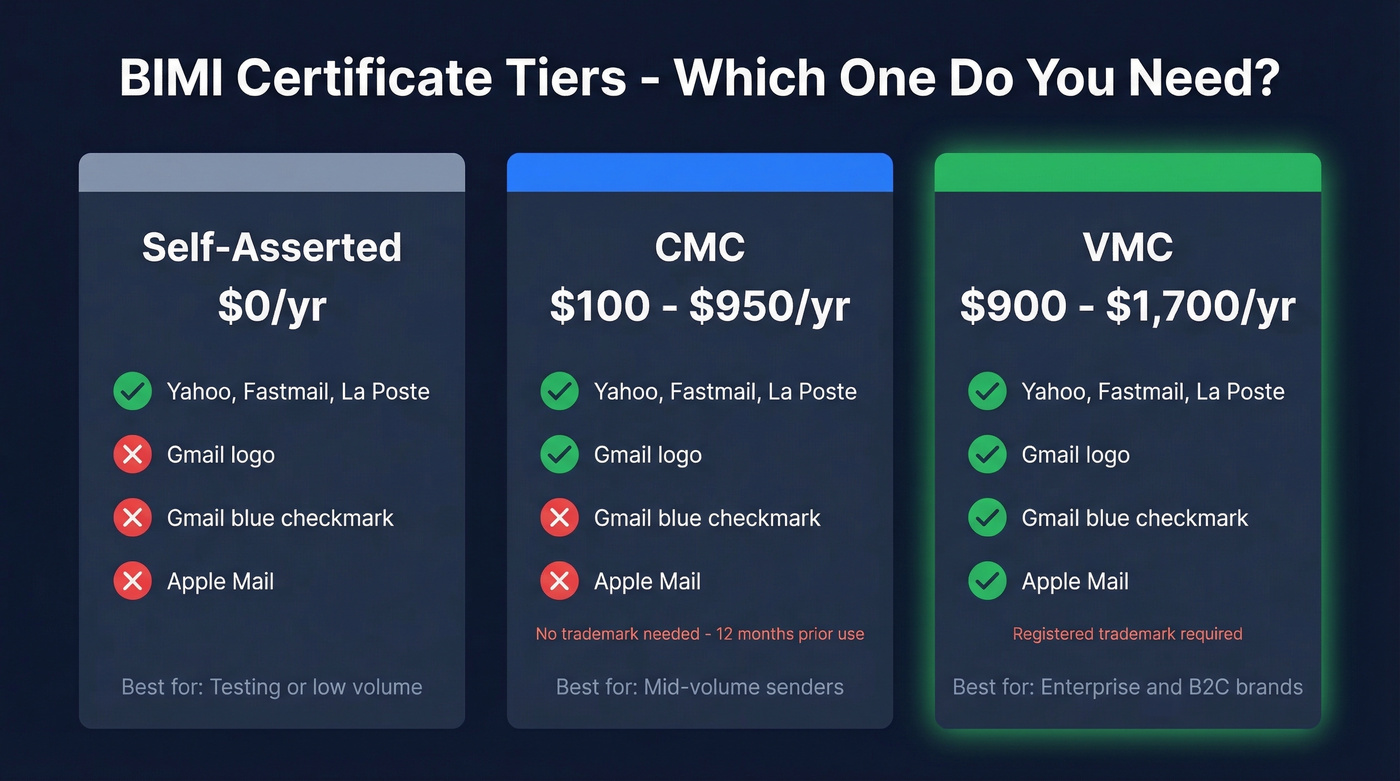
| Self-Asserted | CMC | VMC | |
|---|---|---|---|
| Trademark? | No | No (12mo prior use) | Yes, registered |
| Annual cost | $0 | $100-$950 | $900-$1,700 |
| Gmail logo | No | Yes | Yes |
| Gmail checkmark | No | No | Yes |
| Apple Mail | No | No | Yes |
| Yahoo/Fastmail | Yes | Yes | Yes |
| Best for | Low volume, testing | Mid-volume, no trademark | Enterprise, B2C |
Self-asserted is the free option. You omit the a= tag or leave it empty, and providers that accept self-asserted BIMI - Yahoo, Fastmail, and La Poste - will display your logo. Gmail and Apple Mail won't. It's a legitimate starting point, not a half-measure.
CMC (Common Mark Certificate) enables certified BIMI for non-registered marks via prior-use and modified-mark paths. You need to demonstrate 12+ months of documented prior logo use - archive.org snapshots typically satisfy this requirement. CMCs get your logo into Gmail without the blue checkmark. Pricing ranges from roughly $100-$300/year at the low end, with some DigiCert CMC listings running closer to $950/year.
VMC (Verified Mark Certificate) is the premium tier. It requires a registered trademark, costs $900-$1,700/yr depending on the CA and reseller, and unlocks the broadest support - including Gmail's blue checkmark and Apple Mail logo display. Participating Certificate Authorities include DigiCert and Entrust.
Here's the hidden cost nobody mentions upfront: if you don't already have a registered trademark, that's an additional $250-$1,000+ in filing and legal costs. Factor that into your VMC timeline.

You just spent months getting DMARC to enforcement. One batch of bad contact data sends your bounce rate through the roof and tanks the sender reputation BIMI depends on. Prospeo's 5-step email verification delivers 98% accuracy - so your authentication chain stays intact.
Don't let bad data destroy the deliverability stack you just built.
Email Client Support in 2026
This table determines whether BIMI is worth your time. It depends entirely on where your recipients read email.
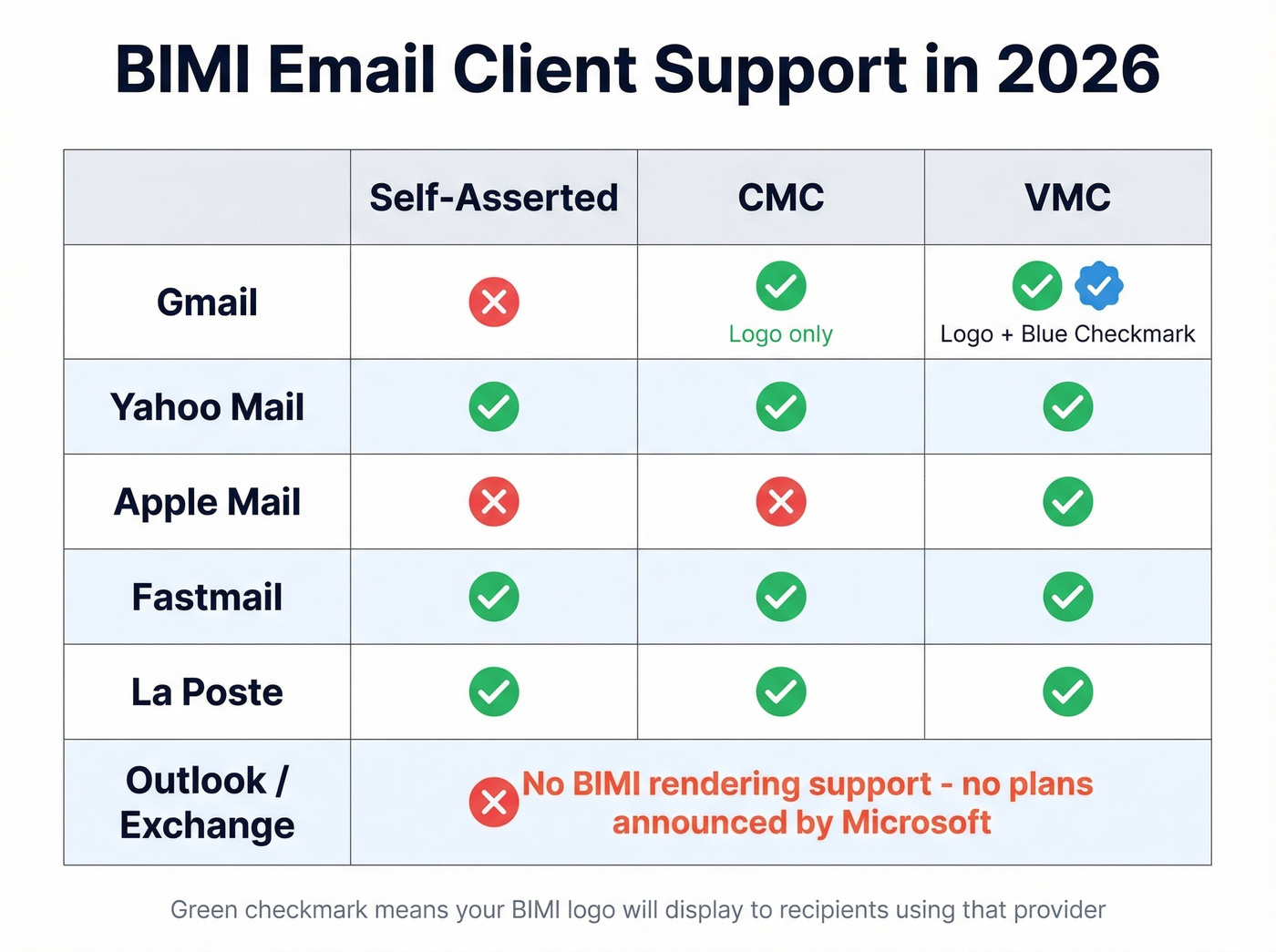
| Provider | BIMI Support | Certificate Required? | Notes |
|---|---|---|---|
| Gmail | Yes | VMC or CMC | Blue checkmark VMC-only |
| Yahoo Mail | Yes | None (self-asserted) | Broadest acceptance |
| Apple Mail | Yes | VMC | No CMC/self-asserted |
| Fastmail | Yes | None (self-asserted) | Full self-asserted support |
| La Poste | Yes | None (self-asserted) | French provider |
| Outlook/Exchange | No | N/A | Sender only, not receiver |
Several additional providers are "considering" BIMI but haven't shared timelines.
The Outlook problem: Microsoft supports BIMI as a sender via Dynamics 365 Customer Insights - Journeys but doesn't render BIMI logos as a receiver in Exchange Online or Outlook. Per Microsoft's own Q&A, there are "no short-term plans or Roadmap items" to change this.
For B2B teams where Outlook dominates the recipient base, this is genuinely maddening. You can do everything right - DMARC enforcement, VMC, perfect SVG - and a huge chunk of your audience still won't see the logo. It's one of the biggest adoption obstacles for BIMI in 2026.
SVG Tiny-PS Logo Requirements
This is where most implementations stall. BIMI doesn't accept standard SVGs. It requires SVG Tiny-PS (Portable/Secure), a restricted profile of SVG Tiny 1.2 that strips out anything potentially dangerous or complex.
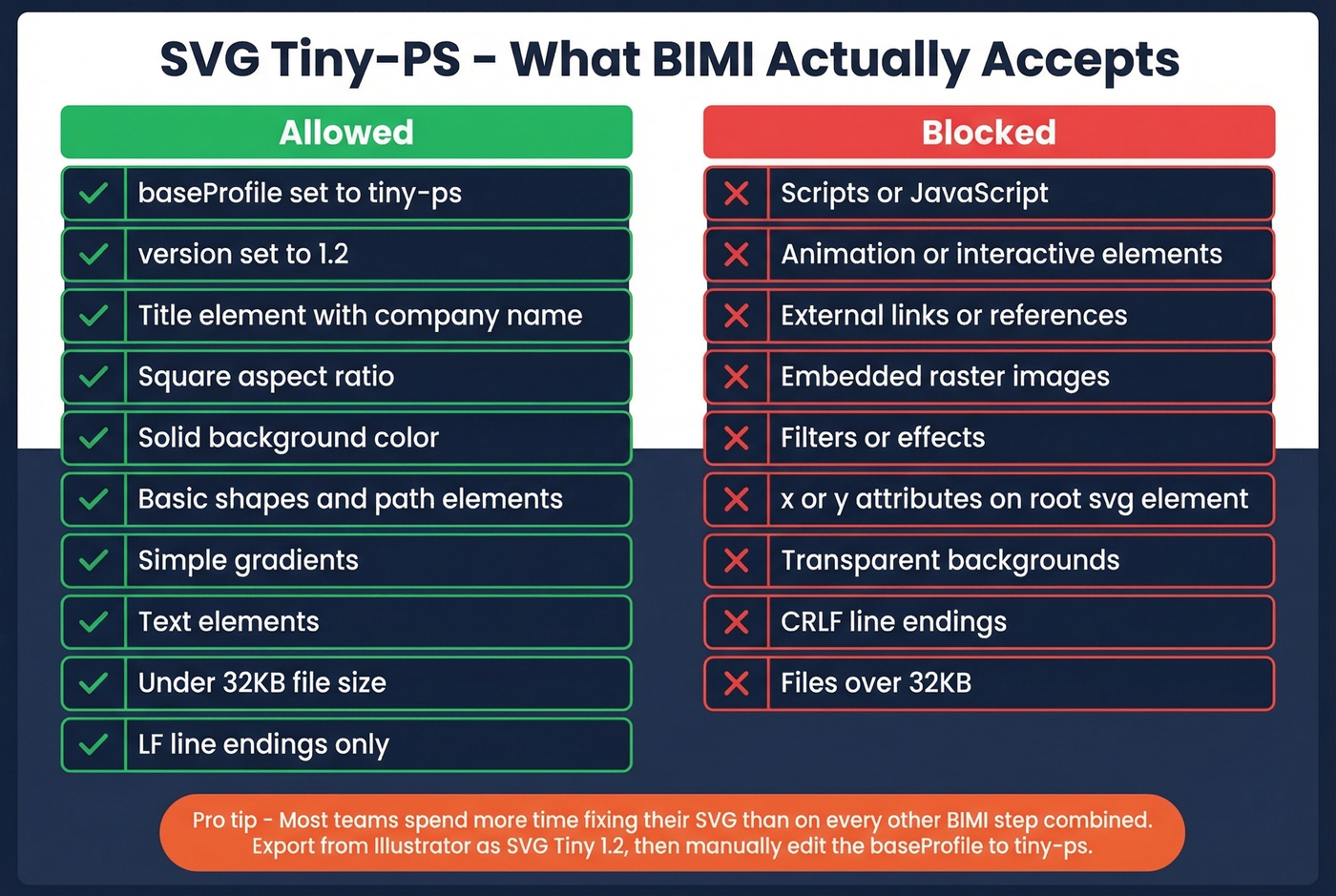
| Requirement | Detail |
|---|---|
baseProfile |
Must be "tiny-ps" |
version |
Must be "1.2" |
<title> element |
Company name inside |
| Aspect ratio | Square |
| Background | Solid - transparent backgrounds often fail |
| Hosting | HTTPS with valid TLS |
| Max file size | 32KB (32,768 bytes) |
| Line endings | LF only, no CRLF |
No external links or references are allowed except XML namespaces. No scripts, animation, interactive elements, x= or y= attributes on the root <svg> element, filters, effects, or embedded images. You're limited to basic shapes, text, simple gradients, and <path> elements.
Conversion Workflow
- Export as SVG Tiny 1.2 from Illustrator - avoid "SVG Compressed"
- Change
baseProfilefrom"tiny"to"tiny-ps" - Remove
x=andy=from the root<svg>element - Add or update the
<title>element with your company name - Convert line endings to LF-only - this is a common gotcha on Windows machines
- Optimize with SVGO to strip metadata and get under 32KB
- Test with the BIMI Group inspector or EasyDMARC's BIMI checker
We've seen teams spend more time getting the SVG right than on every other step combined. The 32KB limit sounds generous until you realize a moderately complex logo with gradients can hit 40-50KB before optimization.
How to Publish Your DNS Record
Once your prerequisites are met and your assets are ready, the DNS part is straightforward.
- Confirm DMARC enforcement. Run a DMARC lookup on your domain. Policy must be
p=quarantineorp=rejectwithpct=100. If you're still atp=none, stop here.
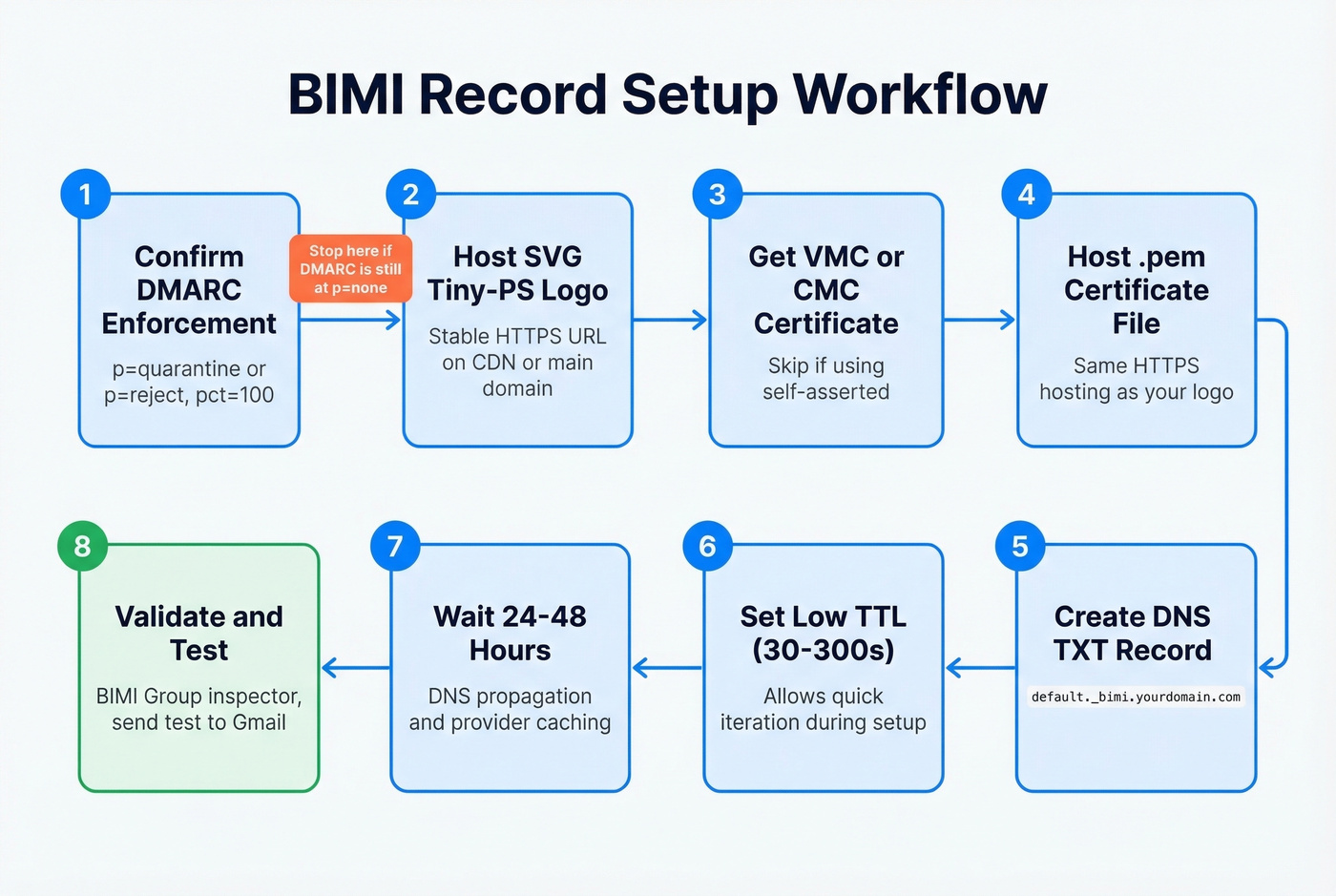
Host your SVG Tiny-PS logo at a stable HTTPS URL. Use a CDN or your main domain - just make sure the URL won't change and the TLS certificate stays valid.
Obtain and host your certificate if using VMC or CMC. The CA provides a .pem file. Host it at an HTTPS URL alongside your logo.
Create the DNS TXT record:
default._bimi.yourdomain.com TXT "v=BIMI1; l=https://cdn.yourdomain.com/logo.svg; a=https://cdn.yourdomain.com/cert.pem"Set TTL to 30-300 seconds during initial setup so you can iterate quickly. Increase to 3600+ once everything validates.
Publish in your DNS provider. Same process as adding any TXT record - Cloudflare, Route 53, GoDaddy, wherever you manage DNS.
Wait 24-48 hours for DNS propagation and mailbox-provider caching. Google says it can take up to 48 hours for Gmail to pick up BIMI changes.
Validate using the BIMI Group inspector, EasyDMARC, or MxToolbox. Send a test email to a Gmail account and check whether the logo appears.
Troubleshooting Common Failures
Here's the thing about BIMI failures: they're silent. No alert, no bounce - the email delivers fine, the logo just doesn't show up. You can go weeks without realizing something's broken.
| Problem | Cause | Fix |
|---|---|---|
| No logo anywhere | DMARC at p=none |
Set to quarantine or reject |
| Validator rejects SVG | Prohibited elements | Re-export as Tiny-PS, strip scripts/filters |
| Size error in validator | SVG exceeds 32KB | Simplify paths, run SVGO |
| Logo not loading | HTTP hosting, not HTTPS | Move to HTTPS with valid TLS |
| No logo in Gmail | Missing VMC/CMC | Obtain certificate from DigiCert/Entrust |
| Logo works in Yahoo, not Gmail | Self-asserted only | Upgrade to CMC or VMC |
| Intermittent display | DNS propagation | Wait full 48 hours, re-check |
| CRLF line ending error | Windows-created SVG | Convert to LF-only line endings |
One specific validator error worth knowing: SVG_FETCH_ERROR: Could not fetch SVG (Size of response body exceeds the maximum allowed of 65535). Despite the 65KB number in the error message, the actual Tiny-PS limit is 32KB. Reduce your file size below 32KB and the error clears.
If everything looks correct and the logo still won't display, check your DMARC aggregate reports. A high failure rate on SPF or DKIM alignment - often caused by unauthorized senders or forwarding - can prevent BIMI from activating even with a valid record. Forwarded emails are a common culprit: ARC (Authenticated Received Chain) can help preserve authentication through forwarding chains, but not all providers support it yet. The r/DMARC subreddit is full of war stories on exactly this problem.
Is BIMI Worth the Cost?
Let's be honest. The consensus on r/email and r/DMARC is that BIMI certificates feel like a "money grabbing scheme" with "absolutely ridiculous" pricing. There's a kernel of truth there - paying $1,200/yr for a VMC on top of $250-$1,000+ for trademark registration is a steep ask, especially when Outlook won't render the result.
But the counterargument has teeth. That 44% brand recall lift and 39% open rate improvement matter if you're sending at scale to Gmail and Yahoo inboxes. For a B2C brand sending 100K+ emails monthly, a VMC at $1,200/yr is a rounding error against the campaign value it protects.
The real cost of BIMI isn't the certificate - it's the months getting DMARC to enforcement. Most organizations have rogue senders, third-party tools, and legacy systems that fail alignment. That cleanup work is the actual investment, and it pays dividends beyond BIMI through reduced spoofing and better deliverability. If you're only pursuing DMARC enforcement because of BIMI, you've had your priorities backwards.
Skip the VMC if your audience is primarily B2B with heavy Outlook usage. You'll spend $1,200/yr for a logo that most of your recipients never see. Start with self-asserted, measure the impact on your Gmail and Yahoo segments, and upgrade when the data justifies it.
One thing we've noticed across our own outbound: the authentication cleanup required for BIMI enforcement also dramatically reduces bounce rates. Clean contact data and proper DKIM/SPF alignment reinforce each other. Tools like Prospeo's real-time email verification help keep bounce rates under control, which protects the domain reputation your DMARC policy depends on (see email bounce rate benchmarks and fixes).
BIMI only works when every layer beneath it holds - SPF, DKIM, DMARC at enforcement, clean reputation. Teams running outbound at scale with unverified lists see bounce rates that push DMARC reports toward failure. Prospeo refreshes 300M+ profiles every 7 days and removes spam traps before they ever hit your sends.
Start with data that won't wreck your sender reputation.
FAQ
Does Outlook Support BIMI?
No. Microsoft supports BIMI as a sender through Dynamics 365 Customer Insights - Journeys, but Outlook and Exchange Online don't render BIMI logos from incoming messages. There are no roadmap items to add receiver-side support.
Do I Need a VMC for BIMI?
Not always. Yahoo, Fastmail, and La Poste accept self-asserted BIMI with no certificate. Gmail requires a VMC or CMC. Apple Mail requires a VMC specifically. Your choice depends on where your recipients read email.
How Much Does a Certificate Cost?
VMCs run $900-$1,700/year, with reseller options around $780/year on the low end. CMCs cost $100-$950/year depending on the product and seller. Self-asserted BIMI is free but limited to Yahoo, Fastmail, and La Poste.
How Long Until My Logo Appears?
Allow 24-48 hours after publishing the DNS TXT record. Google confirms it can take up to 48 hours for Gmail to pick up changes. Set a low TTL during setup so you can iterate faster.
Can I Use BIMI Without a Trademark?
Yes. CMC certificates accept proof of 12+ months of documented prior logo use, typically verified through archive.org snapshots. Self-asserted BIMI also requires no trademark. Only VMCs mandate a registered trademark.