


Bitrix24 Review 2026: Pricing, Pros, Cons & the Numbers Nobody Shows You
Bitrix24 tries to be everything - CRM, project management, team chat, website builder, HR tools - in one flat-rate package. Over 15 million businesses have signed up. The feature list is a 5/5. The day-to-day experience? Closer to a 3.
We've spent real time inside Bitrix24, cross-referencing user reviews across G2, Capterra, and Trustpilot to put together this breakdown of pricing, pros, and cons. The flat-rate model is genuinely compelling for larger teams, but the gap between "features that exist" and "features that work smoothly" is wider than most review sites let on.
Bitrix24 Pricing Breakdown
Bitrix24's pricing is flat-rate, not per-user. That's the headline. A 50-person team on the Standard plan pays $99/mo total - not $99 per seat.
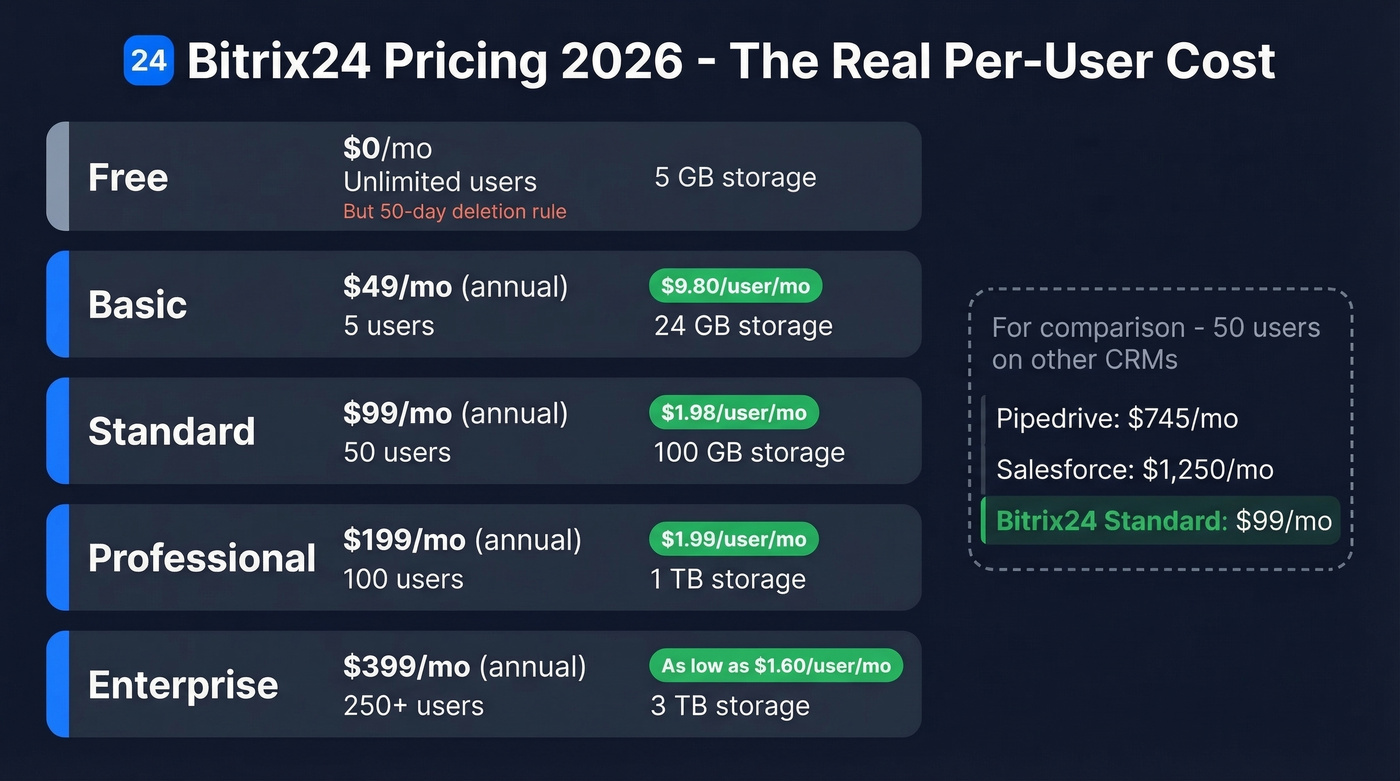
| Plan | Annual Billing | Monthly Billing | Users | Storage | Leads | Pipelines |
|---|---|---|---|---|---|---|
| Free | $0 | $0 | Unlimited | 5 GB | No | 1 |
| Basic | $49/mo | $61/mo | 5 | 24 GB | No | 5 |
| Standard | $99/mo | $124/mo | 50 | 100 GB | Yes | 10 |
| Professional | $199/mo | $249/mo | 100 | 1 TB | Yes | 20 |
| Enterprise | $399/mo | $499/mo | 250+ | 3 TB | Yes | Unlimited |
The $49 vs $61 confusion you'll see everywhere comes down to billing cycle - $49 is the annual commitment price, $61 is month-to-month. Capterra lists it as EUR 61/mo, which adds currency confusion on top.
Professional at $199/mo for 100 users works out to $1.99/user/month. Compare that to Salesforce at $25/user/mo or Pipedrive at $14.90/user/mo. At scale, Bitrix24's cost advantage is hard to beat.
Free Plan - What You Actually Get
The free plan sounds generous. Unlimited users, forever free. But the limits hit fast:
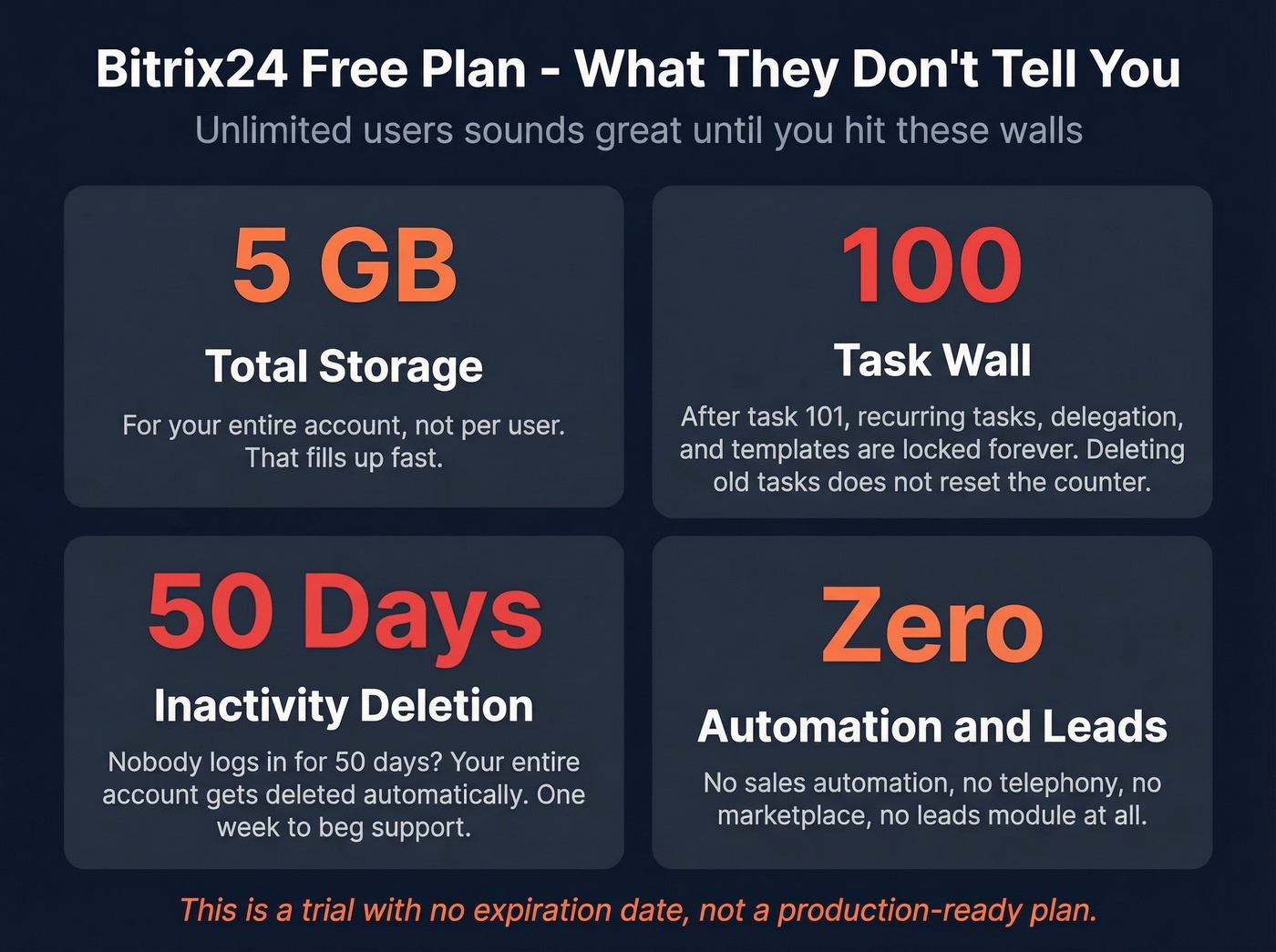
- 5 GB storage for the entire account, not per user
- 100-task threshold - after task 101, you lose recurring tasks, delegation, templates with subtasks, and task statistics. Deleting old tasks doesn't restore access; the counter only goes up.
- No time management, no sales automation, no telephony, no marketplace access
- 50-day inactivity deletion - if nobody logs in for 50 days, your entire account gets automatically deleted. You get one week to contact support and restore it.
Here's the thing: that 50-day rule alone makes the free plan unusable for any team that isn't logging in daily. It's a trial with no expiration date, not a production-ready plan.
Pros Worth Knowing
All-in-one consolidation. CRM, tasks, team chat, video calls, website builder, and HR tools in a single platform. If you're paying for Slack + Asana + Pipedrive + a website builder separately, Bitrix24 replaces all of them. Whether it replaces them well is another question entirely. (If you’re comparing CRM options broadly, see these examples of a CRM.)
Flat-rate pricing crushes per-user models at scale. A 50-person team pays $99/mo total on Standard. That same team on Pipedrive would run about $745/mo at $14.90/user/mo. G2 reviewers flagged ease of use as a positive 48 times - once you get past the initial setup, the value-per-dollar is real. For budget-conscious teams between 10 and 50 people, nothing else comes close on raw cost.
CoPilot AI across modules. Call transcription in CRM, AI-generated task descriptions, chat brainstorming, video call summaries, and AI copy for the website builder. It's integrated everywhere, not bolted on as an add-on. Fair warning: a November 2025 reviewer called the AI assistant "very clunky," so expect a learning curve with CoPilot too. (If you’re evaluating AI in outreach, this AI for Sales Emails guide is a good baseline.)
Generous free tier for unlimited users. Despite the hard limits we covered above, it's still one of the most feature-rich free plans available for teams just getting started. If you’re bootstrapping pipeline, these free lead generation tools can help fill the top of funnel.
Cons You Should Weigh
Support is a serious problem. On Capterra, 56% of the 159 support-related reviews are negative. On Trustpilot, the 2.2/5 rating is driven largely by complaints about being unable to contact anyone at all. We've seen this pattern across every review platform - support is the single biggest risk with Bitrix24.
Bugs and performance issues are persistent. Of 112 Capterra reviews mentioning bugs and glitches, 79% are negative. 82% of performance-related reviews flag slowdowns. One September 2025 reviewer noted: "Automations don't pull updated numbers or contact names." When your CRM automation can't pull current contact data, that's not a minor inconvenience - it breaks your workflow. (Related: common sales pipeline challenges often start with bad inputs.)
The learning curve is steep. G2 reviewers flagged the cluttered interface 19 times as a distinct complaint. The platform tries to do so much that finding what you need becomes its own project. Let's be honest: if you need a YouTube tutorial just to figure out where your pipeline lives, something's wrong.
Regional feature gaps. Some features - like e-signature and workflow automation - are disabled on certain global clusters. A Trustpilot reviewer from October 2025 discovered features advertised on the website simply weren't available in their region. No warning, no workaround.
Free plan hidden limits. The 100-task wall and 50-day deletion rule aren't graceful degradations. They're hard cutoffs that lock you out of features you've already been using.

Bitrix24's CRM automation breaks when it can't pull current contact data - reviewers said it themselves. The fix isn't a better CRM. It's better data going in. Prospeo delivers 98% verified emails and 125M+ mobile numbers with a 7-day refresh cycle, so your automations always have accurate info to work with.
Stop debugging your CRM. Start feeding it data that actually works.
What Real Users Say
| Platform | Rating | Reviews |
|---|---|---|
| G2 | 4.1/5 | 599 |
| Capterra | 4.2/5 | 981 |
| Trustpilot | 2.2/5 | 106 |
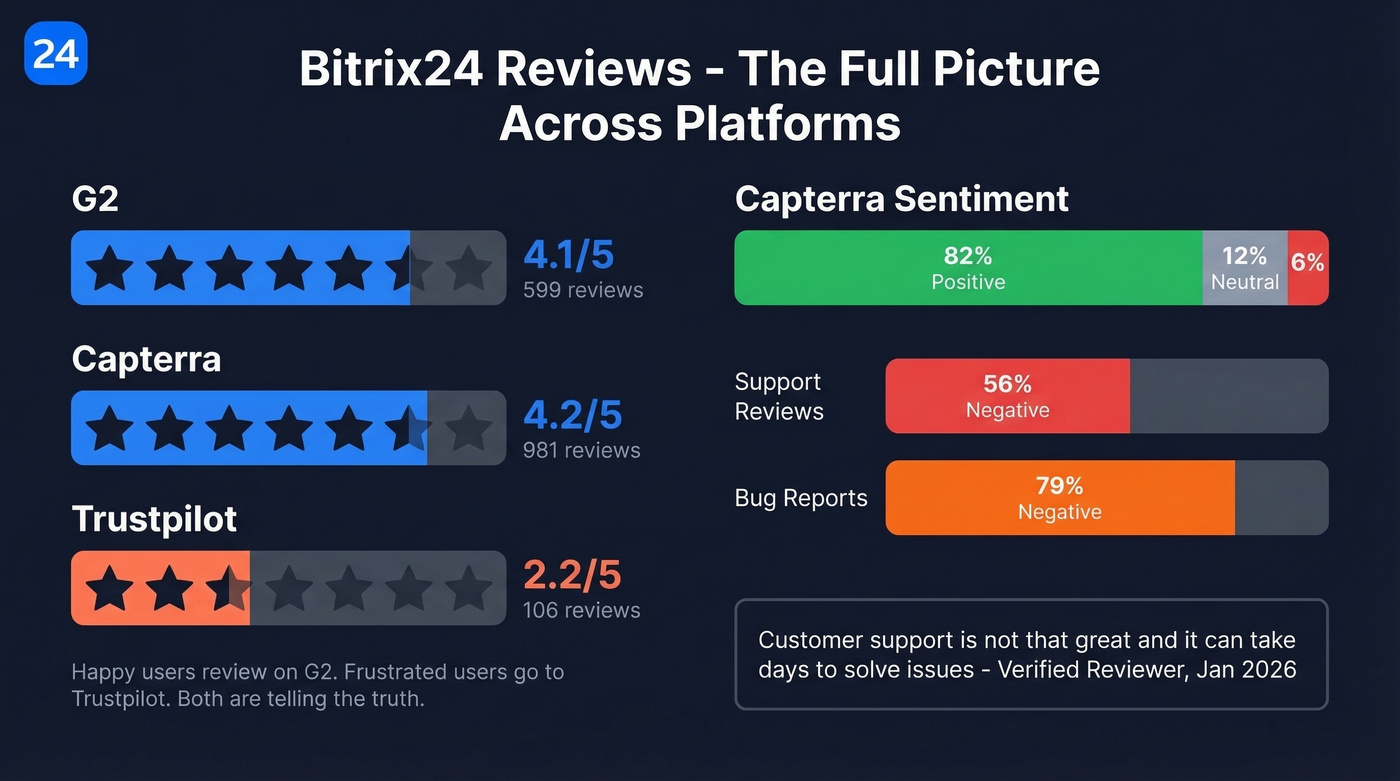
Capterra's overall sentiment breaks down to 82% positive, 12% neutral, 6% negative. That sounds great until you dig into specific complaint clusters. One verified reviewer from January 2026 put it plainly: "Customer support is not that great and it can take days to solve issues."
The gap between G2/Capterra and Trustpilot tells you who reviews where. Satisfied users leave G2 reviews during onboarding or after a good implementation. Frustrated users who can't reach support go to Trustpilot as a last resort. Both camps are telling the truth. The question is which experience you're more likely to have - and the consensus on Reddit threads like r/smallbusiness leans toward "great value, frustrating execution."
Bitrix24 is the best-value all-in-one platform on paper. But most teams don't need all-in-one. They need three things that work flawlessly, not thirty things that work 70% of the time. (If you’re trying to simplify, start with the basics of contact management software.)
Who Should (and Shouldn't) Use It
Use it if you're a budget-conscious team of 10-50 people who need CRM + project management + team communication in one tool, and you have someone technical enough to configure it properly. The flat-rate pricing is unbeatable at that scale.
Skip it if you're a small sales team that just needs pipeline management. You'll spend more time configuring Bitrix24 than actually selling. Pipedrive handles pure pipeline better. HubSpot fits marketing-heavy teams. And if your real bottleneck is finding and verifying prospect emails and phone numbers to feed into any CRM, that's a data source problem, not a workspace problem - tools like Prospeo solve that specific job with 98% email accuracy and no configuration overhead.
How Bitrix24 Compares
| Tool | Pricing Model | Starting Price | Best For |
|---|---|---|---|
| Bitrix24 | Flat-rate | Free / $49/mo | Large teams wanting one platform |
| Zoho CRM | Per user | EUR 14/user/mo | Budget per-user CRM |
| Monday CRM | Per seat | EUR 12/seat/mo | Visual project-first teams |
| Pipedrive | Per user | $14.90/user/mo | Pure sales pipeline |
| Salesforce | Per user | $25/user/mo | Enterprise customization |
| HubSpot | Per user | Free | Marketing-heavy teams |
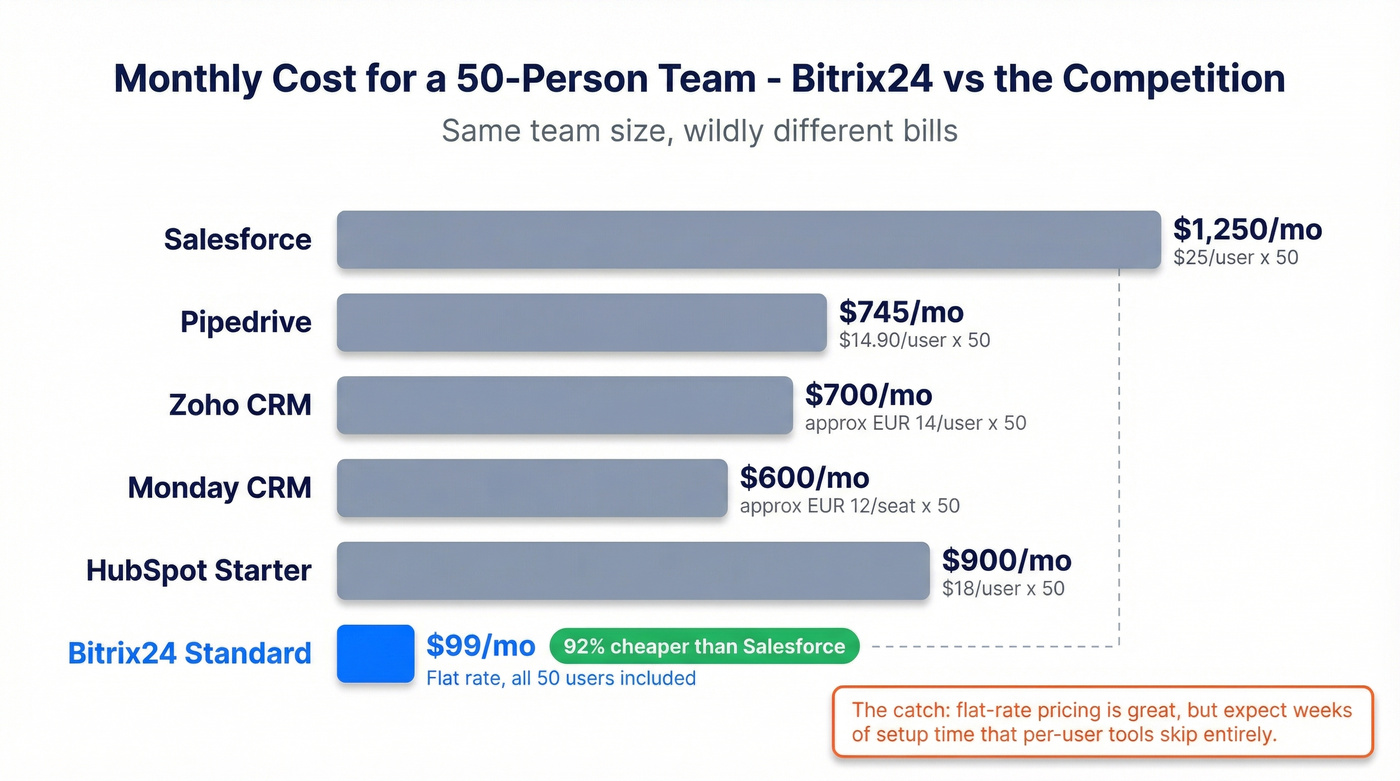
Bitrix24 wins on per-user cost at scale. But if you're comparing it to dedicated CRMs, you're paying for a lot of features you'll never configure. We've seen teams spend weeks setting up Bitrix24 before sending a single outbound email - and that's the real cost the pricing page doesn't show. If you’re deciding between these two specifically, read Bitrix24 vs HubSpot.
You picked Bitrix24 to save money - smart. Now stretch that budget further. Prospeo gives you verified prospect emails at $0.01 each and direct dials with a 30% pickup rate. No contracts, no sales calls. Just accurate data flowing straight into your CRM pipeline.
Flat-rate CRM deserves a data source that won't waste a single seat.
FAQ
Is Bitrix24 really free?
Yes, but with hard limits. You get 5 GB storage, a 100-task threshold that permanently locks key features, no automation, no leads module, and automatic account deletion after 50 days of inactivity. It's a trial with no expiration date, not a production-ready plan.
Is Bitrix24 good for small sales teams?
For teams under 10 reps focused on outbound, a dedicated CRM like Pipedrive or HubSpot deploys faster and requires less configuration. Pair it with a data tool for verified emails and direct dials, and you'll be prospecting in hours instead of weeks.
Does Bitrix24 offer on-premise hosting?
Yes. Expect higher upfront costs plus an annual renewal at roughly 50% of the edition price to maintain updates and support. It's designed for organizations that need full data control or operate in restricted network environments.
What happens after 100 tasks on the free plan?
You permanently lose access to recurring tasks, task delegation, templates with subtasks, and task statistics. The counter is cumulative - deleting old tasks doesn't reset it. Once you cross 100, those features are gone unless you upgrade.