


Best BuiltWith Alternatives in 2026 (Tested & Compared)
$295 a month for two technologies. That's BuiltWith's Basic plan - and if you need ten or more technologies in your reports, you're jumping to $495 or $995 before you've built a usable list. The data's solid, but the pricing model punishes anyone who isn't running a massive prospecting operation.
That's why most teams start looking for alternatives and end up confused by listicles that mix browser extensions with enterprise signal platforms. We've tested the main contenders, and here's what actually works as a replacement - depending on whether you need tech detection, adoption signals, or verified contacts to reach the people behind those company lists.
Our Picks (TL;DR)
- Wappalyzer - Best direct BuiltWith replacement for tech detection and list building. Starts at $250/mo with 5,000 lookups. Fewer technology signatures than BuiltWith, but more frequent re-verification and a cleaner UX.
- Bloomberry - Best for real-time adoption and churn signals. Picks up infrastructure and product adoption signals via DNS/TLS-style data that crawl-based tools often miss. Tracks 200,000+ events per month. Free trial available.
- Prospeo - Best for turning a company list into verified decision-maker contacts. 98% email accuracy, 7-day data refresh, free tier with 75 emails/month.
Where BuiltWith Excels (and Falls Short)
Use BuiltWith if you need deep historical technology data. The platform covers 414 million domains, tracks 113,027 technologies, and has history going back 41 years. For market research, competitive analysis, or tracking long-term adoption trends, nothing else comes close. BuiltWith holds a 4.3/5 on G2 across 62 reviews, and the $144/year Advanced account is worth it for individual site lookups without committing to a full plan.
Skip BuiltWith if you're building outbound lists on a budget. The Basic plan at $295/mo limits you to just two technologies - a constraint that practitioners on Hacker News flagged as a dealbreaker. The Pro plan ($495/mo) unlocks unlimited technologies, but that's a steep jump for most teams.
The other persistent complaint: exports. A G2 reviewer put it bluntly - "Working with BuiltWith data at scale is not easy. The CSV exports are large and often need a lot of manual cleanup." On r/OSINT, BuiltWith gets criticized for stale scans: removed scripts still showing up in profiles because crawls happen periodically, not in real time.
BuiltWith earns its reputation for breadth. But breadth without clean exports and flexible pricing pushes a lot of teams toward alternatives.
Four Categories of Replacements
Most listicles mix these categories without telling you. That's how you end up comparing a browser extension to an enterprise signals platform. Let's break it down:
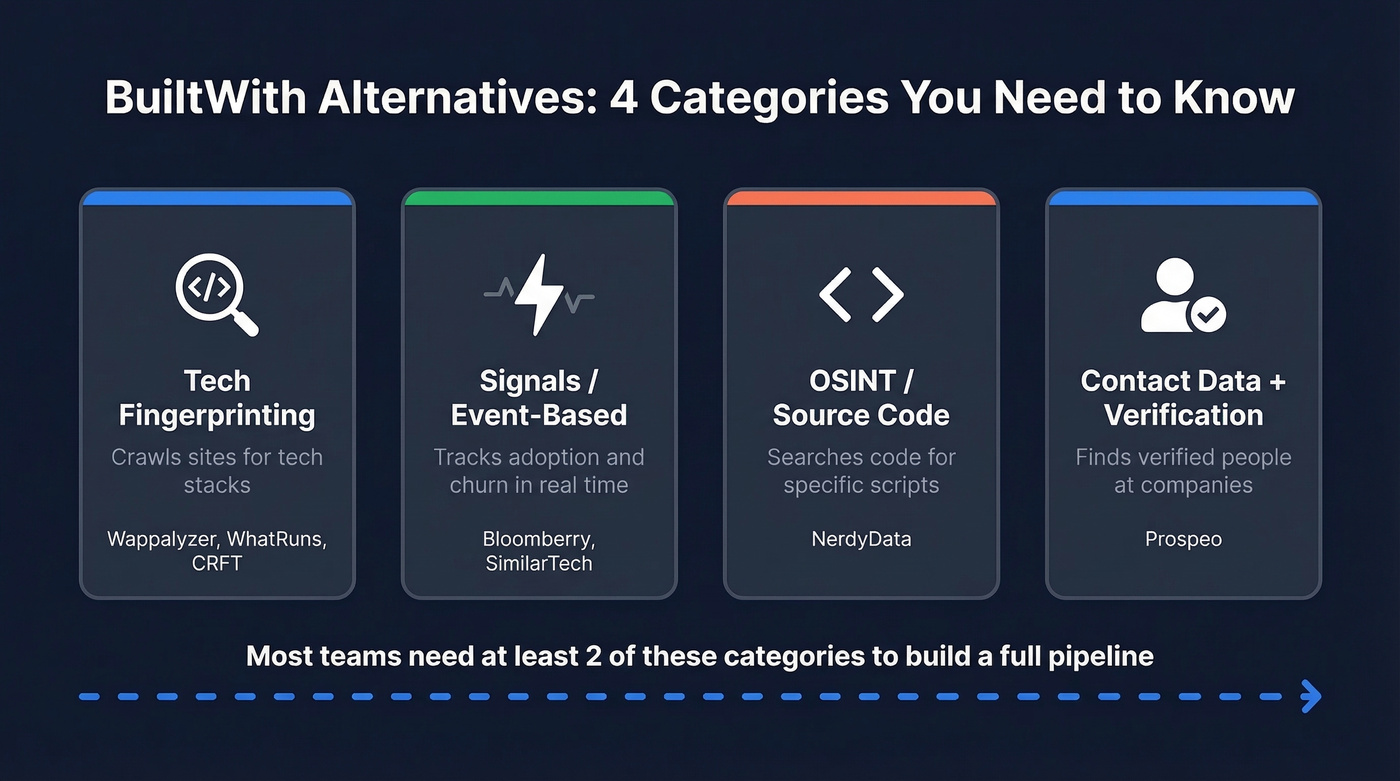
| Category | What It Does | Example Tools | Best For |
|---|---|---|---|
| Tech fingerprinting | Crawls/scans sites for tech | Wappalyzer, WhatRuns, CRFT | Building filtered lists |
| Signals / event-based | Tracks adoption & churn | Bloomberry, SimilarTech | Timing outreach to changes |
| OSINT / source-code | Searches code for scripts | NerdyData | Finding niche implementations |
| Contact data + verification | Finds people at companies | Prospeo | Turning lists into outbound |
The workflow most teams actually need spans at least two of these categories. You detect the tech stack, then you need verified contacts at those companies. No single tool covers the full pipeline.

Tech detection tools show you what companies use. Prospeo shows you who to contact - with 98% email accuracy, 125M+ verified mobiles, and a 7-day data refresh cycle. Import your Wappalyzer or Bloomberry company list and get verified decision-maker contacts at ~$0.01 each.
Stop paying BuiltWith prices for data you can't act on.
Top BuiltWith Alternatives Compared
Here's how the tools stack up:
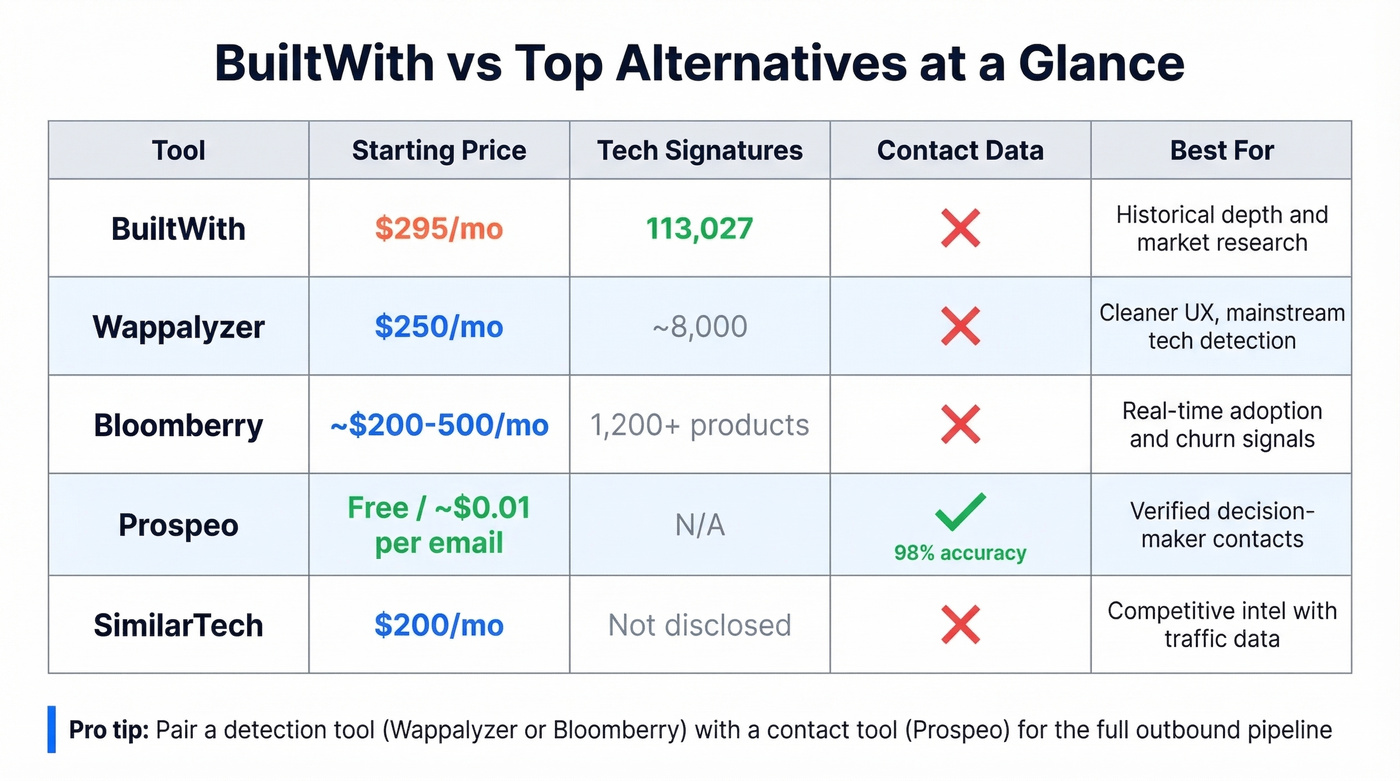
| Tool | Price (from) | Detection Method | Contact Data | Best For |
|---|---|---|---|---|
| BuiltWith | $295/mo | Web crawl | No | Historical depth |
| Wappalyzer | $250/mo | HTTP + HTML | No | Tech list building |
| Bloomberry | ~$200-500/mo | DNS + TLS + crawl | No | Adoption signals |
| Prospeo | Free / ~$0.01/email | Contact enrichment | Yes (98% accuracy) | Verified contacts |
| SimilarTech | $200/mo | Web crawl + traffic | No | Competitive intel |
| TheirStack | Free / ~$59-400/mo | Job postings | No | Cheap discovery |
| CRFT Lookup | Free | Extension scan | No | Quick one-off checks |
| WhatRuns | Free | Extension scan | No | Individual lookups |
| NerdyData | ~$200+/mo | Source-code search | No | Script-level search |
Wappalyzer
Wappalyzer is the tool most teams reach for first when they leave BuiltWith, and for good reason. It does the same core job - identify technologies on websites and build filtered lists - at a lower price point with a cleaner interface.

The Pro plan starts at $250/mo with 5,000 technology lookups, 5,000 email verifications, and 25 website alerts. Business runs $450/mo for 20,000 lookups, and Enterprise starts at $850+/mo. A free tier with 50 lookups per month lets you test the waters. One quirk: credits expire after 60 days, though you can pause your plan for up to three months.
The tradeoff is coverage depth. Wappalyzer maintains ~8,000 technology signatures versus BuiltWith's 113,027. For common stacks - React, Shopify, HubSpot, Stripe - you won't notice the difference. For niche or legacy technologies, BuiltWith still wins.
Wappalyzer is strongest on what it can see via HTTP/HTML and other front-facing signals. For deeper infrastructure or backend adoption signals, event-based tools like Bloomberry are a better fit.
G2 rates it 4.7/5 across 55 reviews, with users consistently praising the data as "accurate, detailed, and instantly actionable." No contact data included - you'll need a separate tool for that.
Use Wappalyzer if you want a cleaner, cheaper BuiltWith for mainstream tech detection. Skip it if you need niche technology coverage or deeper infrastructure signals.
Prospeo
Technographics tools tell you what companies use. Prospeo tells you who to contact at those companies - and gives you verified data to actually reach them. It's the missing step in every tech-detection workflow.
The platform holds 300M+ professional profiles, 143M+ verified emails, and 125M+ verified mobile numbers. Email accuracy sits at 98%, backed by a proprietary 5-step verification process with catch-all handling, spam-trap removal, and honeypot filtering. Data refreshes every 7 days - the industry average is 6 weeks - so you're not emailing people who changed jobs two months ago.
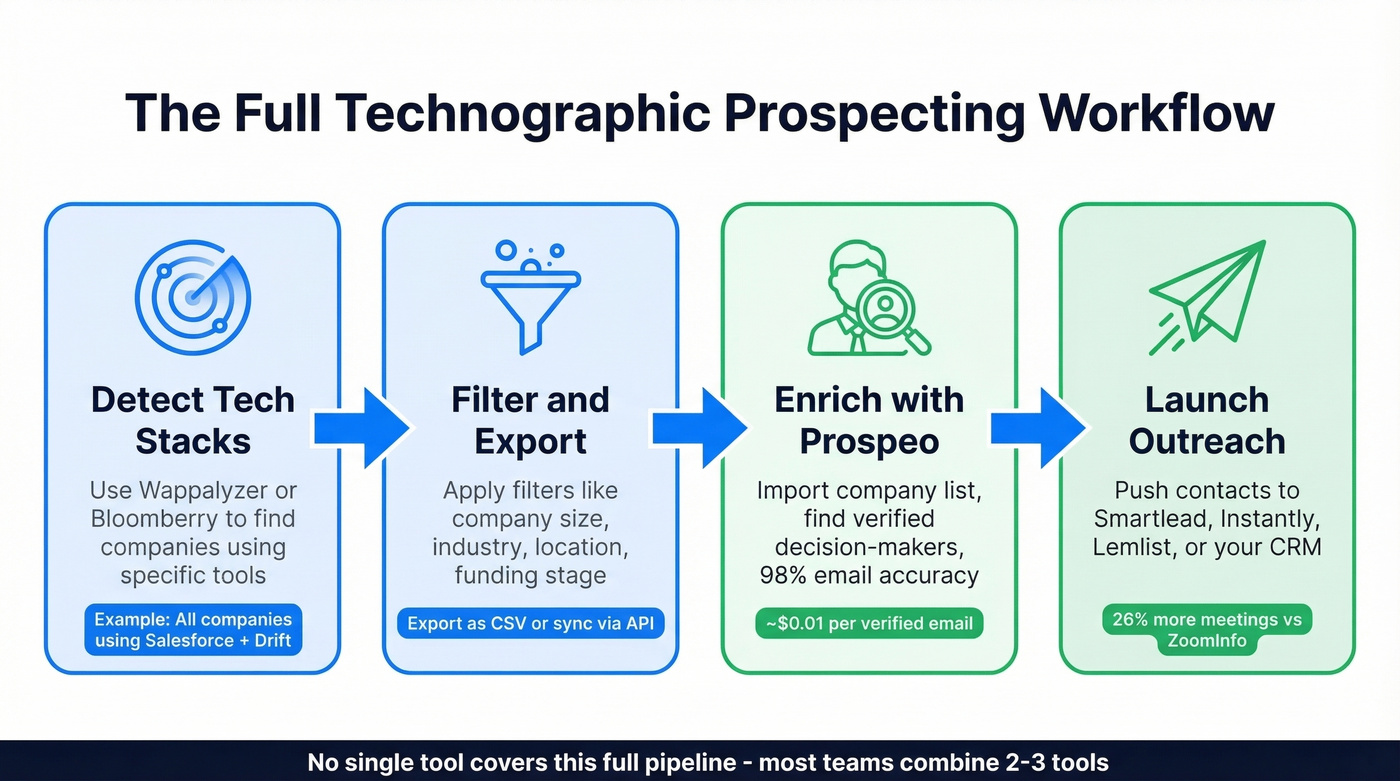
For teams running technographic prospecting, the workflow is straightforward: export your Wappalyzer or Bloomberry company list, import it into Prospeo's B2B database, and filter by job title, department headcount, buyer intent (15,000 topics via Bombora), funding stage, or 30+ other criteria. The enrichment API returns a 92% match rate with 50+ data points per contact. At roughly $0.01 per verified email, it's 90% cheaper than ZoomInfo for the same contact data - and teams report 26% more meetings booked compared to ZoomInfo and 35% more versus Apollo.
The free tier includes 75 emails and 100 Chrome extension credits per month. No contracts, no sales calls, self-serve onboarding. Native integrations with Salesforce, HubSpot, Smartlead, Instantly, Lemlist, Clay, Zapier, and Make mean verified contacts flow directly into your outreach sequences.
Use Prospeo if you already have a company list and need verified decision-maker contacts fast. Skip it if you need the tech-detection layer itself - pair it with Wappalyzer or Bloomberry for the full pipeline.
Bloomberry
Bloomberry takes a different approach entirely. Instead of relying only on website JavaScript fingerprints, it monitors DNS records, certificate transparency logs, DNS query traffic changes, subprocessor list changes, and website changes to detect when companies adopt or drop B2B products. The result is subscribe and churn signals - not static snapshots.
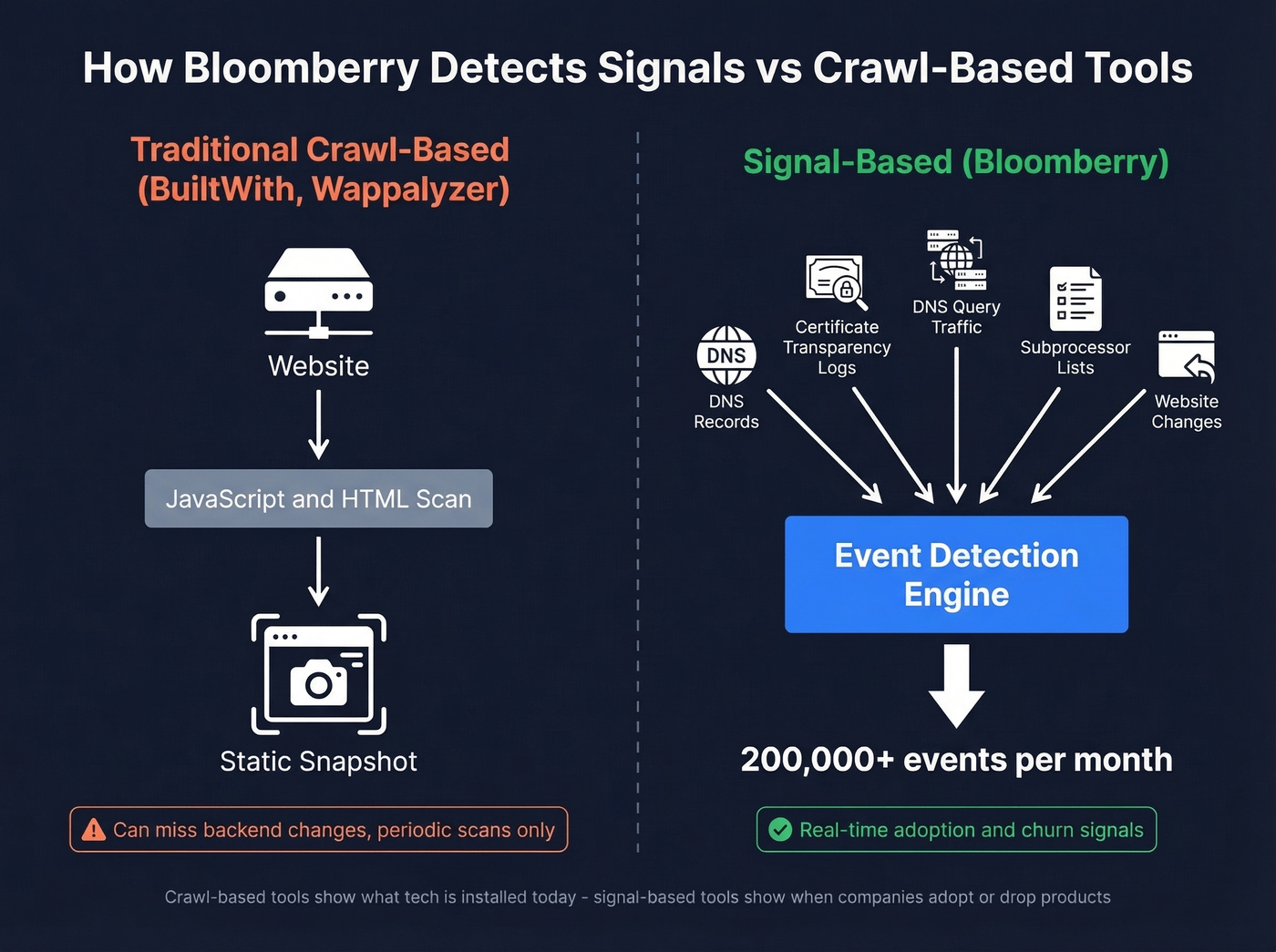
The platform covers 1,200+ B2B products across 150+ categories and generates over 200,000 events per month. In the Hacker News thread that kicked off a lot of searching for technology intelligence tools, Bloomberry was recommended for finding signals like new GitHub organization profiles and self-hosted GitLab instances - exactly the kind of thing crawl-based tools miss.
Bloomberry doesn't get its data from delayed sources like job postings, case studies, or reviews. That's a meaningful distinction from tools like TheirStack.
A free trial is available. Paid pricing isn't public, but based on the data depth and enterprise positioning, expect $200-500+/mo for full access. The UI is still maturing - one early user asked for CSV downloads and CRM integrations that weren't yet available. But for timing-based outreach, nothing else on this list does what Bloomberry does.
SimilarTech
SimilarTech blends tech detection with competitive intelligence. The Basic plan at $200/mo gets you two technology reports plus traffic data, geo targeting, and category filtering. The Ultimate plan at $490/mo unlocks unlimited reports.
The sales intelligence angle is where SimilarTech differentiates - you're not just seeing what tech a site uses, you're getting estimated traffic, geographic distribution, and competitive context. G2 rates it 4.2/5 across 12 reviews. If competitive monitoring matters as much as list building in your role, it's worth a trial. Otherwise, Wappalyzer gives you more list-building power and a bigger lookup quota for $50 more per month.
TheirStack
TheirStack infers technology stacks from job postings. If a company is hiring a "Senior Kubernetes Engineer with Terraform experience," TheirStack flags them as likely using both. Clever and cheap - a free tier is available, with paid plans typically landing in the $59-$400/mo range.
Here's the catch: job-posting data is directional, not proof. A listing for a Snowflake engineer doesn't confirm the company uses Snowflake today - they might be evaluating it, or the listing could be months old. TheirStack works best as a discovery layer paired with a real-time detection tool for validation.
CRFT Lookup
Free, lightweight, and good for exactly one thing: paste a URL, see the stack. No bulk capabilities, no alerts, no exports. Think of it as the "quick check before a sales call" tool, not a technographics replacement.
WhatRuns
Free browser extension for checking a single site's tech stack. Quick, simple, limited to one-at-a-time lookups. No bulk, no API, no list building.
NerdyData
NerdyData searches website source code for specific scripts, snippets, or code patterns. It's a niche tool - useful if you need to find every site running a particular tracking pixel or custom JavaScript library. Not a full replacement for crawl-based detection, but nothing else does source-code search this well. Pricing runs around $200+/mo depending on volume.
Other tools you'll see mentioned: Clay is a workflow automation tool, not a detection tool. SimilarWeb focuses on traffic analytics. Hunter.io's TechLookup is lightweight and limited to basic lookups. None are direct replacements for technographic list building.
Accuracy: What We've Seen
Here's the thing - no technographics tool is 100% accurate. In our testing, here's how the different detection methods performed:
| Detection Method | Accuracy Range | Key Limitation |
|---|---|---|
| Frontend crawl (BuiltWith, Wappalyzer) | ~80-95% on common tech | Misses backend; stale scans |
| DNS + TLS (Bloomberry) | High for infra signals | Limited JS framework coverage |
| Job-post inference (TheirStack) | Directional only | Lags real adoption |
| Source-code search (NerdyData) | High for specific scripts | Narrow scope |
That ~8,000 vs. 113,027 signature gap between Wappalyzer and BuiltWith matters less than it sounds. Most sales teams care about 50-100 mainstream technologies, not obscure legacy scripts. But if you're tracking niche tech, BuiltWith's breadth is still unmatched.
The bigger accuracy problem is staleness. We've seen teams build outreach around a "Marketo user" that switched to HubSpot months ago. Real-time detection via Wappalyzer's extension or event-based monitoring through Bloomberry reduces this risk significantly.
If your average deal size is under $15k, you probably don't need BuiltWith-level data at all. Wappalyzer's ~8,000 signatures cover every mainstream technology your SDRs will actually filter on. Save the $295/mo and spend it on better contact data instead.
From Technographics to Booked Meetings
Here's the workflow that actually converts technographic data into pipeline:
- Detect - Use Wappalyzer or Bloomberry to identify companies running your target tech stack. Export the company list.
- Clean - This is where BuiltWith users hit the wall. Those messy CSV exports need deduplication and formatting. Wappalyzer's exports are cleaner, but still expect some cleanup.
- Enrich and verify - Import your company list into a contact enrichment tool. Match companies to decision-makers, get verified emails and direct dials, and layer on intent signals to identify who's actually in-market.
- Outreach - Push verified contacts to Lemlist, Instantly, Smartlead, or your CRM. Sequences go out the same day.

Most teams stall at step two. They've got a beautiful list of companies using Kubernetes but no way to reach the engineering leads at those companies without manually hunting for contacts. That gap between "I know what they use" and "I can email the right person" is where deals die quietly.
Every BuiltWith alternative on this list tells you the same thing: what technology a company runs. None of them give you verified contact data. Prospeo fills that gap with 300M+ profiles, 30+ filters including buyer intent and technographics, and a 92% enrichment match rate - no contracts, no sales calls.
Start free with 75 verified emails this month - no credit card required.
FAQ
Is BuiltWith free?
Individual site lookups are free forever. Paid plans for list building start at $295/mo (Basic) with a two-technology limit. The $144/year Advanced account gives detailed individual lookups without list-building features. Most sales teams hit the two-technology cap quickly and need Pro at $495/mo.
How accurate are technographics tools?
Expect 80-95% accuracy on common frontend technologies like React, Shopify, or HubSpot. Backend detection is less reliable without DNS or TLS-level signals. Stale scans remain a known issue across crawl-based tools - removed technologies can persist in profiles for weeks after uninstallation.
What's the cheapest BuiltWith alternative for list building?
Wappalyzer's Pro plan at $250/mo includes 5,000 lookups and is the most direct replacement at a lower price. TheirStack offers a free tier for job-posting-based discovery. For contact enrichment after detection, Prospeo's free tier gives 75 verified emails per month - enough to test the full technographics-to-outreach workflow.
Wappalyzer or BuiltWith - which is better?
Wappalyzer is cheaper ($250/mo vs $295/mo) with more frequent re-verification, but covers ~8,000 technology signatures versus BuiltWith's 113,027. Choose Wappalyzer for mainstream tech detection and list building. Choose BuiltWith for niche technologies, historical data, or market research going back decades.
Can I get contact data from technographics tools?
Most technology detection tools only identify companies, not people. You'll need to pair them with a data enrichment platform to get verified emails and phone numbers for decision-makers. The typical workflow is: detect tech stack, export company list, enrich with contacts, launch outreach.