

Bulk Data Export: How to Do It Right and What Most Guides Miss
Most bulk data export failures aren't export failures. They're data quality failures dressed up as timeout errors, corrupted CSVs, and bounced email campaigns. The architecture matters, the format matters, but the source data matters most - and that's the part nobody talks about until it's too late.
Most documentation you'll find is platform-specific: Oracle, FHIR for healthcare, athenahealth. This guide covers the universal patterns that apply everywhere.
What Is Bulk Data Export?
Bulk data export means extracting large volumes of data from a system in a single or batched operation. Instead of pulling records one at a time through a UI, you're moving thousands or millions of rows at once - into a file, a data warehouse, or another platform.
The use cases are everywhere: CRM migrations, analytics pipelines, compliance audits, outbound campaign list building, admin reporting. On Reddit, admins regularly describe spending hours on post-export cleanup - embedded headers in cell values, broken find/replace macros, encoding mismatches that silently corrupt entire columns. Any time you need data out of a system at scale, you're doing bulk export. The mechanics vary, but the risks are the same.
What You Need (Quick Version)
Three things separate a clean export from a mess:
- Format: CSV works fine up to around 1GB. Above that, switch to Parquet - it's typically 3-10x smaller with compression and supports column pruning for faster queries.
- Architecture: Use async/batched processing. Synchronous exports crash or timeout on large datasets. Every time.
- Data quality: Dirty data at scale is just more dirty data. If you're exporting prospect data, start with verified contacts. Garbage in, garbage out - but at 100,000 rows instead of 100.
Get these three right and most export headaches disappear.
How Async Export Works
Synchronous exports - where you click "export" and wait - break at scale. The request times out, the server runs out of memory, or the browser gives up. Async export treats the operation as a job lifecycle with state, retries, and resumability.
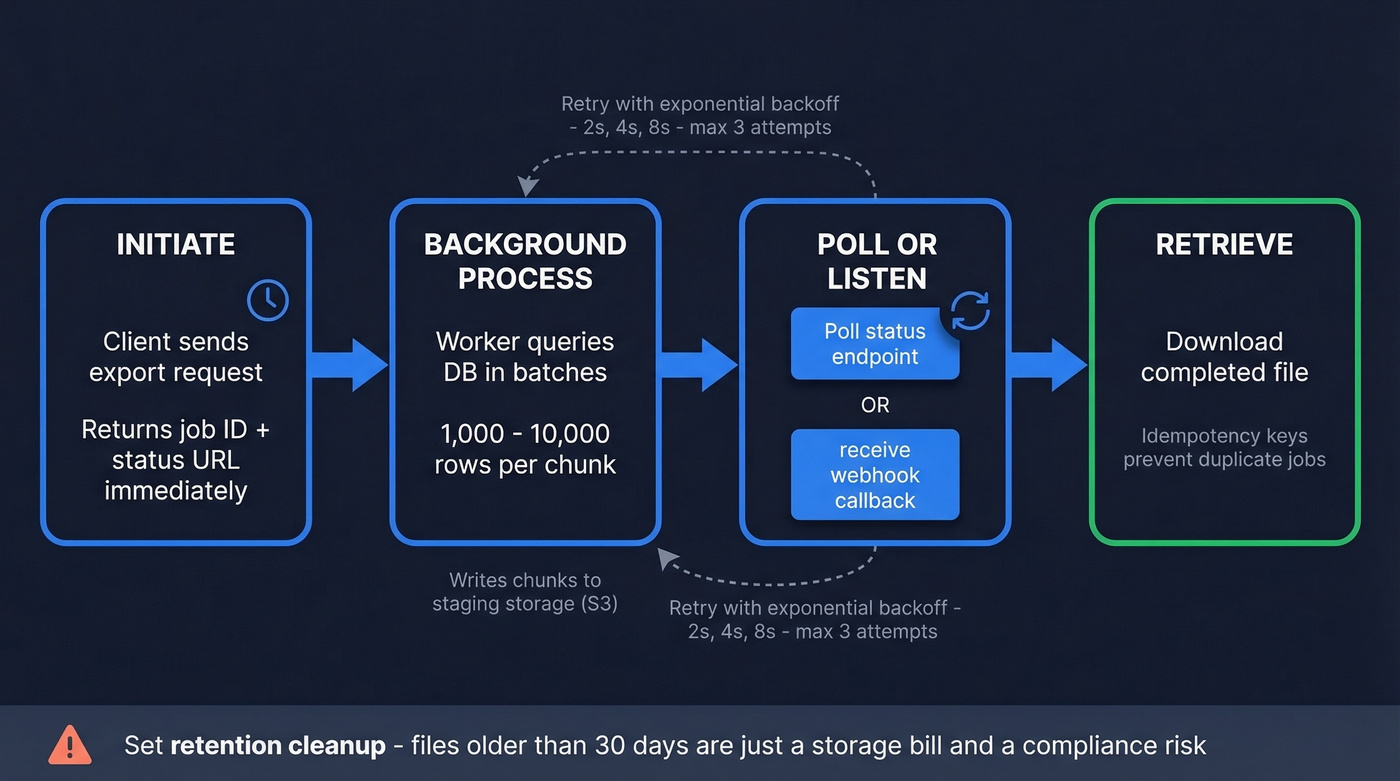
- Initiate - your request creates an export job and returns immediately with a job ID and status URL.
- Background process - a worker queries the database in batches of 1,000-10,000 rows per chunk and writes results to staging storage like S3.
- Poll or listen - you poll the status endpoint or receive a webhook when it's ready.
- Retrieve - download the completed file. Idempotency keys prevent duplicate jobs if you accidentally re-trigger.
Configure retries with exponential backoff - start at 2 seconds, double on each failure, cap at 3 attempts. Always set retention cleanup. Files older than 30 days sitting in staging are just a storage bill and a compliance risk.

Async architecture and Parquet won't fix bad source data. Prospeo's 300M+ profiles are verified through a 5-step process and refreshed every 7 days - so your bulk exports start clean. 98% email accuracy, 92% API match rate, 50+ data points per contact.
Stop debugging CSVs full of bounced emails. Start with verified data.
Choosing the Right Format
| Format | Schema | Nested Data | Compression | Best For |
|---|---|---|---|---|
| CSV | None | No | Moderate | Small exports, human review |
| JSON/JSONL | Flexible | Yes | Poor | APIs, nested structures |
| Parquet | Enforced | Yes | Excellent | Analytics, large datasets |
| Avro | Enforced | Yes | Good | Streaming, schema evolution |
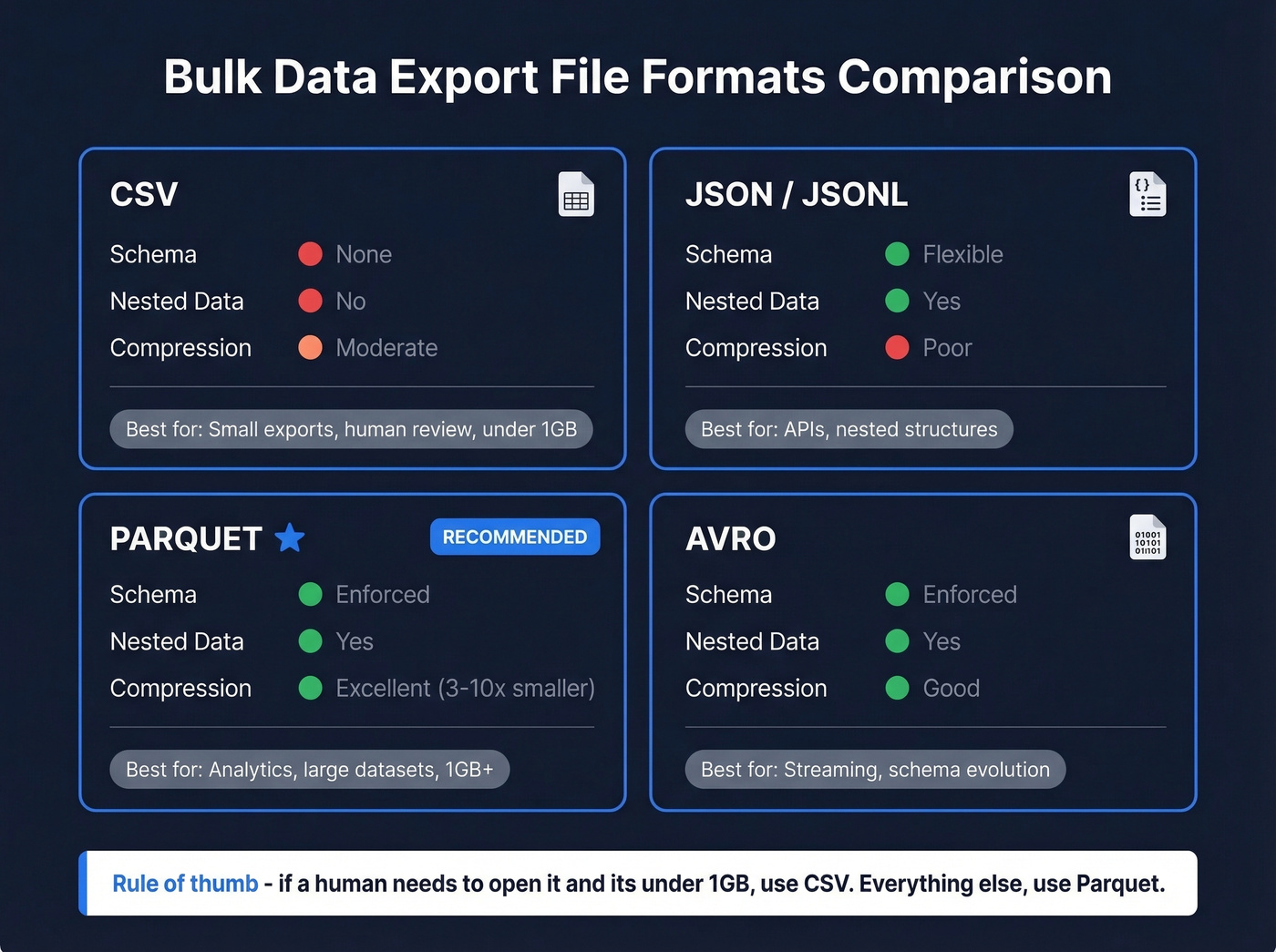
CSV is the default everyone reaches for, and it works - until it doesn't. Leading zeros get stripped from zip codes and IDs, dates like 01/02/2026 are ambiguous across locales, newlines inside quoted fields break parsers, and mixed encodings create silent corruption. We've seen teams waste entire sprints debugging CSV encoding issues that Parquet would have prevented entirely.
Here's my take: if your export is under around 1GB and a human needs to open it, CSV is fine. Above that threshold, just use Parquet. No exceptions. It's columnar, so analytics queries skip unused columns. Compression ratios of 3-10x over raw CSV are typical.
Performance and Safety Tips
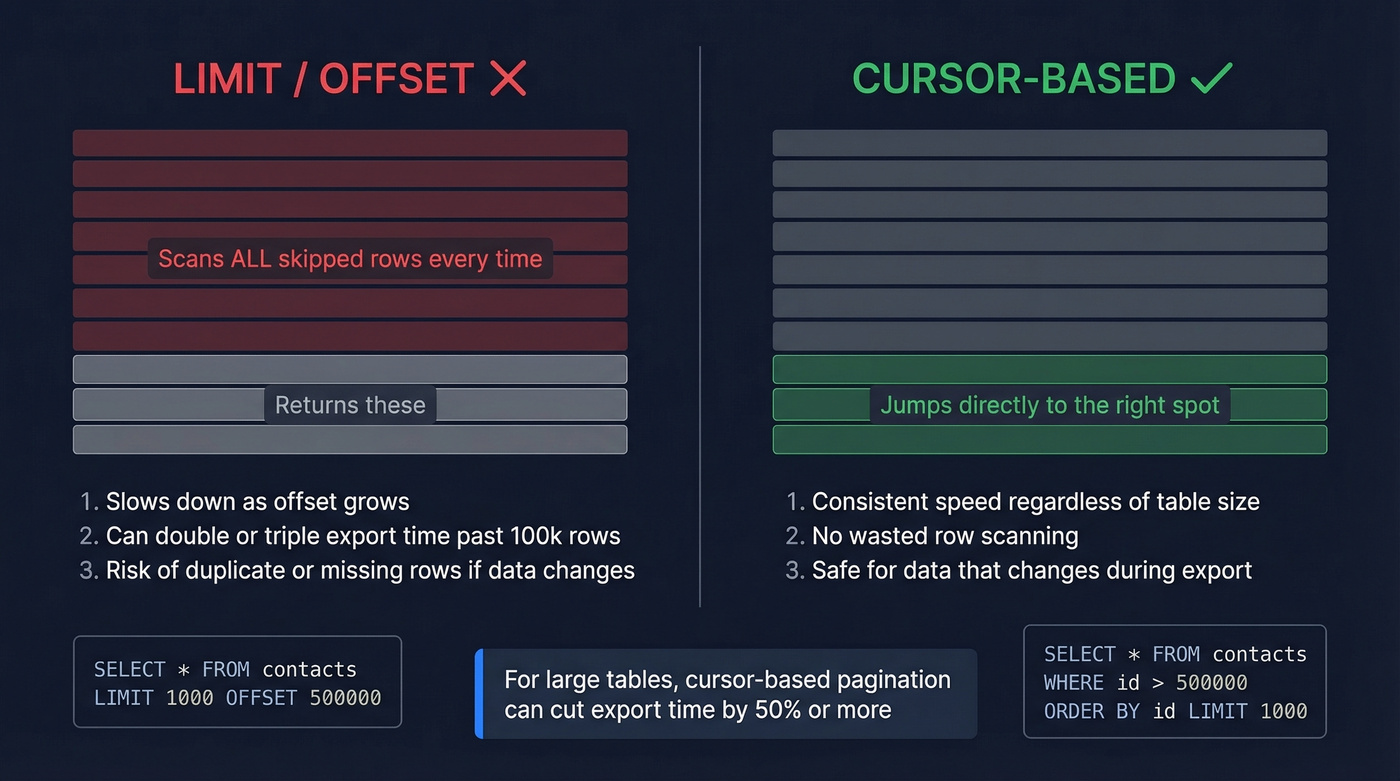
Use cursor-based pagination (WHERE id > last_seen_id ORDER BY id LIMIT ...) instead of LIMIT/OFFSET. The database doesn't scan skipped rows with cursors, which can cut export time dramatically on large tables.
For PostgreSQL, COPY ... TO STDOUT WITH CSV HEADER streamed out is the fastest native export method. SQL Server's bcp utility is the equivalent, though note that you can't use BCP to import/export to Azure Blob Storage into Azure SQL Database - use BULK INSERT or OPENROWSET for Blob scenarios.
A few more things we've learned the hard way:
- Back up before exporting. A botched bulk operation against a production database without a backup is how careers end.
- Encrypt in transit and at rest. Export files sitting unencrypted in S3 are a breach waiting to happen.
- Test with a sample subset first - 1,000 rows will surface encoding issues, schema mismatches, and delimiter problems before you commit to a 10M-row job.
- Cache completed exports for repeated requests. A 2-hour window prevents redundant processing when multiple users pull the same report.
Compliance Risks You Can't Ignore
If your bulk exports touch personal data and cross borders, the DOJ Bulk Data Transfer Rule applies. It took effect April 8, 2025, with affirmative due diligence and compliance program requirements effective October 6, 2025 - so this isn't hypothetical anymore.
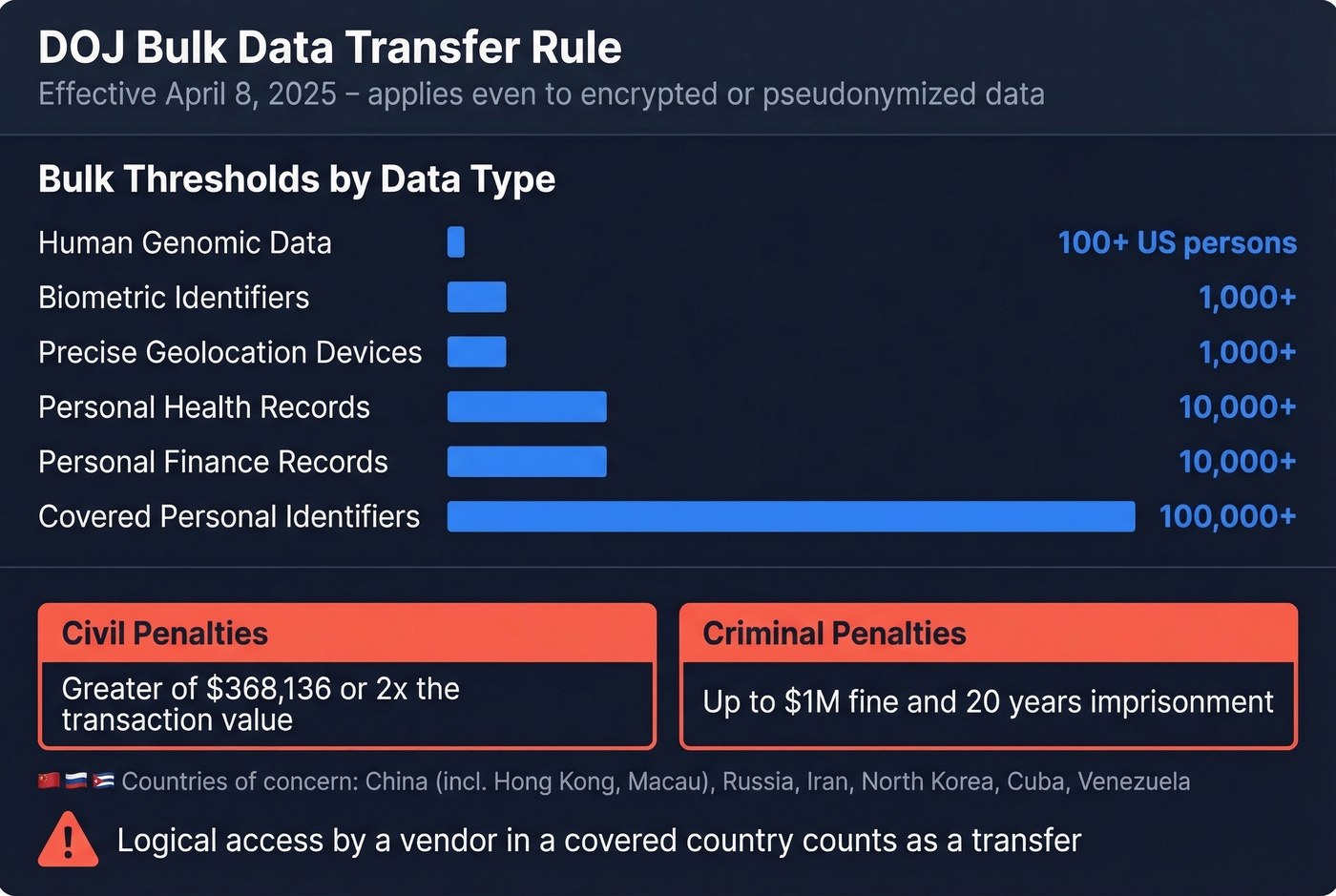
| Data Type | Bulk Threshold |
|---|---|
| Human genomic data | >100 US persons |
| Personal health records | >10,000 |
| Personal finance records | >10,000 |
| Covered personal identifiers | >100,000 |
| Precise geolocation devices | >1,000 |
| Biometric identifiers | >1,000 |
Countries of concern: China (including Hong Kong and Macau), Russia, Iran, North Korea, Cuba, and Venezuela. Civil penalties hit the greater of $368,136 or twice the transaction value. Criminal penalties go up to $1M and 20 years.
Here's the part that catches people off guard: the rule applies even to encrypted or pseudonymized data. If a vendor in a covered country has logical access, that counts. Data mapping is foundational - know what covered data you have and where it flows before you export anything.
Tools and Pricing
ETL and Extraction Tools
| Tool | Type | Starting Price | Setup Level |
|---|---|---|---|
| Skyvia | Cloud ETL | $15/mo | No-code |
| Coupler.io | Cloud ETL | $24/mo | No-code |
| Octoparse | Web scraping | $89/mo | Low-code |
| Hevo Data | Cloud ETL | $239+/mo | Low-code |
| Fivetran | Cloud ETL | ~$1k+/mo | Technical |
| Talend | Enterprise ETL | Custom | Enterprise |
Skip Fivetran if you're a small team - it's built for data engineering orgs with dedicated pipeline owners. Skyvia or Coupler.io will handle most CRM-to-warehouse exports without the overhead.
Database-Native Tools
PostgreSQL's COPY command and SQL Server's bcp utility are both free and built-in. For straightforward table-to-file exports, they're faster than any third-party tool. The tradeoff is flexibility - transformations and scheduling require additional scripting.
B2B Data Platforms
Let's be honest: the export is only as good as the source data. If you're exporting prospect lists for outbound campaigns, the tool that builds the list matters more than the tool that exports it.
Prospeo gives you 300M+ verified profiles with CSV, API, and native CRM export to Salesforce, HubSpot, Lemlist, and Instantly. Email accuracy runs 98% with a 7-day data refresh cycle, which eliminates the bounce problem before data ever leaves the platform. Pricing works out to roughly $0.01 per email with no contracts and a free tier to start.

Apollo offers a generous free tier and works well for teams just getting started, though email accuracy is lower. ZoomInfo has one of the largest databases but typically costs far more with annual contracts - overkill if your primary need is clean contact export rather than a full GTM suite.
If you're building lists for outbound, it also helps to align your export fields to your Ideal Customer Profile and run data enrichment before you push anything into a sequencer.
Building outbound lists at scale? Prospeo's enrichment API returns 50+ data points per contact at a 92% match rate - at roughly $0.01 per email. Export thousands of verified contacts into your CRM or CSV without the post-export cleanup.
Bulk export 143M+ verified emails directly into your pipeline.
FAQ
What's the best file format for large-scale exports?
CSV under around 1GB for human review. Parquet for anything larger - typically 3-10x smaller with enforced schemas and column pruning for faster analytics queries.
How large should export batches be?
1,000-10,000 rows per batch is the sweet spot. Use cursor-based pagination - LIMIT/OFFSET degrades badly past a few hundred thousand rows and can double or triple export time.
How do I make sure exported B2B contact data is accurate?
Verify at the source before exporting. A 7-day refresh cycle and real-time email verification mean your CSV is clean before it hits your sequencer - compared to the 4-6 week refresh cycles that are standard across most B2B data providers.
Does the DOJ rule apply to encrypted bulk exports?
Yes. The DOJ Bulk Data Transfer Rule applies even to encrypted or pseudonymized data. If a vendor in a covered country has logical access to the data, the transfer counts and penalties apply.