


Calendly vs TidyCal: The Comparison Neither Vendor Will Write
Most Calendly vs TidyCal comparisons are written by one of the two companies - or by affiliate sites collecting AppSumo commissions. Neither side has much incentive to be straight with you.
We've spent time testing both tools and digging into the security gaps and development status that other comparisons skip entirely. Here's what we found.
A freelance consultant who books three types of calls - discovery, strategy, follow-up - can't even use Calendly's free plan. It caps you at one event type. Meanwhile, TidyCal's $29 lifetime deal sounds almost too good to be true. The right answer depends on what you're building toward.
30-Second Verdict
Solopreneur on a budget? TidyCal Individual at $29 lifetime (https://tidycal.com/pricing). Pay once, move on with your life.
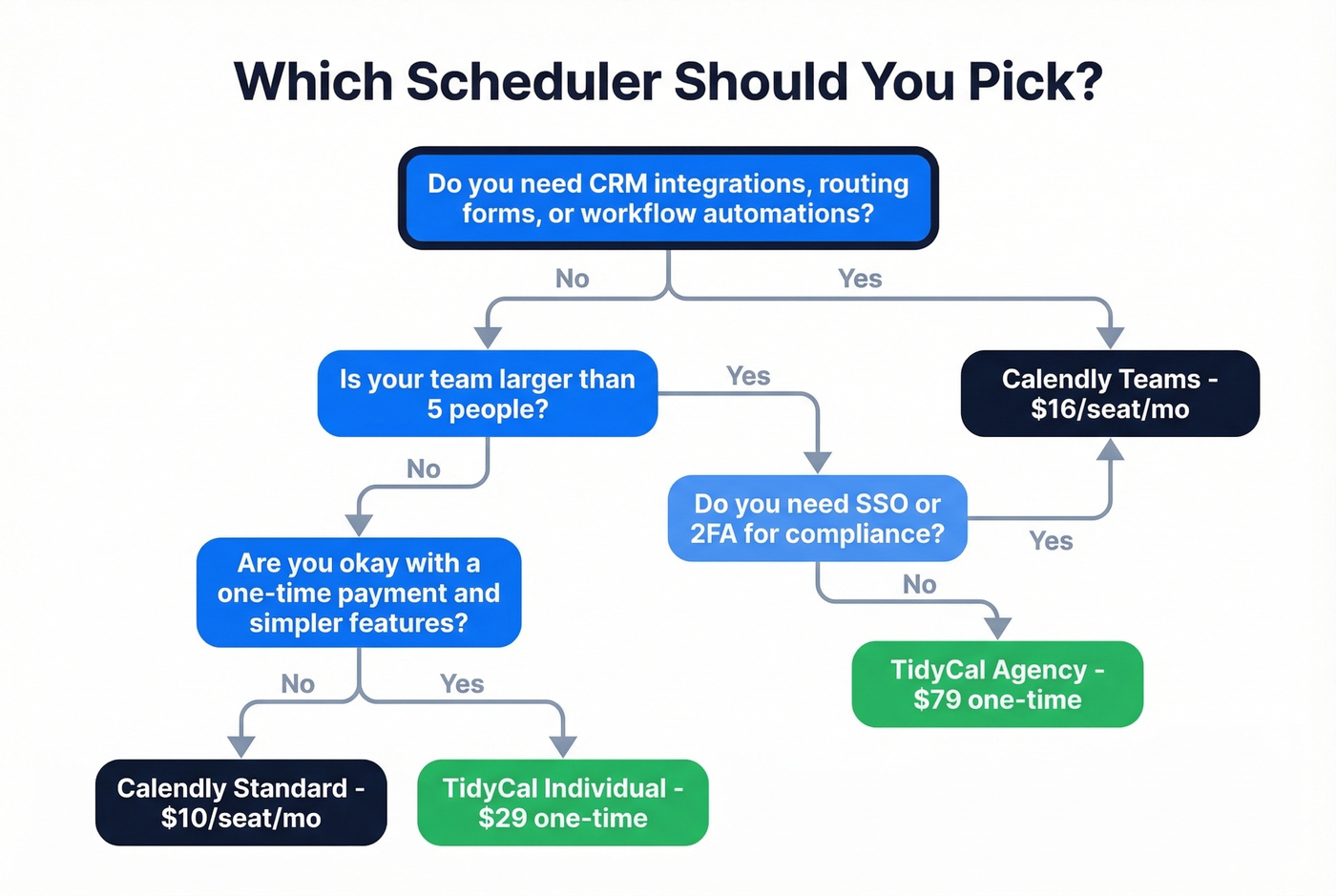
Growing team (5+ people) needing CRM sync, routing, and workflows? Calendly Teams at $16/seat/mo (https://calendly.com/pricing), billed annually. The subscription is justified by what you get.
Sales team booking outbound meetings? Either scheduler handles the calendar side, but the real bottleneck is whether your booking link reaches the prospect at all. Pair your scheduler with Prospeo for verified contact data so those links actually land in real inboxes.
Skip both if you want open-source flexibility and don't mind rougher edges. Cal.com has a generous free tier, but expect to troubleshoot more than schedule.
Pricing Breakdown
TidyCal's pricing model is so different from Calendly's that a side-by-side table almost feels unfair. But that's exactly why you need one.
| Plan | TidyCal | Calendly |
|---|---|---|
| Free | $0 (unlimited bookings) | $0 (1 event type) |
| Starter paid | $29 one-time | $10/seat/mo (annual) |
| Mid-tier | N/A (2 tiers only) | $16/seat/mo (annual) |
| Top tier | $79 one-time (Agency) | $15k+/yr (Enterprise) |
Calendly's monthly billing runs higher. Expect roughly ~$12/seat/mo for Standard and ~$20/seat/mo for Teams if you don't commit annually. That adds up fast.
Here's where the gap gets dramatic:
| Team Size | TidyCal Agency | Calendly Teams (annual) |
|---|---|---|
| 1 person | $79 once | $192/yr |
| 5 people | $79 once | $960/yr |
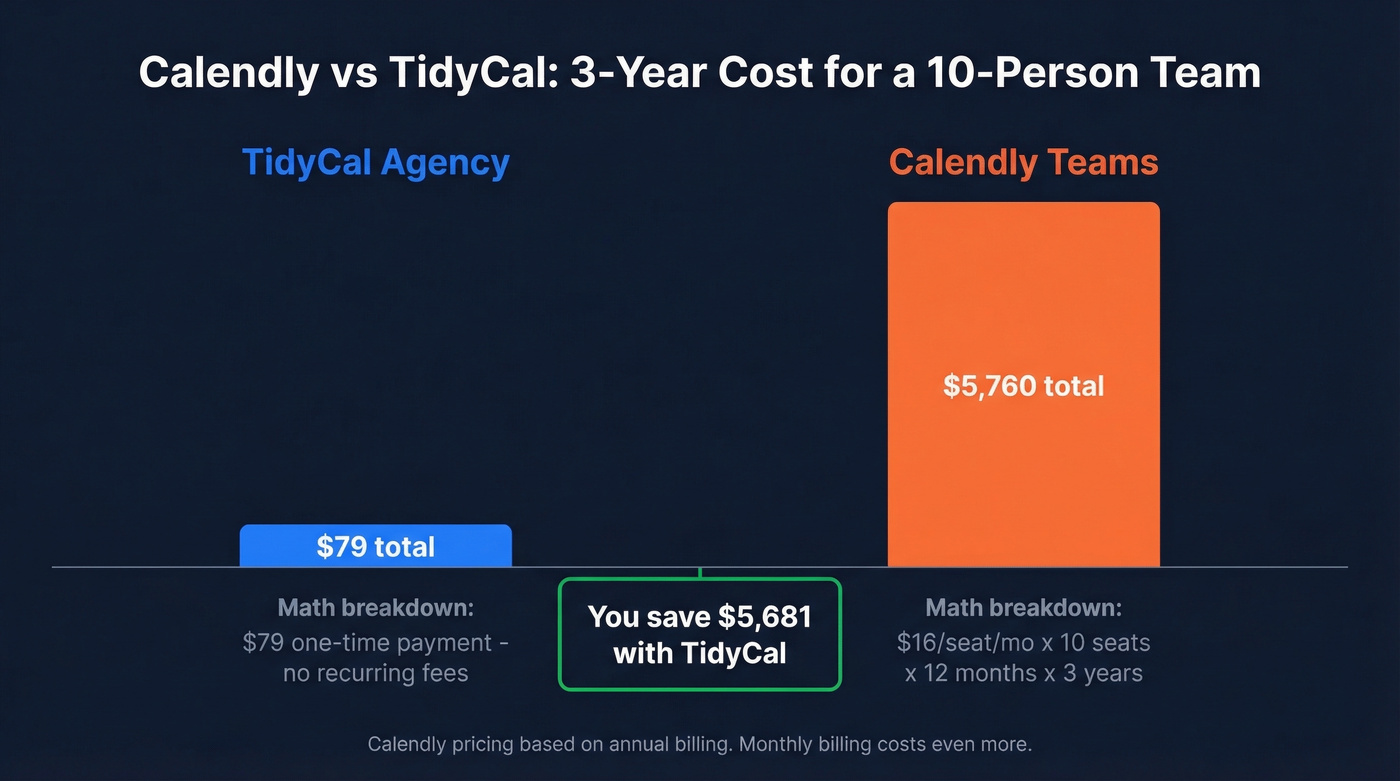
| 10 people | $79 once | $1,920/yr |
| 20 people | $79 once | $3,840/yr |
TidyCal's Agency plan includes unlimited team members per the AppSumo product page, though Zapier lists the $79 as per-user for team features. We're going with the AppSumo listing.
So yes, $79 total for 20 people. Those savings look dramatic, but here's what you give up: CRM integrations, routing forms, workflow automations, SSO, and a mobile app. Whether that tradeoff works depends on the next few sections.
Free Plan Face-Off
Both tools offer a free tier, but they make very different compromises.
Calendly Free works if you only need one meeting type and want a polished experience. You get auto-generated video conferencing links (Zoom, Meet, Teams), a clean booking page, and one calendar connection. Skip it if you're a consultant or coach who needs multiple event types - you'll hit the wall immediately.
TidyCal Free gives you unlimited booking types without paying a cent, plus unlimited bookings, paid/recurring/package booking support, and one calendar connection. The catch? As Zapier's comparison notes, TidyCal's free plan doesn't auto-create Zoom or Meet links. You'll need to manually paste a meeting URL into each booking type. That friction compounds fast at 20+ calls a week.
Features
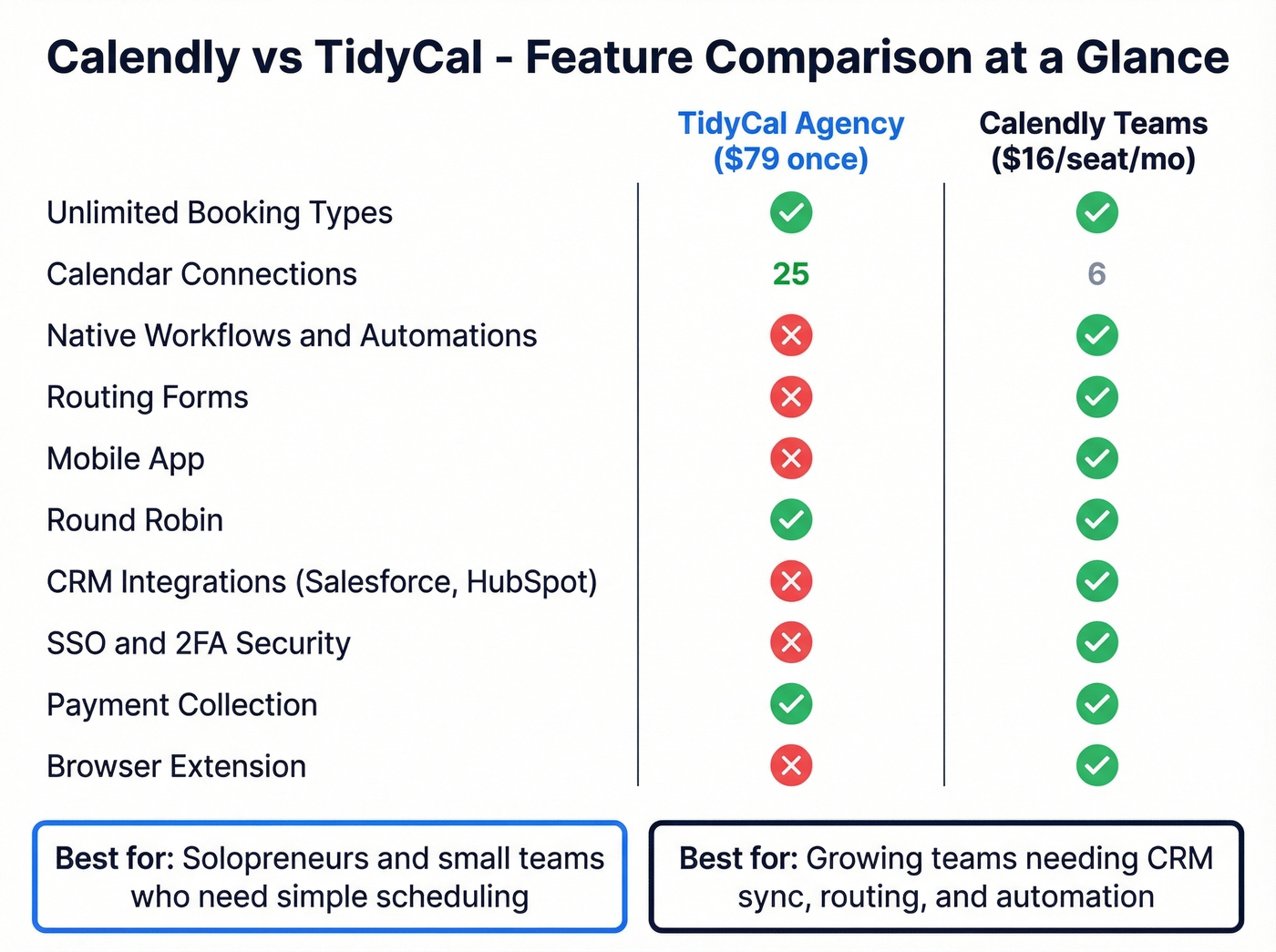
The feature gap between these two isn't subtle. It's structural.
| Feature | TidyCal (Agency) | Calendly (Teams) | Winner |
|---|---|---|---|
| Booking types | Unlimited | Unlimited | Tie |
| Calendar connections | 25 | 6 | TidyCal |
| Auto video links | Yes | Yes | Tie |
| Payments | Stripe + PayPal | Stripe + PayPal (Standard+) | Tie |
| Workflows/automations | None native | Native workflows | Calendly |
| Round robin | Yes (Agency) | Yes (Teams) | Tie |
| Routing forms | No | Yes | Calendly |
| Mobile app | No | Yes | Calendly |
| Browser extension | No | Yes | Calendly |
| SMS reminders | US/Canada only | Yes | Calendly |

The numbers that matter most aren't the checkmarks - they're the automations. Calendly's native workflows handle pre-meeting reminders, post-meeting follow-ups, and conditional notifications without any third-party tools. TidyCal has custom emails and reminders, but nothing approaching workflow automation. If your meeting confirmation needs to trigger a Slack notification, update a CRM field, and send a prep email, that's Calendly territory.
TidyCal wins on calendar connections: 25 on the Agency plan versus Calendly's six. That matters if you're managing multiple client calendars. For most teams, six is plenty.
Let's be honest, though - Calendly wins most of the "power user" rows, but most solopreneurs use maybe three of those features. You're not paying for what a tool can do. You're paying for what you'll actually use. If your workflow is "someone picks a time, we meet," TidyCal at $29 is the smarter buy.

Calendly and TidyCal both handle the booking - but neither solves the real problem: getting your link in front of the right person. Prospeo gives you 98% accurate emails so your scheduling links actually land in real inboxes, not the void.
Stop optimizing your booking page when nobody's seeing it.
Integrations
Calendly connects to 100+ tools natively - Salesforce, HubSpot, Slack, Marketo, and the full enterprise stack. TidyCal offers the basics: Zapier, Stripe, PayPal, and API access on paid plans.
We've seen this scenario play out repeatedly. An SDR manager asks if TidyCal can replace Calendly Teams for an 8-person sales team. The answer is no. The moment someone needs lead routing based on form responses, or automatic Salesforce opportunity creation after a meeting books, TidyCal doesn't have the plumbing. You'd need to build everything through Zapier, and even then you're limited by what TidyCal exposes via API.
For a solo operator or small agency that lives in Google Calendar and Stripe, TidyCal's integration set is fine. For anything touching a CRM at scale, it's not close.
Security & Compliance
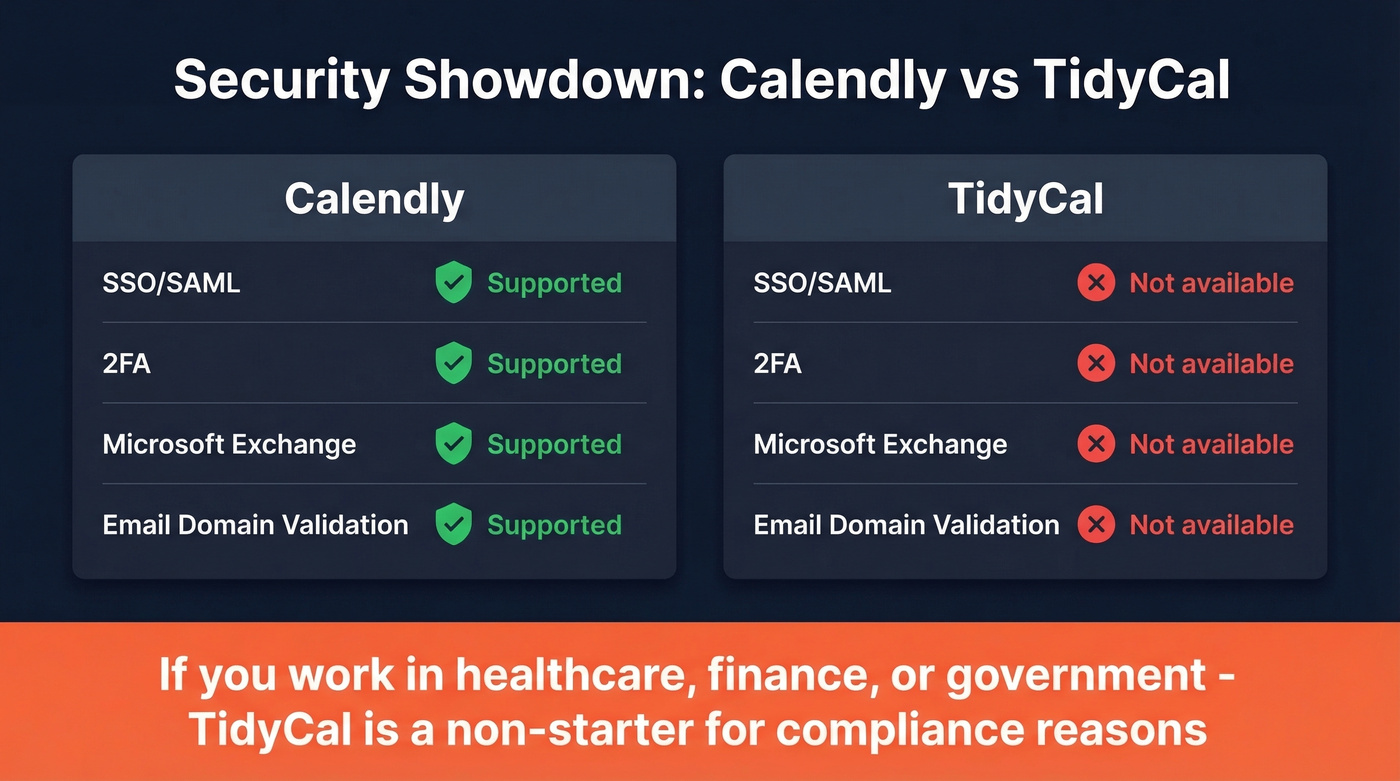
This is where TidyCal's limitations get genuinely concerning for certain use cases.
| Capability | Calendly | TidyCal |
|---|---|---|
| SSO/SAML | Yes (Teams with security add-on; Enterprise) | No |
| 2FA | Yes | No |
| Microsoft Exchange support | Yes | No |
Per TidyCal's own FAQ, there's no two-factor authentication, no CNAME or sending-domain validation for emails, and no Microsoft Exchange calendar support. Without sending-domain validation, notification emails can't be fully branded - which looks unprofessional to clients expecting polished communications.
If you handle sensitive meetings or work in a regulated industry - healthcare, finance, government - TidyCal is a non-starter. For a freelance designer booking client calls, these gaps won't matter at all.
What Real Users Say
Both tools carry a 4.7/5 on G2, but the sample sizes tell very different stories. Calendly has 2,561 reviews. TidyCal has 24. That's not a typo.
You can't draw meaningful conclusions from 24 reviews, no matter how positive.
TidyCal's Trustpilot profile offers a larger sample: 4.0/5 across 174 reviews. The negative themes are more revealing - bugs after UI updates, account/security concerns, and support responsiveness complaints. One detailed AppSumo review from a verified purchaser flags specific UX gaps: no calendar overlay for viewing availability across calendars, no timezone comparison feature, and accessibility issues with booking page contrast.
Calendly's complaint patterns at scale look different. Free-plan limitations topped the list with 54 mentions on G2, followed by calendar syncing issues at 46 and pricing for advanced features at 38. A Reddit thread on Calendly alternatives positioned TidyCal as the budget pick and Cal.com as the customization/open-source option - which tracks with our own evaluation.
Is TidyCal Still Updated?
A December 2025 update bulletin shows concrete recent work: a full dashboard redesign, modernized settings pages, 6-digit email verification for new device logins, round-robin event fixes, and Apple Calendar sync improvements.
The AppSumo stats back up continued traction: 200,000+ users, 3.7M+ bookings processed, and $9M+ in payments handled. The "lifetime deal = abandoned" argument doesn't hold here. But the security gaps - no 2FA, no Exchange, no SSO - are real, and no amount of UI polish changes that.
Before the Meeting: Verified Contacts
Here's the thing most scheduling comparisons miss entirely: your scheduling tool handles step two. Step one is making sure your booking link actually reaches the prospect's inbox. A bounced email means a meeting that never happens, and no scheduler fixes that.
Prospeo's Email Finder covers that first step with 98% email accuracy on a 7-day refresh cycle. The workflow is simple - find verified emails, send your booking link through your sequencer, and let your scheduler handle the rest. The free tier gives you 75 verified emails per month to test the approach.
If you're building a bigger outbound engine, pair this with a tighter lead generation workflow and a few proven sales prospecting techniques so meetings don't depend on luck.

You just saved hundreds on scheduling software. Now invest the difference where it matters - reaching decision-makers. Prospeo delivers verified emails at $0.01 each and direct dials with a 30% pickup rate, so your calendar stays full.
A perfect scheduler with zero bookings is just a pretty page.
FAQ
Is TidyCal really lifetime?
Yes. The AppSumo deal terms guarantee lifetime access with all future plan updates. Active development continues as of late 2025 with dashboard redesigns and security improvements. Activate within 60 days of purchase, and you can upgrade or downgrade tiers while the deal is available.
Can I migrate from Calendly to TidyCal?
There's no direct import - you'll manually recreate event types and booking pages. A handful of event types takes about thirty minutes. Complex routing and workflows built in Calendly disappear entirely, so factor in the functionality loss before switching.
Which scheduler is better for teams?
Calendly Teams wins for any team needing Salesforce integration, routing forms, or workflow automations. TidyCal Agency's $79 one-time for unlimited members is compelling for teams that only need shared booking pages and round-robin scheduling, but you'll outgrow it fast if your sales process is complex.
What about Cal.com?
Cal.com's free tier is genuinely generous, and some reviewers argue it makes both paid options obsolete. That's overstating it. Cal.com is less polished and buggier in practice. Worth evaluating if you're developer-friendly, but don't expect Calendly-level reliability out of the box.
How do I get verified emails before sending booking links?
Prospeo's free tier gives you 75 verified emails per month at 98% accuracy. Upload a CSV or search by 30+ filters, verify in bulk, and push contacts to your sequencer with the booking link attached. At roughly $0.01 per email on paid plans, it's the cheapest way to make sure your scheduling links reach real inboxes.