

Catch-All Emails: What They Are, How to Set Them Up, and How to Handle Them
You just pulled 500 leads from your database, ran them through verification, and 150 came back labeled "catch-all." That's 30% of your list in limbo - not invalid, not confirmed, just unknown. Do you send anyway and risk your domain reputation, or trash a third of your pipeline?
Understanding catch-all emails is the difference between a healthy sender reputation and a deliverability disaster. We've watched teams nuke their domains over this exact decision, and we've seen others leave hundreds of valid prospects on the table by skipping catch-all addresses entirely. Neither outcome is acceptable.
Setting up catch-all on your domain? Jump to the setup section - we cover Google Workspace, Microsoft 365, Proton Mail, and cPanel.
Deciding whether to send to catch-all addresses? Yes, but segment and verify first. The breakdown is in the "should you send" section.
What Is a Catch-All Email Address?
On a standard email domain, if someone sends a message to joh@company.com instead of john@company.com, the mail server checks its list of valid mailboxes, doesn't find "joh," and bounces the message back. Simple rejection.
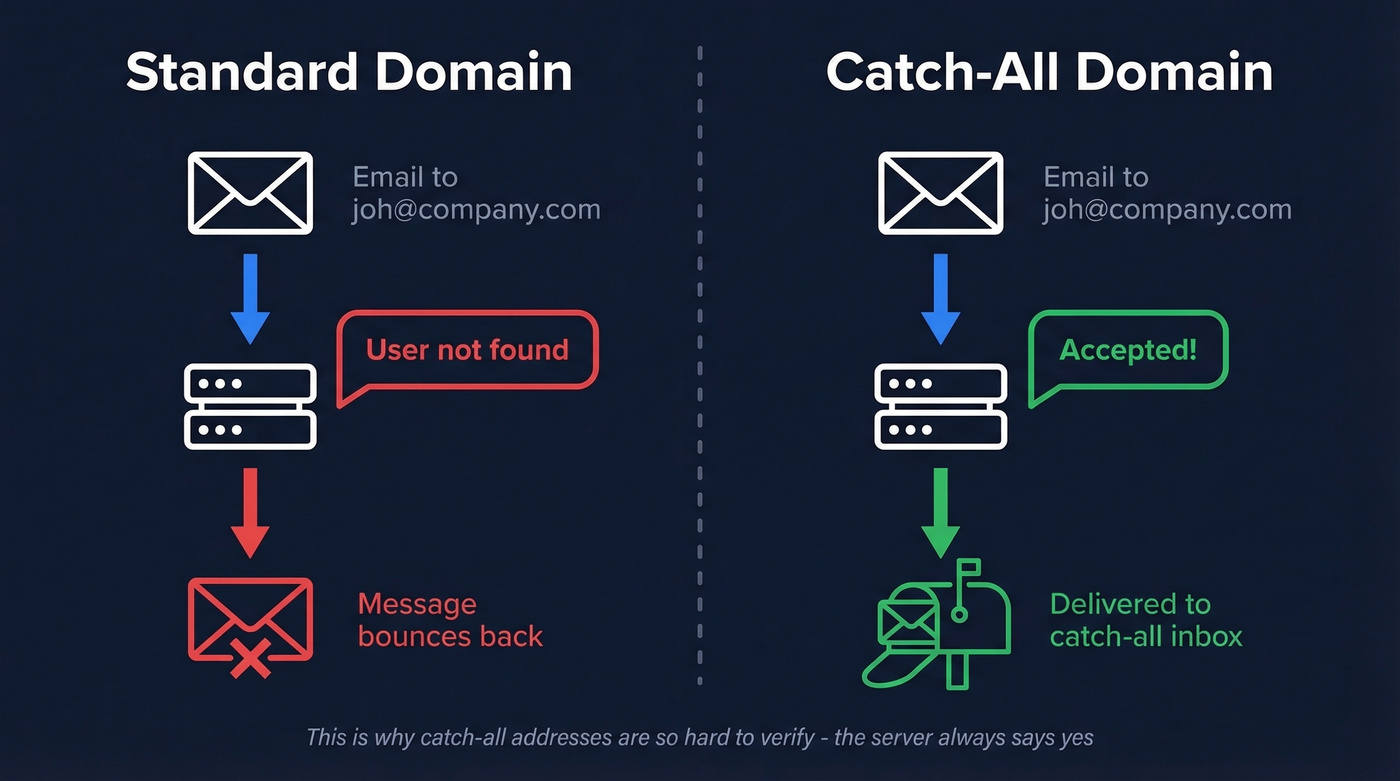
A catch-all domain works differently. The server accepts mail sent to any address at that domain - whether the recipient exists or not. That typo'd email to joh@company.com? It lands in a designated inbox instead of bouncing. So does mail to asdfgh@company.com, test123@company.com, or literally any string before the @. That's the catch-all email meaning in a nutshell: a domain-level safety net that never rejects inbound mail based on the recipient address.
Technically, this happens during the SMTP conversation. When a sending server asks whether a recipient exists, a standard domain rejects unknown recipients, while an accept-all domain accepts them. That distinction is exactly why these addresses are so hard to verify - and why they create headaches for both domain owners and senders.
Catch-All vs. Aliases vs. Alias Services
These three concepts get conflated constantly. They're fundamentally different.
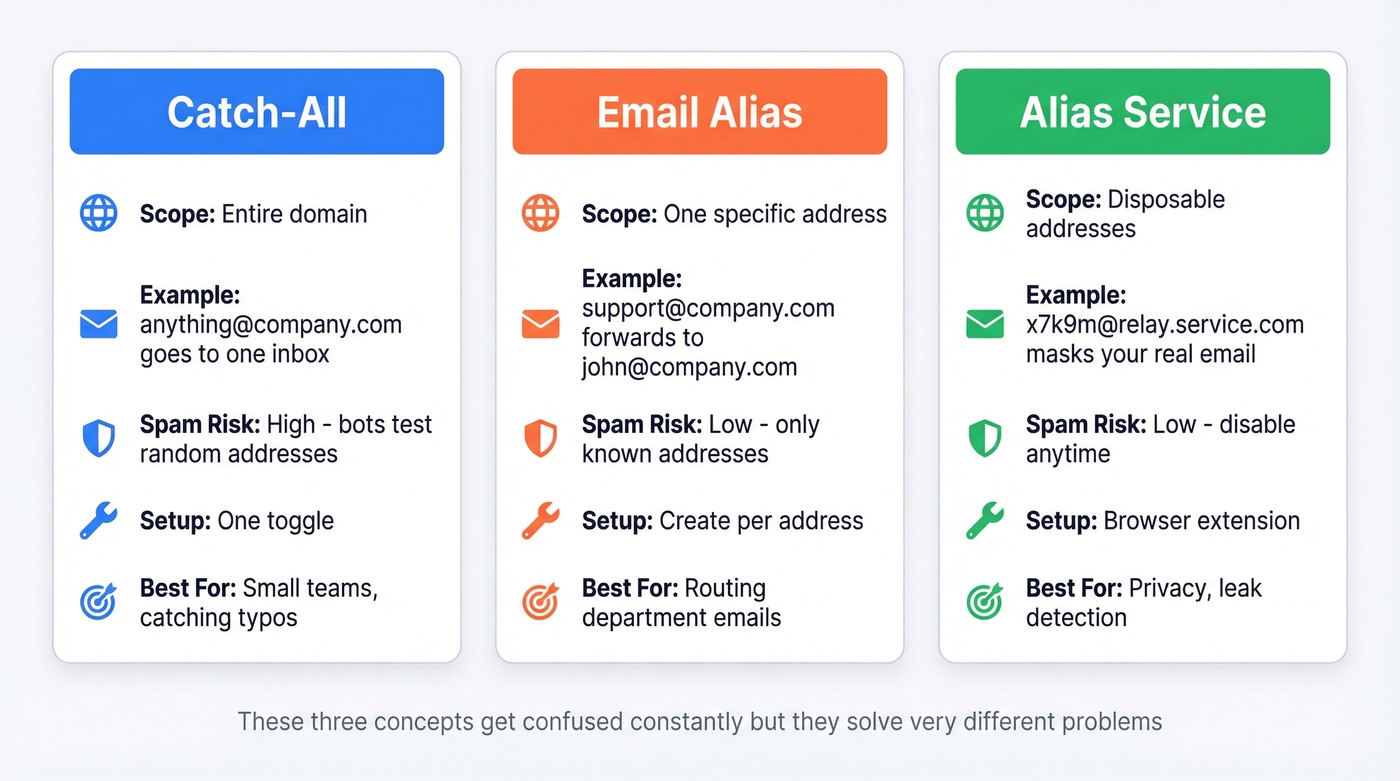
| Feature | Catch-All | Email Alias | Alias Service |
|---|---|---|---|
| How it works | Accepts all mail domain-wide | Forwards one address to a mailbox | Creates throwaway addresses |
| Spam exposure | High - bots test random addresses | Low - only known addresses get mail | Low - aliases can be disabled |
| Privacy level | Moderate - domain still visible | Low - tied to your real address | High - masks domain and identity |
| Setup effort | One toggle or rule | Create per address | Account + browser extension |
| Best for | Catching typos, small teams | Routing support@, sales@, etc. | Personal privacy, leak detection |
An email catch-all is a domain-level safety net that catches everything. An alias like support@company.com is an intentional forward you create for a specific purpose. And alias services like SimpleLogin or Firefox Relay generate throwaway addresses that mask your real email entirely.
One nuance worth knowing: some catch-all domains accept mail first, then reject it later. The SMTP conversation says "yes," but the message bounces afterward. That "accept first, reject later" pattern is what makes a catchall email address particularly dangerous for cold outreach - your verification tool sees a green light, but the bounce comes after you've already sent. SPF, DKIM, and DMARC authentication won't save you here; those protect against spoofing, not against sending to non-existent mailboxes on accept-all domains.
Why Organizations Use Catch-All
The most common reason is simple: don't lose messages. A prospect misspells your sales rep's name, a vendor sends an invoice to the wrong address, a partner uses an old format - a catch-all configuration ensures none of that mail disappears.
Beyond that, organizations enable it for:
- Compliance and audit trails - regulated industries sometimes need to capture all inbound mail, even misaddressed messages
- Small teams - a 5-person startup doesn't want to create 20 aliases; a single domain-wide rule covers everything
- Privacy and leak detection - using unique addresses per service like
stripe@yourdomain.comlets you identify exactly which vendor leaked your address when spam starts arriving - Transition periods - after acquisitions or rebrands, catch-all captures mail sent to old employee addresses
Here's the thing: that privacy use case has a real operational gotcha. If you forget which exact address you used to sign up for a service, password resets become impossible. The reset email goes to the address you can't remember, and catch-all just silently swallows it into a sea of other mail.
How to Set Up a Catch-All Email
Google Workspace
In Google Workspace, catch-all behavior is implemented with Gmail routing rules in the Admin console. You create a rule that routes messages sent to unrecognized recipients to a designated mailbox - either a specific user or a group. After saving, allow time for the change to propagate across Google's systems.
Microsoft 365
Microsoft 365 doesn't have a native catch-all toggle. The workaround involves stitching together a few features.
Create a shared mailbox - no license needed unless you want direct sign-in. Then go to Exchange Admin Center, navigate to Mail flow, then Accepted Domains, and change your domain from Authoritative to Internal Relay. Finally, create a mail flow rule that redirects messages sent to non-existent recipients to your shared mailbox. It's clunky, but it works.
Proton Mail
Settings, Domain, flip the catch-all toggle. Done. Proton delivers all mail sent to your domain that doesn't match an existing address to the designated catch-all address.
cPanel / Hosting Providers
Go to Email, then Default Address. Set it to forward to a specific mailbox rather than discard or bounce. Most cPanel providers make it a single dropdown selection.
Risks of Running a Catch-All Domain
Catch-all isn't free. Here's what you're signing up for:
Spam volume spikes. Bots routinely test random addresses at domains. An accept-all configuration accepts every single one. Expect your inbox noise to increase significantly.
Spoofing vulnerability. Attackers know that any address at your domain "works," making it more attractive for abuse attempts and phishing campaigns.
Resource consumption. All that unwanted mail eats storage and processing power. NameSilo's analysis calls these the "hidden costs" of catch-all, and they add up fast on high-traffic domains.
Misdirected sensitive mail. If your domain is similar to another company's, you'll receive their employees' emails, sometimes including sensitive corporate communications. This creates both a security headache and a legal gray area.
Password reset risk. Losing track of which unique address you used for a service can lock you out permanently.
Deliverability impact for senders. Some filters view "never returns user-not-found errors" as suspicious behavior, which can affect how your domain is perceived by receiving servers. That last point is where catch-all stops being a domain owner's problem and becomes a sender's problem.

Prospeo's proprietary 5-step verification includes catch-all handling, spam-trap removal, and honeypot filtering - so those 150 "unknown" leads don't wreck your domain. 98% email accuracy across 143M+ verified addresses.
Stop guessing on catch-all addresses. Start sending with 98% confidence.
How Common Are Catch-All Emails?
More common than most people realize.
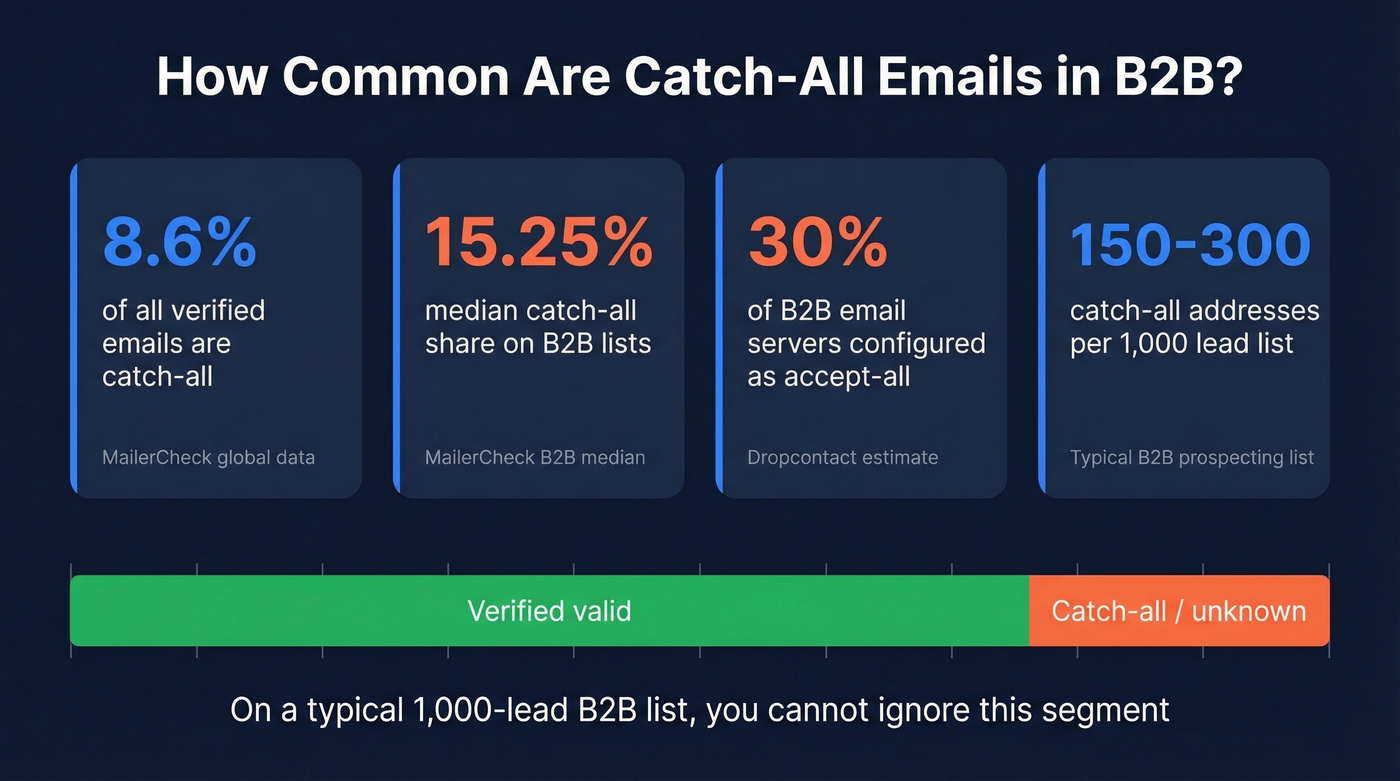
MailerCheck's data shows catch-all addresses make up 8.6% of all emails they've ever verified. That's the global average. When you look at individual B2B lists, the median catch-all share jumps to 15.25%, with an average of 541 catch-all addresses per list.
Dropcontact puts the number even higher from a server-configuration angle: roughly 30% of B2B email servers are configured as accept-all. In our experience, the real number on a typical B2B prospecting list lands somewhere between those two benchmarks. On a 1,000-lead list, expect 150-300 addresses flagged this way. That's not a rounding error you can ignore.
Let's be honest: if you're running outbound and you don't have a catch-all strategy, you don't have an outbound strategy. You're just hoping 15-30% of your list doesn't blow up your domain.
Impact on Email Deliverability
The widely accepted threshold is total bounces below 2%. Top performers keep hard bounces under 1%. Bounce rates above 6% start actively damaging your domain reputation. Cold campaigns average a 7.5% bounce rate, email lists decay roughly 23% per year, and even among emails that don't bounce, 17% never reach the inbox at all. If you need a deeper benchmark breakdown, see our guide to bounce rate.
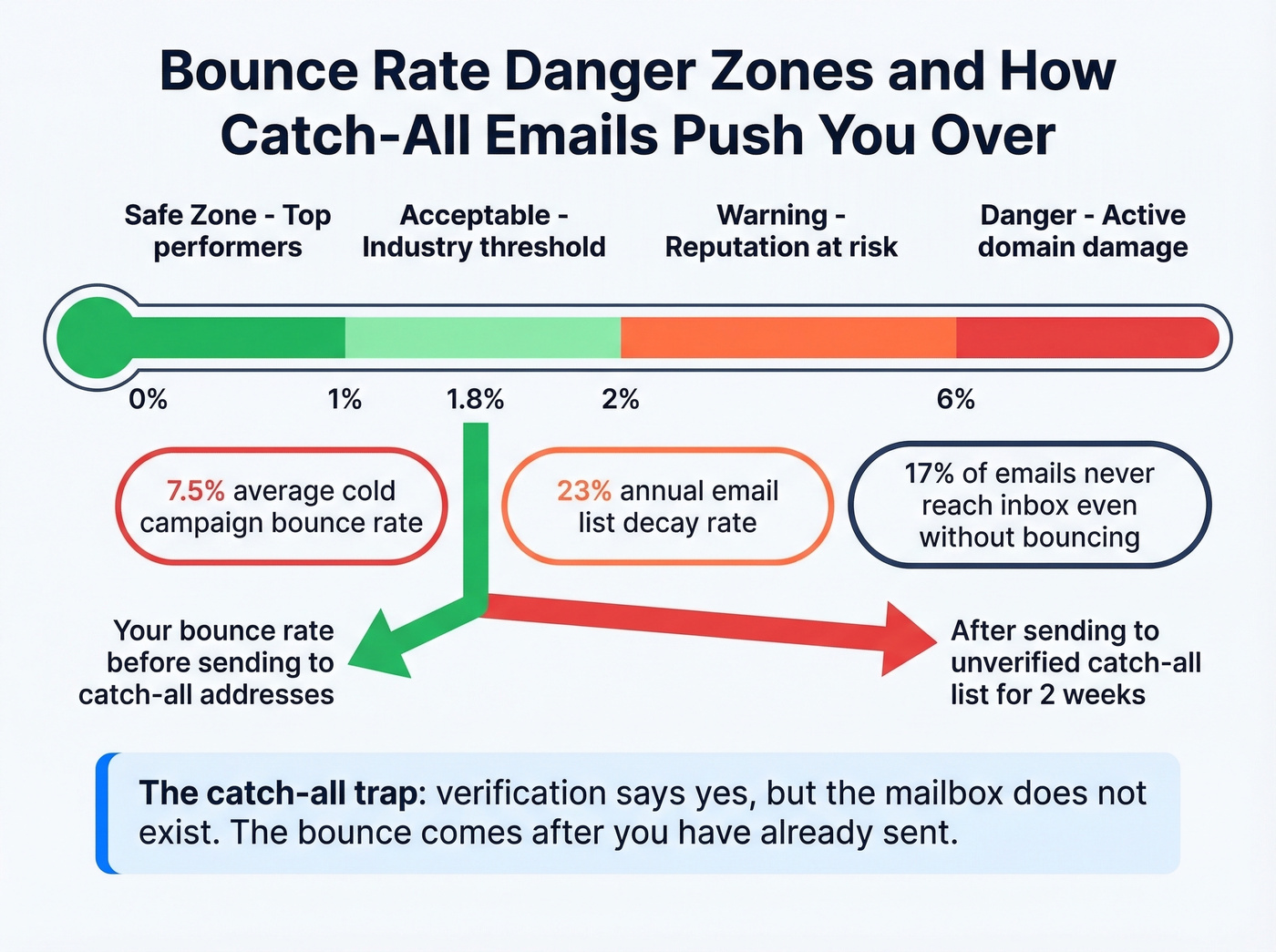
Now layer in catch-all behavior. During the SMTP conversation, a catch-all server tells your sending infrastructure "yes, this address exists" - even when it doesn't. Your verification tool marks it catch-all/unknown. You send. Later, the message bounces because the underlying mailbox was never real. By then, the damage is done: your bounce rate ticks up, and ESPs start throttling your domain.
We've seen this play out firsthand. A team sends to their full list, catch-all addresses included, and their bounce rate creeps from 1.8% to 6% over two weeks. By the time they notice, their warm-up work is undone and they're rebuilding sender reputation from scratch. One way to stay ahead is keeping your data fresh - Prospeo's 7-day refresh cycle means catch-all addresses get re-evaluated weekly rather than sitting stale for the 6-week industry average. If you're actively repairing deliverability, our playbook on sender reputation is a good next step. That alone prevents a chunk of delayed bounces from addresses that changed status since you last verified.
Should You Send to Catch-All Addresses?
Excluding them from your outreach can wipe out a meaningful chunk of your reachable market. On many B2B lists, catch-all addresses land in the 15-30% range - hundreds of valid prospects per campaign get left on the table if you skip them entirely. If you're building outbound motions, these sales prospecting techniques help you protect volume without sacrificing quality.
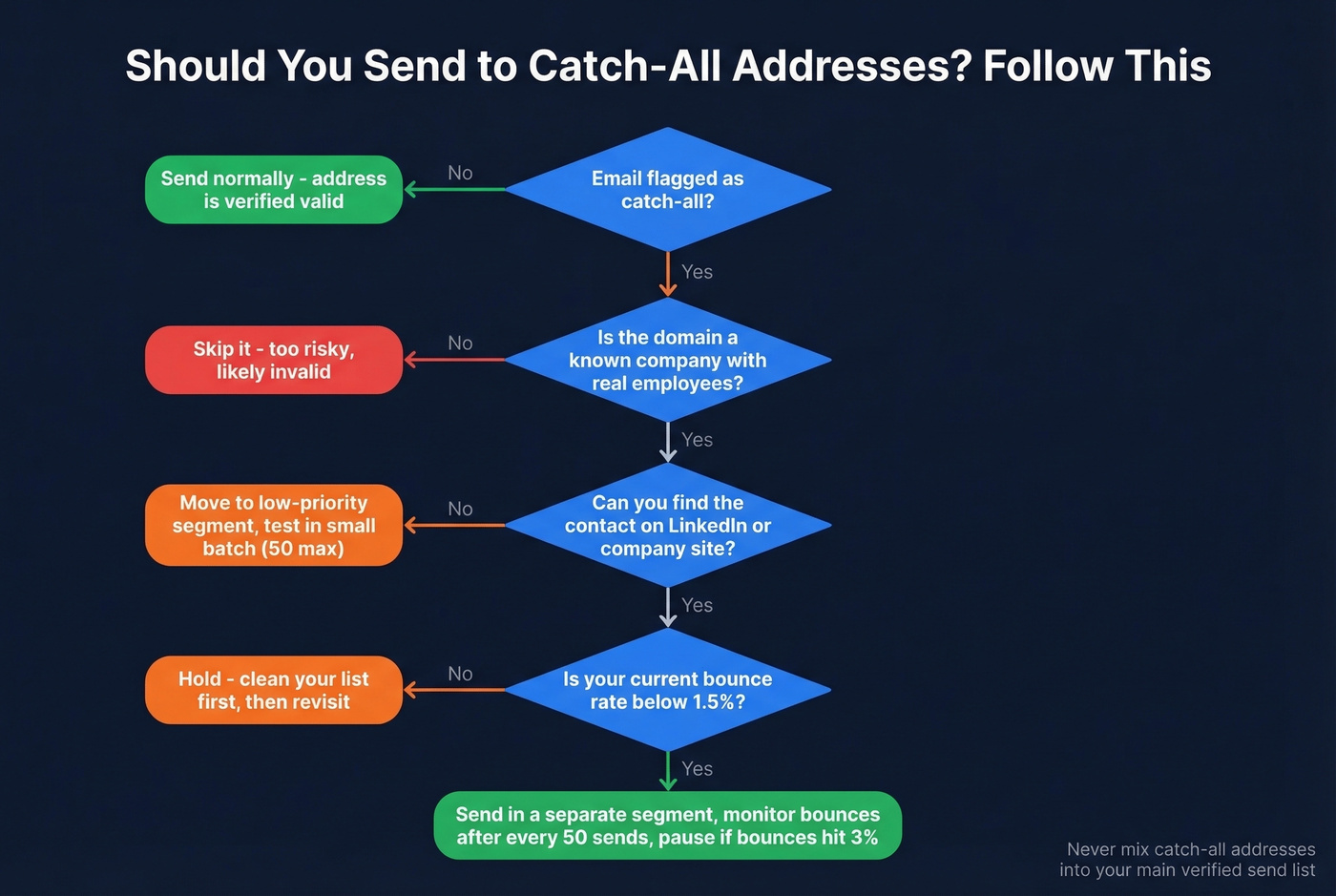
But not all catch-all domains behave the same way. Dropcontact breaks them into three configurations:
- Standard domains - fully verifiable, no catch-all behavior
- Bounce-free catch-all - accepts everything and doesn't bounce for non-existent recipients
- Catch-all with bounce - accepts during verification but bounces after sending
The problem is you can't distinguish type 2 from type 3 during verification. Both look identical in the SMTP conversation. So the play isn't "send to all" or "skip all" - it's segment, test small, and monitor.
The consensus on r/coldemail is consistent with this: most experienced senders keep catch-all addresses but treat them as a separate segment with tighter monitoring. One practitioner shared that about 30% of an Apollo-sourced list was flagged as catch-all after verification. Deleting a third of your pipeline without testing first is just leaving money on the table.
How to Verify Catch-All Emails
Standard SMTP verification fundamentally can't confirm individual mailboxes on catch-all domains. The server accepts everything - that's the whole point. Your verification tool has no way to distinguish a real inbox from a black hole.
Most verification tools handle this by labeling the address "unknown" or "catch-all" and leaving the decision to you. That's a non-actionable verdict. What you actually need is a tool that goes beyond the basic SMTP check and gives you a send/don't-send recommendation for every address on your list. If you're comparing vendors, start with our roundup of email verification alternatives.

Prospeo runs every address through a 5-step verification process that includes catch-all domain handling, spam-trap removal, and honeypot filtering. Instead of a coin-flip "unknown" label, you get an actionable verdict backed by 98% email accuracy. Snyk's team went from 35-40% bounce rates to under 5% after switching - across 50 AEs prospecting weekly.
Regardless of which tool you use, here's the workflow that works:
- Verify your full list - separate valid, invalid, and catch-all addresses
- Segment catch-all into a dedicated list - never mix them with verified-valid contacts
- Send a small test batch of 50-100 from a warmed domain
- Monitor bounces for 48 hours - catch-all bounces often arrive delayed
- Scale if bounces stay under 2%, or suppress the segment if they spike
Skip this workflow if your list is under 100 contacts. At that scale, just manually check the domains - it's faster than setting up segmentation.
When to Enable (and Disable) Catch-All
Enable catch-all if:
- You're a small team and can't predict every address format people will use
- You need to catch typos on critical business communications
- You're using unique per-service addresses for privacy and have solid spam filtering in place
Disable catch-all if:
- Your inbox is drowning in spam and you don't have time to filter it
- You've already set up proper aliases for every address you need
- Nobody monitors the catch-all inbox - unmonitored catch-all is just a spam bucket with extra steps
The smart transition: audit your catch-all inbox for legitimate senders, create dedicated aliases for those addresses, communicate the changes, monitor for a few weeks, then disable catch-all. If you're documenting the process for your team, a lightweight sequence management checklist helps keep changes from slipping.
FAQ
What is a catch-all email address?
A catch-all email address receives all mail sent to any address at a domain, including misspelled or non-existent recipients. Instead of bouncing undeliverable mail, the server routes it to a designated inbox - acting as a domain-wide safety net for misaddressed messages.
Is a catchall email address safe to use?
For domain owners, it's safe but significantly increases spam exposure. For senders, these addresses carry deliverability risk because you can't confirm the underlying mailbox exists. Multi-step verification tools that score them - rather than just labeling them "unknown" - reduce that risk substantially.
Can you verify catch-all emails?
Standard SMTP verification can't confirm individual mailboxes on catch-all domains because the server accepts everything by design. Advanced tools use multi-step verification with spam-trap and honeypot filtering to deliver actionable send/don't-send verdicts instead of a generic "unknown" label.
Should I include them in cold outreach?
Yes - excluding catch-all emails can remove 15-30% of your reachable B2B list. Segment them separately, send a test batch of 50-100, monitor bounces for 48 hours, and scale only if bounces stay under 2%. Never mix them with verified-valid contacts.
How do I disable catch-all on my domain?
In most providers, change the default address behavior from "forward" to "reject" or "bounce." In Google Workspace, remove the routing rule. In cPanel, set the default address to "discard." In Microsoft 365, delete the mail flow rule and switch the accepted domain back to Authoritative.
Bad data from catch-all domains is how teams nuke their sender reputation. Prospeo verifies every email through proprietary infrastructure - no third-party providers - with a 7-day refresh cycle that catches stale addresses before you do.
Protect your deliverability at $0.01 per verified email.