

How to Use ChatGPT for Sales Without Sounding Like a Robot (or Leaking Your Data)
A RevOps lead we know ran a 3-tool bake-off last quarter. ChatGPT wrote the cold emails. Apollo sourced the contacts. And 47 of the first 100 emails bounced because nobody verified the list before hitting send. The AI did its job perfectly - the data layer didn't exist.
That's where most sales teams stall when adopting ChatGPT for sales. 81% have implemented or are experimenting with AI, and AI-forward teams are 1.3x more likely to see revenue growth (83% vs 66%). Yet reps still spend only 28-30% of their time actually selling. ChatGPT can compress research, draft outreach, and prep discovery calls in minutes. It can't fix bad contact data, though, and it can't replace the judgment calls that close deals.
Here's how to use it properly - with prompts you can copy today, privacy rules your team needs, and the tools that fill the gaps AI can't.
Set Up ChatGPT for Your Sales Team First
Most reps open ChatGPT, type a vague prompt, get a mediocre response, and conclude AI doesn't work for sales. The problem isn't the model. It's the setup.
Custom Instructions are non-negotiable. Go to Settings -> Personalization -> Custom Instructions and fill in your persistent context: your role, your ICP, your product's core value prop, your preferred tone, and any constraints like "never use more than 125 words for cold emails." This context carries across every conversation, so you stop re-explaining yourself each session.
Desktop app shortcuts save more time than you'd think. Alt+Space on Windows or Option+Space on Mac opens a quick companion window - no browser tab switching. Ctrl+Shift+C copies the last response instantly. Small things, but they compound across 30+ daily interactions.
Which tier matters: ChatGPT Plus at $20/mo is the sweet spot for most individual reps. Team and Enterprise add workspace controls and stronger privacy defaults. More on privacy below.
Copy-Paste Prompts for Every Sales Stage
These aren't theoretical. They're constrained, copy-paste-ready prompts organized by where you are in the sales cycle. The key mechanic: specify the output format, word count, reading level, and framework. That's what separates usable output from generic AI slop.
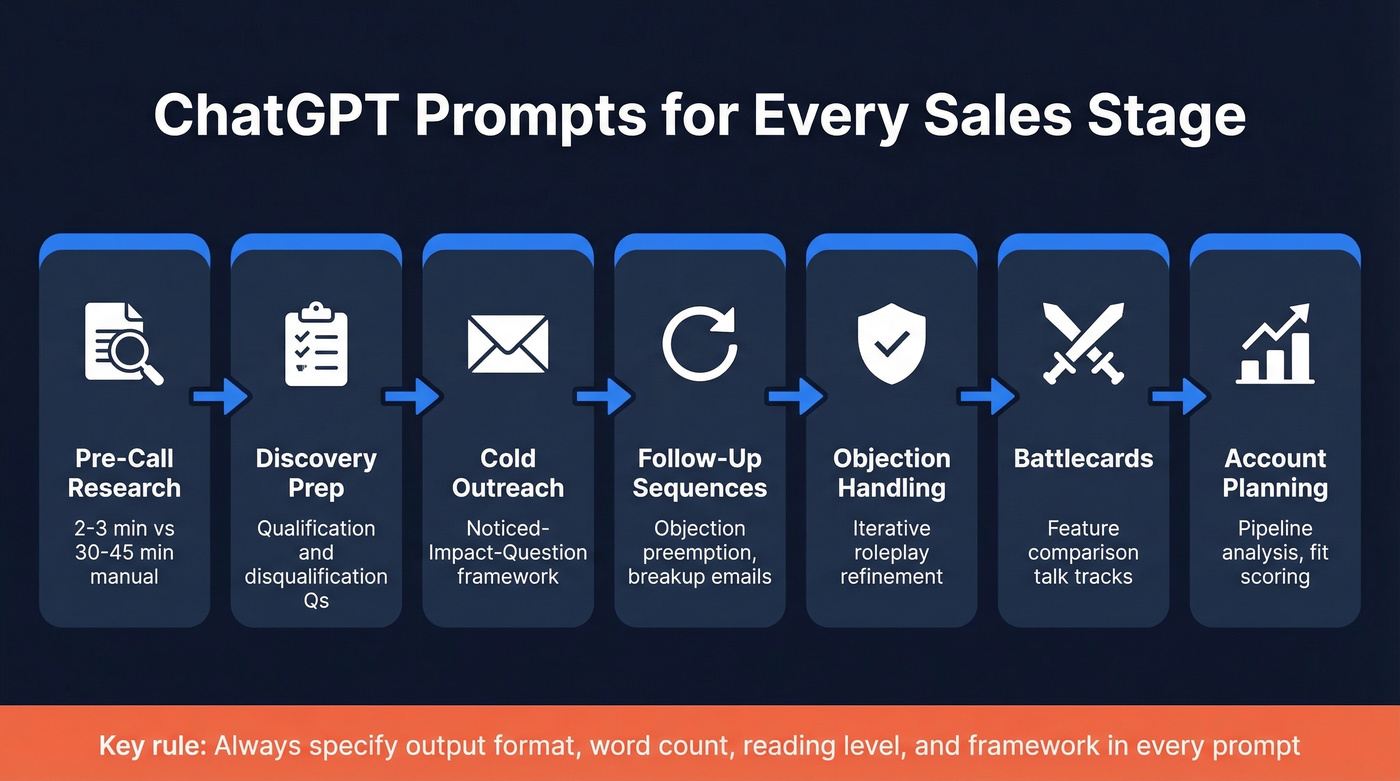
Pre-Call Research
The fastest ROI use case. What used to take 30-45 minutes of manual digging now takes 2-3 minutes.
"Research [Company Name]. Summarize in 200 words: what they sell, their ICP, recent news from the last 90 days, and their likely top 3 priorities this quarter. Format as bullet points."
"Read these case studies [paste URLs or text] and summarize: what motivated each company to buy, what outcomes they achieved, and which objections they likely had before purchasing. Keep it under 300 words."
Discovery Call Prep
"What questions would you ask [Company Name] to determine if they're a good candidate for [your product]? Include 3 qualification questions and 2 disqualification questions. Format as a numbered list."
"What type of company wouldn't be a good fit for [your product] and should be disqualified early? Give me 5 red flags with one-sentence explanations."
Cold Outreach Emails
Here's where constrained prompts make the biggest difference - and where the data backs it up. Signal-personalized outreach achieves 15-25% reply rates vs the 3-5% cold average.
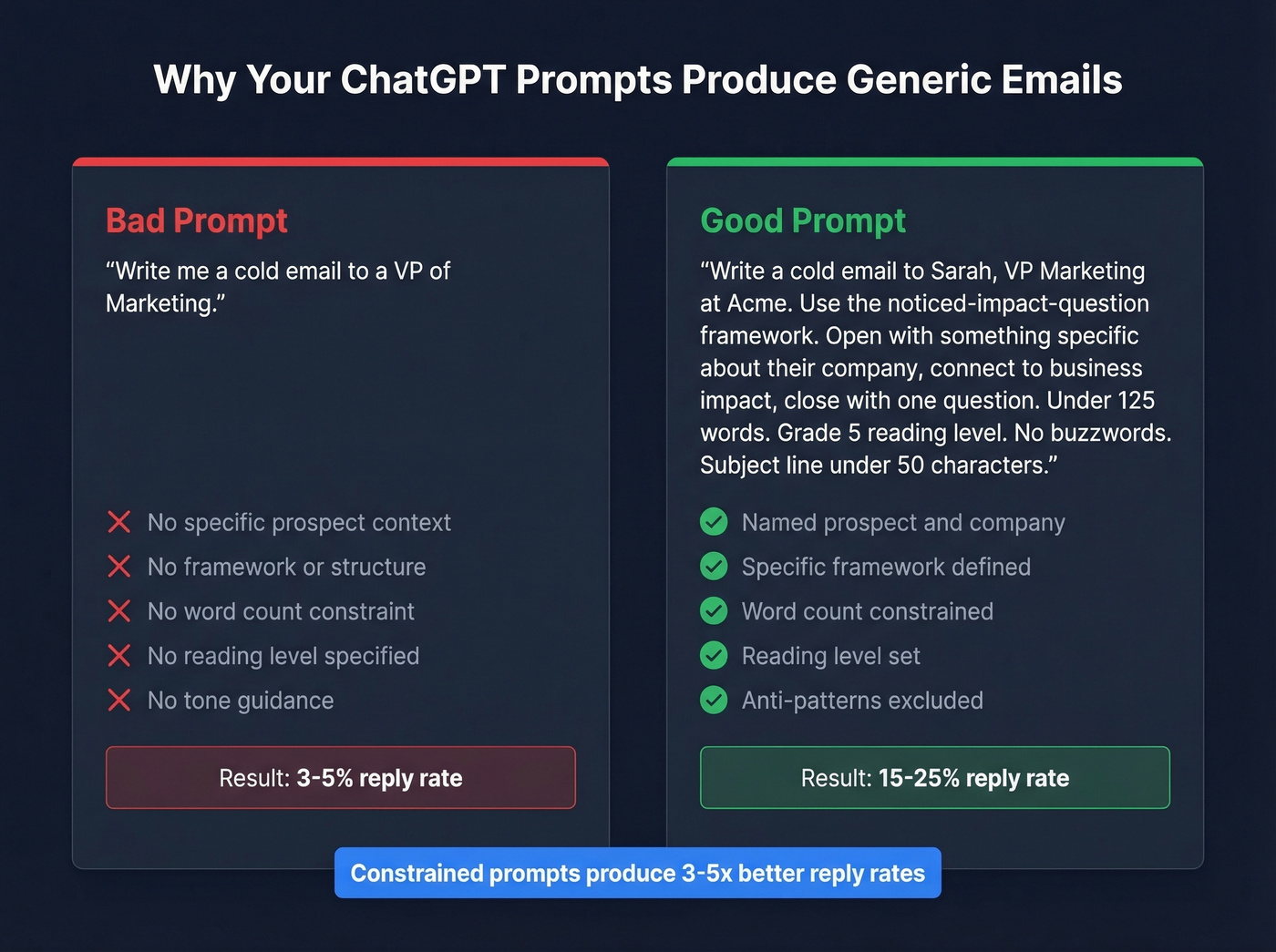
Bad prompt: "Write me a cold email to a VP of Marketing."
Good prompt:
"Write a cold email to [Name], [Title] at [Company]. Use the noticed-impact-question framework: open with something specific I noticed about their company, connect it to a business impact, and close with a single question. Under 125 words. Grade 5 reading level. No buzzwords. Subject line under 50 characters."
For pattern-interrupt style:
"Write a cold email that opens with a counterintuitive stat or contrarian take relevant to [prospect's industry]. Include one line of social proof. Soft CTA - ask for a reaction, not a meeting. Under 125 words, grade 5 reading level."
No prompt can fix bad data. Before you send, verify your list - Prospeo runs real-time checks with 98% email accuracy, so your carefully crafted emails actually land instead of bouncing into the void. If you're comparing providers, start with the best email verifier tools.

Follow-Up & Breakup Sequences
"Write a follow-up email to [Name] who opened my last email but didn't reply. Preempt their most likely objection (price) and reframe the value. Under 70 words. No 'just checking in' language."
"Write a breakup email to [Name] after 4 unanswered touches. Include one piece of unexpected value (a relevant stat or insight) and mention a future trigger event that should prompt them to re-engage. Tone: helpful, not passive-aggressive. Under 80 words."
Objection Handling & Roleplay
This is where iterative prompting shines. Start with a template, then refine through back-and-forth.
"Act as a sales expert. A prospect is interested in [product] but hesitant because [specific objection]. Write a persuasive but short DM addressing this objection. Use logic and emotion. No emojis. Under 100 words."
Then iterate: "I like this angle, but the second paragraph feels pushy. Rephrase it to acknowledge their concern before pivoting." This back-and-forth produces far better output than any single prompt. Always rewrite the final version in your own voice - treat the output as a first draft, not a finished message.
Competitive Battlecards
"Create a competitive battlecard comparing [your product] vs [competitor]. Format: 4 columns - Feature, Us, Them, Talk Track. Include 6 rows covering [key differentiators]. Keep talk tracks under 25 words each."
For trigger-event outreach after a funding round, use the FUND framework: Funding context, Urgency signal, Name the decision maker, Differentiate your value tied to their capital deployment. Post-funding companies enter a 90-120 day sprint where they evaluate vendors. Days 31-60 are the highest-conversion window.
Account Planning & Data Analysis
Two use cases the prompt-library crowd often misses:
"Given this account list [paste CSV or key details], identify the top 5 accounts by fit score based on: company size 50-500 employees, SaaS industry, recent hiring in sales/marketing roles. Explain your ranking."
"Analyze this pipeline CSV [paste data]. Identify: average deal cycle by stage, stages with the highest drop-off, and any patterns in lost deals. Summarize in 200 words with a table."
Writing Prompts That Don't Sound Like AI
The DEPTH framework solves the biggest problem with AI-generated sales content: it all sounds the same.
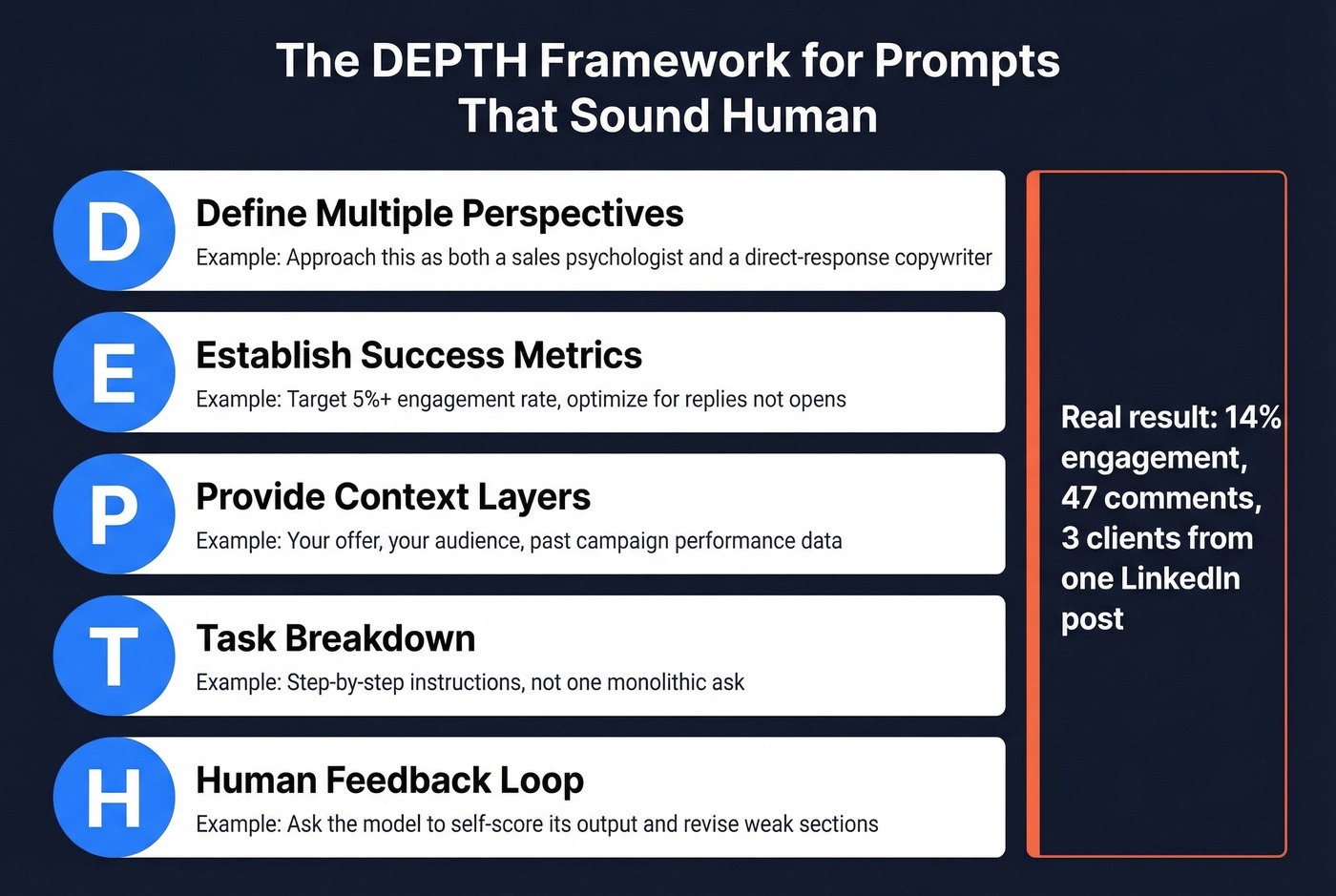
- Define multiple perspectives ("approach this as both a sales psychologist and a direct-response copywriter")
- Establish success metrics (target open rate, reply rate, specific triggers)
- Provide context layers (your offer, your audience, past campaign performance)
- Task breakdown (step-by-step instructions, not a single monolithic ask)
- Human feedback loop (ask the model to self-score its output and revise weak sections)
Single-role prompts produce generic output. When you define multiple perspectives and give the model metrics to optimize against, the output gets noticeably sharper. One practitioner using this framework reported 14% engagement, 47 comments, and 3 clients from a single LinkedIn post.
Let's look at the before/after. "Write a LinkedIn post about our product launch" produces corporate filler. Now compare: "Write a LinkedIn post from the perspective of a frustrated sales leader who just solved a pipeline problem. Target metric: 5%+ engagement rate. Audience: B2B SaaS founders, Series A-C. Include one specific number. Self-score the hook on a 1-10 scale and revise if below 7." That produces something worth reading.
Privacy & Security Rules Your Team Needs
20% of breaches in 2025 involved shadow AI incidents. If your team is using GPT for sales workflows without a policy, you're probably already exposed.
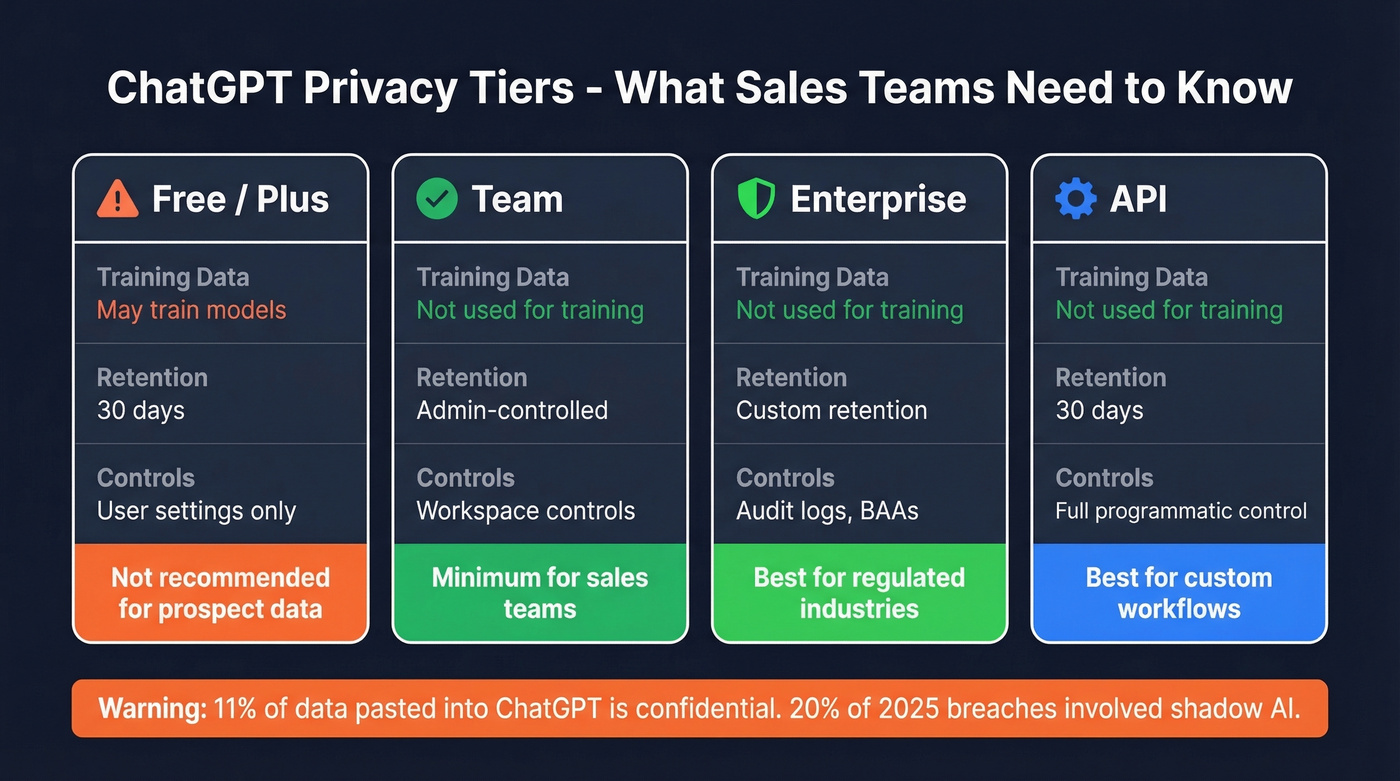
| Tier | Training Data | Retention | Key Controls |
|---|---|---|---|
| Free / Plus | May train models (opt out available) | 30 days | User settings |
| Team | Not used for training by default | Admin-controlled | Workspace controls |
| Enterprise | Not used for training by default | Custom | Audit logs, BAAs |
| API | Not used for training by default | 30 days | Full programmatic control |
The incidents are real and worth knowing about. Samsung engineers pasted confidential semiconductor source code into ChatGPT, leading to an internal ban. Italy's data protection authority hit OpenAI with a EUR15M GDPR fine. A Redis library bug in March 2023 exposed chat titles and payment info for ~1.2% of Plus users during a 9-hour window. And in mid-2025, a share-link indexing incident briefly made some conversations discoverable through search engines.
Here's the stat that should scare every sales leader: 11% of all data pasted into ChatGPT contains confidential information. If your team is on the free tier and hasn't opted out of training, your prospect lists, pricing strategies, and competitive intel could be feeding the model.
Minimum viable policy: use Team tier or above for any sales work involving prospect data. Opt out of training on personal accounts. Never paste customer financials, contracts, or PII into any tier without explicit approval. If you're using AI-generated content in prospect-facing presentations, consider disclosing it - it's becoming an industry norm and builds trust.

ChatGPT can draft a perfect cold email in 30 seconds. But if 47 out of 100 bounce, your domain reputation tanks and none of them matter. Prospeo's 98% email accuracy and 7-day data refresh mean every AI-crafted message reaches a real inbox.
Stop feeding great prompts into bad data. Fix the foundation first.
Where ChatGPT Falls Short
Look, ChatGPT is the best free writing assistant most reps will ever use. But if your deals average under $10k, you probably don't need to build elaborate AI workflows around it - a few good prompts and verified data will outperform any complex setup.
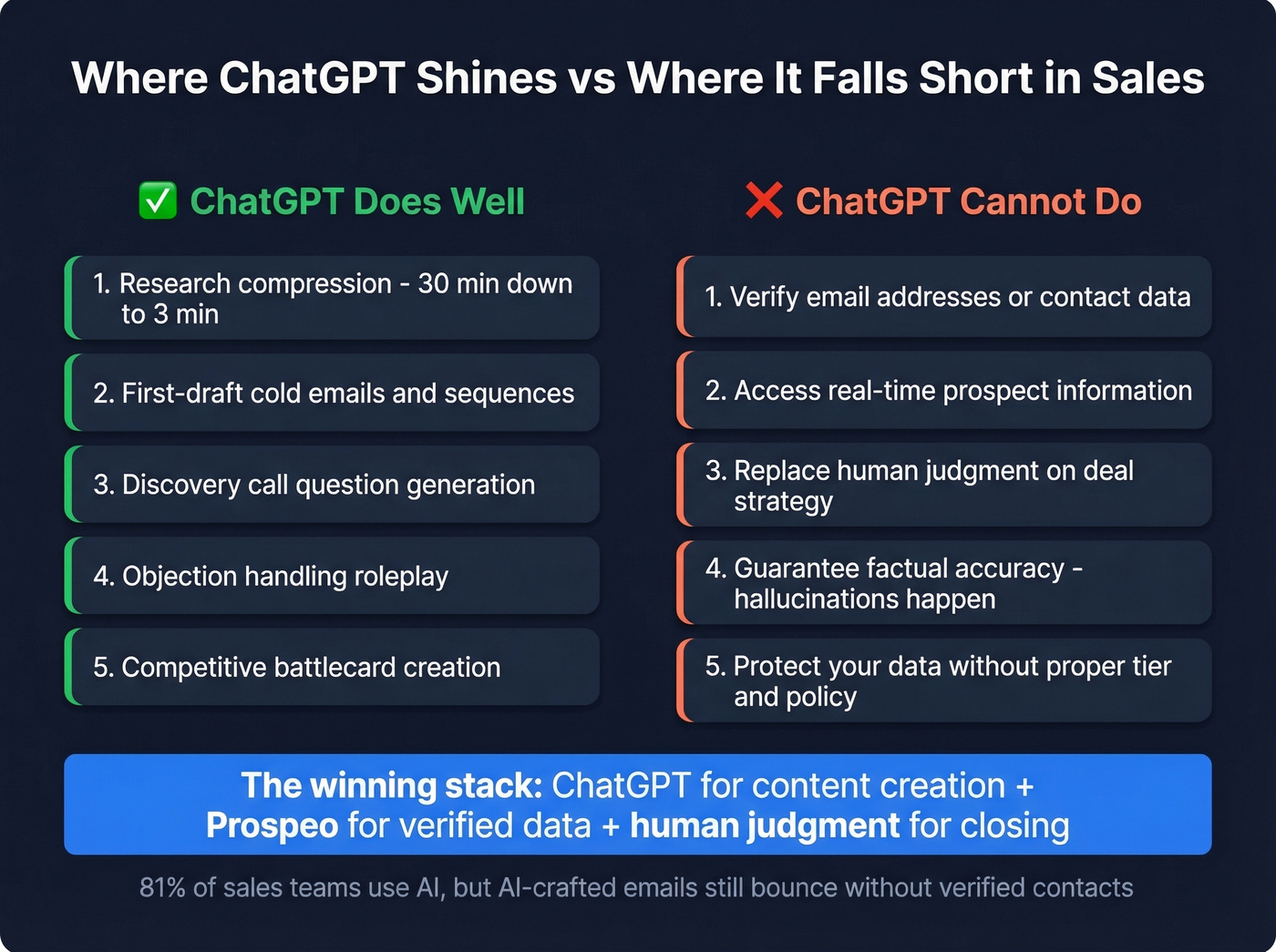
The failure modes are real. One user documented 11 severe incidents in 30 days - hallucinated UI elements, misattributed financial data, and repeatedly ignored explicit instructions. This wasn't a novice user. The model just got things wrong. Across the industry, 17% of AI-generated content contains some form of hallucination according to Stanford HAI, and 51% of companies have encountered AI errors including hallucinations and misclassifications per McKinsey.
ChatGPT also has a sycophancy problem. A common complaint on r/Anthropic is that it tends to agree with you rather than push back - "Exactly! Sharp observation!" - which is the opposite of what you need when pressure-testing your sales messaging.
What actually works for mitigation: set guardrails in your prompts (allowed topics, refusal rules, uncertainty behavior), ground the model with RAG when possible, and always human-review any sales output before it reaches a prospect. We've found that reading every draft aloud before sending catches 80% of the awkward phrasing the model produces. Skip this step and your prospects will know it's AI before they finish the first sentence.
AI Doesn't Replace Your Sales Stack
ChatGPT handles content generation and analysis. It doesn't verify emails, sequence outreach, enrich CRM records, or track intent signals. You need a stack.
| Category | What It Does | Tool | ~Cost |
|---|---|---|---|
| Content/Analysis | Draft emails, research, roleplay | ChatGPT Plus | $20/mo |
| Data Accuracy | Verified emails + mobiles | Prospeo | Free-$39+/mo |
| Enrichment | Flexible data chains | Clay | ~$149/mo |
| Database + Outreach | All-in-one prospecting | Apollo | ~$49-99/mo |
| Phone Numbers | Quick contact lookup | Lusha | ~$49/mo |
| Sequencing | Email delivery + cadences | Instantly / Lemlist | ~$30-97/mo |
ChatGPT writes the email. Prospeo makes sure it reaches someone real - 98% email accuracy, 125M+ verified mobiles with a 30% pickup rate, and a 7-day data refresh cycle where the industry average is six weeks. The free tier gives you 75 verified emails per month, enough to test before you commit. Pair it with your sequencer and ChatGPT, and you've got a complete outbound workflow without a five-figure annual platform contract. If you're rebuilding your stack, use a RevOps tech stack blueprint to avoid tool sprawl.
Apollo is the easiest default for teams that want database + basic outreach in one place. Clay is the most flexible if you're building complex enrichment workflows. Lusha is fast for direct dials, especially in EMEA. None of them write your emails - that's where ChatGPT fits.
For teams that don't need all the bells and whistles, skip Clay and Lusha entirely. ChatGPT Plus + Prospeo + a sequencer like Instantly is a three-tool stack that covers 90% of outbound use cases for under $100/mo total. If you want more options, compare the best AI sales tools and the best outbound sales platforms.
Which AI Model for Which Task?
Claude writes better sales copy than ChatGPT. That's not controversial among practitioners who've used both extensively - the consensus on r/Anthropic is pretty clear on this.
| Task | ChatGPT | Claude | Gemini |
|---|---|---|---|
| General research | ★★★ | ★★ | ★★★ |
| Writing/editing | ★★ | ★★★ | ★★ |
| Tone matching | ★★ | ★★★ | ★★ |
| Web search | ★★ | ★ | ★★★ |
| Image tasks | ★★★ | ★ | ★★ |
| Deep research | ★★★ | ★★ | ★★ |
| ~Price (paid tier) | $20/mo | $20/mo | $20/mo |
ChatGPT wins on general answers, image-related tasks, and deep research mode. Claude excels at writing, editing, and matching your brand's tone without the sycophantic cheerleading. Gemini is strongest for web search and context-heavy analysis. Many practitioners report dual-subscribing to Claude + Gemini and adding ChatGPT only when they need deep research. All three cost $20/mo for paid tiers, so running two isn't unreasonable.
CRM Integration Paths
Three paths, matched to your team's technical maturity:
No-code (Zapier / Make / n8n): Trigger on a CRM event, send data to ChatGPT with a structured prompt and optional JSON schema, then write the response back to a CRM field, task, or tag. This is where most teams should start. Setup takes an afternoon.
Direct API: Webhook to a worker that enriches and redacts PII, then a ChatGPT API call with schema, output validation, and idempotent writeback to CRM. More control, more complexity. You need a developer.
Native CRM AI: Salesforce Einstein, HubSpot AI, and similar tools offer on-record actions like "summarize this call" or "draft a follow-up" stored directly on the contact timeline. Convenient, but you're locked into the CRM vendor's AI capabilities and they're often a generation behind the standalone models.
Regardless of path, your governance checklist: scoped access (not every rep needs API keys), PII redaction before data hits ChatGPT, output validation before CRM writeback, and audit logs for compliance. Skip these and you risk leaking prospect data into consumer-model training on accounts that haven't opted out. If you're automating workflows, start with CRM automation software that supports clean handoffs.
Your AI prompts are dialed in. Your sequences are tight. Now you need contacts that actually connect. Prospeo gives you 300M+ profiles with 30+ filters - buyer intent, job changes, tech stack - so ChatGPT personalizes to real, reachable prospects. Starting at $0.01 per email.
Great AI output deserves data that doesn't bounce. Build your list now.
FAQ
How do I use ChatGPT for sales?
Start with Custom Instructions (Settings -> Personalization) to set your ICP, product context, and tone. Use constrained prompts - specify word count, reading level, framework, and output format. The DEPTH framework above is the fastest path to output that doesn't sound like AI. Pair it with a data verification tool so outreach actually reaches real inboxes.
Is ChatGPT free for sales teams?
Yes - the free tier handles basic prompts. ChatGPT Plus at $20/mo is the most common upgrade for individual reps, adding faster responses and advanced reasoning. Team ($25/user/mo) and Enterprise add workspace controls, audit logs, and custom data retention for compliant rollouts at scale.
Can I paste prospect data into ChatGPT safely?
Free and Plus conversations can be used for model training unless you opt out in settings. Team and Enterprise tiers don't use your data for training by default and offer admin controls. Never paste sensitive prospect data - financials, contracts, PII - on the free tier without opting out first.
Does ChatGPT replace sales tools like CRMs and sequencers?
No. ChatGPT generates content and analyzes data but can't verify emails, sequence outreach, or enrich CRM records. You still need a verification layer, a sequencer for delivery, and a CRM for pipeline management. Our experience is that the best results come from a tight three-tool stack: ChatGPT for writing, a data tool for accuracy, and a sequencer for delivery.
ChatGPT vs Claude - which is better for sales copy?
Claude writes more natural-sounding sales copy with better tone matching and less sycophantic filler. ChatGPT is stronger for research, structured analysis, and deep-research mode. Both cost $20/mo - many practitioners subscribe to both and use each where it excels.