

How to Check Your Domain for Spam (and What to Do About It)
A sysadmin ran every blacklist scanner he could find. All clean. But his company's emails kept landing in spam at three major clients. The culprit? A compromised WordPress link in the email signature was triggering URL reputation filters - something no blacklist checker would ever catch.
That's the gap most people miss when they check a domain for spam: three completely different systems can flag you, and most people only check one.
What Domain Spam Checking Actually Means
When someone says "check my domain for spam," they're usually thinking about email blacklists. That's one piece. There are actually three distinct check types, and practitioners conflate them constantly.
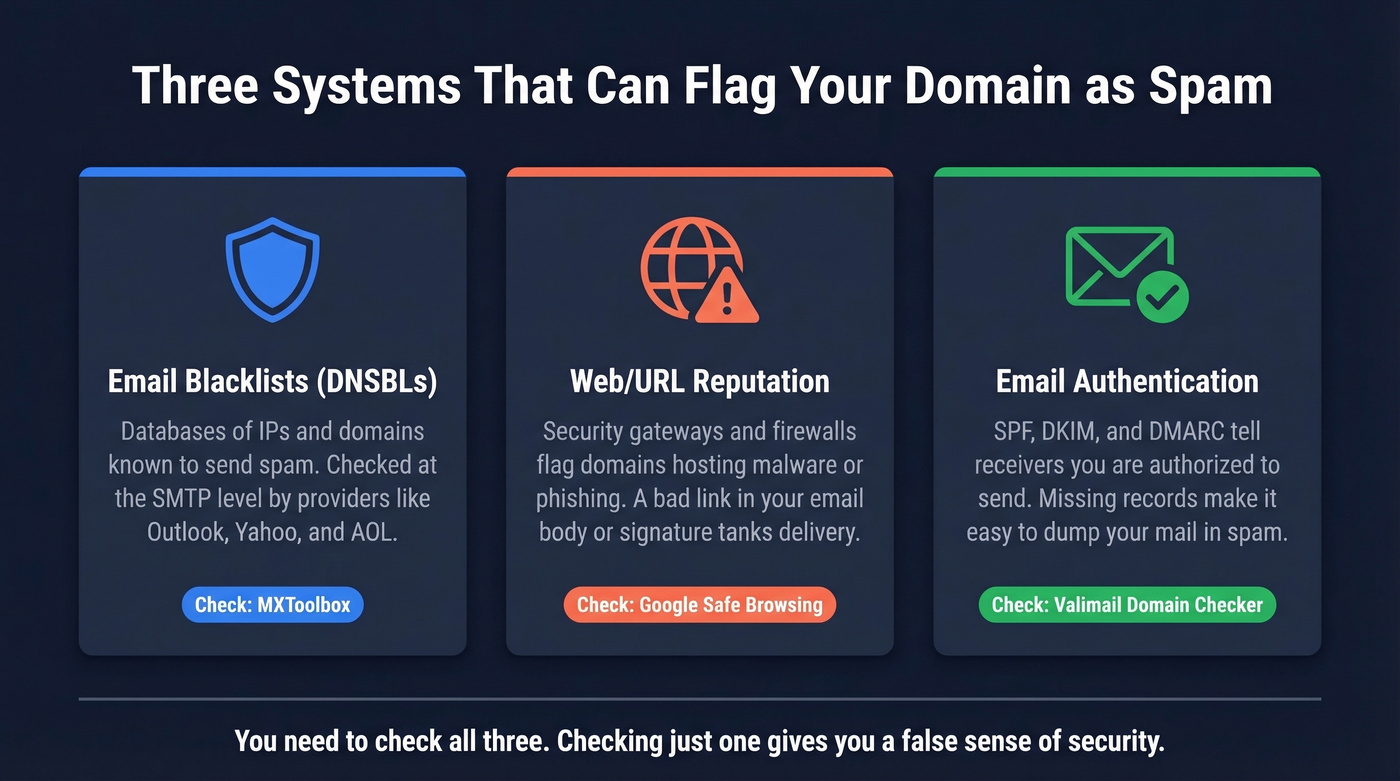
Email blacklists (DNSBLs) are databases of IPs and domains known to send spam. If your sending IP lands on Spamhaus, Microsoft 365/Outlook, Yahoo, and AOL can reject your mail at the SMTP level.
Web/URL reputation is different. Google Safe Browsing, security gateways, and corporate firewalls maintain their own lists of domains hosting malware, phishing pages, or suspicious content. A flagged URL in your email body or signature can tank deliverability even if your sending infrastructure is spotless.
Email authentication - SPF, DKIM, and DMARC - tells receiving servers you're authorized to send from your domain. Missing or misconfigured records don't put you on a blacklist, but they make it trivially easy for providers to dump your mail into spam.
You need to check all three. Checking just one gives you a false sense of security.
Quick Diagnostic
Run these three checks right now - it takes 60 seconds:
- MXToolbox blacklist check - go to mxtoolbox.com/blacklists.aspx, enter your domain or sending IP. It scans 100+ DNSBLs in seconds.
- Google Transparency Report - paste your domain into Google's Safe Browsing site status tool. This tells you if Google considers your website dangerous.
- SPF, DKIM, and DMARC verification - use MXToolbox's SuperTool or Valimail's Domain Checker to verify SPF, DKIM, and DMARC are configured correctly.
If all three come back clean and you're still landing in spam, the problem isn't a blacklist. Keep reading.
Types of Blacklists
Not all blacklists work the same way:
| Type | What It Flags | Examples | Publicly Checkable? |
|---|---|---|---|
| IP-based | Sending IP behavior | Spamhaus SBL, XBL | Yes |
| Domain-based | Sender domain | Spamhaus DBL | Yes |
| URL-based | Links in email body | SURBL, URIBL | Yes |
| Private/ISP | Internal signals | Gmail, Microsoft | No |
IP-based lists like Spamhaus SBL and XBL flag the actual server sending your mail. Domain-based lists like DBL flag the domain itself, regardless of which IP sends it. URL-based lists like SURBL and URIBL scan the links inside your emails - if you're linking to a flagged domain, even someone else's, your mail can get blocked.
Here's a scenario people overlook: shared IP risk. If you're on shared hosting or a shared sending IP, another tenant's spam behavior can get the IP blacklisted and drag your deliverability down with it.
Then there are private lists. Gmail, Microsoft, and Yahoo all maintain internal reputation systems you can't directly query. These matter most for inbox placement, and they're the hardest to diagnose. Mail logs, bounce codes, and Google Postmaster Tools are your only windows in.
Which Blacklists Actually Matter
Let's be honest: most blacklists are irrelevant. The consensus on r/emaildeliverability and in deliverability circles is that the majority of hits come from super-niche lists that major ESPs don't even check. One practitioner reported a brand-new domain showing up on a niche list before they'd sent a single email.
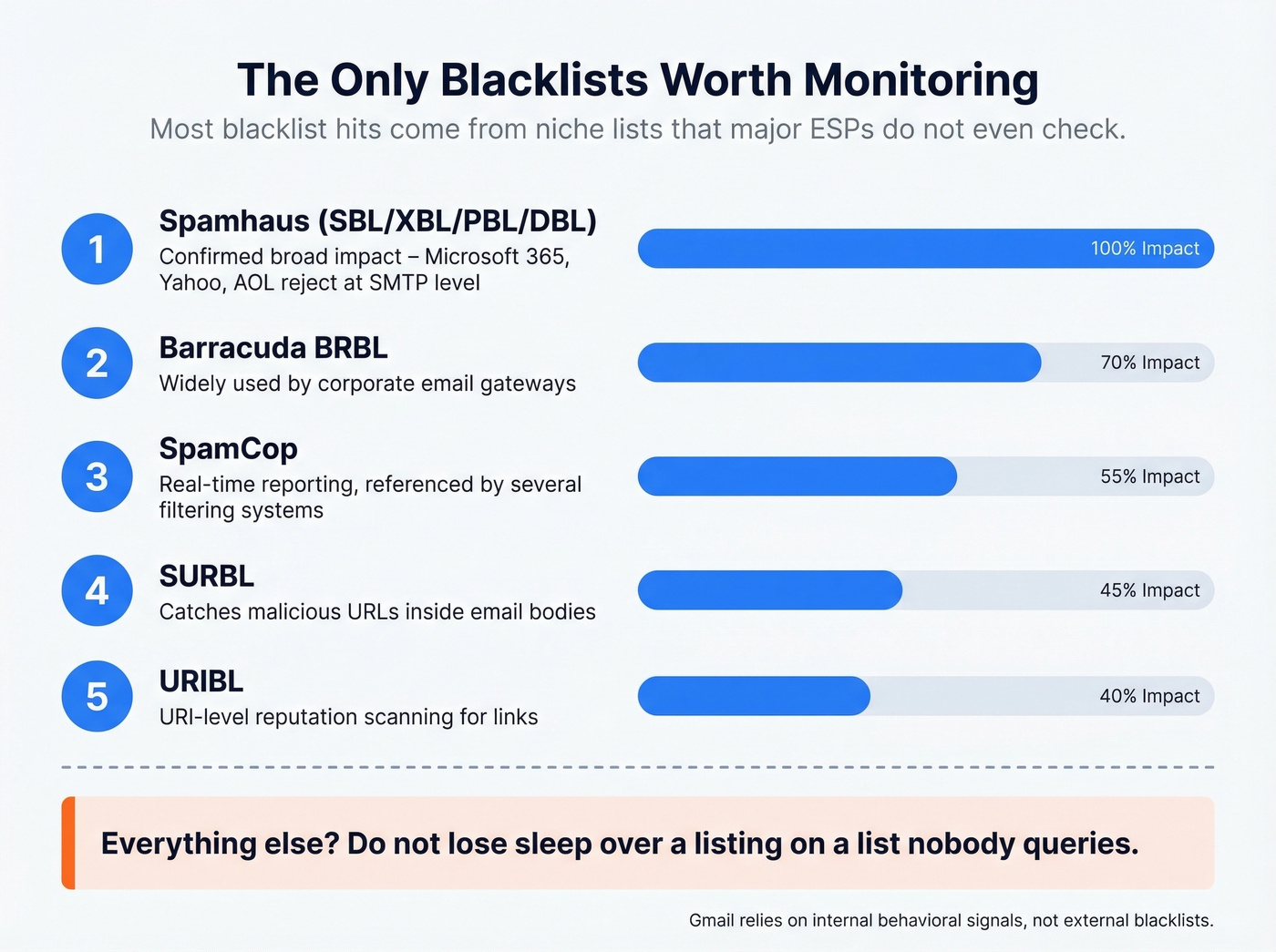
Spamhaus is the only third-party blacklist family with confirmed broad impact across major providers. Microsoft 365/Outlook, Yahoo, and AOL reject listed IPs at the SMTP level when they appear on Spamhaus. Gmail is a different animal - it relies primarily on internal behavioral signals and engagement data, not external blacklists. The exception is Spamhaus PBL, which Gmail checks for unauthorized direct-to-MX sending from dynamic IPs.
Five lists worth monitoring:
- Spamhaus (SBL/XBL/PBL/DBL) - confirmed broad impact across major providers
- Barracuda BRBL - widely used by corporate email gateways
- SpamCop - real-time reporting, referenced by several filtering systems
- SURBL - catches malicious URLs in email bodies
- URIBL - similar to SURBL, focused on URI-level reputation
Everything else? Don't lose sleep over a listing on a list nobody queries.

Most domain spam issues start with dirty contact data - invalid emails, spam traps, and honeypots that torch your sender reputation. Prospeo's 5-step verification with spam-trap removal and honeypot filtering keeps bounce rates under 4%. That's 98% email accuracy at $0.01/lead.
Stop diagnosing blacklist problems you could prevent with cleaner data.
How to Check Domain for Spam: Step by Step
Email Blacklist Check
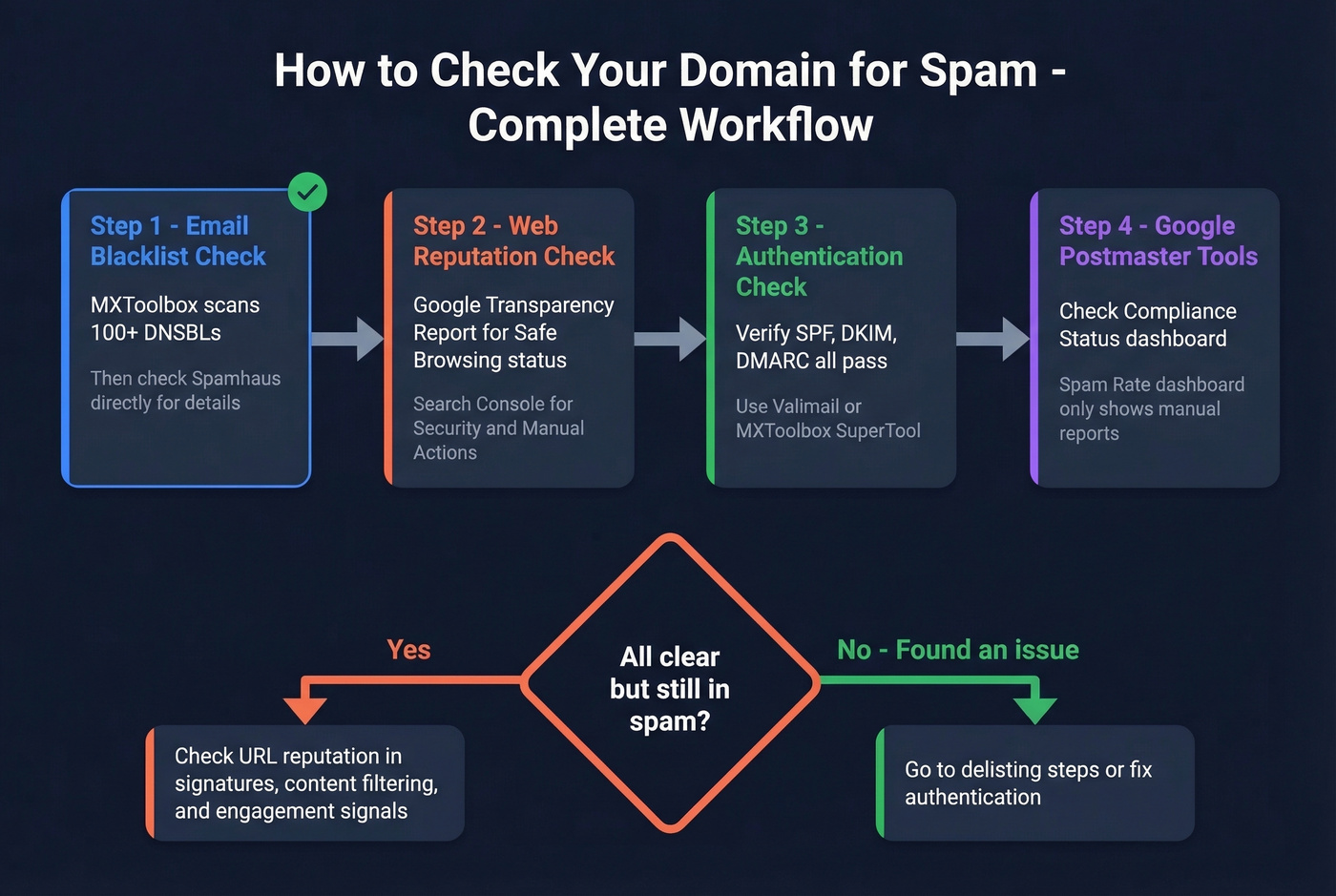
Start with MXToolbox. It checks your IP against over 100 DNS-based blacklists in a single query.
Pro tip if you don't know your mail server's IP: Send an email to ping@tools.mxtoolbox.com, then check the headers. MXToolbox will reply with your sending IP details - faster than digging through DNS records manually.

For the list that actually matters, go directly to Spamhaus's domain reputation lookup. MXToolbox will tell you if you're on Spamhaus, but the Spamhaus tool gives you more context about which specific list and why.
Web Reputation Check
Open Google's Transparency Report and enter your domain in the Safe Browsing site status tool. This tells you whether Google has flagged your site as dangerous - which poisons every email containing a link to your domain.
Next, check Google Search Console under Security & Manual Actions. If your site's been compromised, this is where you'll see details about infected URLs or injected code. The most common culprits are outdated WordPress plugins, malware from shared hosting neighbors, and unpatched CMS installations.
Email Authentication Check
Use Valimail's Domain Checker or MXToolbox's SuperTool to verify SPF, DKIM, and DMARC are all configured and passing. For bonus points, set up BIMI - it displays your brand logo in supported inboxes and requires a DMARC policy at enforcement.
Google Postmaster Tools
Google retired the v1 Postmaster Tools interface in late 2025, removing the IP Reputation and Domain Reputation dashboards deliverability teams relied on. The new focus is the Compliance Status dashboard, which shows pass/fail on SPF, DKIM, DMARC alignment, PTR/rDNS, TLS, and one-click unsubscribe.
The Spam Rate dashboard still exists, but understand its limitation: it only reflects emails users manually report as spam, not messages Gmail automatically routes to the spam folder. You can have a 0.05% spam rate in Postmaster Tools while Gmail silently filters 40% of your mail. And if your sending volume is low, Postmaster Tools won't show any data at all - a frustration cold email senders consistently flag on Reddit.
"All Clear" But Still in Spam
This is the scenario that drives people crazy. Every domain spam check comes back clean. SPF, DKIM, DMARC all pass. Google Safe Browsing says your site is fine. But emails still land in spam.
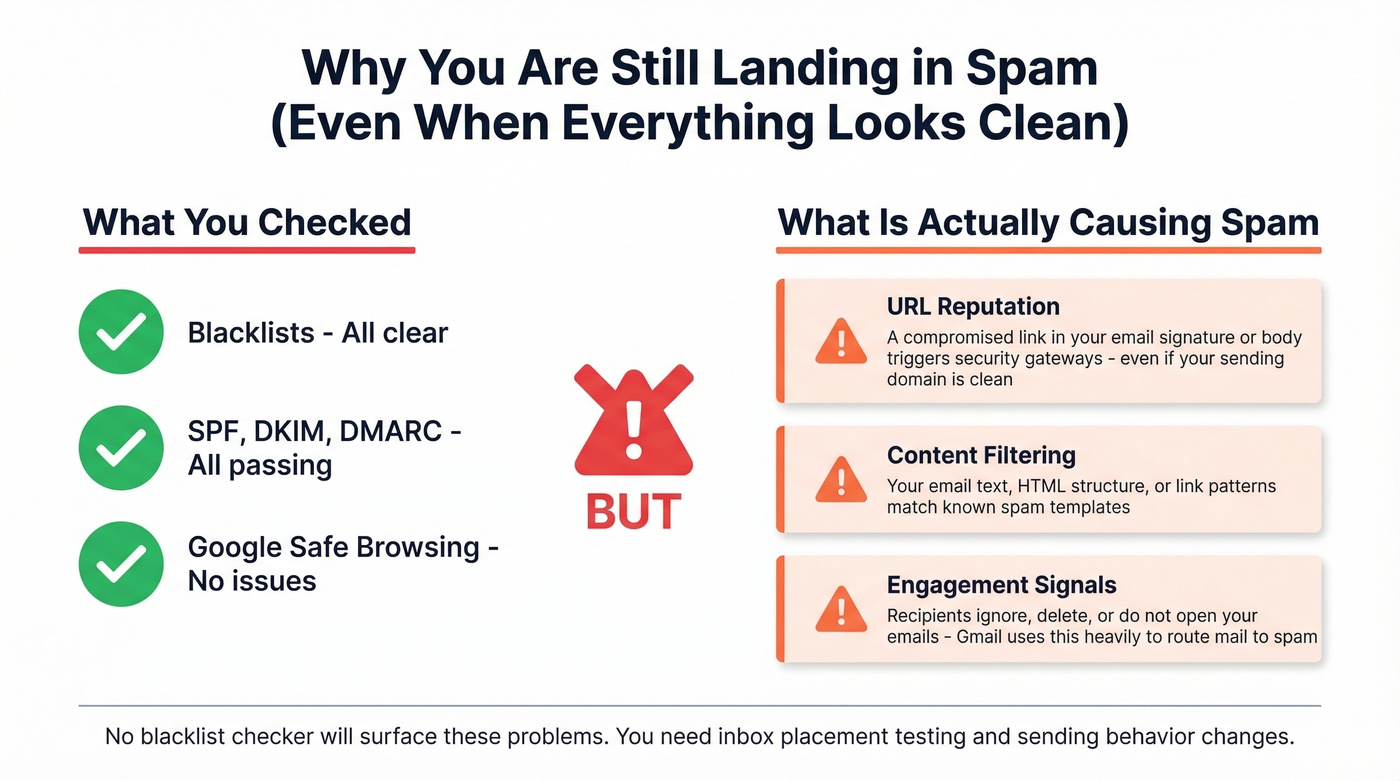
Remember the sysadmin from the intro? His email infrastructure was spotless - the problem was a compromised WordPress site linked in the email signature. A security gateway was flagging the URL reputation of the website link, not the sending domain. Removing the link restored delivery immediately.
Beyond URL reputation, two invisible forces drive spam placement that no checker will surface. Content filtering analyzes your email's text, HTML structure, and link patterns against known spam templates. Engagement-based filtering - which Gmail leans on heavily - tracks whether recipients open, click, reply, or ignore your messages. Low engagement tells the algorithm your mail isn't wanted, and no amount of clean blacklist results will override that signal.
Inbox placement testing tools like GlockApps and MailGenius exist for this scenario. In our experience, they're useful for confirming a problem exists but rarely tell you why. Reddit threads describe them as "gimmicky" after running dozens of A/B tests with virtually no actionable differences. If you're going to use one, GlockApps gives you the most granular per-provider breakdown - but fix authentication and content issues first before paying for placement tests.
How to Get Delisted
Spamhaus
Stop sending. Confirm your listing in Spamhaus Lookup. Fix the root cause. Request removal.
Who can request removal depends on the list:
- SBL: Your ISP or network owner must submit the request. Spamhaus won't accept end-user requests.
- DBL: Domain owners can request removal directly, but you must send from an email address on the flagged domain. Don't use Gmail or Yahoo for this.
- PBL: Self-removal is available for single static IPs through the lookup tool.
Spamhaus typically responds within a day or two. Removal is always free - never pay a third party claiming they can expedite delisting. That's a scam.
Barracuda, SpamCop, SORBS
Barracuda BRBL has a self-service removal form. Fix the underlying issue first, then submit. Turnaround is typically 1-7 days.
SpamCop listings expire automatically once spam reports stop - typically 1-2 days. There's no manual removal process.
SORBS can be slower. Submit a removal request through their portal, but expect a few days to 2+ weeks.
How to Stay Off Blacklists
Prevention beats delisting every time.
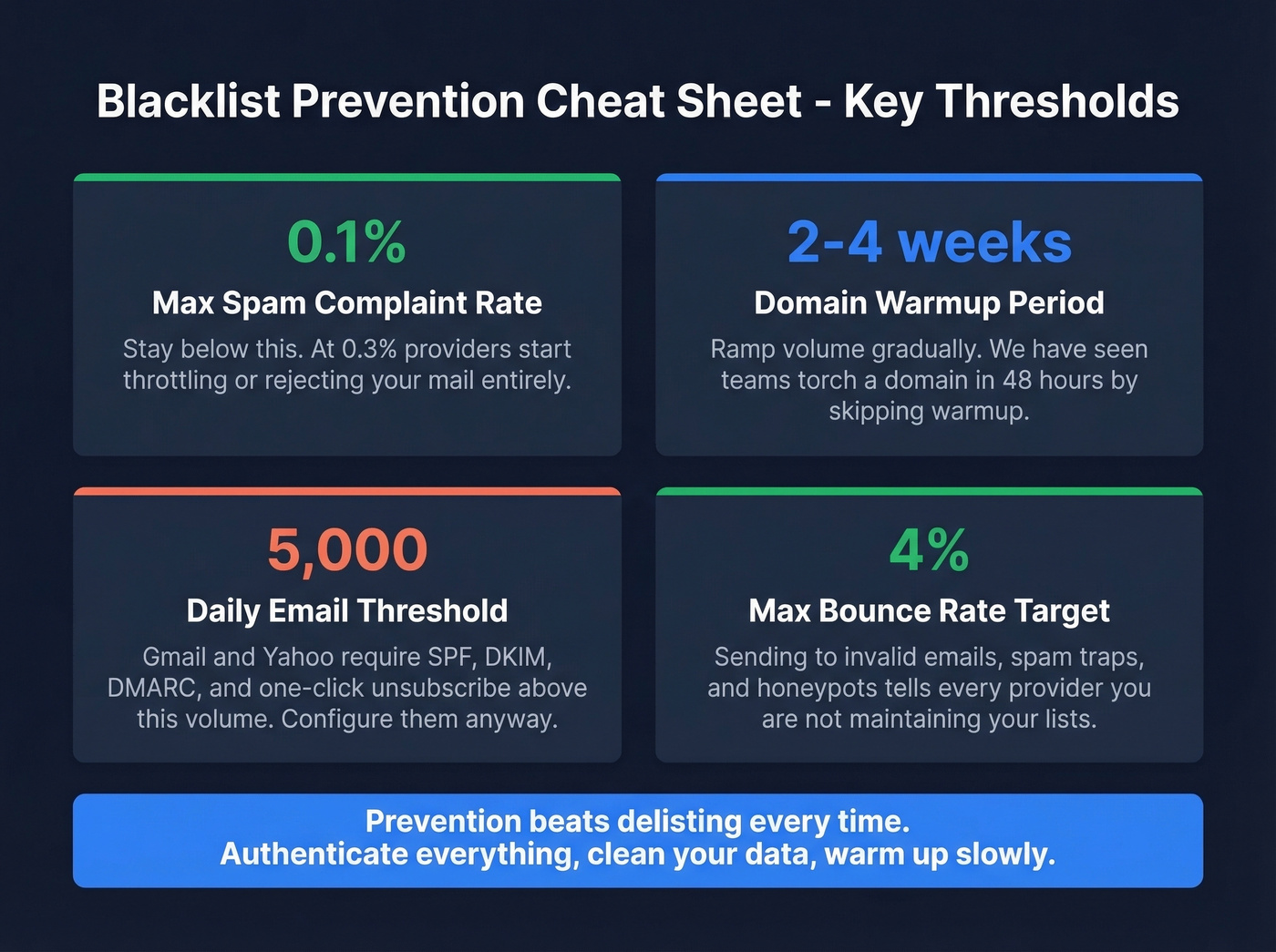
Authenticate everything. Gmail and Yahoo's bulk sender requirements rolled out in phases through 2024 and 2025, and enforcement is now tight. They require SPF, DKIM, DMARC, and one-click unsubscribe for anyone sending more than 5,000 emails per day. Even if you're under that threshold, configure all three. There's no reason not to.
Watch your complaint rate. Keep spam complaints below 0.1%. At 0.3% or above, providers start throttling or rejecting your mail. Yahoo enforces the same 0.3% ceiling.
Warm up new domains and IPs. Don't blast 10,000 emails from a fresh domain on day one. Ramp volume gradually over 2-4 weeks. We've seen teams torch a perfectly good domain in 48 hours because they skipped warmup - and rebuilding reputation takes months, not days. (If you're scaling outbound, also watch your email velocity so you don't spike provider thresholds.)
Use double opt-in for marketing email. It's the single best protection against spam traps and complaint-driven blacklisting.
Clean Your Data Before Sending
Look - if you're running outbound with deal sizes under $10k, bad data will kill your domain faster than any content issue. Sending to invalid emails, spam traps, and honeypots tells every provider you're not maintaining your list, and that's exactly the behavior blacklists exist to catch.

Prospeo's 5-step verification process catches these before you send, including catch-all domain handling, spam-trap removal, and honeypot filtering. Stack Optimize built their agency to $1M ARR using Prospeo for client campaigns - 94%+ deliverability, bounce rates under 3%, and zero domain flags across all clients. That's what clean data looks like in production: a 98% email accuracy rate on a 7-day refresh cycle, so you're never sending to addresses that went bad last month.
Every email you send to an invalid address pushes your domain closer to a blacklist. Teams using Prospeo cut bounce rates from 35%+ to under 4% - because every contact is verified on a 7-day refresh cycle, not stale data from six weeks ago.
Clean data is the best deliverability fix that actually sticks.
Best Free Domain Spam Checkers
| Tool | Lists Scanned | Key Feature | Price |
|---|---|---|---|
| MXToolbox | 100+ | All-in-one diagnostics | Free lookups |
| Spamhaus Lookup | Spamhaus only | The authoritative check | Free |
| Google Postmaster | Gmail internal | Compliance + spam rate | Free |
| ZeroBounce | 300+ | Blacklist + validation | Free check; paid from ~$15/mo |
| EasyDMARC | N/A | DMARC monitoring + reputation | Free check; paid from ~$30/mo |
| MultiRBL | Dozens | Multi-status results | Free |
| CleanTalk | Major lists | Spam activity detection | Free |
| HetrixTools | Multiple | Monitoring + alerts | Free tier; paid from ~$8/mo |
| GlockApps | N/A | Inbox placement testing | Free trial; paid from ~$50/mo |
In our testing, MXToolbox catches everything you need for a first pass. But if you only check one list, make it Spamhaus - it's the only third-party blacklist family with confirmed broad impact across Gmail, Microsoft, Yahoo, and AOL. For ongoing monitoring, HetrixTools and EasyDMARC offer alert-based tracking so you don't have to manually re-check every week. If you're troubleshooting deeper issues, use an email spam checker alongside blacklist scans.
Skip GlockApps if you haven't fixed authentication and content issues first. Paying for placement tests when your SPF record is broken is like hiring a detective to find out why your car won't start when the gas tank is empty.
FAQ
How do I know if my domain is blacklisted?
Run your domain through MXToolbox, which checks 100+ blacklists in one query, and Spamhaus Lookup, which covers the one blacklist family that matters most. If both come back clean, your delivery issue is reputation- or content-based rather than a blacklist problem.
Does being on a blacklist mean my emails go to spam?
Only if you're on a list that major providers actually check. Spamhaus has confirmed broad impact across Microsoft, Yahoo, and AOL. Most niche lists have zero measurable effect on delivery to major inboxes. Don't panic over a listing on a list you've never heard of.
How long does it take to get delisted?
Spamhaus typically responds within 1-2 days. Barracuda and SpamCop usually clear within 1-7 days. SORBS can take 2+ weeks. Removal is always free - never pay a third party for delisting services.
Why do my emails go to spam even though I'm not blacklisted?
Blacklists are only one factor. Gmail and other providers filter based on engagement signals, content quality, authentication records, and sending reputation. URL reputation from links in your emails - including signature links to compromised websites - can also trigger filters independently of any blacklist.
Can bad contact data cause blacklisting?
Absolutely. Sending to invalid emails, spam traps, and honeypots is one of the top causes of blacklisting. Every bounced email and trap hit damages your sender reputation. Verifying your list before sending - catching invalid addresses, spam traps, and honeypots - is the most reliable way to prevent this.