

How to Check If an Email ID Is Valid - And Why Most Tools Get It Wrong
You just uploaded 5,000 leads into your verification tool, hit the button, and 1,800 came back as "unknown." Not invalid. Not valid. Just... unknown. Now you're staring at a list you can't trust, wondering whether to send anyway and risk your domain reputation or throw away a third of your pipeline.
Every free email checker gives you a text box and a green checkmark. None of them explain what's actually happening behind that checkmark - or why the same email gets a different verdict depending on which tool you use. If you need to check if an email ID is valid before sending, you deserve to understand what's really going on.
What You Need (Quick Version)
If you're short on time, here's the decision:
- Single quick check: Paste an address into Hunter's free verifier, Verifalia, or Email Hippo.
- Want to understand why tools disagree and what "unknown" actually means? Keep reading.
What "Valid Email" Actually Means
Most people use "valid" loosely. In practice, there are three distinct layers of email verification, and they catch very different problems.
Syntax validation is the simplest. Does the address follow the right format? An @ symbol, a domain, no illegal characters. This catches typos like john@@company.com but tells you nothing about whether the mailbox exists. Domain/MX validation goes a step further - it checks whether the domain has mail exchange (MX) records, meaning it's configured to receive email at all. A domain with no MX records can't accept mail. Period.
Mailbox verification is where it gets interesting. This is the SMTP handshake that actually asks the recipient's mail server, "Does this specific address exist?" It's also where things break down, because many servers lie.
The distinction matters because most free "email checkers" only do the first two layers. Real verification requires the third - and that's where accuracy separates the good tools from the mediocre ones.
How Verification Works Under the Hood
When a verification tool checks an email, it simulates the beginning of an email delivery without actually sending anything. Here's the exact sequence:
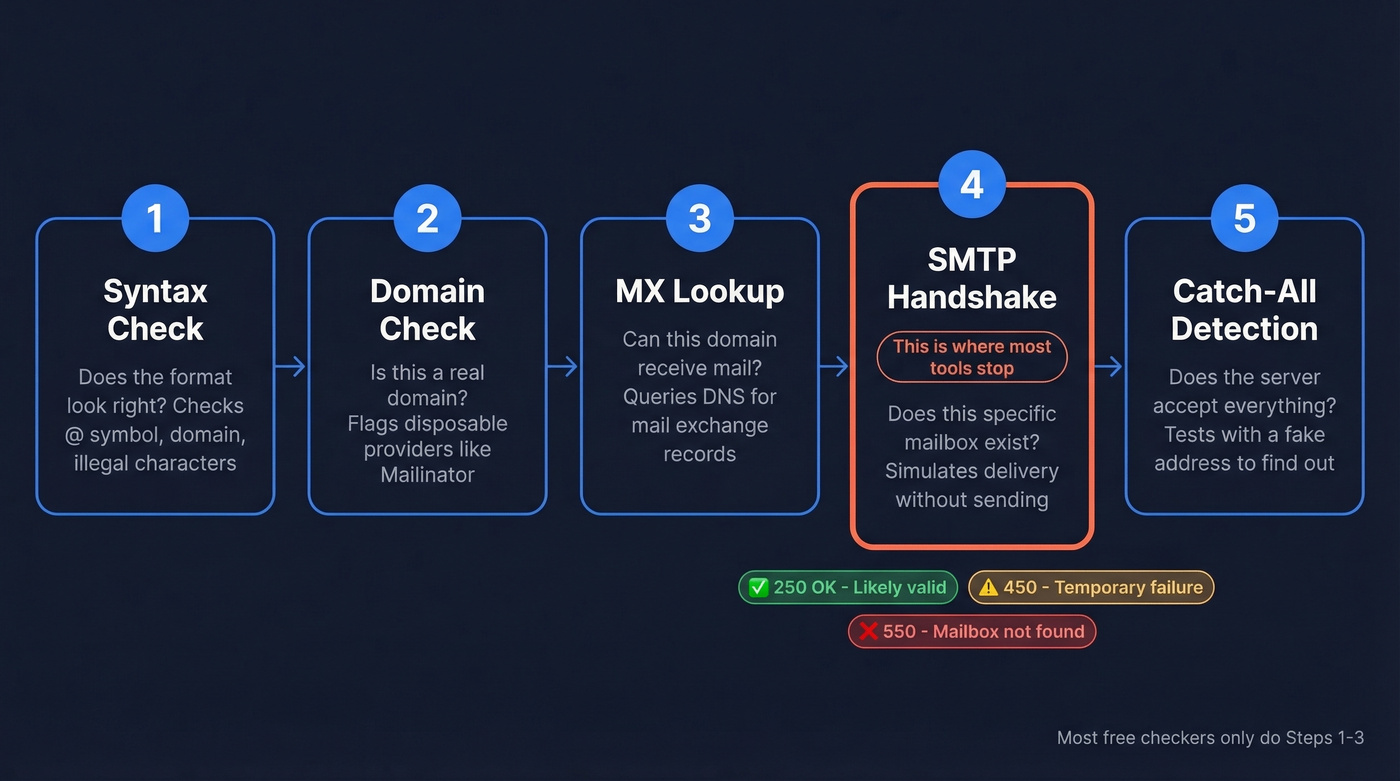
Step 1: Syntax check. The tool confirms the address follows standard formatting rules. Fast, local, no network call needed.
Step 2: Domain check. Does the domain exist? Is it a known disposable provider like Guerrilla Mail or Mailinator?
Step 3: MX lookup. The tool queries DNS for the domain's mail exchange records. No MX records means no mail delivery is possible.
Step 4: SMTP handshake. This is the core of verification. The tool connects to the mail server and runs a partial SMTP session:
EHLO verify.example.com
MAIL FROM:<test@verify.example.com>
RCPT TO:<john@targetdomain.com>
The tool stops before DATA - it never sends an actual message. What matters is the server's response to RCPT TO:
- 250 OK - The server accepted the recipient. Likely valid.
- 550/553 - Permanent rejection. The mailbox doesn't exist.
- 450/451/452 - Temporary failure. Greylisting, rate limiting, or the server being cautious.
- 421 - Connection-level rejection. The server doesn't want to talk to you.
Step 5: Catch-all detection. The tool sends a RCPT TO for a randomly generated, obviously fake address like xk7q9z@targetdomain.com. If the server accepts that too with a 250 OK, the domain is catch-all - it accepts everything, and you can't trust any individual result.
This five-step process is what separates real verification from a syntax check with a green checkmark. The problem? Steps 4 and 5 fail more often than most vendors admit.
Why Results Are Sometimes "Unknown"
Here's the thing: 30-40% of B2B email addresses sit on catch-all domains. That's not a fringe edge case. It's a third of your list.
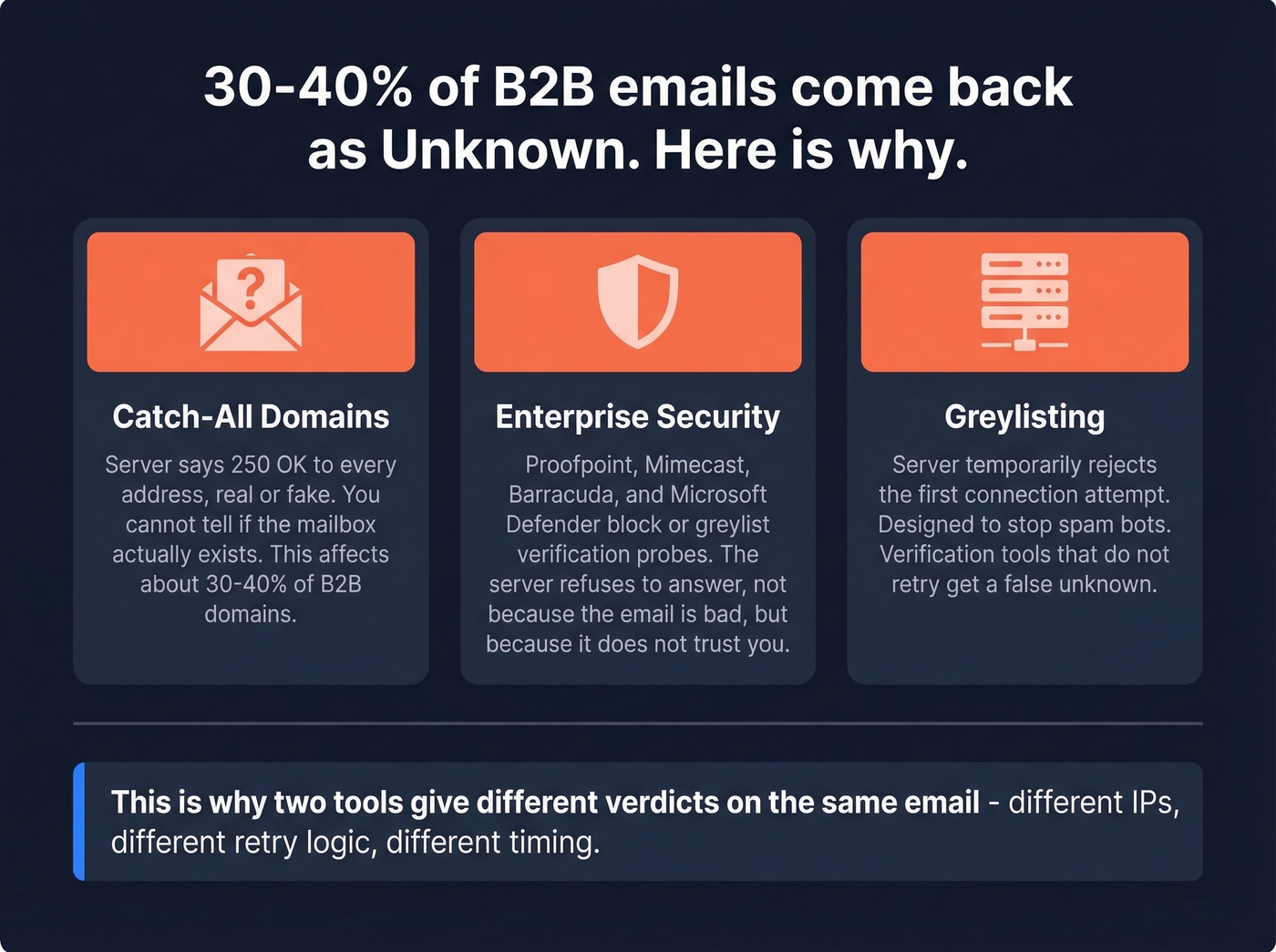
A catch-all server returns "250 OK" for every address, real or fake. The SMTP handshake can't distinguish between the CEO's actual inbox and a completely made-up address. So verifiers return "catch-all," "accept-all," or "unknown" - which is honest, but not helpful when you need to decide whether to send.
Enterprise security makes this worse. Companies running Proofpoint, Mimecast, Barracuda, or Microsoft Defender often block or greylist SMTP verification probes entirely. The server doesn't reject the address - it just refuses to answer the question. That's another bucket of "unknown" results that have nothing to do with the email being invalid. This is why two tools can give you different verdicts on the same email: they're using different sending infrastructure, different IP reputations, different retry logic, and different approaches to catch-all handling. Threads on r/coldemail surface frustration with exactly this inconsistency.

Prospeo doesn't just check if an email is valid - it runs a 5-step verification with catch-all handling, spam-trap removal, and honeypot filtering. That's why teams using Prospeo see bounce rates drop from 35% to under 4%, with 98% email accuracy across 143M+ verified addresses.
Pay $0.01 per verified email. Only pay for valid results.
How to Read Verification Results
Every verifier returns slightly different labels, but they map to the same decision framework:
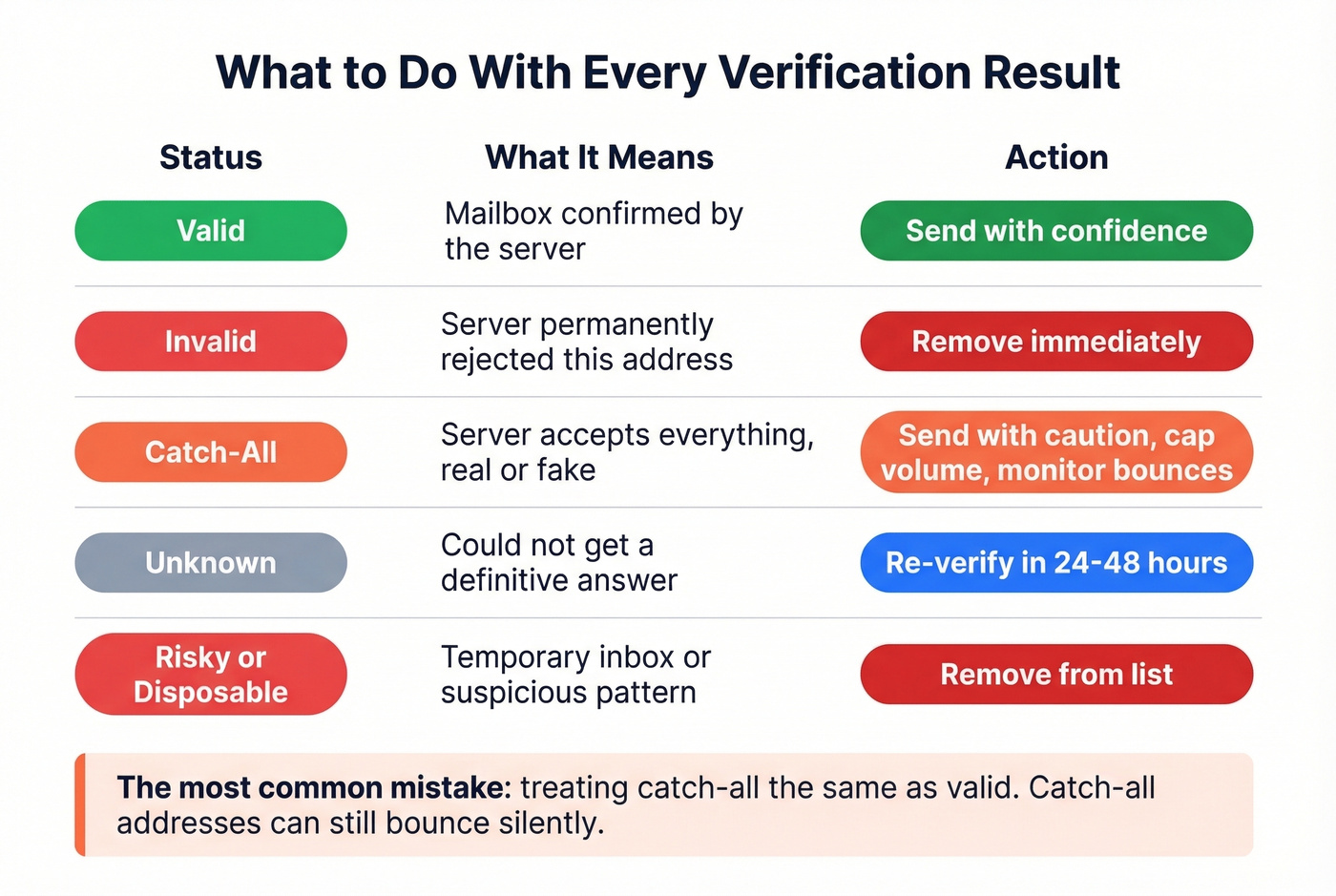
| Status | What It Means | What to Do |
|---|---|---|
| Valid | Mailbox confirmed | Send |
| Invalid | Server rejected | Remove immediately |
| Catch-all | Server accepts everything | Send with caution, cap volume |
| Unknown | Couldn't determine | Re-verify in 24-48 hrs |
| Risky/Disposable | Temporary or suspicious | Remove |
The critical mistake is treating catch-all the same as valid. They're not. Catch-all addresses can still bounce - the server accepted the probe but may silently discard the actual email. If you're sending to a large catch-all segment, throttle your volume and monitor bounces closely.
Unknown results deserve a second pass. Wait 24-48 hours and re-verify - greylisting is temporary by design, and a different verification window often produces a definitive answer.
Why Verifying Matters More Than You Think
Bounce rate thresholds are tighter than most teams realize:
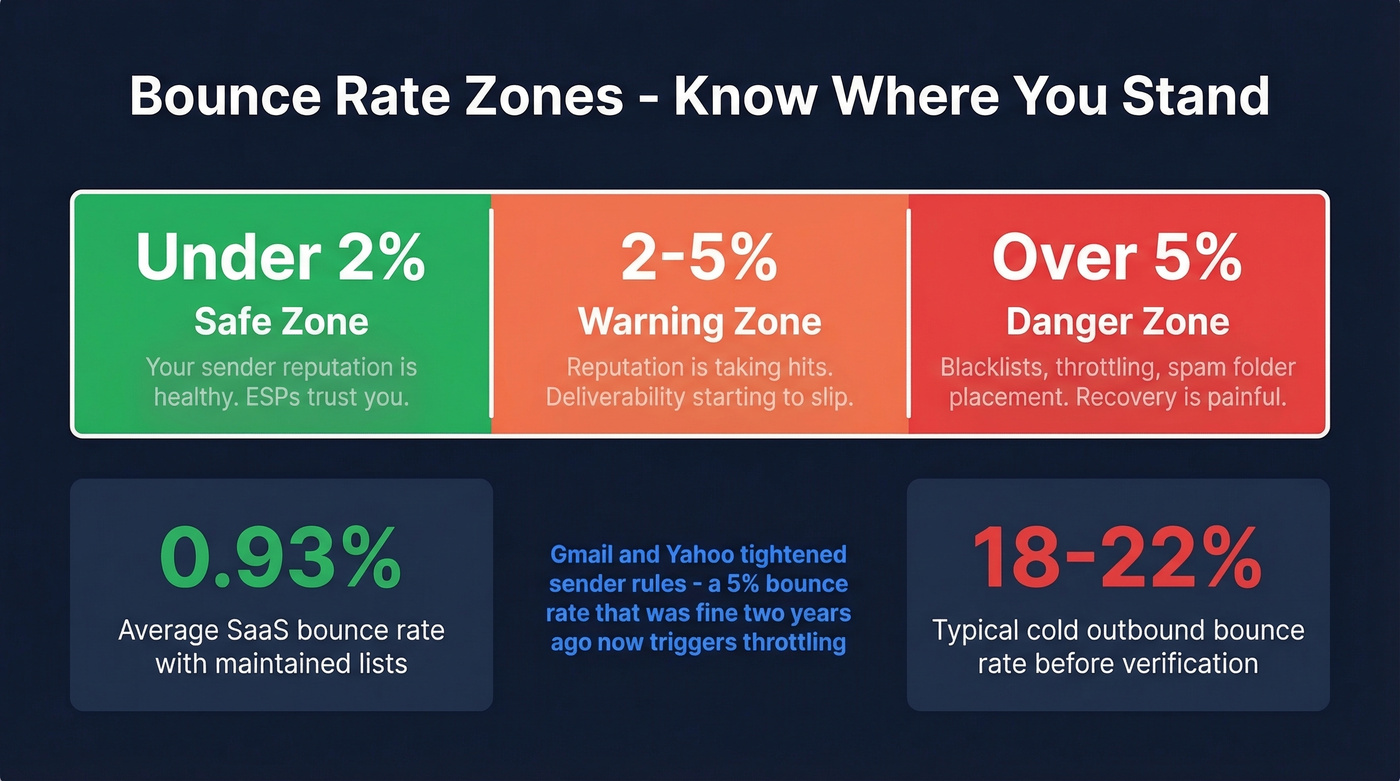
- Under 2%: Safe.
- 2-5%: Warning zone. Your sender reputation is taking hits.
- Over 5%: Critical. You're risking blacklists and deliverability collapse.
For context, clean ESP benchmarks show ecommerce averaging 0.29% and SaaS at 0.93%. Those are established senders with maintained lists. Cold outbound is a different story - one user on r/salestechniques reported 18-22% bounce rates before verification, dropping to roughly 7% after running lists through a verifier.
Gmail and Yahoo tightened sender rules in recent years, raising the stakes further. Google recommends reducing send volume when bounce and deferral errors spike. A 5% bounce rate that was "fine" two years ago can now trigger throttling or spam folder placement.
Look - if your average deal size is under $15K, you probably don't need a six-figure data platform. But you absolutely need verification. Skipping it to save $50/month is the most expensive mistake in outbound sales.
How Accurate Are Verification Tools, Really?
Many verification tools claim "99% accuracy" on their marketing pages. The actual numbers tell a different story.
A benchmark by EmailTooltester tested 15 verifiers against 3,000 emails - 2,700 real addresses and 300 known invalids. The top performer hit 70% accuracy, and most tools landed in the mid-to-high 60% range. The dataset carries some bias, but the takeaway stands: the gap between marketing claims and real-world performance is enormous.
We've run the same list through multiple tools and gotten wildly different verdicts. Accuracy drops further on enterprise domains, where stricter mail server configurations, aggressive firewalls, and catch-all setups are the norm. The emails that matter most - decision-makers at target accounts - are the hardest to verify accurately.
Prospeo's 5-step verification process includes catch-all handling, spam-trap removal, and honeypot filtering - the layers that trip up tools relying on basic SMTP alone. The result is 98% email accuracy. Meritt went from 35% bounce rates to under 4%, and Snyk dropped from 35-40% to under 5% across 50 AEs.
Best Tools to Verify Email Addresses
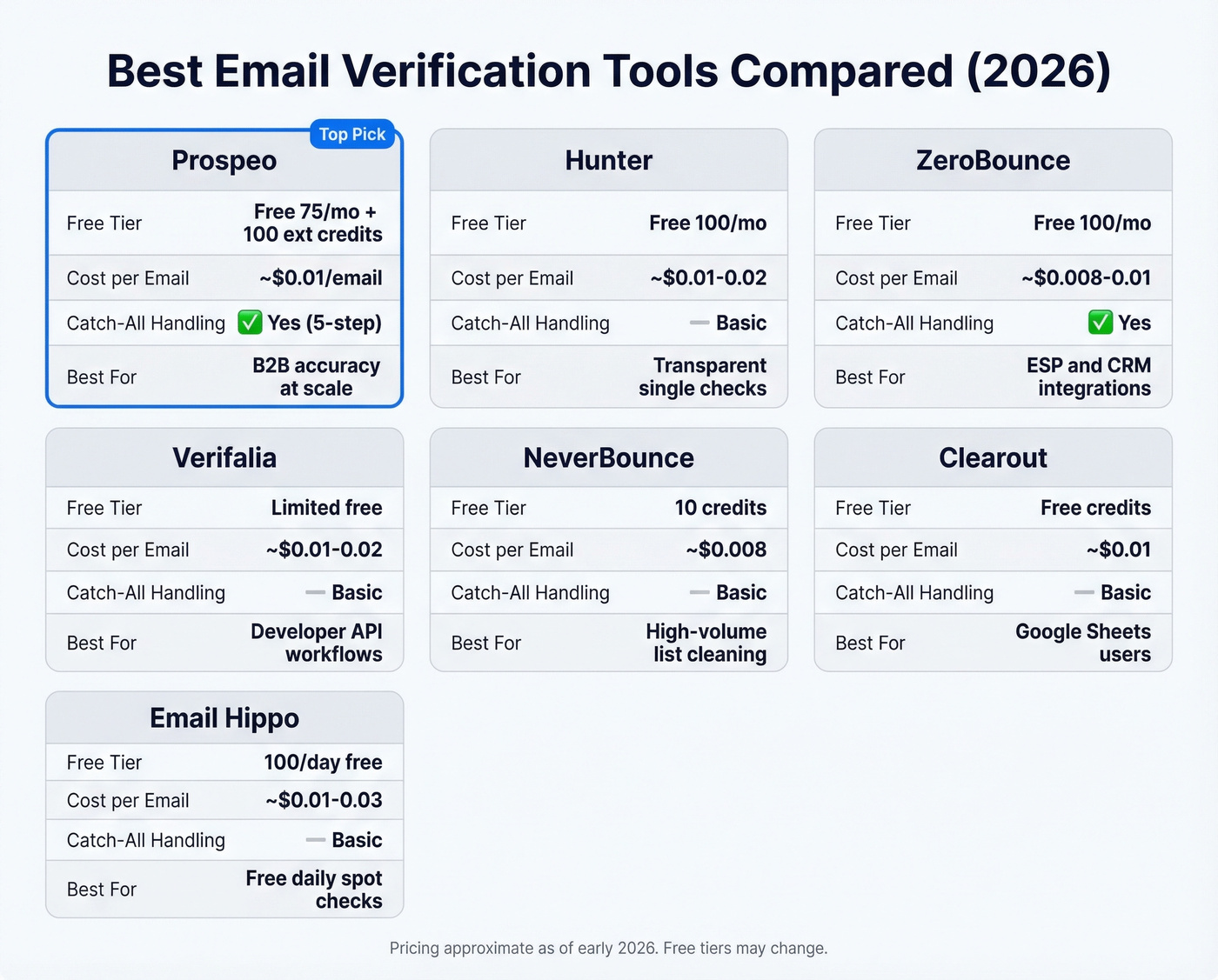
| Tool | Free Tier | ~Cost/Email | Catch-All Handling | Best For |
|---|---|---|---|---|
| Prospeo | 75/mo + 100 ext. credits | ~$0.01 | Yes (5-step) | B2B accuracy at scale |
| Hunter | 100/mo (free plan) | ~$0.01-0.02 | Basic | Transparent single checks |
| ZeroBounce | 100/mo | ~$0.008-0.01 | Yes | ESP/CRM integrations |
| Verifalia | Limited free | ~$0.01-0.02 | Basic | Developer API workflows |
| NeverBounce | 10 credits | ~$0.008 | Basic | High-volume list cleaning |
| Clearout | Free credits available | ~$0.01 | Basic | Google Sheets users |
| Email Hippo | 100/day | ~$0.01-0.03 | Basic | Free daily spot-checks |
Prospeo
Use this if you're running B2B outbound and can't afford bounces tanking your domain. Prospeo's 5-step verification with catch-all handling, spam-trap removal, and honeypot filtering delivers 98% email accuracy - meaningfully above the mid-to-high 60% range most tools actually achieve. The proprietary email-finding infrastructure doesn't rely on third-party providers, which means fresher data and fewer stale results. A 7-day data refresh cycle reinforces that - you're not verifying against records that are weeks old.
The Chrome extension has 40,000+ users for a reason: it makes one-off prospecting verification seamless. Free tier gives you 75 emails/month plus 100 extension credits, and paid plans run ~$0.01/email with no contracts. For teams that have been burned by bad data from other providers, this is the reset button.
Skip this if you only need to check one address once a month and don't care about catch-all handling.
Hunter

Hunter's biggest strength is transparency. They published their own benchmark data showing a 70% accuracy ceiling - which, in a market where everyone claims 99%, tells you they take honesty seriously. You can try the verifier for free without signing up, and the free plan includes up to 100 verifications/month. Paid plans start around $49/mo, the interface is clean, and the API is well-documented.
The tradeoff is accuracy on enterprise domains. That benchmark means roughly 3 out of 10 emails get an inconclusive or incorrect verdict. For quick single checks on common domains, Hunter is excellent. For bulk B2B lists heavy on catch-all domains, you'll want deeper verification - especially if you're running cold outbound at scale.
ZeroBounce
ZeroBounce shines when your stack matters as much as your data. It connects to most major ESPs and CRMs out of the box, and its AI-based email scoring adds a useful layer beyond binary valid/invalid for borderline addresses. 100 free verifications/month at signup with a business/premium domain, ~$0.008-0.01/email at volume.
Watch out for: the free tier requires a business email to sign up, which filters out casual testers. Catch-all detection is solid but not as granular as a dedicated 5-step process.
Verifalia
A developer-friendly option with a real-time API and a clean interface for single checks. Paid plans typically run ~$0.01-0.02/email. Good for building verification into custom workflows or running a quick one-off check with minimal setup.
NeverBounce
Built for volume. Only 10 free credits - barely a test drive - but pricing drops to ~$0.008/email and gets cheaper at scale. If you're verifying six-figure lists regularly and price-per-email is your primary concern, NeverBounce deserves a look. Expect more "unknown" results on B2B lists due to basic catch-all handling.
Clearout
Clearout's Google Sheets add-on makes it the easiest option for non-technical users who live in spreadsheets. ~$0.01/email after the free credits.
Email Hippo
100 free checks per day - generous for individual use. Verification is basic with no advanced catch-all detection, and paid pricing runs ~$0.01-0.03/email. Fine for spot-checking, not for production workflows.
Tired of "unknown" results eating a third of your list? Prospeo's proprietary email infrastructure resolves catch-all domains that other tools punt on. Data refreshes every 7 days - not 6 weeks - so you're verifying against current mailbox states, not stale records.
Get definitive answers where other verifiers return question marks.
Can You Verify Manually?
Yes, technically. Here's the process:
nslookup -q=mx targetdomain.com
This returns the domain's mail exchange server. Then:
telnet mx.targetdomain.com 25
EHLO mydomain.com
MAIL FROM:<test@mydomain.com>
RCPT TO:<john@targetdomain.com>
If the server responds with a 550 error, the mailbox doesn't exist. A 250 response means it probably does - unless it's a catch-all domain, in which case 250 means nothing.
The VRFY command exists in the SMTP spec for exactly this purpose, but almost no server supports it anymore - it was disabled industry-wide as an anti-spam measure. Manual verification breaks down at any real scale. Anti-enumeration protections will block your IP after a handful of checks, greylisting will reject your first attempt, and your IP reputation will crater from raw SMTP connections. It's a useful learning exercise, not a production workflow.
If you're trying to check if an email exists (not just whether it looks valid), you'll run into the same catch-all and greylisting limitations.
Mistakes That Kill Deliverability
Treating catch-all as valid. A catch-all domain accepts every address - including ones that don't exist. Sending to the full catch-all segment at full volume is how you spike your bounce rate overnight.
Verifying once and never again. Email lists decay. After 4 weeks, roughly 2% of a verified list becomes invalid as people leave jobs, domains change, and mailboxes get deactivated. Re-verify before every major campaign, monthly at minimum.
Skipping verification before large sends. We've seen teams import 20,000 contacts from a trade show, dump them into a sequence, and wonder why their domain got blacklisted three days later. Verify first. Always. Knowing how to check if an email ID is valid before hitting send is the bare minimum for protecting your domain.
Using a tool without catch-all detection. If your verifier marks catch-all addresses as "valid," you're flying blind on 30-40% of your B2B list. This is the single most common reason teams get burned by tools that look fine on paper.
If you're already seeing issues, use email reputation tools and follow a full email deliverability guide to recover.
FAQ
How do I check if an email ID is valid for free?
Hunter lets you verify a single address without signing up, and its free plan includes 100 verifications per month. ZeroBounce provides 100/month with a business email signup, Email Hippo offers 100/day, and Prospeo's free tier gives 75 monthly verifications with full catch-all handling. Manual SMTP verification via telnet is possible but unreliable at scale.
How do I verify email addresses in bulk?
Upload your list to a bulk verification service. These tools run the full SMTP handshake against every address and return a status for each. For B2B lists, prioritize a tool with catch-all detection - otherwise a third of your results will come back inconclusive.
Why do different tools give different results for the same email?
Each tool uses different sending infrastructure, IP addresses, retry logic, and catch-all handling. A tool with better IP reputation gets a definitive answer from a server that blocks a competitor's probe entirely. Different timeout settings and greylisting strategies also produce divergent results.
How often should I re-verify my email list?
Re-verify before every major campaign, and monthly at minimum for active lists. Lists lose roughly 2% validity every four weeks as people change jobs and mailboxes get deactivated. Stale data is the top cause of preventable bounces.
What's the difference between email validation and verification?
Validation checks format and syntax - does the address look right? Verification goes further, confirming the mailbox actually exists by communicating with the recipient's mail server via SMTP. Validation catches typos; verification catches dead mailboxes. To reliably check if an email ID is valid, you need verification, not just validation.