

How to Check If an Email Is Real - And Why Most Tools Get It Wrong
You uploaded 5,000 leads into your sequencer, hit send, and watched the bounce rate climb past 8% by lunch. Your ESP flagged the domain. Three weeks of warming - gone.
That scenario plays out constantly, and it's almost always preventable. The industry rule is simple: keep total bounces under 2%, hard bounces under 1%. Everything below explains how to check if an email is real before you hit send - and actually hit those numbers.
What You Need (Quick Version)
Three paths, depending on where you are right now:
Verify one address free, right now. Use Email Hippo or Mailmeteor. Instant for spot-checking a handful of addresses before you fire off a manual email.
Verify a list in bulk on a budget. MillionVerifier at ~$3.70 per 1,000 emails is the cheapest credible option. NeverBounce at $8/1K is more established and slightly more conservative in its classifications.
The right path depends on whether you already have a list or you're building one.
How Email Verification Works
Every verification tool - free or paid - runs the same basic pipeline. The differences are in how they handle the edge cases. Here's the five-step process your email goes through.
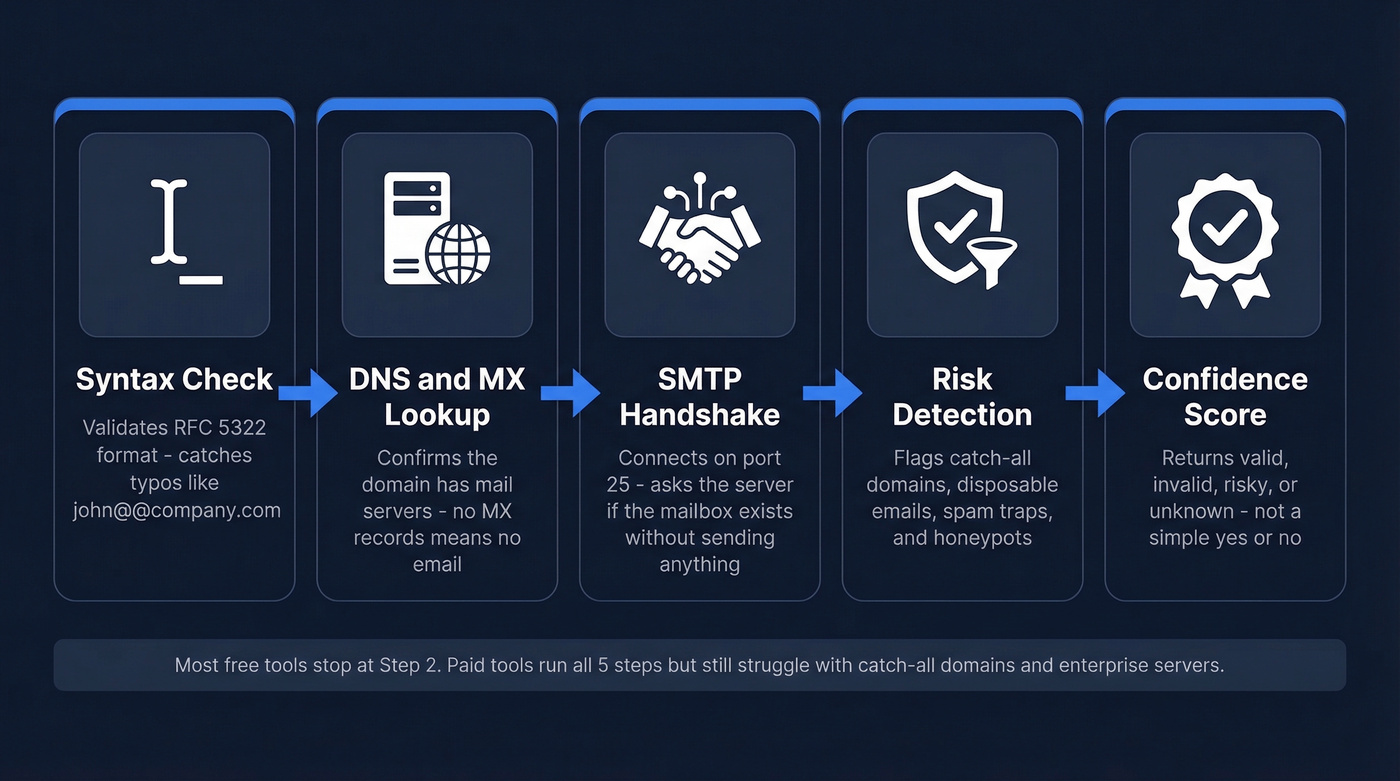
Syntax and Format Check
The tool parses the address against RFC 5322 formatting rules. Does it have an @ symbol? Is the local part valid? Are there illegal characters? This catches typos like john@@company.com or john company.com, but it proves absolutely nothing about whether the mailbox exists. Think of it as a spelling check, not a fact check.
DNS and MX Record Lookup
Next, the tool checks whether the domain actually exists and can receive email. Here's where cheap tools get it wrong: some check A records (the website's IP address) instead of MX records (the mail server's address). A domain can have email without having a website, and vice versa. The correct check is an MX record lookup - if no MX records exist, the domain can't receive mail, and the address is dead.
The SMTP Handshake (RCPT TO)
This is the decisive step, and no email is actually sent. The verifier opens a connection to the mail server on port 25 and runs through a handshake sequence:
- EHLO - introduces itself to the server
- MAIL FROM - declares a sender address
- RCPT TO - asks "does this specific mailbox exist?"
A 250 response means the server acknowledges the mailbox - likely valid. A 550 means the mailbox doesn't exist. The connection closes without delivering anything. It's the digital equivalent of knocking on a door to see if anyone's home, then walking away.
Modern verification probes also negotiate STARTTLS encryption during the handshake, and the most sophisticated tools layer in historical bounce and engagement data on top of the SMTP response. An SMTP probe tells you the server accepted the address - engagement data tells you someone actually reads mail there. That second signal is far more reliable.
Why Verification Isn't Perfect
That five-step pipeline sounds clean, but real-world mail servers don't cooperate. Verification is a confidence score, not a binary answer.
Catch-All Domains
A catch-all domain accepts mail to any address - ceo@company.com, asdfghjkl@company.com, doesn't matter. The server returns 250 for everything. Verifiers can't confirm whether a specific mailbox is actually active on these servers, so they mark results as "risky" or "accept-all." Most tools offer zero guidance on what to do with these results, which is frustrating when 20-30% of your list falls into this bucket.
Greylisting and Rate Limiting
Some servers deliberately reject the first connection attempt to filter out bots. If the verifier doesn't retry, a perfectly valid email gets marked as unknown.
The technical distinction matters: temporary SMTP codes (450, 451, 452) mean "try again later," while permanent codes (550-553) mean "this mailbox is dead." Cheap verifiers often treat temporary failures as permanent ones, inflating your invalid count and costing you reachable contacts.
Anti-Enumeration by Enterprise Servers
Large organizations like Microsoft 365 and Google Workspace have gotten wise to verification probes. Their servers deliberately return ambiguous responses - accepting all RCPT TO commands regardless of whether the mailbox exists - specifically to prevent outsiders from enumerating valid addresses. This is why enterprise domains are the hardest to verify and why tools that claim 99% accuracy on Fortune 500 contacts are bluffing.
Disposable and Temporary Emails
Disposable email services like Guerrilla Mail and Mailinator create addresses that work for minutes or hours, then vanish. Good verifiers detect disposable domains and common patterns associated with temporary providers. If you're verifying signup forms or inbound leads, this check is critical - a disposable address will pass SMTP verification just fine, then go dead before your follow-up lands. Only a legitimate address tied to a real person's inbox will sustain a multi-touch sequence.
Let's be honest about the bottom line here: verification tells you the probability an email will deliver, not the certainty. Every tool that claims otherwise is oversimplifying.

You just read why no single verification pass is enough - and why catch-all domains, greylisting, and anti-enumeration make 99% accuracy claims hollow. Prospeo's 5-step verification handles all of it: catch-all detection, spam-trap removal, honeypot filtering, and proprietary SMTP infrastructure that doesn't rely on third-party email providers. 98% accuracy, independently measured. $0.01 per email.
Find and verify emails in one step - 75 free credits, no card required.
The Truth About "99% Accuracy"
Almost every verification tool claims 95-99% accuracy. Independent testing tells a different story.
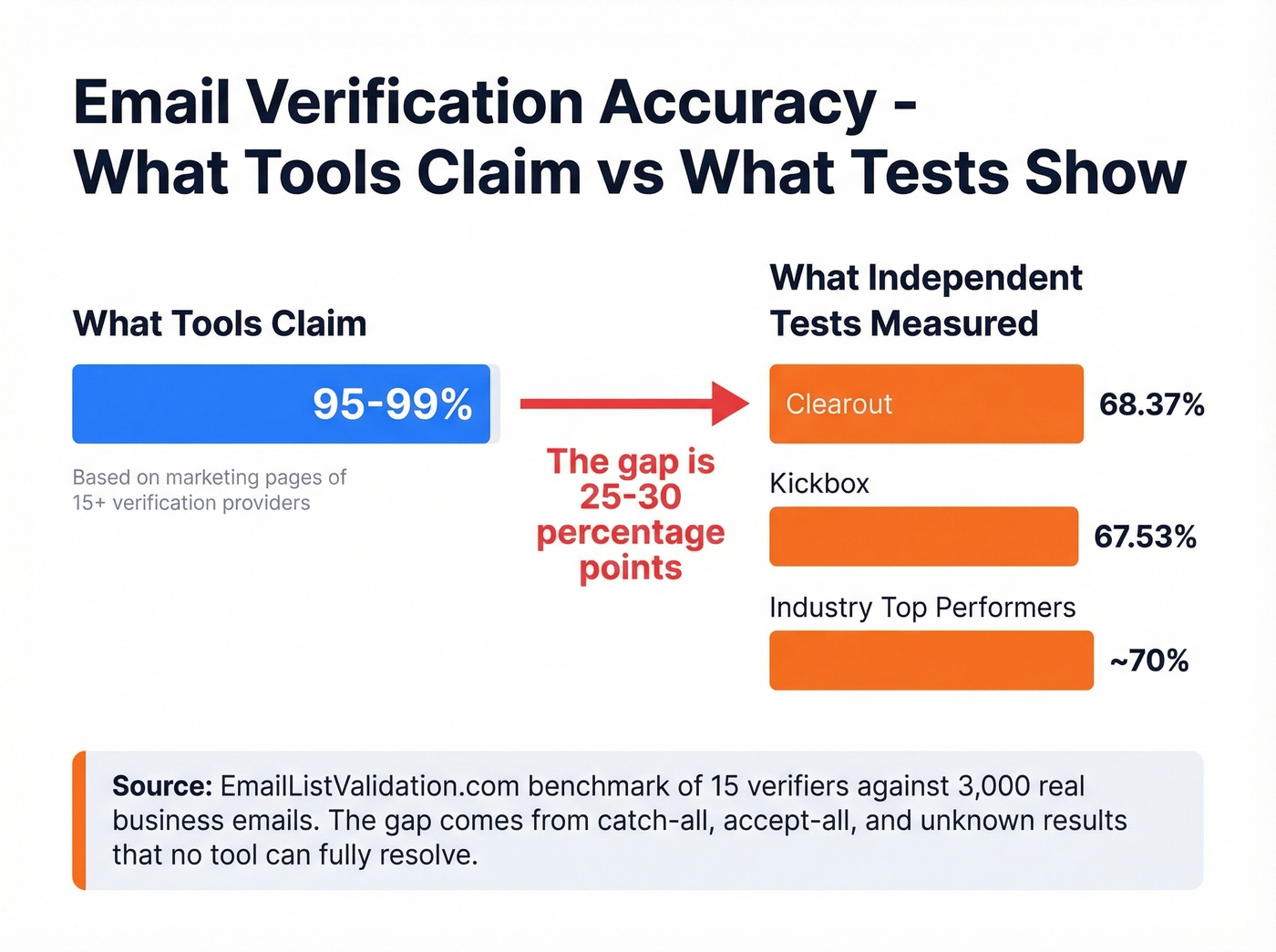
An independent benchmark tested 15 verifiers against 3,000 real business emails. The top performers hit 70% accuracy. Clearout reached 68.37%. Kickbox managed 67.53%. The benchmark's authors acknowledge their own tool may have a home-field advantage - but even so, the gap between "99% claimed" and "70% measured" is damning.
The gap comes from unknown, catch-all, and accept-all results that tools simply can't resolve. No amount of marketing copy changes the underlying limitation.
On the email finder side, Dropcontact ran a 20,000-contact benchmark measuring actual hard bounce rates from live sends. Dropcontact posted a 0.9% hard bounce rate, while FullEnrich hit 3.6%. The spread between tools is massive.
A practitioner on r/EmailProspecting shared results from testing a few thousand enrichments: Apollo and Lusha delivered around 60-70% valid emails, while FullEnrich's waterfall approach - checking multiple providers and verifying before returning a result - pushed accuracy to roughly 90%.
Here's the thing: no single verification pass is enough. If your deal sizes sit above $5K and you're running outbound at any real volume, waterfall enrichment - layering multiple data sources and verifying the output - consistently outperforms any single tool. The teams we've seen burn their domains are almost always the ones who trusted a single provider's "99% accuracy" badge.
Best Tools to Verify an Email Address
| Tool | Cost per 1K | Free Tier | Best For |
|---|---|---|---|
| Prospeo | ~$10 (~$0.01/email) | 75 emails/mo | Find + verify in one step |
| ZeroBounce | $10 | 100/mo | Compliance-heavy teams |
| MillionVerifier | ~$3.70 | None | Budget bulk verification |
| NeverBounce | $8 | 10 credits | Reliable mid-range |
| Hunter | ~$24.50 | 100/mo | Find + verify combo |
| Mailmeteor | Free | 50/mo (Sheets add-on) | Free single checks + Sheets |
| Email Hippo | Free | 100/day | Free single checks |
| Kickbox | ~$5-10 | Limited | Deliverability focus |
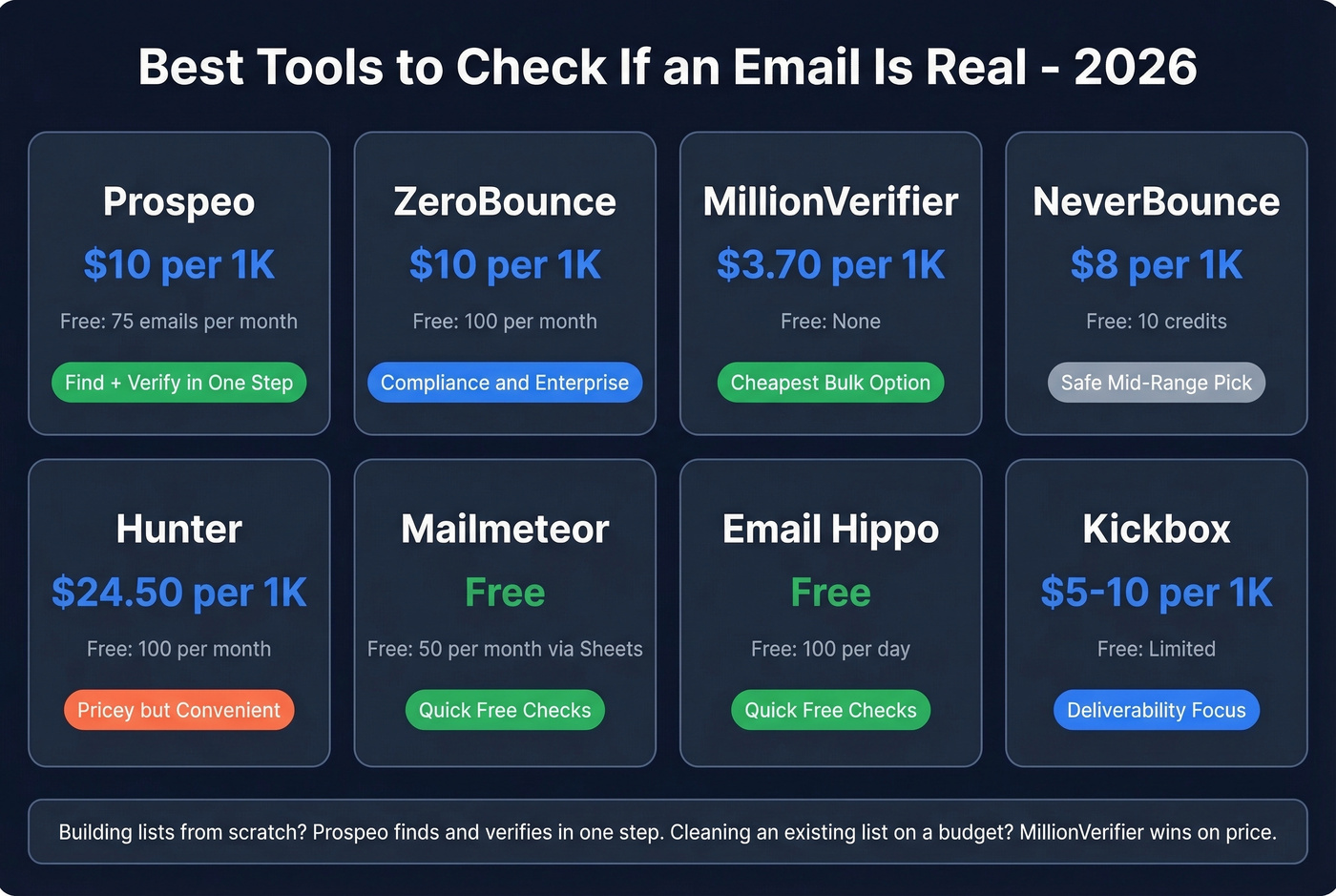
For most outbound teams building lists from scratch, Prospeo eliminates the verification step entirely. For cleaning an existing list on a budget, MillionVerifier is hard to beat.
DeBounce deserves a footnote: it was the cheapest credible verifier at $1.50-2/1K, but it stopped accepting new users. If you already have an account, hold onto it.
For Bulk List Verification
ZeroBounce is the enterprise pick. SOC 2 Type 2, HIPAA, and ISO 27001 certifications make it the default for regulated industries. At $10/1K with a 100-email free tier (when you sign up with a business or premium domain), it's not the cheapest, but compliance-heavy teams don't have a better option. The dashboard gives granular breakdowns - valid, invalid, catch-all, abuse, do-not-mail - which is more useful than the binary valid/invalid most tools return.

Use MillionVerifier if you're verifying large lists and price sensitivity is your primary concern. At ~$3.70/1K, it's the cheapest credible option by a wide margin. Skip it if you need detailed status categories or compliance certifications - it's a volume play, not a precision instrument.
NeverBounce sits in the middle at $8/1K. Solid reputation and a small free tier to test with. It's the safe, boring choice - and sometimes that's exactly what you want.
For Quick Single-Email Checks
Mailmeteor and Email Hippo both offer free single-email verification. Mailmeteor doubles as a Google Sheets add-on, which is handy if your workflow lives in spreadsheets. Email Hippo gives you 100 free checks per day with the quota resetting at midnight UTC. Neither is built for scale, but for spot-checking an address before a manual outreach email, they're perfect.
If you need a deeper workflow than a one-off check, use a check if an email exists process that includes retries and segmentation.
For Find + Verify Combos
Hunter combines email finding and verification in one platform with 100 free verifications per month. The catch: verification costs ~$24.50/1K, which is 2-6x more expensive than standalone verifiers. If you're already paying for Hunter's finder, the built-in verification is convenient. If you're only verifying, you're overpaying.
Kickbox focuses on deliverability prediction rather than just mailbox existence, pricing at ~$5-10/1K depending on volume. Worth evaluating if your primary concern is inbox placement rather than raw verification.

How Often to Re-Verify
Email lists rot faster than most teams realize. Industry data shows roughly 2% of a verified list goes invalid after just four weeks. Professional turnover runs above 40% annually, and 38% of new hires leave within their first year. Every one of those job changes means a dead email address somewhere in your CRM.
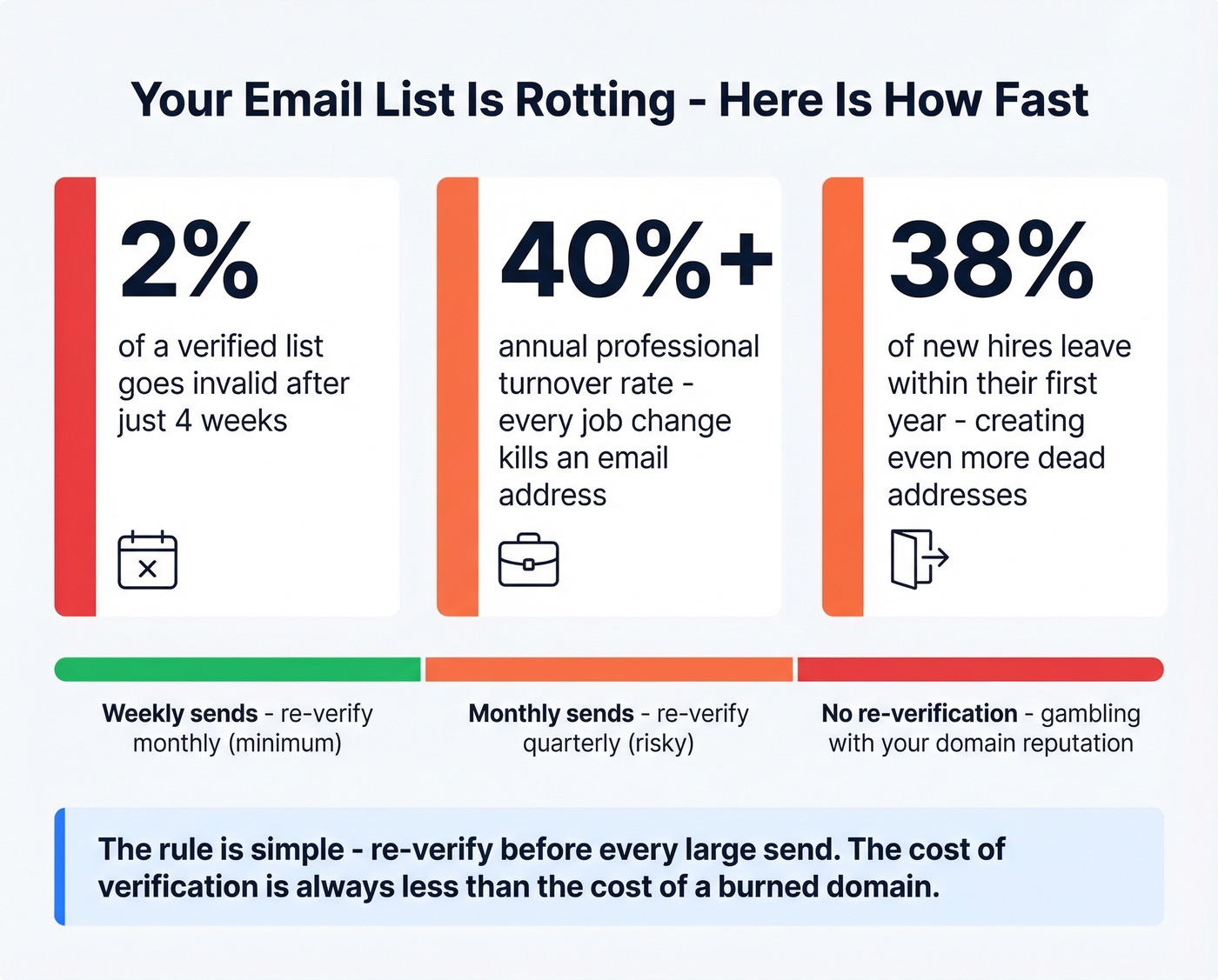
The rule: re-verify before every large send. If you're running weekly sequences, monthly re-verification is the minimum. Quarterly is gambling with your domain reputation.
We've seen lists degrade even faster than 2% per month when targeting high-growth startups with frequent turnover. Series A and B companies churn through SDRs and marketing hires at a pace that makes quarterly verification essentially useless. If your ICP skews toward fast-growing companies, monthly is the floor, not the ceiling.
This is why data freshness matters as much as verification accuracy. A 7-day refresh cycle catches job changes before your sequence hits a dead inbox. The industry average refresh is six weeks - by then, the bounce notification has already done its damage.
If you're sending at scale, pair re-verification with email velocity limits and a clear sequence management policy so you don't spike bounces in a single day.
The benchmark data above shows most tools top out around 70% accuracy. Meanwhile, teams using Prospeo keep bounce rates under 4% and book 35% more meetings than Apollo users. That's the difference between a verification layer bolted on top and a platform built from the ground up on proprietary email-finding infrastructure with a 7-day data refresh cycle.
Stop burning domains on bad data. Start with 75 free verified emails today.
FAQ
Can you check if an email is real without sending a message?
Yes. SMTP verification connects to the recipient's mail server and checks whether the mailbox exists using the RCPT TO command - no message is ever delivered. The server responds with a 250 status code for valid addresses or 550 for nonexistent ones, and the connection closes immediately.
How accurate is email verification really?
Independent benchmarks show 65-70% accuracy for top verifiers - far below the 99% most tools claim. The gap comes from catch-all, accept-all, and unknown results that no tool can definitively resolve. Waterfall enrichment that layers multiple providers consistently outperforms single-tool verification.
How do I check if an email is real for free?
Use Email Hippo (100 free checks per day) or Mailmeteor (50 per month via Google Sheets). Both run the same SMTP handshake as paid tools - syntax check, MX lookup, and RCPT TO probe. Prospeo also offers 75 free verified emails monthly, combining finding and verification in one step.
What does "catch-all" mean in verification results?
A catch-all domain accepts mail to any address, including nonexistent ones, so verifiers can't confirm a specific mailbox is active. Most tools mark these as "risky" or "accept-all." Experienced outbound teams typically send to catch-all results but segment them into separate campaigns with lower daily volume to protect sender reputation.
How often should I re-verify my email list?
Re-verify before every major send. Roughly 2% of a verified list becomes invalid after four weeks due to job changes, domain shutdowns, and account deactivations. For high-volume outbound teams, monthly re-verification is the minimum safe cadence - quarterly is gambling with your deliverability.