

Clickback vs FindThatLead: Which One Do You Actually Need?
Clickback and FindThatLead aren't competitors. They solve fundamentally different problems, and comparing them is like comparing a mailroom to a phone book. Clickback is a cold email sending platform built for purchased B2B lists. FindThatLead is an email finding tool with built-in prospecting and sequences. If you're choosing between them, you've probably misidentified what you actually need.
What Each Tool Actually Does
Clickback is a B2B cold email platform designed for non-permission-based lists. You upload purchased or cold contacts, Clickback cleans them (spam traps, honeypots, dead addresses), and sends campaigns using its own IPs and domains. Its core selling point is compliance - it filters Canadian and European emails to help keep campaigns CASL and GDPR compliant, so you're not accidentally blasting regulated contacts. Clickback also offers a Website Visitor Intelligence product for identifying anonymous site visitors, but the MAIL product is what matters here.
FindThatLead is an all-in-one lead generation suite: Email Finder, Verifier, Prospector with industry and location filters, Chrome Extension, cold email Sender with automated follow-ups, and a lightweight CRM. It positions itself as a full prospecting-to-outreach workflow. That's a lot of surface area for a tool at this price point, and the tradeoff shows up in data quality.
Here's the thing: if your average contract value is under $5K, you almost certainly don't need Clickback's infrastructure. A good email finder paired with a $50/month sending tool will outperform it at a quarter of the cost.
Side-by-Side Comparison
| Clickback | FindThatLead | |
|---|---|---|
| Primary function | Cold email sending | Email finding + outreach |
| Pricing | $300-$600/mo (12-month term) | $37-$75/mo (billed annually) |
| G2 Rating | 4.4/5 (13 reviews) | 4.0/5 (93 reviews) |
| Capterra Rating | 4.6/5 (11 reviews) | Not listed |
| Trustpilot | 3.1/5 (24 reviews) | Not listed |
| Contracts | 12-month agreement | Annual billing |
| Best for | Sending to purchased lists | Email finding + outreach |
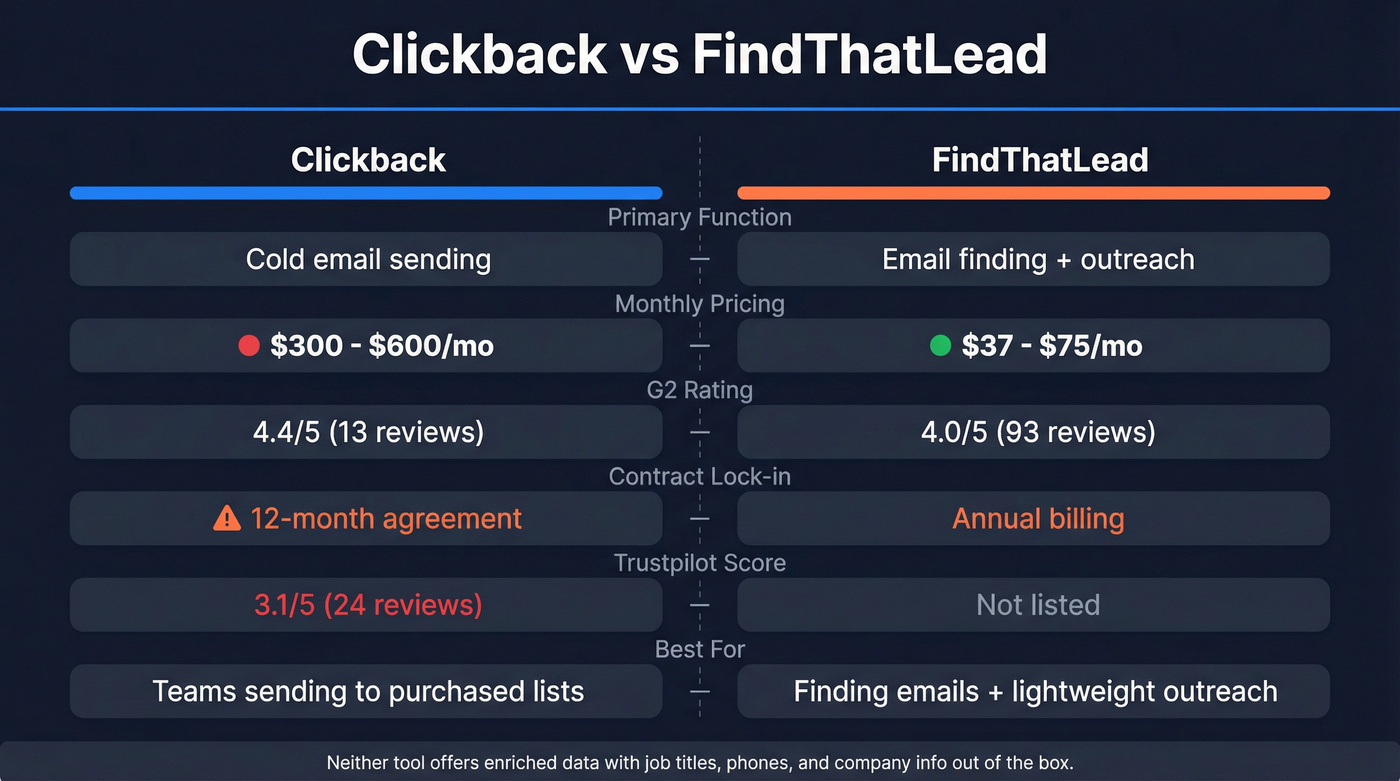
The pricing gap tells the story. Clickback costs 4-16x more because you're paying for dedicated sending infrastructure and IP management. FindThatLead is cheaper because it's primarily a data tool with a lightweight sender bolted on, not a dedicated sending infrastructure product.

Clickback charges $300-$600/mo and locks you into 12 months before you've validated a single deliverability rate. FindThatLead returns emails without names or company data. Prospeo gives you 98% verified emails with 50+ data points per contact - job title, company, phone - at roughly $0.01/email. No contracts. No stitching tools together.
Get the data both tools wish they had - starting at $0.
What Users Actually Complain About
Clickback
The 12-month agreement is the biggest red flag. Trustpilot reviews consistently flag cancellation friction - one reviewer described trying to cancel for months while charges continued. Another reported being offered an early termination fee equal to remaining invoices with a 25% discount. A 2025 review called out an "antiquated interface and low deliverability."
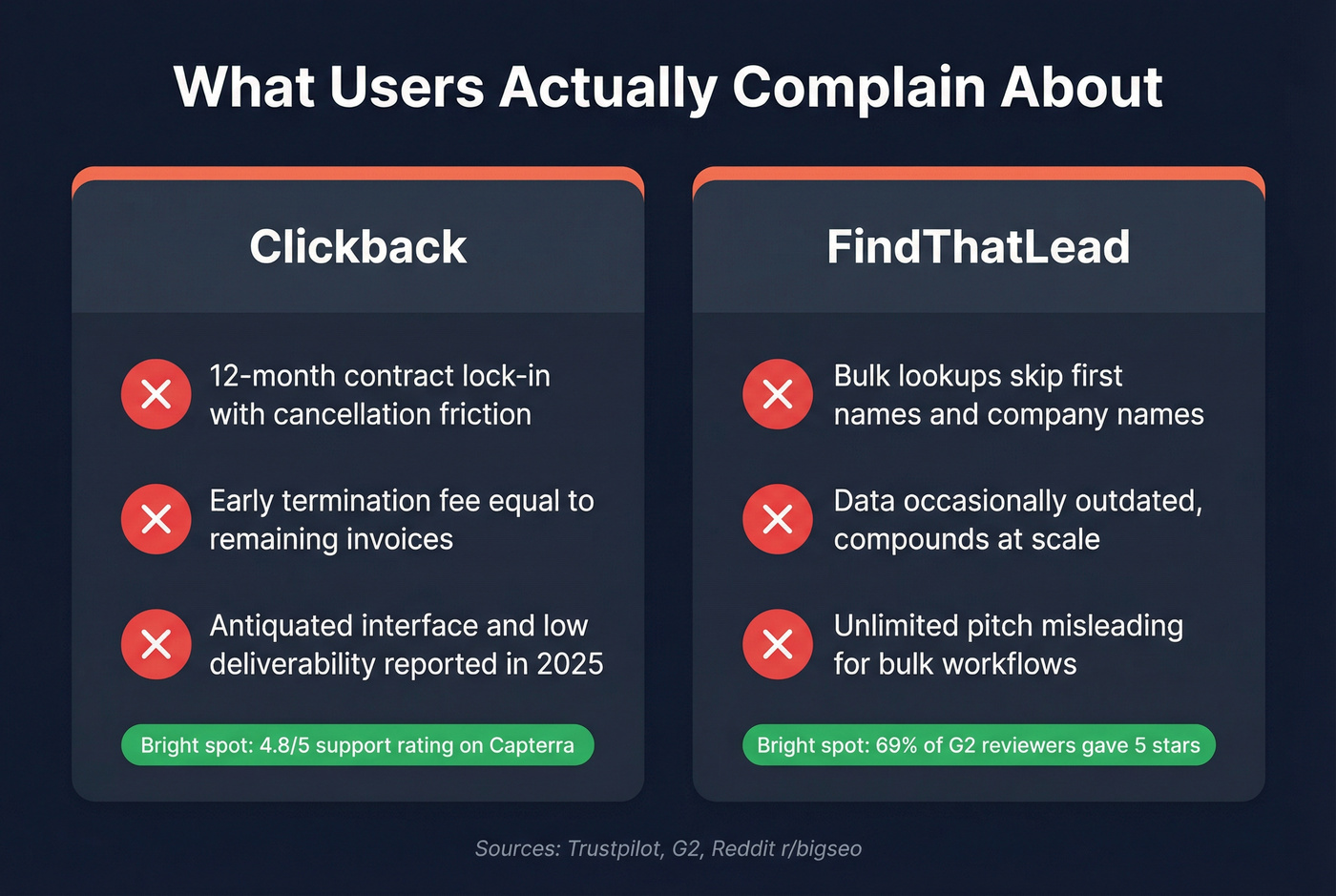
We've seen this pattern across locked-contract platforms: the support team is responsive (Clickback scores 4.8/5 on Capterra for support), but the product creates real friction when you try to leave. If you're a team that tests tools quarterly, a 12-month commitment before you've even validated deliverability rates is a gamble.
FindThatLead
The "unlimited" pitch is where people get frustrated, especially when they try to run bulk workflows.
One practitioner described FindThatLead's bulk URL lookup as costing roughly $0.01/lead, which sounds cheap until you realize those lookups don't return first names or company names. You're paying for emails you can't personalize without manual enrichment. On r/bigseo, one user said they "haven't been happy with the results" for bulk verification. About 69% of G2 reviewers gave it five stars, but the negative reviews cluster around data being occasionally outdated - a problem that compounds fast at scale.
Skip FindThatLead if your workflow depends on enriched records with company data, job titles, and verified phones alongside emails. You'll end up stitching together multiple tools anyway.
A Better Option for Most Teams

Let's be honest - most teams searching for either of these tools really need two things: accurate email data and a way to send campaigns. Trying to get both from one budget tool usually means you're mediocre at both.
The free tier gives you 75 emails per month. When you're ready to send, Prospeo pushes contacts directly into Instantly, Lemlist, HubSpot, or Salesforce - so your sending tool handles outreach while Prospeo handles the data. One of our customers, Stack Optimize, built from $0 to $1M ARR using this exact split approach, maintaining 94%+ deliverability with bounce rates under 3% across all their clients.
If you want to go deeper on deliverability mechanics (and why list quality matters more than most people think), start with an email deliverability guide and then sanity-check your list against email bounce rate benchmarks.
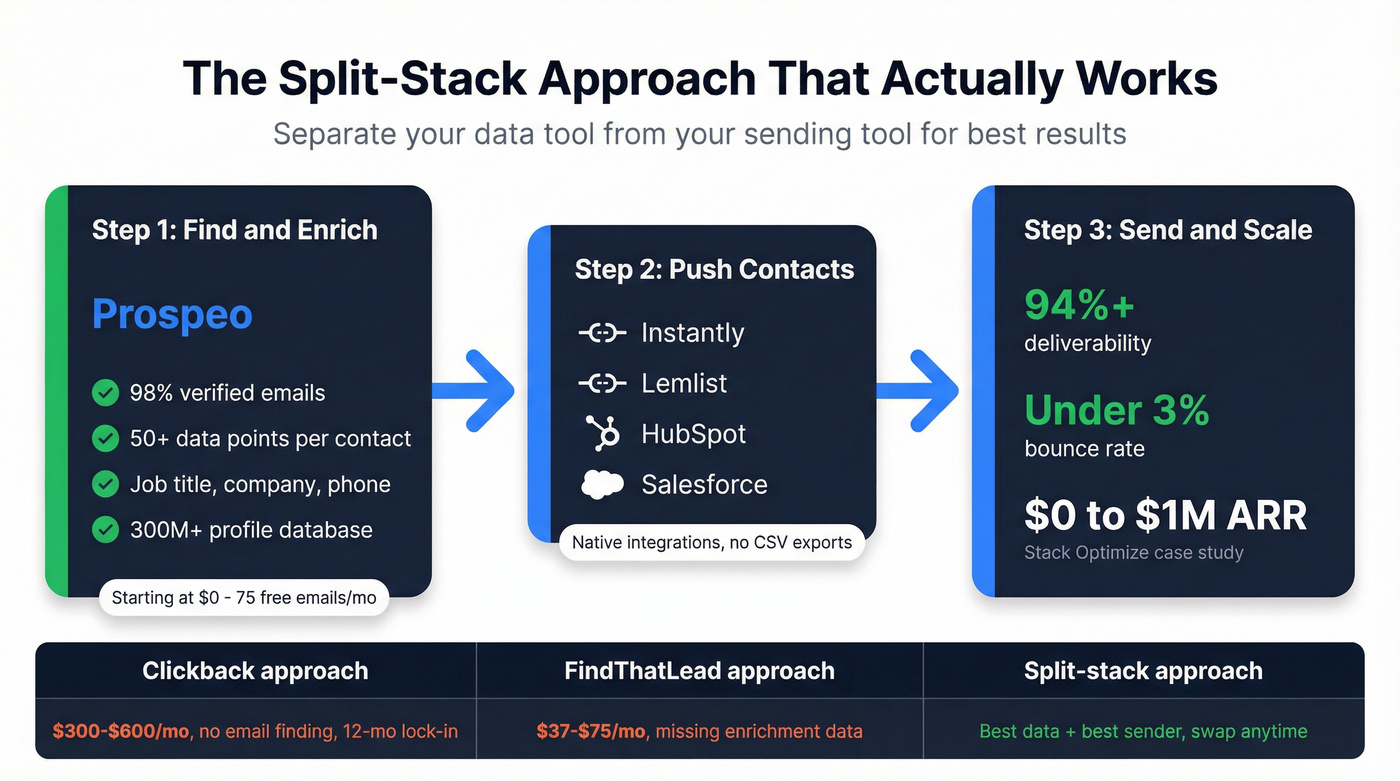
FindThatLead's bulk lookups skip first names and company data. Clickback doesn't find emails at all. Prospeo's 300M+ profile database returns enriched, verified contacts you can push directly into Instantly, Lemlist, or HubSpot - no manual enrichment, no middleman sending infrastructure eating your budget.
75 free emails/month. No credit card, no annual lock-in.
FAQ
Is Clickback an email finder?
No. Clickback is a cold email sending platform for purchased B2B lists. It cleans and sends - it doesn't find addresses.
Does FindThatLead have a free plan?
Not permanently. There's a 7-day free trial with 50 credits. After that, paid plans start around $37/month billed annually.
What's a better alternative to both?
For most teams, a dedicated data platform paired with a standalone sending tool beats either option. Look for 98%+ email accuracy, no annual lock-in, and native integrations with your outreach stack. That combination gives you flexibility to swap sending tools without losing your data pipeline.