

Clodura.AI vs Mails.ai: Honest Comparison (2026)
Comparing Clodura.AI and Mails.ai is like comparing a fishing boat to a grill. One catches the fish, the other cooks it. They don't compete - they solve completely different problems in the outbound stack. But if you're evaluating both, here's what each one does and where the real gaps are.
30-Second Verdict
- Use Clodura.AI if you need a B2B contact database with built-in outreach sequences, enrichment, and a dialer. It finds the people you want to reach.
- Use Mails.ai if you already have a lead list and need a cold email sending engine with unlimited email accounts and warmup. It delivers the message.
- Skip both if you just need verified, accurate contact data without committing to a platform. Prospeo delivers 98% email accuracy with a 7-day data refresh cycle, starts free with 75 emails/month, and feeds directly into whatever sending tool you're already using.
The Core Difference
Clodura.AI is a sales intelligence platform with a 600M+ contact database, waterfall enrichment, org charts for 18M+ companies, and built-in sequences. Mails.ai is a cold email execution platform - closer to Instantly or Smartlead than to any data provider. It connects unlimited email accounts, handles warmup, and rotates inboxes. It has zero contact database. You bring your own list.
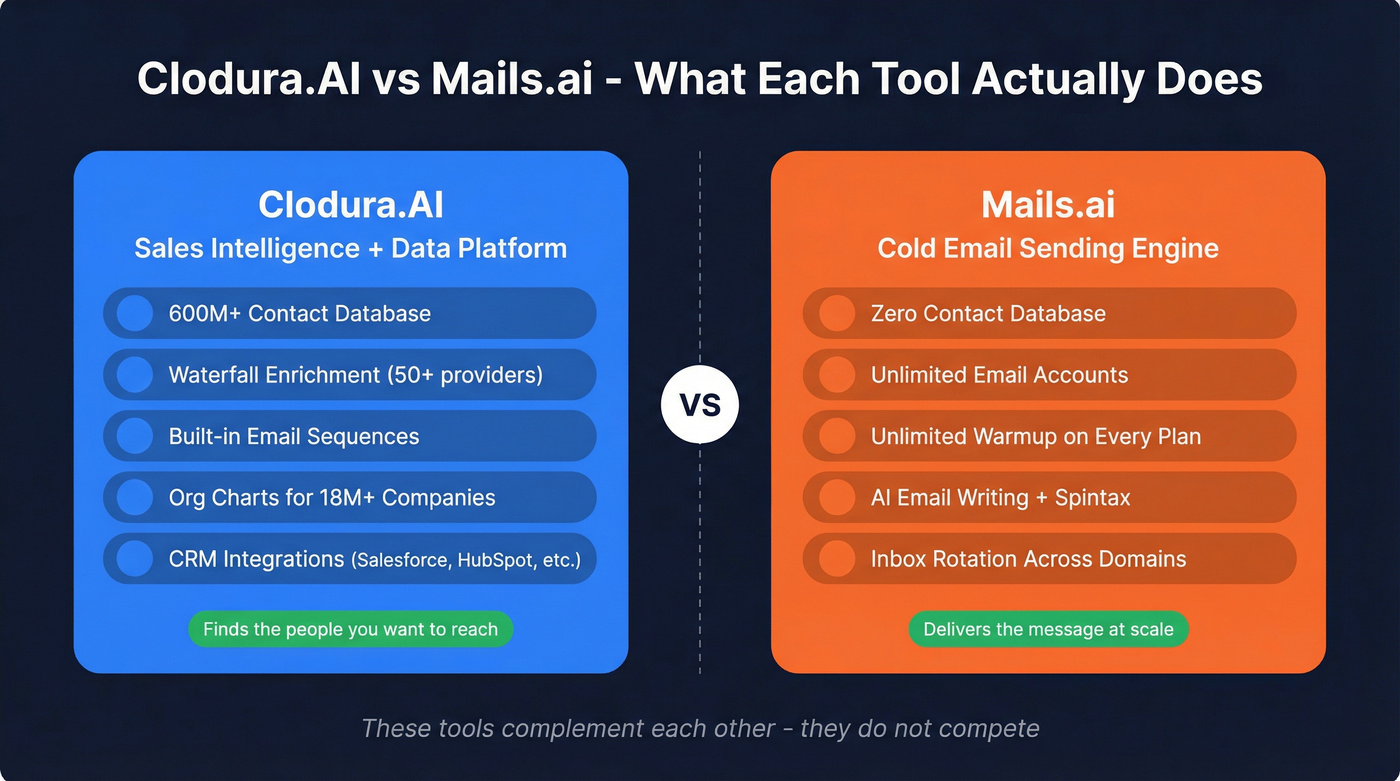
Here's the scenario that trips people up: you've got Mails.ai for sending but no leads to send to, or you've got Clodura for data but want a dedicated sending engine with better inbox rotation. We've seen teams pair these two tools effectively because they complement each other more than they compete.

Clodura's database is massive but reviewers flag outdated records. Mails.ai has no database at all. Prospeo sits between both - 300M+ profiles with 98% email accuracy, refreshed every 7 days, and native integrations with Instantly, Smartlead, and Lemlist to push clean data straight into your sending tool.
Stop burning domains with unverified data. Start with 75 free emails.
Side-by-Side Feature Breakdown
| Feature | Clodura.AI | Mails.ai |
|---|---|---|
| Category | Sales intel + data | Cold email sending |
| Contact database | 600M+ leads | None (bring your own) |
| Email sending | Built-in sequences | Unlimited email accounts |
| Email warmup | Yes (mailbox warmup + deliverability tools) | Yes, unlimited |
| Verification | Waterfall (50+ providers) | 2,000-50,000/mo by plan |
| CRM integrations | Salesforce, HubSpot, Pipedrive, Freshsales, Zoho, Dynamics 365 | Zapier only |
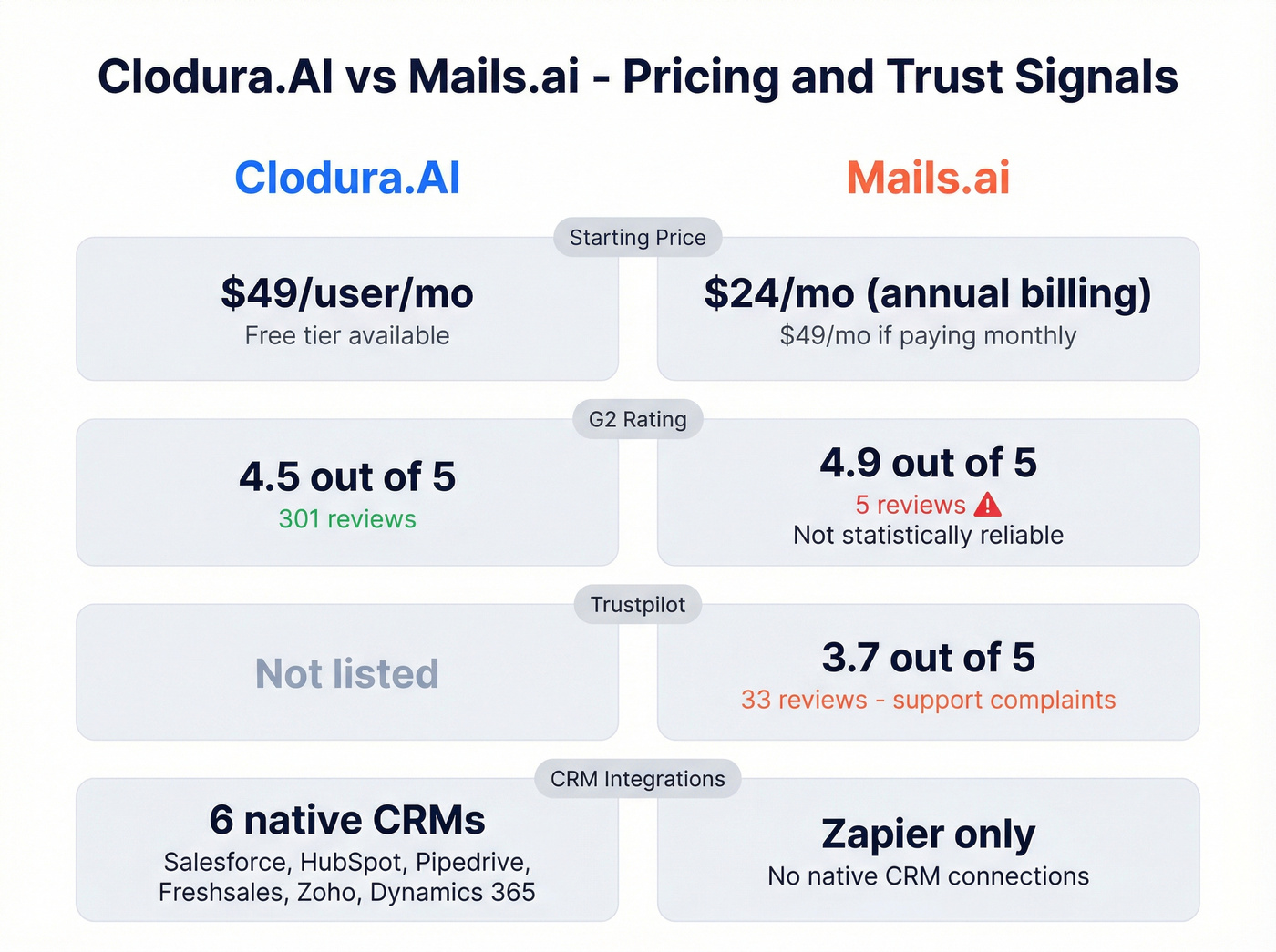
| G2 rating | 4.5/5 (301 reviews) | 4.9/5 (5 reviews) |
| Other review scores | 9.6/10 on TrustRadius | 3.7/5 on Trustpilot (33 reviews) |
| Starting price | Free; paid from $49/user/mo | Free; paid from $24/mo (annual) |
| Best for | Teams needing data + outreach in one platform | High-volume senders who already have a lead list |
What Each Tool Actually Does
Clodura.AI
The 600M+ contact database is the core draw. Search by role, company, tech stack, and buyer intent, then push contacts into built-in sequences or export to your CRM. Waterfall enrichment pulls from 50+ email finder and verifier providers alongside 20+ phone number finder providers, which gives it solid coverage across regions and industries.
An independent test by Sparkle ran 1,529 verified leads through Clodura and got just 28 bounces - roughly 98% deliverability. That's genuinely strong for a database this size.
Across 301 G2 reviews, ease of use is the top theme (73 mentions), followed by lead generation quality (62) and database breadth (54). The platform is GDPR and CCPA compliant, used by 20,000+ GTM teams. On the flip side, 15 reviewers flag inaccurate or outdated data leading to bounces, and 18 mention a learning curve. The platform does a lot, and that complexity shows up during onboarding - expect a week or two before your team is fully comfortable.
Pricing: Free forever tier. Starter at $49/user/month. Enterprise at $99/user/month.
Mails.ai
Mails.ai does one thing: send cold emails at scale without per-inbox fees. Connect as many email accounts as you want, warm them all up automatically, and let inbox rotation distribute sends across domains. AI email writing and spintax help with personalization at volume.

Unlimited email accounts and warmup on every plan - including Free - is the headline feature. For teams running 10+ sending domains, the cost math beats per-seat tools easily.
Now here's where it gets rough. That 4.9 G2 rating comes from five reviews. Five. The Trustpilot score of 3.7/5 from 33 reviews paints a much clearer picture, with recurring complaints about unresponsive support and cancellation friction. Reddit users on r/coldemail report that support goes silent after purchase and that you can't cancel self-serve - you have to email support for a Stripe portal link. Making customers email support to cancel, when support is already known for being unresponsive, is a serious red flag.
Multiple Trustpilot reviewers also report the warmup feature "does nothing" and led to blacklisting. The free plan doesn't allow custom tracking domains either, which can hurt deliverability from day one.
Pricing: Free (unlimited accounts + warmup, 0 contacts). Startup $49/mo or $24/mo annually (1,000 active contacts, 2,000 verifications). Growth $99/mo or $49/mo annually (5,000 contacts, 10,000 verifications). Pro $199/mo or $99/mo annually (unlimited contacts, 50,000 verifications). That "$24/mo" price you see everywhere requires a full year commitment upfront.
The Verification Gap
Neither tool fully solves data accuracy. Clodura has a massive database, but reviewers consistently call out outdated records. Mails.ai has no database at all - if your imported list is dirty, you're burning domains.
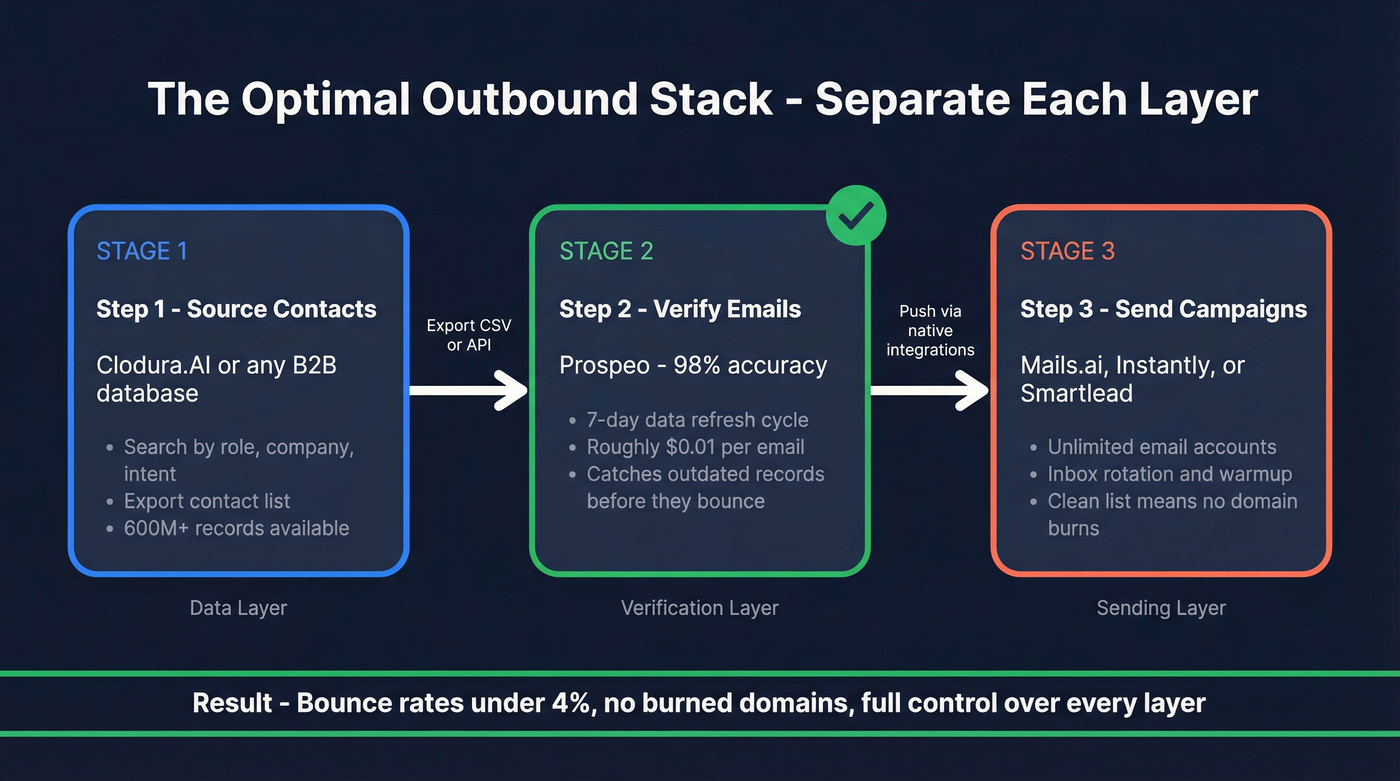
This is where a dedicated verification layer matters. We've tested the workflow ourselves: export from Clodura, verify through Prospeo at roughly $0.01 per email, then load clean contacts into Mails.ai or any sending platform. Native integrations with Instantly, Smartlead, Lemlist, HubSpot, and Salesforce handle the handoff automatically, so there's no manual CSV juggling.
If you want to go deeper on deliverability mechanics, start with email deliverability and the basics of email bounce rate.

Let's be honest about the all-in-one pitch. If your average deal size is under five figures, you probably don't need Clodura's full platform. Source contacts from a dedicated data tool, verify them, and send through whatever sending platform you prefer. The all-in-one tax isn't worth it for smaller contracts, and separating data sourcing from sending gives you more control over each layer of your stack.
That separation also makes it easier to manage email velocity and avoid deliverability issues caused by bad list hygiene.
At ~$0.01 per email, verifying your entire Clodura export through Prospeo costs less than a single bounced-domain recovery. Teams using Prospeo-verified lists see bounce rates under 4% - the same accuracy Sparkle's independent test found, but with a 7-day refresh cycle no all-in-one platform matches.
Clean data in, clean campaigns out. No contracts, cancel anytime.
FAQ
Can I use Clodura.AI and Mails.ai together?
Yes, and they pair naturally since they solve different problems. Use Clodura to find and export contacts, verify them through a tool like Prospeo, then load the clean list into Mails.ai for campaign execution. In our experience, teams that separate data sourcing from sending consistently get better deliverability than those relying on one platform for everything.
Is Mails.ai's G2 rating reliable?
No. Five reviews don't tell you anything statistically meaningful. The Trustpilot score of 3.7/5 from 33 reviews is a much better signal, with recurring complaints about unresponsive support and cancellation friction. Weight the Trustpilot data more heavily when evaluating this tool.
What's the cheapest way to get verified B2B emails?
Prospeo offers verified emails at roughly $0.01 each with a free tier of 75 emails per month - no contracts, cancel anytime. Clodura's free plan includes limited credits but gives you database access. Mails.ai doesn't provide contact data at all, so you'll need a separate data source regardless of which sending tool you choose.