


ContactOut vs MailMerge365: Different Tools, Different Jobs
Your marketing coordinator asks you to send 500 personalized emails from Outlook. You start searching, and somehow you're comparing ContactOut vs MailMerge365 - a $99/month email finder against a ~$200/year Outlook add-in. These aren't the same category of product. ContactOut finds contact data and lets you run basic sequences. MailMerge365 sends personalized campaigns from your Outlook inbox. Let's break down what actually matters.
30-Second Verdict
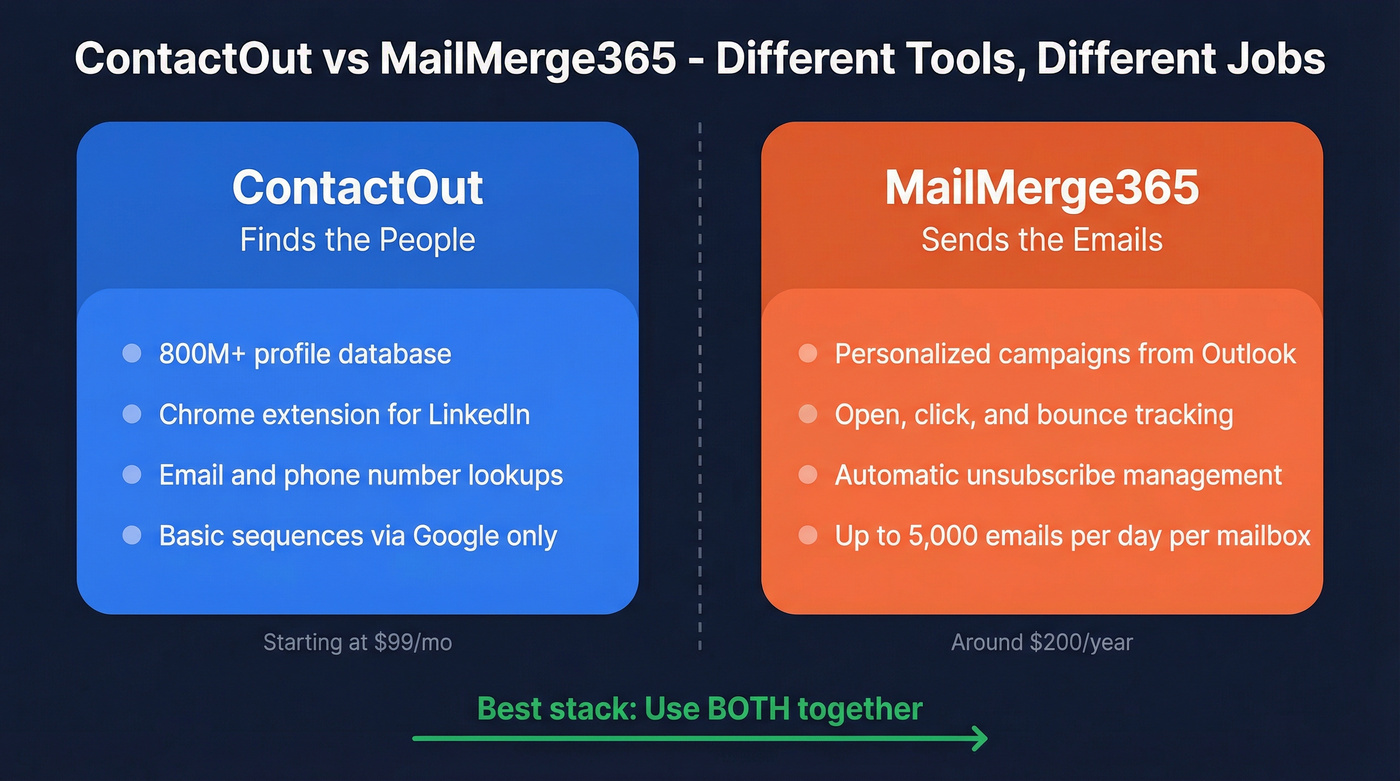
ContactOut is a B2B email and phone finder with an 800M+ profile database and a basic mail merge feature that connects via a Google email account. MailMerge365 is a dedicated Outlook mail merge add-in with zero contact data. They solve different halves of the same problem.
What Each Tool Does
ContactOut
ContactOut is a contact data platform first, campaign tool second. Its database covers 800M+ profiles, and the Chrome extension pulls emails and phone numbers while you browse professional profiles or company websites.
The built-in mail merge connects via a Google email account and supports multi-touch sequences with open and reply tracking. You can upload CSVs, use personalization placeholders, and schedule sends. Despite "unlimited" email claims on higher tiers, fair-use caps limit lookups to roughly 91 per day. It's a data tool that bolted on campaign features - not the other way around.

MailMerge365
Microsoft's shift to the new Outlook has broken traditional Word mail merge for some users, pushing teams toward dedicated add-ins like MailMerge365. It works across Outlook on the Web, Windows, and Mac.
Upload a spreadsheet, drop in personalization tokens, and send campaigns directly from your personal mailbox. You get open and click tracking, bounce detection, automatic unsubscribe management, and the ability to send follow-ups only to non-responders. Microsoft 365 caps you at 5,000 emails per day per mailbox, and you can distribute campaigns over multiple days to stay within limits. G2 reviewers praise its ease of setup, and it holds a 5.0 rating on the Microsoft App Store.
Feature Comparison
These tools barely overlap. The table makes that obvious.
| Feature | ContactOut | MailMerge365 |
|---|---|---|
| Email finding | Yes, 800M+ profiles | No |
| Contact database | 800M+ profiles | None |
| Mail merge | Google account connection | Outlook/M365 |
| Multi-touch sequences | Yes | Yes |
| Open/click tracking | Open + reply tracking | Yes |
| Bounce detection | Not documented | Yes |
| Unsubscribe management | No | Yes |
| Inbox platform | Outlook/M365 | |
| Chrome extension | Yes | No |

ContactOut charges $99/mo for 300 exports. Prospeo delivers 300M+ profiles at 98% email accuracy for ~$0.01 per verified email - with a 7-day data refresh cycle. Pair it with MailMerge365 or any sending tool for a stack that costs a fraction of ContactOut's annual bill.
Two sharp tools beat one mediocre all-in-one. Start with better data.
Pricing Side by Side
| Tool | Plan | Price |
|---|---|---|
| ContactOut | Free | 5 emails/day |
| ContactOut | $99/mo, 300 exports | |
| ContactOut | Email+Phone | $199/mo, 600 exports |
| ContactOut | Team/API | Custom, typically $300+/mo |
| MailMerge365 | Free trial | 100 recipients |
| MailMerge365 | Subscription | ~$200/year per mailbox |
| MailMerge365 | Pay-as-you-go | Credit packs available |
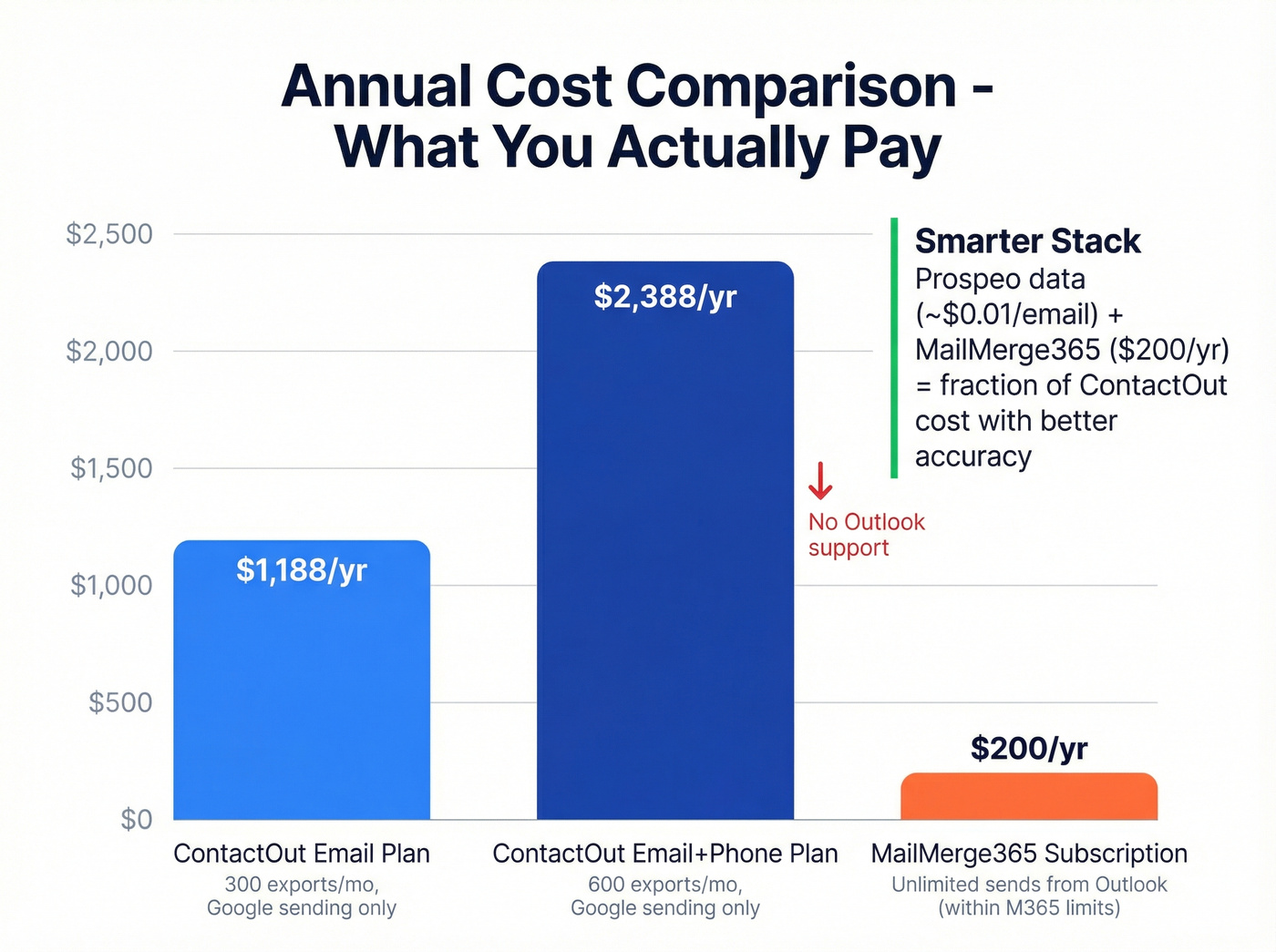
The stack economics tell the story. ContactOut's Email plan alone costs $1,188/year - and its campaign tool only runs through Google. In our experience, teams that split data sourcing from sending spend less and get better results from both tools.
Here's the thing: if your average deal size sits below $15k, you don't need a $1,200/year contact finder that also tries to be a campaign tool. Buy sharp, specialized tools instead.
The Missing Piece: Verified Contact Data
MailMerge365 can't find a single email address. It assumes you already have your list. ContactOut finds emails, but its campaign features are basic and tied to Google accounts. If your team lives in Outlook, you're stuck.
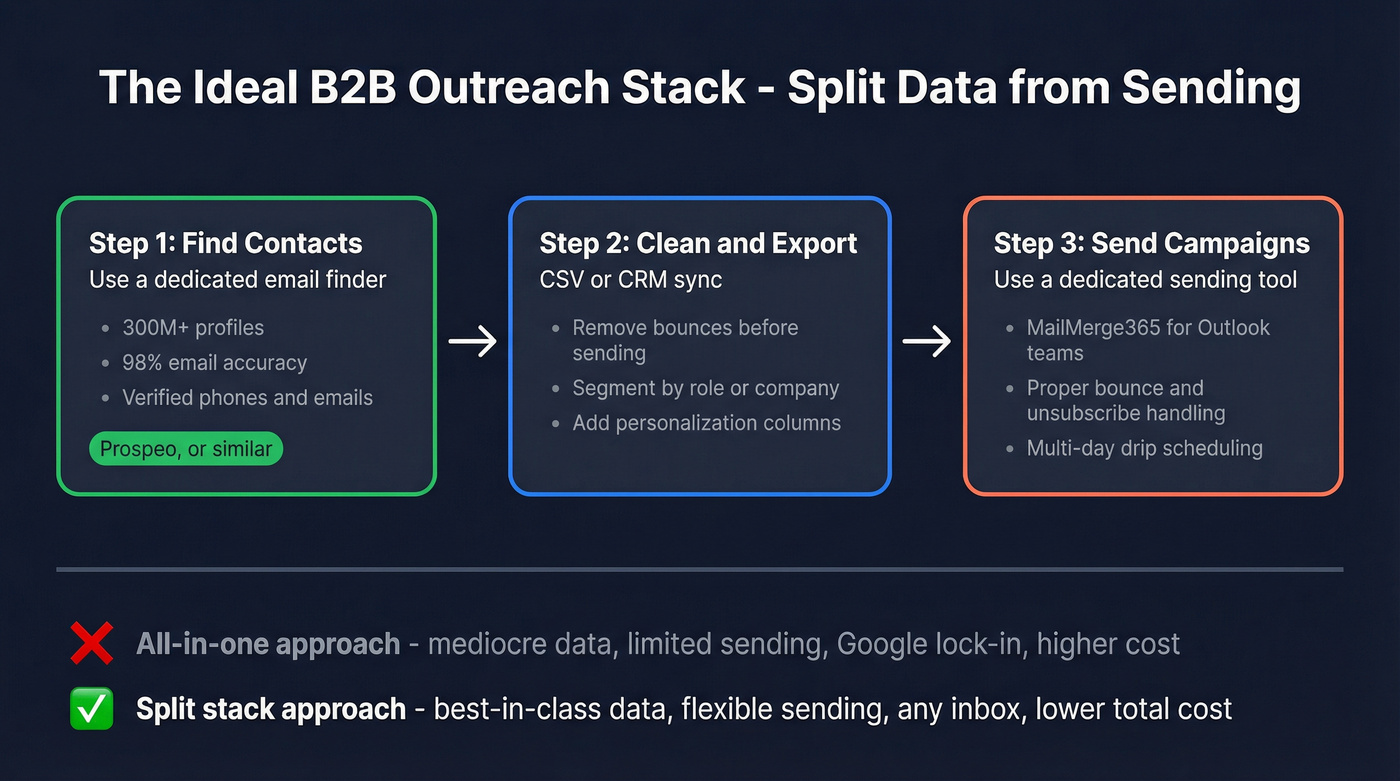
This is where we've seen teams waste the most time - duct-taping together a workflow that fights them at every step. One agency we spoke with burned two weeks trying to pipe ContactOut data into Outlook campaigns before giving up and splitting the tools apart.
Prospeo handles the data side cleanly: 300M+ professional profiles, 98% email accuracy, a 7-day data refresh cycle, and full GDPR compliance. At roughly $0.01 per verified email, a year of Prospeo costs a fraction of ContactOut's Email plan. We've run side-by-side tests, and the combination of dedicated data plus dedicated sending consistently outperforms all-in-one tools that try to do everything at once but excel at nothing in particular.

Your Outlook campaigns are only as good as the data behind them. Prospeo gives you 300M+ profiles, 125M+ verified mobiles, and 30+ search filters - then pipes clean data straight into your CRM or CSV. No Google-only lock-in. No fair-use caps hiding behind 'unlimited' labels.
Build the list. Send from anywhere. Start free with 75 emails per month.
Which Should You Choose?
Pick ContactOut if you need a single platform for finding contacts AND running basic email sequences via Google. You don't want to manage multiple tools, and Outlook isn't part of your workflow. Just know that several editorial reviews argue ContactOut isn't worth the price relative to the data volume you get.
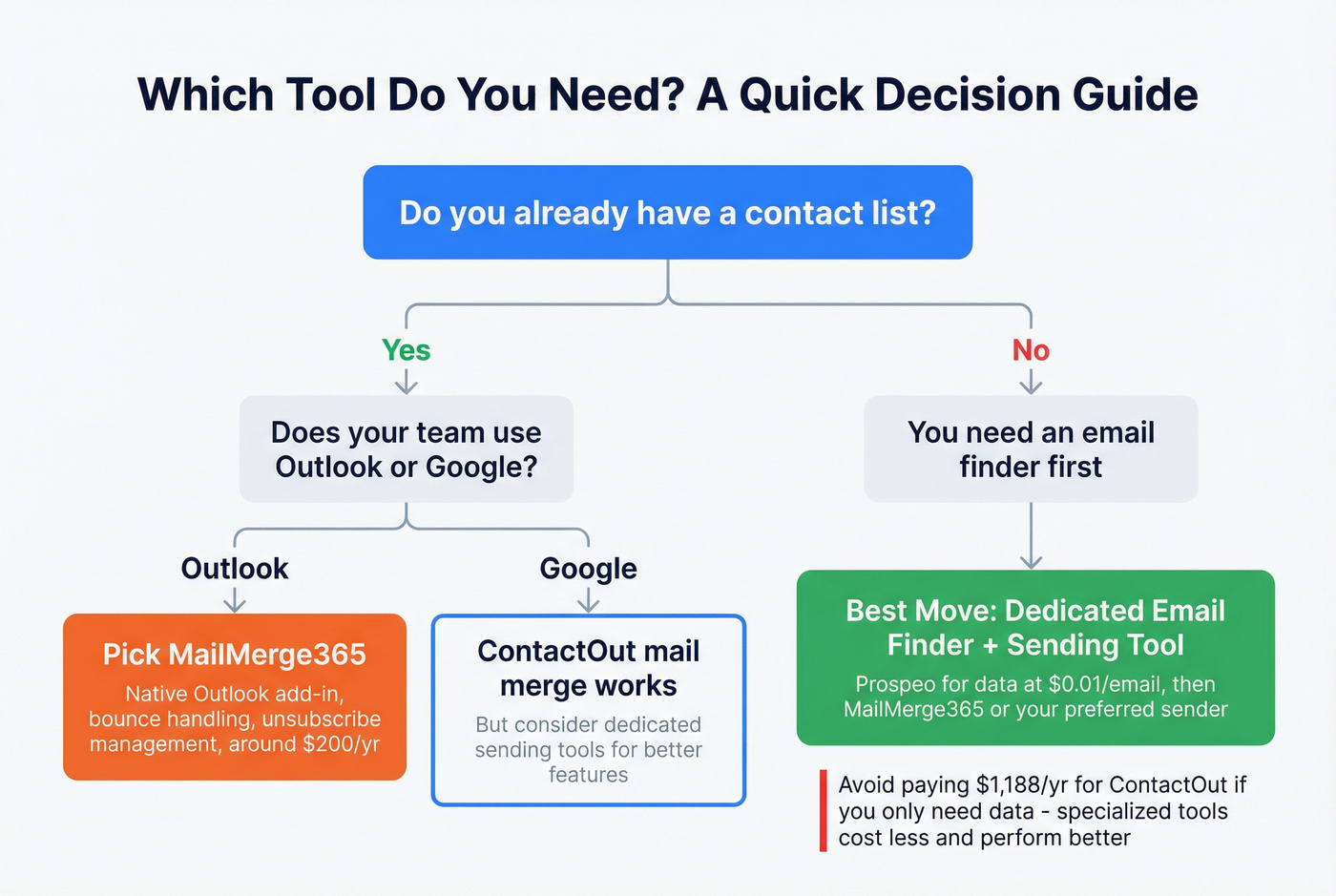
Pick MailMerge365 if your team lives in Outlook and you already have contact data. You need personalized campaigns with proper bounce handling and unsubscribe management - not a database. If you're still building your list, start with sales prospecting techniques that fit your market.
Skip both if you're looking for a single tool that does everything. Neither one covers the full pipeline alone.
Best stack for most teams: A dedicated email finder for data, paired with MailMerge365 or any purpose-built outreach tool for sending. You get enterprise-grade contact accuracy at a fraction of ContactOut's cost, paired with a sending engine that actually handles compliance right. If deliverability is a concern, follow an email deliverability guide and keep an eye on email velocity.
When you weigh ContactOut vs MailMerge365, you're probably asking the wrong question. These aren't substitutes. One finds people, the other emails them. The real decision is whether you want a single mediocre tool or two sharp ones - plus a repeatable lead generation workflow to keep the pipeline full.
FAQ
Can MailMerge365 find email addresses?
No. It's strictly a sending tool with no email finder or contact database. You need a separate data source to build your list before importing it into MailMerge365.
Does ContactOut work with Outlook?
ContactOut's mail merge connects via a Google email account, not Outlook. Teams on Microsoft 365 need a dedicated add-in like MailMerge365 or SecureMailMerge for sending campaigns from their Outlook inbox.
What's the cheapest way to send personalized B2B emails?
Pair a free-tier email finder with MailMerge365's free trial to start at zero cost. On paid plans, expect roughly $300-$1,000/year total for data plus sending. Prospeo's free tier includes 75 email credits per month, which covers early-stage prospecting before you commit to a paid plan.