


Copper CRM Review 2026: Pricing, Pros, Cons, and the Honest Verdict
Copper CRM is the best option for small teams living inside Google Workspace - and much less compelling outside that use case. We've spent time testing it alongside a half-dozen other CRMs, and the pattern is always the same: teams love it until they outgrow it.
30-Second Verdict
- Rating: 4.4/5 - averaged across G2 (4.5/5 from 1,152 reviews), Capterra (4.4/5 from 622), and Trustpilot (4.3/5 from 321)
- Best for: Agencies, consultancies, and service firms under 15 people who live in Gmail.
- Skip if: You need complex automation, deep reporting, or don't use Google Workspace.
Copper CRM Pricing in 2026
Copper runs four tiers, all priced per seat per month. Here's the full breakdown:
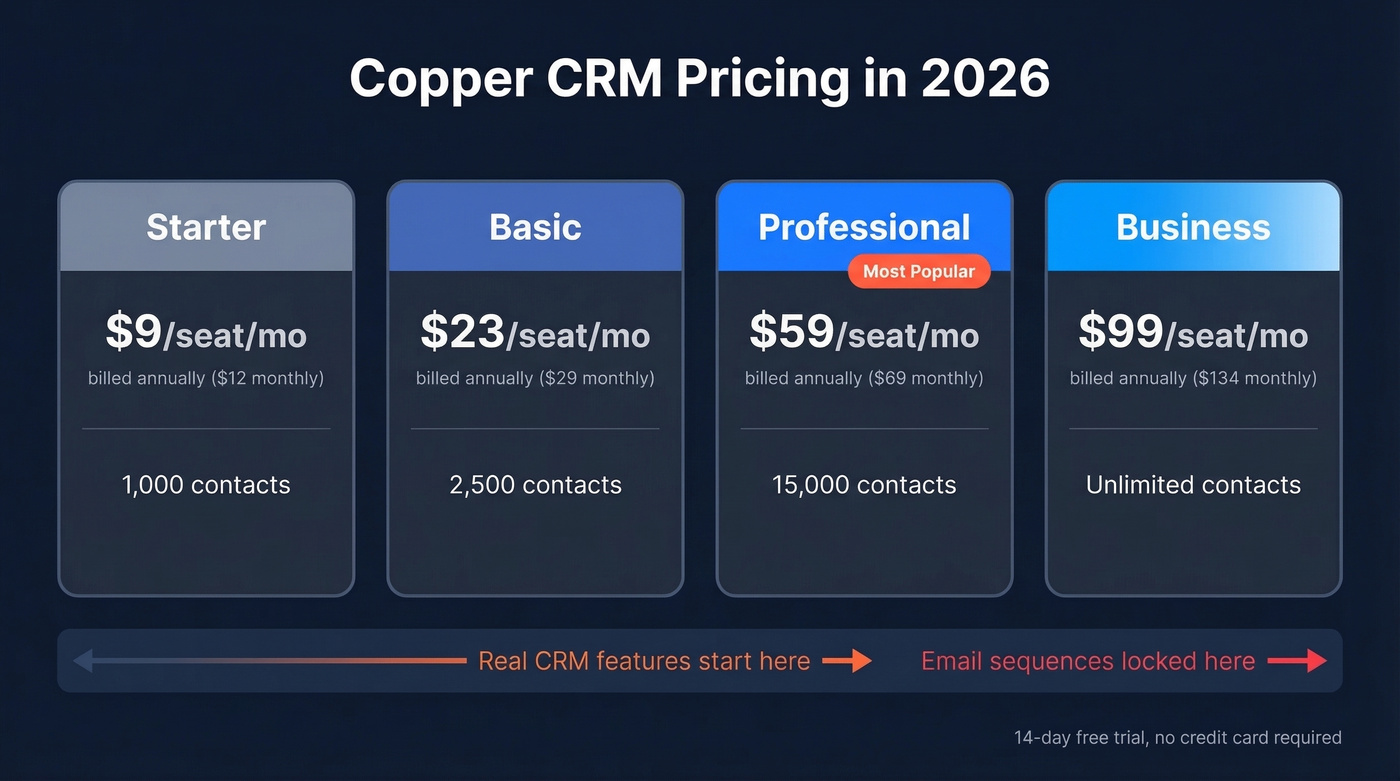
| Plan | Annual Billing | Monthly Billing | Contact Limit |
|---|---|---|---|
| Starter | $9/seat/mo | $12/seat/mo | 1,000 |
| Basic | $23/seat/mo | $29/seat/mo | 2,500 |
| Professional | $59/seat/mo | $69/seat/mo | 15,000 |
| Business | $99/seat/mo | $134/seat/mo | Unlimited |
All plans include a 14-day free trial with no credit card required. A 5-person team on Professional pays $295/mo on annual billing - that's $3,540/year. Not cheap for a CRM where email automation is limited to single sends at that tier, since email series are Business-only.
Here's the thing: real CRM functionality starts at Professional ($59/seat). Starter is essentially a contact database with Gmail sync. Workflow automation, bulk email, API access, and the core reporting set all kick in at the $59 minimum, while the custom report builder stays locked behind Business.
What You Get Per Plan
| Feature | Starter | Basic | Professional | Business |
|---|---|---|---|---|
| Custom Fields | 10 | 25 | Unlimited | Unlimited |
| Pipelines | ✗ | ✓ | ✓ | ✓ |
| Task Automation | ✗ | ✓ | ✓ | ✓ |
| Workflow Automation | ✗ | ✗ | ✓ | ✓ |
| Bulk Email | ✗ | ✗ | ✓ | ✓ |
| API Access | ✗ | ✗ | ✓ | ✓ |
| Email Series | ✗ | ✗ | ✗ | ✓ |
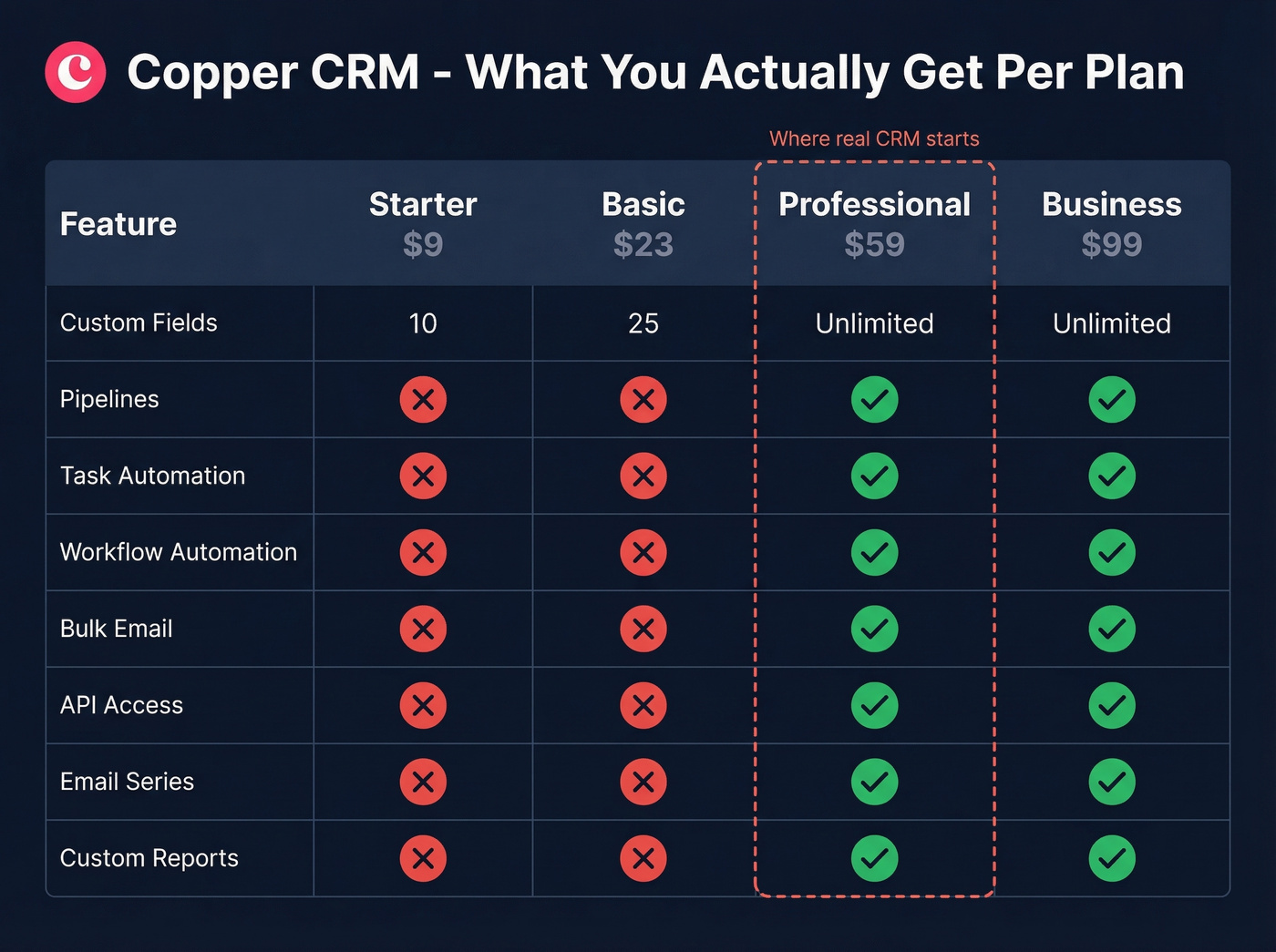
Multi-step email sequences are gated behind the $99/seat Business plan. Professional does unlock native integrations with DocuSign, Mailchimp, QuickBooks, PandaDoc, JustCall, RingCentral, Slack, and Zendesk - so at least the ecosystem opens up at that tier.
Where Copper Shines
Best-in-class Google Workspace integration. Copper auto-captures emails, contacts, and file attachments from Gmail. It's the only CRM with Google's official "Recommended for Google Workspace" designation, and in our testing, the integration works better than any competitor's Gmail add-on. Not close.
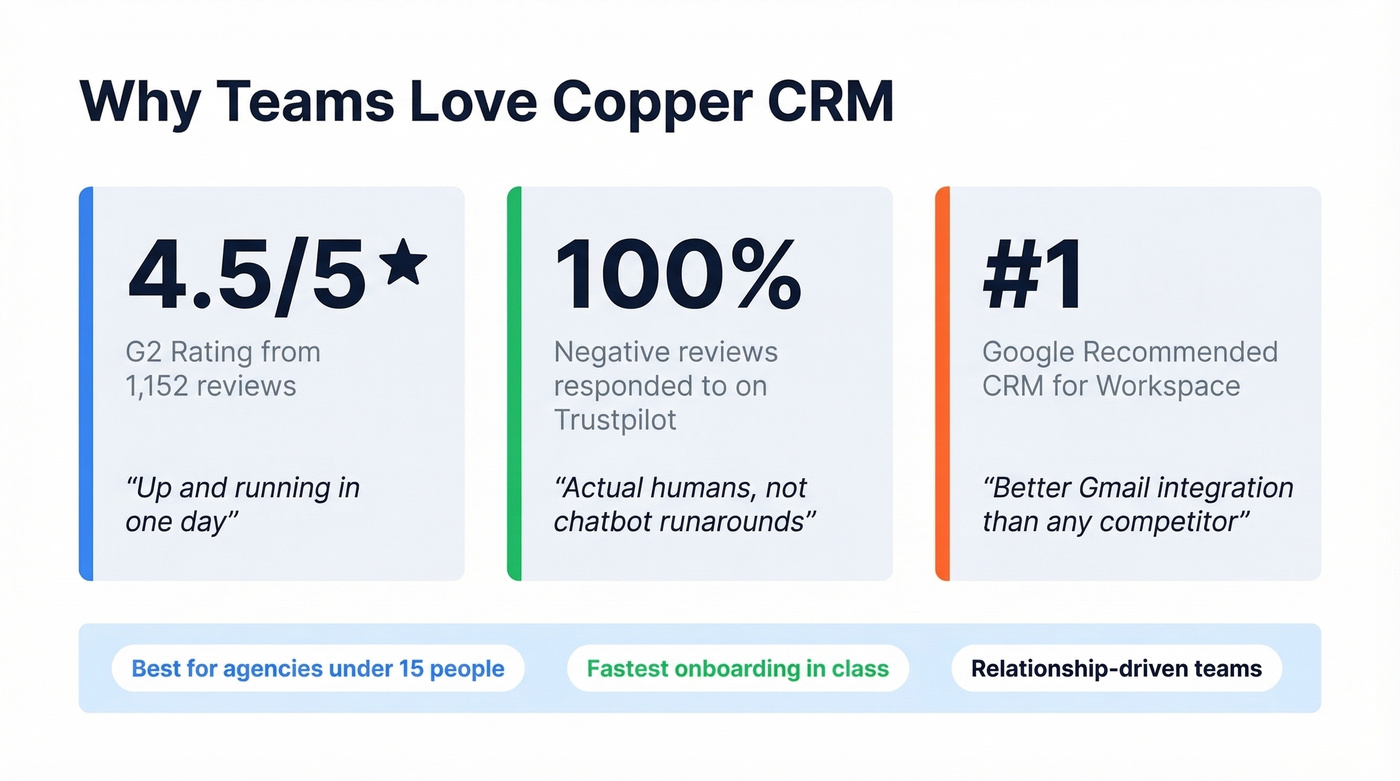
Fast onboarding. Capterra reviewers consistently mention being "up and running in one day." No complex data migration, no admin training - just connect your Google account and go. For a team that's been managing deals in spreadsheets, that speed matters.
Responsive support. Trustpilot shows Copper replied to 100% of negative reviews, typically within 24 hours. Multiple users praise the training calls - actual humans walking you through report building and workflow setup, not chatbot runarounds. G2 and Capterra are where most real user feedback lives, since Reddit discussions about Copper CRM are surprisingly sparse.

Copper's Gmail sync captures contacts automatically - but it doesn't tell you which emails are still valid. Prospeo verifies and enriches your CRM contacts with 98% email accuracy, verified mobile numbers, and 50+ data points per record. At $0.01/email, it costs less than a single Copper Starter seat to clean your entire database.
Stop emailing contacts who left the company two quarters ago.
Where Copper Falls Short
Aggressive feature gating. Automation, bulk email, API access, and the core reporting set are all locked behind the $59/seat Professional plan. You're paying $9 for the privilege of syncing Gmail contacts - everything useful costs 6x more. That's frustrating.
Scaling hits a wall. One team documented their experience growing from 8 to 20 users on Copper in a detailed post-mortem. The automation logic was too shallow for complex rules, reporting required exports for anything beyond basics, and API rate limits made programmatic workflows painful. We've seen the same pattern: teams tend to outgrow Copper's automation around 15-20 users, and the migration out is never fun.
Billing rigidity and bugs. Multiple Capterra reviews flag auto-renewal with no refunds - miss the cancellation window and you're locked in for another cycle. Users also report occasional glitchy behavior in Gmail-related workflows, which stings given that Gmail integration is the entire selling point.
Duplicate management is painful. You can't merge duplicate companies without scrolling through the entire list. For a tool that auto-captures contacts from Gmail, duplicates are inevitable, and the tooling to fix them just isn't there.
Who Should Buy Copper
Use this if: You're a relationship-based business - agency, consultancy, financial services firm - under 15 people, and your entire team lives in Google Workspace. Copper's Gmail integration is genuinely unmatched, and the fast onboarding means you're productive on day one instead of spending a week configuring fields.
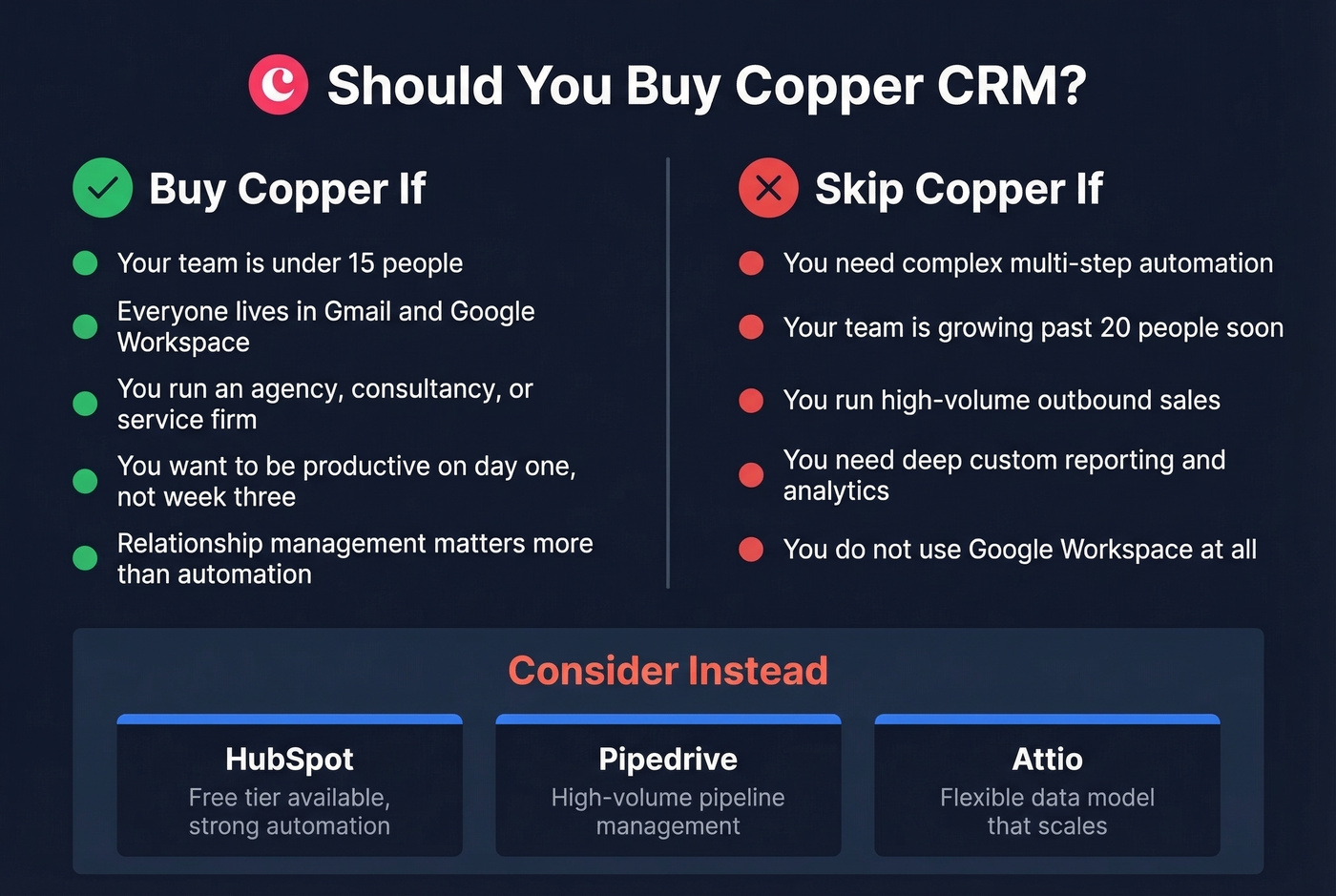
Skip this if: You're running high-volume outbound, need complex multi-step automation, or want deep custom reporting. If you're not on Google Workspace, there's zero reason to consider Copper. Full stop.
For more automation depth, HubSpot has a free tier with paid Sales Hub plans starting around $20-$100+/seat/month depending on edition. Pipedrive handles high-volume pipeline management well at roughly $15-$100/seat/month. Attio is the pick if you need a flexible data model that scales - it offers a free tier with paid plans around $30-$80/seat/month.
If you're weighing Copper against a more pipeline-first CRM, see Copper vs Pipedrive.
Our hot take: Copper is the best CRM for a 6-person agency that never plans to become a 30-person agency. If growth is on your roadmap, you'll outgrow it before your second annual renewal.
Keeping Your CRM Data Clean
Copper captures contacts from Gmail automatically, but it doesn't verify those emails or enrich records with phone numbers, firmographic data, or job titles. Industry benchmarks commonly cite data decay around 30% per year as people change jobs and emails go stale. That means roughly a third of your Copper database is going bad every twelve months whether you notice or not.
Prospeo fills that gap. Upload your Copper contacts and get back 50+ data points per record - verified emails at 98% accuracy, direct dials, company info - with an 83% match rate. Its 7-day data refresh cycle means records stay current far longer than the 6-week industry average, so you're not reaching out to people who left the company two quarters ago.
If you're comparing vendors, start with these data enrichment services and a practical lead enrichment workflow.

Copper's contact limit caps at 2,500 on the Basic plan, and none of those records come enriched. Prospeo returns verified emails, direct dials, job titles, and firmographic data on 83% of contacts you upload - refreshed every 7 days, not decaying for months between updates.
Turn your Copper database from a contact list into a revenue engine.
FAQ
Is Copper CRM free?
No permanent free plan exists. Copper offers a 14-day free trial, no credit card required. After that, Starter begins at $9/seat/month on annual billing. Real functionality - automation, bulk email, reporting - requires Professional at $59/seat/month.
Does Copper work outside Google Workspace?
Technically yes, but the entire value proposition is the Google integration. Without it, you're paying premium prices for a basic pipeline tool. HubSpot or Pipedrive will serve you better for less money.
What are Copper's contact limits?
Starter caps at 1,000 contacts. Basic allows 2,500. Professional jumps to 15,000. Business offers unlimited. There's no middle ground between 15,000 and unlimited, which makes the cost curve steep for growing teams that aren't quite ready for the $99/seat jump.
How do I keep Copper contact data accurate?
Copper auto-captures contacts but doesn't verify or enrich them. Pair it with a data enrichment tool like Prospeo to add verified emails, direct dials, and firmographic data - then schedule quarterly re-enrichment to offset annual data decay.