

Correct Email Format: The Complete 2026 Guide
There's a particular kind of panic that hits when you're staring at a blank compose window. You know what you want to say - you just don't know how to say it without sounding like a robot, a teenager, or someone who's never sent a professional email before. One Reddit user put it perfectly: their brain "malfunctions" with emails despite being a strong essay writer. The stakes are real - professionals spend 28% of their workday on email, poor communication costs large companies $62.4 million annually, and email returns $36 for every $1 spent. Getting the correct email format right isn't just etiquette. It's money.
Quick Version
"Correct email format" means two different things, and most guides only cover one.
Professional email structure follows five parts: subject line, greeting, body, closing, signature. Every professional email you'll ever write fits this skeleton.
Optimal body length is usually 50-125 words when you want maximum readability and replies.
Valid email address format follows the local-part@domain.tld pattern. The local part can be up to 64 characters, the domain up to 255. The best address format for professional use is firstname.lastname@company.com.
Need templates? Jump to the templates section. Need address rules? Keep reading.
What "Format" Actually Covers
Most email format guides make a fundamental mistake: they only cover half the question. Some explain business email structure but never mention address syntax. Others get deep into RFC specifications without telling you how to write a decent subject line.
People searching for this topic want both - whether their email address looks professional and technically valid, and whether their email message follows the right structure. Let's cover both, starting with the address.
Email Address Format Rules
The Standard Structure
Every email address follows the same formula defined by RFC 5322:
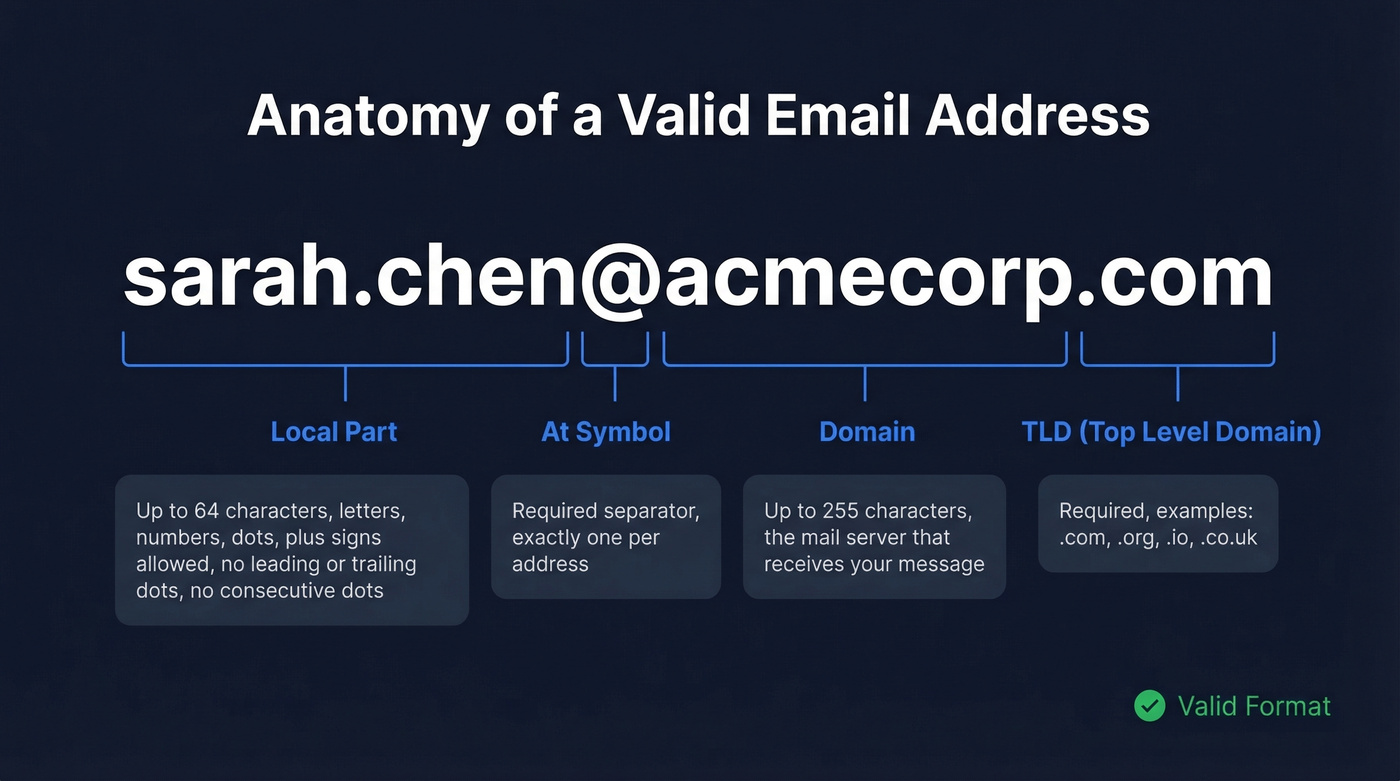
local-part@domain.tld
The local part (everything before the @) supports letters, digits, and a range of special characters including . + - ! # % & ' and others. But there are rules. Dots can't appear at the beginning, end, or consecutively. Plus signs are valid - Gmail uses them for aliases - though some web forms incorrectly reject them.
| Element | Limit |
|---|---|
| Local part | 64 characters max |
| Domain | 255 characters max |
| Common special chars | . + - ! # % & ' |
| Dots | No first, last, or consecutive |
Technically, the local part is case-sensitive per the RFC. In practice, every major provider - Gmail, Outlook, Yahoo - treats it as case-insensitive. Use lowercase for consistency and move on.
Professional Naming Conventions
This is where the Reddit anxiety kicks in. People genuinely stress about picking an address that looks credible. Here's the hierarchy:
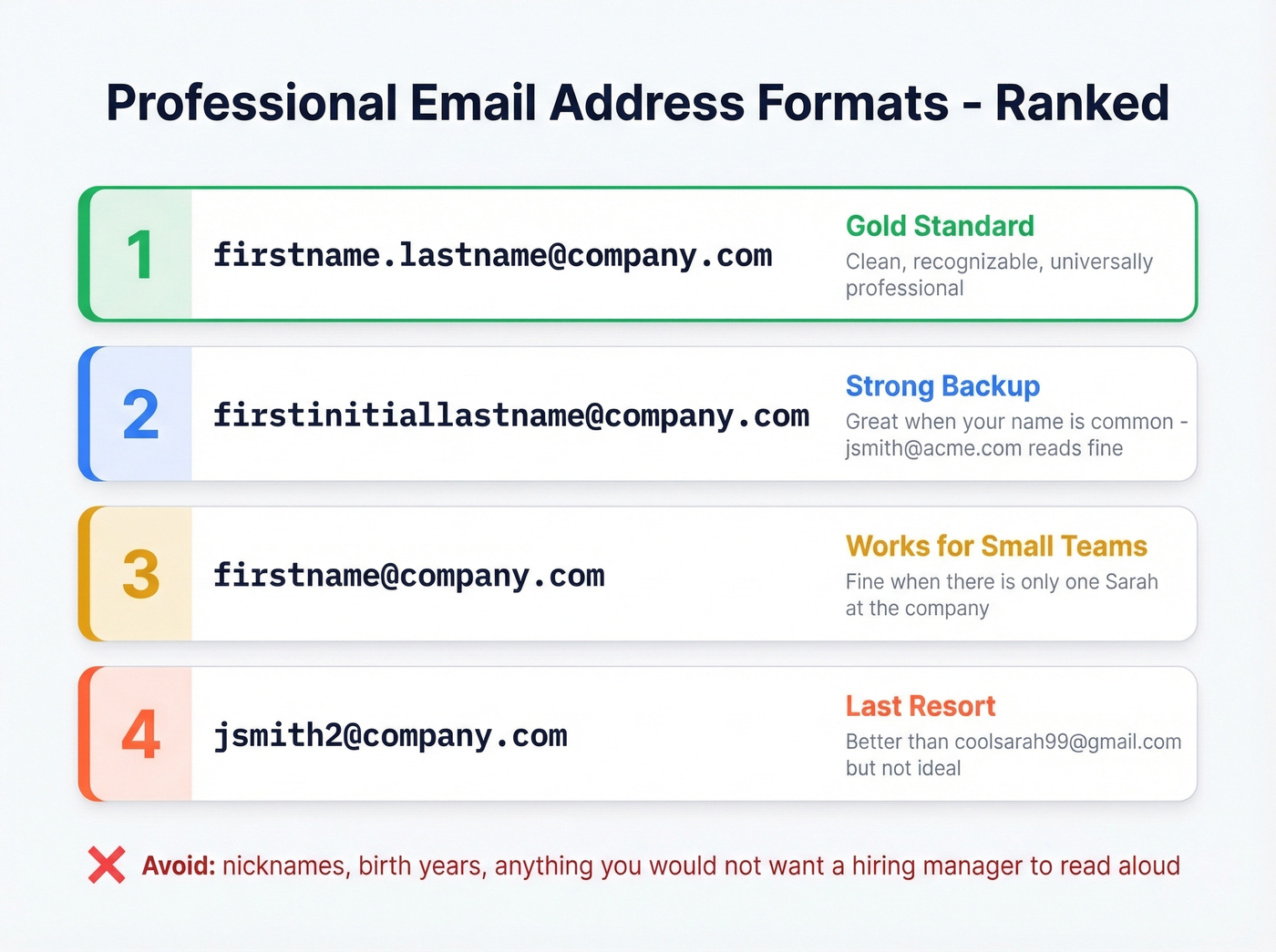
firstname.lastname@company.com- The gold standard. Clean, recognizable, universally professional.firstinitiallastname@company.com- Solid backup when your name is common.jsmith@acme.comreads fine.firstname@company.com- Works at small companies where there's only one Sarah.- Numbers as a last resort -
jsmith2@company.comisn't ideal, but it beatscoolsarah99@gmail.comon a job application.
Skip nicknames, birth years, and anything you wouldn't want a hiring manager to read aloud in a meeting.
Valid vs. Invalid Examples
| Address | Valid? | Why |
|---|---|---|
jane.doe@company.com |
Yes | Standard professional format |
jane+sales@gmail.com |
Yes | Plus addressing is valid |
.jane@company.com |
No | Dot can't be first |
jane..doe@company.com |
No | Consecutive dots |
jane@company |
No | Missing TLD |
jane doe@company.com |
No | Spaces not allowed |
jane@[192.168.1.1] |
Yes | IP-bracketed domain (rare) |
@company.com |
No | Empty local part |
Why Valid Addresses Still Bounce
Here's something that trips up a lot of people: a correctly formatted email sent to an invalid address is a waste of everyone's time. Syntax is step one. Deliverability is step two.
People change jobs. Domains expire. Someone fat-fingers a character during signup. The address looks perfect - local-part@domain.tld, no rule violations - but the mailbox doesn't exist anymore. If you're sending outreach at any kind of volume, this isn't a minor inconvenience. It tanks your sender reputation and can get your domain flagged. Bounces above 2-3% damage deliverability, and understanding the difference between a valid format and a deliverable mailbox is critical for anyone doing outreach at scale.
Prospeo runs real-time email verification with 98% accuracy, catching catch-all domains, spam traps, and honeypots through a 5-step verification process. The free tier gives you 75 email verifications per month - enough to test before committing.

Professional Email Message Structure
Subject Line
33% of recipients decide whether to open an email based on the subject line alone. The average email open rate across industries sits at 42.35%, meaning your subject line is doing most of the heavy lifting on whether you land in that percentage or get ignored.
The rules are simple. Be specific - "Q3 Budget Review: Approval Needed by Friday" beats "Quick Question." Keep it under 30 characters if you want it to render fully on mobile. Never use ALL CAPS. It reads as shouting, and spam filters hate it.
Good: Meeting Reschedule - Thursday 2pm
Bad: IMPORTANT - PLEASE READ ASAP!!!
Bad: Hey
Greeting and Salutation
Match your greeting to the relationship:
- Formal (first contact, senior executives, external clients): "Dear Ms. Chen," or "Dear Dr. Patel,"
- Semi-formal (colleagues you've emailed before, warm introductions): "Hi Sarah," or "Hello David,"
- Casual (teammates, ongoing threads): "Hey team," or just the person's name
When in doubt, start semi-formal. Nobody's ever been offended by "Hi [First Name]." Plenty of people have been put off by "Hey dude" from a stranger.
One note on etiquette that too many guides skip: mirror how recipients sign their own emails. If someone signs off as "Mike," don't reply with "Dear Michael." If you're unsure about honorifics, use their full name - "Dear Alex Rivera" sidesteps gendered title assumptions entirely and signals respect.
Email Body
Let's be honest: if your email is longer than 125 words, you should have scheduled a meeting. Research consistently shows the optimal email body length is 50-125 words. People spend roughly 9 seconds reading an email. That's it. We've seen the same pattern in our own outreach - the 50-125 word range consistently outperforms longer messages for response rates.
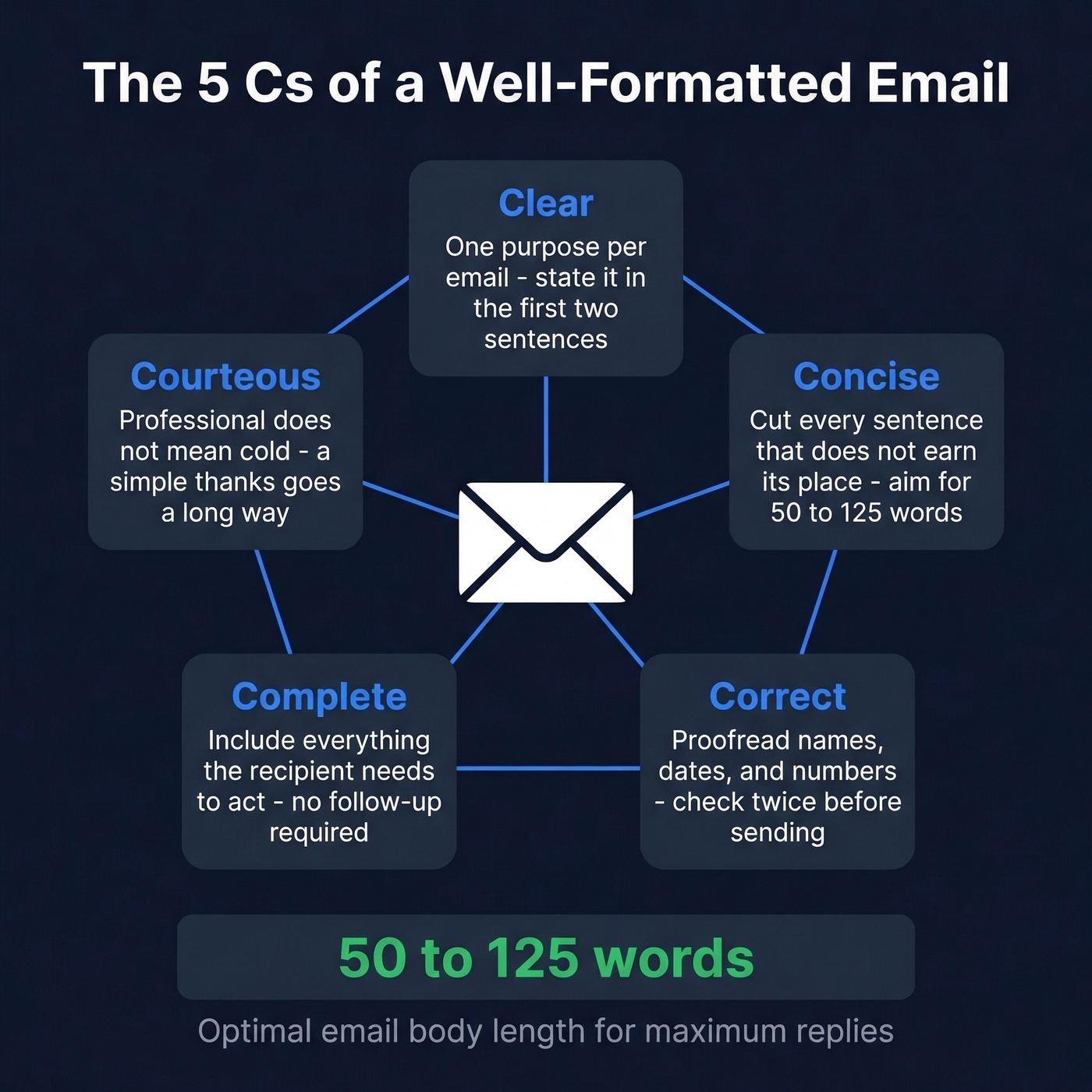
Use the 5 Cs as your quality check:
- Clear - One purpose per email. State it in the first two sentences.
- Concise - Cut every sentence that doesn't earn its place.
- Correct - Proofread names, dates, and numbers. Twice.
- Complete - Include everything the recipient needs to act. No follow-up required.
- Courteous - Professional doesn't mean cold. A "Thanks for your time" goes a long way.
Keep paragraphs to 2-3 sentences. Use bullet points when listing multiple items. One clear call to action at the end.
Closing and Sign-Off
Your sign-off is the last impression. "Best regards" is the safe default that works in virtually every professional context. "Thanks" is warm and collaborative - great for internal emails or when someone's done you a favor. "Sincerely" is formal first-touch only: cover letters, initial outreach to executives.
Avoid "Cheers" in first-touch emails. Skip overly intimate sign-offs in finance-heavy or executive contexts. And "Sent from my iPhone" isn't a sign-off - it's an excuse for typos.
Professional Signature
Keep your signature to 4-5 lines. No inspirational quotes. No rainbow fonts.
Sarah Chen
Director of Revenue Operations | Acme Corp
(415) 555-0192
sarah.chen@acmecorp.com
Add a link to your company site or calendar if it's relevant. If your organization supports it, including pronouns signals inclusivity. Every line beyond five is visual noise the recipient won't read.

Correct format doesn't guarantee delivery. Prospeo's 5-step verification catches catch-all domains, spam traps, and honeypots - keeping your bounce rate under 3% and your sender reputation intact.
Stop guessing if the mailbox exists. Verify 75 emails free this month.
How Formal Should Your Email Be?
There's no single "proper" formal tone - it depends on context. Streak's research makes a useful observation: back-and-forth threads naturally become less formal over time. Your first email to a VP should be more buttoned-up than your fifth reply in the same thread.
| Context | Formality Level | Example Greeting |
|---|---|---|
| First touch, external | Formal | "Dear Ms. Chen," |
| Ongoing thread, peer | Semi-formal | "Hi Sarah," |
| Internal, same team | Casual | "Hey team," |
Three factors drive the decision: whether it's a first touch or an ongoing conversation, whether the recipient is internal or external, and the seniority gap between you. A message to your direct teammate about lunch doesn't need "Dear Colleague." A cold email to a C-suite prospect does need structure.
72% of professionals prefer email for work communication, yet most people overthink formality. For teams selling sub-$10k deals and emailing peers at similar-sized companies, semi-formal is almost always the right call. Save the "Dear Mr. Johnson" energy for enterprise deals and board members.
Mobile Formatting
Here's the thing: 65% of emails open on phones, yet only 35% of email marketers design mobile-first. Most guides don't even mention mobile, which tells you how outdated they are.
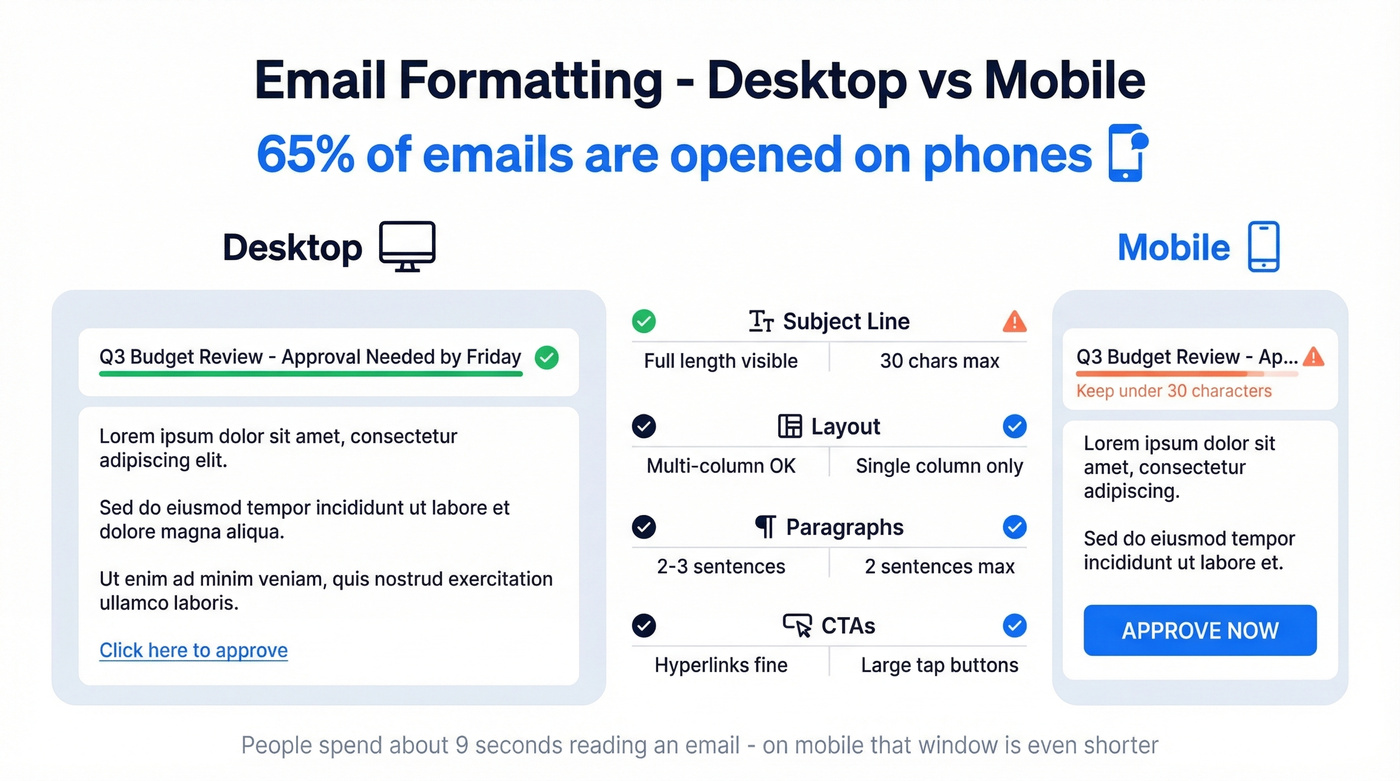
What matters on a 6-inch screen:
- Subject lines: 30 characters or fewer. Everything beyond that gets truncated on most mobile clients. (If you want ideas, borrow from proven subject line examples.)
- Layout: One column. Always.
- Paragraphs: Even shorter than desktop. Two sentences max per block.
- CTAs: Tap-friendly buttons, not tiny hyperlinked text. Thumbs aren't precise.
A wall of text that looks manageable on a 27-inch monitor becomes an unreadable slab on an iPhone. People spend about 9 seconds on an email - on mobile, that window shrinks further because scrolling is friction. Format for the smallest screen first.
Professional Email Templates
Stop collecting templates. You need one structure and the judgment to adapt it. These five aren't templates to memorize - they're starting points that show the structure in action.
Meeting Request
Subject: 15-Min Sync - [Topic] This Week?
Hi [Name],
I'd like to discuss [specific topic]. Would Thursday at 2pm work for a 15-minute call? If not, here's my calendar link: [link].
Best regards, [Your Name]
Follow-Up After No Reply
Subject: Following Up - [Original Topic]
Hi [Name],
Circling back on my email from [date] about [topic]. I know things get buried - just want to make sure this is on your radar.
Thanks, [Your Name]
Job Application
Subject: Application - [Job Title], [Your Name]
Dear [Hiring Manager],
I'm writing to apply for the [Job Title] role. My background in [relevant experience] aligns with [specific requirement from the posting]. Resume attached.
Sincerely, [Your Name]
Cold Outreach
Subject: [Specific Pain Point] at [Their Company]
Hi [Name],
I noticed [Company] recently [trigger event]. We helped [similar company] solve [related problem], cutting [metric] by [number]. Worth a 10-minute conversation?
Best regards, [Your Name]
If you're sending cold outreach at volume, CAN-SPAM requires an unsubscribe mechanism in commercial emails. Don't skip it.
Internal Update
Subject: [Project Name] Update - Week of [Date]
Hey team,
Quick update on [project]:
- Completed: [milestone]
- In progress: [current work]
- Blocked: [issue + who can help]
Thanks, [Your Name]
Common Mistakes to Avoid
Sending to the wrong person tops the list. 58% of professionals have done this. Double-check the To field before hitting send - especially when autocomplete fills in "John Smith (Marketing)" instead of "John Smith (Finance)."
Vague subject lines are the second biggest offender. "Quick Question" tells the recipient nothing. "Budget Approval Needed by Friday" tells them everything.
Walls of text kill readability. If your email requires scrolling on mobile, it's too long. Break it into short paragraphs and bullets.
Reply All misuse is the one that makes enemies. Before you hit Reply All, ask: does everyone on this thread actually need to see your response? Usually the answer is no. And if you're sending to a large group, use BCC - nobody wants their email address exposed to 200 strangers.
Forgetting attachments is the classic. Mention the attachment in your body text - most email clients will flag you if you write "attached" without actually attaching anything.
ALL CAPS or colored text reads as shouting and looks unprofessional. Stick to standard fonts and formatting.
Pre-Send Checklist
- Correct recipient(s) in the To/CC/BCC fields
- Professional sender address (not
partyguy2003@) - Clear, specific subject line (under 30 characters for mobile)
- Proofread body - names, dates, numbers all correct
- Tone matches the relationship and context
- Attachments included and named clearly (not
final_v3_FINAL.pdf) - Conservative formatting - no colored text, no ALL CAPS
- Professional signature present (4-5 lines max)
- Recipient address verified as deliverable (see email bounce rate benchmarks)
That last item matters more than most people realize. All the formatting in the world doesn't help if the email bounces.
You just learned the rules for valid email syntax. Now imagine finding verified, correctly formatted emails for any prospect - 143M+ addresses at 98% accuracy, refreshed every 7 days, for about $0.01 each.
Find the right email address the first time. Every time.
FAQ
What's the correct email address format for professionals?
The standard professional format is firstname.lastname@company.com. It's universally recognized, easy to remember, and looks credible to recipients and hiring managers. If that's taken, use a first initial plus last name (jchen@company.com). Avoid numbers, nicknames, or birth years - they undermine credibility.
How long should a professional email be?
Aim for 50-125 words in the body. Research shows people spend about 9 seconds reading an email, so shorter messages with clear formatting consistently earn better response rates. If you need more than 125 words, consider whether a meeting or shared document would be more effective.
Does capitalization matter in email addresses?
Technically, the local part (before the @) can be case-sensitive per RFC 5322. In practice, every major provider treats addresses as case-insensitive. Use lowercase for consistency. Nobody's email will bounce because you typed j instead of J.
How do I verify an email address before sending?
Use a real-time verification tool that checks whether the mailbox actually exists, not just whether the syntax is valid. Prospeo's free tier includes 75 verifications per month with 98% accuracy, catching catch-all domains and spam traps. This matters most for bulk outreach, where bounces above 2-3% damage your sender reputation.