

CRM Comparison 2026: What Every Platform Actually Costs and Who It's For
A RevOps lead we know ran a three-tool CRM comparison last quarter. The winner wasn't the platform with the most features or the biggest brand name - it was the one reps actually opened on Monday morning. That tracks with what the r/CRM community keeps saying: "CRMs don't fail because they're missing features - they fail because no one wants to use them."
We call this the Monday Morning Test, and it's the single best heuristic for CRM selection. If your reps won't voluntarily open the tool at 9 AM on a Monday, nothing else matters. Not the feature list, not the AI, not the brand. Keep this test in mind as you read every recommendation below.
The CRM market hit $112.91B in 2025 and is barreling toward $262B by 2032. The average CRM returns $8.71 for every $1 spent - but only if your team actually uses it. There are hundreds of options, and at least four of the top ten results online are vendor pages selling you their CRM. Not exactly unbiased territory.
So let's do this differently. We've tested, implemented, and migrated enough CRMs to know which ones deliver and which ones look great in the demo but fall apart at month three. Every tool below gets real pricing, honest tradeoffs, and a clear verdict on who it's actually for.
Our Top CRM Picks for 2026
Short on time? Start here.
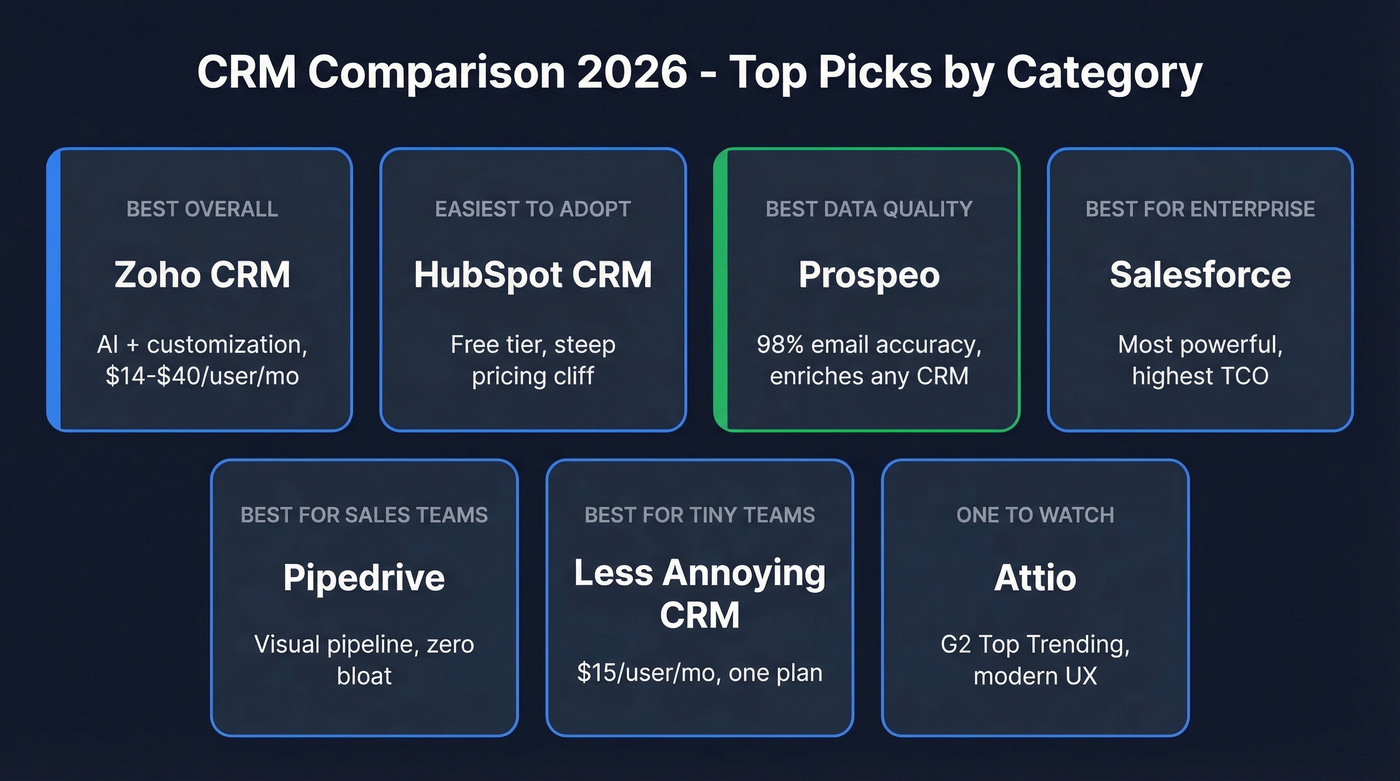
| Category | Pick | Why |
|---|---|---|
| Best Overall | Zoho CRM | AI + customization, $14-$40/user/mo |
| Best Ease of Use | HubSpot CRM | Free tier, steep pricing cliff |
| Best CRM Data Quality | Prospeo | 98% email accuracy, enriches any CRM |
| Best for Enterprise | Salesforce | Most powerful, highest TCO |
| Best for Sales Teams | Pipedrive | Visual pipeline, zero bloat |
| Best for Tiny Teams | Less Annoying CRM | $15/user/mo, one plan |
| One to Watch | Attio | G2 Top Trending, modern UX |
Hot take: Salesforce is still the most powerful CRM on the planet. But most teams don't need the most powerful CRM on the planet. If your average deal size is under $25k and you have fewer than 100 reps, you're probably paying for complexity you'll never use. Zoho CRM at a quarter of the price covers 80% of what Salesforce does for 80% of companies.
What Every CRM Actually Costs
Here's what you'll pay across 12 CRMs, broken into entry, mid, and top-tier plans.
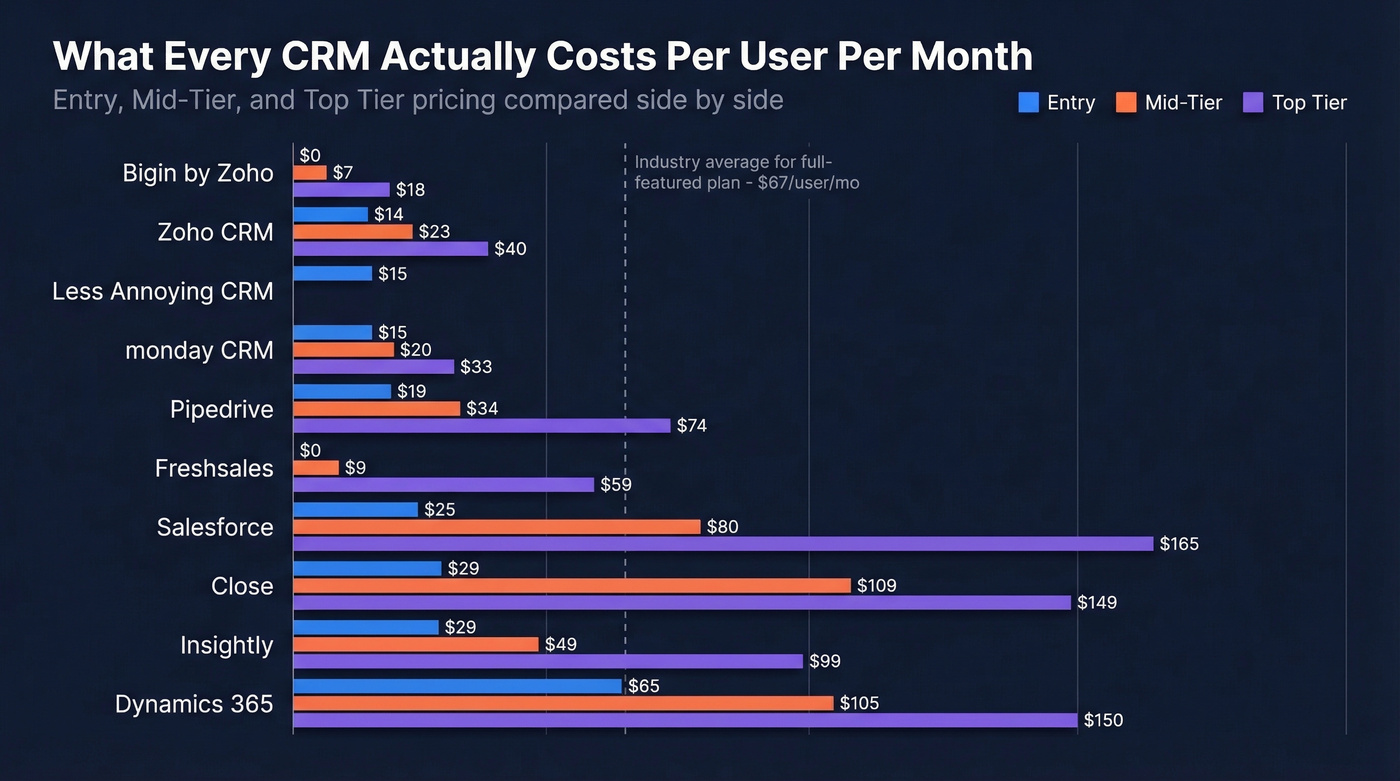
| CRM | Entry | Mid-Tier | Top Tier |
|---|---|---|---|
| Zoho CRM | $14/user/mo | $23/user/mo | $40/user/mo |
| HubSpot | Free (2 users) | ~$1,170/mo (5 users) | $4,300/mo (7 users) |
| Salesforce | $25/user/mo | $80/user/mo | $165/user/mo |
| Pipedrive | $19/user/mo | $34/user/mo | $74/user/mo |
| Freshsales | Free | $9/user/mo | $59/user/mo |
| Close | $29/user/mo | $109/user/mo | $149/user/mo |
| monday CRM | $15/user/mo | $20/user/mo | $33/user/mo |
| Less Annoying | $15/user/mo | - | - |
| Attio | Free | ~$29/user/mo | ~$80/user/mo (custom) |
| Insightly | $29/user/mo | $49/user/mo | $99/user/mo |
| Bigin by Zoho | Free | $7/user/mo | $12-$18/user/mo |
| Dynamics 365 | $65/user/mo | $105/user/mo | $150/user/mo |
The average full-featured CRM plan runs about $67/user/month. That's the real benchmark - not the $14 entry price you see in ads.
Here's the sizing framework that actually holds up. Teams under 50 employees should budget $10-$30/user/month. Mid-market orgs in the 51-250 range typically land at $40-$100/user/month. Enterprise shops with 250+ users? Expect $150-$650/user/month once you factor in modules, add-ons, and premium support.
One billing gotcha: several CRMs show monthly prices but only offer annual billing. Pipedrive, Zoho, and Freshsales all do this on lower tiers. Always check whether you're committing to 12 months before you click "subscribe." HubSpot also has a Starter tier around ~$20/user/month that sits between Free and Pro, but the jump to Pro is still the cliff that catches teams off guard.
Hidden Costs Nobody Mentions
Sticker price is a lie. Especially at the enterprise end.
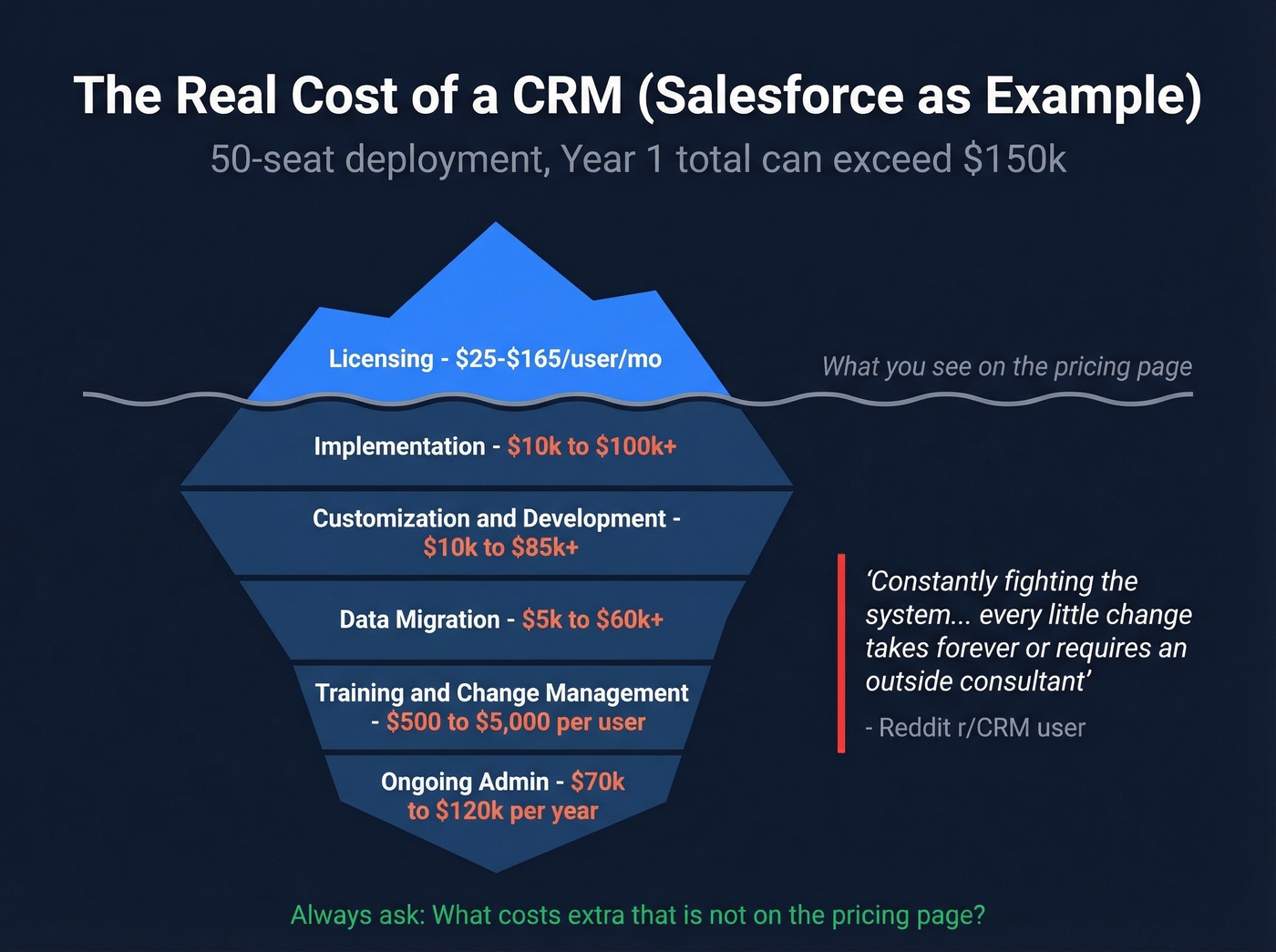
Let's use Salesforce as the case study because it's the most extreme example - and the one most teams underestimate. Here's what a real Salesforce TCO breakdown looks like beyond licensing:
- Implementation: $10k-$100k+ depending on complexity
- Customization & development: $10k-$85k+
- Data migration: $5k-$60k+
- Training & change management: $500-$5,000 per user
- Ongoing admin: [$70k-$120k/year](https://www.indeed.com/career/salesforce-administrator/salaries/Los-Angeles - CA) for a dedicated admin, or $2k-$5k/month for managed services
That's not a typo. A 50-seat Salesforce deployment can easily cost $150k+ in year one before anyone closes a deal. One Reddit poster captured it perfectly: they're "constantly fighting the system" because without a dedicated admin, "every little change takes forever or requires an outside consultant."
Beyond Salesforce, the hidden cost categories that bite teams across every CRM include user overages, contact limits that trigger upsells, and storage caps. HubSpot's per-seat jump from free to Pro is legendary. Paid integrations and premium support tiers add real money to your annual bill. Always ask the vendor: "What costs extra that isn't on the pricing page?" If they can't answer clearly, that's your answer.
Comparing CRMs by Company Size
Small Business (Under 50)
Your CRM should take less than a day to set up. If it needs a consultant, it's the wrong tool.
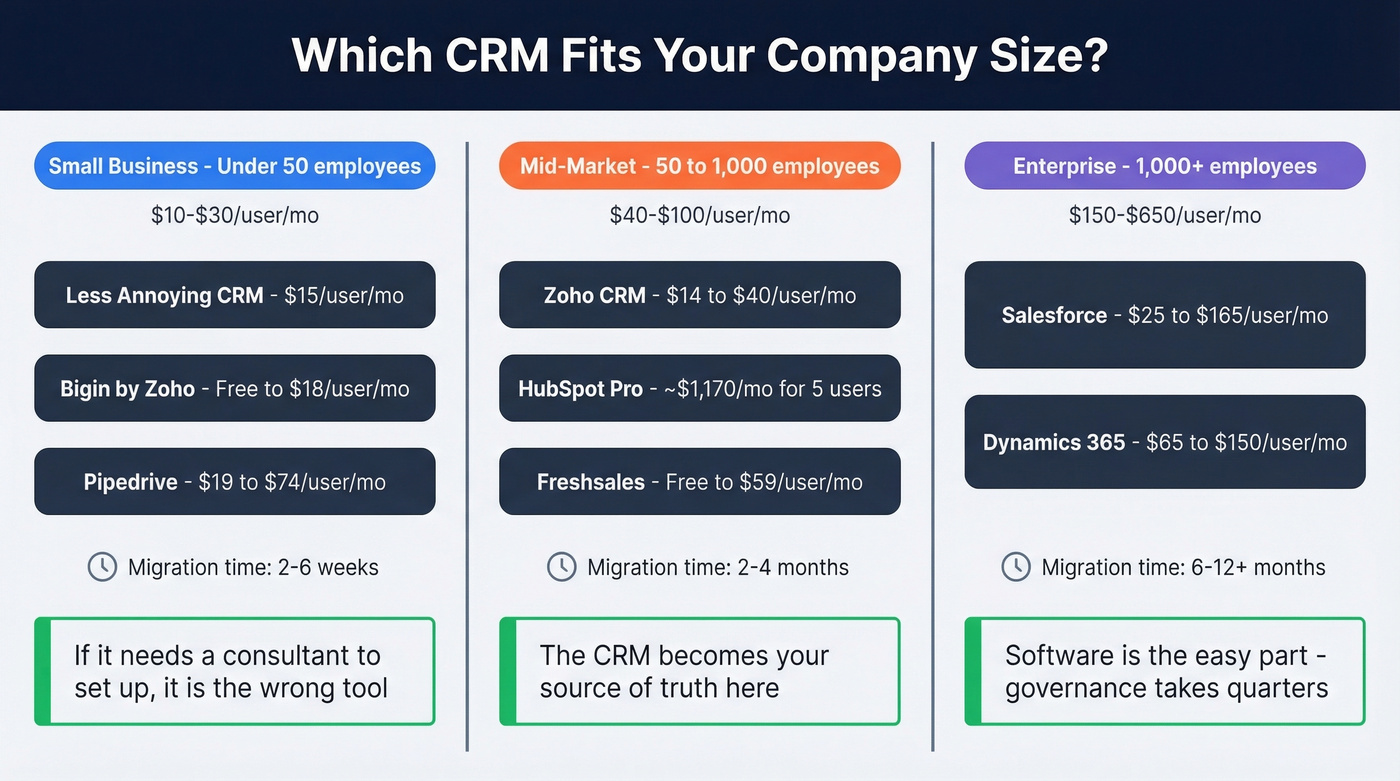
Less Annoying CRM ($15/user/mo, single plan) is the purest expression of this philosophy - no tiers, no upsells, no AI you'll never configure. Bigin by Zoho starts free and scales to $18/user/mo for teams that want a lightweight pipeline without the full Zoho CRM learning curve. Pipedrive ($19-$74/user/mo) is the pick if your team lives in the pipeline view and wants visual deal management without bloat.
One thing the r/Entrepreneur community flags constantly for small teams: slow mobile apps, email sync issues, and customization that "breaks something else." Test the mobile experience during your trial - not just the desktop demo.
Migration at this size takes 2-6 weeks, mostly spent on data cleanup and getting the team comfortable.
Mid-Market (50-1,000)
This is where the CRM becomes your source of truth. You need real reporting, segmentation, no-code workflow builders, and role-based permissions that don't require an engineer to configure.
Zoho CRM hits the sweet spot here - deep customization, Zia AI, and pricing that doesn't punish growth. Zoho is bootstrapped and profitable, which means they don't need to charge Salesforce prices to keep the lights on. HubSpot Pro works if your marketing and sales teams want a single platform, but watch that pricing cliff. Freshsales is the dark horse: Freddy AI plus strong automation is hard to beat on value.
Expect 2-4 months for a mid-market migration, especially if you're consolidating tools.
Enterprise (1,000+)
At this scale, the CRM is data infrastructure. You need multi-region data residency, multi-currency support, audit trails, custom object modeling, and enterprise SLAs. The shortlist is short: Salesforce and Microsoft Dynamics 365.
Salesforce owns ~21% of the global CRM market for a reason - nothing else matches its customization depth and ecosystem breadth. Dynamics 365 is the play if you're already deep in the Microsoft stack and want native Teams, Outlook, and Azure integration without middleware.
A quick note on open-source options like SuiteCRM and Odoo: they exist, they're free to license, and they require self-hosting plus dedicated technical resources. If you have the engineering team to support one, they can work. For everyone else, they're outside the scope of this guide.
Plan for 6-12+ months on enterprise migrations. The software is the easy part; governance across business units is what takes quarters.
The Best CRMs Compared
Zoho CRM - Best Overall

Use this if you want the best ratio of capability to cost. PCMag gave Zoho CRM Editors' Choice for 2026, and it's deserved. At $14/$23/$40 per user/month across Standard, Professional, and Enterprise tiers, you're getting Zia AI, deep customization, workflow automation, and a marketplace of extensions - all at roughly a quarter of Salesforce's price.
Zia is the standout. It's a big reason Zoho punches above its price point, especially for teams that want automation without enterprise overhead. In our experience, mid-market teams that invest a couple of weeks in Zoho configuration end up with a system that rivals platforms costing three or four times as much - the ROI curve is steep once you clear the initial setup.
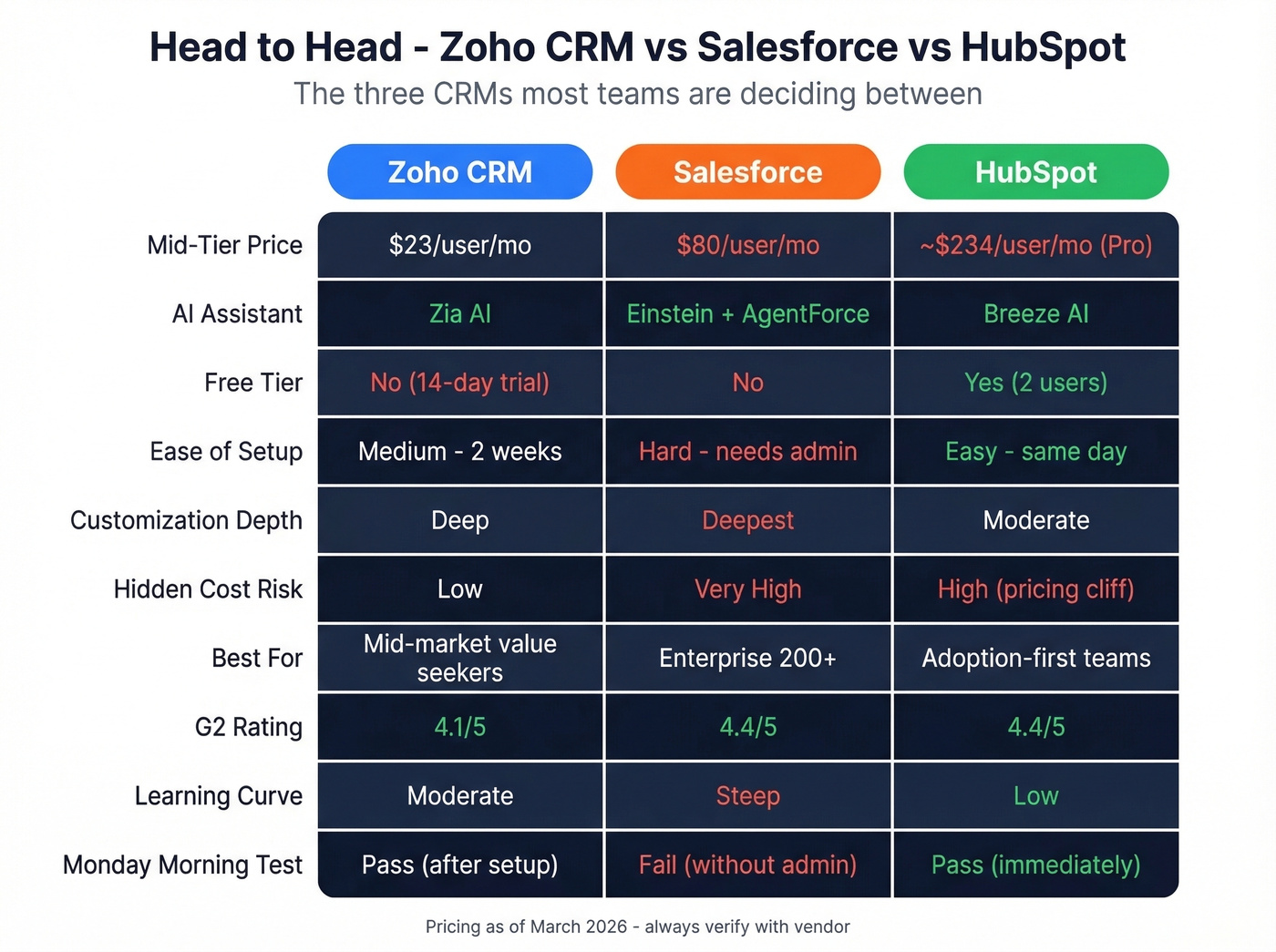
Skip this if you need something your team can master in an afternoon. Zoho's learning curve is real. The customization depth that makes it powerful also means it takes weeks to configure properly. Teams without someone willing to own the setup will underutilize it badly.
HubSpot CRM - Easiest to Adopt
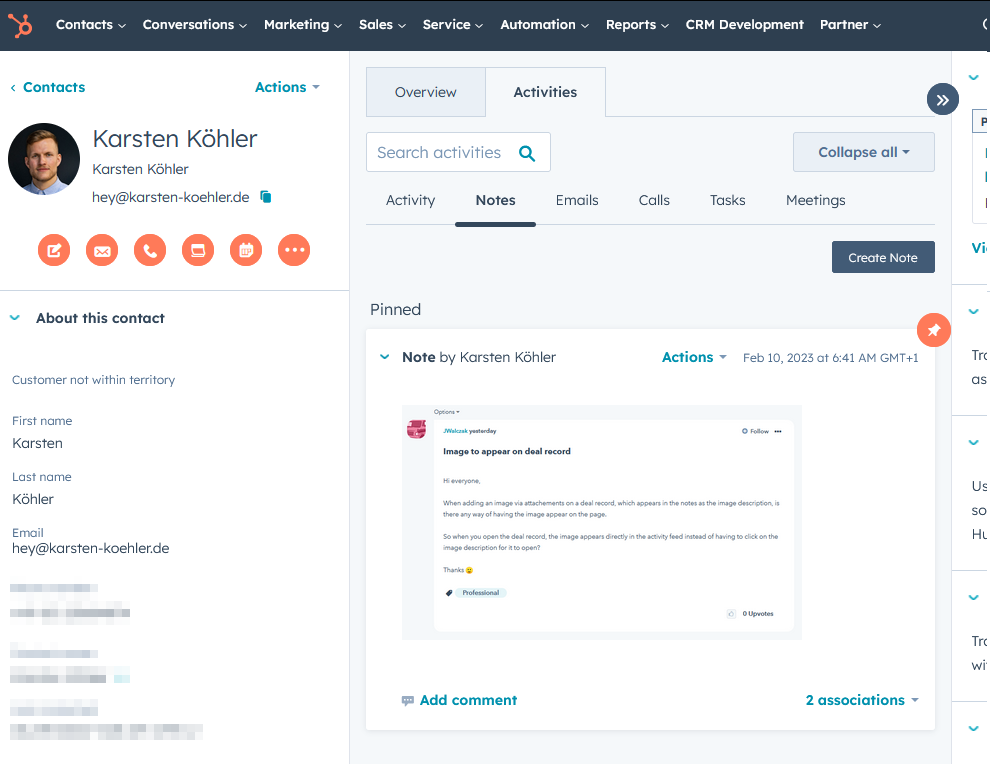
Use this if adoption is your #1 priority. HubSpot's free tier (2 users, no time limit) is the best way to get a team using a CRM without budget approval. The UI is genuinely intuitive - reps figure it out without training. With 228,000+ paying customers and 20-25% year-over-year growth, HubSpot's ecosystem is massive.
Breeze AI, HubSpot's AI layer, is one of the easiest CRM AI experiences to deploy. Content assistance and workflow help are especially strong out of the box.
Skip this if you're budget-conscious beyond the free tier. HubSpot's pricing cliff is one of the steepest in the industry. Free to Starter around ~$20/user/mo to ~$1,170/month for 5 Pro users to $4,300/month for 7 Enterprise users. That jump from double digits to four figures catches teams off guard every single time. Factor in marketing contacts fees and add-ons, and a mid-market HubSpot deployment can rival Salesforce pricing.
Salesforce Sales Cloud - Enterprise Powerhouse
Salesforce at $25/$80/$165 per user/month is the most powerful CRM on the market. With 25,000+ G2 reviews and a 4.4/5 rating, it's battle-tested at scale. Einstein AI and the newer AgentForce deliver predictive forecasting, automated data capture, and AI-generated next-best-actions that no other CRM matches in depth. The AppExchange ecosystem, custom object modeling, and workflow engine are unmatched for complex enterprise requirements.
Who should buy it: 200+ person orgs with dedicated IT resources and complex sales processes. Who shouldn't: Anyone without a dedicated Salesforce admin or budget for one. Re-read the hidden costs section. We've seen mid-market teams buy Salesforce for the brand name and switch to Zoho or HubSpot within 18 months because the overhead crushed them.
Pipedrive - Built for Sellers
Pipedrive does one thing exceptionally well: visual pipeline management. The drag-and-drop deal board is the best in the category, and the entire product is designed around moving deals forward rather than logging activities for management's sake. Pricing runs $19/$34/$74 across Essential, Advanced, and Professional tiers. No free plan, but the 14-day trial is generous. If your team is under 50 reps and pipeline velocity is the metric that matters, Pipedrive is the obvious pick.
Freshsales - Best Free-to-Paid Ramp
Freshsales offers the smoothest free-to-paid upgrade path in CRM. The free tier is genuinely usable, and paid plans at $9/$39/$59 per user/month scale without sticker shock. Freddy AI is a strong value lever for teams that want AI-assisted selling without paying enterprise prices. The Freshworks ecosystem - Freshdesk, Freshmarketer - means fewer logins if you're consolidating support and marketing alongside sales.
Close - For Inside Sales Teams
Close is purpose-built for inside sales. Built-in calling, SMS, and a power dialer are native - not bolted-on integrations. At $29/$109/$149 per user/month, it isn't cheap, but teams running high-volume outbound from the CRM itself save on separate dialer subscriptions. The workflow is tight: call, log, email, next - all without leaving the app. Skip it if you're field sales or need heavy marketing automation. This is a phone-first CRM.
monday CRM - Project Management Crossover
monday CRM ($15/$20/$33 per user/month) is what happens when a project management tool builds a CRM layer. The visual boards are excellent for ops-heavy teams that manage deals alongside delivery workflows. It's less polished as a pure sales tool than Pipedrive or Close, but if your team already lives in monday.com for project management, adding the CRM module avoids yet another login. Better for services businesses and agencies than pure SaaS sales teams.
Less Annoying CRM - Radical Simplicity
$15/user/month. One plan. No tiers, no AI, no upsells.
Less Annoying CRM is one of the simplest CRMs you can buy, and G2 highlights it as "Easiest to Use." Contact management, pipeline tracking, task management, and calendar integration - nothing more. For solo operators and tiny teams who've been burned by CRM complexity, this is the antidote. Don't expect reporting depth or automation workflows. That's not the point.
Attio - The One to Watch
G2 highlights Attio as "Top Trending," and after spending time with it, the hype is justified. The UX feels like a modern productivity tool rather than a legacy database. Free tier available, paid plans around $29/user/month. It's still early-stage compared to Zoho or HubSpot - the integration ecosystem is thinner and enterprise features are limited. But for startups and small teams that value design and speed, Attio is the CRM that actually feels like it was built in 2026.
Insightly
Insightly ($29/$49/$99 per user/month) blends CRM with project management, making it a decent pick for professional services firms that need to track deals and delivery in one place. The project management side is lighter than monday.com's, but the CRM fundamentals are solid.
Bigin by Zoho
Bigin is Zoho's micro-business pipeline tool - free tier, then $7/$12/$18 per user/month. It's deliberately simple: pipeline management, contact tracking, and basic automation without the full Zoho CRM learning curve. Perfect for freelancers and teams under 10 who don't need enterprise features.
Microsoft Dynamics 365
Dynamics 365 Sales runs $65/$105/$150 per user/month and is the enterprise CRM for Microsoft-native organizations. If your company lives in Teams, Outlook, and Azure, Dynamics integrates more deeply than Salesforce ever will with that stack. For everyone else, the UI feels dated and the implementation complexity rivals Salesforce.

Every CRM on this list has the same weakness: garbage in, garbage out. Prospeo enriches your HubSpot, Salesforce, or any CRM with 50+ data points per contact at a 92% match rate - emails verified to 98% accuracy, refreshed every 7 days. At $0.01 per email, it costs less than one bad bounce.
Stop comparing CRMs and start fixing the data inside yours.
AI Features in CRM - Who's Delivering?
88% of sales leaders expect AI to improve their CRM processes within two years, and AI adopters report 30% revenue increases. The AI-in-CRM market is projected to grow from $11B to $48.4B by 2033. The question isn't whether AI matters - it's which vendors are delivering versus just slapping "AI-powered" on their marketing pages.
| CRM | AI Brand | Strength | Availability |
|---|---|---|---|
| HubSpot | Breeze AI | Easiest to deploy | Mid-tier+ |
| Salesforce | Einstein / AgentForce | Most powerful | Mid-tier+ / add-on |
| Zoho | Zia | Best AI at entry price | Standard tier+ |
| Freshsales | Freddy AI | Cheapest AI access | Paid plans |
| Pipedrive | Pipedrive AI | Lead scoring, email | Higher tiers |
Here's the pattern: AI is almost always gated to mid-to-top tiers or sold as add-on credits. Salesforce's Einstein and AgentForce are the most capable, but you're paying enterprise prices for enterprise AI. HubSpot's Breeze sits in the middle - powerful enough for most teams, accessible without a consultant to configure it.
One emerging criterion worth tracking: MCP readiness - whether your CRM can connect to third-party AI tools like ChatGPT, Claude, or Gemini. Most CRMs aren't there yet, but the ones that open up their data layer to external AI agents will have a real advantage within the next 12-18 months.
The real question isn't "which AI is best?" It's "which AI will my team actually use?" A simpler AI that reps engage with daily beats a sophisticated one that sits untouched behind a settings menu. Apply the Monday Morning Test here too.
The CRM Data Quality Blind Spot
Here's the thing every CRM comparison ignores: data quality. You can pick the perfect CRM, nail the implementation, and train your team flawlessly - and it'll still fail if 30% of your email addresses bounce and half your phone numbers are disconnected.
The r/CRM community flags this constantly. Reporting becomes "a mess" requiring heavy data cleanup before you can trust any dashboard. Reps stop logging activities because the contact records are stale. The CRM becomes a graveyard instead of a system reps actually reference.
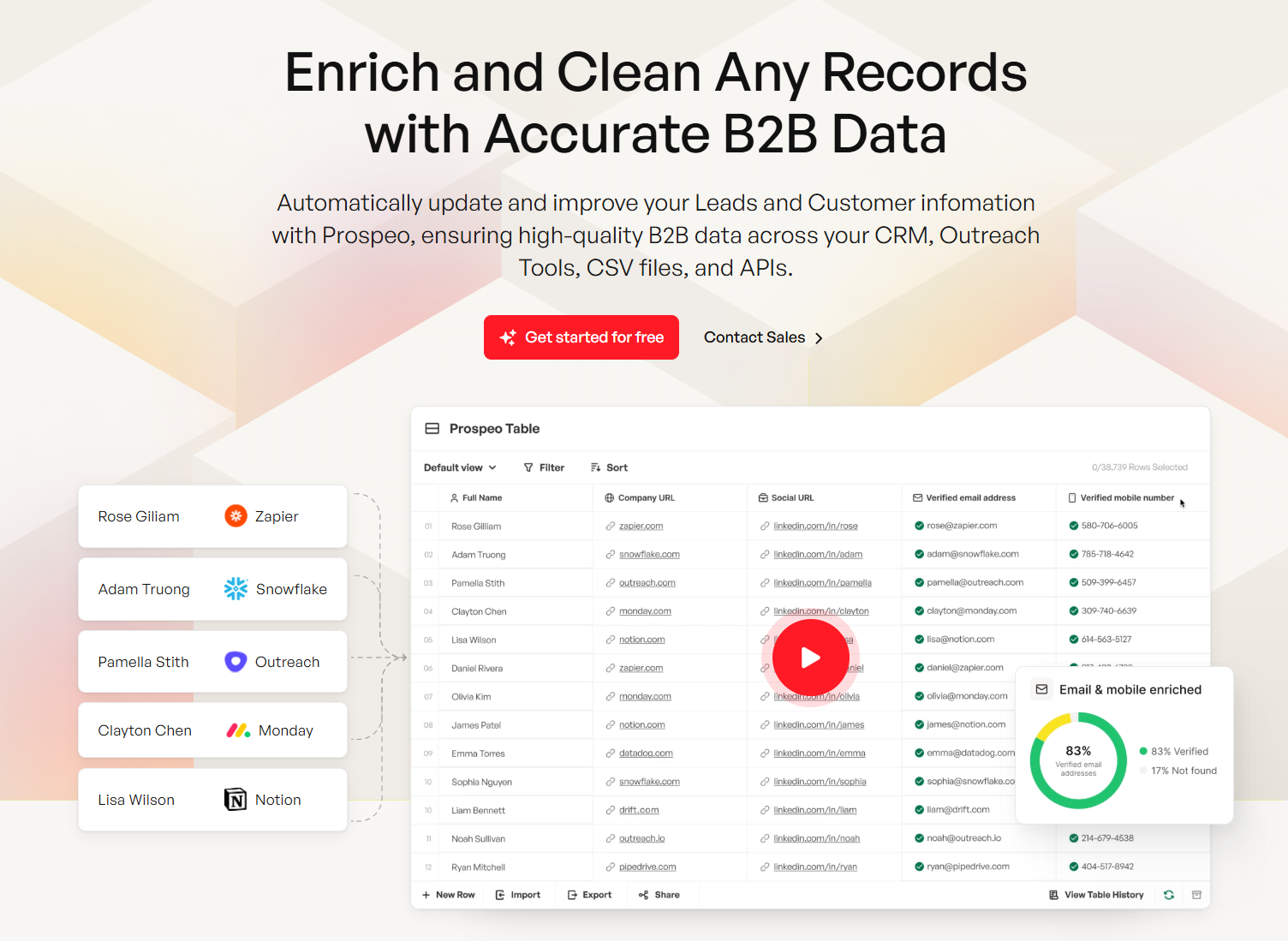
This is where Prospeo fits into your CRM stack. It's not a CRM - it's the data layer that makes your CRM trustworthy. With 300M+ professional profiles, 98% email accuracy, and 125M+ verified mobile numbers, the CRM enrichment feature returns 50+ data points per contact at an 83% match rate, filling in the gaps that make segmentation, routing, and reporting actually work. Data refreshes every 7 days - the industry average is 6 weeks - so the email you verified last Monday is still accurate this Monday. Native integrations with Salesforce and HubSpot mean enrichment happens inside your CRM, not in a separate spreadsheet workflow.

That $8.71 ROI per dollar spent on CRM? It only works when reps reach real buyers. Prospeo plugs into Salesforce, HubSpot, and 10+ other tools to deliver 143M+ verified emails and 125M+ direct dials - so your CRM isn't just organized, it's actually connected to revenue.
Your CRM comparison is incomplete without a data quality layer.
5 Red Flags During a CRM Demo
Before you sign anything, watch for these. Any one of them predicts trouble at month three.
- The demo uses fake data. If the sales engineer won't import your actual contacts and show your real workflow, they're hiding something. Insist on a proof-of-concept with live data.
- "That's a premium feature." Count how many times you hear this during the demo. More than twice? The sticker price is fiction.
- No clear answer on total cost. Ask: "What will a 25-seat deployment cost me in year one, including implementation and training?" Vague answers mean surprise invoices.
- The admin panel requires a developer. If basic configuration - adding a field, changing a pipeline stage, building a report - requires code or a consultant, your team will never self-serve.
- They can't show the mobile app. Your reps live on their phones. If the mobile experience is an afterthought, adoption will crater the moment anyone leaves their desk.
Apply the Monday Morning Test to every demo: would a rep voluntarily open this tool, or would they need to be forced?
Selection Mistakes That Cost Months
Choosing based on popularity, not workflow fit. Salesforce is the biggest CRM on the planet. That doesn't mean it's right for your 20-person sales team. Map your actual daily workflow first - then find the tool that fits it.
Ignoring total cost of ownership. A $25/user/month CRM that requires $80k in implementation and a full-time admin is a $150k+ decision in year one. Always model the 12-month cost, not the monthly price.
Not trialing with real users. Your ops team loved the demo. Great. Will your reps actually use it? Get 3-5 end users into a free trial with real data before you commit. Adoption beats features every time.
Skipping data quality planning. Garbage in, garbage out. If you're migrating to a new CRM without cleaning and enriching your contact data first, you're just moving the mess to a new address. Build data enrichment into your migration plan from day one (see data enrichment options).
Over-evaluating. Stop comparing 15 CRMs. Narrow to 3 based on your size, budget, and primary use case. Trial all three. Decide in 30 days. One team we worked with spent four months evaluating CRMs and ended up picking the same tool they'd identified in week two. Meanwhile, a company that switched to NetSuite CRM for ERP integration reduced operational latency by 30% - because they committed and moved.
30-Day CRM Evaluation Playbook
Week 1: Define requirements. Lock in your company size, budget ceiling, and primary use case - pipeline management, marketing alignment, or customer success. This alone narrows the field to 2-3 realistic options.
Week 2: Free trials with real data. Import actual contacts, not test data. Build your real pipeline stages. See how the tool handles your workflow, not a hypothetical one. Involve end users from day one - the Reddit consensus is clear that early team involvement is the single biggest predictor of successful adoption.
Week 3: Test integrations and reporting. Connect your email, calendar, and any outbound tools. Run an import/export cycle. Build one report you'd actually use in a pipeline review. If any of these feel painful, that pain multiplies at scale. If outbound is part of your motion, make sure you can connect your outreach tool to CRM cleanly.
Week 4: Collect feedback, negotiate, decide. Get structured feedback from every trial user. Negotiate pricing - most CRMs offer 10-20% discounts on annual plans if you ask. Make the call. A good CRM implemented today beats a perfect CRM implemented in six months.
FAQ
What's the best free CRM in 2026?
HubSpot CRM offers the most features at free for up to 2 users with no time limit. Freshsales, Zoho CRM (3 users), and Bigin by Zoho also have free tiers. HubSpot wins on out-of-box usability; Zoho has the best paid upgrade path if you plan to scale.
How much should a small business pay for CRM?
Expect $10-$30/user/month for teams under 50 people. Less Annoying CRM ($15/user/mo) and Bigin ($7-$18/user/mo) are the most affordable options with real utility. Avoid enterprise platforms at this stage - you'll pay for features you won't touch for years.
Is Salesforce worth it for small teams?
Usually not. Licensing starts at $25/user/month, but total cost of ownership - implementation, admin, consultants - can add $50k-$150k+ in the first year. Consider Zoho CRM or HubSpot unless you have dedicated IT resources and complex multi-team workflows that demand Salesforce's customization depth.
How do I run a CRM comparison properly?
Narrow to 3 options based on company size and budget. Run parallel free trials with real data and real users for 2 weeks. Test integrations, build one real report, and collect structured feedback. Decide within 30 days - evaluation shouldn't take longer than implementation.
How do I keep CRM data accurate after migration?
Pair your CRM with a data enrichment tool that refreshes contacts automatically. Prospeo verifies emails at 98% accuracy and refreshes records every 7 days, compared to the 6-week industry average. Native Salesforce and HubSpot integrations mean enrichment runs inside your CRM without manual exports.
How long does it take to switch CRMs?
Small businesses can migrate in 2-6 weeks. Mid-market organizations typically need 2-4 months. Enterprise migrations run 6-12+ months. The biggest variable isn't the software - it's data migration complexity and team retraining. Clean your data before you move it.