

CRM Data Migration: A Practitioner's Playbook That Actually Works
A real trigger for CRM migration is vendor shutdown. One team migrating to Salesforce shared they were moving about four years of CRM data because Zendesk Sell was being discontinued - and they didn't want to risk losing pipeline history in the process. This playbook breaks CRM data migration into six phases with concrete timelines, costs, and the field-level detail most guides skip. That matters because 55-70% of migration projects fail to meet their objectives, and the mistakes are depressingly predictable.
The Short Version
If you're pressed for time:
- Audit and cleanse before you export. Most CRMs carry 30-40% dead weight - duplicates, test records, contacts who left their companies two years ago. Verify emails, fill gaps, and flag dead records before they touch your new system.
- Budget 4-16 weeks depending on company size. Small teams can move in a month. Mid-market orgs need two to four months. Enterprise migrations with custom objects and integrations run six months or longer.
- Build a field mapping template before touching any tool. Source field, target field, transformation rule. Do this in a spreadsheet first. It'll save you weeks of rework.
- Run a test migration on a sample dataset. Pick 500-1,000 records across all object types. If something breaks, you want to find it here - not in production.
- Keep the old CRM live for ~6 months. You'll discover missing data. Someone will need a call note from 2023. Parallel access is cheap insurance.
What Is CRM Data Migration?
CRM data migration is the process of moving contacts, companies, deals, activity history, and associated metadata from one CRM to another - while preserving relationships, data integrity, and business context. It's not a file transfer. It's a translation exercise.
Three types come up most often. CRM-to-CRM means switching from HubSpot to Salesforce, or Zendesk Sell to anything else. On-prem to cloud covers legacy Dynamics on-prem moving to Dynamics 365 Online. Consolidation is merging two or more CRMs after an acquisition into a single system. That last scenario - data centralization after M&A - is increasingly common as companies look to unify customer records, kill redundant platforms, and give every team a single source of truth.
Why Companies Migrate
- Vendor sunset. Your CRM is being discontinued.
- Outgrown the platform. The CRM that worked for 10 reps doesn't work for 50. Reporting breaks, automation hits limits, and the sales team starts building workarounds in spreadsheets.
- M&A consolidation. Two companies, two CRMs, one mess.
- Cost reduction. You're paying enterprise pricing for features nobody uses. Moving to a leaner platform can cut CRM spend 20-50%.
- Cloud move. On-prem infrastructure is expensive to maintain and impossible to scale quickly.
- Compliance requirements. GDPR, CCPA, or industry-specific regulations demand capabilities your current CRM doesn't support.
Timelines and Costs
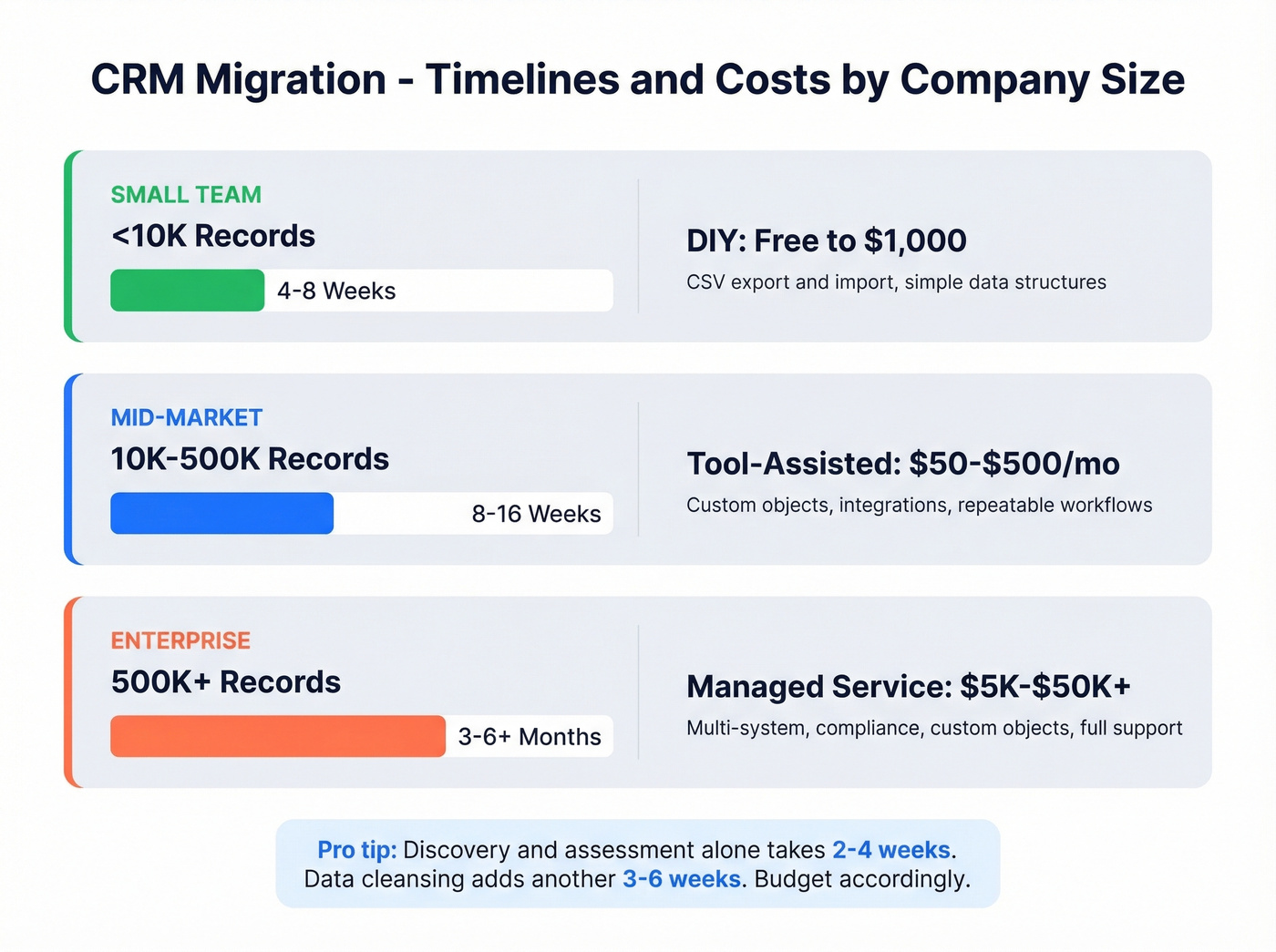
Timelines vary wildly based on data volume, custom objects, and integration complexity. Here's what we've seen across dozens of projects:
| Company Size | Timeline | Key Driver |
|---|---|---|
| Small (<10K records) | 4-8 weeks | Mostly contacts + deals |
| Mid-market (10K-500K) | 8-16 weeks | Custom objects, integrations |
| Enterprise (500K+) | 3-6+ months | Multi-system, compliance |
Discovery and assessment alone often takes 2-4 weeks, and data analysis plus cleansing can take 3-6 weeks. If you're migrating email and activity history, plan extra time for extraction, transformation, and validation - that's where the surprises live.
On cost, you've got three tiers:
| Approach | Cost Range | Best For |
|---|---|---|
| DIY (CSV export/import) | Free-$1,000 | <10K records, simple data |
| Tool-assisted | $50-$500/mo | Mid-complexity, repeatable |
| Managed service | $5K-$50K+ | Enterprise, custom objects |
The DIY route works until it doesn't. Past ~10,000 records - or anytime you're dealing with relational data where contacts link to deals link to activities - manual CSV imports become error-prone fast.

Most CRMs carry 30-40% dead weight. Migrating garbage into your new system just makes it someone else's problem. Prospeo's enrichment verifies emails at 98% accuracy, fills missing phone numbers from 125M+ verified mobiles, and returns 50+ data points per contact - so you only migrate records worth keeping.
Clean your CRM data before it crosses over. Not after.
The Six-Phase Process
Phase 1 - Audit Your Data
Here's the uncomfortable truth: 76% of CRM users say less than half their data is accurate and complete. In that same Validity survey of 602 CRM stakeholders, 37% reported losing revenue directly because of poor data quality. Your CRM isn't as clean as you think.
Before you export a single record, you need to know what you're working with. Most CRMs carry 30-40% dead weight - duplicates, test records, contacts with bounced emails, people who changed jobs two years ago.
Export your contacts as a CSV and run them through an data enrichment tool to verify emails, fill missing phone numbers, and flag dead records. Prospeo's enrichment handles this at 98% email accuracy and returns 50+ data points per contact. Instead of migrating 50,000 contacts and discovering 15,000 are garbage in your new CRM, you catch the problems before they cross over. Start your audit by working through these items:
- Count total records by object type - contacts, companies, deals, activities
- Identify duplicates and near-duplicates
- Flag records with missing critical fields like email, company, or title
- Check for data decay - contacts older than 2-3 years are likely stale
- Set a cut-off date. Records older than 5 years are rarely worth migrating. Archive them and move on.
Phase 2 - Define Scope and Plan
Not everything in your CRM needs to make the trip. Here's the full inventory of data categories to evaluate:
- Contacts and companies
- Deals/opportunities and pipeline stages
- Communication history - emails, call notes, meeting logs
- Support tickets and case history
- Documents and attachments
- Analytics and saved reports
- User roles and permissions
- Integration configurations
- Marketing data like lists, campaign history, and lead scores
For each category, decide: migrate, archive, or discard. Most orgs discover that 30-40% of their custom fields are rarely used and can be retired. Don't migrate fields nobody looks at - they'll just clutter your new system.
Define success criteria upfront. What does "done" look like? Record count matches? All deals preserved with stage history? Activity history intact for the past 24 months? Write it down. You'll need it during validation.
Phase 3 - Map Your Fields
Field mapping is where migrations quietly fail. A free-text "Industry" field in your old CRM won't drop cleanly into a dropdown picklist in the new one. Custom objects might have no equivalent. Relational data can break if you migrate objects in the wrong order.
Build your mapping template before you touch any tool:
| Source Field | Target Field | Transformation |
|---|---|---|
| Contact.Email | Contact.Email | Lowercase, trim spaces |
| Contact.Phone | Contact.Phone | Standardize to E.164 |
| Account.Industry | Account.Industry | Map free text to picklist |
| Deal.Stage | Opportunity.Stage | Map custom stages to new |
| Activity.Note | Activity.Description | Truncate to system limit |
In our experience migrating mid-market CRMs, the most common mapping failure is data type mismatches - dates stored as strings, currencies without decimal handling, and custom objects that simply don't exist in the target system. For that last case, you've got two options: build a custom object in the new system or flatten the data into standard fields. Neither is fun, but deciding upfront beats discovering it mid-migration when half your records are already loaded and the other half are stuck in limbo.
Phase 4 - Cleanse and Prepare
With your audit done and mapping defined, it's time to actually clean the data. This is the grunt work that separates successful migrations from the ones that multiply dirty data into a new system.
- Deduplicate using email + company name as the primary match key
- Standardize formats: phone numbers to E.164, addresses to postal standards, dates to ISO 8601
- Create a Legacy ID field in your target CRM for every migrated record - this lets you trace records back to the source system and run delta updates later
- Build compound keys where needed: if your old CRM is contact-centric with no account IDs, create a Company + Address key to group contacts into accounts
One thing to watch for: legacy export formats can be a hidden blocker. We've seen teams discover their old CRM only exports email history as Thunderbird .mbox files - a format nobody on the team knows how to parse. Test your exports early. The consensus on r/salesforce and r/sales is that the biggest surprise isn't the migration itself - it's discovering your old CRM can't export what you need.
Run your contacts through an AI email checker and verification tool one final time at this stage. At roughly $0.01 per record, catching bounced emails and dead numbers is the last line of defense before go-live - and it's cheaper than one bounced outreach sequence in your new system.
Phase 5 - Test Migration
Never go straight to production. Run a test migration in a sandbox or UAT environment first.
- Pick a representative sample: 500-1,000 records across contacts, companies, deals, and activities
- Verify record counts match between source and target
- Spot-check 20-30 records manually - do the fields look right?
- Test relational integrity: does Contact A still link to Deal B and Company C?
- Confirm activity history transferred: open a random contact and check that emails, notes, and call logs are attached
- Validate picklist values mapped correctly with no "Other" dumping ground
If your test migration surfaces issues, fix the mapping or transformation rules and run it again. Iterating in a sandbox is infinitely cheaper than rolling back a production migration.
Phase 6 - Execute and Go Live
Schedule your production migration for a weekend or low-activity window. Communicate the timeline to every team that touches the CRM - sales, marketing, CS, finance.
Here's the thing most teams miss: delta processing. Records created or updated in the old CRM during the migration window need to be captured and synced to the new system. Without a delta process, you'll lose deals that closed on Friday afternoon.
After cutover, run your validation checklist again on production data. Log every error. Assign owners to fix them within the first week.
Keep the old CRM running in read-only mode for approximately six months. Someone will need a call note from 2022. Someone will discover a custom report that didn't migrate. Parallel access is cheap insurance - don't cut the cord early.
Why CRM Migrations Fail
Most migration failures aren't technical. They're planning failures. Here are the patterns we see over and over.
Dirty data multiplication. You migrate 50,000 contacts with 12,000 duplicates. Now you have 12,000 duplicates in a system nobody knows how to clean. Post-migration cleanup costs 3-5x more in labor hours than pre-migration cleansing. Always clean before export.
Beermat forecasting. Teams estimate timelines without examining the data. "It's just contacts and deals, should take two weeks." Then they discover 47 custom objects, three integration dependencies, and email history locked in a proprietary format. Spend the first two weeks on discovery, not migration.
Skipping activity history. Migrating contacts and deals without emails, notes, and call logs strips all context. Your reps open a contact and see a name with no history - that's useless. Explicitly scope activity history in Phase 2 and test the export format early.
No test migration. Going straight to production is gambling. One bad field mapping can corrupt thousands of records. Always run a sandbox test first.
Post-Migration Data Integration
Migration doesn't end at go-live. Most teams underestimate the integration work required to reconnect the new system with the rest of their stack - marketing automation, billing, support platforms, and enrichment tools all need to sync cleanly. Map every integration dependency during Phase 2, and budget at least one to two weeks post-cutover for testing data flows between systems. Native CRM connectors simplify ongoing enrichment so new records get verified and enriched automatically instead of decaying in your freshly migrated database.
If you’re rebuilding your outbound stack after cutover, it’s worth reviewing how to connect outreach tool to CRM so sequences, tasks, and activity logging don’t break again.
Migration Tools Compared
| Tool | Starting Price | Best For |
|---|---|---|
| Import2 | Free tier (up to 100K records) | Simple CRM-to-CRM moves |
| Skyvia | Free (up to 10K records/month) | Scheduled syncs, cloud CRMs |
| Hevo | ~$200-$300/mo | Data pipelines, 500K+ records |
| Boomi | ~$99/mo | Enterprise integrations |
| Jitterbit Data Loader | Free (up to 100 ops/month) | Salesforce-specific loads |
| Zapier / Make | ~$10-$30/mo | Lightweight automation |
| ClonePartner | Project-based pricing | Full-service migration |
| Managed services | $5K-$50K+ | Complex, multi-system |
For straightforward CRM-to-CRM moves under 100,000 records, Import2 is the obvious starting point - it's free at the base tier and handles the most common migration paths. We've tested it on datasets up to 80K records and it handles the basics well, though it won't help you with custom object relationships.
Skip Hevo unless you're running 500K+ records - it's overkill for most migrations and the pricing reflects that. Skyvia works well for ongoing syncs if you need to run parallel systems during transition.
ClonePartner got a strong recommendation on Reddit from a team migrating from Zendesk Sell to Salesforce - they called it "the most cost efficient" option with good service.
Let's be honest: if your average contract value is under $15K and you have fewer than 50K records, you almost certainly don't need a managed service. Import2 or Skyvia plus a weekend of focused work will get you there. Save the $15K for hiring a RevOps person who'll keep the new CRM clean.
FAQ
How long does a typical migration take?
Small businesses with under 10,000 records typically finish in 4-8 weeks. Mid-market companies need 8-16 weeks. Enterprise migrations with custom objects and multiple integrations run 3-6+ months. Discovery alone takes 2-4 weeks regardless of size. Salesforce's own migration guide echoes these ranges.
Can I migrate data myself with CSV exports?
For under 10,000 records with simple structures, CSV export and import works fine. Beyond that threshold, manual imports become error-prone fast - use a tool like Import2 or Skyvia, or hire a specialist for anything involving custom objects or relational data.
Should I clean data before or after migration?
Before. Always before. Post-migration cleanup costs 3-5x more in labor hours because your team is learning a new interface while simultaneously fixing data quality issues. Running contacts through a verification tool at ~$0.01 per record to catch bounced emails and dead numbers before cutover is the cheapest insurance you'll buy.
What happens to email and activity history?
It depends entirely on your source CRM's export capabilities. Some platforms export contacts and deals cleanly but lock email history in proprietary formats. Others don't export call notes at all. Test the export in Phase 1 - before you commit to a timeline or budget.
How do I handle data centralization after an acquisition?
Audit both systems independently using Phase 1 of this playbook. Identify overlapping records - shared customers, duplicate contacts - and decide which system's data takes priority. Then treat the merge as a consolidation migration: map fields from both sources into a single target schema, deduplicate aggressively, and validate that no customer context is lost. HubSpot's CRM migration resources cover some of the platform-specific nuances worth reviewing.
Field mapping fails when contact data is stale. People change jobs, emails bounce, phone numbers go dead. Prospeo refreshes data every 7 days - not every 6 weeks - so your migration starts with records that actually reflect reality. At $0.01 per email, cleaning 50K contacts costs less than one hour of consultant rework.
Stop migrating contacts who left their company two years ago.