

CRM Pipeline Stages: The Practitioner's Guide With Real Benchmarks
84% of sales reps miss quota. Not because they can't sell - because their pipeline is fiction. Stages with no exit criteria, forecasts built on gut feel, and "qualified" deals that haven't spoken to a decision-maker in six weeks.
Every guide gives you seven stages and stops there. This one gives you the benchmarks, the probabilities, and the setup steps to make your CRM pipeline stages actually mean something.
What You Need (Quick Version)
Most B2B teams need 5-7 pipeline stages. Each stage needs three things: exit criteria that define when a deal moves forward, a default forecasting probability, and a conversion benchmark to measure against. If you just want the numbers, jump to the probability table or the conversion benchmarks. If you want to understand why your pipeline is lying to you, keep reading.
What Is a Pipeline in CRM?
Pipeline stages in a CRM are the sequential steps a deal moves through from first contact to closed revenue. They represent seller actions - what your team does to advance a deal. This is the critical distinction most people miss: a pipeline tracks what sellers do, while a funnel tracks the buyer's journey.
Here's how the two map together using the classic AIDA framework):
| AIDA Stage | Buyer Journey (Funnel) | Seller Actions (Pipeline) |
|---|---|---|
| Attention | Awareness | Prospecting |
| Interest | Consideration | Qualification, Discovery |
| Desire | Decision | Proposal, Negotiation |
| Action | Post-Purchase | Expansion, Renewal |
The pipeline is your internal operating system. The funnel is how marketing thinks about the buyer's mindset. They're complementary, not interchangeable - and using them interchangeably is one of the fastest ways to create misalignment between sales and marketing.
The 7 Standard Sales Stages
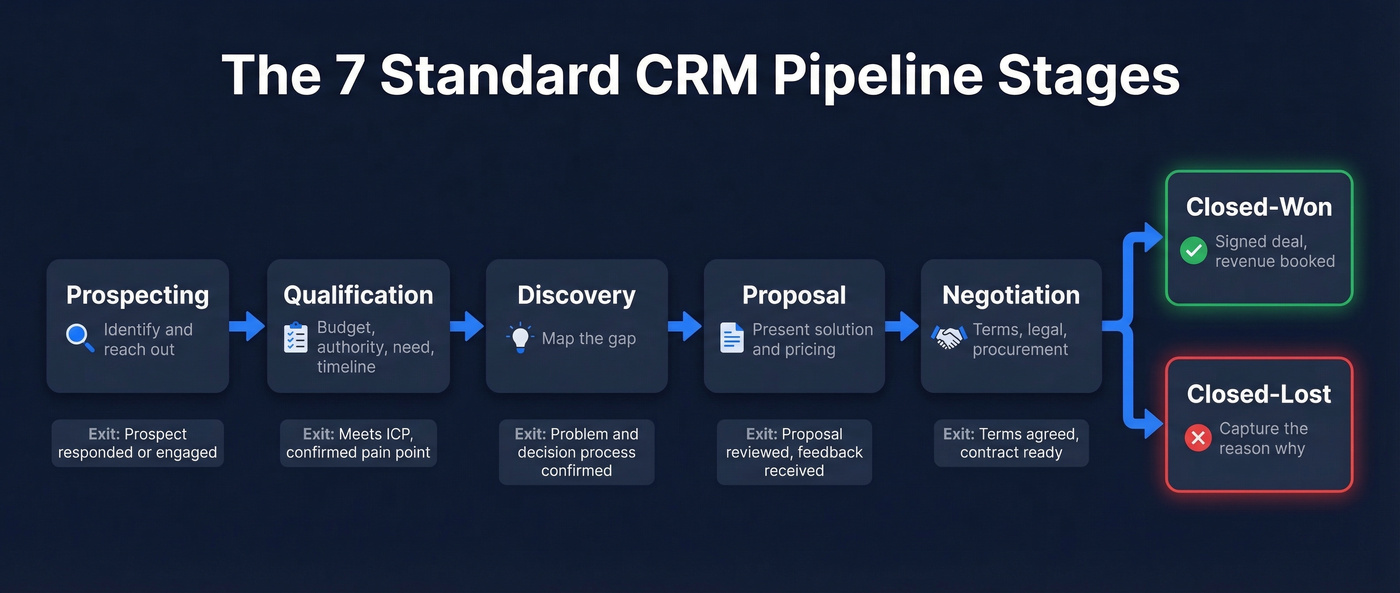
These seven stages work for most B2B sales teams. Adapt the names to your CRM's conventions, but don't skip the exit criteria - they're what separate a functioning pipeline from a glorified to-do list.
Prospecting
You're identifying potential buyers and making initial outreach. This is where data quality makes or breaks everything downstream. If 20% of your emails bounce, Stage 1 numbers are inflated and every conversion metric after it is a lie. Prospeo verifies every contact before it enters the pipeline - 98% email accuracy across 143M+ verified emails, refreshed every 7 days. Your Stage 1 count reflects real opportunities, not dead addresses.
Exit criteria: Prospect has responded or engaged - opened an email, accepted a meeting request, returned a call.

Qualification
You've made contact. Now you're determining whether this prospect has budget, authority, need, and timeline. BANT still works here, though plenty of teams use MEDDIC or CHAMP instead. The framework matters less than consistency - every rep should evaluate the same criteria.
Exit criteria: Prospect meets your ICP criteria and has confirmed a specific pain point or initiative.
Discovery / Needs Analysis
This is where you go deep. You're mapping the prospect's current state, desired state, and the gap between them. For enterprise deals with six to ten stakeholders, discovery often takes multiple calls across different departments, and rushing it is the single most expensive mistake a rep can make because a weak discovery produces a generic proposal that procurement ignores.
Exit criteria: You can articulate the prospect's problem, its business impact, and the decision-making process - and the prospect has confirmed your understanding.
Proposal
You've built a solution and presented pricing. The prospect has a document they can circulate internally. This stage is where deals go to die if you haven't done discovery properly - a proposal that doesn't map to stated needs gets forwarded to procurement and forgotten.
Exit criteria: Prospect has reviewed the proposal and provided feedback or questions.
Negotiation
Terms, pricing, legal review, procurement. Enterprise deals can sit here for weeks. The key metric to watch is time-in-stage - if deals consistently exceed your target, you've got a process problem, not a sales problem.
Exit criteria: Both parties have agreed on terms. Contract is ready for signature.
Closed-Won
Signed deal. Revenue booked. This isn't really a "stage" in the active sense - it's the finish line. But it matters for reporting and triggers downstream workflows like onboarding handoffs and commission calculations.
Closed-Lost
The deal didn't happen. Always capture a reason. "Lost to competitor," "budget cut," "went dark" - these categories become your most valuable pipeline intelligence over time. Teams that don't track loss reasons are flying blind on win-rate analysis.
Post-sale stages like Onboarding, Renewal, and Expansion are worth adding if your CRM supports multiple pipelines. Most mature RevOps teams separate these into a dedicated Customer Success pipeline rather than bolting them onto the sales pipeline.
How Many Stages Do You Need?
There's no universal answer, but there is a clear range.
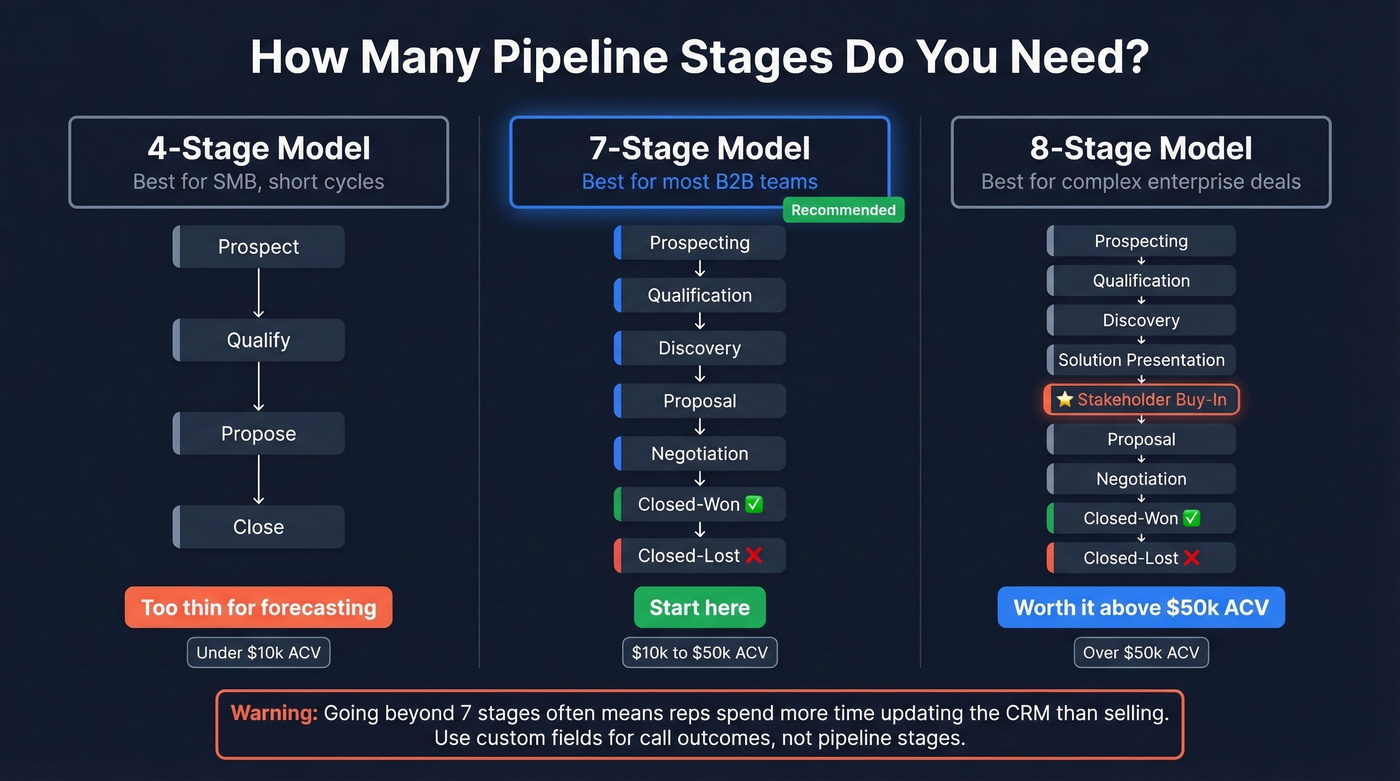
| Model | Stages | Best For | Our Take |
|---|---|---|---|
| Copper's 4-stage | Prospect - Qualify - Propose - Close | SMB, short cycles | Too thin for forecasting |
| Standard 7-stage | Full model above | Most B2B teams | Start here |
| Enterprise 8-stage | Adds Stakeholder Buy-In | Complex, multi-threaded deals | Worth it above $50k ACV |
The 8-stage model inserts a "Stakeholder Buy-In / Consensus" stage between Solution Presentation and Proposal. For enterprise deals where buying committees average 7 people, that's not overkill - it's necessary. You need a stage that explicitly tracks whether the economic buyer, the champion, and the technical evaluator are all aligned before you send a proposal.
Now let's look at what overkill actually looks like. An agency owner on Reddit shared their pipeline while migrating CRMs: Lead Interested, Info Request, Meeting Request, Never Replied, Meeting Booked, Missed Call, Meh Call, Great Call, Proposal Sent, Won, Lost. Eleven stages. The poster themselves called it "overkill" - and they were right.
Here's the thing: if your average deal size is under $10k, you probably don't need more than 5 stages. The overhead of maintaining a complex pipeline eats more revenue than it saves. We've watched teams go beyond 7 stages and spend more time updating the CRM than selling. Use custom fields for sales activities - not pipeline stages.
Stage-by-Stage Conversion Benchmarks
Benchmarks give you something to measure against. Without them, your pipeline is just a list of deals with no context for whether your conversion rates are healthy or hemorrhaging.
MarketJoy's aggregated data provides a useful baseline:
| Stage Transition | Benchmark |
|---|---|
| Lead - MQL | 22% |
| MQL - SQL | 15% |
| SQL - Opportunity | 11% |
| Opp - Closed-Won | 7% |
The biggest bottleneck across nearly every dataset we've analyzed is MQL to SQL. That 15% conversion means 85% of marketing-qualified leads don't survive sales scrutiny. If your number is significantly worse, the problem is usually lead scoring criteria, not sales effort.
Digital Bloom's SaaS benchmarks break it down by segment:
| Stage | SMB/Mid-Market | Enterprise |
|---|---|---|
| Visitor - Lead | 1.4% | 0.7% |
| Lead - MQL | 41% | 39% |
| MQL - SQL | 39% | 31% |
| SQL - Opportunity | 42% | 36% |
| Opp - Close | 39% | 31% |
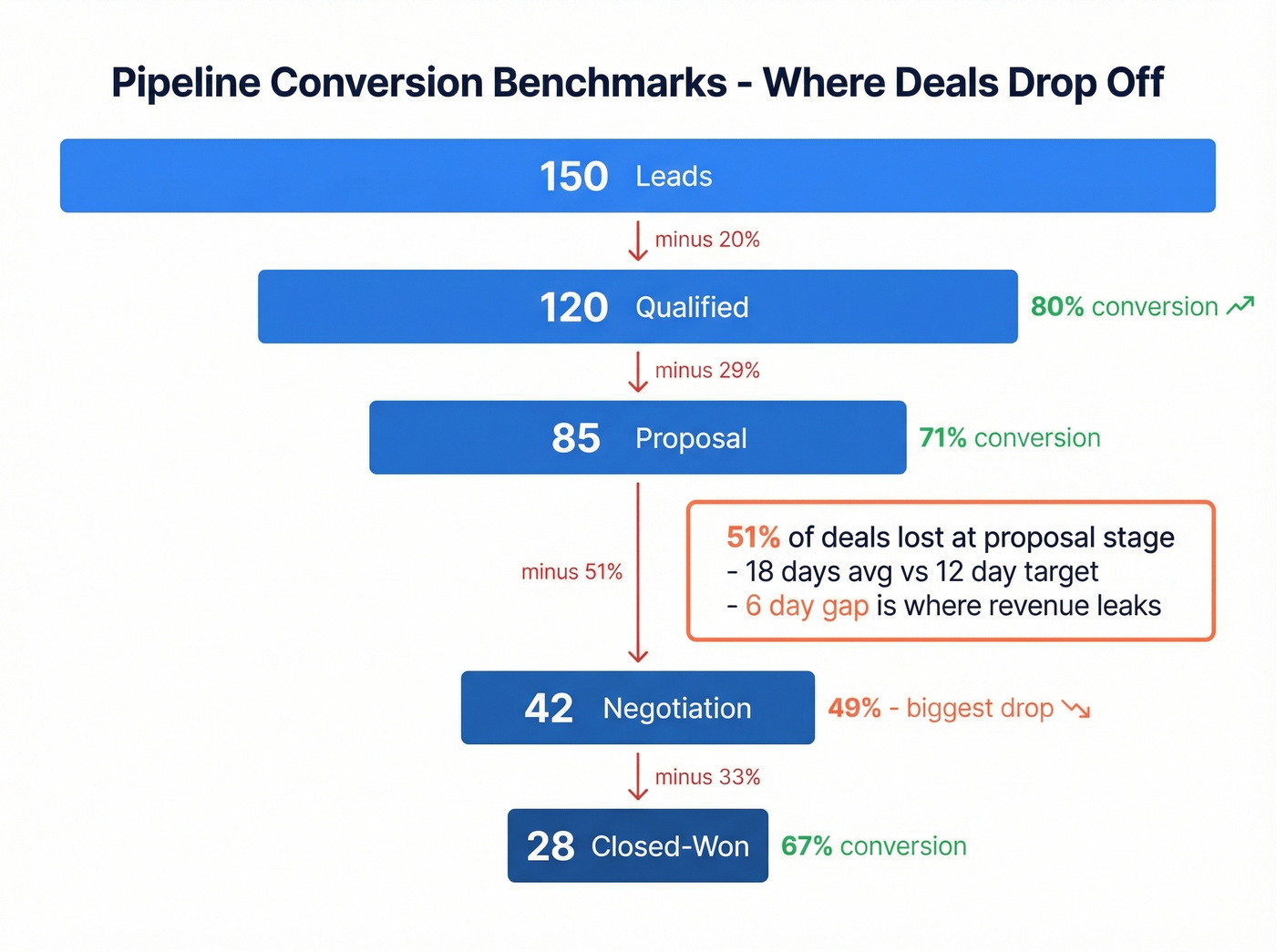
Let's make this concrete with a worked example. In one quarter: 150 leads entered the pipeline, 120 qualified (80%), 85 reached proposal (71%), 42 entered negotiations (49%), and 28 closed (67%). The biggest drop was proposal to negotiation - 51% loss. The average deal spent 18 days in the proposal stage against a 12-day target. That 6-day gap is where revenue leaked.

Every pipeline stage conversion benchmark in this guide assumes your Stage 1 data is real. If 20% of your emails bounce, your MQL-to-SQL rates are fiction. Prospeo delivers 98% email accuracy across 143M+ verified contacts, refreshed every 7 days - so your prospecting stage reflects actual opportunities, not dead addresses.
Clean pipeline starts with clean data. See the difference at $0.01 per email.
Sales Cycle Benchmarks
How long should deals take? It depends on industry, prospect company size, and deal value.
By Industry (total days):
| Industry | Avg Days |
|---|---|
| Retail | 70 |
| Software | 90 |
| Healthcare | 125 |
| Insurance | 127 |
| Manufacturing | 130 |
| Energy | 155 |
| Non-Profit | 162 |
By Prospect Company Size:
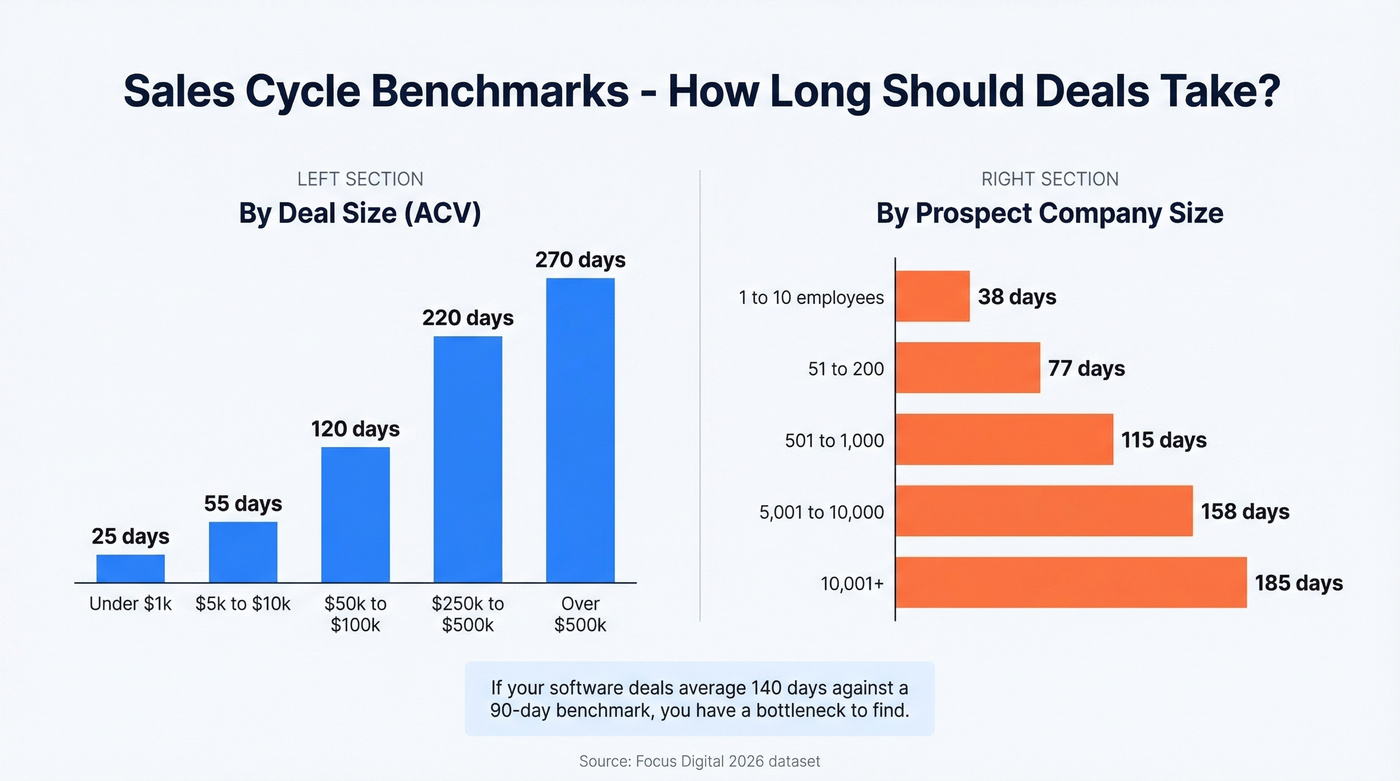
| Employees | Avg Days |
|---|---|
| 1-10 | 38 |
| 51-200 | 77 |
| 501-1,000 | 115 |
| 5,001-10,000 | 158 |
| 10,001+ | 185 |
By Deal Size (ACV):
| ACV | Avg Days |
|---|---|
| <$1k | 25 |
| $5k-$10k | 55 |
| $50k-$100k | 120 |
| $250k-$500k | 220 |
| >$500k | 270 |
These numbers come from Focus Digital's 2026 dataset. Use them to set time-in-stage targets for each pipeline stage. If your software deals are averaging 140 days against a 90-day benchmark, you've got a bottleneck to find.
Stage-Based Forecasting Probabilities
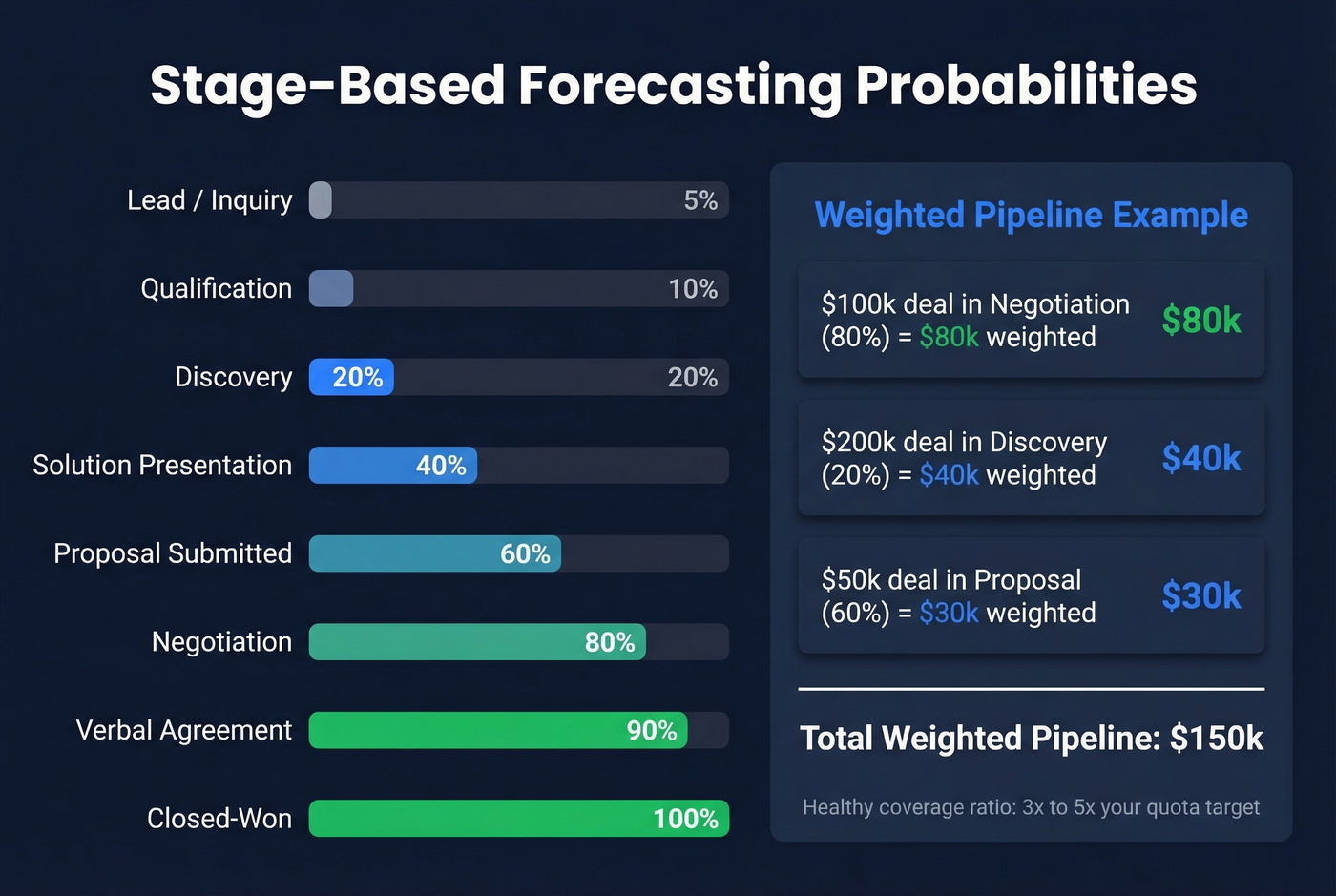
This is the table your finance team actually wants. Copy it into your CRM and adjust based on your historical win rates after a quarter or two of data.
| Stage | Default Probability |
|---|---|
| Lead / Inquiry | 5% |
| Qualification | 10% |
| Discovery | 20% |
| Solution Presentation | 40% |
| Proposal Submitted | 60% |
| Negotiation | 80% |
| Verbal Agreement | 90% |
| Closed-Won | 100% |
The weighted pipeline formula is straightforward: Deal Amount x Stage Probability = Weighted Value. A $100k deal in Negotiation (80%) contributes $80k to your weighted pipeline. A $200k deal in Discovery (20%) contributes $40k. Sum all weighted values and you've got your forecast.
We've run these probability defaults across multiple teams and they hold up as a starting point. With discipline, stage-based forecasting reaches 85-95% accuracy for the current quarter and 70-80% for next quarter - dramatically better than gut-feel forecasts. Fewer than 20% of sales leaders rate their pipeline forecast accuracy as "predictable," which tells you how low the bar is.
For pipeline coverage, the healthy range is 3x-5x your quota target. SMB teams with shorter cycles can operate at 1.5-2x. Enterprise teams selling into long cycles need 4-5x because more deals will slip or stall. When your coverage ratio drops below your floor, that's a leading indicator you'll miss the quarter - and you'll know weeks before the number comes in.
Setting Up Stages in Your CRM
HubSpot: Best for Automation
HubSpot's real strength is stage-based workflow automation - auto-creating tasks, sending internal notifications, and triggering sequences when deals move stages. Navigate to Settings - Objects - Deals - Pipelines tab, then hit the Automate tab. You'll need Super Admin or Workflow edit permissions. The free CRM includes basic pipeline customization, but the full workflow editor requires Professional or Enterprise tier. You'll outgrow the free tier fast.
Salesforce: Best for Complex Sales Motions
If you're running multiple sales motions, overlapping territories, or need granular permission controls, Salesforce is unmatched - but it earns that flexibility with a steeper learning curve. Pipeline stages are managed on the Opportunity object as Stage values. Update them in Setup, and make sure each stage has a consistent probability percentage so forecasting stays coherent across the team. Salesforce's documentation on opportunity stages walks through the full configuration.
Pipedrive: Fastest to Launch
You can have a fully configured pipeline in under 10 minutes. Head to Settings - Pipelines, add or edit stages, and drag to reorder. For a small team that wants to stop debating CRM setup and start selling, Pipedrive is the answer.
Whichever CRM you're using, keep pipeline data clean with enrichment. Prospeo's native HubSpot and Salesforce integrations enrich records with 50+ data points per contact, so stage transitions are based on current information rather than stale data from six months ago.
Pipeline Design for SaaS and PLG
Product-led growth breaks the traditional pipeline model. When you've got thousands of free trial signups per month, creating a deal for every one of them turns your CRM into a junk drawer.
This is a common question in HubSpot's community forums, and the consensus is clear: a signup isn't a deal - a demo request or a usage milestone is. Keep trial users as contacts until they show real buying intent.
The biggest structural change is running multiple pipelines for different motions: Trial to Paid Conversion, Expansion/Upsell, and Renewal/Churn Prevention. Each has different stages. Assign high-volume trials to pooled ownership rather than individual reps, and automate deal creation on specific signals like demo requests, usage thresholds, team invitations, or paid trial upgrades. This keeps your pipeline clean and your conversion metrics honest.
I've seen teams try to force PLG into a traditional 7-stage pipeline. It never works. The volume overwhelms the model. Separate your motions, automate the handoffs, and let the pipeline reflect actual buying behavior.
Common Pipeline Mistakes
Stage bloat. You're tracking activities, not buyer progress. "Missed Call" and "Meh Call" aren't stages - they're call outcomes. Use a custom field. Every unnecessary stage adds friction for reps and noise to your forecast.
No exit criteria. Without clear criteria for when a deal moves forward, reps interpret stages differently. One rep's "Qualified" is another rep's "Had a nice chat." Deals stall because the seller assumes progress that isn't happening - 89% of B2B buyers had a deal stall in the past year.
Ignoring conversion metrics. If you're not measuring stage-to-stage conversion rates, your pipeline is a to-do list, not a forecasting tool. Review conversion rates monthly. When a stage consistently converts below benchmark, that's where your coaching and process investment should go.
Skip the temptation to redesign your pipeline every quarter. Pick a structure, commit to it for 90 days, collect data, then iterate. The teams with the best forecasts aren't the ones with the fanciest stage names - they're the ones who've been measuring the same stages long enough to know what normal looks like. If you want a tighter diagnostic, start with pipeline health metrics before you rename anything.
Deals stall in negotiation when you're talking to the wrong stakeholders. Prospeo's 30+ search filters - including department headcount, job changes, and buyer intent across 15,000 topics - help you map the full buying committee before you ever send a proposal. 83% enrichment match rate means fewer gaps in your CRM.
Stop sending proposals to people who can't sign them.
FAQ
What's the difference between pipeline stages and deal stages?
They're the same thing. "Pipeline stages" describes the overall process framework, while "deal stages" is the field name most CRMs use on individual records. When you edit pipeline stages in HubSpot or Salesforce, you're editing deal stages. The industry uses them interchangeably.
How often should I review my pipeline stages?
Review quarterly. If any stage consistently has fewer than 5% of deals passing through it, merge it with an adjacent stage. If one stage holds 40%+ of all deals, split it - you're missing a decision point. Major changes to your sales motion warrant an immediate review.
How do pipeline stages differ across industries?
The core framework - prospecting through closed-won - stays the same, but stage count and time-in-stage targets vary significantly. A retail SaaS team with a $5k ACV might collapse qualification and discovery into a single stage, while a healthcare enterprise team needs separate stages for compliance review and stakeholder consensus. Use the sales cycle benchmarks above to calibrate.
How do I keep pipeline data accurate at scale?
Automate enrichment at the point of entry. Prospeo's CRM integrations return 50+ data points per contact with a 92% match rate, ensuring records stay current on a 7-day refresh cycle. Pair that with mandatory fields on stage transitions so reps can't advance deals without updating key information.