

CSVgo vs Tomba: Email Verifier vs Email Finder Compared
The CSVgo vs Tomba comparison is misleading from the start. It's like comparing a dishwasher to a grocery store - one cleans what you already have, the other helps you find what you need. They aren't competitors. They solve different problems at different stages of the outbound workflow, and the real question isn't which is better. It's whether you already have emails or you're still hunting for them.
30-Second Verdict
- Pick CSVgo if you've got a CSV of leads and need fast bulk cleaning, ESP grouping, and catch-all handling before launching sequences.
- Pick Tomba if you don't have emails yet and need a domain search database plus finder plus verifier in one platform.
Feature Comparison at a Glance
| Feature | CSVgo | Tomba |
|---|---|---|
| Primary function | Email verifier/cleaner | Email finder + verifier |
| Database | None (BYO list) | 450M+ emails, 76M domains |
| Pricing model | Per-verification credits | Search + verification credits |
| Catch-all handling | Flags & segments | Confidence scoring (0-100) |
| Integrations | File exports (multiple formats) | HubSpot, Pipedrive, Airtable, Zapier, Mailchimp |
| Best for | Cleaning existing lists | Finding new contacts |
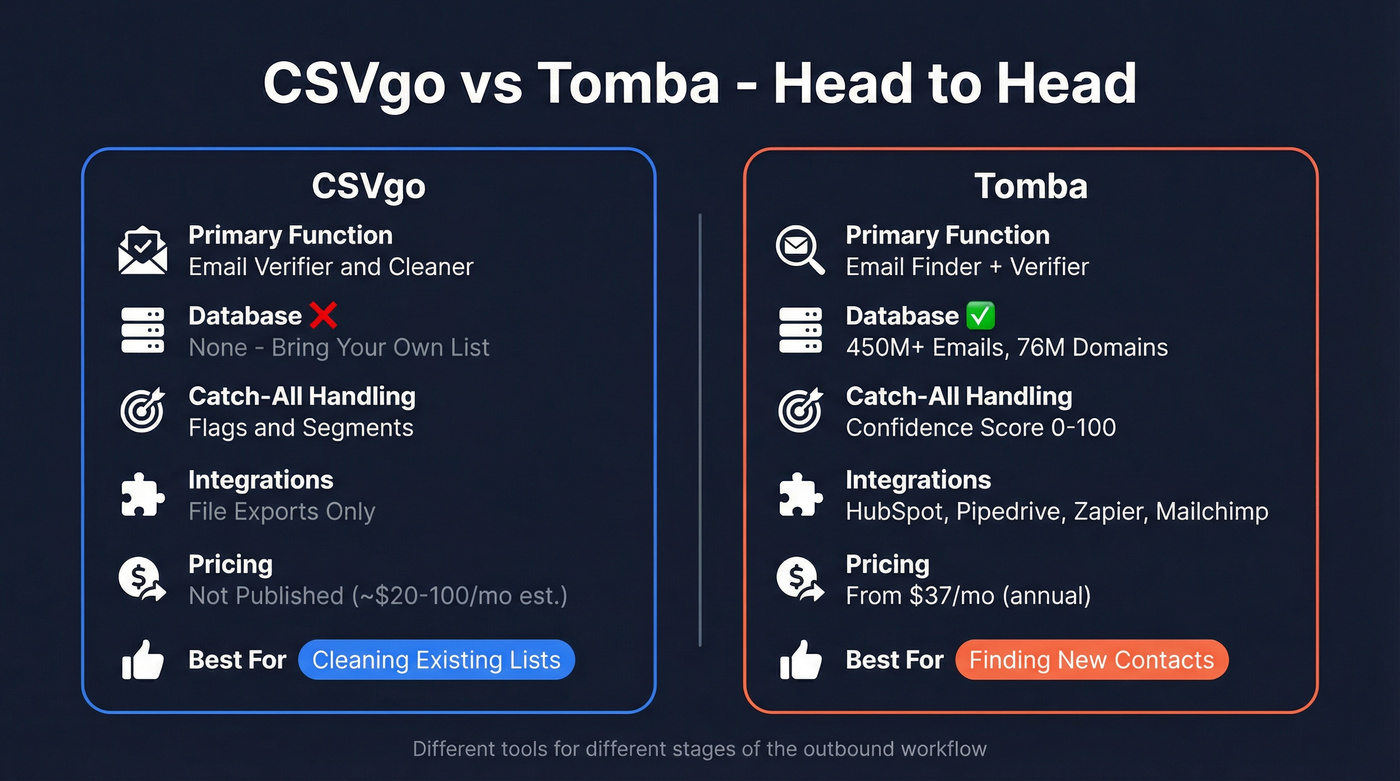
If you're exporting leads from Apollo or another database and need to scrub before sending, CSVgo fits. Starting from a list of target domains and need to surface emails? Tomba fits.

CSVgo cleans lists. Tomba finds emails. Prospeo does both - plus enrichment, intent data, and CRM sync - in one workflow. 300M+ profiles, 98% email accuracy, 7-day data refresh, and credits at ~$0.01 per email.
Ditch the two-tool stack and start prospecting in one click.
What Each Tool Actually Does
CSVgo - Bulk List Cleaning
Use this if you've got a messy CSV export and need campaign-ready contacts in minutes. CSVgo's workflow is dead simple: upload, map columns, clean, verify, analyze, download. It groups contacts by ESP (Gmail, Outlook, SMTP) so you can segment sends for better deliverability (and protect your sender reputation), and it flags catch-all addresses rather than silently discarding them. We've found that ESP grouping alone saves about 15 minutes per campaign setup compared to doing it manually in a spreadsheet, which adds up fast when you're running weekly sends.
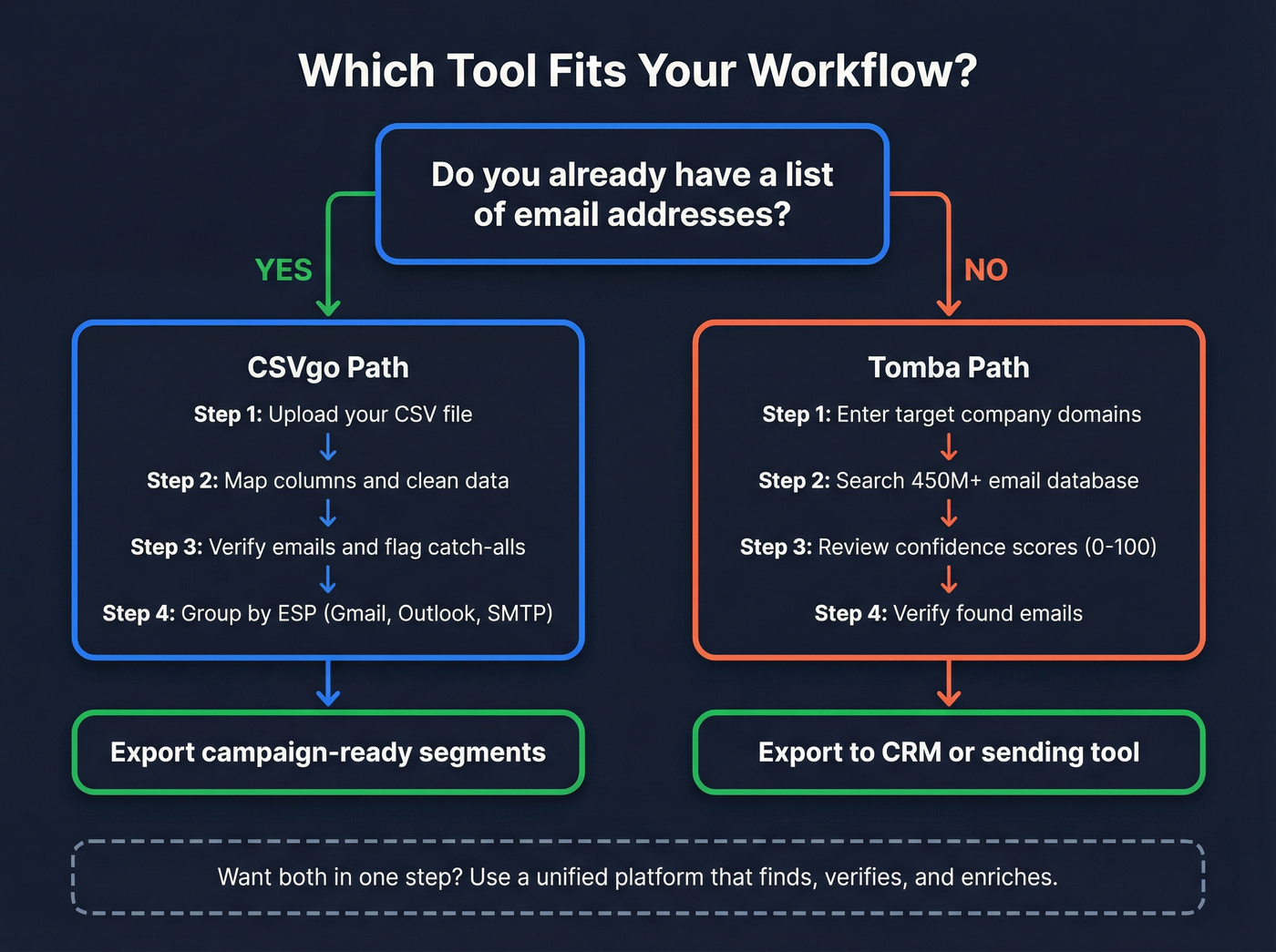
Skip this if you don't have a list yet. CSVgo doesn't find emails - it only validates what you bring. Pricing isn't public, but expect roughly $20-100/mo depending on volume.
Tomba - Email Finder + Verifier
Tomba's database covers 450M+ emails across 76M domains, and the domain search feature pulls known contacts for any company domain you throw at it. The built-in verifier runs confidence scoring on catch-all domains - a score from 0 to 100 rather than binary pass/fail - which is genuinely useful for preserving borderline-valid leads. Tomba claims 99%+ verification accuracy with 3-month smart caching on real-time checks.
A Reddit benchmark test of 2,500 contacts across eight finders put Tomba at 76.9% valid emails found - the highest in that particular test. On G2, it holds a 4.7/5 across 25 reviews, with users praising affordability and data accuracy, though reviews also flag tight quotas on lower-tier plans.
One thing cold emailers should know: Tomba doesn't send emails or warm up inboxes. You'll pair it with Instantly, Smartlead, or a similar sending tool (or follow a safer cold email marketing setup). The consensus on r/coldemail is that Tomba is cheap and useful for domain searches, but quality really depends on the industry you're targeting.
Pricing Breakdown
Tomba's pricing runs on annual plans with separate search and verification quotas:
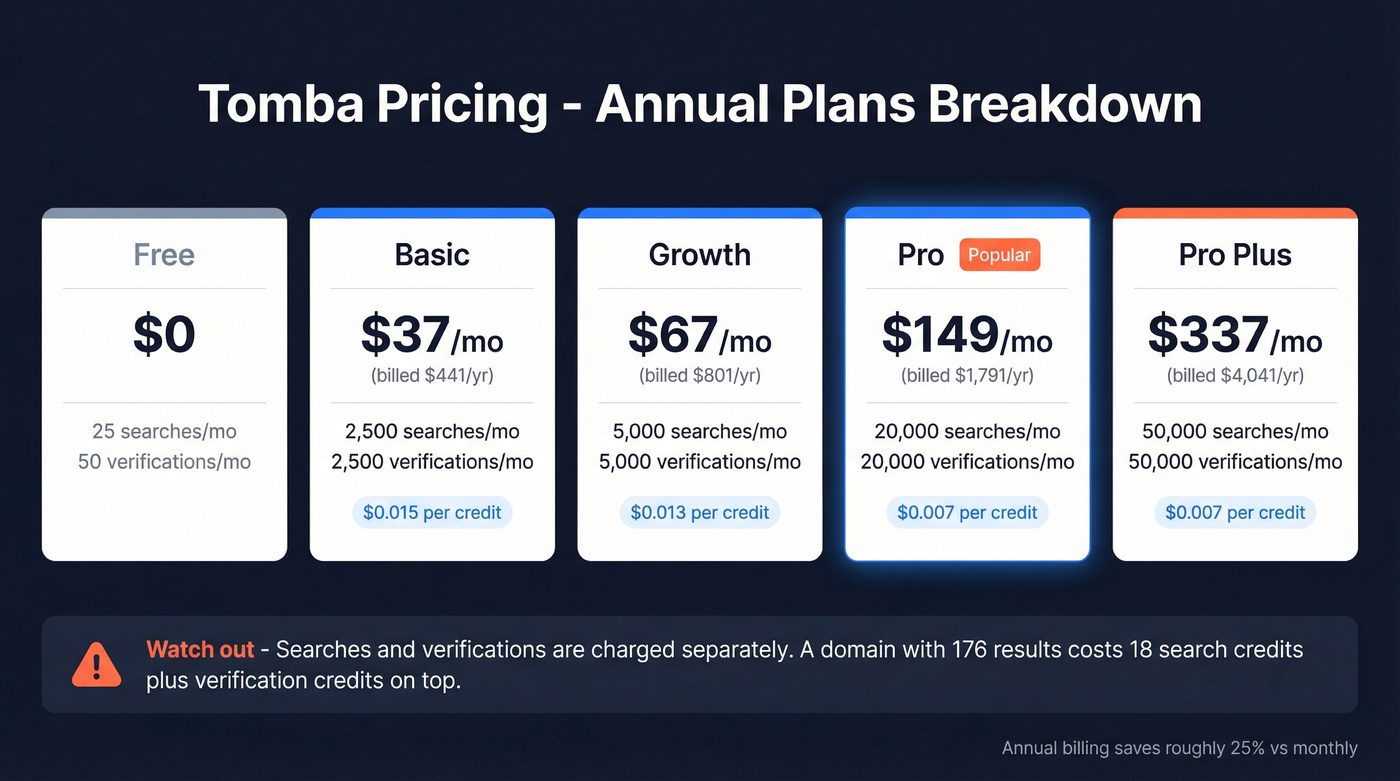
| Plan | Annual Price | Searches/mo | Verifications/mo |
|---|---|---|---|
| Free | $0 | 25 | 50 |
| Basic | $441/yr (~$37/mo) | 2,500 | 2,500 |
| Growth | $801/yr (~$67/mo) | 5,000 | 5,000 |
| Pro | $1,791/yr (~$149/mo) | 20,000 | 20,000 |
| Pro Plus | $4,041/yr (~$337/mo) | 50,000 | 50,000 |
Monthly plans run higher (Starter $39/mo, Growth $89/mo, Pro $189/mo, Enterprise $389/mo), so annual billing saves around 25%.
Here's the part that trips people up: Tomba charges searches and verifications separately. A domain search returning 176 results costs 18 search credits (1 per 10 results), and verifying those emails burns additional credits. The upside is that no-result searches and duplicates within a billing period don't count. CSVgo doesn't publish pricing, but since it only verifies without any finding capability, you're paying for one function instead of two.
Why Most Teams Need Neither
Let's be honest - most teams weighing CSVgo against Tomba don't actually want two tools. They want one workflow that finds contacts, verifies them, and pushes clean data into their CRM (see lead enrichment for what “clean” should include). We've run both tools side by side, and the context-switching between a finder and a separate verifier adds real friction to every campaign. It's the kind of friction that doesn't show up on a feature comparison chart but eats 30 minutes out of every prospecting session.
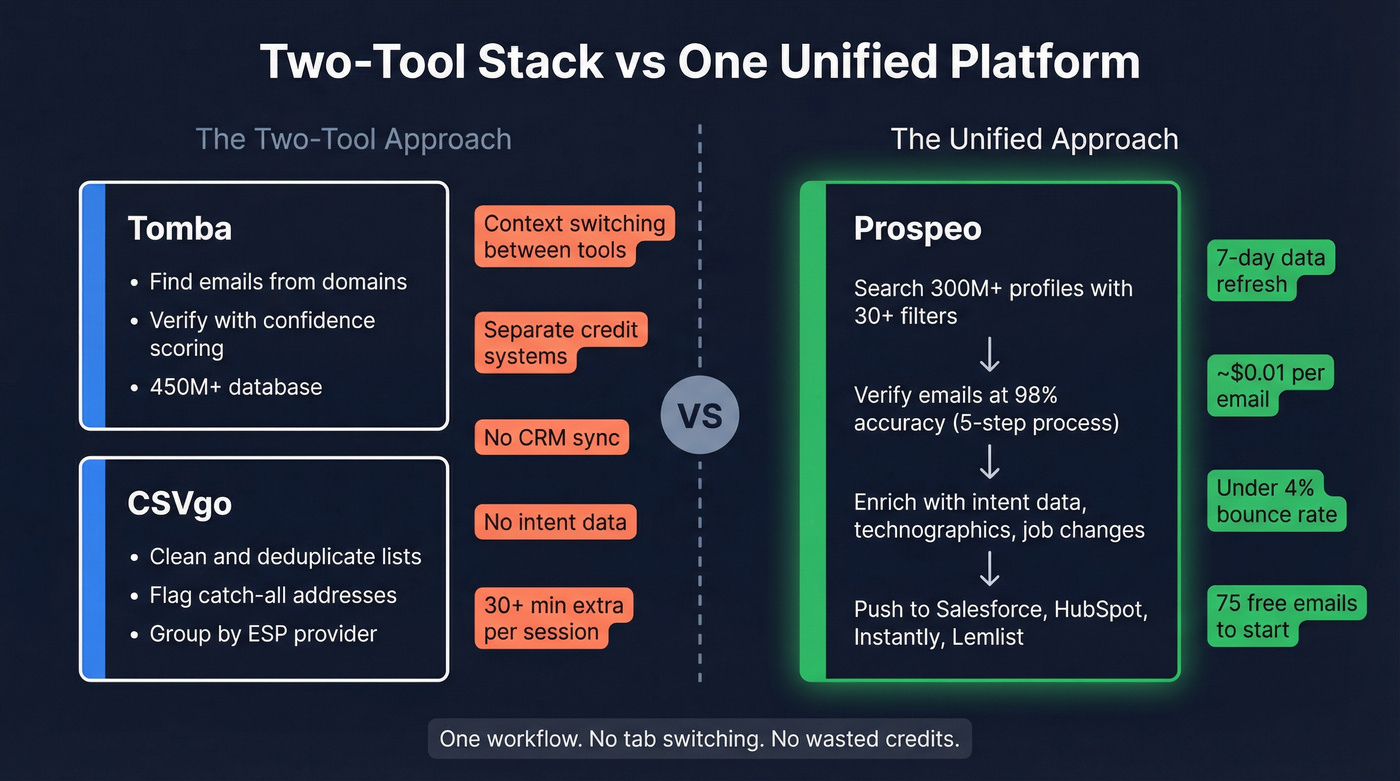
Prospeo removes that friction. It covers 300M+ professional profiles with 98% email accuracy and a 7-day data refresh cycle versus the 6-week industry average. Search with 30+ filters including intent data, technographics (more on firmographic and technographic data), job changes, and funding signals, then export verified contacts straight to Salesforce, HubSpot, Instantly, or Lemlist. Pricing starts free - 75 emails plus 100 Chrome extension credits per month - with paid plans at roughly $0.01 per email. No contracts, no sales calls.

Tomba's catch-all scoring is useful, but Prospeo's 5-step verification with spam-trap removal and honeypot filtering keeps bounce rates under 4% at scale. Pair that with 30+ search filters, buyer intent signals, and native integrations to Instantly, Smartlead, and HubSpot.
Find, verify, and enrich contacts without switching tabs.
FAQ
What's the difference between an email finder and a verifier?
A finder locates email addresses you don't have yet. A verifier checks whether addresses you already have are real and active. If your list is stale or scraped, you need a verifier. If you're building from scratch, you need a finder - or a platform that does both in one step.
Does Tomba charge for failed searches?
No. Tomba doesn't deduct a credit when no email is found. Duplicates count only once per billing period. Domain searches cost 1 request per 10 results, so a domain with 176 results uses 18 credits.
What are catch-all emails and why do they matter?
A catch-all domain accepts mail sent to any address at that domain, making verification inconclusive. Some tools flag these as risky and discard them, which means losing valid leads. Look for confidence scoring on catch-all domains rather than binary pass/fail so you can make your own risk call. Both CSVgo and Tomba handle catch-alls better than most budget tools, but if you're sending at scale, a 5-step verification process with spam-trap and honeypot removal gives you much more confidence in your list.