

Data Automation: What It Is, What It Costs, and How to Start Without Wasting 6 Months
Every data automation guide follows the same script. Define the term, list five generic benefits, drop a stock photo of a dashboard, then hit you with "Schedule a Demo." The world generates 402.74 million terabytes of data every day - annual volume is expected to hit 221 zettabytes in 2026 - yet the best advice most vendors offer is "let us handle it." You deserve actual numbers, actual pitfalls, and a roadmap that doesn't require a six-figure contract to start.
What You Need (Quick Version)
One-line definition: Data automation replaces manual, repetitive data tasks - extraction, transformation, loading, validation, enrichment - with software that runs on schedules or triggers without human babysitting.
The single biggest mistake: Automating a broken process just makes chaos faster. Fix the workflow first, then automate it.
Where to start: Pick one workflow. Automate it this week. Not ten workflows. Not a "data strategy." One.
Tool starting points by use case:
That's the cheat sheet. The rest of this guide explains why, how much it costs, and what goes wrong.
What Is Data Automation?
At its core, this practice means using software to handle data tasks that humans currently do by hand - extracting data from sources, transforming it into usable formats, loading it into destination systems, validating its quality, and enriching it with additional context. Fewer hands on keyboards, fewer errors, faster time-to-insight.
The scope is broader than most people realize. It covers ETL pipelines, data integration between SaaS tools, validation and deduplication, enrichment with appended fields, and downstream actions like triggering alerts or updating CRM records. Roughly 60% of companies already use some form of automation, and IBM estimates that 68% of collected data goes entirely unanalyzed. That means most organizations are sitting on insights they'll never see without automated pipelines to surface them. The question isn't whether to automate - it's which workflows to tackle first.
Your finance team's 47-tab Excel workbook that takes three people two days to update monthly? That's a manual process begging for automation. Your sales team copying leads from a spreadsheet into HubSpot one by one? Same thing.
Automation vs. Orchestration vs. ETL
These three terms get used interchangeably. They shouldn't.
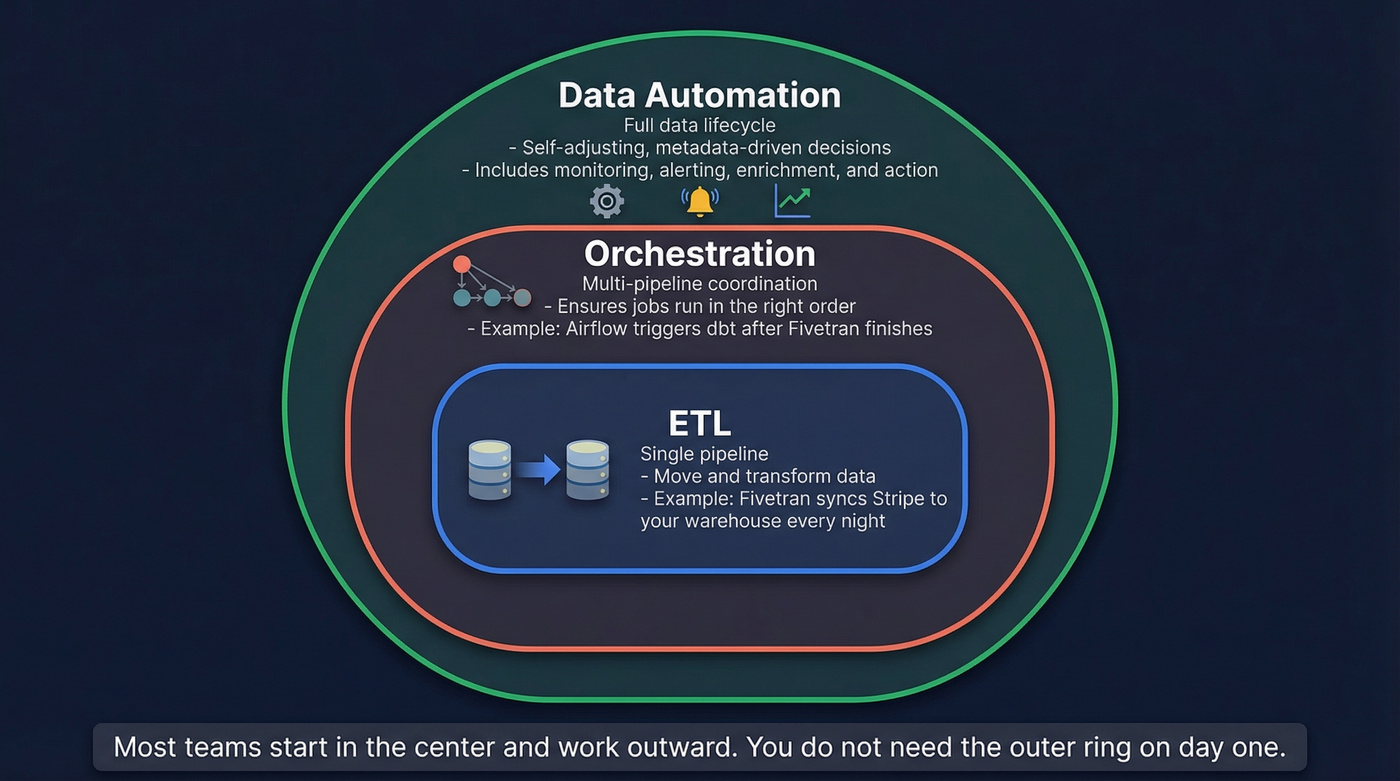
| ETL | Orchestration | Data Automation | |
|---|---|---|---|
| Scope | Single data pipeline | Multi-pipeline coordination | Full data lifecycle |
| Outcome | Data moved & transformed | Tasks run in correct order | End-to-end efficiency |
| Error handling | Within one job | Across workflows | Metadata-driven recovery |
| Scheduling | Time-based (cron) | Event-driven + dependency-aware | Adaptive (metadata signals) |
| Examples | Fivetran, Stitch, Matillion | Airflow, Prefect, Dagster | Tools + logic + monitoring |
The analogy that clicks for most people: ETL is a single recipe. Orchestration is the kitchen schedule ensuring appetizers come out before entrees. Full-lifecycle automation is the entire restaurant running itself - ordering ingredients when stock is low, adjusting the menu based on demand, and flagging the manager when something burns.
Ascend.io frames the distinction well: orchestration choreographs tasks via timers, triggers, and DAGs (directed acyclic graphs), while automation goes further by making decisions based on change frequency, historical patterns, and data lineage rather than just following a static schedule.
Here's the thing: most teams don't need to care about these distinctions on day one. If you're still manually exporting CSVs, you need ETL. If you've got five ETL jobs that step on each other, you need orchestration. If you want the whole thing to run without you, that's full-lifecycle automation.
How Automated Data Workflows Operate
Every system follows a lifecycle: extract, transform, load, analyze, act. The maturity comes from how much human intervention each stage requires.
Three Automation Patterns
Scheduled automation runs on a timer. Every night at 2 AM, pull yesterday's sales data from Stripe, transform it, load it into your warehouse. Simple, predictable, and sufficient for most reporting workflows.
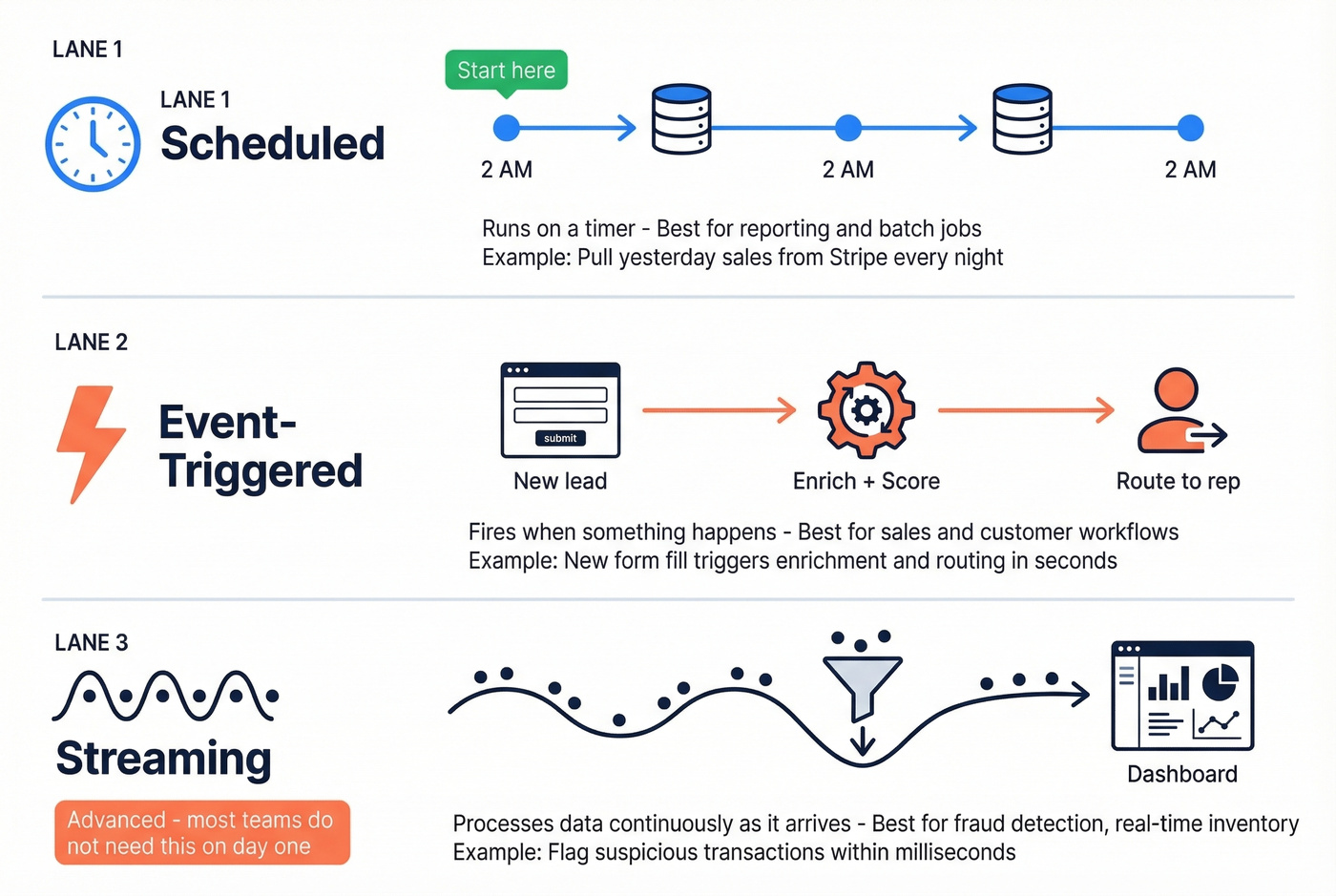
Event-triggered automation fires when something happens. A new lead fills out a form, and within seconds the system enriches the contact, scores it, and routes it to the right rep. This is where automation starts earning its keep with end users - the value is immediate and visible.
Streaming automation processes data continuously as it arrives. Think fraud detection or real-time inventory management, scenarios where a nightly batch job means you're always a day behind.
The Maturity Progression
Most teams start with scheduled jobs and graduate to event-driven triggers as their needs grow. The next frontier is metadata-driven automation, where the system itself decides what needs to run based on whether data has actually changed, what resources are available, and whether downstream dependencies are ready.
In our experience, most teams get enormous value from scheduled + event-triggered automation alone. Don't over-engineer toward the most advanced pattern until you've outgrown the simpler ones.
Types of Tools by Category
The real problem isn't finding tools. It's figuring out which category you need.
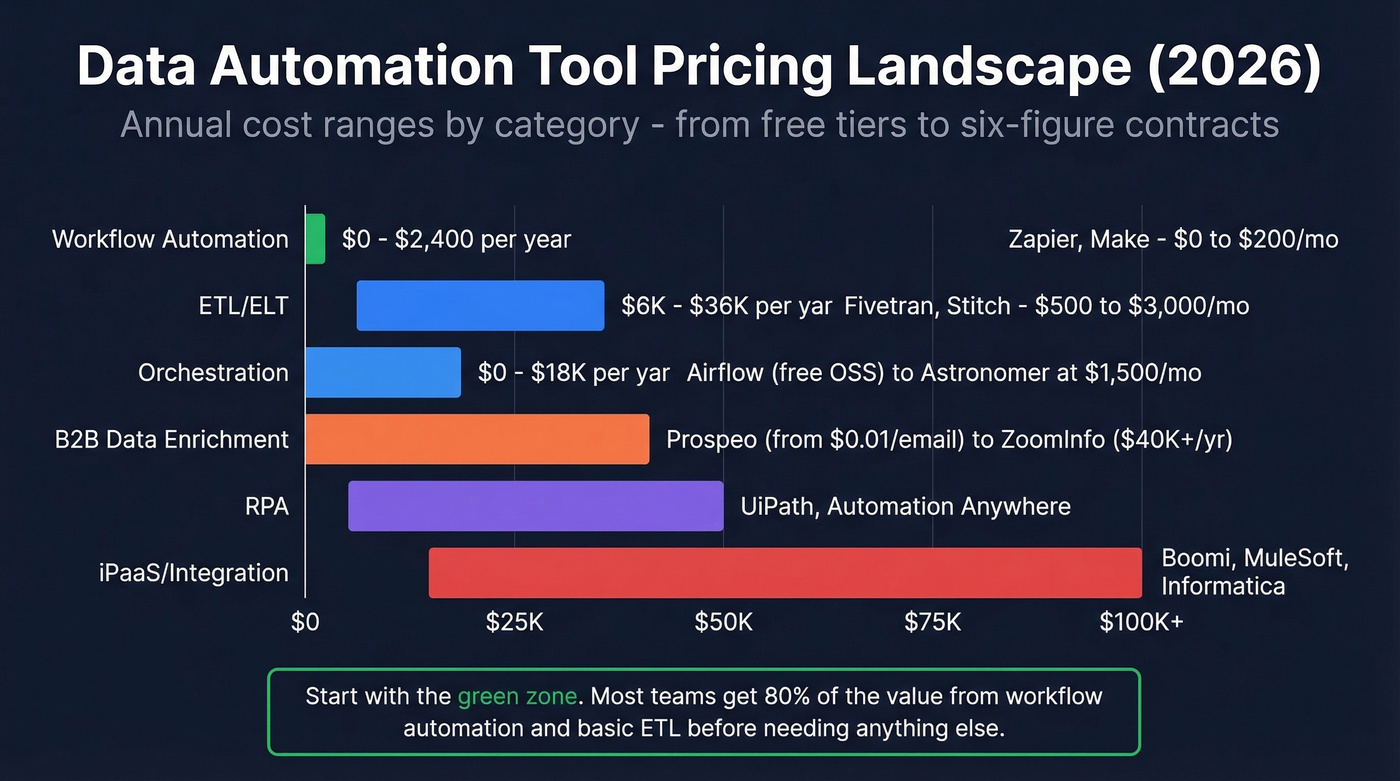
| Category | Example Tools | Estimated Pricing | Best For |
|---|---|---|---|
| ETL/ELT | Fivetran, Matillion, Stitch | $500-$3,000+/mo | Moving data to warehouses |
| Orchestration | Airflow, Prefect, Dagster | Free (OSS) to ~$1,500/mo | Pipeline coordination |
| iPaaS/Integration | Boomi, Informatica, MuleSoft | $15K-$100K+/yr | Enterprise system integration |
| Workflow Automation | Zapier, Make, Power Automate | Free-$200/mo | No-code task automation |
| RPA | UiPath, Automation Anywhere | $5K-$50K+/yr | Legacy system automation |
| B2B Data Enrichment | Prospeo, ZoomInfo, Apollo | Free-$40K/yr | Sales data enrichment |
ETL/ELT Platforms
Fivetran dominates managed ETL with hundreds of pre-built connectors. Expect $500-$2,000/mo for mid-volume usage, scaling with data rows synced. Matillion targets teams already on Snowflake or BigQuery. Stitch offers a lower entry point around $100-$500/mo but with fewer connectors.
Orchestration
Open-source Airflow is free to run - but you'll pay in engineering hours to keep it alive. Managed options like Astronomer run ~$500-$1,500/mo. Prefect and Dagster offer a better developer experience at similar cloud pricing.
iPaaS and Integration
This is where pricing gets painful. Boomi, Informatica, and MuleSoft target enterprises connecting dozens of systems at $15K-$100K+/year. These aren't tools you trial on a Friday afternoon.
Workflow Automation
Zapier and Make are the entry points most teams know. Zapier's free tier handles basic automations; paid plans run $20-$200/mo depending on task volume. The most common Zapier frustration we hear: you hit the task limit faster than you expect. Make is typically 30-50% cheaper for equivalent workflows. Power Automate fits Microsoft-heavy shops at ~$15/user/mo.
RPA
If your team is drowning in legacy mainframe data with no API in sight, RPA is your category. UiPath and Automation Anywhere automate clicks through systems that refuse to modernize. Pricing starts around $5K/year for small deployments and scales quickly.
B2B Data Enrichment

Your automation pipeline is only as good as the data feeding it. Prospeo's CRM and CSV enrichment returns 50+ data points per contact at a 92% match rate - refreshed every 7 days, not every 6 weeks. At $0.01 per email, you automate enrichment without the six-figure contract.
Automate enrichment that actually works - start with 75 free emails.
Benefits - With Actual Numbers
Companies adopting automated data workflows report 40-60% reductions in operational costs, primarily from eliminating manual data handling and reducing error-driven rework. For a team spending $200K/year on data operations, that's $80-120K back.
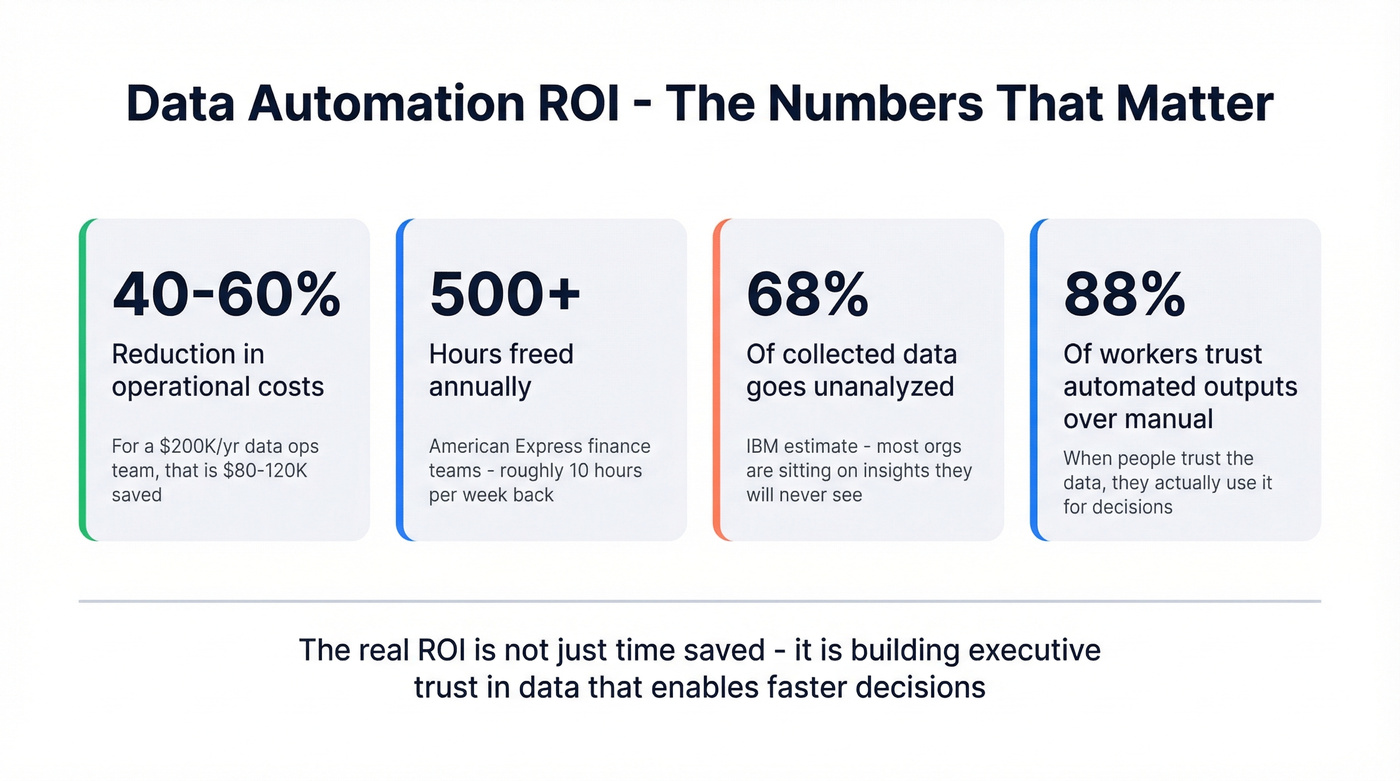
American Express found that payment automation freed up 500+ hours annually in their finance departments - roughly 9.9 hours per week that analysts got back for actual analysis instead of data wrangling. Accenture estimates that up to 80% of finance transactional work could be automated, which means most finance teams are still doing the majority of their automatable work by hand.
On the employee side, Salesforce survey data shows 74% of workers say automation helps them work faster, and 88% say they trust the accuracy of automated outputs more than manual processes. That second stat matters more than it sounds - when people trust the data, they actually use it for decisions instead of rebuilding reports from scratch "just to be sure." This is the connection most teams miss: automation doesn't just save time, it builds the executive trust in data that makes faster decisions possible.
Let's be honest: if your average deal size is under $15K, you probably don't need a $40K/year data platform. Start with free tiers and workflow tools. The ROI math only works for enterprise-grade tooling when your deal sizes justify it.
5 Mistakes That Kill ROI
1. Automating Broken Processes
This is the number one killer. Automating a broken workflow produces faster chaos. If your lead routing logic is wrong, automating it just delivers bad leads to the wrong reps at machine speed. Map the process, identify where it breaks, fix the logic, then automate.
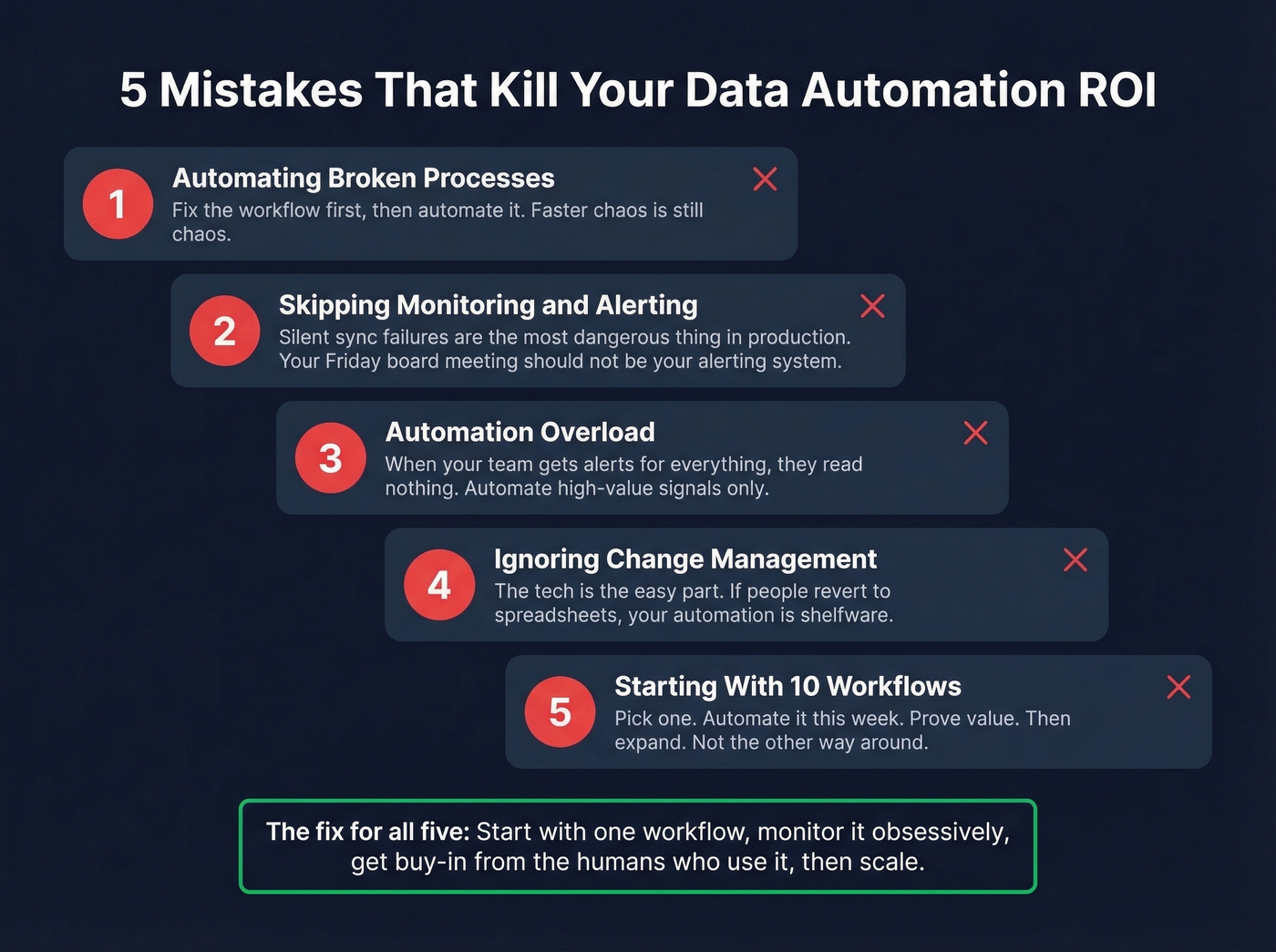
2. Skipping Monitoring and Alerting
Silent sync failures are the most dangerous thing in production automation. Your Salesforce-to-warehouse sync breaks on a Tuesday, nobody notices until the Friday board meeting when the pipeline numbers look wrong, and now you're spending the weekend rebuilding data. Every automated workflow needs logging, alerting on failures, and retry logic. Our team learned this the hard way - the teams that skip monitoring on their first automation always regret it by month two.
3. Automation Overload
We've seen teams automate every possible touchpoint and then wonder why nobody reads their alerts anymore. When your sales team gets automated Slack notifications for every lead score change, every deal stage update, and every contact enrichment, they stop reading all of them. Be selective. Automate the high-value signals, not everything that moves.
4. Ignoring Change Management
The technical implementation is often the easy part. The hard part is getting people to actually use the automated workflows instead of reverting to their spreadsheets. If you don't share the "why" - why this process changed, what it means for their daily work, how it makes their job better - you'll build automation that nobody trusts or adopts.
5. Automating Judgment Instead of Labor
Automate the repetitive doing work: data entry, file transfers, report generation, validation checks. Don't automate the decisions that require human judgment, context, and nuance. Your enrichment workflow should automatically append company data to new leads. Your decision about whether to pursue a $500K enterprise deal should not be delegated to a scoring algorithm alone.
How to Start - A Practical Roadmap
Audit Your Workflows (Week 1-2)
Map every manual data process your team runs. Look for the ones that are high-frequency, high-pain, and low-complexity - daily or weekly tasks with straightforward logic and clear inputs and outputs.
Your sales team spending 10 hours a week manually updating CRM records? That's your candidate. Your finance team's multi-tab Excel workbook? Also a candidate, but probably not your first one - start with something where the logic is simple enough that you won't spend three weeks debating edge cases.
Pick One Workflow and Pilot (Week 2-4)
Narrow the scope ruthlessly. One data source, one destination, one tool. A good starter: automate a weekly report that someone currently builds by hand, or set up automatic CRM enrichment for new leads. Ship something small that works, and let the team see the value before you expand.
Add Monitoring Before Scaling (Week 4-6)
Before you automate a second workflow, make sure the first one has proper alerting, failure handling, and data quality checks. Set up Slack or email alerts for failures. Add a simple data quality check - row counts, null rates, freshness timestamps. This step is boring. Skip it and you'll pay for it later.
Scale Deliberately (Month 2-4)
Expand to adjacent workflows. Document everything - what's automated, what triggers it, what to do when it breaks. Add governance as you grow: who owns each automation, how changes get reviewed, where the runbooks live.
A multi-system rollout with proper governance typically takes 2-4 months. Rushing this timeline is how you end up with 30 automations and no one who understands how any of them work.
Automating Sales Data Workflows
Some of the highest-ROI automation happens in sales and RevOps, where teams burn hours on manual data work that directly delays pipeline generation. Reps spend 10+ hours a week researching prospects, copying data between tools, and updating CRM records - and half that data is stale by the time it's entered.
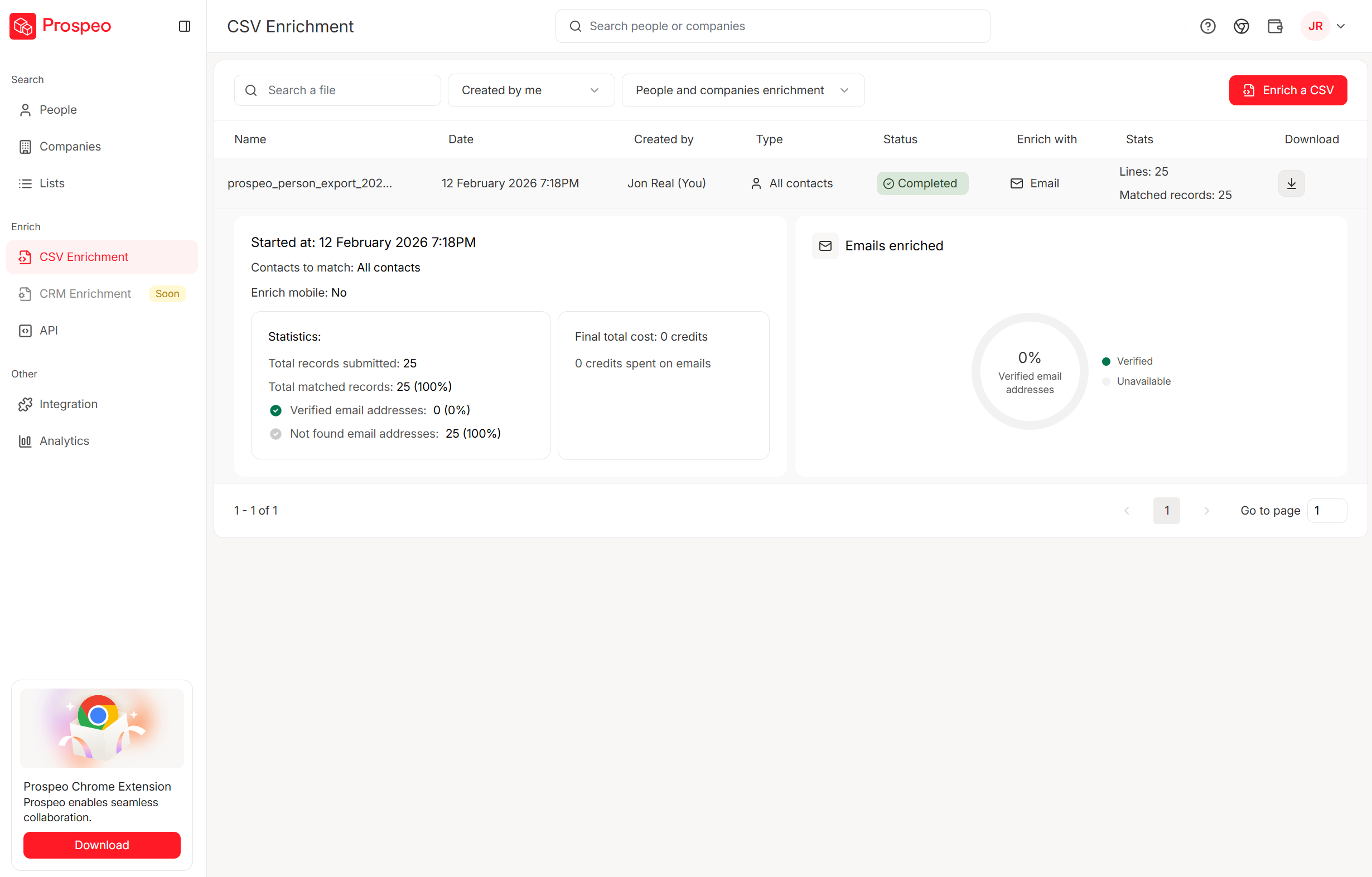
Automating contact enrichment, email verification, and CRM hygiene eliminates this entirely. Upload a CSV or connect your CRM, and an enrichment platform appends verified emails, phone numbers, company firmographics, technographics, and intent signals without any rep touching the record. Meritt tripled their pipeline from $100K to $300K per week after switching to this approach. Snyk's 50-person AE team dropped bounce rates from 35-40% to under 5% and saw AE-sourced pipeline jump 180%.
Event-triggered automation only pays off when your contact data is accurate. Prospeo's API delivers 98% verified emails and 125M+ mobile numbers directly into your workflows via Zapier, Make, Clay, or native CRM integrations - no manual cleanup required.
Feed your automations verified data instead of garbage. Try Prospeo today.
What's Next - AI and Agentic Automation
Everyone's talking about agentic AI - autonomous agents that plan, decide, and execute without human oversight. The reality is more measured. Forrester predicts that fewer than 15% of firms will actually activate agentic features in their automation suites this year.
The distinction that matters: "agentish" versus truly agentic. Agentish means narrowly scoped AI agents embedded within deterministic workflows - an LLM that classifies support tickets before routing them. Truly agentic means reasoning-first agents that dynamically plan and execute multi-step processes. Most of what vendors ship today is agentish. That's fine. It's useful.
Forrester also predicts that process intelligence will rescue 30% of failed AI projects - the bottleneck isn't the AI model, it's understanding the process well enough to automate it. By 2028, 33% of enterprise software will incorporate agentic AI, up from less than 1% in 2024.
Look, the practical takeaway hasn't changed: get your data house in order first. The teams that benefit most from AI-powered automation already have clean data, well-defined processes, and proper monitoring. If you're still running manual CSV exports, agentic AI isn't your next step. Basic automation is.
FAQ
What's the difference between data automation and RPA?
RPA mimics human clicks on a screen and works best for legacy systems with no API - mainframe applications, old ERP interfaces, that sort of thing. Data automation covers the entire lifecycle from extraction through transformation to delivery and action. RPA is one tool category within the broader toolkit, suited for screen-scraping tasks that can't be solved with modern APIs.
How much does implementation cost?
No-code workflow tools like Zapier and Make start free. ETL platforms run $500-$3,000+/mo. Enterprise iPaaS solutions hit $15-100K/year. For B2B enrichment, you can start free at ~$0.01/email with no contracts - 90% cheaper than enterprise alternatives like ZoomInfo. The real cost driver isn't the tool; it's the engineering time to implement, monitor, and maintain.
What's the fastest way to automate CRM data entry?
Connect your CRM to an enrichment tool that auto-populates new records. Set up a trigger - new lead created in HubSpot or Salesforce - that fires an enrichment API call, appending verified emails, phone numbers, and company firmographics without any rep touching the record. Setup takes an afternoon, and it eliminates the single most-hated task in every sales org.
Stop reading definitions. Pick one workflow. Automate it this week. Three starters that work: automate a weekly report someone builds by hand, set up CRM enrichment so new leads arrive with complete data, or add email verification before your next outbound sequence. One workflow, one tool, one afternoon. That's how every good data automation stack begins.