

Data Cleansing: What It Is, Why It Matters, and How to Do It
Your team spent three months building a churn prediction model. The data cleansing step got skipped - "we'll clean it later" - and the results looked promising in testing, then fell apart in production. The culprit wasn't the algorithm. It was 14,000 duplicate customer records and a date column where half the entries were in MM/DD/YYYY and the other half in DD/MM/YYYY.
Three months of work, undone by dirty data nobody bothered to fix.
That's the real cost of skipping this step. Not bad reports - wasted quarters.
What Is Data Cleansing?
Data cleansing is the process of detecting and correcting (or removing) inaccurate, incomplete, duplicated, or improperly formatted records from a dataset. The goal is simple: make your data trustworthy enough to act on.
You'll hear it called data cleaning, data scrubbing, or data cleanse interchangeably. They mean the same thing. Some teams prefer "cleansing" in governance contexts and "cleaning" in analytics workflows, but there's no functional difference - use whichever term your organization has standardized on.
What separates this discipline from general data management is its focus on fixing what's already there. You're not building new pipelines or designing schemas. You're finding the rot in existing data and cutting it out before it poisons everything downstream.
Cleansing vs. Transformation vs. Validation
These three terms get conflated constantly, especially in ETL/ELT pipeline discussions. They're related but distinct.
| Data Cleansing | Data Transformation | Data Validation | |
|---|---|---|---|
| Purpose | Fix errors and inconsistencies | Change format or structure | Confirm data meets requirements |
| Examples | Remove duplicates, fix typos, fill gaps | Map fields, normalize values, aggregate | Check ranges, verify types, flag anomalies |
| Pipeline stage | Early (pre-transform) | Middle (the "T" in ETL/ELT) | Late (post-transform QA) |
| Outcome | Accurate, consistent data | Analysis-ready structure | Confidence that output is correct |
Cleansing fixes what's wrong. Transformation reshapes what's right into the format you need. Validation confirms the end result actually meets your requirements. In practice they overlap - you'll often standardize formats during the cleaning pass, and validation catches issues that send data back for another round of cleansing.
Why It Matters
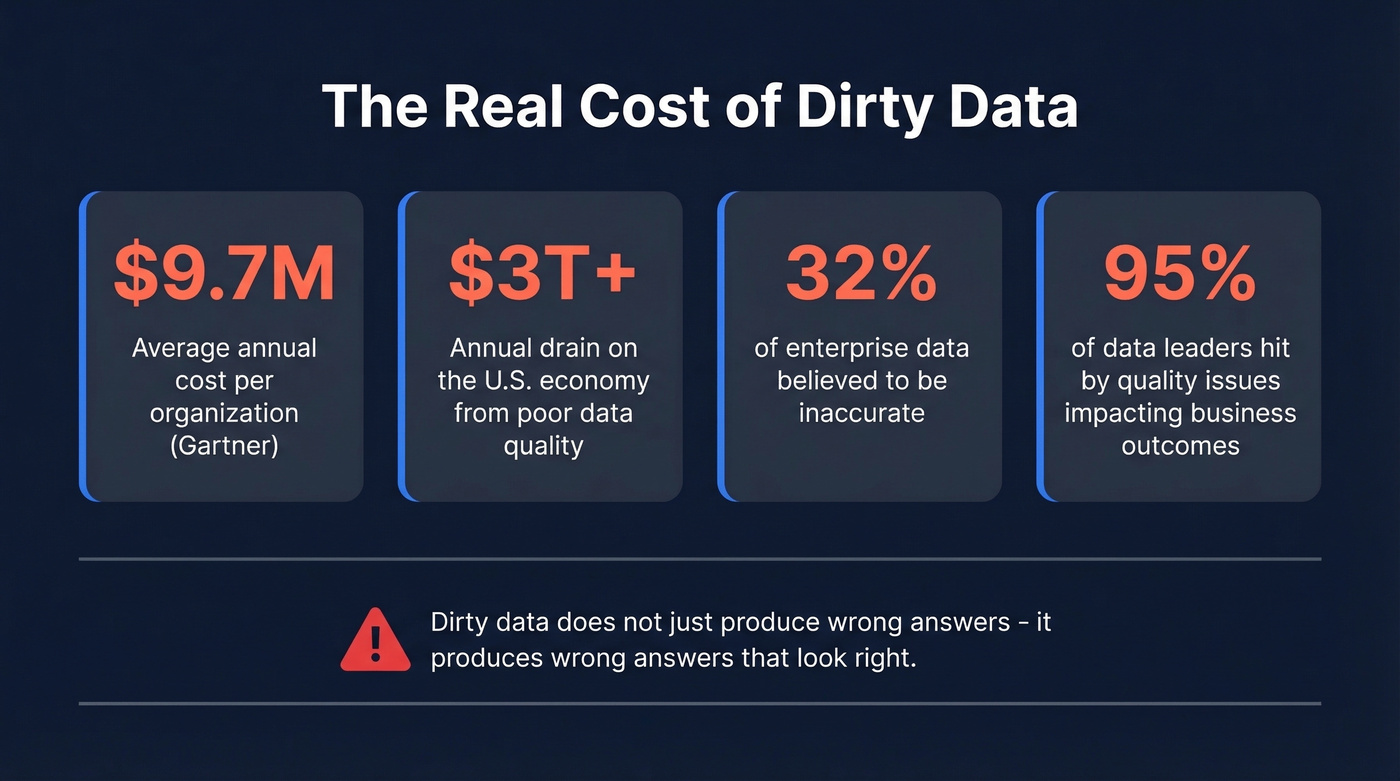
Let's talk money. Gartner estimates that poor data quality costs the average organization ~$9.7M per year. IBM's Institute for Business Value found that over a quarter of organizations lose more than $5M annually to bad data, with 7% reporting losses above $25M. Across the U.S. economy, poor data quality drains an estimated $3T+ every year.
These aren't abstract numbers. In 2017, Uber miscalculated driver commissions in New York due to improper data processing, underpaying drivers by roughly $45M. That's a single quality failure at a single company. Organizations broadly believe 32% of their data is inaccurate - and they're probably being optimistic.
The operational impact runs deeper than dollars. 43% of chief operations officers identify data quality as their most significant data priority. And 95% of enterprise data leaders have experienced a quality issue that directly impacted business outcomes, per Anomalo's State of Enterprise Data Quality report. Understanding how to solve these issues before they cascade is what separates high-performing data teams from the rest.
Here's the thing about dirty data: it doesn't just produce wrong answers. It produces wrong answers that look right. A dashboard built on duplicated records shows inflated pipeline numbers. A segmentation model trained on inconsistent job titles groups VPs with interns. A churn model built on misformatted dates predicts nothing useful. The danger isn't that bad data breaks things visibly - it's that it breaks things silently, and you don't find out until the quarterly review.
The AI angle makes this even more urgent. With AI spending forecast to surpass $2T in 2026 and 79% of organizations now adopting AI agents in some form, every company racing to deploy models is building on a data foundation. If that foundation is dirty, the models amplify the errors at scale. We'll cover this in detail in the AI section.
Common Data Quality Issues
Before you can fix data problems, you need to know what you're looking for. Here's the checklist, organized by the five core quality dimensions:
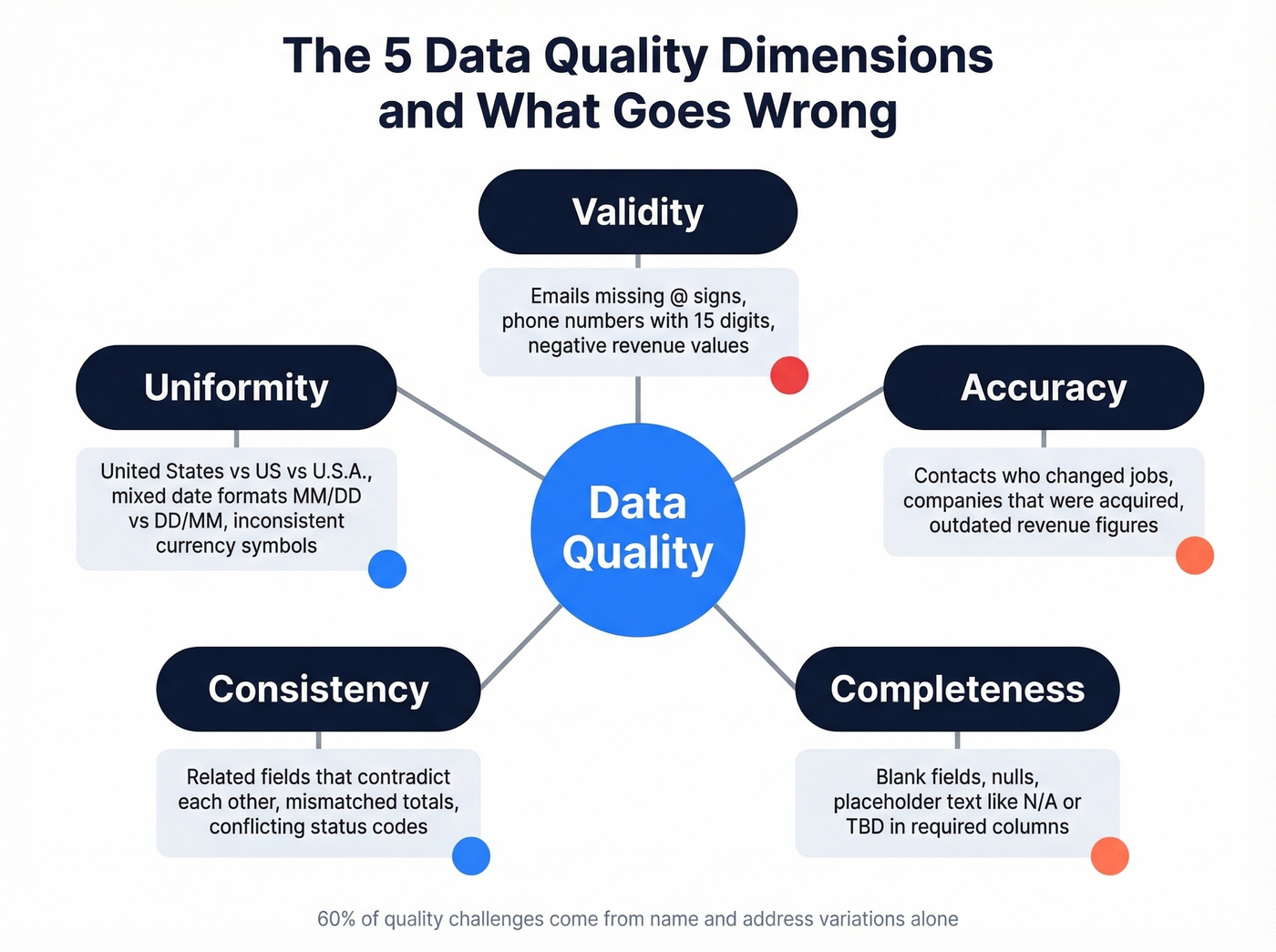
- Duplicates - The same record appearing multiple times, often with slight variations. CRM duplication rates reach up to 20%. This inflates counts, skews analytics, and wastes outreach effort.
- Missing values - Blank fields, nulls, or placeholder text like "N/A" or "TBD." Missing data isn't always a problem, but unacknowledged missing data always is.
- Inconsistent formatting - "United States" vs. "US" vs. "U.S.A." in the same column. Date formats that switch between American and European conventions. Variations in business names, personal names, and addresses account for 60% of the quality challenges organizations face.
- Outdated records - A contact who changed jobs six months ago. A company that was acquired. Revenue figures from last fiscal year sitting in a "current" field. Data decays faster than most teams realize.
- Invalid entries - An email address without an @ sign. A phone number with 15 digits. A negative value in a revenue column. These are structurally wrong and should be caught by basic validation rules.
The five quality dimensions to evaluate against: validity (does it conform to the expected format?), accuracy (does it reflect reality?), completeness (are required fields populated?), consistency (do related fields agree?), and uniformity (are units and formats standardized?).
Step-by-Step Process
Whether you're cleaning a 500-row spreadsheet or a 50M-record warehouse table, the process follows the same logic. Here's a seven-step workflow we've refined from Tableau's cleaning steps, Talend's pipeline framing, and academic cleaning workflows.
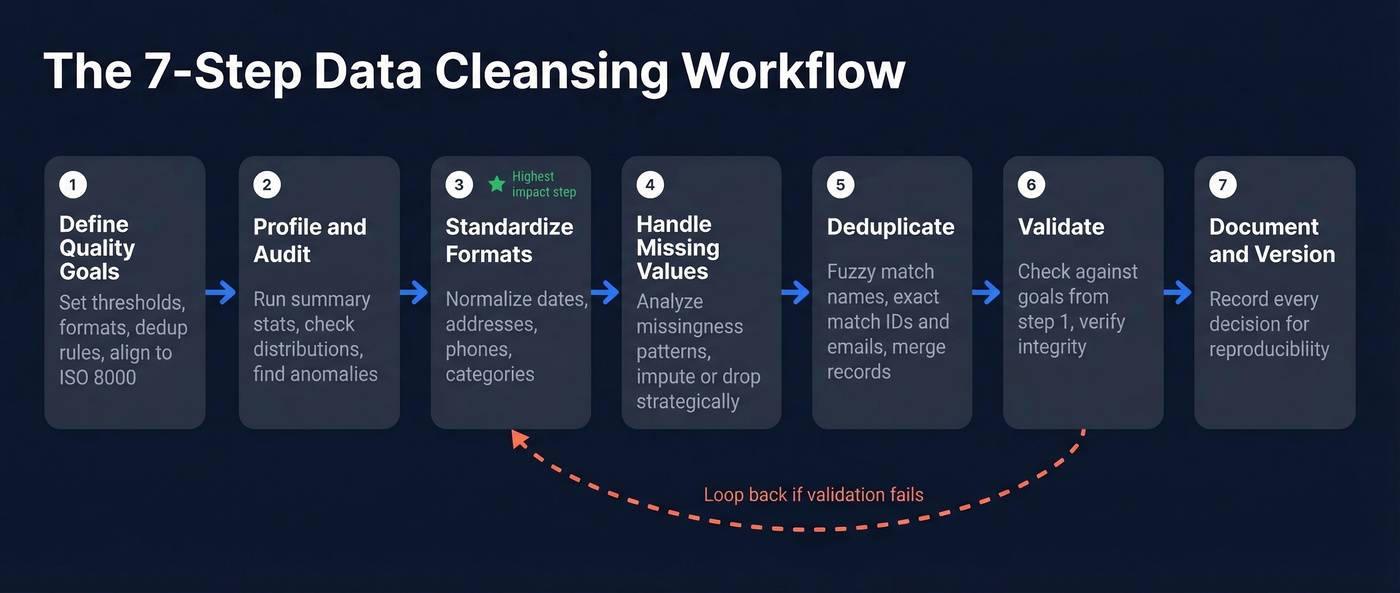
1. Define quality goals. What does "clean" mean for your use case? A marketing email list has different quality requirements than a financial reporting dataset. Set explicit thresholds - acceptable null rates, required formats, deduplication rules. If your organization follows ISO 8000, align your goals to that framework.
2. Profile and audit your data. Before you fix anything, understand what you have. Run summary statistics, check distributions, identify columns with high null rates or suspicious patterns. This is where you discover that your "state" column has 73 unique values when there should be 50.
3. Standardize formats. Normalize dates, addresses, phone numbers, currency symbols, and categorical values. This is the single highest-impact step for most datasets - inconsistent formatting causes more downstream errors than any other issue.
4. Handle missing values. Don't just drop rows with nulls. Analyze the missingness pattern first. Is it random, or are certain segments systematically underrepresented? Start simple - mean or mode imputation works for many cases - and only escalate to more complex methods when the data demands it.
5. Deduplicate. Match and merge duplicate records using fuzzy matching for names and addresses, exact matching for IDs and emails. This is harder than it sounds - "IBM Corp" and "International Business Machines" are the same company, but naive dedup won't catch it. Company data cleaning at scale almost always requires a combination of fuzzy logic and domain-specific rules.
6. Validate. Run your cleaned data against the quality goals from step 1. Check ranges, verify referential integrity, confirm that transformations didn't introduce new errors. If validation fails, loop back to the relevant step.
7. Document and version. Every cleaning decision should be recorded. What did you impute? Which duplicates did you merge? What thresholds did you use for outlier removal? Undocumented cleaning is irreproducible cleaning, and irreproducible cleaning means nobody can trust the output.

Dirty CRM data costs $9.7M/year. Prospeo's 5-step verification and 7-day refresh cycle mean you're building on clean data from day one - not spending quarters scrubbing records that decayed weeks ago.
Skip the cleanup. Start with 300M+ profiles that are already verified.
How to Clean Data in Python
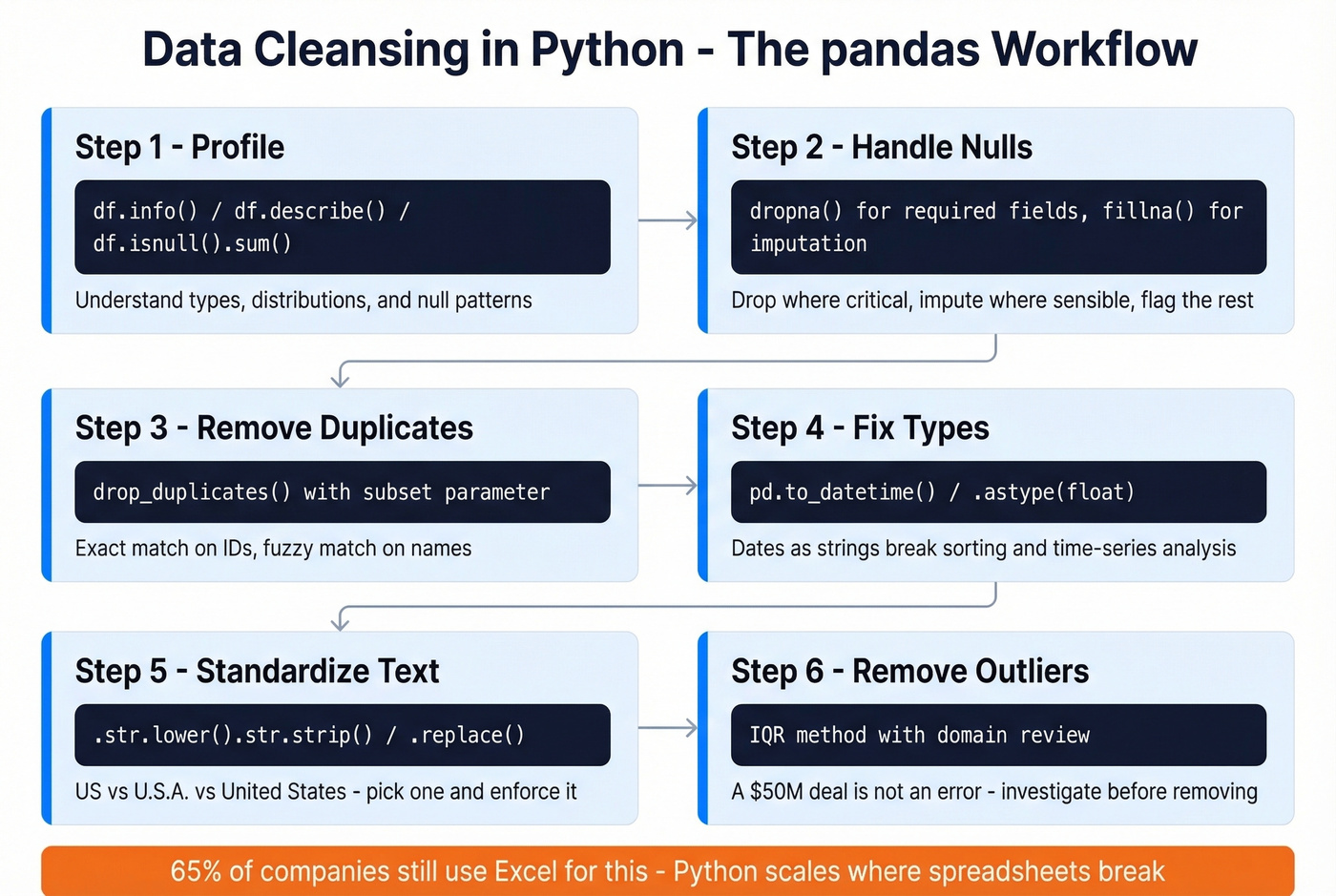
65% of companies still rely on manual methods like Excel to scrub data. That's not a process - that's a prayer. If you're working with anything beyond a few thousand rows, Python with pandas is the practical starting point.
Profiling your data:
df = pd.read_csv('your_data.csv')
df.info()          # Column types, non-null counts
df.describe()      # Summary stats for numeric columns
df.isnull().sum()  # Missing values per column
Three lines give you the lay of the land. You'll immediately see which columns have type mismatches, where nulls concentrate, and whether numeric ranges look reasonable.
Handling missing values:
# See what's missing
print(df.isnull().sum())

# Drop rows where critical fields are null
df.dropna(subset=['email', 'company_name'], inplace=True)

# Impute numeric columns with the mean
df['revenue'].fillna(df['revenue'].mean(), inplace=True)
Don't blindly drop every row with a null. That kills your sample size and can introduce bias if the missingness isn't random. Drop nulls in required fields, impute where it makes sense, and flag the rest for manual review.
Removing duplicates:
print(df.duplicated().sum())  # Count exact dupes
df.drop_duplicates(inplace=True)

# For fuzzy dedup, match on specific columns
df.drop_duplicates(subset=['email'], keep='first', inplace=True)
Fixing data types:
# Dates stored as strings
df['order_date'] = pd.to_datetime(df['order_date'])

# Prices with dollar signs
df['price'] = df['price'].str.replace('$', '').astype(float)
Type mismatches are silent killers. A date column stored as a string won't sort correctly, won't filter correctly, and will break any time-series analysis you attempt.
Standardizing text:
df['city'] = df['city'].str.lower().str.strip()
df['country'] = df['country'].replace({
    'US': 'united states',
    'U.S.A.': 'united states',
    'USA': 'united states'
})
Removing outliers via IQR:
Q1 = df['revenue'].quantile(0.25)
Q3 = df['revenue'].quantile(0.75)
IQR = Q3 - Q1

df = df[(df['revenue'] >= Q1 - 1.5 * IQR) &
        (df['revenue'] <= Q3 + 1.5 * IQR)]
Don't apply IQR filtering blindly. A $50M deal in a dataset of $10K deals isn't an error - it's your best customer. Always investigate outliers with domain knowledge before removing them. These same techniques apply when you need to clean scraped data - web-scraped datasets are especially prone to encoding issues, HTML artifacts, and structural inconsistencies that require aggressive standardization before analysis.
Mistakes That Ruin Your Analysis
We've seen teams invest weeks in cleaning and still end up with garbage. Here are the seven anti-patterns that cause the most damage.
1. Blindly removing outliers. Not every extreme value is an error. Removing legitimate rare observations distorts your distribution and eliminates the most interesting signals. Investigate root causes before deciding to keep, transform, or remove.
2. Blindly dropping missing values. If missingness isn't random, dropping rows introduces systematic bias. A survey where high-income respondents skip the income question doesn't have "random" nulls. Analyze the pattern first.
3. Mixing units and formats. Revenue in dollars and euros in the same column. Dates in MM/DD and DD/MM. One missed conversion cascades through every downstream calculation.
4. Wrong categorical encoding. Treating nominal categories like colors or regions as numeric values implies a false ordering that misleads models. Use one-hot encoding for nominal variables; reserve ordinal encoding for categories with genuine rank order.
5. Not documenting cleaning steps. The biggest mistake on this list. Undocumented transformations are irreproducible, which means every analysis built on that data rests on assumptions nobody can verify. Treat your cleaning pipeline like production code.
6. Over-cleansing. Aggressively normalizing and standardizing can strip important context. Free-text fields often contain valuable information that gets destroyed by overzealous cleaning. Know when "messy but meaningful" beats "clean but empty."
7. Skipping post-cleaning validation. You cleaned the data - did you check that the cleaning worked? Run your quality metrics again after every pass. Compare row counts, check distributions, verify that joins still work.
Data Cleansing for AI and ML
Researchers studying 99M retail employee shifts planned by AI scheduling software found that managers manually corrected 84% of the shifts the system generated. About 10% of those adjustments traced directly to faulty input data. That's not an AI failure - it's a quality failure that AI faithfully reproduced at scale.
Let's be honest: AI doesn't fix dirty data - it amplifies it. One bad record in a training set can corrupt model weights and propagate errors across thousands of predictions. 45% of business leaders cite data accuracy and bias concerns as the leading barrier to scaling AI initiatives. With AI spending on track to pass $2T in 2026, the organizations that get quality right will pull ahead. The ones that don't will spend millions training models on garbage.
The practical takeaway is to treat cleaning as code. dbt Labs advocates for version-controlled cleaning pipelines with automated tests - not ad hoc scripts that someone runs manually before a model training job. Build validation checks directly into your pipeline: verify ranges, confirm category integrity, check chronological ordering for time-series data. If a test fails, the pipeline stops. No exceptions.
The "AI is mostly data cleaning" meme on r/datascience and r/MachineLearning exists because it's largely true. The teams shipping production ML models aren't the ones with the fanciest architectures - they're the ones with the cleanest pipelines.
Cleaning B2B Contact Data
Your marketing team just sent 10,000 emails. 2,000 bounced. Your domain reputation tanks, and now even the good emails land in spam.
This is what happens when general-purpose database scrubbing meets the specific problem of B2B contact data.
Contact data has a unique decay problem. People change jobs, companies get acquired, email servers get decommissioned. If you don't verify and refresh contact records continuously, lists go stale fast. In our experience, B2B email lists lose roughly 2-3% of their validity every month - which means a list that's six months old has already degraded significantly.
Standard cleaning tools handle structural issues like deduplication, format standardization, and null handling. But they can't tell you whether jane.smith@acme.com still works at Acme or whether that phone number connects to a real person. For that, you need purpose-built verification - especially before pushing a prospecting list through your outreach tools.
Prospeo handles this with a 5-step verification process that includes catch-all domain handling, spam-trap removal, and honeypot filtering. The workflow is straightforward: upload a CSV of your contacts, verify emails and enrich records with 50+ data points, and export the clean list to your CRM or outreach tools. For teams running ongoing campaigns, the API handles enrichment programmatically with a 92% match rate. Snyk took their bounce rate from 35-40% down to under 5% after switching their verification workflow, and their AE-sourced pipeline jumped 180%.

CRM duplication rates hit 20%. Outdated contacts poison every model downstream. Prospeo enriches your existing data with 50+ data points per contact at a 92% match rate - replacing the rot instead of patching it.
Enrich your CRM with data that doesn't need cleansing.
Best Tools for Data Cleansing
That stat about 65% of companies still using Excel for data scrubbing? It shows up in every survey, and it's still true. Here's what to use instead - but first, a contrarian take: if your deals average under five figures, you probably don't need an enterprise data quality platform. You need a process and the discipline to run it.
Before picking a tool, know what capabilities actually matter: profiling, deduplication and matching, standardization, missing value handling, validation rules, and auditability. Any tool worth your time covers at least four of those six.
| Tool | Category | Best For | Pricing | Key Strength |
|---|---|---|---|---|
| Prospeo | B2B Contact Data | Email/phone verification | Free tier; paid ~$39/mo+ | 98% email accuracy, 7-day refresh |
| OpenRefine | Open-Source | Messy tabular data | Free | Clustering and faceting UI |
| dbt | SQL-Based | Warehouse pipelines | Free (Core); Cloud ~$100/mo | Testing + version control built in |
| pandas | Code-Based | Ad hoc analysis | Free | Unlimited flexibility |
| AWS Glue DataBrew | Cloud-Native | AWS-native teams | Pay-as-you-go | 250+ prebuilt transformations |
| Informatica | Enterprise | Large-scale governance | Not public | End-to-end data quality suite |
| Talend | Enterprise | ETL-heavy orgs | Not public | Deep integration catalog |
| Alteryx | Self-Service | Analyst-driven prep | Starts ~$4,900/user/year | Visual drag-and-drop workflows |
| Ataccama ONE | Enterprise | AI-assisted governance | Not public | Automated profiling + rules |
For Python users: start with pandas. It's free, infinitely flexible, and handles 90% of cleaning tasks for datasets under a few million rows. When you outgrow it, look at Polars or Dask.
For SQL-based teams: dbt is the right answer. It treats transformations as version-controlled code with built-in testing and documentation. The open-source Core version is free; dbt Cloud adds scheduling and a UI starting around $100/month.
For B2B contact data: general cleaning tools can deduplicate and standardize your CRM records, but they can't verify whether an email is deliverable or a phone number reaches a real person. That's a different problem entirely, and it requires purpose-built verification tooling. If you're evaluating providers, start with a verified contact database or compare options in our guide to the best email verifier tools.
For enterprise-scale governance: Informatica, Talend, and Ataccama are the established players. They're expensive - typically mid-five to six figures annually - but they handle the complexity of multi-source, multi-team programs that smaller tools can't. Skip these unless cleaning is a production ops function, not an analyst side project.
OpenRefine deserves special mention as the best free tool for interactive data exploration. Its clustering algorithms catch duplicates that exact-match dedup misses, and the faceting UI lets you spot inconsistencies visually. It's best for smaller, one-off cleaning projects where you want a fast, reversible, hands-on workflow.
Best Practices
Regardless of your tools or team size, these strategies separate teams that maintain clean data from those that fight fires every quarter:
- Automate repeatable steps. Any cleaning task you do more than twice should be scripted. Manual processes don't scale and introduce human error on every run.
- Clean at the source. Add input validation to forms, APIs, and import processes so bad data never enters your system in the first place. Prevention is cheaper than remediation.
- Establish data ownership. Every dataset needs a named owner responsible for its quality. Without accountability, cleaning becomes everyone's problem and nobody's priority.
- Schedule regular audits. Don't wait for a crisis. Run profiling and validation checks on a cadence - weekly for high-velocity data, monthly for slower-moving datasets.
- Measure and report on quality. Track metrics like null rates, duplicate percentages, and validation pass rates over time. What gets measured gets managed.
- Version control your pipeline. Treat your cleaning workflow like production software. Use Git, write tests, and make every transformation reproducible and auditable.
If you're applying these practices to revenue data, it helps to align them with your RevOps tech stack so validation and enrichment happen automatically, not as a quarterly cleanup project.
FAQ
What's the difference between data cleansing and data cleaning?
There's no difference - they're synonyms. "Data scrubbing" is also interchangeable. Governance teams tend to say "cleansing," analysts tend to say "cleaning," but they describe the same process of detecting and correcting errors in a dataset.
How often should you clean your data?
It depends on velocity. CRM and contact data should be verified at least quarterly - though automated tools that refresh on a weekly cycle handle B2B contact decay without manual intervention. Warehouse data should run automated validation tests on every pipeline run. The higher your data velocity, the more frequently you need to clean.
Can AI clean data automatically?
Partially. AI excels at pattern detection, fuzzy deduplication, and anomaly flagging. But context-dependent decisions still require human-defined rules. The shift-scheduling study where managers corrected 84% of AI-generated schedules shows that AI outputs still need human review, especially when input data itself is flawed.
What's the biggest data cleansing mistake?
Not documenting your cleaning steps. Undocumented transformations are irreproducible, meaning every downstream analysis rests on assumptions nobody can verify. Treat your cleaning pipeline like production code: version control it, log decisions, and make it auditable.
How much does bad data cost?
Gartner estimates ~$9.7M per year for the average organization. IBM found that over 25% of companies lose more than $5M annually, with 7% reporting losses above $25M. The U.S. economy loses an estimated $3T+ per year from poor data quality across all sectors.