

Best Data Enrichment Tools for Salesforce in 2026
Your Salesforce data is rotting. B2B contact data decays at roughly 2.1% per month - over 22% of your records going stale every year. People change jobs, companies get acquired, phone numbers go dead. Poor data quality costs companies roughly 12% of revenue annually, and if you're staring at a ZoomInfo renewal quote wondering whether there's a smarter way to keep your CRM clean, you're asking the right question.
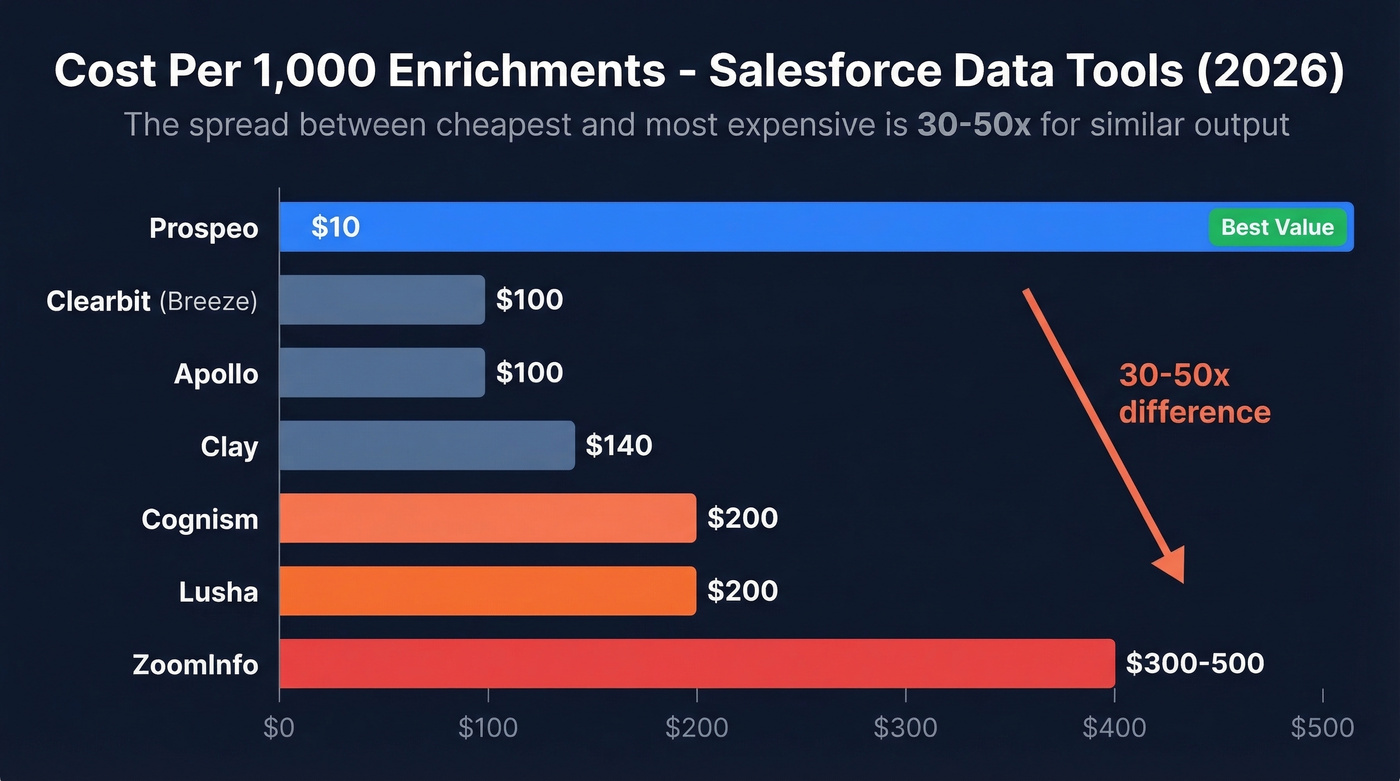
The right enrichment tool can fix this without draining your budget. We've tested and compared nine options, and the differences in cost-per-enrichment are staggering - a 30-50x spread between the cheapest and most expensive for functionally similar output.
Our Picks (TL;DR)
| Pick | Best For | Starting Price |
|---|---|---|
| Prospeo | Email accuracy & data freshness | ~$0.01/email (free tier) |
| Apollo | Volume + free-tier access | Free; paid from $49/user/mo |
| ZoomInfo | Enterprise intent + org charts | ~$15,000/year |
Most teams use one tool for contacts and another for firmographics. We'd recommend starting with Prospeo or Apollo unless you've got a $25K+ budget.
Here's the thing: ZoomInfo is still one of the broadest US databases. But most teams paying $25K/year are using maybe 15% of its capabilities. You're probably better off pairing two specialized tools at a third of the cost.
Quick Comparison
| Tool | Best For | Starting Price | Data Refresh | Cost/1K Enrichments |
|---|---|---|---|---|
| Apollo | Volume prospecting | Free / $49/user/mo | - | ~$100 |
| ZoomInfo | Enterprise GTM | ~$15K/year | - | ~$300-500 |
| Cognism | EMEA + compliance | ~$16.5K/year (1 user) | - | ~$150-250 |
| Clay | Orchestration | $185/mo | Varies | ~$140 |
| Lusha | Quick phone lookups | Free / $29.90/user/mo | - | ~$200 |
| Clearbit (Breeze) | Firmographics | ~$12K-$18K+/year | Real-time; monthly refresh | ~$80-120 |
| Crunchbase | Funding signals | $49/user/mo | - | N/A (firmographic) |
| SF Data Cloud | Data unification | Tens of thousands/yr | Varies | - |

You just read that bad data costs 12% of revenue. Prospeo's Salesforce integration returns 50+ data points per enrichment at a 92% match rate - with a 7-day refresh cycle that keeps records current while competitors let them rot for six weeks. At ~$0.01/email, that's 30-50x cheaper than ZoomInfo.
Stop paying enterprise prices to enrich your Salesforce. Start free today.
Best Salesforce Enrichment Tools Reviewed
Prospeo
Prospeo's edge is straightforward: 300M+ professional profiles, a 98% email accuracy rate, a 92% API match rate, and a 7-day data refresh cycle when the industry average sits around six weeks. That gap matters when you're running outbound sequences and every bounce chips away at your domain reputation.
The platform returns 50+ data points per enrichment and integrates natively with Salesforce. Intent data covers 15,000 Bombora topics, so you can layer buyer signals directly into your enrichment workflow rather than bolting on a separate tool.
A real proof point: Snyk's 50-person AE team was running bounce rates of 35-40% before switching. After deploying Prospeo, bounces dropped under 5%, and AE-sourced pipeline jumped 180% - over 200 new opportunities per month. At ~$0.01 per email with a free tier of 75 emails/month, the cost-per-enrichment is 10-50x cheaper than enterprise alternatives. No contracts, no sales calls required.
Apollo
Apollo is the tool most "Salesforce enrichment" articles somehow forget to mention - which is odd, because its 275M+ contact database and generous free tier make it the obvious starting point for teams that don't want to commit budget upfront. Paid plans start at $49/user/month, with an Organization tier at $149/user/month ($119 billed annually).
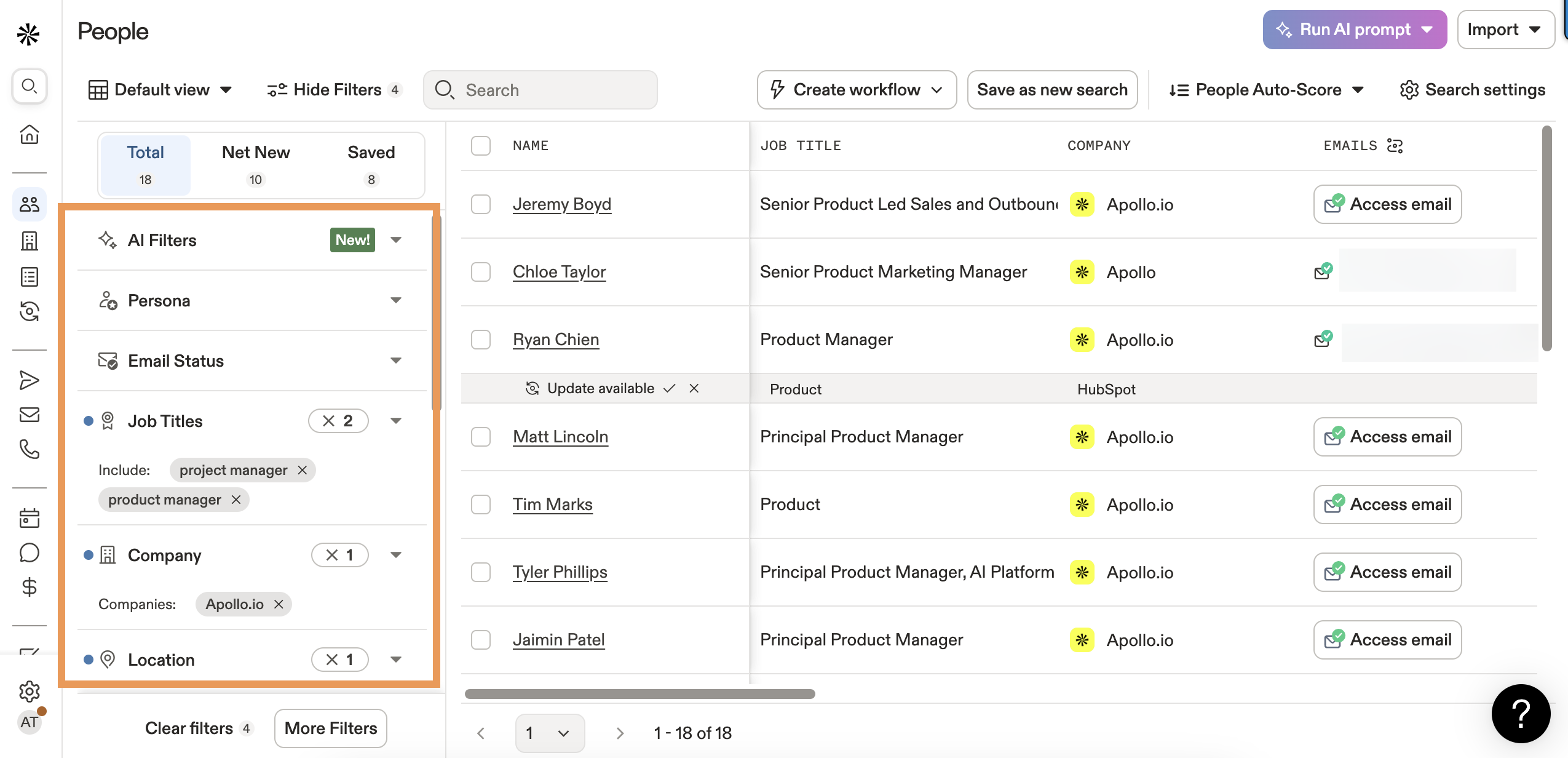
The native Salesforce integration works well for prospecting workflows, and Apollo offers waterfall enrichment from multiple sources. The caveat, per practitioners on r/salesforce: the API "isn't the best" for programmatic enrichment use cases. If you're building API-first workflows, test thoroughly before committing. For reps doing manual prospecting that syncs to Salesforce, it's hard to beat the value.
ZoomInfo
ZoomInfo covers 321M+ active professionals at 104M companies. It's also the most expensive option on this list by a wide margin. Pricing starts at $14,995/year for Professional+, scaling to $29,995 (Advanced+) and $35,995 (Elite+). Small teams typically pay around $25,000 annually. Each additional user runs $2,500 at list price, though 30-65% negotiated discounts are common.
The Salesforce integration is mature and deep - org charts, intent signals, and workflow automation all pipe in natively. Where ZoomInfo struggles: cost-per-enrichment is brutal at $300-500 per 1,000 contacts on many contracts, and practitioners consistently flag "expensive and outdated info," especially for credential-level data. If you're an enterprise team with budget and need broad US coverage, ZoomInfo still wins on sheer scale. For everyone else, the ROI math gets shaky fast. If you're evaluating options, start with our breakdown of ZoomInfo alternatives.
Cognism
Use this if you're selling into EMEA and compliance isn't optional. Cognism is often chosen for strong mobile coverage in Europe, including phone-verified numbers on higher tiers.
Skip this if you're budget-conscious. The pricing structure is a trap for the unprepared: a $15,000 annual platform fee plus $1,500 per user on Platinum, with $3,000-$8,000 implementation fees on top. Diamond tier jumps to a $25,000 platform fee plus $2,500/user. Annual contracts only. A 5-user Grow setup runs roughly $22,500/year after negotiation. ZoomInfo is typically stronger for broad US coverage; Cognism earns its keep in European markets.
Clay
Clay overhauled its pricing in 2026 and introduced a dual-credit system: Data Credits for pulling data from 150+ providers, and Actions for platform operations like AI calls, CRM pushes, and exports. The Launch plan runs $185/month; Growth is $495/month. CRM integrations require Pro+ at $720/month.
Clay is the right call for teams that want to orchestrate waterfall enrichment across multiple data sources. It's also complex and expensive if all you need is Salesforce-specific enrichment. At ~$140 per 1,000 enrichments, you're paying a premium for flexibility most teams won't fully use. If you just need clean emails in Salesforce, this is overkill.
Lusha
Lusha keeps things transparent. Free tier gives you 70 credits/month, Pro runs $29.90/user/month billed annually, and Premium hits $52.45/user/month.
The credit math is where it gets interesting: revealing an email costs 1 credit, but a phone number costs 10. That 10:1 ratio means your "250 credits/month" Pro plan gets you 25 phone numbers - or 250 emails, but not both. Lusha reports 81% accuracy, which is honest but noticeably below the top performers. For quick phone lookups with a clean Salesforce sync, it's a solid lightweight option.
Clearbit (Breeze Intelligence)
Now rebranded under HubSpot as Breeze Intelligence, typically priced around $12,000-$18,000+/year depending on plan and volume. It's a strong option for firmographic enrichment - company size, industry, tech stack - and it can enrich records in real time.
If your CRM is Salesforce and not HubSpot, validate the integration path before you commit. The product is increasingly optimized for HubSpot-native workflows, and Salesforce teams sometimes find the fit awkward.
Crunchbase
Crunchbase plans start at $49/user/month, and the Salesforce plugin is free. It's the go-to for funding rounds, investor data, and firmographic signals. It isn't a contact enrichment tool - don't expect emails or phone numbers. Pair it with a contact-level tool for a complete picture.
Salesforce Data Cloud
Salesforce's native enrichment option is an enterprise add-on typically priced in the tens of thousands per year depending on edition and usage. It's better for unifying existing data across your Salesforce org than pulling net-new external contacts. If old guides mention Data.com, ignore them - it's retired. Data Cloud makes sense for large orgs already deep in the Salesforce ecosystem, but it won't replace a dedicated enrichment provider.
How Credit Systems Actually Work
Not all credits are created equal, and this is where vendors love to obscure the real cost.
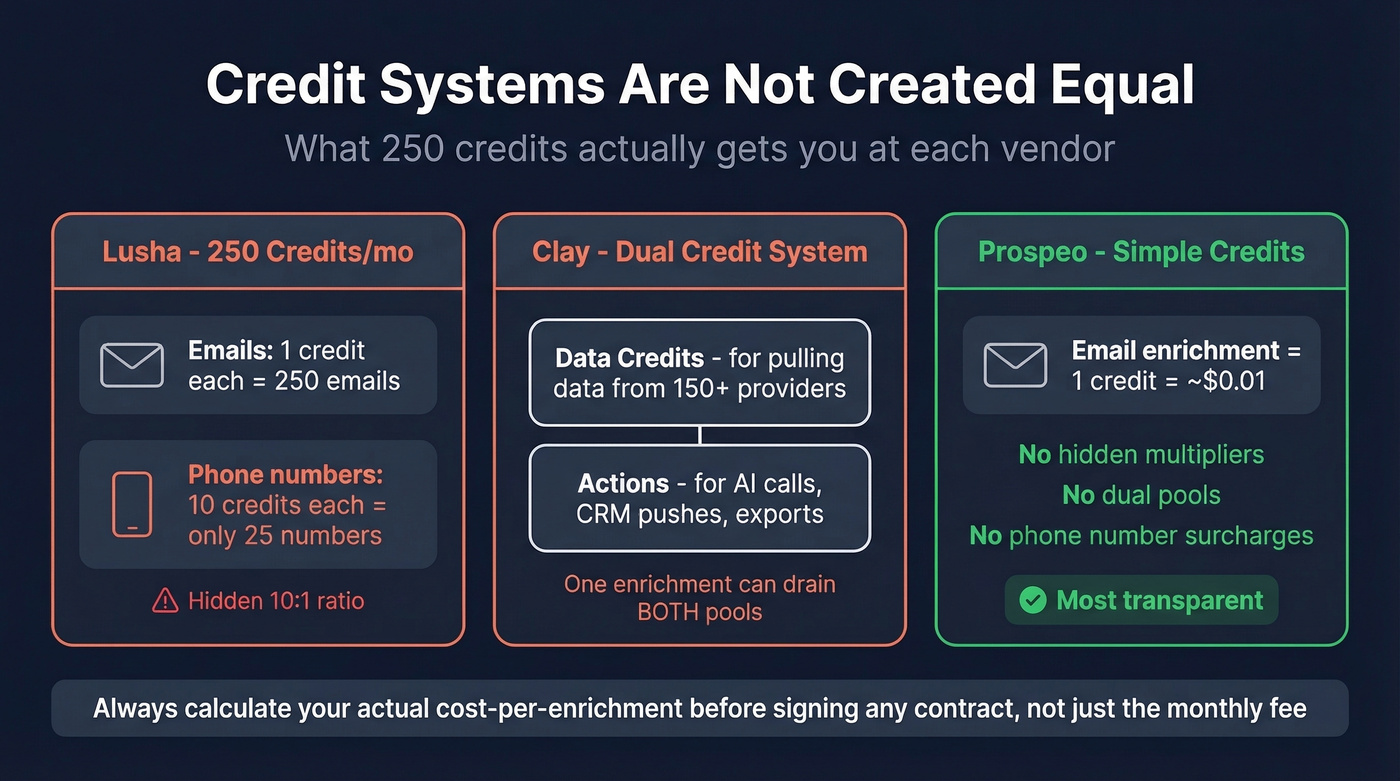
Lusha charges 10 credits for a phone number versus 1 for an email - so a "250 credit" plan might only get you 25 dials. Clay splits credits into Data Credits and Actions, meaning a single enrichment can consume credits from two separate pools. The math gets confusing fast.

In our testing, the cost-per-enrichment gap was even wider than the sticker prices suggest. Prospeo runs about $10 per 1,000 enrichments, Apollo ~$100, Clay ~$140, Lusha ~$200, and ZoomInfo $300-500 depending on your contract. That's a 30-50x spread between the cheapest and most expensive option for functionally similar output. Before you sign any contract, calculate your actual cost-per-enrichment - not just the monthly fee.
How to Choose the Right Tool
Let's be honest: the tool you pick matters less than how you implement it. We've seen enrichment projects go sideways not because of bad data, but because of bad field mapping. If you want a step-by-step implementation approach, see our guide on how to enrich CRM data.
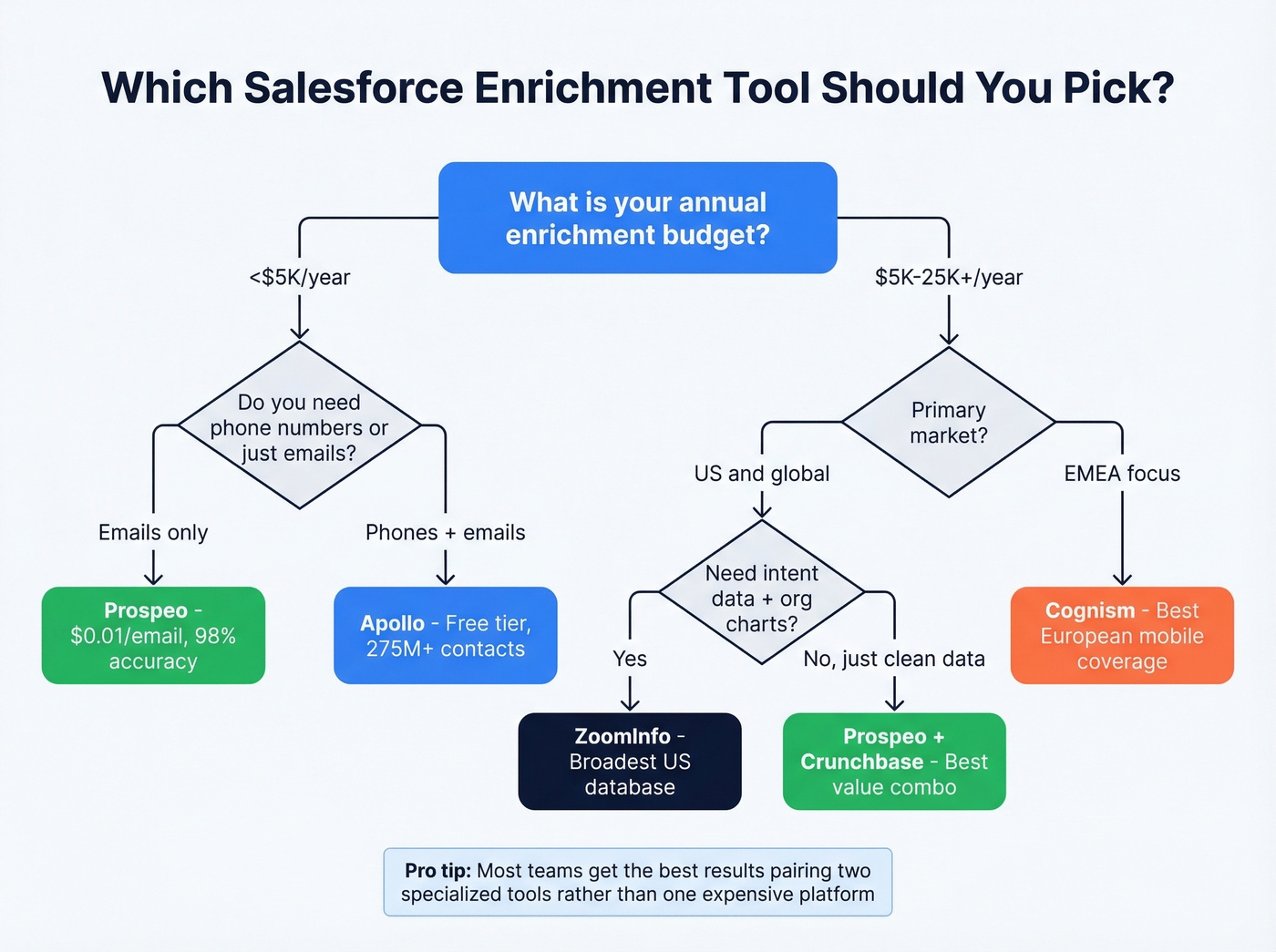
The classic horror story involves ZoomInfo writing state/territory values into Salesforce picklist fields. ZoomInfo's address data includes roughly 4,000 state values globally. Salesforce warns that picklists with over 1,000 values cause performance issues. The result: broken picklists, failed enrichments, and an angry Salesforce admin spending their weekend cleaning up the mess.
Map enrichment outputs to text fields first, then validate before writing to picklists. Set trigger patterns deliberately - enrich on record creation for inbound leads, use scheduled batch jobs for quarterly refresh, and keep on-demand enrichment for high-value accounts. Always test with 500 records before going org-wide. Every enrichment tool handles edge cases differently, and your Salesforce schema has quirks no vendor anticipated.
One more pattern worth knowing: warehouse-first enrichment. Some teams now enrich records in Snowflake or BigQuery first, then sync clean data to Salesforce via reverse ETL. It's more complex to set up, but it gives you a single source of truth and avoids polluting your CRM with raw vendor data.
Snyk cut Salesforce bounce rates from 35% to under 5% and added 200+ new opportunities per month with Prospeo's enrichment. 300M+ profiles, 98% email accuracy, native Salesforce sync - no contracts, no sales calls required.
Enrich 75 Salesforce records free this month and see the difference.
FAQ
What is Salesforce data enrichment?
It's the process of appending verified contact, firmographic, and intent data to existing CRM records - filling gaps like missing emails, outdated phone numbers, and wrong titles. With roughly 22% of B2B records going stale annually, regular enrichment is essential for any team running outbound from Salesforce.
How often should I re-enrich my database?
Quarterly at minimum. Contact data decays about 2.1% per month, so waiting a full year means roughly a quarter of your records are unreliable. Tools with shorter refresh cycles - like a 7-day cycle versus the 6-week industry average - reduce this burden significantly.
Can I enrich Salesforce data for free?
Yes. Apollo's free tier, Lusha's 70 credits/month, and Prospeo's 75 emails/month all offer no-cost plans. These free tiers are enough to validate your workflow and test data quality before committing budget.
What's the difference between contact and account enrichment?
Contact enrichment adds people data - verified emails, direct dials, job titles, seniority. Account enrichment adds company data - revenue, headcount, funding history, and technographics. Crunchbase excels at account-level firmographics; Prospeo and Lusha focus on contact-level data.
Why does enrichment break Salesforce picklists?
Enrichment tools can write non-standard values into picklist fields - like 4,000 global state codes into a field designed for 50 US states. Salesforce warns that picklists exceeding 1,000 values cause performance degradation. Always map enrichment data to text fields first, then validate before writing to constrained fields.