

How to Enrich CRM Data: The Practitioner's Playbook
A HubSpot user on Reddit described running enrichment that "did the opposite" of what they expected - wrong company names stamped on verified accounts, duplicated records across three segments, and outdated job titles overwriting fields reps had manually confirmed. The sales team stopped trusting the CRM entirely. Routing broke. Sequences fired to the wrong personas. Attribution fell apart because enriched firmographics no longer matched the segments they fed. Cleanup meant pulling field history from backups, rebuilding dedupe rules, and manually auditing thousands of records. It took six weeks.
That's not an edge case. 40% of CRM data becomes obsolete annually, and most enrichment projects make things worse before they make them better - not because the data is bad, but because the implementation is careless. The industry sells you on "append and go." Reality requires governance, sequencing, and a healthy distrust of any single provider.
Here's the thing: most teams don't have an enrichment problem. They have an overwrite-protection problem. The data providers are fine. The workflows connecting them to your CRM are where everything breaks.
What CRM Data Enrichment Actually Requires
CRM enrichment comes down to three things:
- A reliable data provider - one with verified emails and real-time validation, not a stale database dump (see our picks for data provider options).
- Do-not-overwrite rules per field - so enrichment doesn't destroy data your reps already verified.
- A 90-day refresh cycle - because B2B contacts decay 22.5% per year, and 90 days is the standard freshness window for contact data.
Why Your CRM Data Is Worse Than You Think
Most teams dramatically underestimate how degraded their CRM already is before they even start enriching.
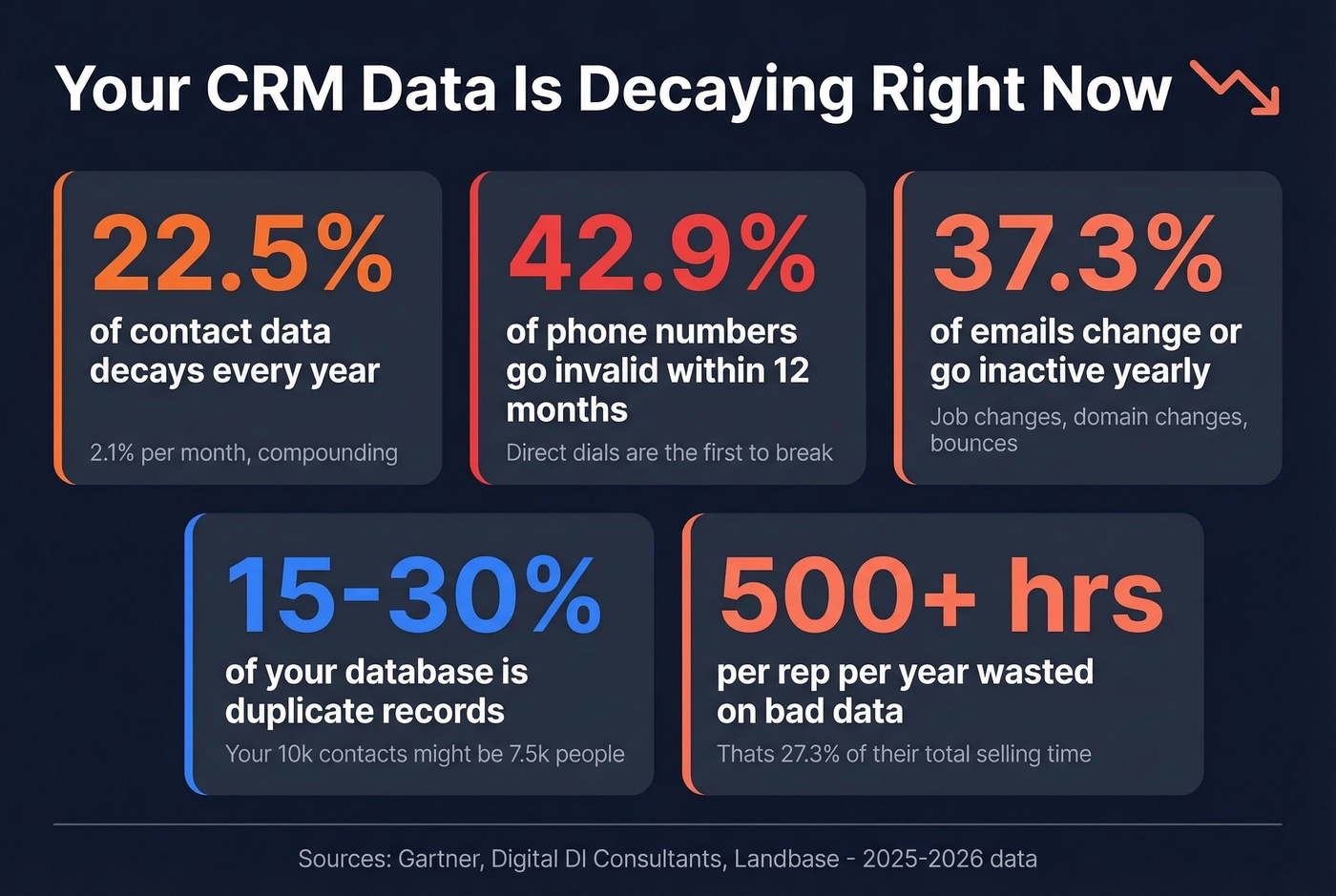
B2B contact data decays at 2.1% per month - that's 22.5% per year. Phone numbers invalidate at 42.9% within a year. Emails change or go inactive at 37.3%. People change jobs, companies get acquired, titles shift. Your CRM doesn't know any of this happened.
Duplicates compound the problem. The average contact database carries 15-30% duplicate records. Your "10,000-contact" database is really 7,500 unique people - with three versions of the same VP of Marketing sitting in different segments, getting different sequences.
And it's not just decay. 71% of sales reps say they spend too much time on data entry, which is exactly what enrichment is supposed to reduce. Instead, reps waste 27.3% of their time - over 500 hours per year - pursuing invalid or outdated leads. The average annual cost of poor data quality runs $12.9M across large organizations. Even if your org is a fraction of that size, the proportional waste is real: reps calling dead numbers, emails bouncing, segments built on stale firmographics.

The 4-Stage Enrichment Workflow
Most enrichment guides tell you to "connect a tool and enrich." That's like telling someone to renovate a house by buying paint. The sequence matters enormously. We've audited enrichment runs where 10-20% of "new" contacts were duplicates created by mismatched domains - all because the team enriched before deduplicating.
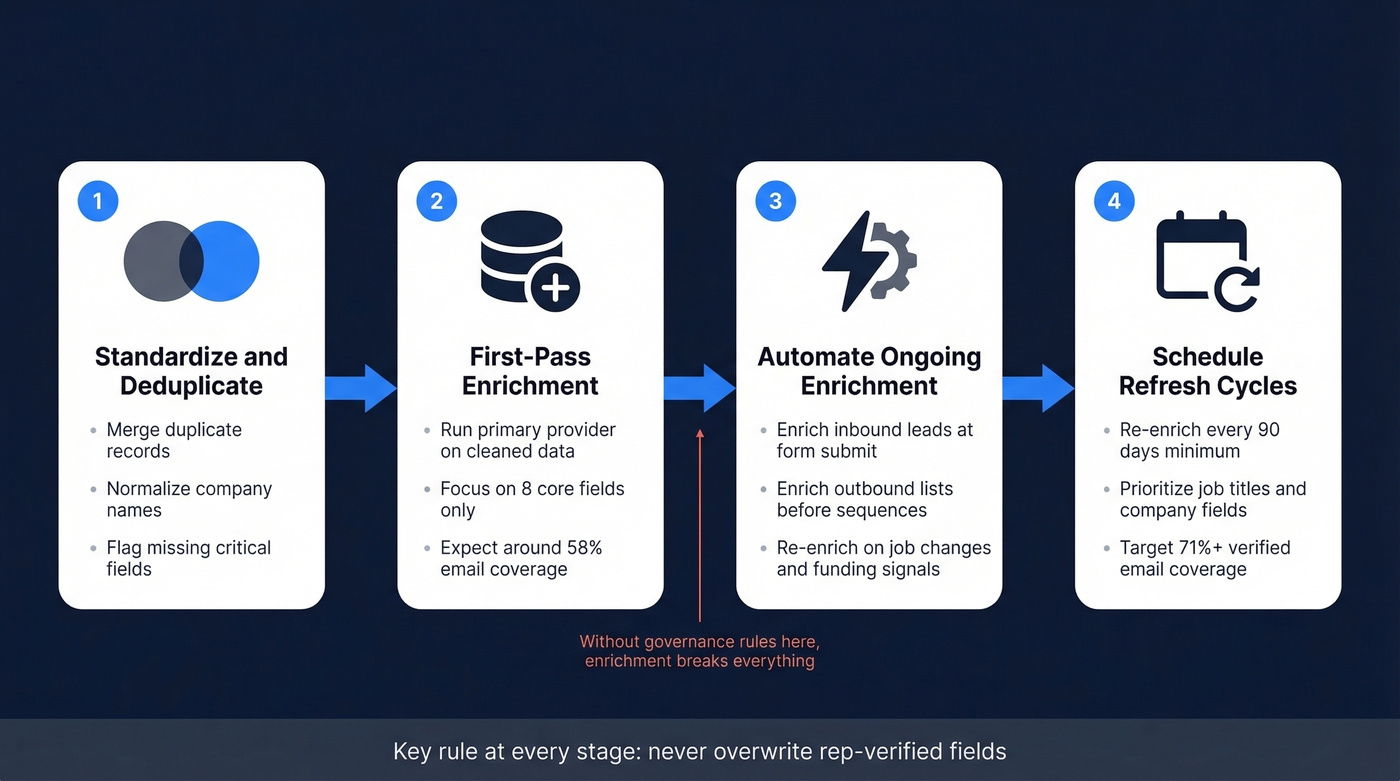
Stage 1: Standardize and Deduplicate
Before you touch any enrichment provider, clean what you have. Merge duplicates, normalize company names (is it "IBM" or "International Business Machines" or "ibm.com"?), standardize phone formats, and flag records with missing critical fields.
Skipping this step means enrichment amplifies your existing mess. If you have three duplicate records for the same person, enrichment gives you three enriched duplicates - now with conflicting data across them. In our experience, the fastest win is locking rep-verified fields before you connect any provider. That single step prevents the majority of enrichment disasters.
If you need a broader cleanup stack, start with CRM automation to reduce manual entry and standardize inputs.
Stage 2: First-Pass Enrichment
Run your primary provider against the cleaned database. Focus on the fields that actually drive segmentation and scoring - your minimum viable enrichment set. For most B2B teams, that's eight fields:
- Verified email - the foundation of every outbound sequence (pair this with an email verifier if your provider doesn’t validate in-line)
- Direct dial - for phone-first sales motions (and better phone sales skills training to convert connects)
- Job title + seniority level - for persona routing and lead scoring
- Company size - for segment assignment
- Industry - for vertical-specific messaging
- Tech stack - for technographic targeting (more on technographics if you’re new to it)
- Funding stage - for timing and budget signals
Don't enrich everything. Enriching 30 fields per contact when you only use 8 for routing is a cost explosion with no ROI.
A practical benchmark: in a test on 1,200 accounts, a first pass from one provider produced 58% verified work emails. Expect this range. No single provider covers everything, which is why Stage 3 and waterfall logic exist.
Stage 3: Automate Ongoing Enrichment
Set up triggers so enrichment happens automatically at key moments.
Inbound: enrich at form submit, before routing. When a lead fills out a form with just name and email, enrich instantly with firmographics and seniority so your routing rules can assign the right rep within 60 seconds. This reduces form fields (improving conversion) while giving your router the data it needs. The goal is a fully enriched record within 15-30 seconds of creation.
Outbound: enrich on list import, before sequence send. Every contact imported from a list, event, or manual entry should hit your enrichment API before entering a sequence. This catches bad emails before they damage your sender reputation (especially if you’re running outbound email automation).
Beyond these core triggers, build signal-based enrichment that re-enriches records when something changes in the market. When a contact changes jobs, re-enrich both the contact and the account - the old company now has a gap, and the new company has a warm relationship. When a target account announces funding or a hiring surge, re-score and bump it in your prioritization queue. When a new technology is detected in a prospect's stack, route the account to the SDR pod that owns that use case. These signals turn enrichment from a static data fill into a dynamic prioritization engine.
Batch imports should run in groups of 50 to avoid API rate limits.
Stage 4: Schedule Refresh Cycles
Contact data should be considered fresh for no longer than 90 days. Set a scheduled job - quarterly at minimum - to re-enrich records where the "last enriched date" exceeds that window. Pay special attention to job titles and company associations, which change fastest.
After adding do-not-overwrite rules and running a second provider in the benchmark test above, verified email coverage jumped from 58% to 71%, and the bounce rate dropped by half. That second pass with proper governance is where the real gains happen.
Governance Rules That Prevent Disasters
Enrichment without governance is how you get the horror story from the intro.
Do-Not-Overwrite Rules
This is the single most important governance mechanism. Simple rule: if a field has been manually verified by a rep, enrichment never overwrites it.
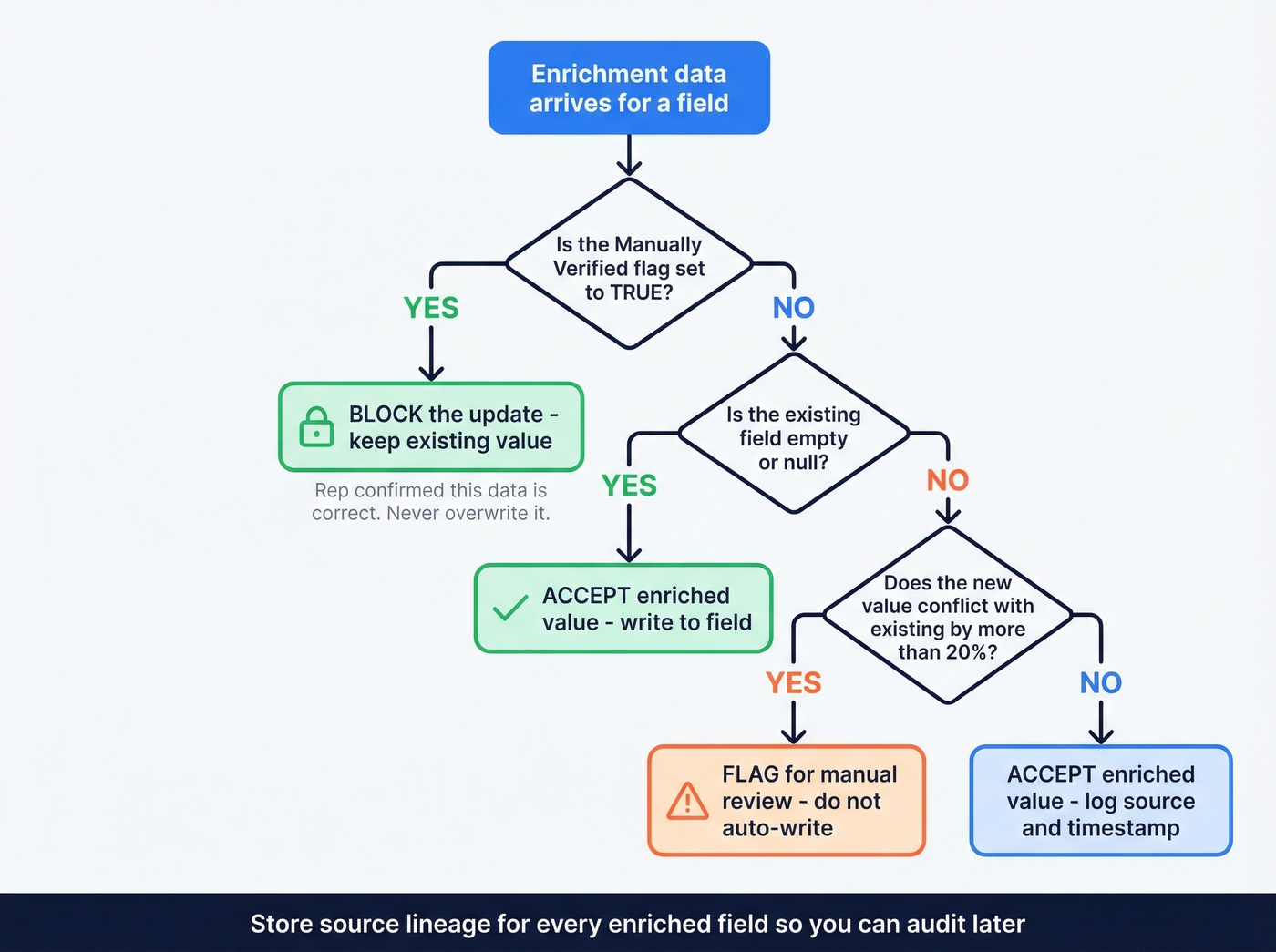
A concrete example: "Do not overwrite Mobile Phone when the 'Manually Verified' flag is true." One team overwrote thousands of verified mobile numbers because this rule wasn't in place. The fix took weeks and required pulling data from backups.
Build a "Manually Verified" checkbox for every critical field. When a rep confirms a phone number or email is correct, that flag locks the field from automated updates. It's a five-minute configuration that saves weeks of cleanup.
Source Priority and Provenance
Not every provider is best at everything. Define a source-of-truth hierarchy per field: prefer Provider A for company size and revenue, Provider B for funding stage, and your CRM's own data for job titles that reps have confirmed.
When sources disagree by more than 20% on a numeric field like employee count, flag the record for manual review rather than picking one arbitrarily. Automated conflict resolution fails at scale because it silently writes wrong data into thousands of records.
Store source lineage for every enriched field. Create a custom field (or use your CRM's field history) to track which provider filled which value and when. This provenance trail lets you audit data quality per vendor, gives compliance teams the paper trail regulators demand, and tells you which providers are actually earning their keep when contract renewal comes around.
Which Fields Are Worth Enriching
Enrich only fields tied to segmentation, scoring, or routing - the eight fields from Stage 2. Everything else - social profiles, personal interests, secondary office locations - is noise that costs credits and clutters your CRM. Map provider fields to CRM fields explicitly, and create custom fields for enrichment-specific data like tech stack, funding round, and intent score rather than jamming them into existing fields.

Your CRM decays 22.5% per year. Prospeo's 7-day refresh cycle and 92% API match rate keep records current - returning 50+ data points per contact without overwriting rep-verified fields.
Enrich thousands of CRM records at $0.01 per email. No contracts.
How Waterfall Enrichment Works
Relying on a single enrichment provider typically leaves 40-60% of qualified prospects unreachable. Waterfall enrichment fixes this.
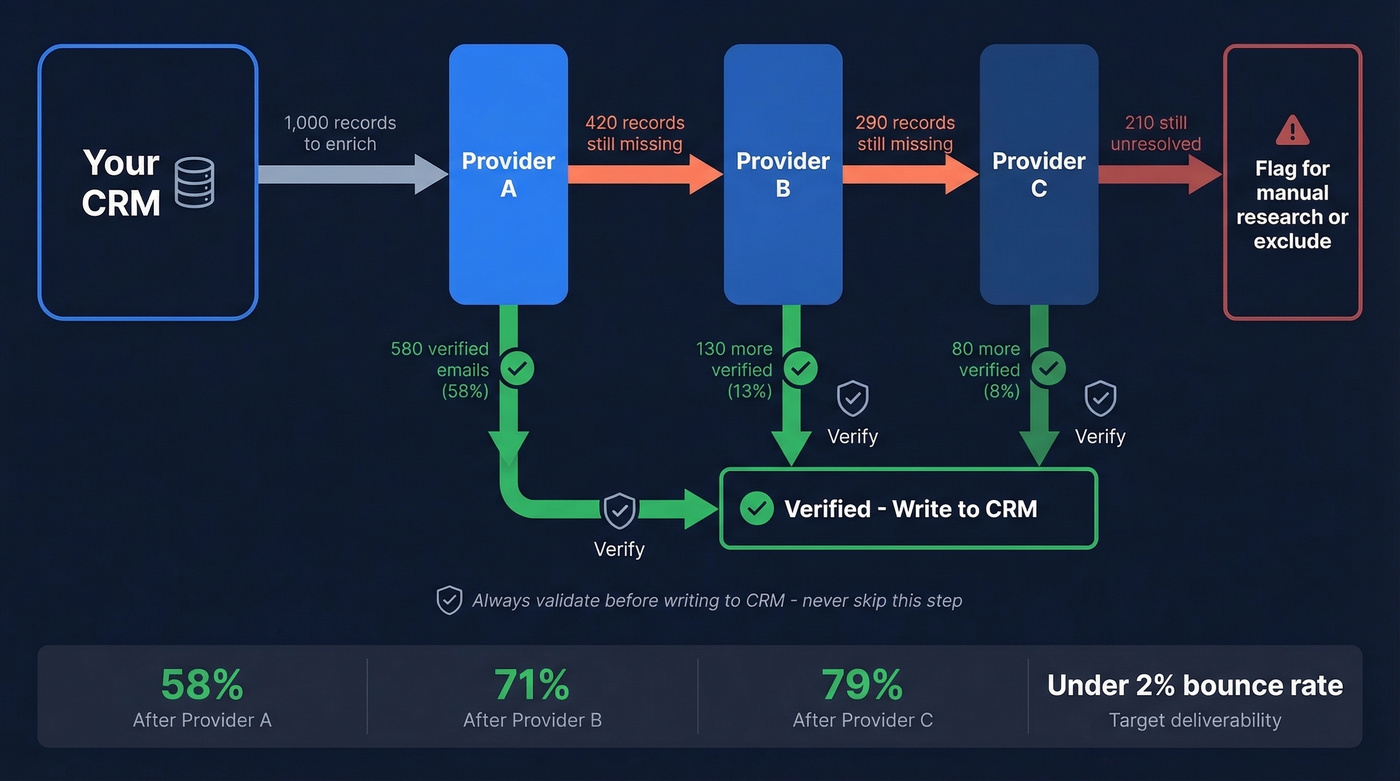
The concept is straightforward: query Provider A first. For any records that come back empty or unverified, pass them to Provider B. Still gaps? Provider C. At each step, validate and score the returned data before accepting it. Store source lineage so you can audit quality later.
One team got 45% technographic coverage from their primary provider. Adding a second specialized source pushed identification of their target tech combination to 73%. That's the difference between a half-built ABM list and a usable one (see account based marketing benchmarks for what “good” looks like).
The deliverability guardrail for waterfall email enrichment is strict: target under 2% bounce rate on enriched emails. If you're above 5%, your verification step is broken. Building a verification layer into the waterfall - where enriched emails get validated before they ever hit your CRM - eliminates the "enrich now, verify later" two-step that most teams fumble.
Best CRM Enrichment Tools Compared
| Tool | Best For | Coverage / Quality | Starting Price | Key Limitation |
|---|---|---|---|---|
| Prospeo | Email accuracy + enrichment | 98% email accuracy; 92% API match | Free; ~$0.01/email | Best paired with your existing dialer |
| Apollo.io | All-in-one + sequencing | 270M+ contacts | Free; $49/user/mo (annual) | Email accuracy lags dedicated tools |
| Clay | Waterfall orchestration | 75+ data sources | $149/mo | Steep learning curve |
| Cognism | GDPR-first / EU teams | Diamond Data verified phones | ~$1,000-$3,000/mo | Sales-led, custom pricing |
| ZoomInfo | Enterprise GTM coverage | 321M profiles | ~$15,000/yr | Enterprise pricing, overkill for SMBs |
| HubSpot Breeze | Native HubSpot users | 40+ attributes | Credit-based (included with Pro/Enterprise) | 30-40% records unenriched |
Integrations snapshot: Prospeo connects to Salesforce, HubSpot, Clay, Zapier, Make, Smartlead, Instantly, and Lemlist. Apollo integrates with Salesforce, HubSpot, and Outreach. Clay works with Salesforce, HubSpot, and Zapier. Cognism and ZoomInfo both support Salesforce, HubSpot, and major sales engagement platforms. Breeze is HubSpot only.

Prospeo
Prospeo draws from 300M+ professional profiles and 143M+ verified emails to return 50+ data points per contact at an 83% enrichment match rate. Every email runs through a 5-step verification process including catch-all handling, spam-trap removal, and honeypot filtering, delivering 98% email accuracy. The 125M+ verified mobile numbers carry a 30% pickup rate across all regions.
The 7-day data refresh cycle keeps records current while most competitors refresh every 4-6 weeks. Snyk's team of 50 AEs saw bounce rates drop from 35-40% to under 5% after switching, with AE-sourced pipeline up 180%. For programmatic workflows, the Enrich API handles CRM and CSV enrichment at scale. Pricing starts free (75 emails/month) and scales at ~$0.01 per email - no contracts, no sales calls.
Apollo.io
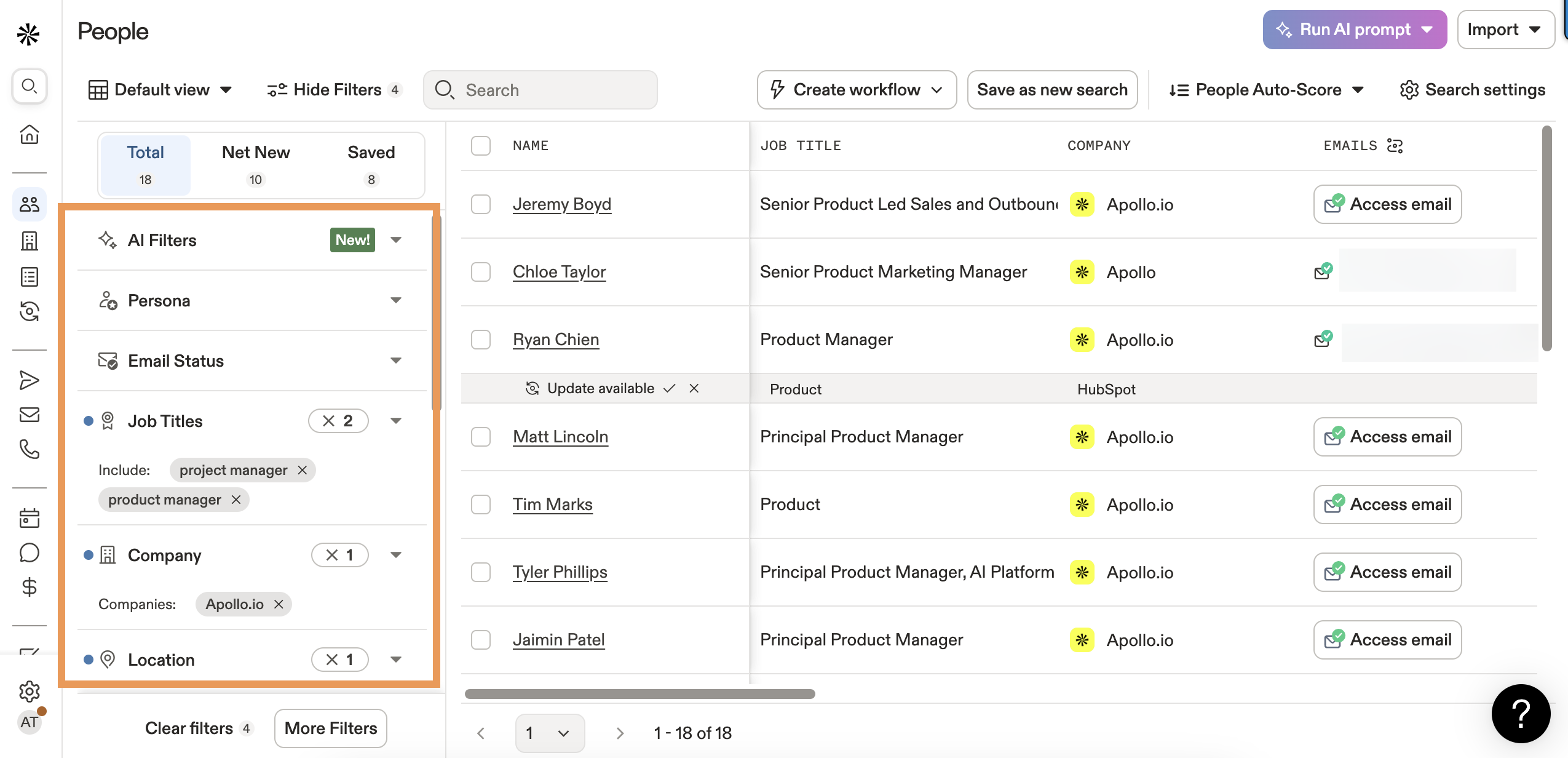
Apollo is the best all-in-one option if you want enrichment, sequencing, and a dialer in one platform. The database covers 270M+ contacts, and the free tier gives you 100 credits per month to test. Paid plans run $49-$119/user/month billed annually depending on features.
The tradeoff is email accuracy. If Apollo-sourced emails push you above 2% bounces, put a verification layer in front of your CRM before those addresses enter any sequence. For teams that want one login for everything and can tolerate that extra step, Apollo is a strong pick. For teams where deliverability is mission-critical from day one, a dedicated verification tool saves you the headache.
Clay
Clay is the power tool for waterfall enrichment. It connects 75+ data sources and lets you build custom enrichment sequences - query one provider first, fall back to another, verify with a third, score the result. The flexibility is unmatched.
Skip this if you want plug-and-play simplicity. Clay has a real learning curve, and credit costs add up fast once you're running complex waterfalls at scale. Plans start at $149/month and climb to $800+ for heavy usage. Use it if you're a RevOps team that wants granular control over every enrichment decision and has the technical chops to build the workflows (or follow a dedicated Clay list building workflow).
Cognism
Cognism is the right call for teams selling into Europe where GDPR compliance is non-negotiable. Their Diamond Data phone verification delivers 98% accuracy on mobile numbers, and the platform is built compliance-first with full DPA support and consent tracking.
US-focused SMBs should skip it. The ~$1,000-$3,000/month price tag and sales-led buying process don't make sense for smaller teams with a domestic-only ICP. Cognism earns its price when you need verified European mobile numbers and airtight compliance documentation.
ZoomInfo: Price-to-Value Reality
ZoomInfo has one of the largest databases at 321M profiles and remains the default for enterprise teams running full-stack GTM. But let's do the math.
A typical mid-market contract with intent data and mobile numbers often lands around $25,000-$60,000/year. If that's a 5-seat deal, you're at $5,000-$12,000 per seat. If each rep sources 200 contacts per month (2,400/year), that's roughly $2-$5 per contact per seat - before you factor in the contacts that come back empty. For a Series A company that needs verified emails and direct dials, that's 10-50x what you'd pay with a self-serve tool. ZoomInfo wins on breadth, workflow depth, and enterprise integrations. It loses badly on price-to-value for teams that don't need the full platform.
HubSpot Breeze Intelligence
Here's the credit burn that catches people off guard. Breeze Intelligence costs 1 credit per field per contact. Enriching 5 fields across 200 contacts burns your entire monthly Professional allowance of 1,000 credits. Enterprise gets 5,000 credits - still only enough for 1,000 contacts at 5 fields each.
The convenience of native enrichment is real if you're already on HubSpot Professional or Enterprise. The limitation is also real: 30-40% of records remain unenriched because HubSpot's database simply doesn't have the data. Extra credit packs run $500-$1,500. Treat Breeze as a supplement, not your primary enrichment source.
Enrichment Mistakes That Wreck Your CRM
Five mistakes we see repeatedly - and every one of them is preventable.
1. No overwrite protection. This is the #1 enrichment disaster. Without do-not-overwrite rules, automated enrichment silently replaces verified data with unverified data. One bad batch run can overwrite thousands of mobile numbers your reps spent months confirming. We've watched this happen three times in the last year alone.
2. Enriching every field. More fields doesn't mean better data. Every field you enrich costs credits, creates potential conflicts, and adds noise. Enrich what drives segmentation and scoring. Leave the rest alone.
3. Skipping email verification after enrichment. Enrichment providers return emails. That doesn't mean those emails are deliverable. If your bounce rate is above 5%, your verification step is broken. Build verification into the enrichment workflow itself so every email that hits your CRM is already validated (use an email reputation check to diagnose systemic issues).
4. Single provider reliance. No single provider covers your entire ICP. Expecting one tool to handle every industry and region leaves 40-60% of qualified prospects with incomplete data. Use waterfall logic or at minimum a primary plus secondary provider (or compare options in our best B2B database roundup).
5. No refresh schedule. You enriched your database once in January. It's now October. A quarter of those records are already stale. Set a 90-day refresh cycle and automate it. The data doesn't maintain itself.
Waterfall enrichment only works if your first pass covers enough. Prospeo's 83% enrichment match rate across 300M+ profiles means fewer gaps to fill - and 98% email accuracy means fewer bounces wrecking your sender reputation.
Replace your broken enrichment stack with data that actually connects.
Compliance Checklist
Enrichment without compliance guardrails is a liability. Before you flip the switch, document purpose limitation for every enrichment use case - why you're collecting each data point and how it serves a specific business function. Tell contacts what you store and why; transparency isn't optional under GDPR or most US state privacy laws.
With those foundations in place, verify these specifics:
- GDPR exposure: Fines can reach EUR 20M or 4% of global turnover. If you're enriching EU contacts, document a legitimate interest assessment for each enrichment use case. Data minimization means enriching only what you need - not everything a provider offers.
- CCPA penalties: $7,988 per intentional violation. California residents have the right to know what data you've collected and to request deletion.
- 20+ US states now have comprehensive privacy laws with overlapping obligations. Don't assume CCPA is the only US regulation that matters (use a dedicated B2B compliance checklist to avoid gaps).
- Audit trail: Track which provider enriched which field, when, and from what source. If a regulator asks where you got a contact's phone number, "our enrichment tool" isn't a sufficient answer.
- Automated decision-making: If enriched data feeds lead scoring or routing, GDPR Article 22 requires human review mechanisms and the ability for contacts to contest automated decisions.
- Opt-out enforcement: Honor unsubscribe and deletion requests across all enriched data, not just your email platform.
FAQ
How often should I re-enrich CRM data?
Every 90 days at minimum. B2B contact data decays at 22.5% per year, with phone numbers and emails degrading fastest. Quarterly refresh cycles catch job changes, company moves, and invalidated contact info before they break your sequences.
What's waterfall enrichment?
Waterfall enrichment queries multiple data providers sequentially until verified data is found for each field. Single providers miss 40-60% of contacts, so the sequential approach fills gaps that any one tool can't cover alone.
Is CRM enrichment GDPR compliant?
It can be, with proper safeguards. You need documented legitimate interest assessments, data minimization practices, opt-out mechanisms, and audit trails showing where each data point originated. Without these, you're exposed to fines up to EUR 20M.
How much does CRM enrichment cost?
Self-serve tools like Prospeo start free and scale at ~$0.01/email. Apollo's free tier includes 100 credits. At the enterprise end, ZoomInfo contracts run $15,000-$60,000/year depending on seats and modules. Most mid-market teams land in the $50-$500/month range.
What's the difference between native and third-party enrichment?
CRM-native tools like HubSpot Breeze are convenient but limited - 30-40% of records go unenriched because the native database lacks coverage. Third-party tools offer higher match rates, waterfall capabilities, and dedicated verification that native solutions can't match.