

Dialers in 2026: Types, Top Tools, Compliance, and the Data Problem Nobody Talks About
Your SDR manager just pulled up the dialer dashboard. Connect rate: 4%. Four out of every hundred dials reach a human being. The reps are burning through lists, the system's humming along at 50-70 calls per hour, and almost nobody's picking up. The dialer isn't broken - the numbers you're feeding it are.
Quick picks for 2026: CloudTalk for best overall value, Nooks for the best parallel dialer, Five9 for enterprise call centers. But the tool you pick matters far less than the data you feed it. In a lot of B2B outbound, connect rates are now in the low double-digits or worse, and bad phone numbers are a major culprit.
What Is a Dialer?
A dialer is software that automatically calls phone numbers from a pre-loaded list or CRM, routing only answered calls to available agents. Instead of a rep manually punching digits, waiting through rings, and hitting voicemail after voicemail, the system handles the mechanical work - dialing, detecting answering machines, and connecting live pickups to the next available person.
A core component is answering machine detection (AMD). Good AMD accurately distinguishes between a live human and a voicemail greeting within the first few seconds of a pickup, then routes accordingly. Poor AMD either drops live calls (thinking they're voicemail) or wastes rep time connecting them to answering machines. AMD accuracy varies wildly across vendors and is worth testing during any trial period - it's one of those features that looks identical on spec sheets but performs completely differently in production.
The global auto dialer market sits at roughly $1.5 billion and is projected to reach $3 billion by 2033. That growth tracks with a simple reality: automated calling eliminates up to 90% of manual dialing tasks, letting reps make three to five times more calls per day. Modern platforms plug directly into CRMs like Salesforce and HubSpot, logging dispositions and feeding analytics dashboards without the rep lifting a finger. Standalone tools that don't sync bidirectionally with your CRM are hard to justify at this point.
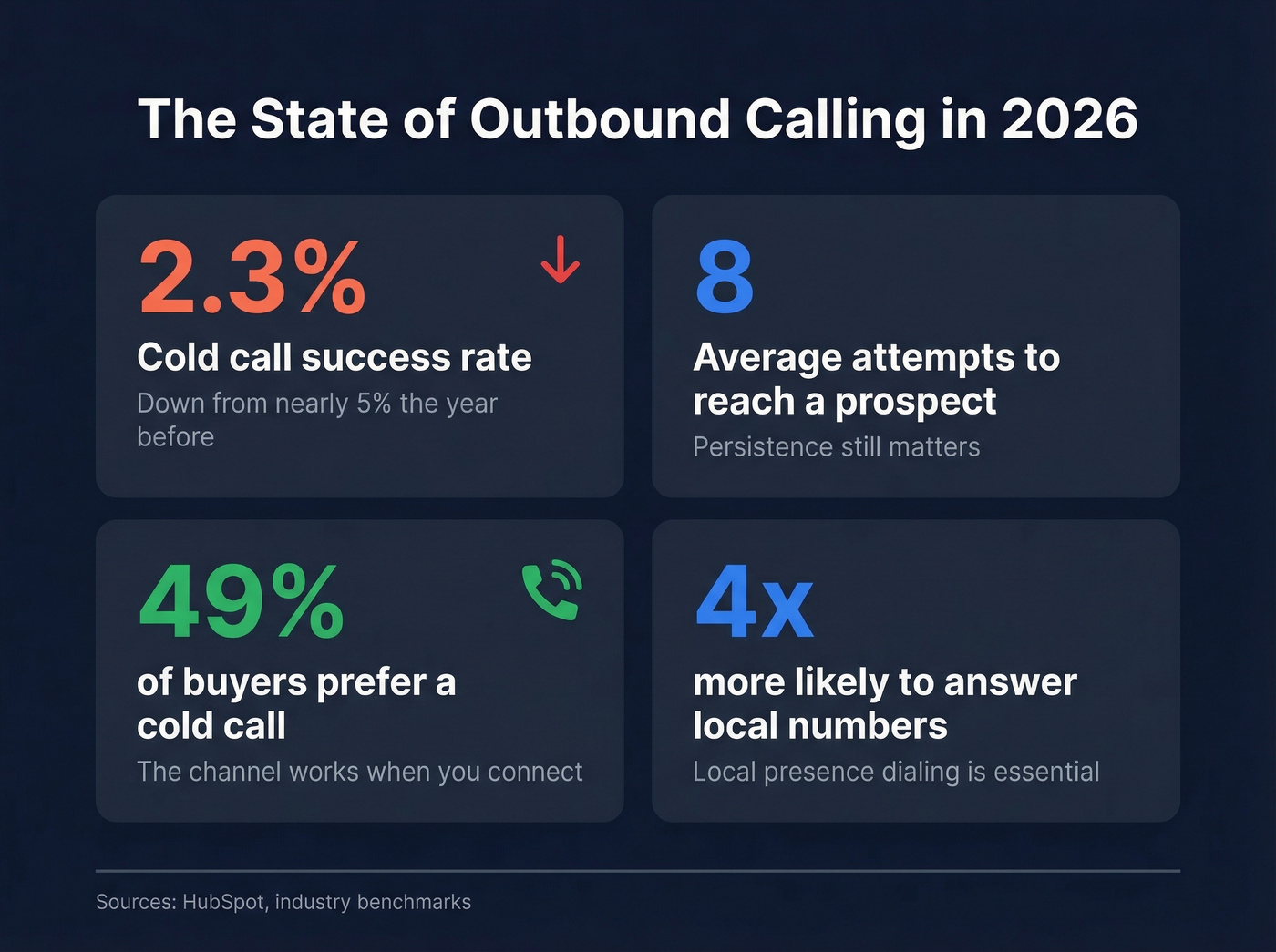
But more calls doesn't automatically mean more conversations. The cold-calling success rate sits at around 2.3%, down from nearly 5% the year before. It takes an average of eight attempts to reach a prospect. And yet, 49% of buyers prefer to be contacted via a cold call, and 57% of C-level executives and VPs prefer hearing from sales reps by phone. The channel works - when you can actually get someone on the line.
That gap between "the phone still works" and "nobody's answering" is the central tension of outbound calling in 2026.
What Changed in 2024-2026
Picture this: you're running a $125k/month outbound operation. Scrubbed lists, permission-based campaigns, experienced reps. Two years ago, your connect-through rate hovered around 60%. Today you're lucky to hit 15%. Your conversion rate on best days is 0.8%. That's not a hypothetical - it's a real operator's experience shared on r/b2bmarketing, and it mirrors what we're hearing across the industry.

Three forces converged to make outbound calling dramatically harder.
STIR/SHAKEN implementation gave carriers a framework to authenticate caller identity. Numbers that can't be verified get flagged or silently dropped before they ever ring. Carrier spam filtering from engines like Hiya, TNS, and First Orion now aggressively labels high-volume callers as "Spam Likely" - even legitimate businesses. And the one-to-one consent rule that took effect January 27, 2025, means you can no longer rely on multi-party consent agreements. Consent must be to a single, specific seller.
The 2022 outbound playbook is dead. Faster dialing into bad data doesn't scale - it accelerates you into a wall. Teams that doubled down on volume without fixing data quality and number reputation saw their economics collapse. The ones adapting are investing in verified mobile numbers, caller ID rotation, and compliance infrastructure before they even think about speed.
Types of Sales Dialers
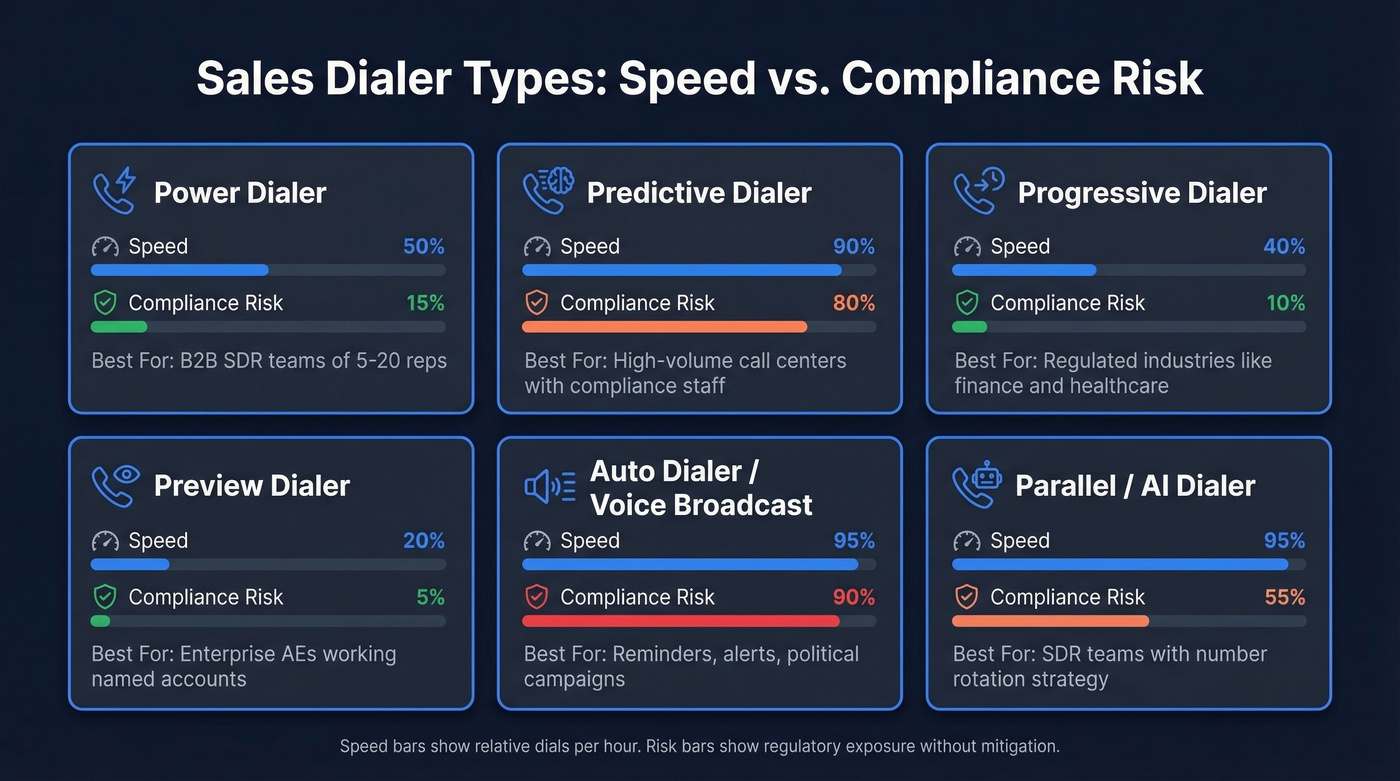
Not all dialers work the same way, and picking the wrong type for your use case wastes money and creates compliance risk. Here are the six categories that matter.
Power Dialers
The workhorse of B2B sales. A power dialer calls one number at a time from your list, automatically advancing to the next number after each call ends. No manual dialing, no dead air between calls. Reps typically hit 50-70 calls per hour - roughly triple what manual dialing produces.
Power dialers are the safest option from a compliance standpoint because there's always a 1:1 ratio between calls and available agents. No abandoned calls, no "telemarketer delay" when someone picks up. If you're an SDR team of 5-20 reps doing B2B outbound, this is your starting point. Many also support local presence dialing - displaying a local area code to the recipient - which is worth enabling. Prospects are four times more likely to answer a call from a local number.
Predictive Dialers
Predictive dialers use algorithms to dial multiple numbers simultaneously per agent, predicting when an agent will become available based on average call duration and answer rates. The result: triple-digit dials per hour and near-zero idle time between conversations.
The tradeoff is real. When the algorithm miscalculates, multiple prospects answer at once and some get silence or a delayed connection - the classic "telemarketer delay." That creates abandoned calls, which are both a terrible customer experience and a compliance liability under TCPA. For high-volume call centers with dedicated compliance staff, predictive dialers make sense. For most B2B sales teams, they're a risk that isn't worth the throughput gain.
Progressive Dialers
Think of progressive dialers as the cautious cousin of predictive. They dial one number at a time, but only when an agent is confirmed available. The system waits for the rep to finish their current call, then automatically dials the next number. No overlap, no abandoned calls.
They sacrifice some speed, but they eliminate the compliance and CX risks of predictive dialing. They're the right choice for teams that need automation without the regulatory exposure, particularly in regulated industries like financial services or healthcare.
Preview Dialers
Preview dialers give the agent a chance to review the prospect's record before the call is placed. The rep sees the contact's name, company, notes from previous interactions, and any relevant context, then manually triggers the dial when ready.
This is the slowest automated dialing mode, but it produces the highest-quality conversations. For reps calling into named accounts, working enterprise deals, or following up on warm leads, preview dialing makes more sense than raw speed.
Auto Dialers (Voice Broadcast)
Voice broadcast systems deliver pre-recorded messages to a list of numbers. No live agent involved - the system dials, plays the message, and moves on. Use cases include appointment reminders, event notifications, political campaigns, and emergency alerts.
These aren't sales tools in the traditional sense, and they carry significant TCPA exposure if used for marketing without proper consent. If you're considering voice broadcast for cold outreach, talk to a compliance attorney first.
Parallel / AI Dialers
This is the biggest shift in outbound calling since the power dialer. Parallel dialers - led by tools like Nooks, Orum, and Koncert - dial 3-10 numbers simultaneously and connect the rep to the first live pickup. The rest are silently dropped.
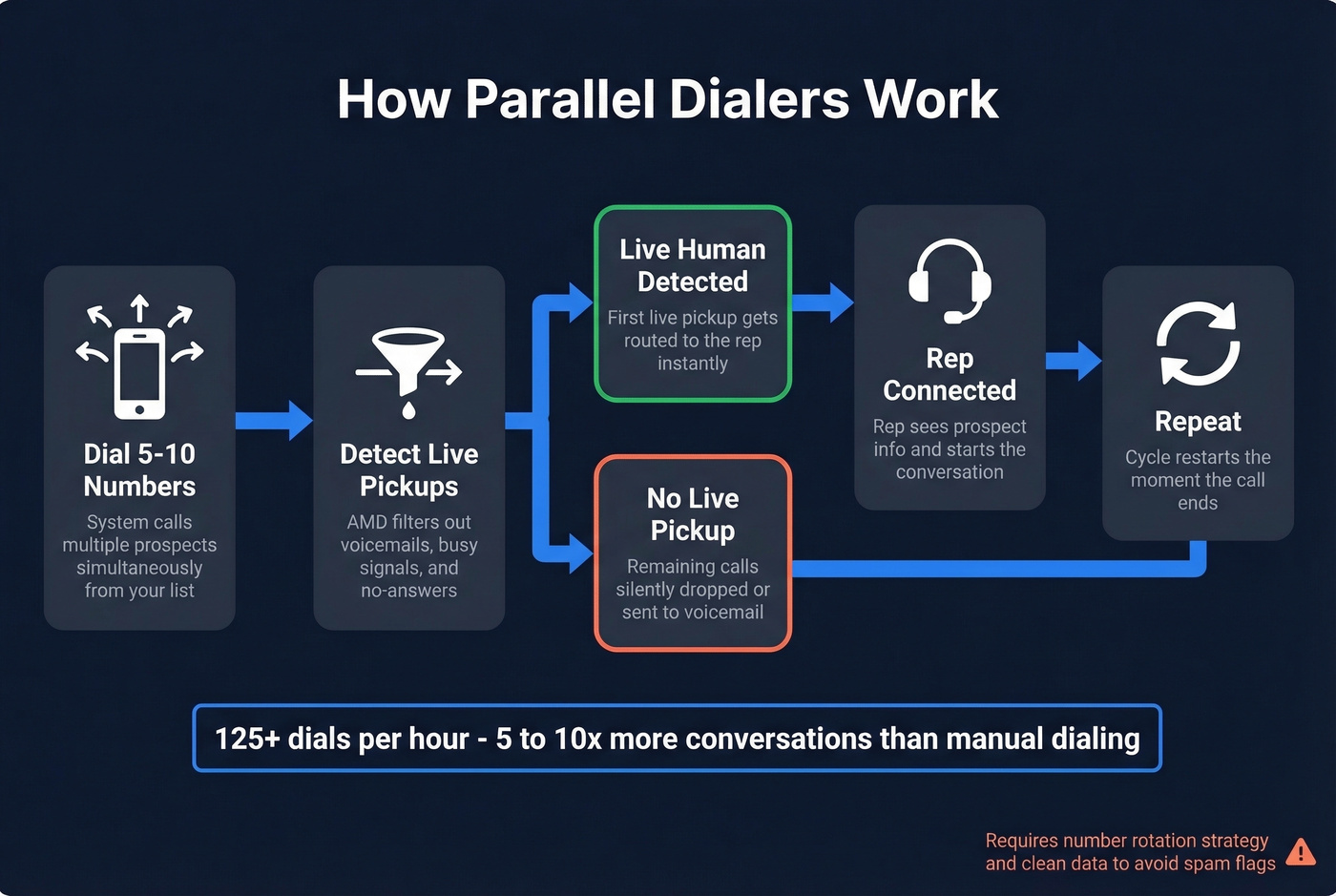
The throughput is staggering: 125+ dials per hour, with 5-10x more conversations compared to manual dialing. An analysis of 20M+ sales calls found that mobile phones achieve 61% higher connection rates than office lines - and parallel dialers are optimized to burn through lists fast enough to find those live pickups.
The catch: parallel dialers burn through caller IDs quickly, and the "silent drop" when a prospect answers but isn't connected can trigger spam reports. If you haven't evaluated a parallel dialer in 2026, you're behind. But you need a number rotation strategy and clean data to make them work.
Best Dialers Worth Evaluating in 2026
| Tool | Starting Price | G2 Rating | Best For | Free Trial |
|---|---|---|---|---|
| CloudTalk | $19/user/mo | 4.4/5 | SMB sales teams | Yes |
| Nooks | ~$1,000-2,500/mo | 4.8/5 | SDR parallel dialing | Demo |
| RingCentral | $20/user/mo | 4.3/5 | Enterprise unified comms | Yes |
| Dialpad | $15/user/mo | 4.4/5 | Budget AI features | Yes |
| Aircall | $30/license/mo | 4.4/5 | CRM integrations | Yes |
| JustCall | $29/user/mo | 4.3/5 | Calling + SMS | Yes |
| Five9 | $159/user/mo | 4.1/5 | Enterprise call center | Demo |
| Nextiva | $15-20/user/mo | 4.5/5 | Unified comms | Yes |
| Mojo Dialer | ~$100-150/mo | 4.3/5 | Real estate | Yes |
| BatchDialer | ~$50-150/user/mo | 4.0/5 | Real estate | Yes |
| PhoneBurner | ~$120-170/user/mo | 4.7/5 | Power dialing | Yes |
| Orum | ~$1,000-3,000/mo | 4.5/5 | AI parallel dialing | Demo |
| Koncert | ~$1,500-4,000/mo | 4.5/5 | Enterprise AI dialing | Demo |
| Readymode | $199/user/mo | 4.2/5 | Outbound call center | Demo |
| Talkdesk | $85/user/mo | 4.4/5 | CX-focused center | Demo |
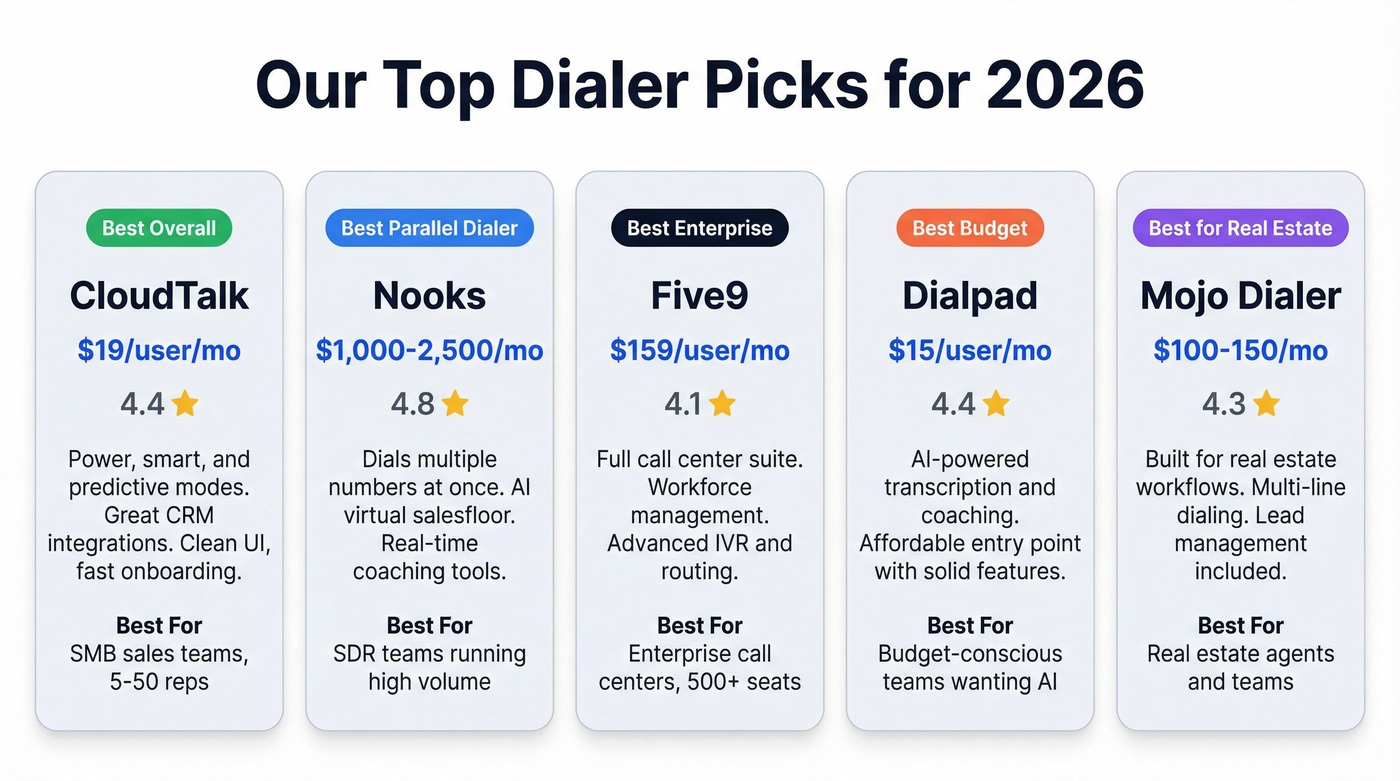
Our picks by category: Best overall value - CloudTalk. Best parallel dialer - Nooks. Best enterprise call center - Five9. Best budget - Dialpad. Best for real estate - Mojo Dialer.
CloudTalk
CloudTalk is the obvious starting point for most SMB sales teams, and it's the tool we recommend most often for teams that don't need enterprise complexity. At $19/user/month on annual billing, it's one of the cheapest options that still offers multiple dialing modes - power, smart, and predictive - plus built-in call recording, analytics, and CRM integrations with Salesforce and HubSpot.
The interface is clean, onboarding takes hours instead of weeks, and the international number coverage is strong if you're dialing into EMEA or APAC. Where CloudTalk falls short is at true enterprise scale - if you need workforce management, advanced IVR routing, or 500+ seats, you'll outgrow it. But for teams of 5-50 reps doing B2B outbound, it's the best value in the market right now.
Nooks
If your SDR team is serious about parallel dialing, Nooks is the tool to beat. It dials multiple numbers simultaneously, connects reps to live pickups, and wraps the whole experience in an AI-powered "virtual salesfloor" that lets managers coach in real time. Nooks and Orum are the two most talked-about parallel dialers in SDR circles, and for good reason - the throughput gains are real.
Nooks doesn't publish pricing - expect to pay ~$1,000-2,500/month depending on team size. That's a real investment, but the throughput justifies it for teams running high-volume outbound. Skip Nooks if you're running fewer than 5 SDRs - the economics don't work until you have enough volume to justify the platform cost.
RingCentral
Use this if you need a unified communications platform that handles voice, video, messaging, and contact center in one stack. RingCentral at $20/user/month is hard to beat for enterprise teams that want everything under one roof, especially if you're replacing a legacy PBX system. Skip it if you're purely an outbound sales team looking for a fast dialer. RingCentral is a phone system first, a sales dialer second.
Dialpad
At $15/user/month, Dialpad gives you AI-powered call transcription, real-time coaching prompts, and solid Salesforce/HubSpot integrations. The voice intelligence features are genuinely useful - automated call summaries and searchable transcripts reduce admin work and make coaching easier. But if raw dialing speed is your priority, Dialpad isn't the answer. It's a smart phone system with AI features, not a dedicated power dialer.
If you're comparing options, see Dialpad alternatives before you commit.
Aircall
Aircall's strength is integrations. The Salesforce and HubSpot integrations are among the cleanest in the market. At $30/license/month, it's priced in the middle of the pack. The power dialer works well for small-to-mid teams, and the analytics dashboard gives managers visibility into rep activity without needing a separate BI tool.
If you're deciding between the two, start with Aircall vs CloudTalk.
JustCall
A solid mid-market option at $29/user/month. JustCall offers power dialing, SMS capabilities, and a clean interface that doesn't require a week of training. It's particularly strong for teams that blend calling with SMS follow-ups - the unified inbox keeps everything in one place.
Five9
Enterprise call centers live here. At $159/user/month, Five9 isn't cheap, but it's a complete contact center platform with predictive dialing, workforce management, omnichannel routing, and advanced IVR - built for 100+ seat operations running inbound and outbound simultaneously. For a 10-person SDR team, Five9 is overkill. For a 200-seat contact center, it's on your shortlist alongside Talkdesk and Genesys.
Other Notable Tools
Nextiva ($15-20/user/mo) is a strong unified comms platform with solid uptime and customer support - evaluate it if you need phone, video, and messaging in one package. Mojo Dialer (~$100-150/mo) and BatchDialer (~$50-150/user/mo) are popular in real estate cold calling with multi-line dialing and skip tracing integrations. PhoneBurner (~$120-170/user/mo) is a reliable power dialer with a loyal user base. Orum (~$1,000-3,000/mo) competes directly with Nooks in parallel dialing. Koncert (~$1,500-4,000/mo for enterprise teams) brings AI-assisted dialing and publishes benchmarks from its 20M+ call dataset. Readymode ($199/user/mo) targets outbound call centers with predictive dialing and lead management. Talkdesk ($85/user/mo) focuses on CX-driven contact centers with AI-powered routing and analytics.

Connect rates are collapsing because reps are dialing bad numbers. Prospeo's 125M+ verified mobile numbers deliver a 30% pickup rate - triple the industry average. Stop burning dials on disconnected lines.
Fix the data before you upgrade the dialer.
How to Choose the Right Dialer
Picking a tool comes down to five criteria. Most buying guides cover the first three. The fifth one actually determines your ROI.
Your first consideration is matching dialing modes to your workflow and making sure the tool integrates deeply with your CRM. SDR teams need power or parallel dialing. Call centers need predictive or progressive. Account-based teams doing enterprise outreach need preview dialing. Don't pay for modes you won't use. And a system that doesn't sync cleanly with Salesforce or HubSpot creates data entry work that kills rep productivity - look for bi-directional sync where call logs, dispositions, and recordings flow into the CRM automatically, and CRM data populates the screen pops.
Compliance tooling is non-negotiable. DNC list scrubbing, consent tracking, calling-hours enforcement, and opt-out management aren't optional features - they're requirements. If the platform doesn't handle these natively, you'll need a separate compliance layer, which adds cost and complexity.
On pricing, per-user/month is the most common model, but watch for per-minute charges, overage fees, and minimum seat requirements. A $15/user/month tool with $0.03/minute calling costs gets expensive fast at high volume. Calculate your total cost at your expected call volume, not just the sticker price.
AI features are emerging as a real differentiator. Real-time transcription, live coaching prompts, and automated summaries used to be enterprise-only capabilities. Now tools like Dialpad offer them at $15/month.
The fifth criterion - the one nobody mentions in buying guides - is the data quality of your contact list. A $2,500/month parallel dialer calling bad numbers is just an expensive way to burn through caller IDs. Pair your tool with verified mobile data to make sure you're only dialing live numbers. That's the difference between a 4% connect rate and a 20% one.
If you're actively improving list quality, compare data enrichment services and sales prospecting databases before you buy more seats.
TCPA, DNC, and STIR/SHAKEN
Compliance isn't a checkbox - it's the thing that keeps your outbound operation from getting shut down.
The Telephone Consumer Protection Act (TCPA) regulates how businesses can use automated dialing equipment. After the Supreme Court's Facebook v. Duguid decision in 2021, the definition of an automatic telephone dialing system (ATDS) was narrowed: a device must use a random or sequential number generator to store or produce numbers. List-based systems that call from a pre-loaded CRM list don't qualify as an ATDS under this definition - but that doesn't mean you're in the clear.
Marketing calls and texts to cell phones still require prior express written consent, regardless of whether your tool technically qualifies as an ATDS. The one-to-one consent rule that took effect January 27, 2025, tightened this further: consent must be to a single, specific seller. The old practice of buying leads with broad multi-party consent agreements is dead.
Calling hours are restricted to 8am-9pm in the recipient's local time zone, with some states imposing tighter windows. Penalties run $500 per violation, up to $1,500 for willful violations. Under the Telemarketing Sales Rule (TSR), DNC violations can be fined up to $43,792 per call. Starting April 11, 2025, opt-out requests must be honored within 10 business days. Your system needs to automatically suppress opted-out numbers across all campaigns, not just the one the prospect opted out of.
Here's the thing about predictive dialers specifically: they're a compliance liability for most B2B teams. The abandoned call risk, the "telemarketer delay," and the volume patterns they create all increase your exposure. Unless you have dedicated compliance staff and legal counsel reviewing your dialing practices, stick with power, progressive, or parallel modes that maintain a 1:1 agent-to-call ratio.
If you're building a repeatable outbound motion, pair your dialer with a documented sales prospecting techniques playbook so reps don’t default to volume-only behavior.
Phone Number Reputation
Your dialer can work perfectly and still fail if your outbound numbers are flagged as spam. Understanding number reputation is now a core competency for any outbound team.
Carrier analytics engines - Hiya, TNS, and First Orion are the big three - track the behavior of every outbound number. They're looking at call volume per number, answer rates, call duration, and consumer complaint patterns. When a number exceeds their thresholds, it gets labeled "Spam Likely" or "Scam Likely" on the recipient's phone. Roughly 40% of legitimate businesses experience negative impact from spam labeling. You're probably one of them.
The fix is operational discipline. Keep volume under 100 dials per number per day - many experienced teams recommend a tighter threshold of ~70 calls per day per caller ID. Register your numbers with the Free Caller Registry. Make sure your carrier provides STIR/SHAKEN A-level attestation, which tells receiving carriers that your number is legitimate and authenticated. Enable local presence dialing if your platform supports it - displaying a local area code to the recipient dramatically increases pickup rates.
Teams that implement smart number rotation and reputation monitoring report 25-40% increases in answer rates. That's not marginal. It's the difference between a struggling outbound program and a profitable one.
One more data point worth internalizing: mobile phones achieve 61% higher connection rates than office or direct lines. If you're still dialing switchboards and office numbers, you're leaving conversations on the table. The shift to verified mobile numbers isn't optional anymore - it's where the pickups are.
Data Quality > Dialer Speed
Let's be honest: if your average deal size is under $10k, you probably don't need a $2,500/month parallel dialer. What you need is better data. The dialer isn't your problem. Your data is.
We've seen this pattern repeatedly - a team invests $2,000/month in a parallel dialer, feeds it a list of 10,000 "direct dials" from a cheap data provider, and wonders why their connect rate is 3%. Three times more calls to bad numbers is just three times more wasted time.
The math is brutal. If a third of your phone numbers are wrong, disconnected, or landlines that never get answered, your system is spending a third of its capacity calling dead air. Your caller IDs burn faster because you're generating high-volume, low-answer patterns that carriers flag as spam. Your reps sit idle waiting for connections that never come. And the frustrating part? You're paying full price for a tool that's running at a fraction of its potential because the inputs are garbage.
Prospeo's Mobile Finder addresses this at the source. The database covers 125M+ verified mobile numbers with a 30% pickup rate - measured across real outbound campaigns, not a theoretical number. Every record runs through a 7-day refresh cycle, compared to the 6-week industry average at most data providers. When Meritt switched to verified data, their connect rate tripled to 20-25% and their bounce rate dropped from 35% to under 4%.
If you’re building a full outbound stack, start with the SDR tools your team actually uses daily.
The dialer is the engine. The data is the fuel. One doesn't work without the other.
Eight attempts to reach a prospect means nothing if the number is wrong. Prospeo refreshes every mobile number on a 7-day cycle and verifies each one through a 5-step process - so every dial your reps make has a real person on the other end.
Feed your dialer numbers that actually connect.
FAQ
What is a dialer and how does it work?
A dialer automatically calls phone numbers from a pre-loaded list or CRM, routing only answered calls to available agents. It uses answering machine detection to filter out voicemails and busy signals, so reps talk to live prospects instead of listening to rings. Most modern platforms integrate directly with Salesforce or HubSpot to log calls automatically.
What's the difference between a power dialer and a predictive dialer?
A power dialer calls one number at a time in sequence, connecting the rep to every answered call with zero delay. A predictive dialer calls multiple numbers simultaneously using algorithms to predict agent availability, pushing throughput into triple-digit dials per hour but creating abandoned call risk. Power dialers are safer for compliance; predictive dialers are built for high-volume call centers with 100+ seats.
What's the best dialer for cold calling?
For most B2B teams, CloudTalk offers the best balance of features and price at $19/user/month. If you're running 5+ SDRs at high volume, Nooks is the strongest parallel option available. The tool matters less than the data feeding it - verified mobile numbers with a 30% pickup rate are the single biggest lever for improving connect rates.
Are auto dialers legal?
Yes, with significant restrictions. The TCPA requires prior express written consent for marketing calls to cell phones using automated dialing equipment. Calling hours are limited to 8am-9pm local time, DNC lists must be scrubbed, and the one-to-one consent rule effective January 2025 means consent must be to a single specific seller. Penalties run $500-$1,500 per violation, up to $43,792 per call under the TSR.
How do I improve my connect rate?
Verified mobile numbers are the single biggest lever - they connect at 61% higher rates than office lines. Beyond data quality, keep call volume under 70-100 dials per number per day, rotate caller IDs, register numbers with the Free Caller Registry, enable local presence dialing, and ensure STIR/SHAKEN A-level attestation on your outbound lines. Teams implementing these tactics report 25-40% lifts in answer rates.