

Dialfire Pricing, Reviews, Pros and Cons: What It Actually Costs in 2026
Five different review sites, five different answers on what Dialfire costs. G2 shows $25-$35/month tiers. TrustRadius lists micro-rates that don't line up with Dialfire's current homepage pricing widget. Capterra doesn't publish clear numbers at all. We dug through all of them, cross-referenced against Dialfire's own site, and put together this breakdown with real numbers, honest user feedback, and practical guidance so you can decide whether it fits your stack.
30-Second Verdict
Dialfire is an outbound-focused, usage-based dialer with inbound call blending, no monthly fees, and unlimited users. You're not paying per agent just to have seats.
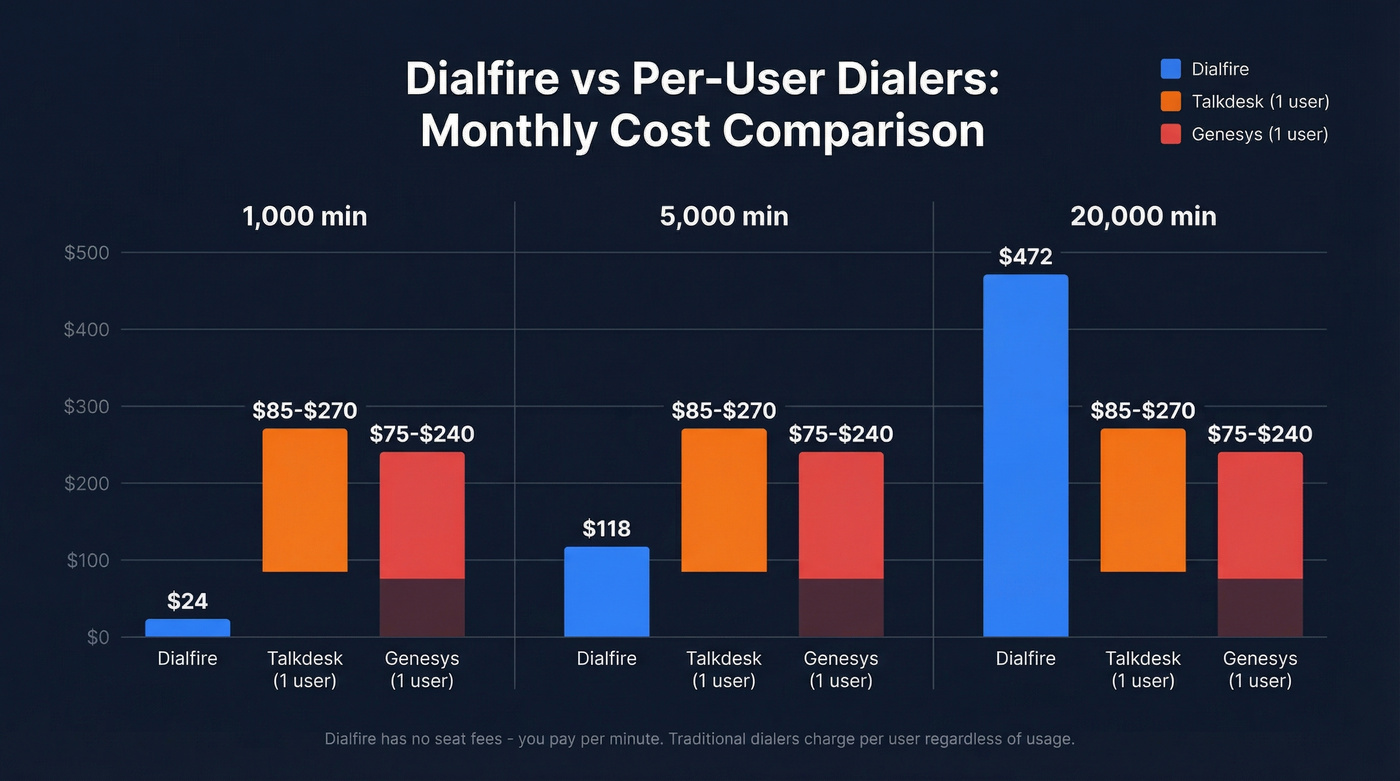
At $0.0236/min, 5,000 outbound minutes runs about $118/month. Compare that to Talkdesk at $85-$270 per user/month, where you pay per user regardless of how many minutes you actually burn. The math gets interesting fast.
The catch: steep learning curve, dated UI, outdated documentation, and real CRM integration constraints. It's best for technical teams running outbound at scale - not for teams that need polished UX, heavy inbound IVR, or secure payment capture. And if you're loading lists into any dialer, verify them first with a tool like Prospeo's mobile finder before burning minutes on dead numbers.
What Dialfire Actually Costs
Dialfire's pricing model is genuinely unusual. There's no monthly fee, no seat license, and no minimum commitment. You pay based on usage, billed in one-second increments starting from the 10th second depending on which features and campaign setup you've activated. Bring your own caller ID at no extra charge.
Published rates from Dialfire's homepage pricing widget:
- Outbound predictive dialing: $0.0236/min (landline and mobile)
- Inbound call blending: $0.0050/min
The total per-minute cost can split between telephony connection costs and platform feature costs depending on which modules you turn on. Country and currency also affect the final number.
We ran the math at multiple volume tiers against traditional per-user pricing:
| Monthly Minutes | Dialfire | Talkdesk (1 user) | Genesys (1 user) |
|---|---|---|---|
| 1,000 min | ~$24 | $85-$270 | $75-$240 |
| 5,000 min | ~$118 | $85-$270 | $75-$240 |
| 20,000 min | ~$472 | $85-$270/user | $75-$240/user |
If you've got multiple agents but relatively low minutes per agent, Dialfire typically comes out dramatically cheaper than per-user CCaaS plans. With Talkdesk or Genesys (1 user), you're paying for access - not usage.
So why does G2 show $25/$35 monthly tiers? G2 flags that the Dialfire profile hasn't been active for over a year, so those tiers are likely outdated or misclassified. Trust the numbers on Dialfire's own site first.
What Reviewers Actually Like
Pay-for-what-you-use economics. One G2 reviewer put it bluntly: "you cannot beat the price... others cost thousands." A Capterra user praised the "payment scheme where you only pay what functionality you use." For teams used to per-user licensing, the model feels liberating.
Deep customization. A late-2025 Capterra review nailed it: "99% of the time Dialfire has a method to deploy this change." Low-code JavaScript customization, REST APIs, and webhooks give technical teams near-total control over campaign behavior.
Responsive support and fast setup. Reviewers call the support team "A+" - critical for a tool with this kind of learning curve. The platform is browser-based with no install required, and Dialfire claims its predictive dialer reaches up to 3x more contacts than manual dialing.
Ratings across platforms:
- Capterra: 4.7/5 (23 reviews)
- G2: 4.2/5 (3 reviews)
- SourceForge: 4.7/5 (26 reviews)
The G2 sample size is tiny. Weight the Capterra and SourceForge numbers more heavily.

Dialfire charges $0.0236/min - every dead number you dial is money wasted. Prospeo's 125M+ verified mobile numbers have a 30% pickup rate, compared to 11-12% from competitors. Clean your list before it hits the dialer and cut your cost-per-connect in half.
Pay Dialfire for conversations, not voicemails and disconnected lines.
Real Friction Points
Documentation is a problem. Multiple reviewers flag outdated or missing docs. A late-2025 Capterra review specifically noted relying on support chat for basic setup tasks that should be self-serve. That's frustrating when you're trying to move fast.
If you're building a repeatable outbound motion, it helps to standardize your sales activities so tooling gaps don't derail execution.
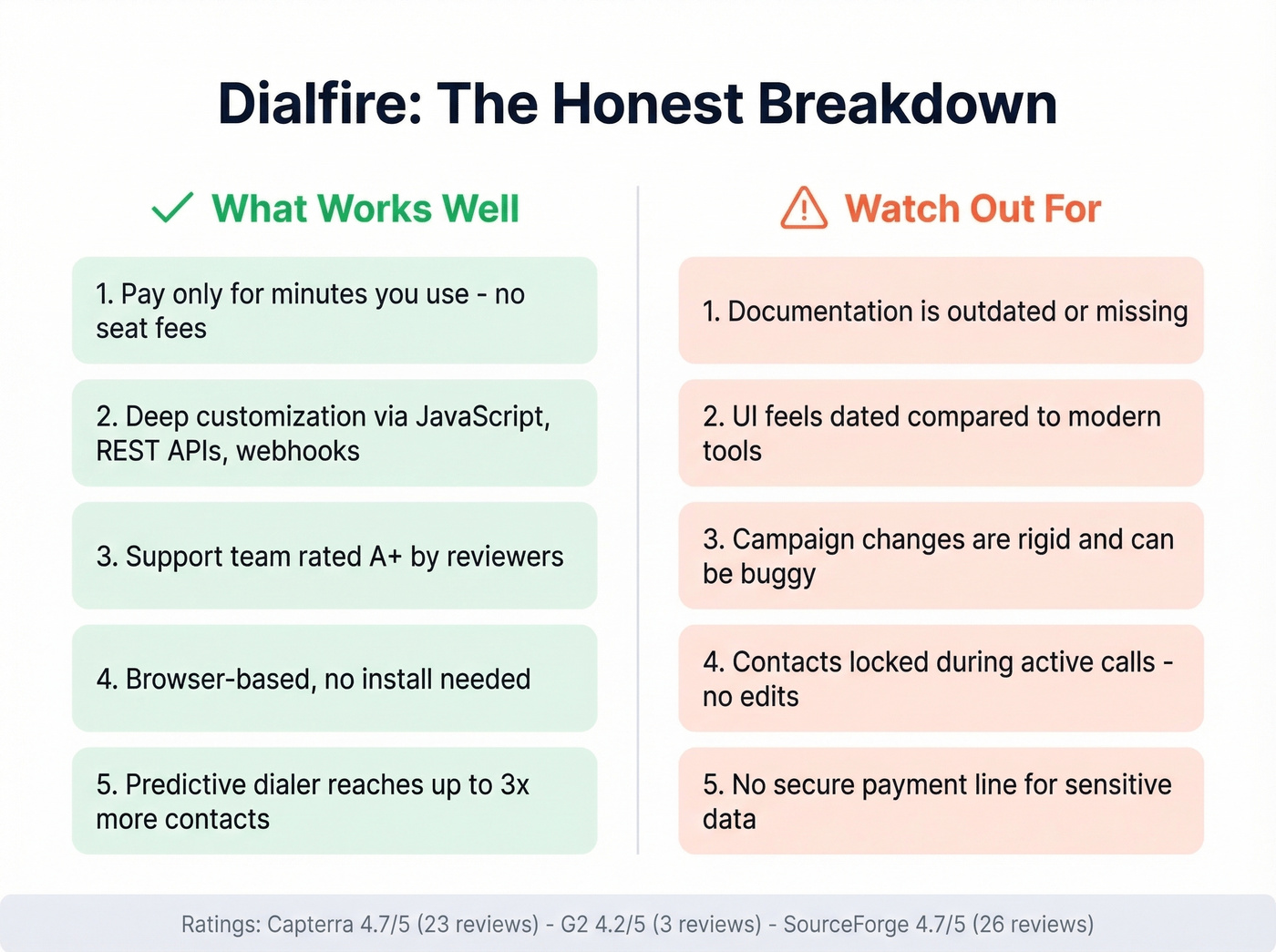
The UI feels dated. Reviewers describe the initial setup as "overwhelming" and the interface as a step backward from polished tools like Aircall or Talkdesk. If your team expects modern SaaS design, brace them.
Campaign rigidity and bugs. A 2022 Capterra reviewer flagged that adjusting existing campaigns is difficult and automation can be "finicky." Older G2 reviews mention glitches - pressure-test this during a trial before committing volume.
Contact locking during calls. You can't make simultaneous updates to a contact record while an agent is actively on a call. For teams running complex dispositions or real-time data entry, that's a genuine operational constraint.
No secure payment line. Dialfire doesn't offer a secure line for capturing sensitive information like credit card details. Dealbreaker for collections and e-commerce support teams.
Reddit threads on Dialfire are sparse - the tool flies under the radar in most sales communities, which itself tells you something about its niche positioning.
CRM Integration Gotchas
Here's the thing most review sites won't tell you: Dialfire's Salesforce and HubSpot integrations have real constraints.
If you're evaluating what should live in your CRM vs your dialer, these examples of a CRM help clarify the boundary.
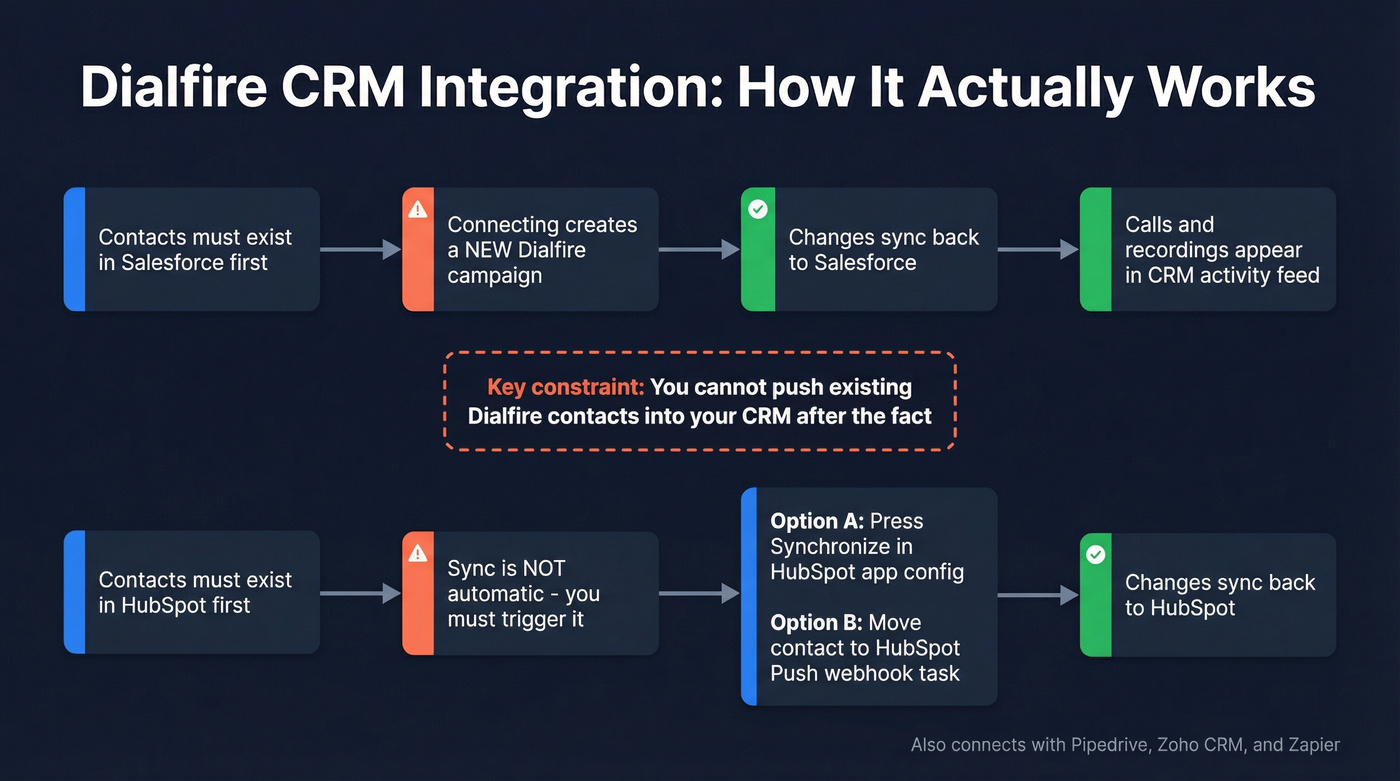
Connecting always creates a new Dialfire campaign. You can't integrate into existing ones. Contacts must exist in your CRM first; you can't push existing Dialfire contacts into Salesforce or HubSpot after the fact. Changes do sync back, and calls plus recordings appear in your CRM activity feed - so it's not broken, just rigid.
HubSpot sync also needs a trigger: either you press Synchronize in the HubSpot app configuration, or you move a contact into the "HubSpot Push" webhook task inside Dialfire. It's not automatically real-time unless you set up the right workflow. If your RevOps team isn't comfortable building that plumbing, expect friction.
Dialfire also connects with Pipedrive, Zoho CRM, and Zapier for lighter-weight integrations. If you're planning to connect outreach tool to CRM, map the data flow before you commit.
Who Should Use Dialfire
Best for:
- High-volume outbound teams avoiding per-user licensing traps
- BPOs with fluctuating agent counts who don't want to pay for idle seats
- Technical teams comfortable with JavaScript and API configuration
- EU-based teams that care about data security - Dialfire is built in the EU and supports secure data transfer and voice encryption
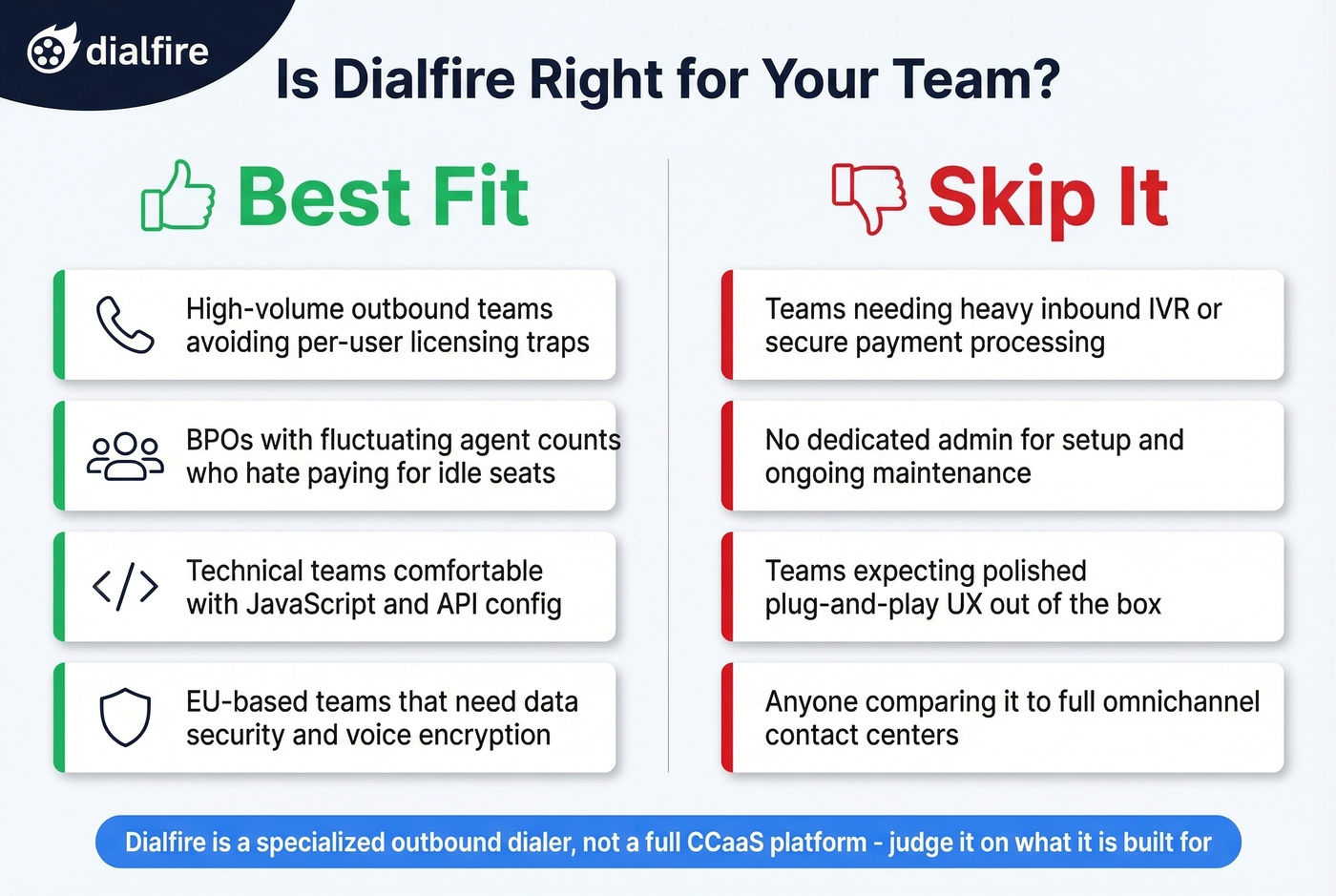
Skip it if you need heavy inbound IVR or secure payment processing, don't have a dedicated admin for setup and maintenance, or expect polished plug-and-play UX out of the box.
Let's be honest: stop comparing Dialfire to enterprise CCaaS platforms like Genesys or NICE. It's a specialized outbound dialer, not a full omnichannel contact center. Judge it on what it's built for, and it punches well above its weight class for the price.
If you're still shopping, it can help to benchmark against other SDR tools and outbound stacks.
Your Data Matters More Than Your Dialer
Cold calling converts at roughly 2-3%. With Dialfire's usage-based model, every dead number you dial is per-minute spend going straight into the void. We've seen teams cut their effective cost-per-connect in half just by cleaning their lists before loading them into a dialer - it's the single highest-ROI move you can make before touching dialer settings.
If you want a broader view of list quality and enrichment, start with these data enrichment services and sales prospecting techniques.
Prospeo covers 125M+ verified mobile numbers with a 30% pickup rate, refreshed on a 7-day cycle. Feed those into Dialfire and you're dialing numbers that actually connect - same pay-for-what-you-use philosophy, starting free.
Dialfire's CRM integrations require contacts to exist in your CRM first. Prospeo enriches your Salesforce or HubSpot records with 50+ data points - verified emails, direct dials, intent signals - at a 92% match rate. Load clean, complete contacts before syncing to Dialfire.
Enrich your CRM contacts, then dial them with confidence.