

DKIM Setup for GoDaddy: Step-by-Step Guide (2026)
Your email tool is showing a red DKIM warning. You call GoDaddy support and get bounced between departments. Meanwhile, major inbox providers' bulk sender requirements mean DKIM isn't optional anymore - it's table stakes for reaching inboxes.
We've walked dozens of teams through this exact setup on GoDaddy, and this is the consolidated guide they should've written but didn't.
What DKIM Actually Does
DKIM - DomainKeys Identified Mail - attaches a cryptographic signature to every email you send. The receiving server checks that signature against a public key stored in your DNS. Match? The email is verified as genuinely from your domain and unaltered in transit.
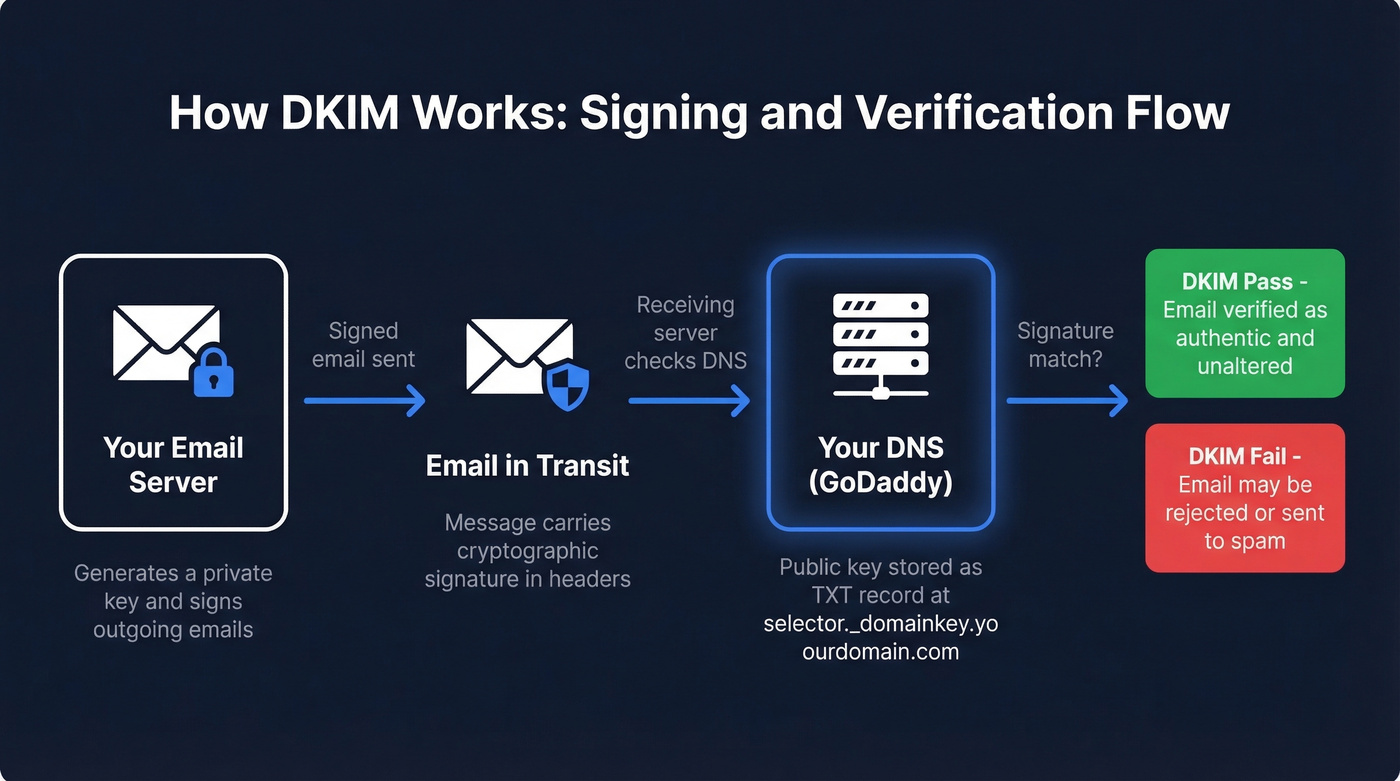
It's one of three authentication standards you need: SPF, DKIM, and DMARC. Together they tell inbox providers you're legitimate. DKIM handles the message integrity piece specifically, proving the message body and headers haven't been tampered with between your server and the recipient's.
Identify Your Email Provider First
Before touching DNS, you need to know which service actually sends mail for your domain. The fastest way: run your domain through MXToolbox and check your MX records.
| MX Record Pattern | Email Provider |
|---|---|
aspmx.l.google.com |
Google Workspace |
*.mail.protection.outlook.com |
Microsoft 365 |
mailstore1.secureserver.net |
GoDaddy Workspace |
mail.yourdomain.com |
GoDaddy cPanel Hosting |
| Something else | Check your provider's docs |
GoDaddy makes this harder than it should be by splitting instructions across multiple help pages for different products. This guide puts everything in one place.
How to Add a DKIM Record in GoDaddy DNS
Start with these universal steps, then follow the subsection for your provider.
- Log in to your GoDaddy account.
- Go to My Products and select your domain.
- Click DNS, then DNS Management.
- Click Add Record.
Now follow the steps below for your specific email service.
Google Workspace
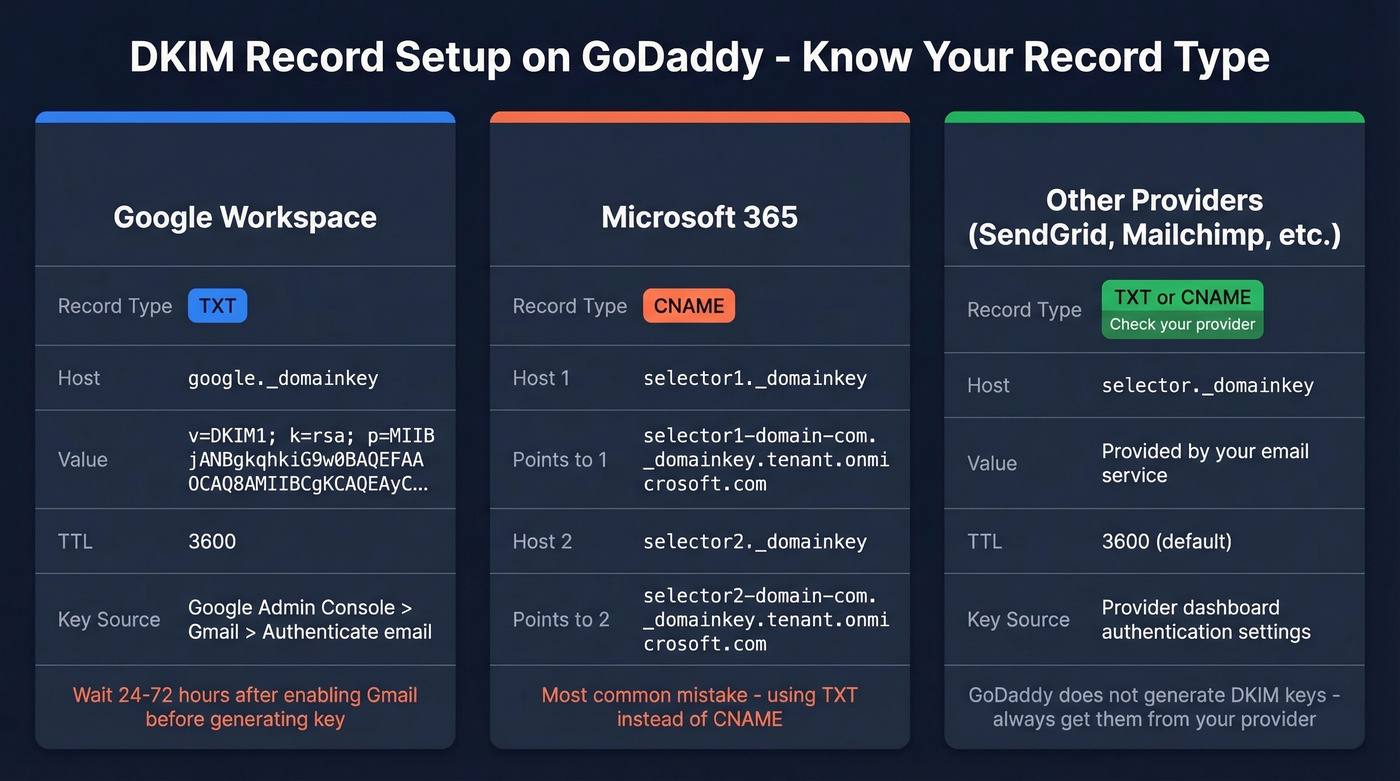
In your Google Admin console, go to Apps > Google Workspace > Gmail > Authenticate email. Google's built-in DKIM generator produces the key pair for you - choose a selector and copy the public key value it displays.
Back in GoDaddy, add a TXT record:
- Host:
selector._domainkey(use the selector Google gives you) - TXT Value: the full key from Google Admin (starts with
v=DKIM1; k=rsa; p=...) - TTL: 3600
One critical note: if you just enabled Gmail for your domain, wait 24-72 hours before generating the DKIM key. Otherwise you'll hit errors like "DKIM record not created." We've seen teams waste hours troubleshooting what turns out to be a timing issue.
Microsoft 365
Microsoft uses two CNAME records - not TXT. Getting the record type wrong is the single most common reason Microsoft DKIM fails on GoDaddy.
Grab both records from the Microsoft 365 Defender portal under Email authentication > DKIM, or from GoDaddy's Microsoft 365 DKIM guide.
Record 1:
- Type: CNAME
- Host:
selector1._domainkey - Points to:
selector1-yourdomain-com._domainkey.yourtenant.onmicrosoft.com
Record 2:
- Type: CNAME
- Host:
selector2._domainkey - Points to:
selector2-yourdomain-com._domainkey.yourtenant.onmicrosoft.com
Replace yourdomain-com and yourtenant with your actual values. Double-check these character by character - a single typo here means silent failure.
Other Providers (SendGrid, Mailchimp, Postmark, etc.)
Same pattern. Go to your provider's authentication settings, copy the selector and key value, then create a DKIM record in GoDaddy with the host set to selector._domainkey.
- If your provider gives you a TXT DKIM key, paste the full value as the TXT value (it typically starts with
v=DKIM1;). - If your provider gives you CNAME targets, create CNAME records exactly as provided.
Set TTL to 3600 unless your provider says otherwise. GoDaddy itself doesn't generate DKIM keys - you always rely on your email service for the key pair.

You're setting up DKIM to prove your emails are legitimate. But authentication only works if you're emailing real people. Prospeo's 5-step verification - including catch-all handling, spam-trap removal, and honeypot filtering - keeps your bounce rate under 4% so your freshly authenticated domain stays clean.
Don't let bad data undo the authentication work you just did.
Verify Your DKIM Record
Three ways to confirm it's working:
- Use MXToolbox's DKIM lookup. Enter your domain and selector.
- Send a test email to yourself and check the headers for
dkim=pass. - Google Workspace users can also verify in Admin console > Gmail > Authenticate email.
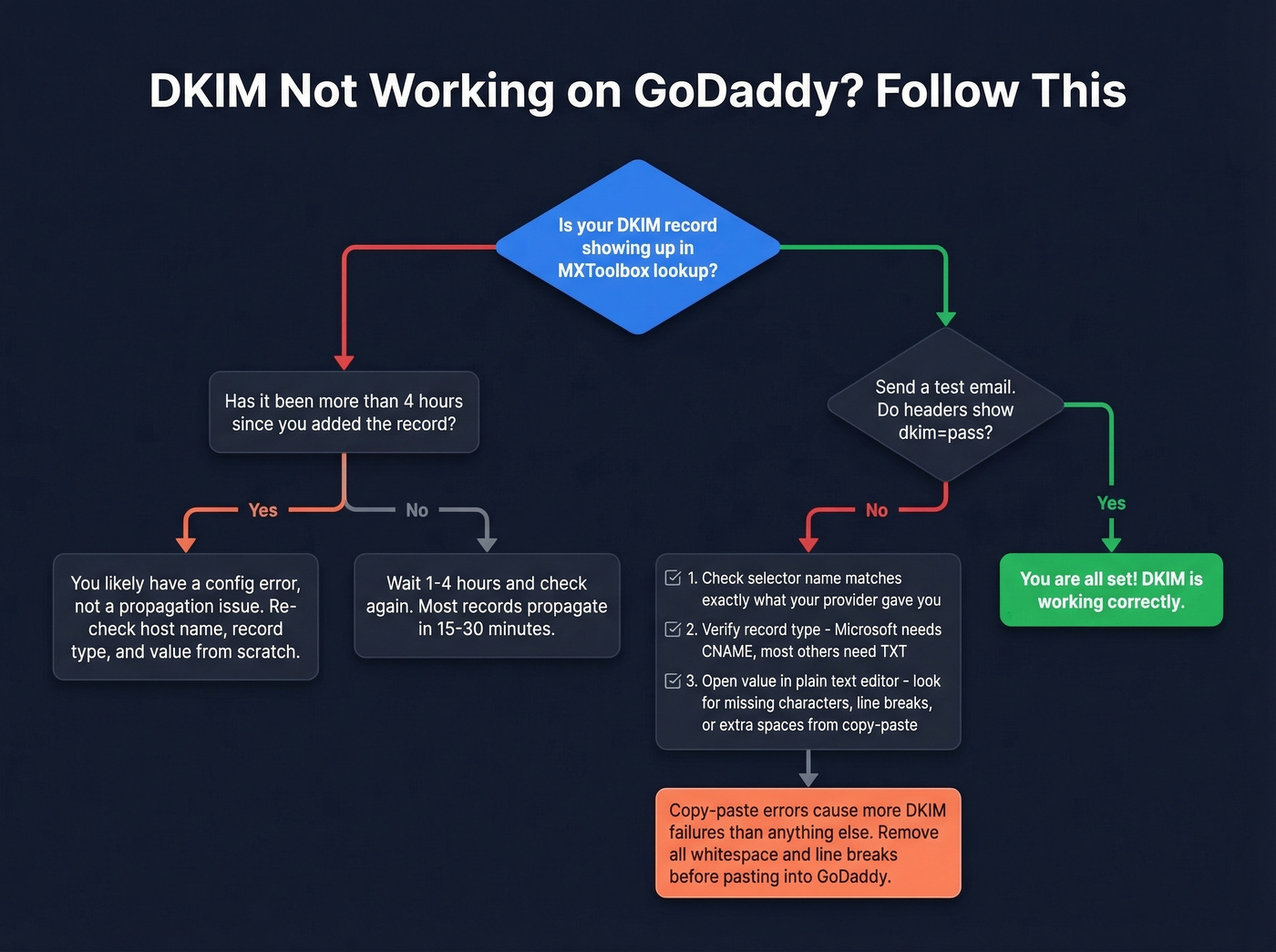
Many guides say DNS propagation takes up to 48 hours. In our experience, DKIM records show up within 15-30 minutes most of the time, with 1-4 hours being typical. If it's been longer than that and verification still fails, stop waiting. You almost certainly have a configuration error.
If you want a deeper walkthrough of the checks (including header parsing), follow our guide on verify your DKIM is working.
Troubleshooting Common Failures
Here's the thing: copy/paste issues - especially incomplete DKIM values with missing characters or stray line breaks - cause more failures than anything else.
| Problem | Cause | Fix |
|---|---|---|
| Value looks incomplete | Copy/paste dropped characters or added line breaks | Remove all whitespace and line breaks before pasting. Use a plain text editor. |
dkim=fail in headers |
Wrong selector name | Double-check your provider's exact selector string |
| Record type mismatch | CNAME where TXT is needed, or vice versa | Microsoft = CNAME; most others = TXT |
| Multiple providers conflicting | Overlapping selectors | Each provider uses a unique selector - they coexist fine |
| Still failing after 4+ hours | Config error, not propagation | Re-check host, type, and value from scratch |
The GoDaddy help page for hosting email DKIM covers their own products, but for third-party providers you'll mostly follow the provider's DNS instructions.
Complete Your Authentication Stack
DKIM is one of three. Here's the full checklist:
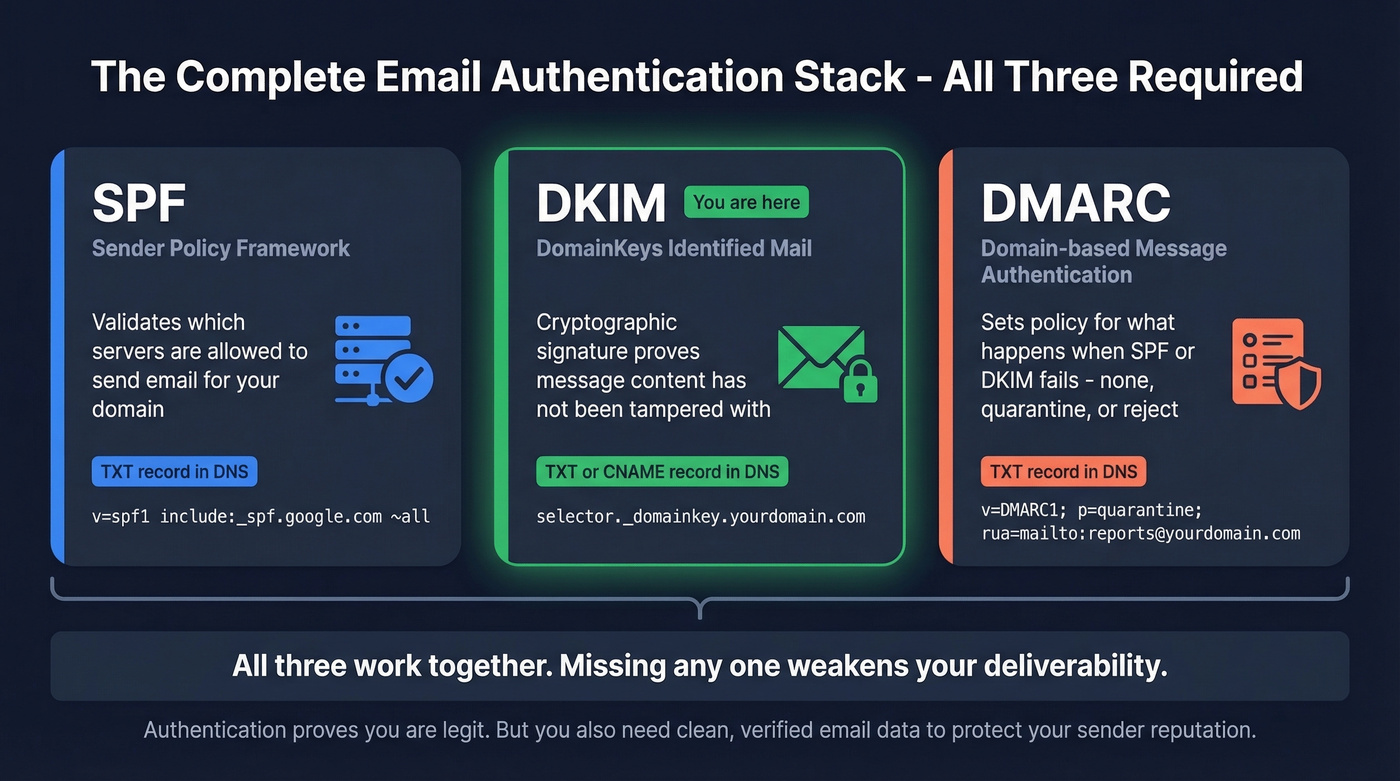
- SPF record - which servers can send email for your domain
- DKIM record - cryptographic message verification
- DMARC alignment - policy for what happens when SPF or DKIM fails
Let's be honest about something nobody wants to hear: authentication is only half the deliverability equation. You can have perfect DKIM, SPF, and DMARC and still tank your sender reputation by emailing addresses that don't exist. One enterprise team of 50 AEs dropped bounce rates from 35-40% to under 5% after switching to Prospeo's verified contact data - its 5-step verification catches invalid addresses, spam traps, and honeypots before they hit your sequences.
If you're running outbound, it also helps to understand email deliverability and how to improve sender reputation over time.
One team of 50 AEs went from 35-40% bounce rates to under 5% after switching to Prospeo - that's the difference between a domain that lands in spam and one that reaches inboxes. Your DKIM setup proves you're legit. Prospeo's 98% email accuracy at $0.01/email ensures every send counts.
Start with 75 free verified emails and see the difference in your first campaign.
FAQ
Can I have multiple DKIM records on one GoDaddy domain?
Yes. Each email provider uses a unique selector, so multiple _domainkey TXT or CNAME records coexist without conflict. This is common when you run Google Workspace for business email alongside Mailchimp or SendGrid for marketing campaigns.
How long does DKIM propagation take on GoDaddy?
Expect 15-30 minutes at best, 1-4 hours typically, and up to 48 hours in rare cases. If verification still fails after several hours, the problem is almost always a configuration error - wrong selector, incomplete value, or incorrect record type - not propagation delay.
Do I need DKIM if I already have SPF?
Yes. SPF validates the sending server; DKIM validates message content and integrity. They solve different problems. For bulk sending, major inbox providers expect both, and missing either will hurt deliverability.
What's the difference between 1024-bit and 2048-bit DKIM keys?
2048-bit keys are more secure and recommended by default. Google Workspace supports 2048-bit, and you should use them where possible. If your tooling rejects a long TXT value, 1024-bit is a valid fallback - far better than no DKIM at all.
Does DKIM alone prevent emails from going to spam?
No. DKIM is one signal among many. Inbox placement also depends on SPF, DMARC, sender reputation, content quality, and whether you're sending to valid addresses. Skip this step if you think authentication alone will fix deliverability - it won't. You need clean data too, which is why teams pair authentication with verified contact sources to protect their domain reputation.