

How to Run a DMARC Alignment Check (And Fix Failures)
Your SPF passes. Your DKIM passes. And DMARC still fails. You stare at the Authentication-Results header like it's written in a foreign language, wondering how three green checks can produce a red X. The answer is almost always alignment - and a quick DMARC alignment check is the fastest way to confirm it.
Why Alignment Matters in 2026
Google and Yahoo started requiring DMARC policies for bulk senders in February 2024. Microsoft followed with similar bulk-sender requirements in early 2025. Gmail tightened enforcement through late 2025, and in 2026 non-compliant messages can be blocked at SMTP before recipients ever see them.
Here's the thing: if your authenticated domains don't align with your visible From address, mailbox providers will bounce your mail. Not "might." Will.
Quick version: Look up _dmarc.yourdomain.com with a DNS tool like EasyDMARC's lookup. Open a real email's headers (Gmail: Show Original) and confirm that the DKIM d= domain or the Return-Path domain matches your From address. If SPF and DKIM pass but DMARC fails, the problem is alignment.
What DMARC Alignment Actually Means
Defined in RFC 7489, DMARC alignment ties your authentication results to the domain recipients actually see.
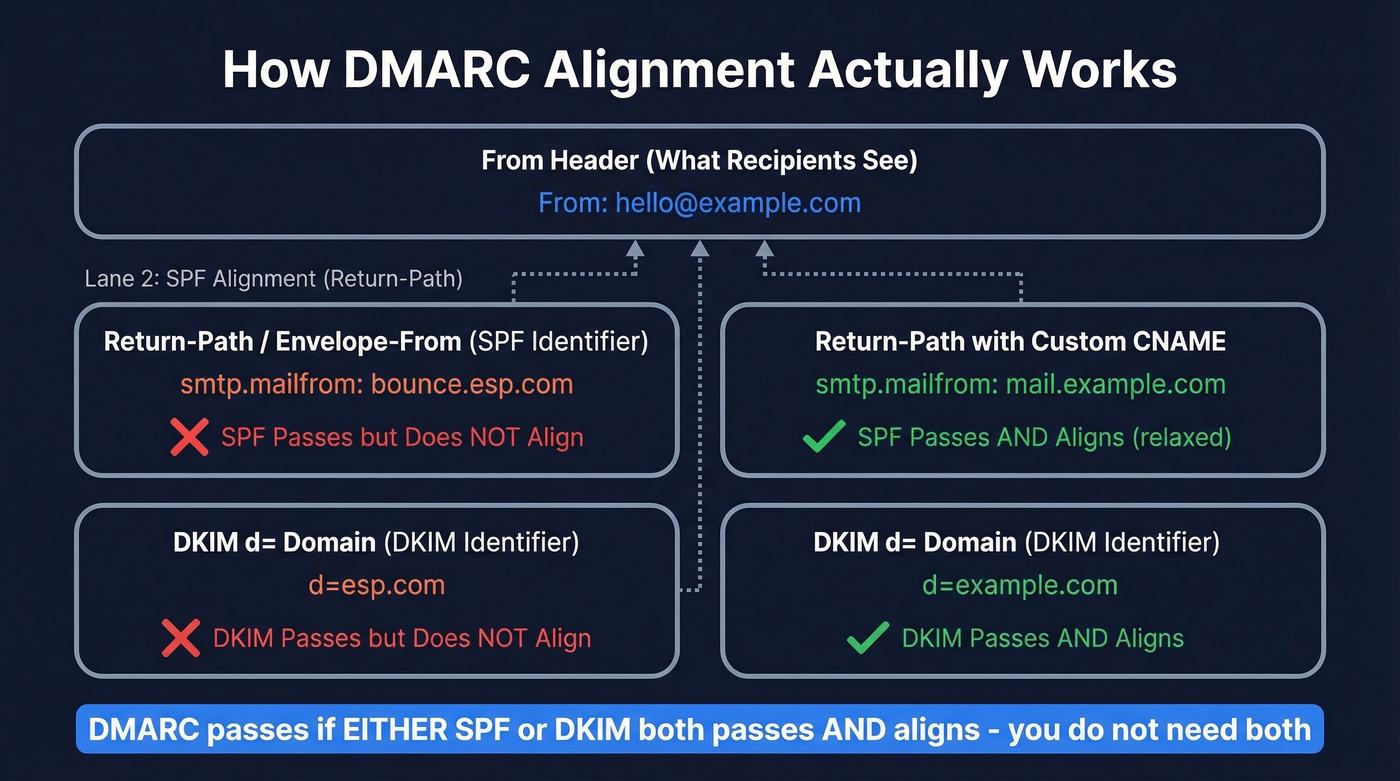
- SPF alignment compares the Return-Path (envelope-from /
smtp.mailfrom) domain against the From header domain. - DKIM alignment compares the DKIM signature's
d=domain against the From header domain.
DMARC passes if either SPF or DKIM both passes and aligns - both don't need to succeed. But SPF and DKIM can individually pass their own checks while DMARC still fails, because the domains they authenticated don't match the From address.
This trips people up constantly in real troubleshooting threads. "SPF pass + DKIM pass" does not automatically mean "DMARC pass."
One useful data point from DMARCReport's field dataset: across 1.2M messages analyzed, 78% of DMARC passes came via DKIM alignment and just 22% via SPF alignment. For forwarded mail, that number jumped to 93% via DKIM. In practice, DKIM alignment is the first thing to fix because it survives forwarding far better than SPF.
Strict vs Relaxed Alignment
Your DMARC record's aspf and adkim tags control how strictly domains must match. Unset tags default to relaxed.
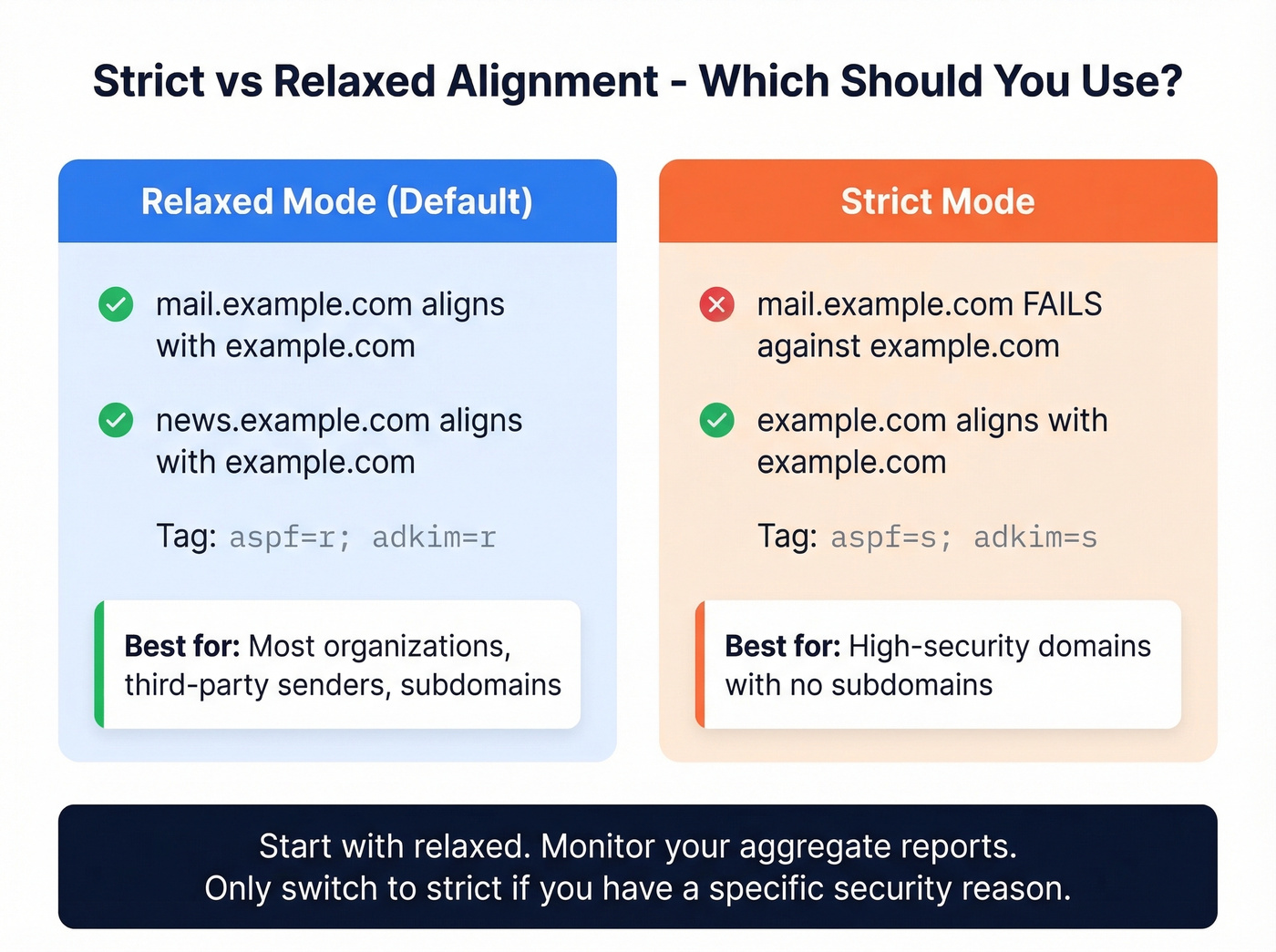
Relaxed (r) |
Strict (s) |
|
|---|---|---|
| Match type | Organizational domain | Exact domain |
| Subdomain handling | mail.example.com aligns with example.com |
mail.example.com fails against example.com |
| Tag syntax | aspf=r; adkim=r |
aspf=s; adkim=s |
| Best for | Most organizations | High-security domains |
Relaxed is the right default for most organizations. Strict sounds more secure, but it'll break legitimate mail from subdomains and third-party senders fast. We've seen teams flip to strict on a Friday afternoon and spend Monday morning explaining to the C-suite why half the company's outbound mail bounced over the weekend. Start relaxed, monitor your aggregate reports, and only tighten if you have a specific reason.

Fixing DMARC alignment keeps your domain healthy. But perfect authentication is wasted if you're sending to invalid addresses. Prospeo's 5-step email verification - with catch-all handling, spam-trap removal, and honeypot filtering - delivers 98% accuracy so your carefully authenticated emails actually land.
Don't let bad data undo your deliverability work. Verify before you send.
How to Run Your Check Step by Step
Check Your DMARC Record
Run a DNS lookup for _dmarc.yourdomain.com using dig, nslookup, or a free tool. Look for the adkim and aspf tags - if they're absent, alignment mode is relaxed by default. Note the p= value too (none, quarantine, or reject).
Inspect Real Email Headers
Send yourself a test email from each sending source: your ESP, marketing tool, transactional system. Open raw headers (Gmail: three dots, Show Original; Outlook/M365: View Message Source) and find the Authentication-Results header. You need three values:
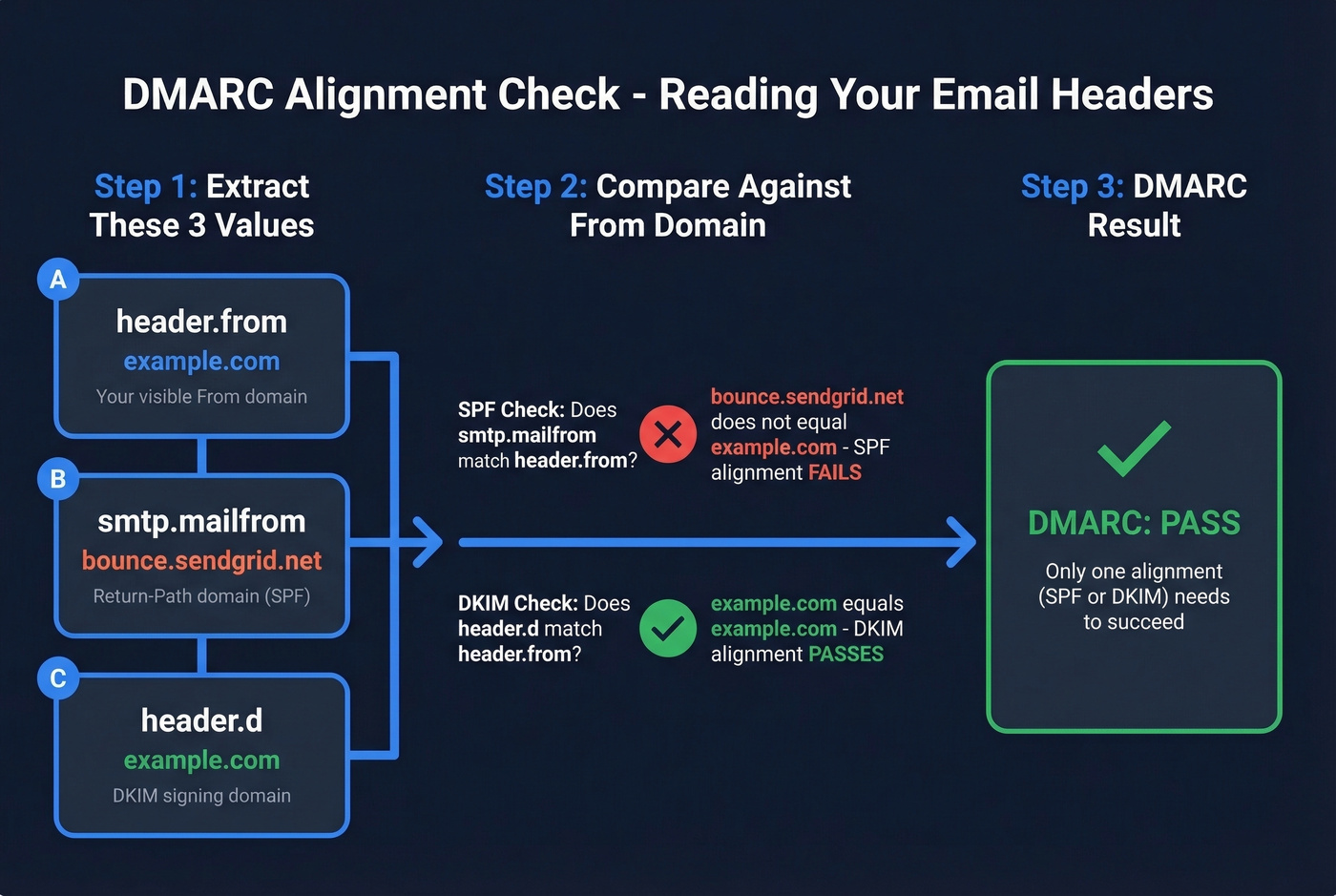
header.from- your visible From domain (the alignment reference)smtp.mailfrom- the Return-Path domain (SPF identifier)header.d- the DKIM signing domain (DKIM identifier)
SPF alignment passes when smtp.mailfrom matches header.from based on your strict vs relaxed setting. DKIM alignment passes when header.d matches header.from. If you see multiple DKIM signatures - common when ESPs add their own - any single passing signature that aligns is enough to satisfy DMARC.
Read Your Aggregate Reports
Your RUA reports arrive as daily XML files. Inside each <record>, the <policy_evaluated> node shows what the receiver did and whether SPF/DKIM passed under DMARC evaluation. Don't confuse that with <auth_results>, which shows the raw SPF/DKIM authentication results and domains - those are the pre-alignment checks. For a walkthrough of the XML structure, Valimail's guide is solid.
Free Tools for Checking Alignment
You don't need a paid monitoring tool for a single domain. Gmail's Show Original plus a free aggregate report parser handles it. Paid tools earn their keep once you're managing five or more domains - skip them if you're running a single-domain setup.
| Tool | Free Plan | Limitation | Paid From |
|---|---|---|---|
| MxToolbox | Free lookup | No monitoring | - |
| dmarcian | 1,250 msgs/mo, 2 domains | Limited volume | ~$20/mo |
| EasyDMARC | 1,000 msgs/mo | Limited volume | ~$36/mo |
| Valimail Monitor | Free | ~24-hr delay | - |
| Postmark | Unlimited | Weekly-only reports | ~$14/mo |
| PowerDMARC | 15-day trial | Trial only | ~$8/mo |
Common Failures and Fixes
SPF/DKIM pass but DMARC fails. The classic scenario. You'll see error strings like DMARC/ADKIM Fail: Header sender domain does not match DKIM header domain. The fix: configure your vendor's DKIM to sign with your domain as the d= value. In our experience, this single change - available in SendGrid, Mailchimp, Google Workspace, and most ESPs - clears the majority of alignment failures. dmarcian catalogs configuration instructions for over 1,000 third-party senders, which gives you a sense of how many vendors you might need to align individually.
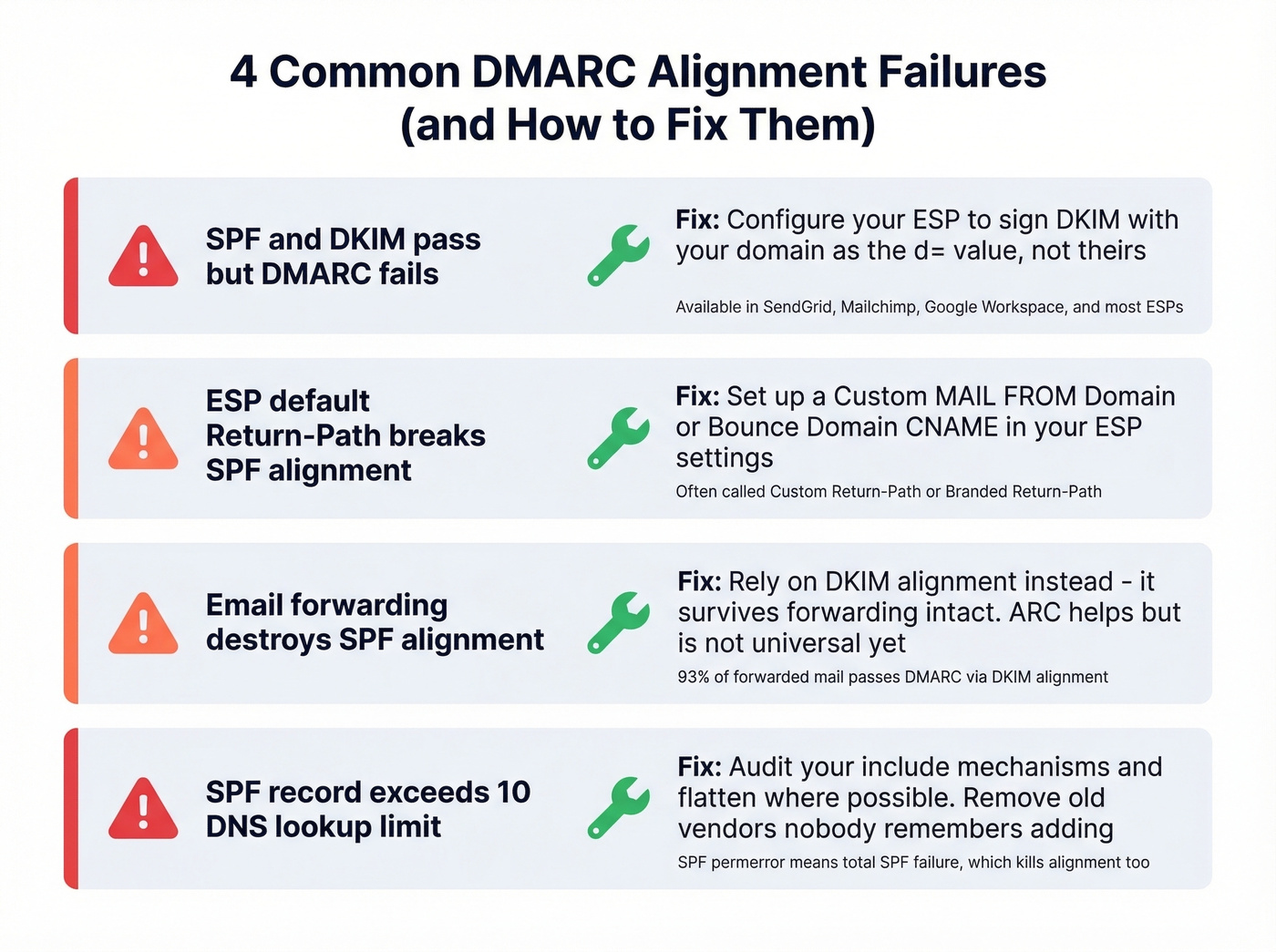
ESP default Return-Path breaks SPF alignment. Most ESPs set the Return-Path to their own domain. SPF passes for their domain, but it doesn't align with your From address. Set up a custom Return-Path CNAME - often called "Custom MAIL FROM Domain" or "Bounce Domain" in your ESP settings. (If you need the mechanics, see our Return-Path setup guide.)
Forwarding kills SPF alignment. Auto-forwarding changes the envelope sender, which destroys SPF alignment. ARC (Authenticated Received Chain) helps preserve authentication across hops, but it isn't universal yet. This is exactly why DKIM alignment matters more - it survives forwarding intact.
SPF record exceeds 10 DNS lookups. If your SPF record hits the lookup limit, SPF fails entirely, taking alignment with it. Audit your include: mechanisms and flatten where possible. Let's be honest: most SPF records we've audited have at least two includes that nobody remembers adding. If you want a quick syntax refresher, use these SPF record examples.
For organizations that want strict alignment on their primary domain, isolate marketing and transactional mail on a subdomain like mail.yourcompany.com. This lets you run strict on the apex domain without breaking every third-party sender - and it's cleaner than trying to wrangle 15 vendors into perfect alignment.
One forward-looking note: DMARCbis is replacing the Public Suffix List approach with a DNS Tree Walk for determining organizational domains. It won't change your day-to-day checks yet, but it's worth tracking.
Fix Authentication, Then Fix Your Data
A passing DMARC alignment check fixes the sending side of deliverability. But bad recipient data destroys sender reputation from the other direction - every bounce chips away at the domain trust you just worked to build. We've watched teams nail their DMARC setup only to torch their reputation by blasting unverified lists the following week. Prospeo's 5-step verification process catches spam traps, honeypots, and catch-all domains at 98% accuracy before you send, so your carefully aligned messages reach real inboxes instead of hitting dead addresses. (If bounces are spiking, start with our email bounce rate guide, then work through how to improve sender reputation.)
You just spent hours aligning SPF and DKIM across every sending source. Now protect that investment. Teams using Prospeo's 143M+ verified emails see bounce rates under 4% - because every address passes a 5-step verification process before it ever hits your outbox.
Your domain reputation is too valuable for unverified contact data.