

DMARC Configuration: The Complete Guide From p=none to p=reject
81.6% of the top 10 million domains have no DMARC record at all. That's not a rounding error - it's the vast majority of the internet leaving their domains wide open to spoofing. If you're sending outbound email at any volume, getting your DMARC configuration right isn't a nice-to-have anymore. Google and Yahoo require it for anyone sending 5,000+ daily emails, and enforcement is only getting stricter.
Most guides stop at "publish a TXT record with p=none." That's step one of a ten-step process. We've walked dozens of teams through the full rollout - from the first DNS TXT record to p=reject enforcement - and the pattern of mistakes is remarkably consistent. This guide covers the concrete week-by-week timeline, report interpretation, and every pitfall we've seen along the way.
What You Need Before Starting
Before you touch a DMARC record, three prerequisites must be in place:
- SPF configured and passing for all legitimate sending sources
- DKIM signing enabled for your primary domain and any third-party senders (see how to verify DKIM is working)
- DNS access to publish TXT records at your domain registrar or DNS host
Copy this starter record, replace the email address, and publish it as a TXT record at _dmarc.yourdomain.com:
v=DMARC1; p=none; rua=mailto:dmarc-reports@yourdomain.com;
That's monitoring mode. It won't block anything - it just starts collecting data. You'll ramp from here to quarantine and then reject over the next 8-12 weeks. Don't skip the monitoring phase, and don't jump straight to reject.
Why DMARC Matters in 2026
Since February 2024, Google and Yahoo require an active DMARC policy for any domain sending over 5,000 emails per day. Non-compliant messages can be rejected at the SMTP level. This isn't a suggestion - it's a gate.
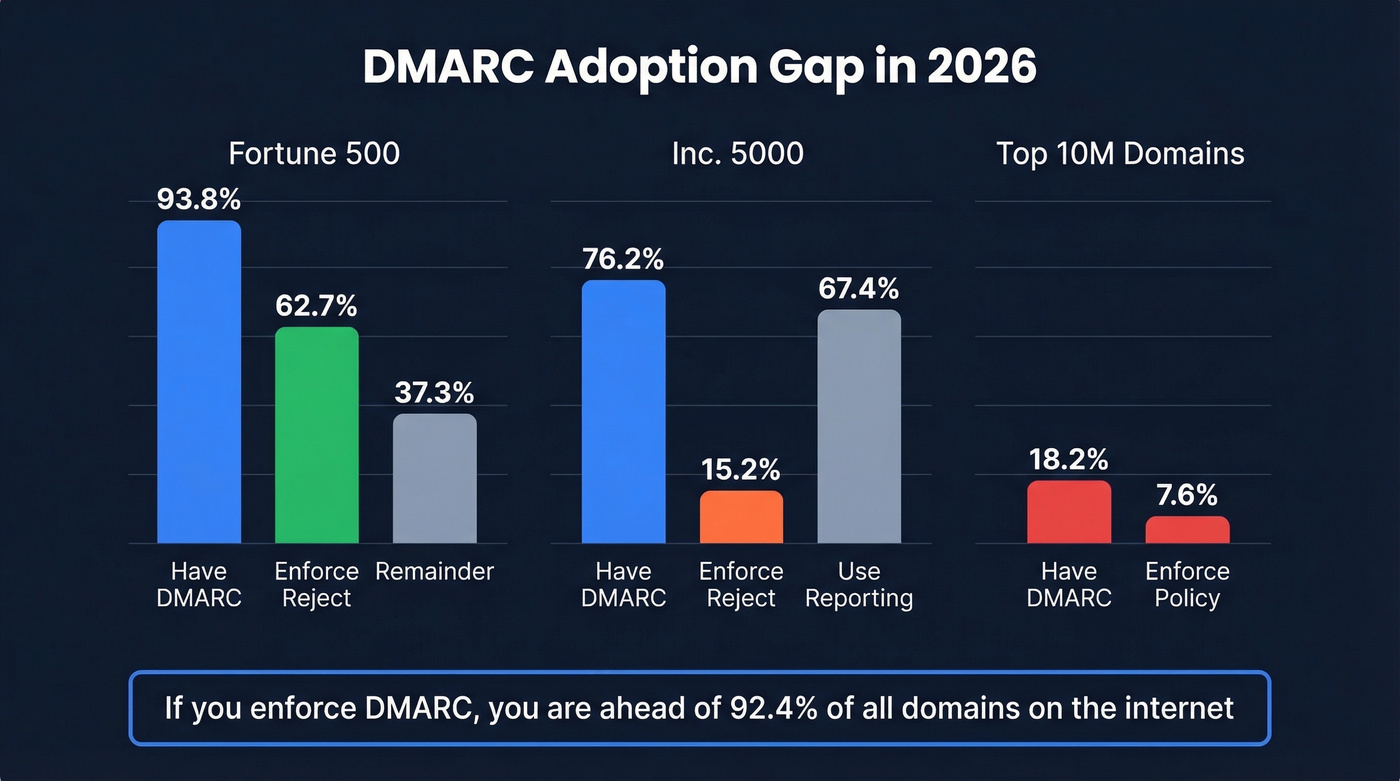
The adoption gap tells the story. 93.8% of Fortune 500 companies have valid DMARC records, and 62.7% of those enforce p=reject. Among Inc. 5000 companies? Only 76.2% have DMARC at all, just 15.2% enforce reject, and 67.4% use aggregate reporting - meaning 32.6% of Inc. 5000 companies with DMARC aren't even looking at their reports. More than half sit on p=none, watching domain spoofing happen without stopping it.
Globally, the picture is worse. Of the top 10 million domains by traffic, only 18.2% have a valid DMARC record. Just 7.6% enforce quarantine or reject. If you configure DMARC properly and push to enforcement, you're already ahead of 92.4% of domains on the internet. DMARC, defined in RFC 7489, doesn't guarantee inbox placement - but without it, you're leaving your domain reputation to chance.
Prerequisites: SPF and DKIM First
DMARC checks whether incoming mail passes SPF or DKIM and aligns with your domain. If neither is configured, DMARC has nothing to evaluate. Get these right first (use these SPF record examples if you need a quick reference).
SPF checklist:
- Publish a single SPF TXT record at your root domain
- Include every service that sends on your behalf -
include:_spf.google.com,include:spf.protection.outlook.com, etc. - Stay under the 10-DNS-lookup limit. 1.1% of domains exceed it, causing silent SPF failures
- End with
-allor~all- never+all
DKIM checklist:
- Enable DKIM signing in your email platform's admin console
- For Microsoft 365, create two CNAME records at your DNS host:
selector1._domainkeypointing toselector1-<domain>._domainkey.<domain>.onmicrosoft.com, andselector2._domainkeypointing to the corresponding selector2 address - The M365 admin UI throws an error when you first enable DKIM - that error message contains the exact CNAME values you need. This is by design, not a bug.
- Rotate DKIM keys at least every 6 months. Stale keys are a security risk most teams ignore.
Microsoft 365 warning: If your domain's DMARC policy is set to quarantine or reject and outbound messages fail DMARC at the recipient, Microsoft routes them through its high-risk delivery pool - which tanks deliverability. Get SPF and DKIM passing before you tighten policy.
DNS Setup for Your DMARC Record
DMARC lives as a TXT record at _dmarc.yourdomain.com. Publishing it takes five minutes.
- Log into your DNS host - Cloudflare, Route 53, GoDaddy, wherever you manage DNS
- Create a new TXT record with the host/name
_dmarc - Paste your DMARC value
- Set TTL to 3600 (one hour) - short enough to iterate quickly during rollout
If you're unsure about the correct format, use a DMARC TXT record generator to build the syntax. Most monitoring tools include one, and it eliminates typos in tag values. Below are three records for three scenarios.
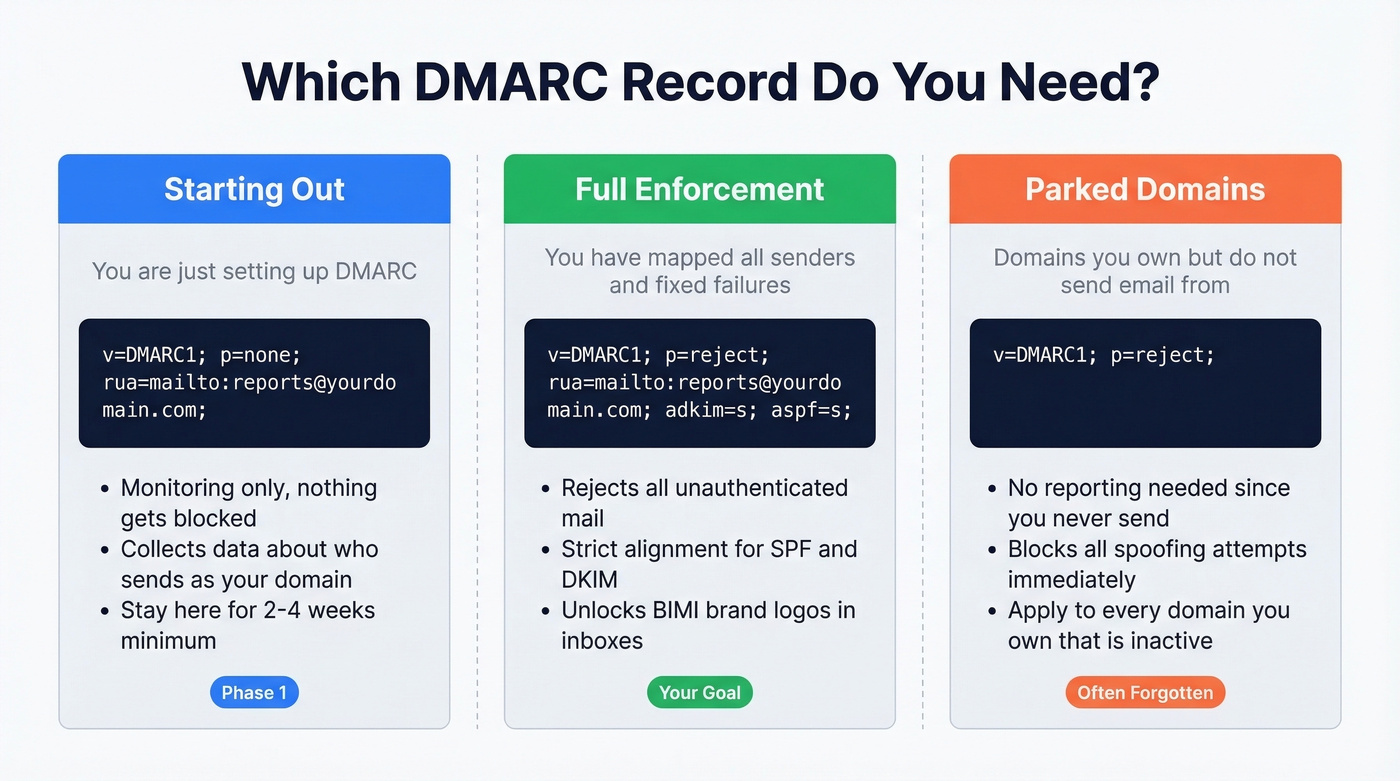
Monitoring mode (start here):
v=DMARC1; p=none; rua=mailto:dmarc-reports@yourdomain.com;
Enforcement mode (your goal):
v=DMARC1; p=reject; rua=mailto:dmarc-reports@yourdomain.com; adkim=s; aspf=s;
Non-sending domain (parked domains, vanity domains):
v=DMARC1; p=reject;
That last one is critical. Every domain you own that doesn't send email should still publish a reject policy. Without it, attackers can spoof your parked domains for phishing and you'd never know.
DMARC Tags Reference
Misconfiguring even one tag can break your rollout. Here's the full reference:
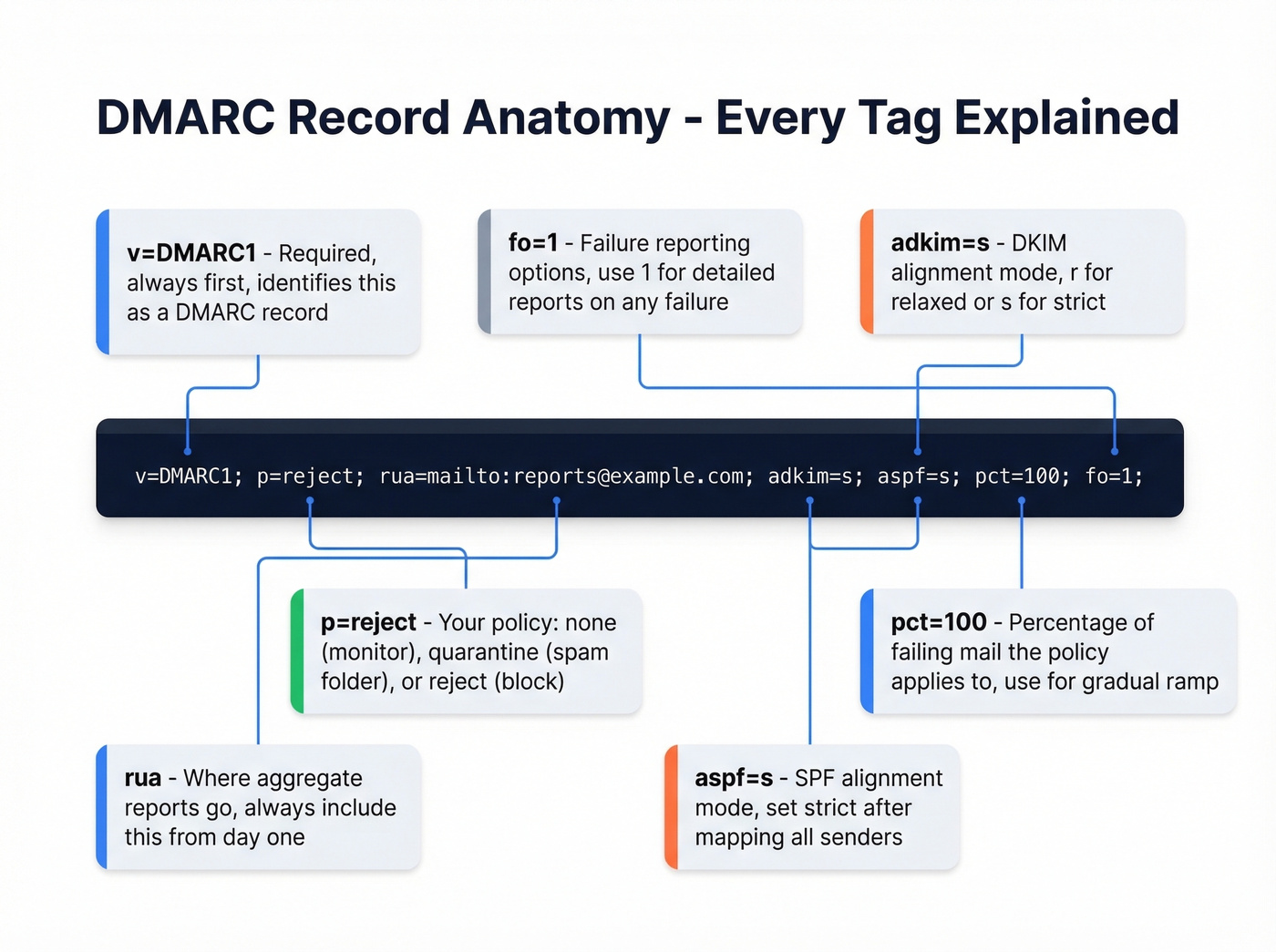
| Tag | Required? | Values | Default | When to Use |
|---|---|---|---|---|
v |
Yes | DMARC1 |
- | Always first |
p |
Yes | none/quarantine/reject |
- | Always second |
sp |
No | none/quarantine/reject |
Same as p |
Subdomain policy |
rua |
No* | mailto: URI(s) |
None | Day one - always |
ruf |
No | mailto: URI(s) |
None | After initial setup |
adkim |
No | r (relaxed) / s (strict) |
r |
Strict after mapping all senders (more on DMARC alignment) |
aspf |
No | r (relaxed) / s (strict) |
r |
Strict after mapping all senders |
pct |
No | 0-100 | 100 | During policy ramp |
fo |
No | 0/1/d/s |
0 |
1 for detailed failure reports |
ri |
No | Seconds | 86400 | Rarely changed |
*Technically optional, but publishing DMARC without rua is like installing a security camera with no recording. Always include it.

DMARC protects your domain reputation. Bad data destroys it. One bounced email to a spam trap undoes weeks of authentication work. Prospeo's 5-step verification - including catch-all handling, spam-trap removal, and honeypot filtering - delivers 98% email accuracy so your carefully configured domain stays clean.
Don't let bad contact data wreck the domain reputation you just spent 12 weeks building.
Week-by-Week Rollout Timeline
This is where most guides fail. They tell you to "start with p=none and eventually move to reject" without defining "eventually." Here's the concrete timeline we recommend.
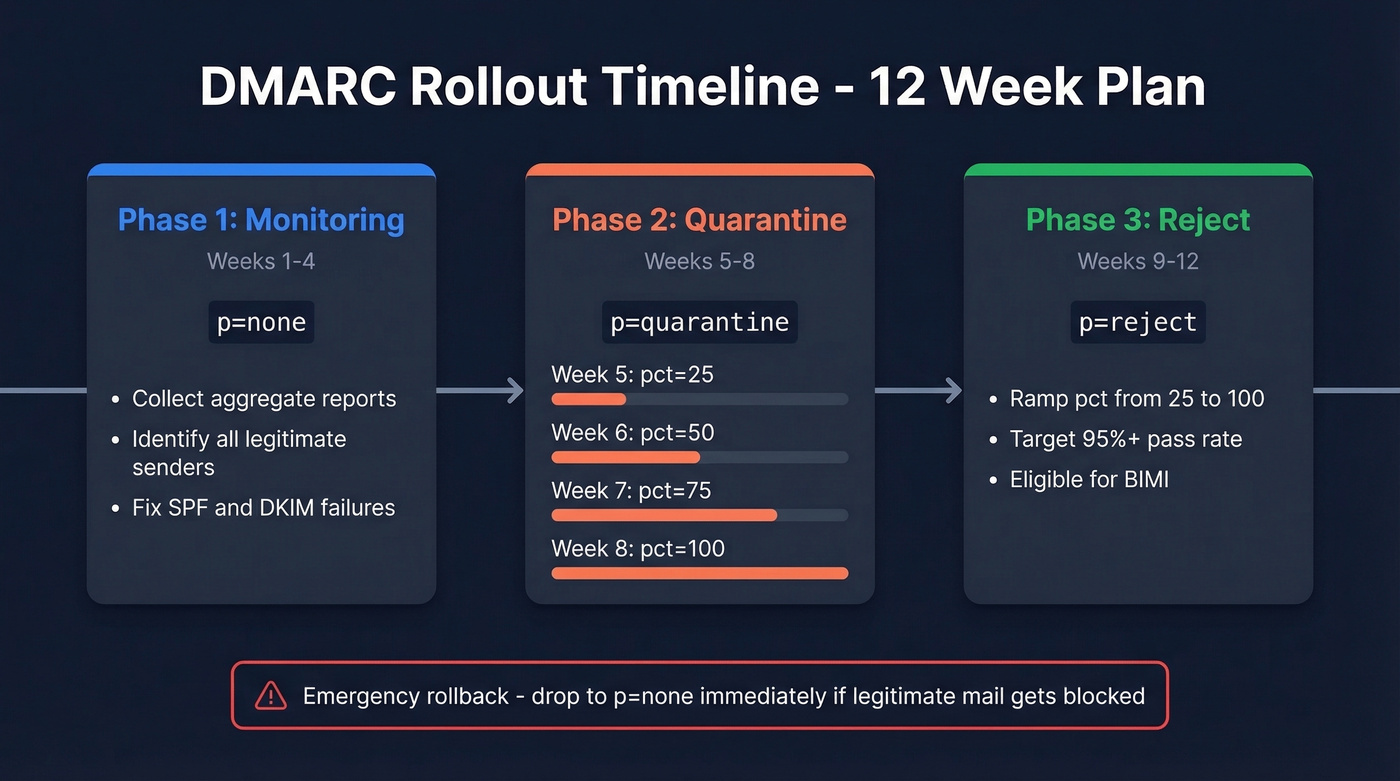
Phase 1: Monitoring (Weeks 1-4)
Publish p=none with rua= pointing to a mailbox or monitoring tool. For the next 2-4 weeks, your only job is collecting data. Review aggregate reports to identify every legitimate source sending as your domain. Fix SPF includes and DKIM signing for any source that's failing. Don't move forward until known senders pass consistently.
Phase 2: Quarantine (Weeks 5-8)
Switch to p=quarantine; pct=25; - this quarantines 25% of failing messages while letting the rest through. Ramp weekly:
- Week 5:
pct=25 - Week 6:
pct=50 - Week 7:
pct=75 - Week 8:
pct=100
Monitor reports at each step. If legitimate mail starts landing in spam, pause the ramp and fix the source before continuing.
Phase 3: Reject (Week 9+)
Move to p=reject; pct=25; and ramp the same way over 2-3 weeks. The decision criteria: your pass rate should be 95%+ with no complaints from internal teams or customers about missing email.
Emergency rollback: If legitimate mail gets blocked, drop back to p=none immediately. DNS propagation takes minutes to a few hours - don't wait. You can also reduce pct instead of rolling back entirely.
Subdomain tip: Consider p=reject; sp=quarantine; during the transition. This enforces reject on your root domain while giving subdomains a softer landing.
What p=reject unlocks: Once you reach full enforcement, you're eligible for BIMI - Brand Indicators for Message Identification. BIMI displays your brand logo next to emails in supported inboxes, which improves open rates and brand trust.
Reading Your First Reports
RUA reports arrive as zipped XML attachments, usually daily. They're dense and machine-readable - not designed for human consumption. But you don't need to parse every field. Here's what a key record looks like:
<!-- unknown MDX component: record -->
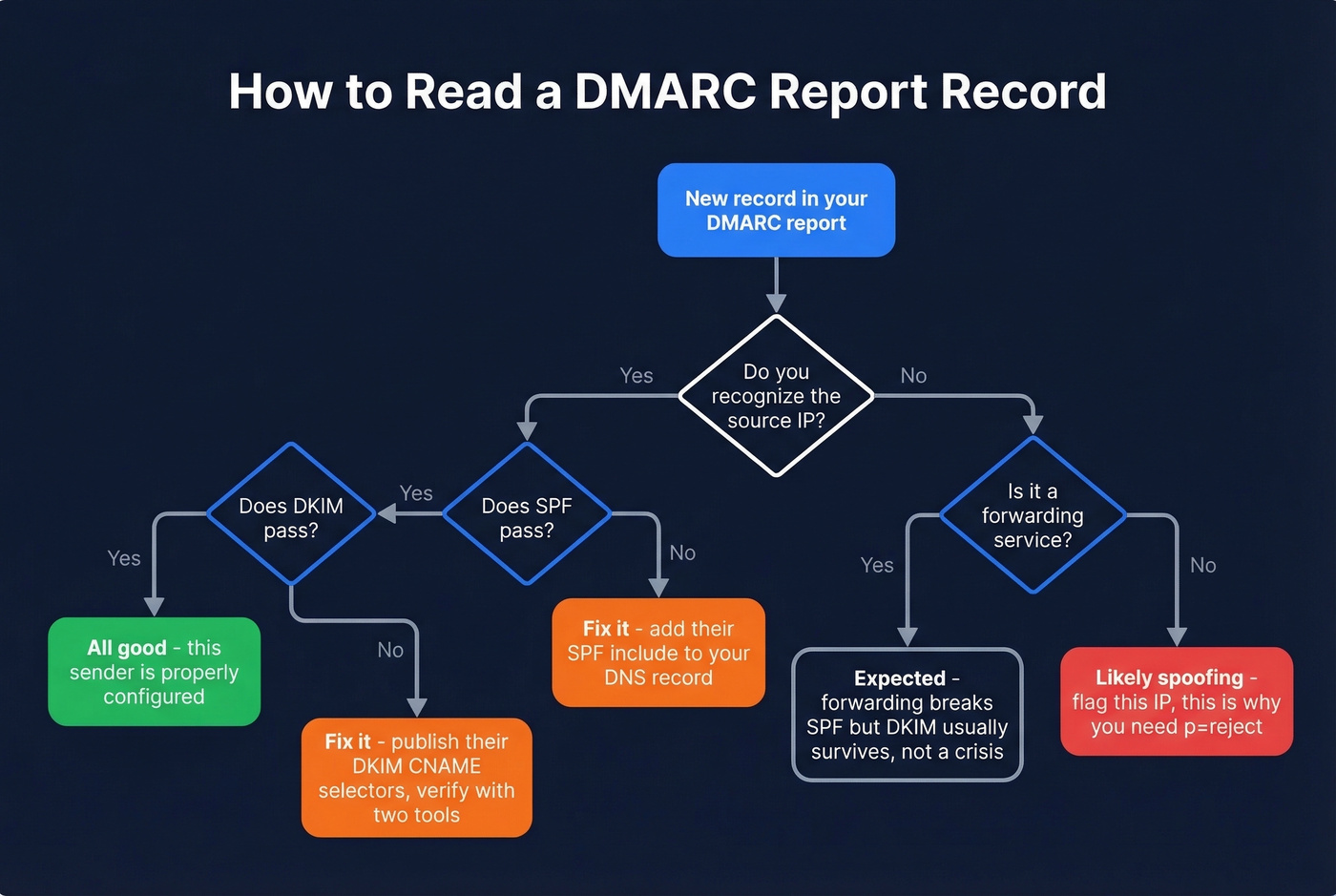
Focus on four things per record: the source IP (who sent this message claiming to be your domain), the disposition (what the receiver did), the SPF/DKIM result, and the alignment (did the sending domain match your DMARC domain).
A known provider like Google Workspace or Mailchimp failing SPF or DKIM usually means misconfiguration, not spoofing. Fix it. Forwarded mail often breaks SPF but DKIM survives - this is expected behavior, not a crisis.
Your prioritized action list: fix legitimate sources that are failing, flag unknown IPs sending as your domain (those are spoofing attempts), then verify that policy actions match your intent before ramping enforcement.
Aligning Third-Party Senders
Here's the thing: third-party senders are the #1 source of DMARC failures in practice. We've seen this play out repeatedly - a team sets up their policy, ramps to quarantine, and suddenly their Constant Contact newsletters land in spam.
One r/sysadmin thread captures the pain perfectly. A user added include:spf.constantcontact.com to their SPF record and published the DKIM CNAME selectors per Constant Contact's documentation - and DKIM still failed. The fix? Constant Contact's initial CNAME values were wrong. The vendor had to provide corrected values before alignment worked.
Vendor DNS instructions can be outdated, and you won't know until you test. The checklist for every third-party sender:
- Add their SPF include to your SPF record
- Publish their DKIM CNAME selectors at your DNS host
- Send a test message and verify with at least two different validation tools - validators can disagree, so cross-checking isn't paranoia, it's good practice
If you're running outbound campaigns through tools like Smartlead or Instantly, verify your prospect list before sending. High bounce rates damage the same sender reputation that DMARC protects, and once you've tightened your policy to quarantine or reject, the consequences of bad data hit harder. Prospeo's email verification catches invalid addresses and spam traps before they trigger bounces - 98% accuracy, with catch-all handling and spam-trap removal built in (see spam trap removal and email bounce rate).
Common Mistakes to Avoid
Let's be honest - most of these are embarrassingly simple, and we've still seen experienced teams make every single one.
Staying on p=none forever. Monitoring without enforcement doesn't block spoofing. Set a deadline to move to quarantine.
Multiple DMARC records on one domain. Only one
_dmarcTXT record should exist. Multiple records cause evaluation failures.Missing
mailto:in rua/ruf. The address must be a URI:rua=mailto:reports@yourdomain.com, notrua=reports@yourdomain.com.Wrong tag order.
p=must immediately followv=DMARC1;. Placing other tags between them can cause receivers to ignore your record entirely.No subdomain policy. Skipping
sp=leaves subdomains defaulting to your root policy - or worse, unprotected if you haven't considered them.Exceeding the SPF 10-lookup limit. Every
include,redirect, andamechanism counts. Flatten if needed, but know that flattening creates maintenance overhead as vendor IPs change.Ignoring non-sending domains. Publish
p=rejecton every domain you own that doesn't send email. Attackers love unprotected parked domains.Jumping straight to p=reject. Skipping the monitoring and quarantine phases guarantees you'll block legitimate mail. Follow the phased rollout.
DMARC Monitoring Tools
| Tool | Free Tier | Starting Price | Best For |
|---|---|---|---|
| dmarcian | 14-day trial | $19.99/mo | Guided policy progression |
| PowerDMARC | Yes | $8/mo | Budget-friendly dashboards |
| EasyDMARC | Yes | $35.99/mo | Full-suite reporting |
| Valimail | Yes | $19/mo | Automated enforcement |
| Postmark | Yes | $14/mo | Dev-friendly, simple UI |
You don't need a monitoring platform on day one. A dedicated mailbox and manual XML review works fine for the first few weeks. The reports are ugly, but they're readable once you know the four fields to focus on. Once you're managing multiple domains or ramping to enforcement, a dashboard pays for itself in time saved.
PowerDMARC at $8/mo is the cheapest entry point. dmarcian is the best choice for teams that want hand-holding through policy progression. If you already use Cloudflare for DNS, they offer DMARC monitoring at $25/mo - worth considering to keep everything in one place.
If your deals are typically under five figures, you probably don't need enterprise-grade DMARC monitoring. The free tiers from PowerDMARC or Valimail handle single-domain setups just fine. Save the budget for tools that directly generate pipeline.
You're spending 8-12 weeks hardening your email authentication. Teams using Prospeo keep bounce rates under 4% because every email is verified before it's sent - not after it damages your sender score. At $0.01 per email, protecting your domain costs less than one failed campaign.
Stack Optimize built a $1M agency with sub-3% bounce rates using Prospeo data. Start free today.
DMARC Configuration FAQ
How long should I stay on p=none?
Two to four weeks - enough time to identify all legitimate senders in your aggregate reports and fix their SPF/DKIM alignment. Once known sources pass consistently, move to p=quarantine with pct=25. Staying on p=none longer than a month means you're monitoring spoofing without stopping it.
Does DMARC work without DKIM?
Technically yes - DMARC passes if either SPF or DKIM aligns with your domain. But relying on SPF alone is fragile because email forwarding breaks SPF (the forwarding server's IP isn't in your record). DKIM survives forwarding since it's tied to the message itself. Always configure both.
Do non-sending domains need DMARC?
Yes. Publish v=DMARC1; p=reject; on every domain that doesn't send email. Without it, attackers can spoof your parked domains for phishing. There's no legitimate mail to break, so go straight to reject - no monitoring phase needed.
What's the difference between rua and ruf?
rua delivers daily aggregate reports - volume summaries showing which IPs sent as your domain and whether they passed authentication. ruf sends forensic reports with individual failure details. Start with rua only; many receivers don't send ruf due to privacy concerns, and aggregate data is sufficient for policy decisions during rollout.
Can DMARC improve deliverability?
Indirectly, yes. Receivers treat authenticated domains more favorably, but DMARC alone doesn't guarantee inbox placement - it prevents spoofing, which protects the reputation you've built. The other half of the equation is clean sending data: verifying emails before campaigns prevents the bounces and spam-trap hits that erode that same reputation.