

DMARC Record Setup: Get to p=reject in 2026
Your outbound sequences are authenticated, your SPF passes, your DKIM signs - and Gmail still junks 12% of your cold emails. The missing piece is almost always DMARC, and in 2026, mailbox providers aren't asking nicely anymore. Here's how to configure it, move to full enforcement, and stop leaving deliverability on the table.
What You Need (Quick Version)
DMARC is a single DNS TXT record. It depends on two prerequisites: SPF and DKIM must already be configured and passing for your sending domain. The setup takes five minutes. The rollout to full enforcement takes 6-9 weeks if you do it right.
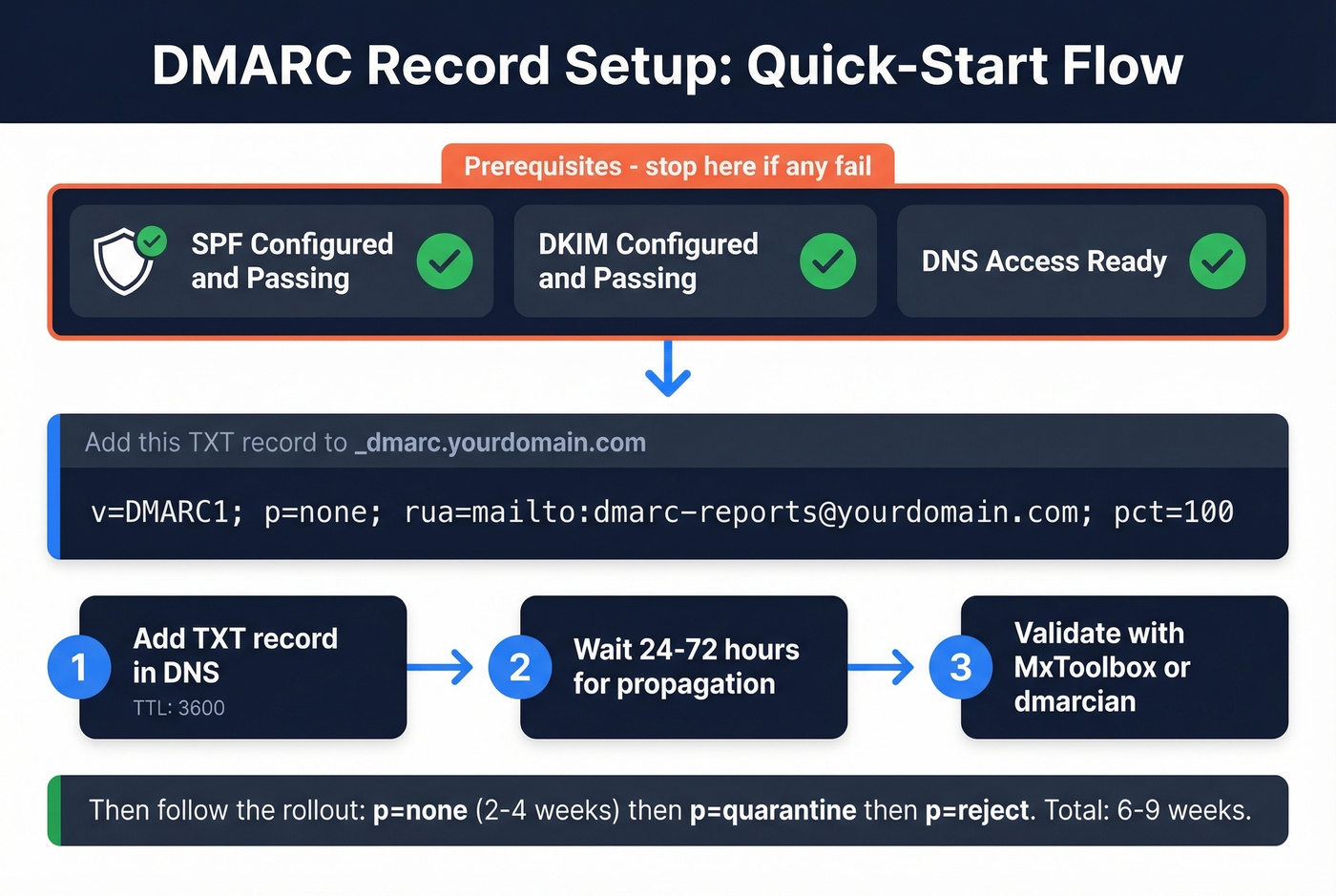
Copy-paste this into your DNS as a TXT record on the _dmarc hostname:
v=DMARC1; p=none; rua=mailto:dmarc-reports@yourdomain.com; pct=100
Start with p=none to collect data. Monitor reports for 2-4 weeks. Then ramp through p=quarantine to p=reject using the pct tag. The rest of this guide walks through every step, every provider, and every mistake we've seen teams make.
Why DMARC Is Mandatory in 2026
Google and Yahoo rolled out bulk sender requirements in February 2024, mandating DMARC (at minimum p=none) for anyone sending 5,000+ messages per day. Google tightened enforcement through late 2025, and Microsoft followed with similar requirements that same year.
As of 2026, non-compliant messages get rejected at the SMTP level. Your emails don't bounce - they never arrive. Phishing accounts for roughly 16% of data breaches, and mailbox providers are done tolerating unauthenticated senders. Only about half of public companies have reached full DMARC enforcement. The other half remain exposed.
Here's the thing: DMARC stops spoofing, but it doesn't stop you from torching your own sender reputation by emailing bad addresses. Bounced emails from outdated contact lists damage domain trust just as fast as missing authentication. Tools like Prospeo handle that other half of the deliverability equation with real-time verification - but first, let's get your DNS record right.
Prerequisites Before You Start
Before you touch DNS, confirm these four items:
- SPF configured and passing. Run your domain through MxToolbox. You should see a valid SPF record with
include:entries for every service that sends email on your behalf. (If you need examples, see our SPF record guide.) - DKIM configured and passing. Your email provider (Google Workspace, Microsoft 365, etc.) and any third-party senders (SendGrid, Mailchimp, HubSpot) should have DKIM signing enabled with keys published in your DNS. If you’re unsure, follow how to verify DKIM is working.
- DNS management access. You need to create TXT records on your domain. If IT or a registrar controls this, loop them in now.
- A reporting email address. Create something like
dmarc-reports@yourdomain.comor use a dedicated mailbox. This is where aggregate reports land.
If SPF or DKIM aren't passing yet, stop here and fix those first. DMARC without SPF/DKIM is a record that does nothing.
How to Set Up DMARC (Step by Step)
Step 1: Choose Your Hostname
DMARC records always live at _dmarc.yourdomain.com. In most DNS interfaces, you enter _dmarc as the hostname - the provider appends your domain automatically.
Step 2: Build Your Record
Every DMARC record starts with v=DMARC1. This is mandatory and must be the first tag. Here are three records for each phase of your rollout:
Starter (monitoring only):
v=DMARC1; p=none; rua=mailto:dmarc-reports@yourdomain.com; pct=100
Quarantine with gradual enforcement:
v=DMARC1; p=quarantine; rua=mailto:dmarc-reports@yourdomain.com; pct=25
Full enforcement:
v=DMARC1; p=reject; rua=mailto:dmarc-reports@yourdomain.com; pct=100
Step 3: Add the Record in DNS
Create a new TXT record. Set the hostname to _dmarc, paste your DMARC string as the value, and set TTL to 3600 seconds (1 hour). The lower TTL lets you iterate faster during setup. If you're unsure how to do this in your specific provider, see the provider instructions below.
Step 4: Wait for Propagation
DNS changes can take 24-72 hours to propagate globally. Validation tools will show "no record found" during this window - don't panic.
Step 5: Validate
Use dmarcian's DMARC Inspector or MxToolbox's DMARC Lookup. Enter your domain and confirm the record parses correctly - no syntax errors, no duplicate records, reporting address present.
Provider-Specific DNS Instructions
GoDaddy
Navigate to My Products, select your domain, then DNS, then Add Record, then TXT. In the Host field, enter _dmarc. In the TXT Value field, paste your DMARC string. Set TTL to 3600. Save.
AWS Route 53
Go to Services, Route 53, Hosted Zones, select your domain, Create Record Set. Set Name to _dmarc, Type to TXT, and paste your DMARC string in the Value field wrapped in double quotes. Propagation follows the same 24-72 hour window.
Cloudflare
Open your domain's DNS settings and add a new TXT record. Use _dmarc for the record name, and paste your DMARC string as the content. Set TTL to 3600 while you're iterating.
Namecheap
In Advanced DNS, add a new TXT Record. Set Host to _dmarc and Value to your DMARC string. TTL to 3600.
Microsoft 365 Note
If you're using Microsoft 365, know this: outbound mail from domains with p=reject or p=quarantine that fails DMARC checks at the destination gets routed through the High-risk delivery pool for outbound messages. There's no override. Plan your alignment carefully before enforcing.

DMARC enforcement means nothing if 12% of your list bounces. Bad contact data triggers the same reputation damage as missing authentication. Prospeo's 5-step email verification delivers 98% accuracy - teams using it cut bounce rates from 35% to under 4%.
Fix authentication and fix your data. One without the other is half a strategy.
Why DMARC Fails (Alignment)
This is where most teams get stuck. DMARC can fail even when SPF and DKIM both pass. The reason is alignment: the authenticated domain must match the visible "From" domain in the email header.
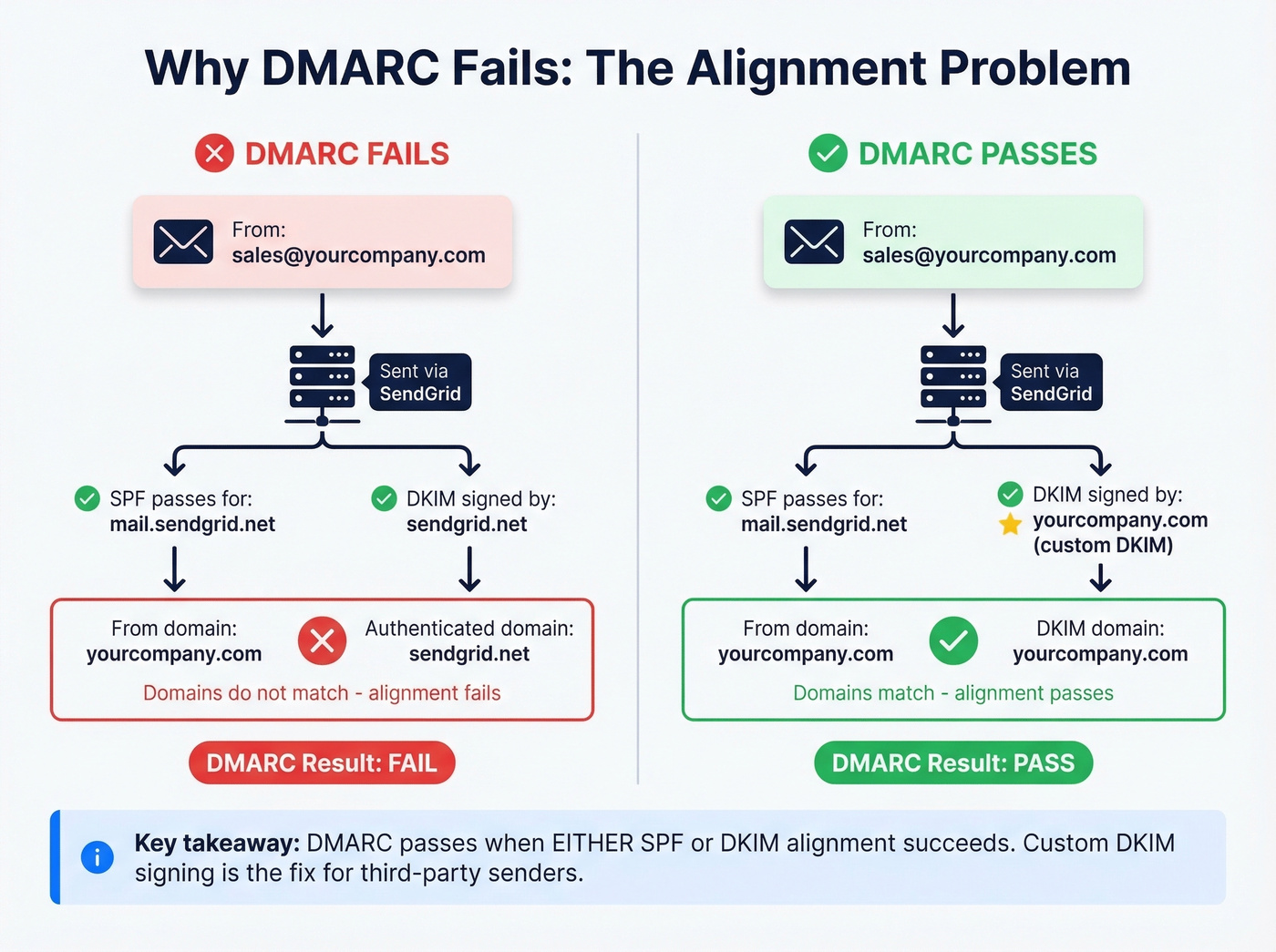
The most common failure we see is with third-party senders. You're sending from sales@yourcompany.com through SendGrid. SPF passes for mail.sendgrid.net - but that doesn't match yourcompany.com. DMARC fails because the domains aren't aligned, even though the email is completely legitimate. In technical terms, DMARC's relaxed alignment checks whether the authenticated domain shares the same Organizational Domain as the From header, while strict alignment requires an exact match.
DMARC passes when either SPF alignment or DKIM alignment succeeds. You don't need both. This is why custom DKIM signing is the recommended fix for third-party senders - configure SendGrid, Mailchimp, or HubSpot to sign with your domain's DKIM key, and alignment passes regardless of SPF. (For a deeper breakdown, see DMARC alignment.) In SendGrid specifically, go to Settings, Sender Authentication, Authenticate Your Domain, and add the CNAME records it generates to your DNS.
Here are the SPF include strings for the most common platforms:
| Platform | SPF Include |
|---|---|
| Google Workspace | include:_spf.google.com |
| Microsoft 365 | include:spf.protection.outlook.com |
| SendGrid | include:sendgrid.net |
| Mailchimp | include:servers.mcsv.net |
| HubSpot | include:spf.hubspot.com |
Two warnings. First, SPF has a hard limit of 10 DNS lookups. Every include: counts. If you're running five or six third-party senders, you'll hit this fast - flatten your SPF record or use a subdomain strategy. Second, consider using a subdomain for marketing email (like marketing.yourcompany.com) to isolate third-party complexity from your primary domain's authentication.
Rollout Strategy: p=none to p=reject
Nearly 75% of senders are stuck on p=none. That's monitoring mode - it tells you what's happening but doesn't stop anything. If you've been on p=none for more than six weeks, you've got a participation trophy, not a DMARC policy.
Let's be honest: most teams stall on p=none not because they're being cautious, but because nobody owns the project. Assign one person, give them the schedule below, and you'll be at p=reject before the quarter ends. Configuring the DNS record is the easy part. Following through on the rollout is where discipline matters.
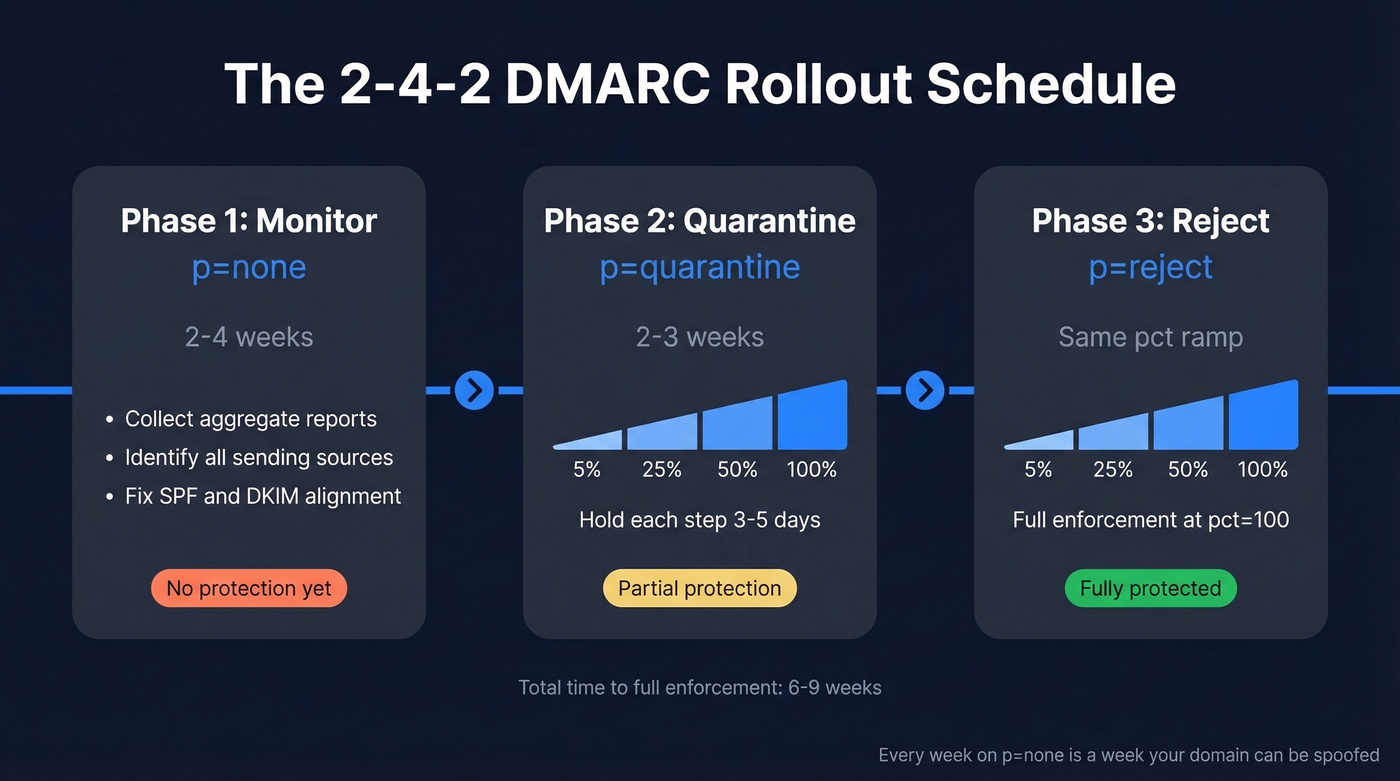
Here's the "2-4-2 schedule" we recommend:
| Phase | Policy | Duration | pct Ramp |
|---|---|---|---|
| Phase 1 | p=none |
2-4 weeks | 100 (monitor all) |
| Phase 2 | p=quarantine |
2-3 weeks | 5% → 25% → 50% → 100% |
| Phase 3 | p=reject |
Ongoing | 5% → 25% → 50% → 100% |
Phase 1 is discovery. You're identifying every service that sends email on your behalf and confirming SPF/DKIM alignment for each. Review your aggregate reports weekly. This is where you'll catch that forgotten Calendly integration or the billing system nobody told you about.
Phase 2 introduces enforcement gradually. Start with pct=5 - only 5% of failing messages get quarantined. If nothing breaks, bump to 25%, then 50%, then 100%. Each increment should hold for 3-5 days minimum.
Phase 3 follows the same pct ramp but with p=reject. At pct=100; p=reject, you're fully enforced. Unauthenticated messages from your domain get blocked entirely. Every week on p=none is a week your domain is unprotected from spoofing, so don't drag this out.
Best DMARC Monitoring Tools
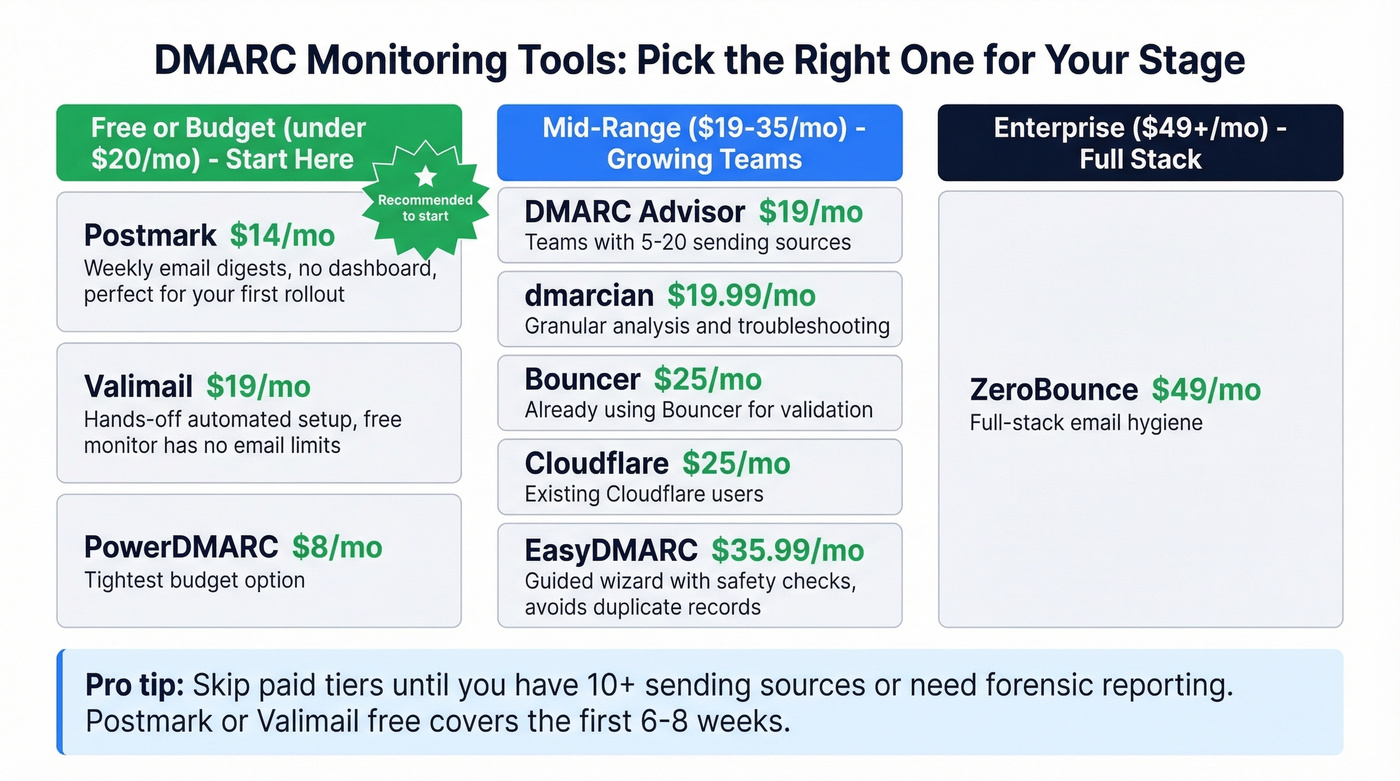
DMARC aggregate reports arrive as XML files. Nobody reads XML. You need a monitoring tool to parse these into something useful.
| Tool | Starting Price | Best For |
|---|---|---|
| PowerDMARC | $8/mo | Tightest budget |
| Postmark | $14/mo | Monitoring your first rollout |
| Valimail | $19/mo | Hands-off automated setup |
| DMARC Advisor | $19/mo | Teams with 5-20 sending sources |
| dmarcian | $19.99/mo | Granular analysis and troubleshooting |
| Bouncer | $25/mo | Teams already using Bouncer for validation |
| Cloudflare | $25/mo | Existing Cloudflare users |
| EasyDMARC | $35.99/mo | Guided wizard with safety checks |
| ZeroBounce | $49/mo | Full-stack email hygiene |
Start with Postmark or Valimail free. Postmark sends weekly email digests on the free tier - no dashboard, but enough to monitor your rollout. Valimail's free monitor has no limits on the number of emails analyzed. EasyDMARC's wizard detects existing records before adding a new one, which avoids the duplicate-record pitfall that trips up users of other tools; its free tier caps at 1,000 emails per month with 14-day log retention.
Skip the paid tiers until you have 10+ sending sources or need forensic reporting. For most teams running outbound sales sequences, Postmark or Valimail free will cover the first 6-8 weeks without spending a dollar.
Common Mistakes to Avoid
A recurring thread on r/dns cataloged the same mistakes we see over and over. Seven cause the most damage:
1. Leaving p=none forever. Monitoring mode doesn't block spoofing. Set a calendar reminder to start enforcement after 4 weeks.
2. Missing the rua reporting address. Without rua, you get zero visibility into who's sending as your domain. Always include it.
3. Publishing duplicate DMARC TXT records. Two DMARC records on the same hostname invalidates DMARC entirely. Always delete the old record before adding a new one. Some monitoring tools create a new record without checking for an existing one - this is the single most common "it was working yesterday" failure we debug.
4. Exceeding the SPF 10-lookup limit. Every include:, redirect, and nested lookup counts toward the cap. Flatten your SPF record using an SPF macro service, or move third-party senders to a subdomain.
5. Misconfigured alignment mode. If you're using aspf=s (strict) but your third-party senders use subdomains, alignment will fail. Default to aspf=r (relaxed) unless you have a specific reason for strict.
6. Forgetting subdomain policy. Without sp=, subdomains inherit the parent domain's policy. If you want different enforcement for marketing.yourcompany.com, set sp= explicitly.
7. Formatting errors in long TXT records. Line breaks, missing semicolons, and incorrect quoting in DNS interfaces break the record silently. Always validate after publishing.
DMARC Tag Reference
All 11 tags defined in RFC 7489, with defaults and examples:
| Tag | Required? | Default | What It Does | Example |
|---|---|---|---|---|
v |
Yes | - | Protocol version | v=DMARC1 |
p |
Yes | - | Domain policy | p=reject |
rua |
No | None | Aggregate report URI | rua=mailto:d@co.com |
ruf |
No | None | Forensic report URI | ruf=mailto:f@co.com |
sp |
No | Same as p |
Subdomain policy | sp=quarantine |
adkim |
No | r (relaxed) |
DKIM alignment mode | adkim=s |
aspf |
No | r (relaxed) |
SPF alignment mode | aspf=r |
pct |
No | 100 |
% of mail to filter | pct=25 |
fo |
No | 0 |
Failure report options | fo=1 |
ri |
No | 86400 (24h) |
Report interval (sec) | ri=3600 |
rf |
No | afrf |
Report format | rf=afrf |
The two you'll adjust most during rollout are p and pct. Everything else can stay at defaults for most organizations.
Protect Every Domain You Own
Implement DMARC on every domain in your portfolio - including non-sending domains and parked domains - to close off spoofing vectors completely. A simple v=DMARC1; p=reject on a domain that never sends email costs you nothing and removes a phishing vector attackers love to exploit.
But authentication is only half the deliverability picture. We've seen teams nail their DMARC rollout, hit p=reject, and still watch their sender reputation crater because they're emailing outdated contacts full of spam traps and dead addresses. If you’re troubleshooting bounces, start with email bounce rate benchmarks and fixes. Prospeo's 5-step verification - including catch-all handling and spam-trap removal - closes that gap so your newly authenticated domain doesn't get burned by bad data. (If you need remediation steps, see our spam trap removal playbook.)

You just spent weeks getting to p=reject. Don't burn that pristine sender reputation on stale emails from a database refreshed six weeks ago. Prospeo refreshes 300M+ profiles every 7 days - so your outbound hits real inboxes, not spam traps.
Send to verified emails at $0.01 each. Your domain reputation will thank you.
FAQ
How long does DMARC propagation take?
DNS propagation takes 24-72 hours. Set your TTL to 3600 seconds during initial setup so subsequent record changes take effect faster.
Do non-sending domains need DMARC?
Yes. Publish v=DMARC1; p=reject on every domain that doesn't send email. Attackers routinely spoof parked and inactive domains for phishing campaigns because most organizations leave them unprotected.
Can I have multiple DMARC records?
No. Two DMARC TXT records on the same _dmarc hostname invalidates DMARC entirely. Always delete the old record before publishing a new one - this is the most common accidental breakage we see.
What's the difference between rua and ruf?
rua delivers daily aggregate XML summaries showing pass/fail volumes per sending source. ruf sends individual forensic failure reports with message-level detail. Most organizations skip ruf due to privacy concerns and limited receiver support.
How do I keep deliverability high after enforcement?
Full enforcement protects your domain from spoofing but doesn't prevent bounces from bad contact data. Pair your DMARC record setup with real-time email verification to catch invalid addresses, spam traps, and honeypots before they damage your sender reputation.