

Double Opt-In: The Data-Backed Guide to Better Email Lists
Over 23% of initial subscribers never click the confirmation link. Open rates crater. The spam complaint ratio crosses Gmail's threshold, and your domain reputation circles the drain. The fix isn't a better subject line - it's how people got on your list in the first place. Double opt-in is the single most effective gatekeeper between a healthy list and a deliverability nightmare.
What Double Opt-In Actually Is
Double opt-in adds one step between "someone fills out your form" and "they're on your list." A visitor enters their email on your signup form, your system immediately fires a confirmation email, the subscriber clicks a verification link in that email, and only then do they land on your active list. Single opt-in skips the confirmation step entirely - submit the form, you're in.
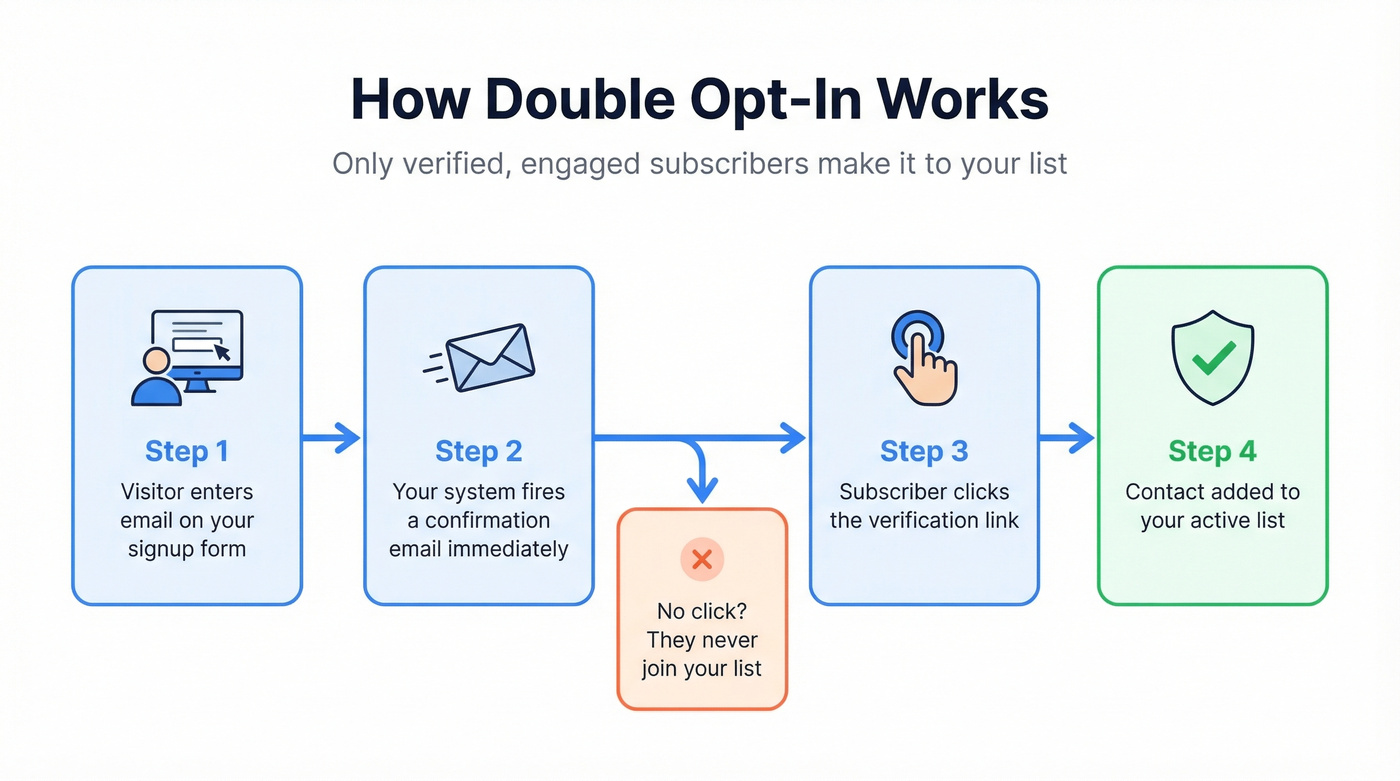
The distinction sounds minor. But it's the difference between a list of people who typed an email address and a list of people who proved they own that address and actually want to hear from you. Despite the clear quality advantage, only around 40% of senders use this two-step verification. Many sectors sit below 20% adoption.
Quick Verdict
If you're sending 10K+ emails per month, use double opt-in. Full stop.
The core tradeoff is straightforward: you'll lose 20-30% of subscribers who never confirm, but those confirmed subscribers deliver 72%+ more unique opens and 114% more clicks. The contacts who never confirm were never going to engage anyway.
Single opt-in is acceptable for low-volume transactional signups, time-sensitive lead magnets where you'll aggressively nurture and clean the list afterward, or situations where you're verifying emails through other means before sending.
Single vs. Double Opt-In - The Real Numbers
The gap between these two methods is wider than most marketers expect.
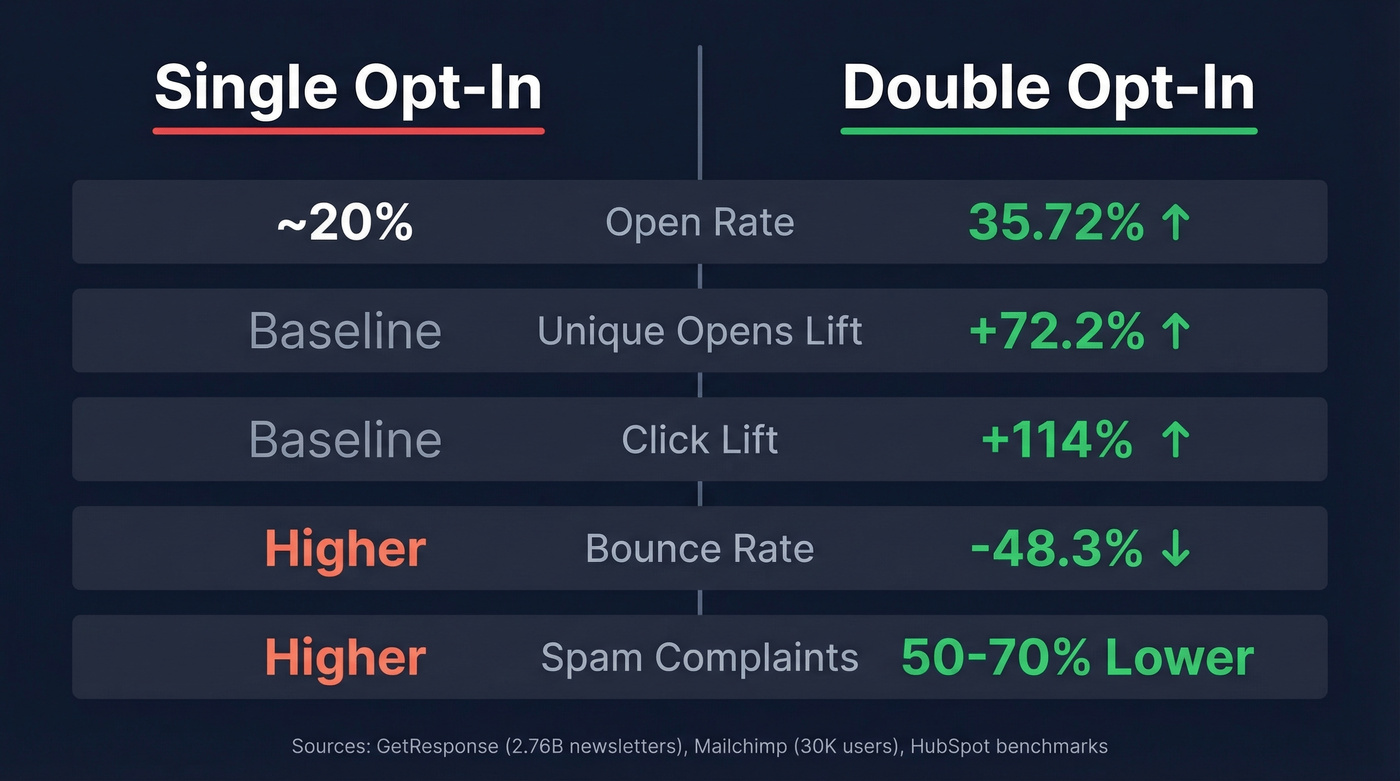
GetResponse analyzed 2.76 billion individual newsletters across their premium SMB accounts. The headline finding: single opt-in produces a 1.28% subscription rate versus 0.33% for the two-step process. That's nearly 4x more raw signups with single opt-in. Sounds like a slam dunk - until you look at what happens after signup.
| Metric | Single Opt-In | Double Opt-In |
|---|---|---|
| Subscription rate | 1.28% | 0.33% |
| Open rate | ~20% | 35.72% |
| Unique opens lift | Baseline | +72.2% |
| Click lift | Baseline | +114% |
| Bounce reduction | Baseline | -48.3% |
| Confirmation rate | 100% (no step) | 65-90% |
| Spam complaints | Higher | 50-70% lower |
Sources: GetResponse (2.76B newsletters), Mailchimp benchmark of 30,000 users, HubSpot community benchmark
DOI lists in the GetResponse study hit a 35.72% open rate overall. In Arts & Entertainment, confirmed-subscriber lists reached 41.95% versus 19.71% for single opt-in - more than double the engagement from a smaller, cleaner list.
A widely cited Mailchimp benchmark of 30,000 users reinforced this pattern: DOI lists produced 72.2% more unique opens, 114% more clicks, and 48.3% fewer bounces. The bounce reduction alone justifies the switch for anyone who's had deliverability problems. And here's the thing - that 20-30% subscriber drop-off from the confirmation step isn't really a loss. Those are mistyped addresses, bot submissions, and people who weren't interested enough to click one button. Confirmation completion rates typically land between 65% and 90% depending on your industry and offer quality.
We've seen teams agonize over that raw signup number dropping, only to realize their cost-per-engaged-subscriber actually went down after switching to DOI. Fewer contacts, more revenue per contact. That's the math that matters.
Why a Confirmed List Is Worth the Tradeoff
Email marketing generates $36 for every $1 spent. List quality directly impacts how much of that return you actually capture. And the deliverability environment is getting harder, not easier.
Gmail and Yahoo's bulk-sender policies use a 0.3% spam complaint threshold. Cross that line and your deliverability drops across future sends from that domain - not just the offending campaign. The two-step confirmation process is one of the most effective ways to stay under that threshold, because confirmed subscribers are 50-70% less likely to hit the spam button.
Global inbox placement dropped to 83.5% in 2024, down 1.9% year-over-year. That means roughly 1 in 6 emails never reaches the inbox. Only 9.7% of domains implement DMARC authentication, even though correct setup improves inbox placement by 5-7 percentage points. Every unverified, disengaged, or invalid address on your list makes that ratio worse for your legitimate contacts too.
Then there's list decay. Email lists degrade at roughly 28% per year - people change jobs, abandon addresses, switch providers. Without DOI filtering new signups, you're adding bad addresses on top of naturally decaying ones.
Let's be honest: picture your boss asking why 30% of the list has never opened a single email. With single opt-in, you don't have a good answer. With confirmed subscribers, every address on your list clicked a verification link at some point. The conversation shifts from "why is our list so dead?" to "how do we re-engage lapsed subscribers?"
DOI protects the front door. But for contacts already in your database - decaying at 28% per year - you need a different solution. Prospeo's 5-step email verification catches what DOI can't reach: invalid addresses, catch-all domains, and spam traps across your existing list. Pair the two and you've got clean inbound and clean existing data.


DOI filters bad addresses at signup. But 28% of your existing list decays every year. Prospeo's 5-step verification catches invalid emails, spam traps, and catch-all domains across your entire database - at $0.01 per email with 98% accuracy.
Stop bleeding deliverability on contacts DOI can't protect.
When Single Opt-In Makes More Sense
DOI isn't universally the right call. Skip it in these scenarios:
- High-volume B2C lead gen with aggressive nurture sequences that quickly identify and remove non-engagers
- Time-sensitive campaigns where a 24-hour confirmation delay kills the conversion - flash sales, event registrations with immediate access
- Low-risk industries where spam complaints are rare and list quality is maintained through other means
- Real-time email verification already baked into your signup flow, validating addresses before they hit your list
Here's our hot take: if your deal sizes are small and you're running pure volume plays, single opt-in with aggressive list hygiene can outperform DOI. But the moment your bounce rate crosses 5%, your domain reputation takes a hit, or you're sending to European audiences - particularly Germany, Austria, or Switzerland - switch immediately. The risk-reward math flips fast when deliverability problems compound.
Compliance: Country-by-Country Requirements
What GDPR, CAN-SPAM, and CASL Say
None of the three major email regulations explicitly mandate double opt-in. CAN-SPAM doesn't require it. CASL doesn't require it. GDPR doesn't require it. But GDPR does require demonstrable consent under Articles 5(2), 7, and 24 - and the two-step confirmation process is the strongest way to prove that consent exists. The German Federal Court of Justice (BGH) has specifically ruled that IP logging alone is insufficient to demonstrate consent, making DOI effectively mandatory in practice for German audiences.
Where DOI Is Required or Expected
| Country/Region | DOI Status | Legal Basis |
|---|---|---|
| Germany | Required | BGH precedent + DSK 2022 guidance |
| Austria | Required/Expected | Common enforcement practice |
| Greece | Required/Expected | Common enforcement practice |
| Switzerland | Required/Expected | Common enforcement practice |
| Luxembourg | Required/Expected | Common enforcement practice |
| Norway | Required/Expected | Common enforcement practice |
| Italy | Moving toward required | Garante June 4, 2025 decision |
| EU (GDPR generally) | Best practice, not mandated | Articles 5(2), 7, 24 |
| US (CAN-SPAM) | Not required | - |
| Canada (CASL) | Not required | - |
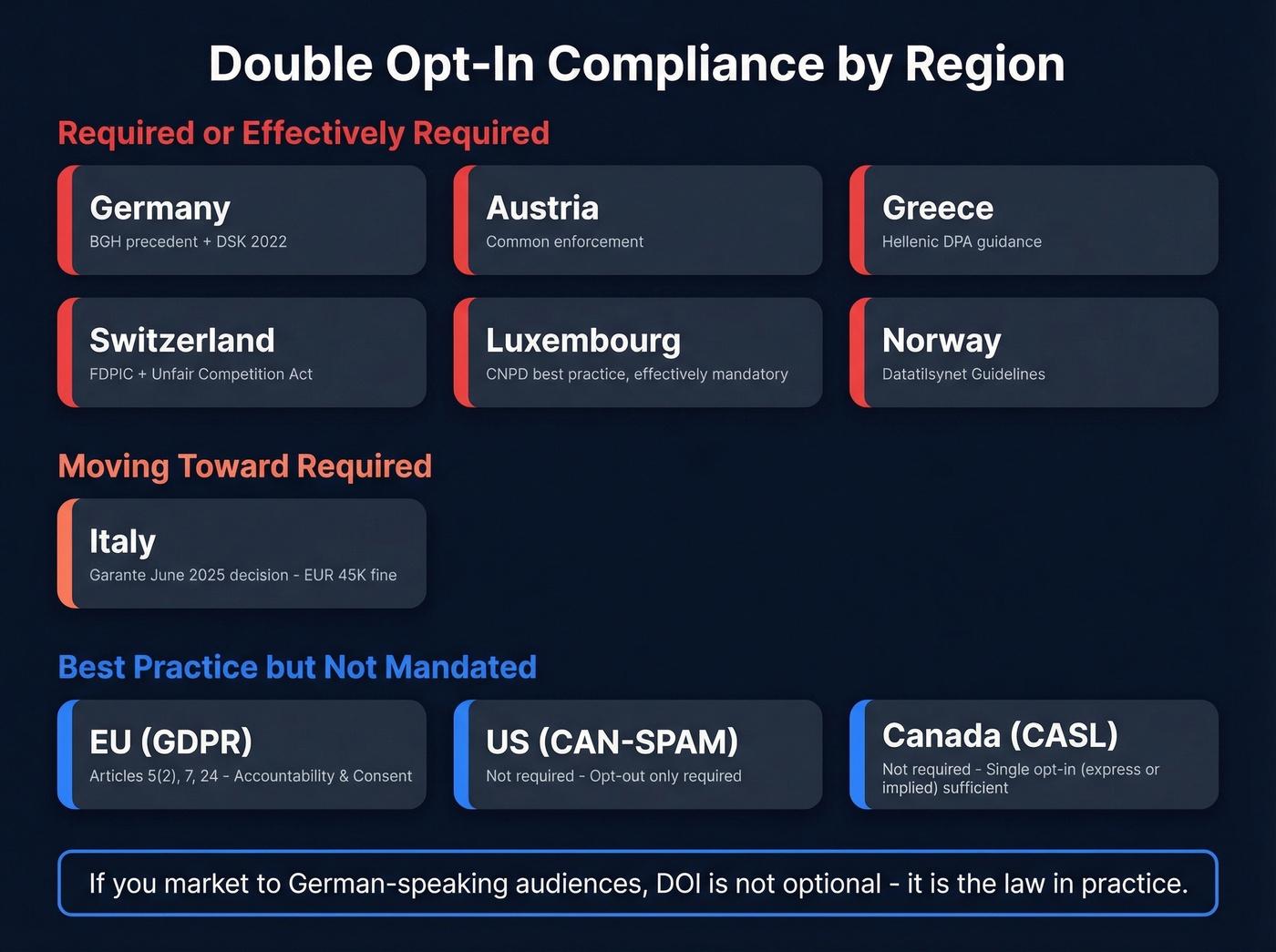
If you're sending to German, Austrian, or Swiss audiences, DOI isn't optional. It's the law in practice. The German Data Protection Conference (DSK) 2022 guidance treats it as the required standard for direct marketing consent.
Italy's 2025 Ruling Changes the Game
On June 4, 2025, Italy's data protection authority (Garante) fined Noi Compriamo Auto S.r.l. EUR 45,000 for unlawful processing tied to marketing emails. The decision found that logs and IP addresses were unreliable as proof of consent and stated that "documentation of consent via double opt-in constitutes, to date, a minimum standard of protection."
Italy isn't fully in the "required" column yet, but the direction is unmistakable. If you're marketing to Italian audiences, implement DOI now rather than waiting for the next enforcement action.
SMS Consent Requirements
TCPA requires prior express written consent for promotional texts, with penalties of $500-$1,500 per unauthorized message. Carriers like T-Mobile, Verizon, and AT&T enforce their own guidelines on top of that, with fines up to $10,000 per violation and the ability to block your number entirely. Two-step confirmation isn't universally mandated by carriers for SMS, but it's the safest compliance posture given the penalty exposure. With 10DLC registration requirements tightening, unregistered A2P messages face throttling or outright blocking.
How to Set Up Double Opt-In
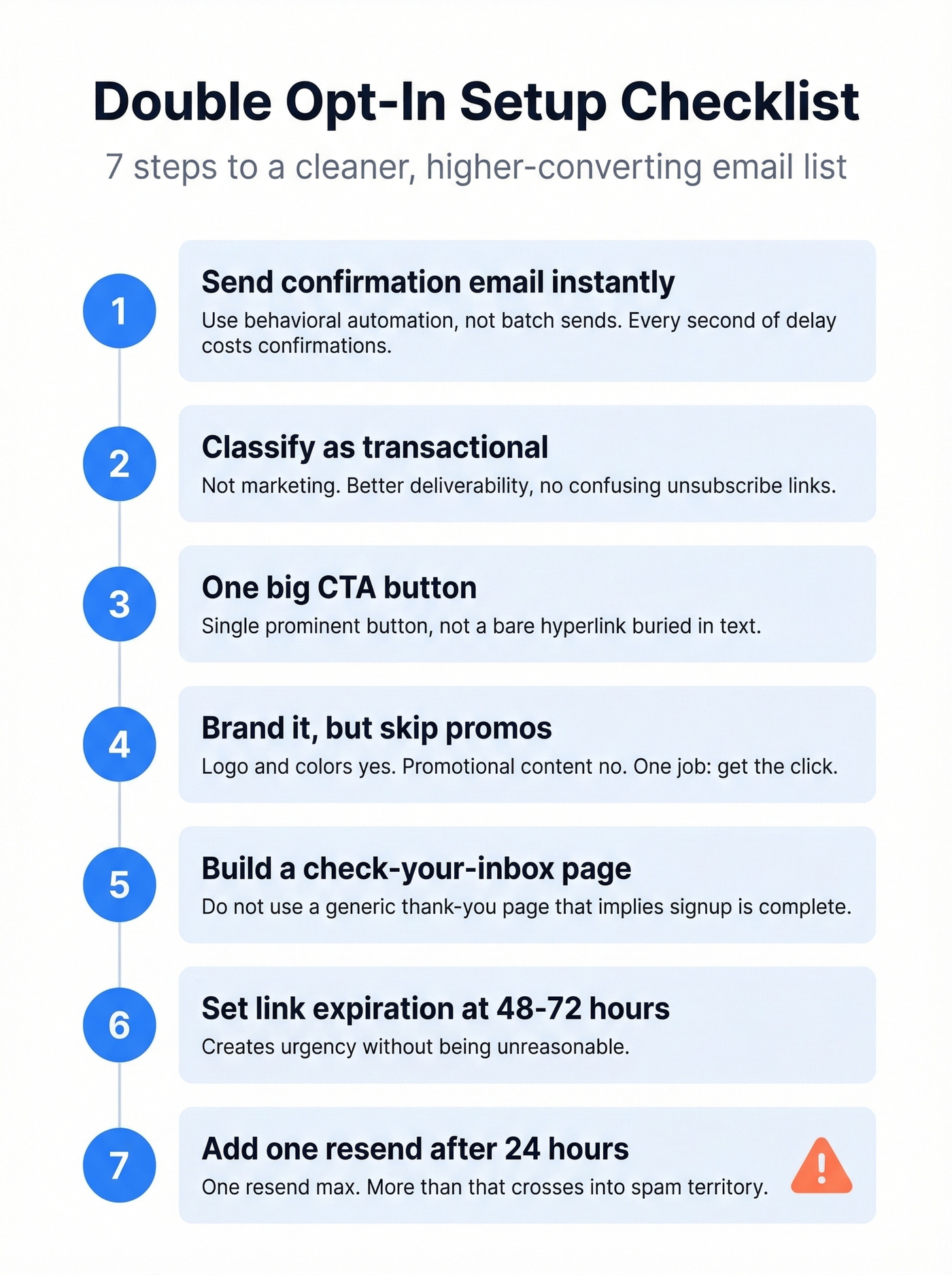
Implementation Checklist
- Trigger the confirmation email immediately - use behavioral automation, not batch sends. Every second of delay costs you confirmations.
- Classify the confirmation email as transactional, not marketing. This improves deliverability and avoids confusing unsubscribe links.
- Use a single, prominent CTA button rather than a bare hyperlink buried in text. One button, one action.
- Brand the email with your logo and colors, but skip any promotional content. The only job of this email is getting the click.
- Create a "check your inbox" confirmation page after form submission. Don't use a generic thank-you page that implies the process is complete.
- Set link expiration at 48-72 hours to create urgency without being unreasonable.
- Build a resend flow for non-confirmers - one resend after 24 hours, maximum. More than that crosses into spam territory.
Implementation varies by ESP. Mailchimp, Klaviyo, and HubSpot all handle DOI configuration differently - check your platform's documentation for list-level vs. account-level settings. When configuring your forms for email collection, make sure the form tool itself isn't bypassing your ESP's DOI settings by adding contacts directly to the list.
Confirmation Emails That Convert
The lead magnet version consistently outperforms every other template format because it ties confirmation to an immediate reward. Here's what it looks like:
Lead magnet (highest-converting):
Subject: "Confirm & get your [resource name]"
Body: "Your [guide/template/checklist] is ready - confirm your email to unlock the download. We'll send it immediately after you click."
CTA: "Confirm & Get My Free Guide"
For other scenarios:
| Template Style | Best Subject Line | CTA Text | Use When |
|---|---|---|---|
| Standard | "Almost there - confirm your email" | "Confirm My Subscription" | General newsletter signups |
| Minimalist | "One click to confirm" | "Yes, Subscribe Me" | Highly engaged audiences like existing customers or event attendees |
| Social proof | "Join 15,000+ marketers - confirm your spot" | "Confirm & Join" | Community-driven lists with strong brand recognition |
Subject lines that reference what the subscriber gets outperform generic "please confirm" lines. We've tested this repeatedly - the reward-based framing wins every time. (If you want more swipeable options, see these email subject line examples.)
Troubleshooting Common Problems
Confirmation Emails Landing in Spam
One Reddit user on r/Emailmarketing reported a 0.19% spam rate on their confirmation email while sending 400K emails per month - and every single complaint came from Microsoft addresses (Outlook, Hotmail, Live, MSN). Zero from Gmail or iCloud. This isn't surprising: Microsoft's inbox placement rate sits at 75.6% compared to Gmail's 87.2%, which partly explains why confirmation email complaints cluster on those addresses.
The fix: use a branded HTML template with a clear button CTA, ensure DKIM/SPF/DMARC authentication is properly configured, and consider a dedicated transactional subdomain like mail.yourdomain.com to isolate confirmation email reputation from your marketing sends. Given that only 9.7% of domains implement DMARC, this single step puts you ahead of the vast majority of senders. (If you're debugging issues end-to-end, use an email deliverability guide to avoid missing root causes.)
Selective DOI Across Lists
A common frustration on r/Emailmarketing: you want DOI for newsletter subscribers but not for meeting requests or event signups. Tools like MailerLite and Zapier make this surprisingly painful. The fix is to configure DOI at the group or list level inside your ESP, not in the form tool or automation platform. Most ESPs support per-list settings - the problem is that form builders and Zapier workflows bypass those settings by adding contacts directly.
Low Confirmation Rates
If you're below the 65-90% benchmark, check three things. First, your subject line - "Confirm your email" is fine, but "Confirm & get your [resource]" converts better. Second, your confirmation page copy - it should say "Hold up, check your inbox and confirm before we can send you anything," not "Thanks for signing up!" And third, build that one-time resend flow. A single reminder 24 hours later recovers a meaningful chunk of non-confirmers without being aggressive.
Confirmed subscribers open 72% more - but only if your outbound data matches that quality. Prospeo verifies 143M+ emails on a 7-day refresh cycle, so every contact you add to your CRM is as clean as your DOI signups.
Give your outbound list the same quality standard as your inbound.
FAQ
Is double opt-in required by GDPR?
No - GDPR doesn't mandate it, but it requires demonstrable consent under Articles 5(2) and 7. DOI confirmation is the strongest way to prove consent exists and is effectively required in Germany, Austria, and several other EU countries through national court rulings and regulatory guidance.
What's a good confirmation rate?
Aim for 65-90%, depending on your industry and offer quality. If you're below 65%, optimize your confirmation email subject line with reward-based framing, add a clear "check your inbox" interstitial page, and build a one-time resend flow at the 24-hour mark.
Does double opt-in hurt list growth?
Expect to lose 20-30% of subscribers who never confirm. But confirmed subscribers produce 72%+ more opens, 114% more clicks, and 48% fewer bounces. The contacts who skip confirmation were never going to engage. Your list shrinks, but revenue per contact goes up.
How do I clean contacts added before switching to DOI?
Run your existing list through email verification to catch invalid addresses, catch-all domains, and spam traps. Upload a CSV to a tool like Prospeo and get results in minutes - its 5-step verification process handles catch-all detection and spam-trap removal at 98% accuracy. That's the highest-impact action alongside implementing DOI for new signups.