

Email Address Breakdown: What Every Part Does and Why It Matters
In 2026, an estimated 376.4 billion emails are sent daily - and the number keeps climbing. Every single one depends on a tiny string of characters being formatted correctly. Yet when a sysadmin posted a quiz on r/sysadmin asking people to identify valid email addresses, most got it wrong. A proper email address breakdown reveals rules that are simultaneously looser and stricter than almost anyone realizes.
Quick version: Every email address has three core parts - the local-part (your username), the @ symbol, and the domain (where the mail goes). The local-part can be up to 64 characters, the domain up to 255. The practical total limit is 254 characters, not the 320 figure you'll see elsewhere. Most formatting rules are looser than you think, but most providers are stricter than the standard allows.
Three Core Parts of an Email Address
RFC 5322 defines an email address in one clean line:
[addr-spec = local-part "@" domain](https://datatracker.ietf.org/doc/html/rfc5322)
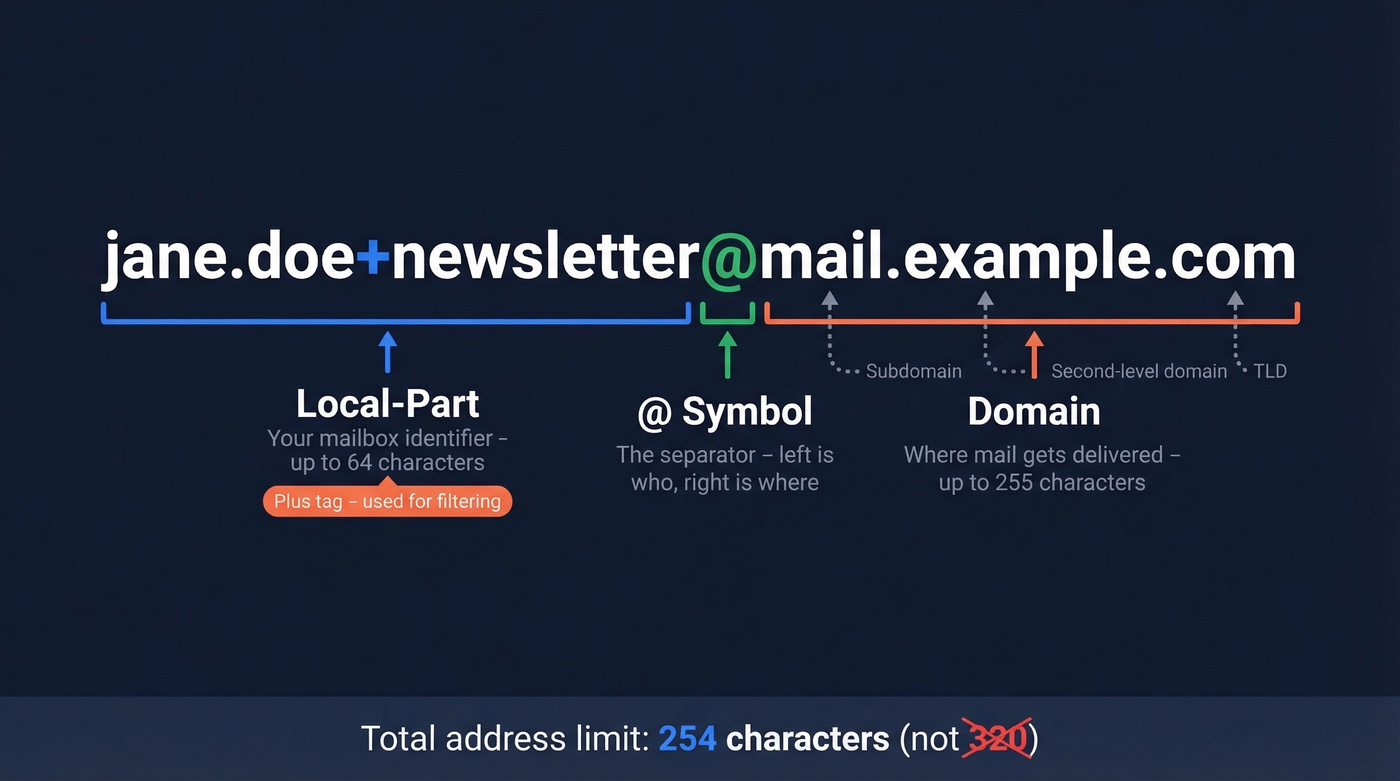
Three pieces. Let's break down jane.doe+newsletter@mail.example.com:
Local-part (jane.doe+newsletter) - everything before the @. This identifies the specific mailbox and can be up to 64 octets long, which in most systems means 64 ASCII characters. The +newsletter portion is a plus tag - it doesn't change where the email lands, just adds metadata for filtering.
@ symbol - the separator. It does exactly one thing: tells the system "everything to my left is the recipient, everything to my right is where to find them." No ambiguity, no variation.
Domain (mail.example.com) - everything after the @. This tells mail servers where to deliver. It can be up to 255 octets. Here, mail is a subdomain, example is the second-level domain, and .com is the TLD. The total address - local-part + @ + domain - caps at 254 characters, not 320. The "320" number comes from adding 64 + 1 + 255, but the practical limit for a routable email address is 254.
Local-Part Deep Dive
The local-part is where things get weird. RFC 5322 defines two forms: dot-atom and quoted-string.
Dot-atom is what you're used to. Letters, numbers, and a surprisingly generous set of special characters. Dots are allowed but can't be the first character, the last character, or appear consecutively - john..doe@ is invalid.
Here's what's actually permitted in a dot-atom local-part:
| Allowed | Not allowed (unquoted) |
|---|---|
a-z, A-Z, 0-9 |
Spaces |
. (with dot rules) |
(), <>, [] |
!#$%&'*+/=?^_{}\|~ |
,;: |
- |
" (outside quotes) |
+ (plus addressing) |
@ (obviously) |
Quoted-string is the local-part's escape hatch. Wrap the local-part in double quotes and suddenly spaces, escaped characters, and nearly anything goes. "jane doe"@example.com is valid. So is ""@example.com - a quoted empty string.
Sysadmins on r/sysadmin regularly describe local-part rules as "insane" - and they're not wrong. Technically valid addresses include 'SLEEP(10000)@example.com and !#$&'*+-/=?^{|}~@example.com. They look like injection payloads. They're just RFC-compliant.
Domain Part and Mail Routing
The domain tells the internet's mail infrastructure where to deliver. When you send to jane@example.com, your mail server queries DNS for example.com's MX (Mail Exchange) records. Those MX records point to the actual mail server - maybe mx1.google.com if the company uses Google Workspace, or mail.protection.outlook.com for Microsoft 365.
No MX record? The sending server falls back to A or AAAA records and tries delivering directly to the domain's IP address. This fallback is rare in practice but it's in the spec.
Subdomains work fine in email addresses. user@mail.company.com is perfectly valid - the MX lookup just happens against mail.company.com instead of company.com. One concept worth knowing: catch-all domains. A catch-all configuration accepts mail sent to any local-part at that domain, even ones that don't correspond to a real mailbox. It's useful for small businesses that don't want to miss messages, but it's a spam magnet and makes email verification harder since you can't distinguish real addresses from typos.
And here's a detail that matters for security: the address in the email header - what you see in your inbox - can differ from the SMTP envelope address that servers use for routing. This mismatch is how email spoofing works, and it's the entire reason SPF, DKIM, and DMARC exist.
RFC vs. Reality: What Providers Actually Accept
Here's the thing: what the RFC allows and what the real world accepts are two very different sets.
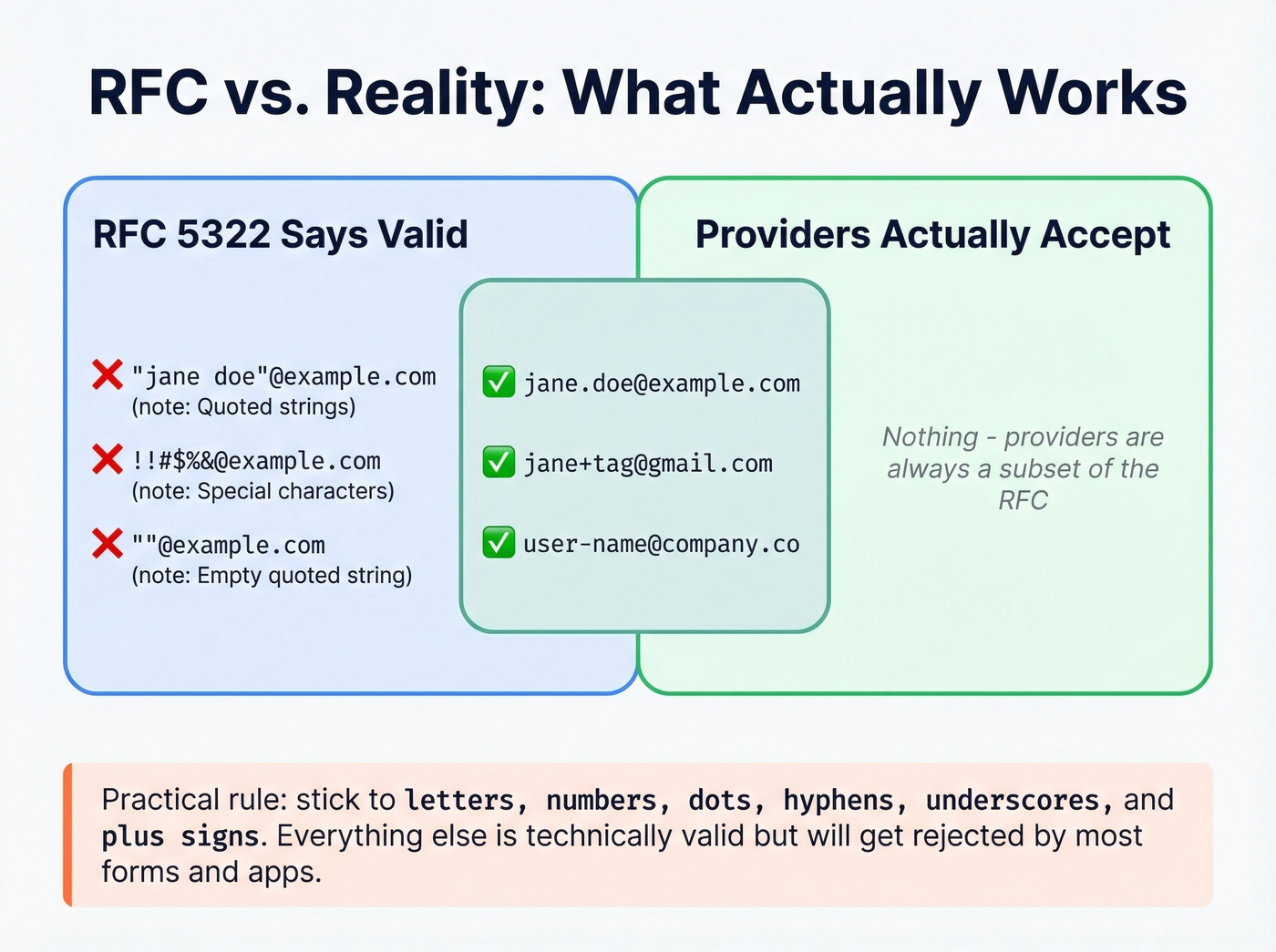
That r/sysadmin quiz thread highlighted addresses like ""@example.com, maybe-like-this @example.com with a space before the @, and fed-up-yet@ example.com with a space after it. These are exactly the kinds of edge cases that confuse people - and they're rejected by virtually every signup form, email client, and web application you'll encounter.
This isn't a bug. In our experience, most forms reject RFC edge cases for good reason: allowing quoted strings and special characters opens the door to injection attacks, confuses users, and creates support headaches nobody wants.
| Format | RFC-valid? | Accepted in practice? |
|---|---|---|
jane.doe@example.com |
✅ | ✅ Universally |
jane+tag@example.com |
✅ | ✅ Most providers |
"jane doe"@example.com |
✅ | ❌ Most forms reject |
""@example.com |
✅ | ❌ Rejected everywhere |
user @example.com |
- | ❌ Rejected everywhere |
!#$%&@example.com |
✅ | ❌ Most forms reject |
The practical rule: if an address uses only letters, numbers, dots, hyphens, underscores, and plus signs in the local-part, it'll work almost everywhere. Anything beyond that is technically valid but usually not worth supporting in consumer-facing forms.
Plus Addressing by Provider
Plus addressing - also called subaddressing - lets you append +anything to your local-part. jane+receipts@gmail.com delivers to jane@gmail.com. It's great for filtering, tracking which services sell your email, and organizing inbound mail.
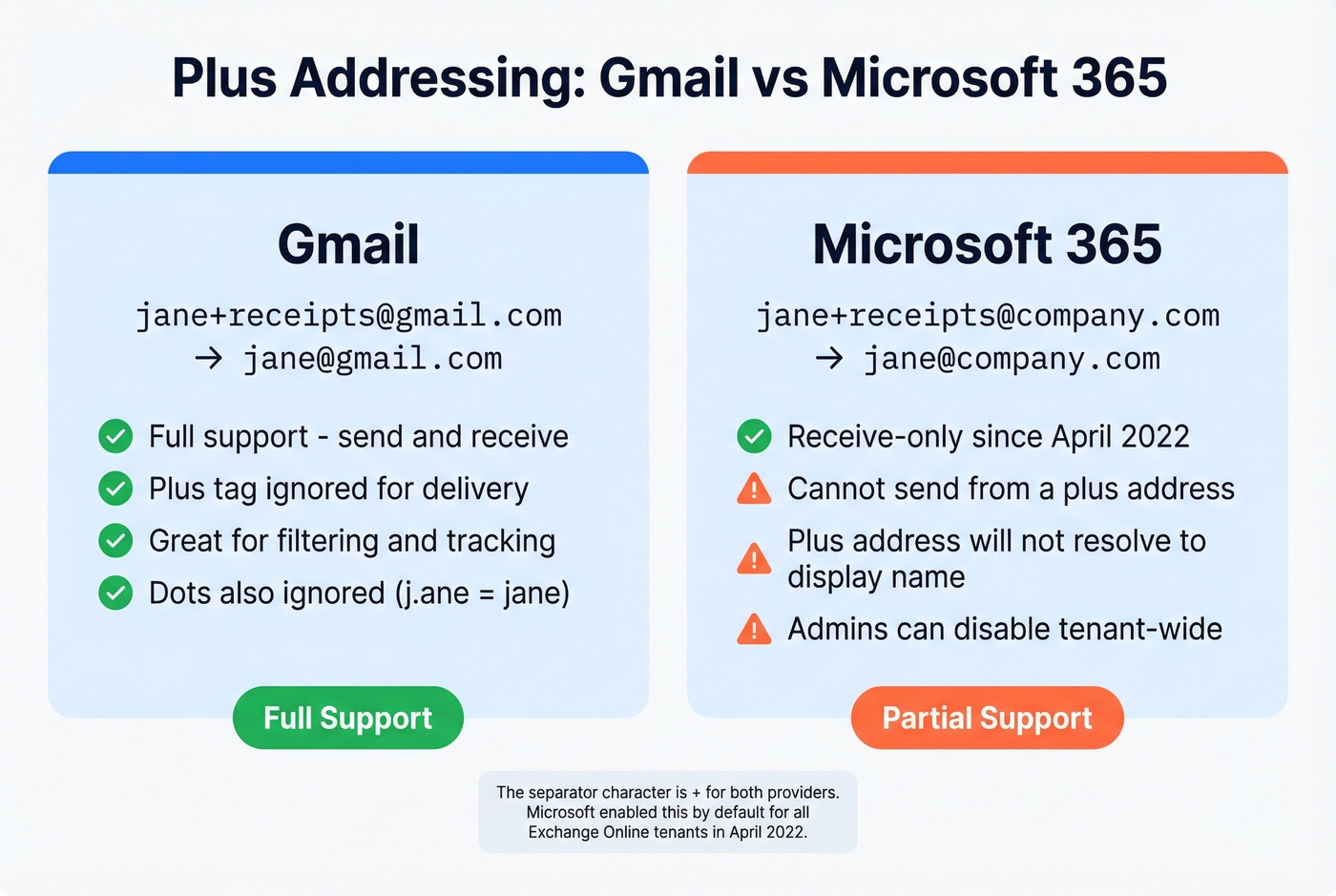
Support varies:
| Provider | Supported? | Separator | Notes |
|---|---|---|---|
| Gmail | ✅ Full | + |
Send and receive |
| Microsoft 365 | ✅ Default | + |
Receive-only since Apr 2022 |
Microsoft first rolled out plus addressing in October 2020, then made it the default for all Exchange Online tenants in April 2022. There's a quirk, though: plus addresses are receive-only. You can't send from a plus address in Outlook, and the plus address won't resolve to the user's display name. Admins can disable it tenant-wide with Set-OrganizationConfig -DisablePlusAddressInRecipients $true.

Understanding email address structure matters - but what matters more is whether the address you're sending to actually works. Prospeo's 5-step verification handles catch-all domains, strips spam traps and honeypots, and delivers 98% email accuracy across 143M+ verified addresses.
Stop guessing which addresses are real. Verify before you send.
Case Sensitivity and Normalization
The local-part is technically case-sensitive per RFC 5322. In practice, every major provider treats it as case-insensitive. Jane@gmail.com and jane@gmail.com go to the same inbox. The domain is always case-insensitive.
Gmail adds another wrinkle: it ignores dots in the local-part entirely. j.a.n.e@gmail.com, jane@gmail.com, and ja.ne@gmail.com all deliver to the same mailbox. This creates a real problem for apps. A developer on r/webdev tested Linear and Resend and found both treat dot variants as separate accounts, meaning one person can accidentally create duplicates - or worse, access someone else's data.
Best practice for normalization: lowercase the domain, trim whitespace, and leave the local-part alone unless you're specifically handling Gmail addresses. Don't strip dots globally - that'll break addresses on every other provider.
Internationalized Email Addresses
Email addresses aren't limited to ASCII anymore, but support is uneven.
Domain internationalization works well. Unicode domains get converted to an ASCII-compatible form via IDNA/Punycode behind the scenes, and virtually all modern mail servers handle this without issues.
Local-part internationalization is a different story. UTF-8 characters in the local-part require SMTPUTF8 support (RFC 6531) on both the sending and receiving servers. Postfix 3 added this in February 2015, and major providers have been rolling it out gradually. But support across the broader ecosystem - web forms, CRMs, marketing platforms - remains inconsistent.
Practical rule of thumb: treat internationalized domains as safe, and UTF-8 local-parts as unreliable for now. If you're building systems, accept them gracefully but don't assume they'll work end-to-end.
How to Validate an Email Address
Look, regex alone won't save you. Email validation should be progressive - start cheap, get more expensive only when needed. If you're doing this for outbound, it helps to pair validation with an email deliverability checklist so you don't fix syntax while ignoring reputation.
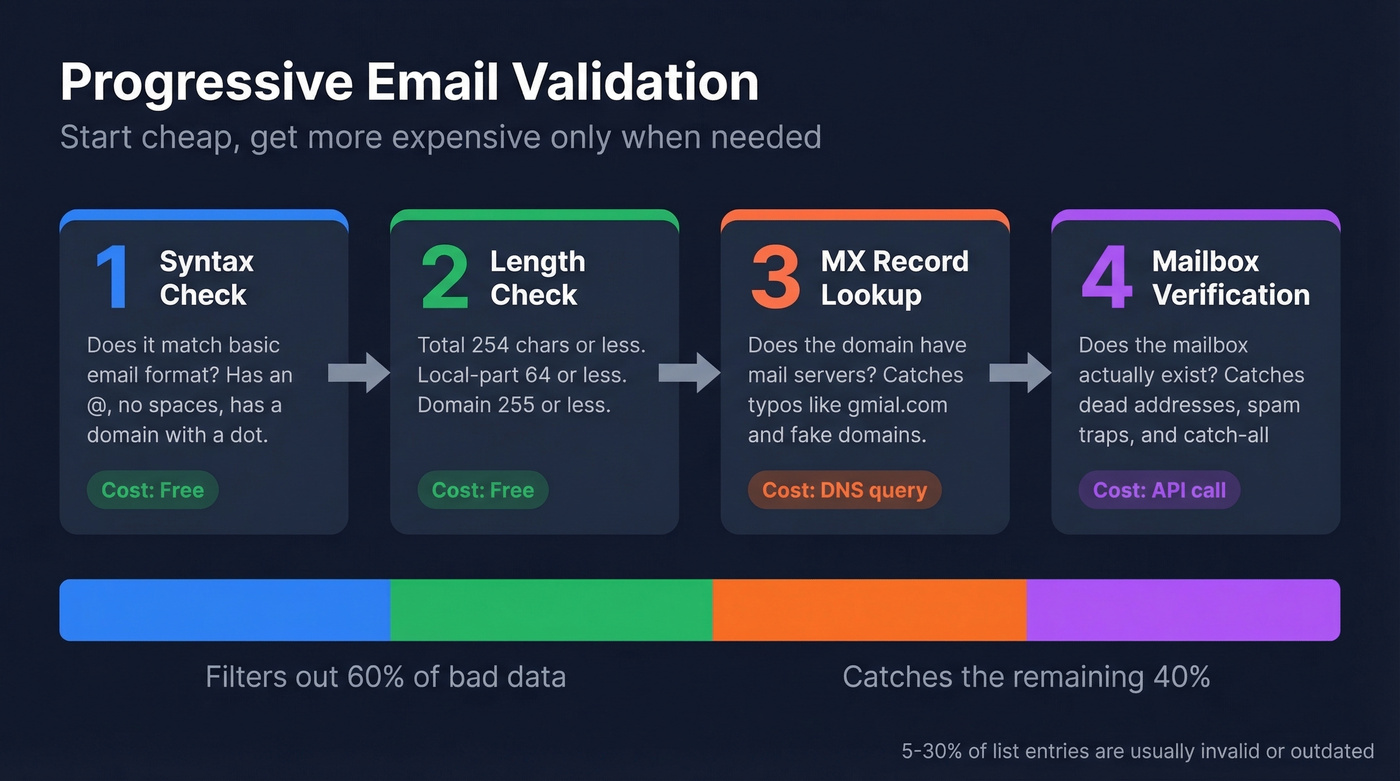
Step 1: Syntax check. A permissive regex handles this:
^[^\s@]+@[^\s@]+\.[^\s@]+$
This catches the obvious garbage - missing @, spaces, no domain - without rejecting valid edge cases. Good enough for form validation.
Step 2: Length check. Total address must be 254 characters or fewer. Local-part 64 or fewer. Domain 255 or fewer. Most developers skip this and regret it later.
Step 3: MX record lookup. Confirm the domain actually has mail servers configured. This eliminates typo domains like gmial.com and completely fake domains.
Step 4: Mailbox verification. This is where syntax stops and deliverability starts. As the canonical Stack Overflow thread on email regex puts it: syntax validation doesn't prove a mailbox exists. Running a verification pass through a tool like Prospeo before import flags dead addresses in seconds - catching the 5-30% of list entries that are usually invalid or outdated.
Why This Matters for Deliverability
Understanding each component in an email address breakdown catches formatting errors. Verification catches everything else - dead mailboxes, spam traps, catch-all domains that mask invalid addresses.
We've seen teams import 1,200 contacts from a trade show, skip verification, and bounce 28% on the first sequence. That kind of bounce rate damages your sender reputation for weeks. It's the most common deliverability mistake in outbound - and it's entirely preventable. If you're troubleshooting, start with email bounce rate benchmarks and then work backward into list quality.
Real talk: if your bounce rate is above 5%, your data is the problem, not your copy or your targeting. Fix the data first. Everything else is downstream. (If you're scaling volume, also watch your email velocity so you don't compound the issue.)
Catch-all domains, plus addressing quirks, RFC edge cases - email validation is a minefield. Prospeo's proprietary email-finding infrastructure verifies every address through catch-all handling, spam-trap removal, and honeypot filtering on a 7-day refresh cycle. The result: bounce rates under 4% for teams like Snyk and Meritt.
Get emails that survive every validation check at $0.01 each.
Quick Reference Cheat Sheet
| Rule | Value |
|---|---|
| Max total length | 254 characters |
| Max local-part | 64 characters |
| Max domain | 255 characters |
| Allowed local-part chars | a-z 0-9 . ! # $ % & ' * + - / = ? ^ _ { \| } ~ |
| Dots in local-part | No leading, trailing, or consecutive |
| Case-sensitive? | Technically yes; practically no |
| Plus addressing | Commonly supported via + |
| UTF-8 local-parts | Requires SMTPUTF8; inconsistent support |
| IDN domains | Broadly supported via Punycode |
| Normalization advice | Lowercase domain, trim whitespace, don't strip dots |
FAQ
What are the three parts of an email address?
Every email address has three parts: the local-part (username before the @), the @ symbol (separator), and the domain (destination after the @). The local-part identifies the mailbox, the domain tells servers where to route the message, and the total can't exceed 254 characters.
What characters are allowed in an email address?
Letters, numbers, dots, hyphens, and specials like +, _, !, #, $, %, &, ', *, /, =, ?, ^, {, |, }, ~ in the local-part. The domain allows letters, numbers, hyphens, and dots. Quoted strings in the local-part allow nearly anything, including spaces - but most providers reject them.
Is the local-part of an email case-sensitive?
Technically yes per RFC 5322, but every major provider treats it as case-insensitive. John@example.com and john@example.com deliver to the same inbox on Gmail, Outlook, Yahoo, and every other major service. Always lowercase when storing or comparing addresses.
How do you verify an email address actually exists?
Regex only checks format - not whether a mailbox is real. Professional verification services run multi-step checks: syntax validation, MX record lookup, catch-all detection, spam-trap removal, and mailbox confirmation. This catches the 5-30% of list entries that are typically invalid, protecting your sender reputation before you hit send.