

Email Address Invalid - What It Means, Why It Happens, and How to Fix It
You've typed your email correctly - you're sure of it - and the form still flashes red: "email address invalid." Or worse, you've just sent a campaign to 10,000 contacts and 2,400 bounced. Same error, completely different problem, and the fix depends on which side of it you're on.
What You Need (Quick Version)
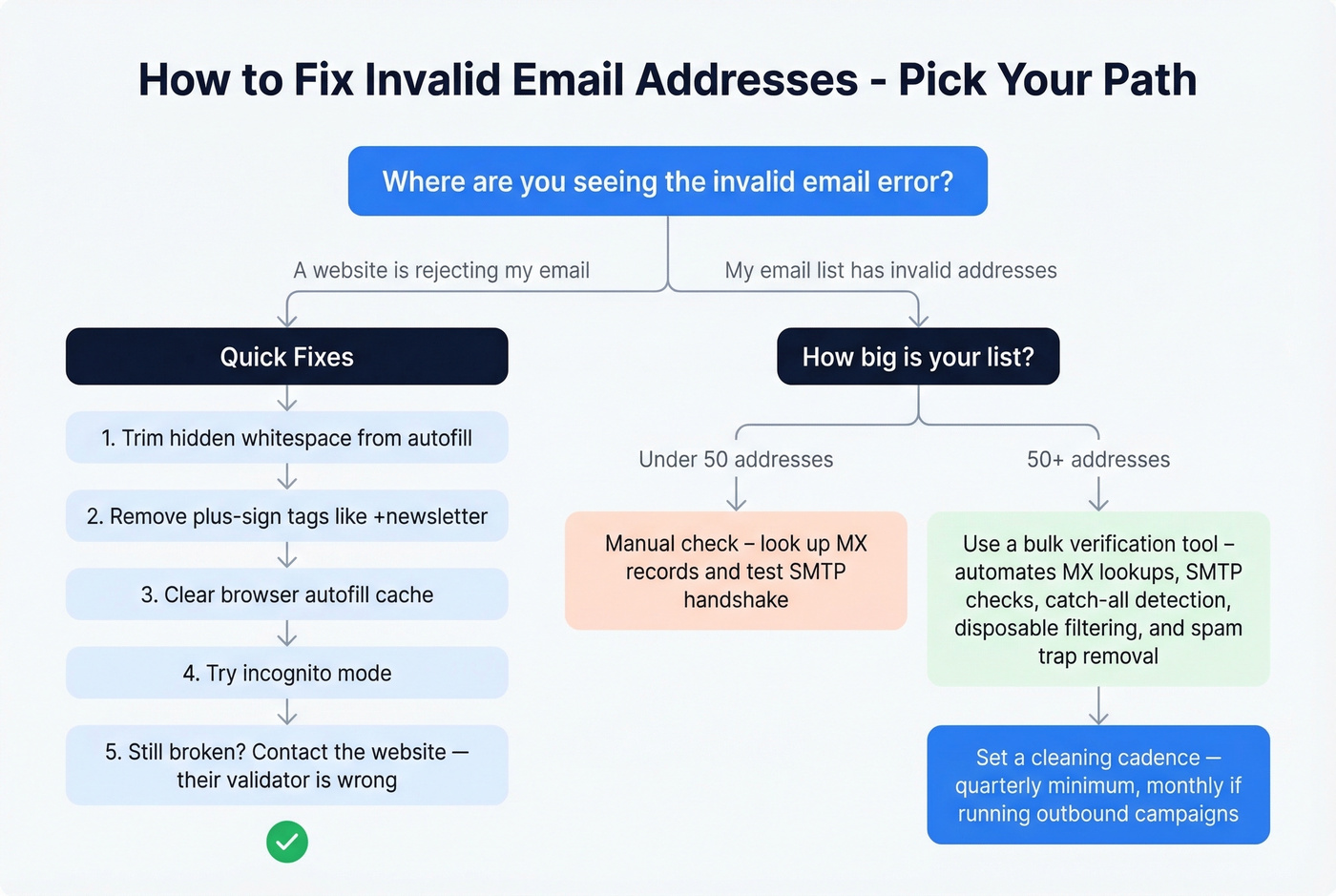
If a website is rejecting your email: It's almost certainly the website's validator, not your email. Try removing plus-signs, check for hidden whitespace from autofill, or open an incognito window.
If your email list has invalid addresses: At least 23% of any email list decays every year. You need a bulk verification tool - not a one-time cleanup.
If you want to prevent invalid emails entirely: Use real-time verification at the point of collection and clean your list quarterly.
What "Invalid" Actually Means
An invalid email address triggers one of two failures: the syntax doesn't comply with internet email format standards, or the mailbox simply doesn't exist at the recipient's mail server. Two failure modes, one error message.
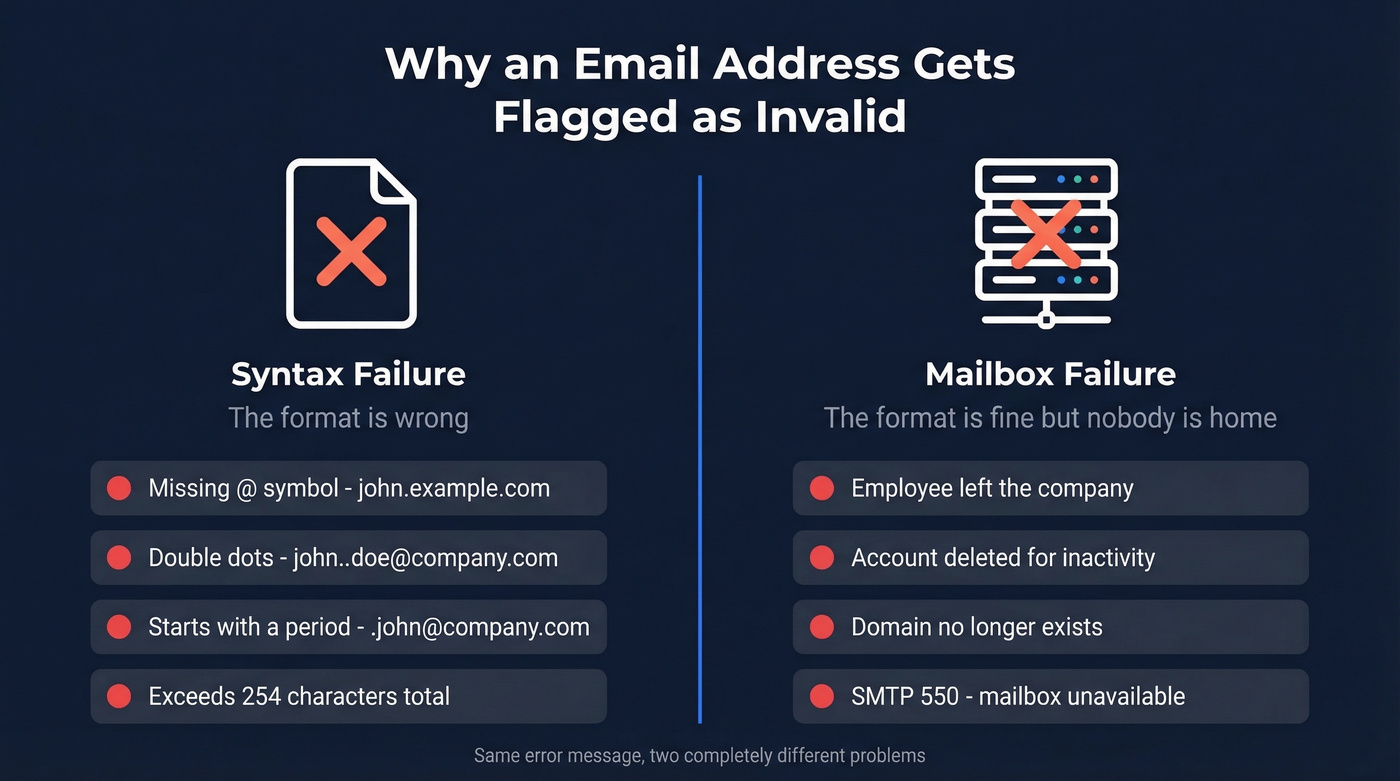
The local-part (everything before the @) can be up to 64 characters, the domain up to 255, and the entire address can't exceed 254 characters total. Most people never hit these limits, but automated systems generating addresses sometimes do.
The allowed characters in the local-part are broader than most people realize: letters, digits, and special characters including ! # $ % & ' * + - / = ? ^ _ { | } ~ and periods. Periods have rules though - you can't start with one, and you can't use two in a row. So john.doe@company.com is fine, but john..doe@company.com isn't.
On the server side, when a mail server can't find the mailbox, it returns an SMTP 550 response - "mailbox unavailable." The address might be perfectly formatted but point to a mailbox that was deleted six months ago.
Why Your Valid Email Gets Rejected
Here's the frustrating part: your email can be 100% valid per RFC 5322 and still get rejected by a website form. The problem isn't your email. It's their validator.
The most common culprit is plus-sign aliases. If you use yourname+newsletter@gmail.com to filter incoming mail, plenty of forms will reject it. Plus-addressing is explicitly valid per the RFC spec, but lazy regex patterns treat the + as an illegal character. The form is wrong, not you.
Other common reasons your valid email gets rejected:
- TLD-length restrictions. Some validators cap the domain extension at 3 characters, breaking addresses using
.info,.technology, or any of the hundreds of modern TLDs. As one Quora user put it: "validators absolutely suck." - Autofill whitespace injection. Browser autofill sometimes inserts invisible leading or trailing spaces. The form sees
john@example.comand rejects it. - Outlook autocomplete cache. A common scenario from r/sysadmin: a user couldn't email a shared mailbox because Outlook's autocomplete was serving a stale cached entry. Disabling autocomplete suggestions fixed it immediately.
- Quoted-string local parts. RFC 5322 allows quoted strings like
"john doe"@example.comwith spaces inside quotes. Almost no web form accepts this, even though it's technically valid.
Quick Fixes When Your Email Is Rejected
If a website or app is telling you your address isn't valid, work through these steps:
- Trim spaces. Copy your email into a plain text editor and check for leading or trailing whitespace. Paste the cleaned version back.
- Remove the plus-tag. If you're using
you+tag@gmail.com, try justyou@gmail.com. Set up a filter later. - Clear your browser's autofill cache. Go to settings, then autofill, then saved addresses, and delete or update the stored email entry.
- Clear Outlook's autocomplete cache. Start typing the recipient's name, hover over the suggestion, and click the X to remove it. Then type the full address manually.
- Try incognito mode. This isolates whether a browser extension or cached data is causing the issue.
- Check your email provider. Log in directly. If the account's been suspended or deactivated, that's your answer.
- Contact the website. If nothing else works, the problem is their validator. Tell them - they probably don't know it's broken.

You just read that 23% of email lists decay every year. Prospeo refreshes its 300M+ profiles every 7 days - not every 6 weeks like competitors. Every email passes 5-step verification including catch-all handling and spam-trap removal, delivering 98% accuracy.
Start with 75 free verified emails and see what clean data feels like.
Validation vs. Verification
These terms get used interchangeably, but they're different steps.
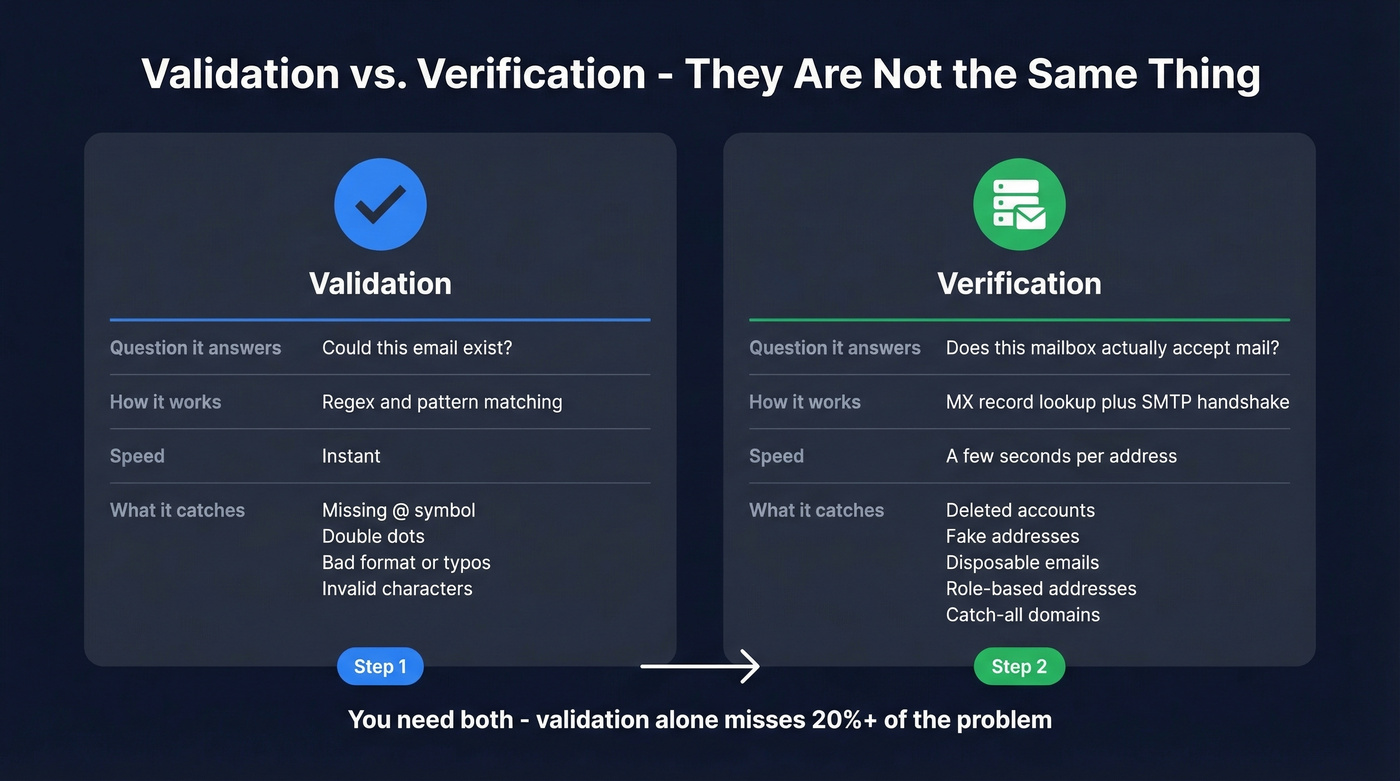
| Validation | Verification | |
|---|---|---|
| What it checks | Format and syntax | Mailbox existence |
| How it works | Regex / pattern matching | MX records + SMTP handshake |
| Catches | Typos, missing @, bad format | Deleted accounts, fake addresses, disposable emails, role-based addresses |
| Speed | Instant | Seconds per address |
Validation answers "could this email exist?" Verification answers "does this mailbox actually accept mail?" A proper email checker combines both. An address can pass validation with correct format and fail verification because the mailbox was deleted - or vice versa, when a catch-all domain accepts mail to any address, even nonexistent ones.
Full verification goes beyond a simple SMTP ping. It checks MX records, tests the SMTP handshake, detects disposable email providers like Guerrilla Mail or Mailinator, flags role-based addresses like info@ or sales@ that tank reply rates, and identifies catch-all domains. We've tested tools that only do syntax validation - they miss 20%+ of the problem.
Why Email Addresses Go Invalid Over Time
Email addresses aren't permanent. People leave jobs, companies rebrand, providers delete inactive accounts. The result is steady, measurable decay in any email list's quality.
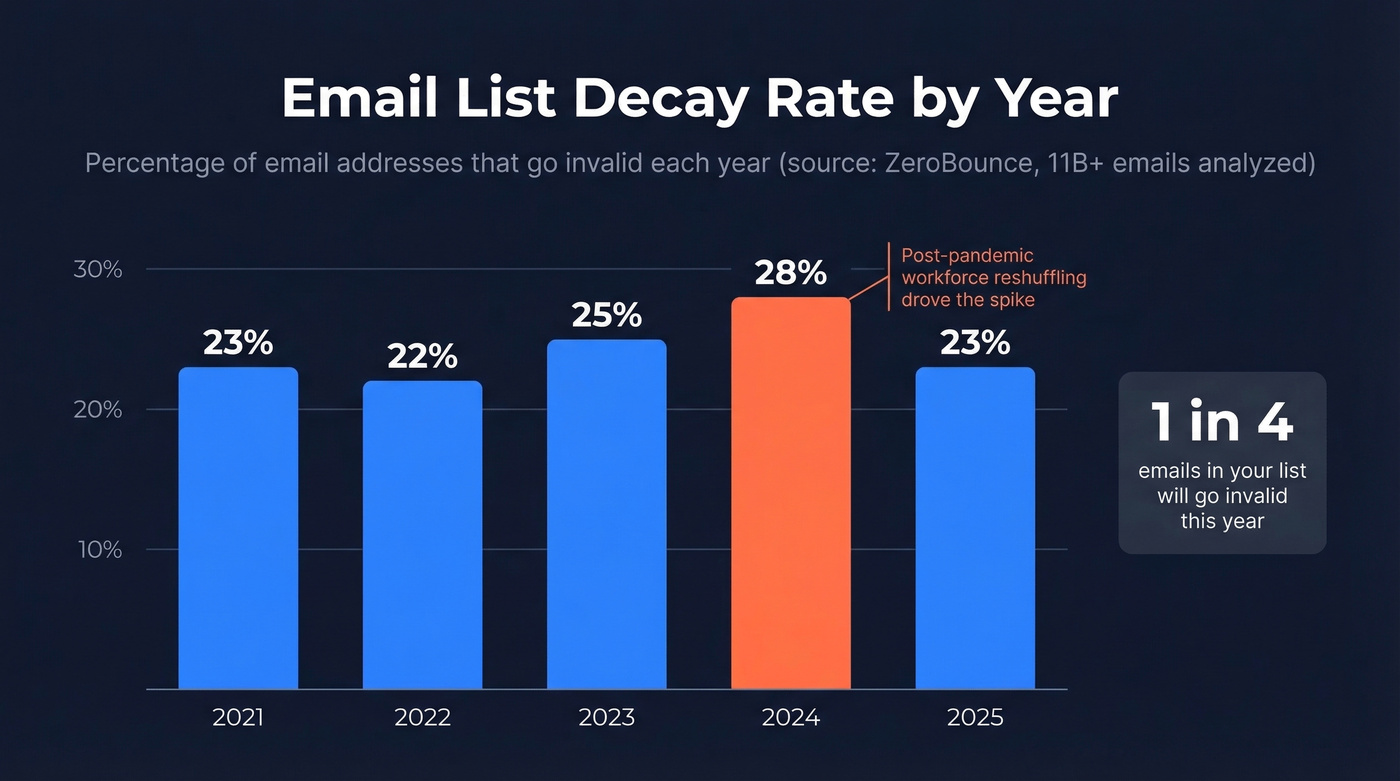
ZeroBounce analyzed over 11 billion email addresses in their 2025 Email Statistics Report and found that at least 23% of an email list degrades every year. That's the low-end estimate - catch-all addresses that may bounce later aren't counted. The five-year trend tells an interesting story:
| Year | Decay Rate |
|---|---|
| 2021 | 23% |
| 2022 | 22% |
| 2023 | 25% |
| 2024 | 28% |
| 2025 | 23% |
The 2024 spike to 28% reflects post-pandemic workforce reshuffling - mass layoffs, job changes, and company closures all accelerate address turnover. The 2025 drop back to 23% suggests stabilization, but that's still nearly a quarter of your list going stale every year. 2026 data isn't available yet, but the five-year trend suggests decay will remain in the 22-28% range.
The broader picture is worse. Only 62% of all emails submitted in 2024 were valid and safe to send. A MediaPost breakdown of verified addresses shows where the rest fall: 24.34% outright invalid, 10.80% catch-all, 1.59% abuse addresses, 1.74% do-not-mail, and 0.01% spam traps. That last category is tiny but devastating - even a handful of spam trap hits can get your domain blacklisted.
Google's inactive account deletion policy accelerates this. Gmail accounts unused for over two years are now scheduled for permanent deletion. If you're still mailing a list you built three years ago without cleaning it, a meaningful chunk of those Gmail addresses simply don't exist anymore.
What Invalid Emails Cost You
The direct cost is wasted sends. But the real damage is to your sender reputation, and that's harder to recover from.
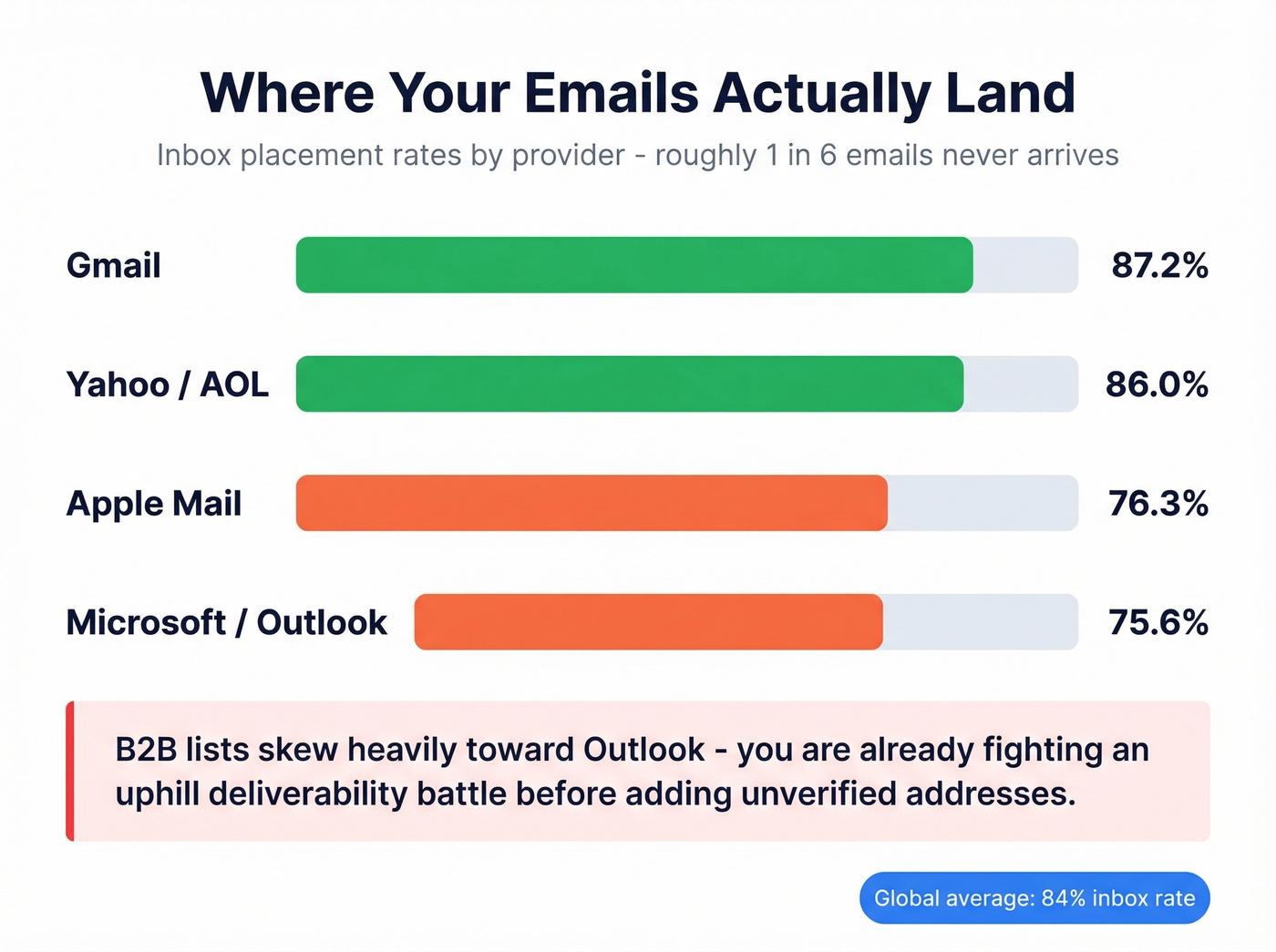
Globally, about 84% of emails reach the inbox - meaning roughly 1 in 6 never arrives. That average hides significant variation by provider:
| Provider | Inbox Rate |
|---|---|
| Gmail | 87.2% |
| Yahoo/AOL | 86.0% |
| Apple Mail | 76.3% |
| Microsoft | 75.6% |
If your prospect list skews toward corporate Outlook addresses - which most B2B lists do - you're already fighting an uphill deliverability battle. Adding unverified addresses to the mix makes it worse.
Gmail enforces a 0.3% spam complaint rate threshold. Cross it, and your inbox placement drops fast. The benchmark for acceptable bounce rates is under 2%, with under 1% being ideal. Industries like Beauty & Personal Care average 0.33%, while Construction hits 1.28%. Above 2%, you've got a data quality problem. Above 5%, and most ESPs will flag or suspend your account. We've seen teams lose sending privileges mid-campaign because they skipped list verification.
Let's be honest: if your average deal size is under $15k, you probably can't afford not to verify. The cost of a blacklisted domain - rebuilding sender reputation over weeks or months - dwarfs the cost of a verification tool by orders of magnitude.
There's also a compliance angle most teams ignore. CAN-SPAM violations carry penalties up to $53,088 per email. GDPR requires a lawful basis for processing, and mailing addresses that hard-bounce repeatedly suggests you aren't maintaining your data as required. Invalid emails aren't just a deliverability problem - they're a legal liability. A thread on r/emailmarketing put it bluntly: "If your list is dirty, you're one complaint away from a very expensive lesson."
How to Find and Fix Invalid Emails
Manual Checks
For small lists or one-off checks, you can verify an address manually. Look up the domain's MX records using dig or an online MX lookup tool - if the domain has no mail server configured, every address at that domain is invalid. You can also initiate an SMTP handshake to check if a specific mailbox exists, but this doesn't scale past a few dozen addresses, and some servers will block you if you check too many too fast.
Bulk Verification Tools
Manual checks fall apart at scale. If you're maintaining a list of 1,000+ contacts, you need a bulk verification tool that automates MX lookups, SMTP checks, catch-all detection, disposable email filtering, and spam-trap identification in a single pass. Running your entire database through a dedicated verification service is the fastest way to surface every address flagged as invalid.
Prospeo's 5-step verification process handles the hard cases most tools skip: catch-all domain verification, spam-trap removal, and honeypot filtering, delivering 98% email accuracy with a 7-day data refresh cycle compared to the 6-week industry average. At roughly $0.01 per email, it's accessible for teams of any size. If you’re comparing vendors, start with a shortlist of email verification tools before you commit.
The proof is in the bounce rates. Snyk's team of 50 AEs went from 35-40% bounce rates to under 5% after switching their verification workflow. Stack Optimize maintains sub-3% bounce rates and 94%+ deliverability across all their clients. Those are production results from teams sending at scale.
Cleaning Cadence
With 23% annual list decay, cleaning once a year guarantees deliverability damage. Quarterly is the minimum viable cadence. Monthly is better if you're running outbound campaigns. In our experience, teams that verify before every major send consistently stay under 1% bounce rates - the effort-to-payoff ratio is hard to beat.
How to Prevent Invalid Emails Entirely
Prevention beats cleanup every time.
Use double opt-in for inbound lists. It adds friction, but every address that confirms is verified by definition.
Add real-time verification at the point of collection. Prospeo's API verifies emails the moment they're entered, delivering a 92% match rate for enrichment workflows and catching typos and fake addresses before they hit your database.
Never use purchased lists. Look, purchased lists are a deliverability death sentence. They're packed with spam traps, recycled addresses, and contacts who never opted in. Skip this if you value your domain reputation at all - no verification tool can fully salvage a bad list. If you’re unsure where the line is, read up on purchased lists.
Re-verify before every major campaign. Even if you cleaned last month, run a quick verification pass before any high-stakes send. Data decays faster than you think. If you want a repeatable workflow, follow a cold email sequence that bakes verification into the process.
Suppress bounces immediately. Hard bounces should trigger automatic suppression in your ESP. Don't wait for the next cleaning cycle. Track and manage your email bounce rate so it never creeps up unnoticed.
Invalid emails don't just bounce - they destroy your sender reputation. Prospeo's proprietary verification infrastructure catches what basic syntax validators miss: deleted mailboxes, disposable addresses, and honeypot traps. At $0.01 per email, fixing your list costs less than one bounced campaign.
Stop guessing which addresses are real. Verify them before you hit send.
FAQ
Is my email invalid if it has a plus sign?
No. Plus-addressing (user+tag@gmail.com) is fully valid per RFC 5322. If a form rejects it, the form's validator is broken - not your address. Remove the plus-tag to bypass the form, then set up an inbox filter afterward.
How often should I clean my email list?
Quarterly at minimum, monthly if you send frequently. With 23% annual decay, waiting a full year virtually guarantees deliverability damage and rising bounce rates.
What bounce rate is too high?
Above 2% is a warning sign. Above 5%, most ESPs will flag or suspend your account. Under 1% is the benchmark top-performing teams hit consistently.
What free tools can verify email addresses?
Prospeo offers 75 free verifications per month with full 5-step checks including catch-all and spam-trap detection. MailerCheck and ZeroBounce also offer limited free tiers, though they typically cap at fewer checks or skip advanced filtering steps.