

The Best Email Clean Up Tools in 2026 - And the Free Methods That Work Just as Well
The average office worker gets 121 emails a day. Roughly 376 billion emails circle the globe every 24 hours, and nearly half of them are spam. Between the newsletters you forgot you signed up for and the promotional blasts from a mattress company you bought from in 2019, your inbox fills up faster than you can empty it. That's not a personal failing. It's a system designed to overflow.
A combination of free built-in tricks and one or two purpose-built tools can get you to a manageable inbox in an afternoon. Here's what actually works.
Our Picks at a Glance
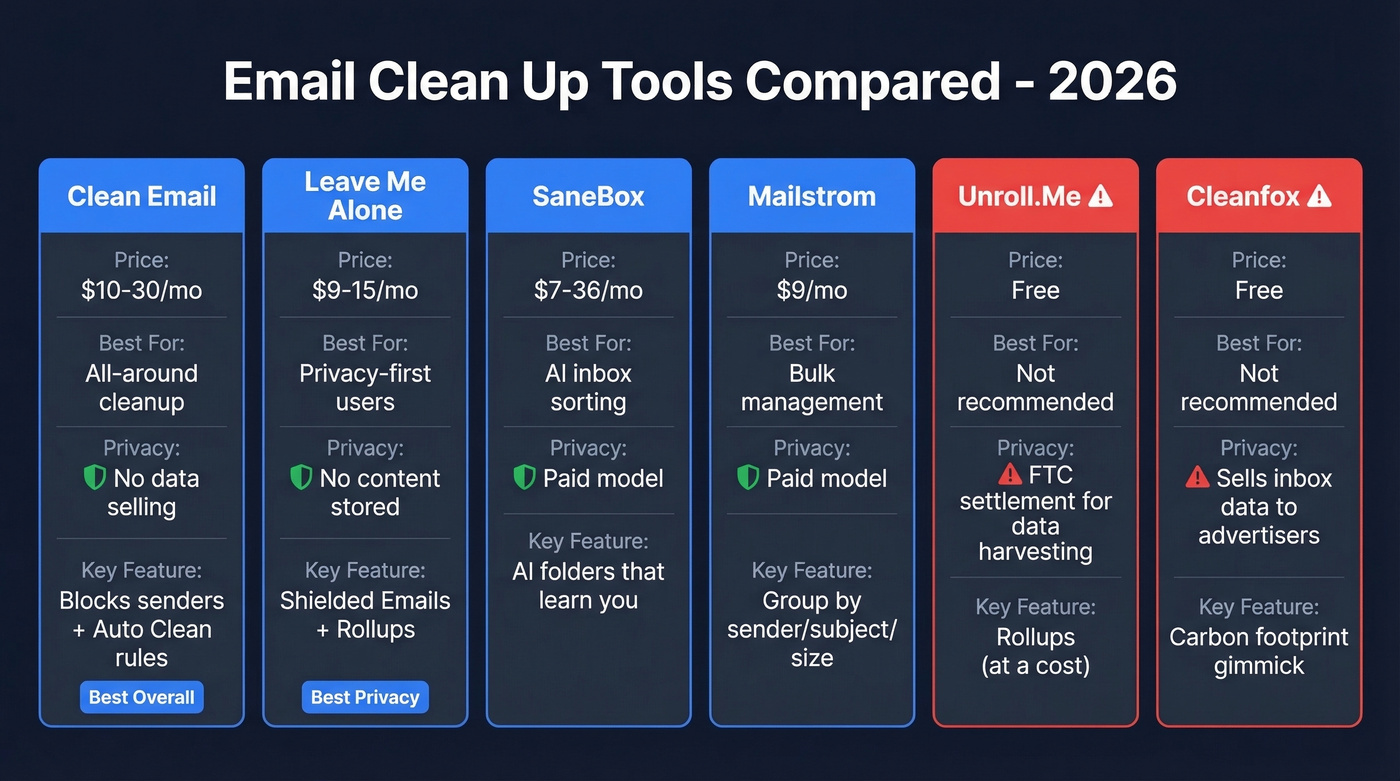
| Tool | Price | Free Tier | Best For |
|---|---|---|---|
| Clean Email | ~$10-30/mo | Limited free trial | All-around inbox cleanup |
| Leave Me Alone | ~$9-15/mo | 10 free unsubscribes | Privacy-first users |
| SaneBox | $7-36/mo | 14-day trial | AI inbox sorting |
| Mailstrom | $9/mo | Free trial | Bulk email management |
| Unroll.Me | Free | Full access | Not recommended |
| Cleanfox | Free | Full access | Not recommended |
Feature Comparison
| Tool | Bulk Unsubscribe | Rollups/Digests | AI Sorting | Privacy |
|---|---|---|---|---|
| Clean Email | ✅ Blocks senders who ignore requests | ✅ | ❌ | Doesn't sell or share email content |
| Leave Me Alone | ✅ One-click | ✅ Daily digest | ❌ | Doesn't store email content |
| SaneBox | ❌ | ❌ | ✅ Learns your priorities | Paid model, no data selling |
| Mailstrom | ❌ | ❌ | ❌ | Paid model |
| Unroll.Me | ✅ | ✅ | ❌ | FTC settlement for data harvesting |
| Cleanfox | ✅ | ❌ | ❌ | Data-funded "consumer panel" model |
Clean Email is the best all-around tool for personal and work inbox cleanup. Leave Me Alone wins if you refuse to let any app store your email content. And if you're technical or just stubborn, Gmail's built-in search operators handle more than most people realize.
Let's be honest: most people don't need a paid tool at all. Spend 30 minutes with Gmail's search operators and filters and you'll solve 80% of the problem for free. The paid tools earn their keep only when you want ongoing automation or you're juggling multiple accounts.
DIY Methods (No Tools Needed)
Before you hand inbox access to any third-party app, try the free methods already sitting inside your email client. They're surprisingly powerful.
Gmail Bulk Delete & Filter Tricks
Gmail's search operators are the fastest way to nuke thousands of emails without installing anything:
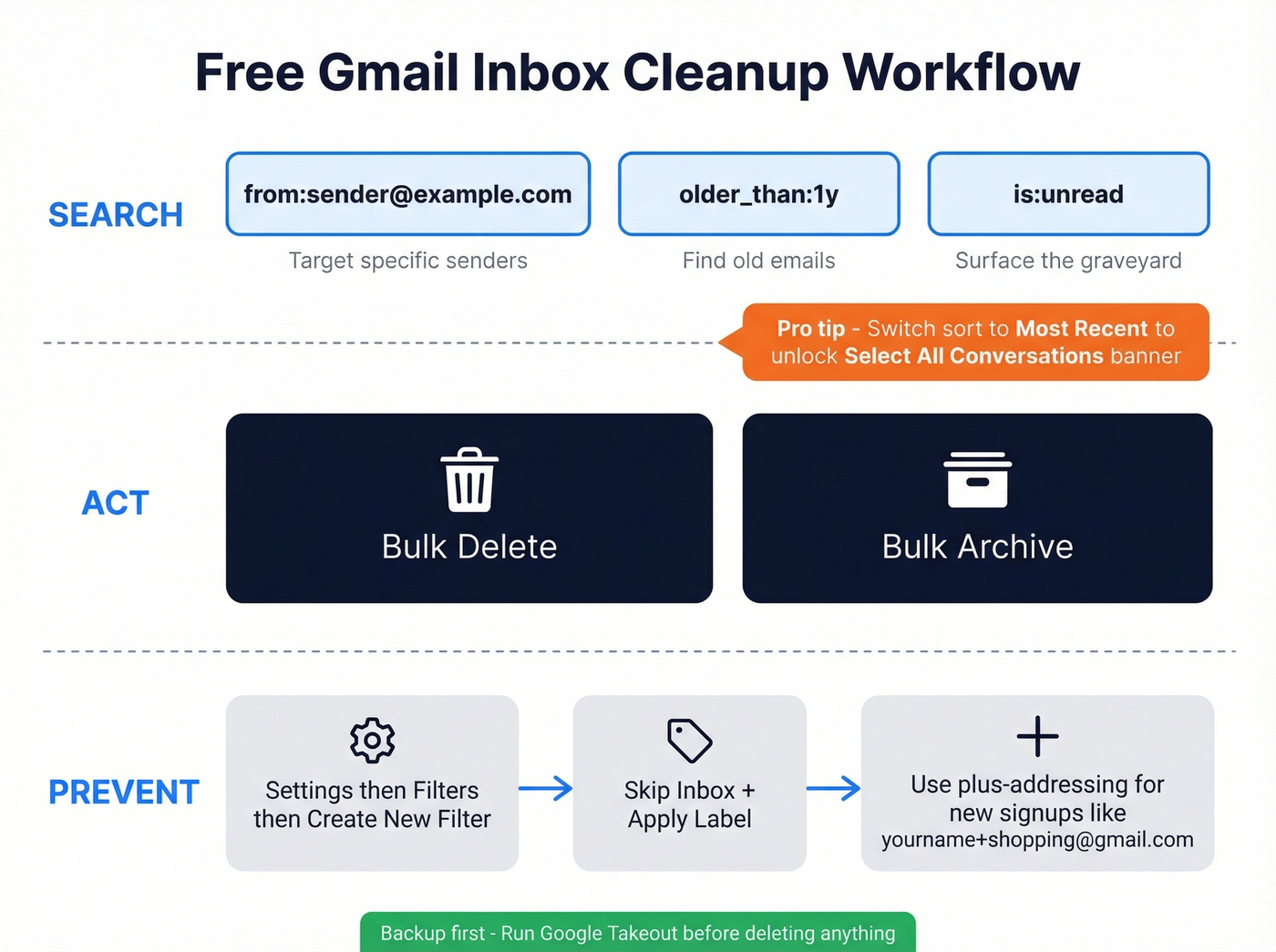
from:newsletter@example.com- target a specific senderolder_than:1y- find everything older than a yearis:unread- surface the graveyard of emails you never opened
Most people miss this trick: after running a search, switch the sort dropdown from "Most relevant" to "Most recent." This forces Gmail to show the "Select all conversations that match this search" banner, letting you mass-select beyond the first page. Without that toggle, you're stuck selecting 50 at a time.
For ongoing prevention, create filters via Settings > Filters > Create New Filter. Set matching emails to Skip the Inbox and Apply a Label so future messages from that sender route straight to a folder you check on your own terms. Also worth exploring: Gmail's inbox type settings under Settings > Inbox, where switching to "Priority Inbox" or "Unread first" gives you automatic triage without any third-party tool.
Plus-addressing is another underused weapon. Sign up for new services with yourname+shopping@gmail.com or yourname+newsletters@gmail.com, then filter anything sent to that alias into its own label. Free, built-in, 30 seconds to set up.
Before you delete thousands of emails, run a Google Takeout backup. It takes a few minutes and saves you from the "oh no, I needed that receipt" moment.
Outlook Conversation Clean Up
Outlook has a native feature most users don't know exists. Go to Home > Delete > Clean Up Conversation. This scans a thread and removes redundant messages - the ones where the full content is already quoted in a later reply. Cleaned messages move to Deleted Items, so you can recover them if needed. It's not as flexible as Gmail's search operators, but for long email chains with 15 replies and 12 of them saying "Thanks!", it's a one-click fix.
Best Tools for Inbox Cleanup
Clean Email - Best Overall
Use this if you want a single tool that handles unsubscribes, bulk cleanup, and ongoing automation across any email provider. Clean Email organizes your inbox into bundles and smart folders, surfaces cleaning suggestions, and lets you act on hundreds of emails at once. The Unsubscriber feature doesn't just click unsubscribe links - it blocks senders who ignore those requests. Auto Clean rules let you set up permanent automation: archive anything older than 30 days from a specific sender, mark promotional emails as read, send weekly digests of what was cleaned.
The privacy story is unusually strong for this category. Clean Email states that 100% of their income comes from subscription fees, and they won't share, sell, or "anonymize" your data, including email content and attachments. That's a meaningful differentiator when the two biggest free tools in this space have documented histories of monetizing inbox data.
Clean Email carries a 4.5/5 rating from 3,300+ reviews and works with Gmail, Outlook, Yahoo, AOL, and company email accounts. Pricing runs ~$10-30/month depending on account count and billing cycle.
Skip this if you only need to unsubscribe from a few newsletters - the free methods above handle that fine.
Leave Me Alone - Best for Privacy
Leave Me Alone is for people who want inbox cleanup from a company that treats their data like it's radioactive. They don't store email content except what's needed to create your Rollups, and their business model is subscriptions, not data monetization.
The product is clean and focused. You get one-click unsubscribes, Shielded Emails (masked addresses for new signups), and Rollups that bundle multiple subscriptions into a single daily digest. The 4.8/5 Trustpilot rating from 82 reviews reflects a small but loyal user base that consistently praises the simple UI and effective unsubscribe flow.
Pricing is flexible: 10 free unsubscribes to start, a $19 seven-day pass for full access, or recurring subscriptions around $9-15/month with a 14-day money-back guarantee.
Skip this if you need deep automation rules or bulk email management. Leave Me Alone is laser-focused on unsubscribes and rollups - it's not a full inbox management suite. Some users also report friction with IMAP setup for non-Gmail accounts.
SaneBox - Best for AI Sorting
Here's the thing about SaneBox: it's great at sorting, but sorting isn't cleaning. If your inbox has 10,000 unread emails, SaneBox won't delete them. It'll just organize the next 10,000 more intelligently. The AI folders - @SaneLater, @SaneNews, @SaneBlackHole - genuinely learn your preferences over time, and we've seen the sorting accuracy improve noticeably after the first week. But you'll want to pair it with a cleanup tool or use it after you've done the initial purge.
The Snack plan ($7/month) gives you 1 account and 2 features. Lunch ($12/month) bumps to 2 accounts and 6 features. Dinner ($36/month) unlocks everything for 4 accounts. The 14-day trial doesn't require a credit card, which is nice. One downside: email snooze is locked behind the mid-tier plan, so budget-conscious users won't get the full experience.
Mailstrom - Bulk Management
Mailstrom takes a different approach: it groups your emails by sender, subject, date, and size, then lets you take bulk actions on entire groups. Think of it as a power tool for the initial purge - find every email from a sender, select all, archive or delete. Starting price is $9/month with a free trial available. One Capterra reviewer noted that "sync was a bit slow, but once everything loaded it was a breeze." Solid option if you want something simpler and cheaper than Clean Email, focused purely on bulk management.
Unroll.Me - Free but Not Worth It
Unroll.Me is free. It's also the cautionary tale of this entire category.
The app was caught collecting purchase and receipt data from user inboxes and sharing it through parent company Slice's analytics product - including selling receipt data to Uber to help them target Lyft users. The FTC settlement required Unroll.Me to delete collected personal information and barred them from misrepresenting their data practices. Not recommended.
Cleanfox - Free but Data-Funded
Cleanfox is owned by AC Nielsen SAS, a NielsenIQ company. Their privacy policy is remarkably transparent about the business model: connect your inbox, and Cleanfox collects copies of your commercial emails - purchase receipts, delivery confirmations, marketing messages - to provide market intelligence, analytics, datasets, and lookalike models for targeted advertising. Their customers include e-commerce businesses, investment companies, consumer brands, media companies, and data brokers. Reddit users have flagged exactly this concern, with one asking "how they are going to handle privacy" before connecting a 15-year-old Gmail account. Not recommended.

A clean inbox is nice. A clean outbound list is revenue. Prospeo's 5-step email verification - with spam-trap removal, honeypot filtering, and catch-all handling - delivers 98% accuracy so your campaigns never trigger bounce-rate disasters.
Stop cleaning up bounces. Start with emails that actually land.
Why Free Email Cleaners Aren't Free
If the tool is free, your data is the product. This isn't paranoia - it's documented.
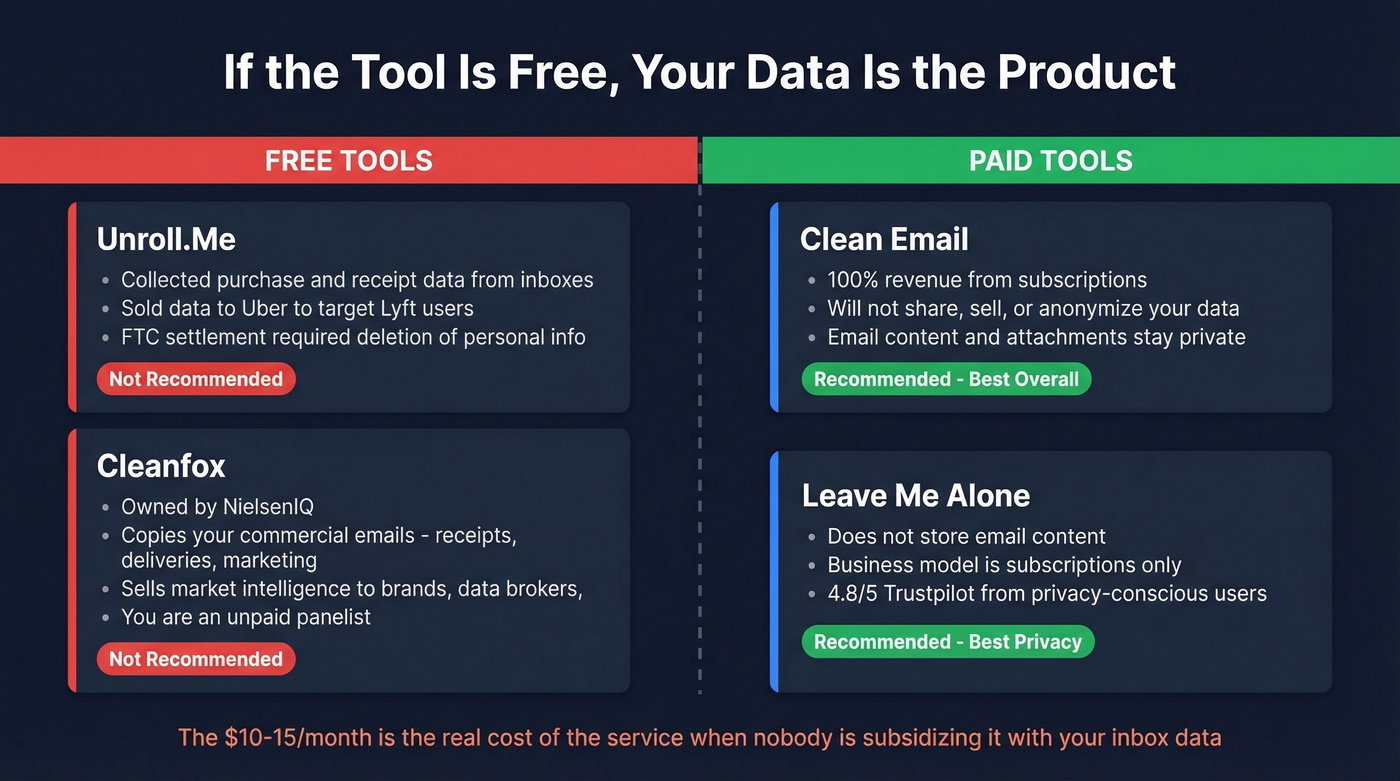
Cleanfox's privacy policy spells it out: they collect copies of your commercial emails and use them to power a "consumer panel" business that produces market intelligence and advertising audiences for third parties. Every purchase receipt, every delivery confirmation becomes a data point in an analytics pipeline. You're not a user. You're an unpaid panelist in a consumer research study.
Unroll.Me's story is worse because it took an FTC investigation to surface it. The consensus on r/privacy is blunt: stop using it.

Contrast this with Clean Email's explicit subscription-only revenue model and Leave Me Alone's policy of not storing email content. The $10-15/month these tools charge isn't a premium - it's the actual cost of the service when nobody's subsidizing it with your inbox data.
How to Clean Email Lists for B2B Outbound
Tidying your personal inbox is one thing. If you're running outbound campaigns and your prospect list is bouncing 20-35% of emails, you have a data quality problem that no inbox tool will solve.
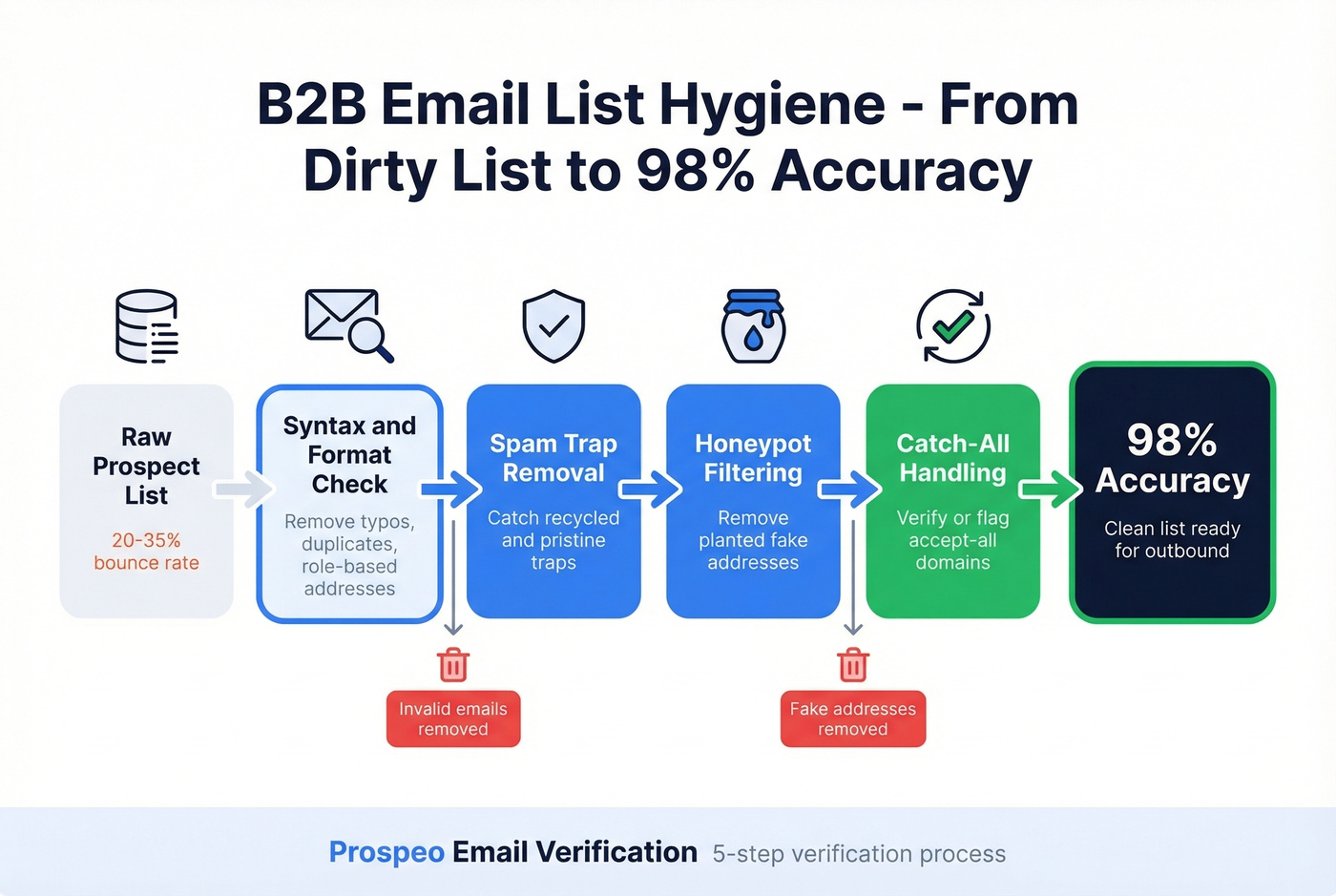
Every bounced email chips away at your sender reputation. Hit enough spam traps and your domain ends up on blocklists - recovering from that takes weeks, not minutes. We've seen teams lose months of domain warming progress because they skipped list verification on a single campaign. Knowing how to clean your email list before launching is the difference between a successful sequence and a blacklisted domain.
Prospeo's email verification catches these problems before they hit your outbound sequences. The 5-step process handles catch-all domains, spam traps, honeypots, syntax errors, and real-time mailbox checks across 143M+ verified emails on a 7-day refresh cycle. GreyScout dropped their bounce rate from 38% to under 4% after switching to verified data - the difference between a healthy sender domain and one headed for the spam folder.
The free tier gives you 75 verifications per month, enough to test on a real campaign list. Paid plans run about $0.01/email with no contracts.
Inbox cleanup fixes the mess after it happens. Prospeo prevents the mess before it starts - 143M+ verified emails refreshed every 7 days, not the 6-week industry average. At $0.01 per email, list hygiene is built in from day one.
Clean data in, zero bounces out. That's how outbound should work.
Maintaining a Clean Inbox Long-Term
The initial purge feels great. Keeping it clean is the hard part.
Here's a system that takes 15 minutes a week, based on Merlin Mann's Inbox Zero framework - where "zero" means zero time your brain spends in the inbox, not literally zero messages.
For every email, run through this decision tree: delete or archive if it needs no action; delegate by forwarding and archiving; respond immediately if it takes under two minutes; defer by snoozing or flagging anything that needs a longer response; and do - schedule the task if it requires real work from you.
Then layer automation on top. Set up Auto Clean rules in Clean Email to automatically archive recurring low-priority messages. If you're using SaneBox, let its AI sorting handle triage. Create plus-address aliases for every new signup going forward so you can filter by category from day one. Schedule a quarterly mailing list cleanup to unsubscribe from anything that's accumulated since your last review - this single habit prevents the slow creep back to an overflowing inbox.
The goal isn't perfection. It's a weekly 15-minute review where you clear the backlog, adjust your rules, and stay ahead of the accumulation.
Open-Source Alternatives
For developers who'd rather run their own code than trust a third-party app, two projects are worth a look.
CleanMail is a Python tool that groups Gmail messages by sender for bulk delete and unsubscribe - one user reported going from 1,847 inbox emails to 180, with over 70% of the deleted messages being marketing junk. Confygre Email is a Flutter-based Android app that uses the Gmail API for one-click unsubscribe and delete. Both are early-stage projects. Vet the code before granting API access - open-source doesn't automatically mean safe. If you're not comfortable reading through a GitHub repo, stick with the paid tools above.
If you're doing this for outbound, pair inbox hygiene with email deliverability basics and a plan to improve sender reputation.
FAQ
Are inbox cleaner apps safe?
Clean Email and Leave Me Alone commit to never selling or monetizing your data - their revenue comes from subscriptions. Cleanfox and Unroll.Me have documented histories of harvesting inbox data for third parties. If the tool is free with no obvious revenue source, assume your data is the product.
What's the best free way to clean up email in 2026?
Gmail's built-in search operators and filters. No third-party access, no privacy risk, and more powerful than most people realize. Use older_than:1y and is:unread to mass-delete, then set up filters to prevent future buildup. Leave Me Alone also offers 10 free unsubscribes to get started.
How do I mass delete Gmail emails?
Search for the emails you want to remove (e.g., older_than:2y), switch sort to "Most recent" to trigger the select-all banner, click "Select all conversations that match this search," then delete. Back up via Google Takeout first.
How often should I clean my inbox?
Do one deep cleanup, then spend 15 minutes weekly maintaining it. Use Auto Clean rules, filters, or SaneBox to prevent buildup between sessions. A quarterly unsubscribe sweep catches anything that slipped through.
How do I clean a B2B email list before sending a campaign?
Upload your list to a verification tool like Prospeo, which checks for invalid addresses, spam traps, and catch-all domains in a 5-step process at 98% accuracy. Remove any contacts that fail verification, and re-verify quarterly - people change jobs and addresses go stale faster than you'd expect.