

Best Email Deliverability Checkers in 2026 (Tested)
Your open rates dropped from 45% to 18% over three weeks. Nothing changed - same copy, same list, same send times. But something shifted under the hood, and now a quarter of your emails are landing in spam.
The global average inbox placement rate sits at 83.5%, which means roughly 1 in 6 legitimate emails never gets seen. That's not a rounding error - it's revenue disappearing quietly while your dashboard shows "delivered." Fixing deliverability is one of the fastest ways to recover lost pipeline, and the right email deliverability checker is how you find out what broke.
Our Picks (TL;DR)
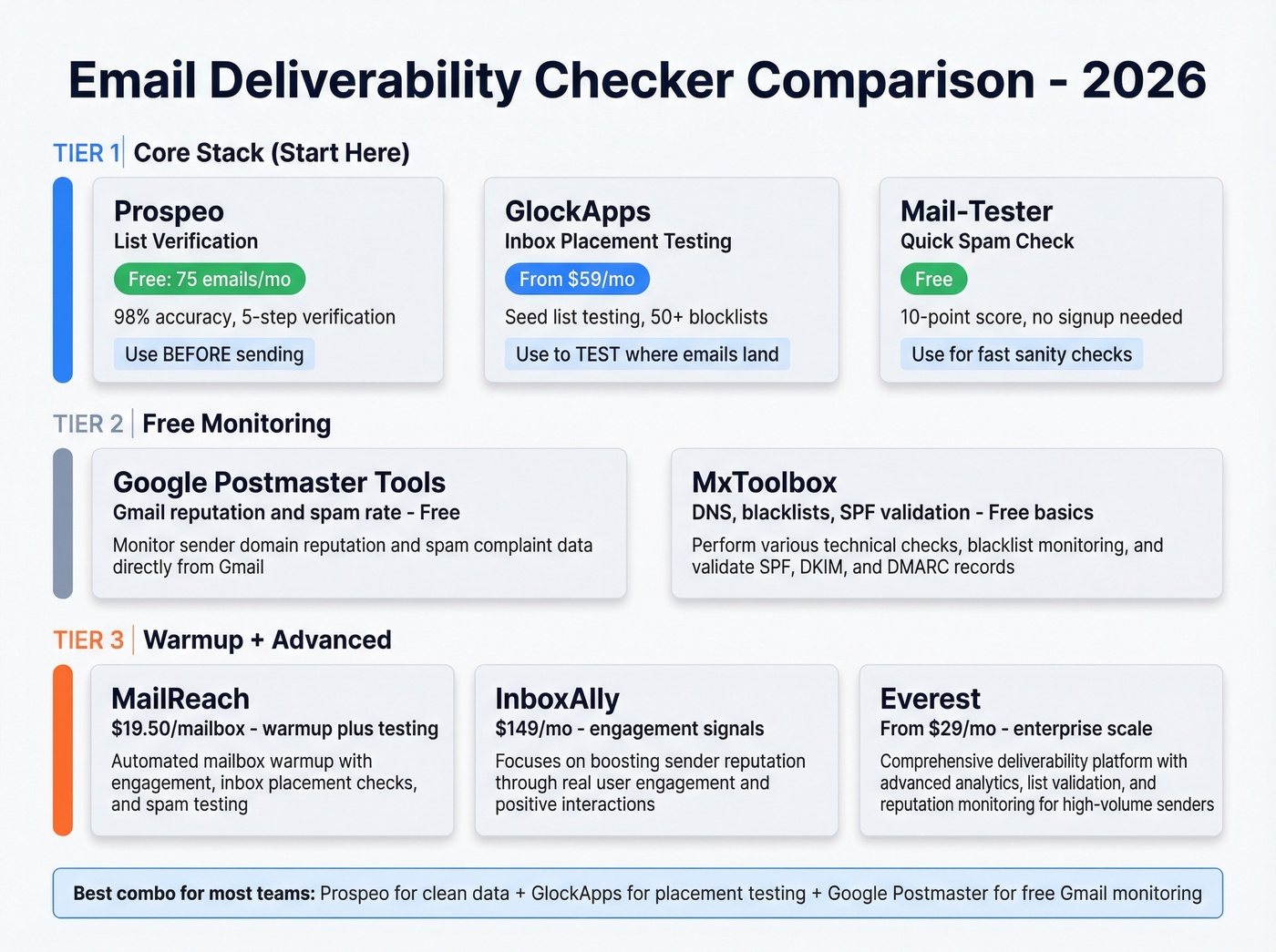
Prospeo - Best for list verification. Most deliverability problems start with bad data. Prospeo's 5-step verification catches bounces, spam traps, and honeypots before they torch your sender reputation. It's the step most people skip, and it's the one that matters most.
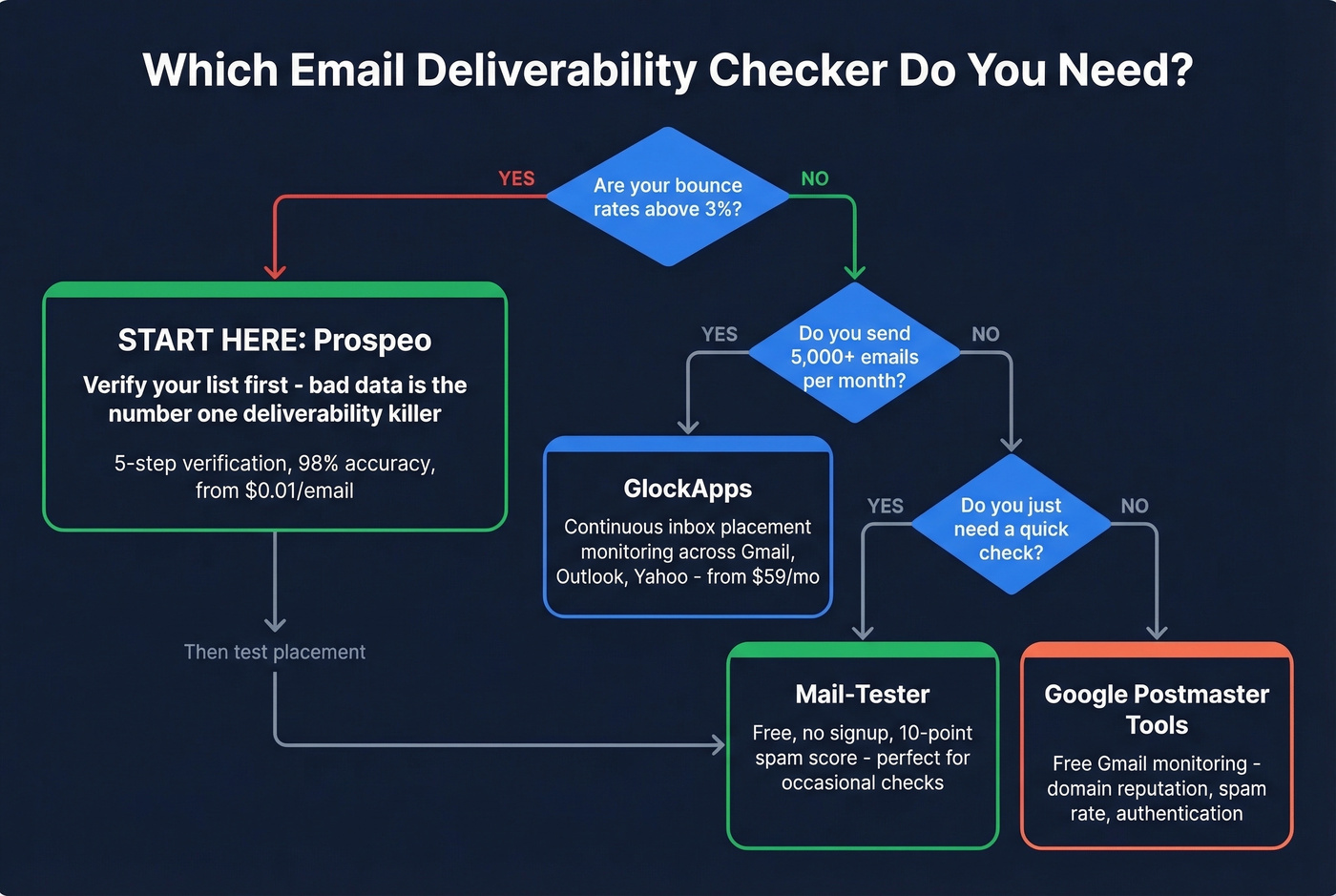
GlockApps - Best for inbox placement testing. The most complete paid option for seeing exactly where your emails land across Gmail, Outlook, and Yahoo. Detailed reports, 50+ blocklist monitoring, and real ongoing monitoring - not just a one-time score.
Mail-Tester - Best free spam checker. No signup, no upsell pressure. Send a test email, get a score. The interface looks like 2012 and that's part of its charm.
How Deliverability Checkers Work
Most email deliverability checkers rely on seed list testing. You send your email to a controlled set of addresses spread across Gmail, Yahoo, Outlook, and other providers, and the tool checks whether each copy landed in the inbox, spam, or promotions tab. Seed testing remains the only accurate way to measure inbox placement - everything else is an approximation.
GlockApps uses a seed list of around 100 mailboxes. That's enough to spot patterns, but it's not a census - don't over-interpret small percentage swings between tests.
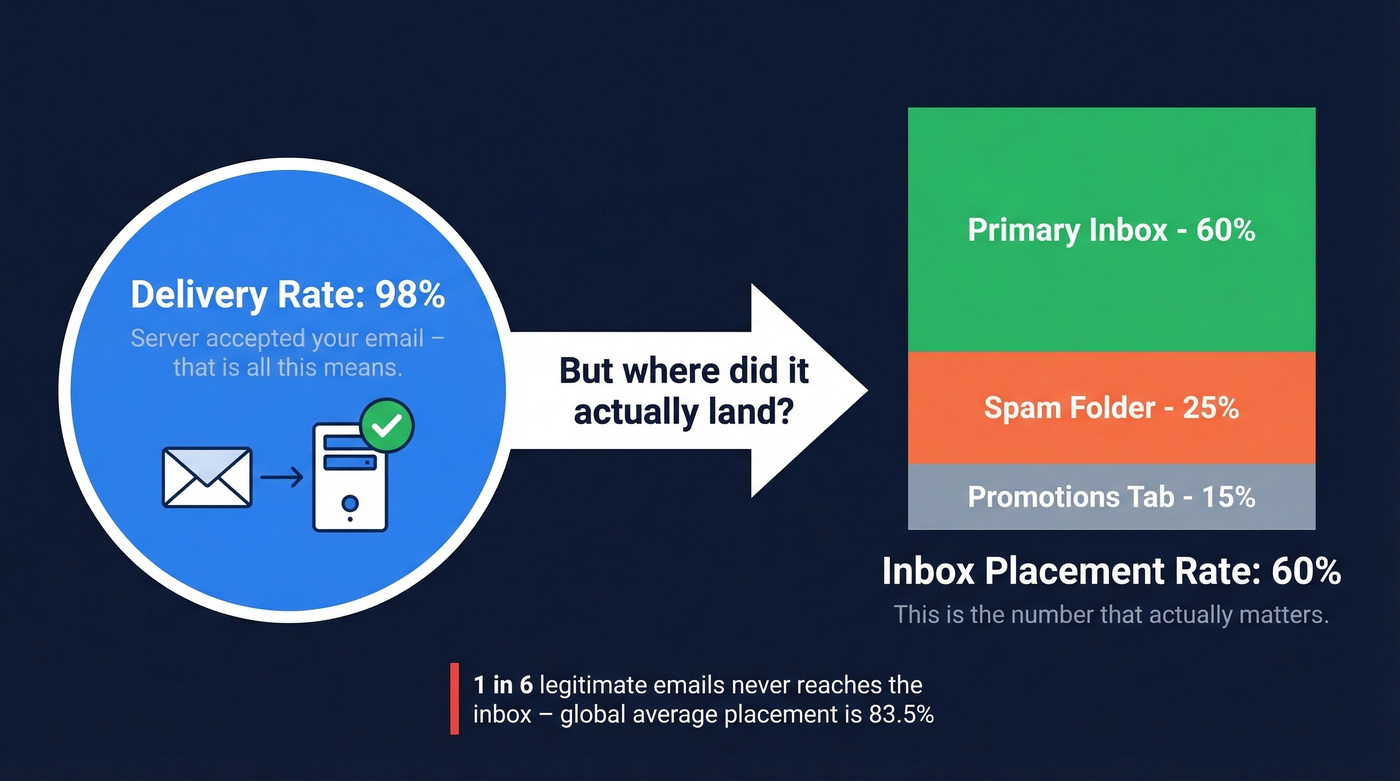
Here's a distinction most people miss: delivery rate vs. inbox placement. Delivery rate means the server accepted your email. Inbox placement means it actually landed in the primary inbox, not spam. A 98% delivery rate can hide a 60% inbox placement rate. The first number makes you feel good. The second tells you the truth.
Seed tests also can't capture engagement. Because seed accounts don't open, click, or reply, seed-based deliverability scores tend to understate your real inbox placement - your actual results with a warm, engaged list will be better than what the tool shows. Keep that in mind before you panic over a mediocre score.
Weighted seed lists mirror your actual audience mix (say, 60% Gmail, 25% Outlook, 15% Yahoo), while unweighted lists distribute evenly and are better for troubleshooting specific provider issues. Most tools don't let you choose.
The Best Tools for Testing Deliverability
Prospeo - Best for List Verification
Prospeo isn't a deliverability checker in the traditional sense - it's the tool you use before one. High bounce rates from unverified emails are the single fastest way to destroy sender reputation, and Prospeo eliminates that problem at the source.
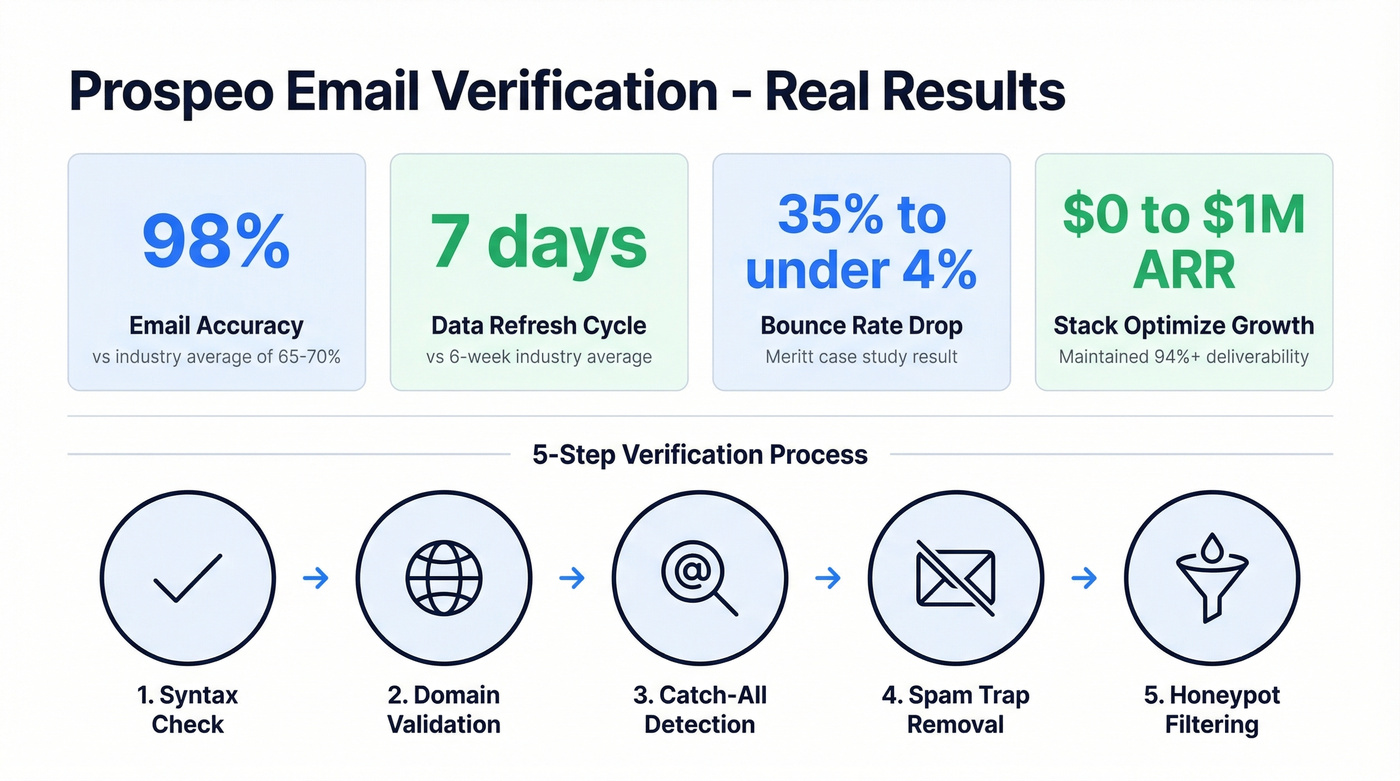
The platform runs a 5-step verification process that handles catch-all domains, removes spam traps and honeypots, and delivers 98% email accuracy. For context, benchmark testing of email verifiers on real-world datasets often shows top tools landing in the high-60% to ~70% range, which is why 98% accuracy is a meaningful differentiator. Data refreshes every 7 days compared to the 6-week industry average, so you're not blasting emails to people who changed jobs last month.
Real results back this up: Stack Optimize built from $0 to $1M ARR while maintaining 94%+ deliverability with under 3% bounce rates across all clients. Meritt cut their bounce rate from 35% to under 4% and tripled pipeline from $100K to $300K/week.
Use this if: You're running outbound at scale and need to verify lists before they hit your sequencer. The free tier gives you 75 emails/month to test the workflow, and paid plans run ~$0.01/email.
Skip this if: You need inbox placement testing - pair Prospeo with GlockApps for the full picture.
GlockApps - Best for Inbox Placement
GlockApps is the inbox placement tester you reach for when you need to know where your emails land, not just whether they were accepted. It tests across all major ISPs, scores your content against Google, Barracuda, and SpamAssassin spam filters simultaneously, and tracks the full chain of IPs delivering your emails - not just the primary sender.
We've run dozens of tests through GlockApps over the past year, and the provider-level breakdown is genuinely useful - it'll show you that Gmail is fine while Outlook is flagging you, which is the kind of specificity you need to actually fix things. The 50+ blocklist monitoring alone has saved us from problems we wouldn't have caught for weeks otherwise.
Pricing breaks down cleanly. Essential at $59/mo gets you 360 spam test credits, one sending account, and a 600,000/month DMARC message allowance. Growth ($99/mo) scales to 10 accounts and 1,080 tests. Enterprise ($129/mo) pushes to 1,800 tests and 20 accounts. The free tier gives you 2 spam test credits plus 10,000 DMARC messages - enough for a quick gut check.
Use this if: You're sending 5,000+ emails/month and need continuous monitoring across multiple sending domains.
Skip this if: You're sending a few hundred cold emails a week. At that volume, Mail-Tester's free checks will tell you what you need to know.
Mail-Tester - Best Free Spam Checker
You send an email to a unique address, and it scores your message on a 10-point scale. SPF, DKIM, DMARC authentication checks. Content spam scoring. Blacklist lookups. All free, no signup required.
We've used it dozens of times as a sanity check before launching campaigns - it's the fastest way to catch obvious authentication failures or content red flags. The catch: no monitoring, no alerts, no automated testing, and a daily test limit that won't scale for teams running high-frequency campaigns. You'll outgrow it the moment you need to monitor deliverability across multiple domains, but until then, it's perfect.
MailGenius is another free option with a similar workflow. We prefer Mail-Tester for its simplicity.
Google Postmaster Tools - Best Free Gmail Monitoring
Google Postmaster Tools is free, straight from the source, and gives you the metrics that actually matter for Gmail: domain reputation, IP reputation, spam rate, and authentication success. If Gmail is where most of your audience lives, this is non-negotiable.
The catch is you need meaningful volume before Google surfaces data - low-volume senders get blank dashboards. And it's Gmail-only. No Outlook visibility, no Yahoo. Microsoft offers SNDS for Outlook reputation data, and Yahoo has Sender Hub - both free, both worth checking if those providers matter to your audience.
Pricing: Free forever.
MailReach - Warmup + Testing Combined
MailReach is a warmup tool first, deliverability tester second. At $19.50/mailbox/month, you get AI-driven warmup across Google and Outlook plus 20 spam test credits included in the all-in-one plan. The spam tester shows inbox placement by provider, runs blacklist checks, and sends Slack alerts when something breaks.
Let's be honest: deliverability can't be an afterthought in 2026. Tighter spam filters from Google and Microsoft mean warmup and placement testing need to work together. If you're already warming up mailboxes, MailReach's built-in testing makes that seamless. If you just need a deliverability check and don't care about warmup, you're paying for features you won't use.
Warmy - Free Quick Test
Warmy offers a free deliverability test you can run without committing to a paid plan - useful for a quick baseline. The real product is warmup, with a 7-day free trial. Same tradeoff as MailReach: if you need warmup, the deliverability testing is a welcome add-on. If you don't, look elsewhere.
MxToolbox - DNS & Blacklists
MxToolbox is a go-to toolset for DNS lookups, reverse DNS checks, and blacklist monitoring. The free tools cover the basics - MX record lookups, SPF validation, blacklist scanning. It also has an email deliverability tool where you send a test email and get back a report analyzing headers, outbound IP blacklist reputation, and SPF records.
Here's the thing: MxToolbox checks your infrastructure, not where your emails land. It'll tell you if your DNS is misconfigured or your IP is blacklisted, but it won't tell you whether Gmail is routing you to spam. Use it alongside an inbox placement tool, not instead of one.
Pricing: Free basic tools; Delivery Center from $129/mo.
EasyDMARC - Quick Placement Visibility
EasyDMARC offers a free inbox placement test - send an email with a generated code, click "RUN MY FREE TEST," and it reports placement across Inbox, Spam, or Promotions. It also breaks down Gmail tabs (Primary/Promotions/Updates/Spam). There's a daily test limit, and it's designed for visibility rather than full root-cause diagnosis.
Everest by Validity - Enterprise Scale
Everest is an enterprise-grade inbox placement platform from Validity, built for teams that need seed-list monitoring at scale. Pricing starts at $29/month for entry plans.
InboxAlly - Engagement Signals
InboxAlly takes a different approach: it simulates real engagement - opens, clicks, read time - to train inbox algorithms that your emails deserve the primary tab. Starting at $149/mo, it's a premium price for a premium strategy. Worth testing if you've fixed authentication and list hygiene but still can't crack inbox placement.
Comparison Table
| Tool | Best For | Free Tier | Paid From | Key Feature |
|---|---|---|---|---|
| Prospeo | Email verification | 75 emails/mo | ~$0.01/email | 5-step verification, 98% accuracy |
| GlockApps | Inbox placement | 2 tests/mo | $59/mo | Seed list testing + IP chain tracking |
| Mail-Tester | Spam scoring | Yes (daily limit) | Free | No-signup checks |
| Google Postmaster | Gmail monitoring | Unlimited | Free | Domain reputation |
| MailReach | Warmup + testing | No | $19.50/mailbox | AI warmup + spam tests |
| Warmy | Free test + warmup | Free test | 7-day trial | Free deliverability test |
| MxToolbox | DNS & blacklists | Basic tools | $129/mo | Header + blacklist + SPF analysis |
| EasyDMARC | Placement visibility | Daily limit | Paid plans | Inbox/Spam/Promotions + Gmail tabs |
| Everest | Enterprise monitoring | No | $29/mo | Seed list at scale |
| InboxAlly | Engagement signals | No | $149/mo | Simulated engagement |

Bad data is the #1 deliverability killer. Prospeo's 5-step verification catches spam traps, honeypots, and catch-all domains before they torch your sender reputation - delivering 98% email accuracy with a 7-day refresh cycle.
Fix deliverability at the source - start with cleaner data.
Why These Tools Give Different Results
If you've ever run the same email through two deliverability checkers and gotten wildly different scores, you're not alone. This is the #1 frustration we see on Reddit about these tools - and there's a structural reason for it.
Different tools use different seed lists with different sample sizes. GlockApps tests against ~100 mailboxes. Mail-Tester scores your content against SpamAssassin. Google Postmaster Tools only looks at Gmail. They're measuring different things with different methodologies, so of course the numbers diverge.
Scoring models compound the problem. SpamAssassin weights content differently than Google's internal filters, which differ from Barracuda's. A subject line that scores clean on Mail-Tester might trigger a flag in GlockApps' Google filter check. And seed tests don't generate engagement - real subscribers who open, click, and reply send positive signals that boost your placement, while seed accounts just sit there passively, meaning every seed-based test understates your actual deliverability.
Look, if a tool shows you a scary score and immediately offers a $49/month warmup plan, that's not a diagnosis - it's a sales funnel. Some users on r/MarketingAutomation have flagged this exact pattern. Use multiple tools, triangulate the results, and don't let any single score drive a panic purchase.
What Good Deliverability Looks Like
Here are the benchmarks that actually matter:
Inbox placement: The global average is 83.5%. Above 80% is healthy. Below 70% means you have a serious problem that needs immediate attention. Gmail tends to deliver ~87.2% to inbox; Microsoft is tougher at ~75.6%. High-volume senders face even steeper penalties - those pushing 1M+ emails have seen inbox placement drop to ~27.6% in some benchmark datasets.
Bounce rate: Keep it under 2%. Anything above that signals list hygiene issues and will erode your sender reputation fast.
Spam complaint rate: Gmail and Yahoo require you to stay below 0.3%, but target under 0.1%. This is the metric that'll get your domain blacklisted fastest.
Authentication: Only 18.2% of top domains have valid DMARC, and just 7.6% actually enforce it. Fully authenticated senders are 2.7x more likely to reach inboxes. If you haven't set up SPF, DKIM, and DMARC properly, no deliverability tool in the world will save you.
How to Fix Your Deliverability
Here's the checklist we'd run through before touching any settings in your ESP:
Verify your list. Remove invalid addresses, spam traps, and honeypots. Run your list through a verification tool before every campaign - a 5-step verification approach that handles catch-all domains and removes known trap addresses is the gold standard here.
Authenticate everything. SPF should stay under the 10 DNS lookup limit. DKIM needs 2048-bit keys, rotated every 6 months. DMARC should progress from
p=none(monitoring) toquarantinetorejectas you validate your sending sources. (If you need a refresher on the mechanics, start with DMARC and a practical SPF setup.)Warm up new domains and IPs. Don't blast 10,000 emails from a fresh domain on day one. Ramp gradually over 2-4 weeks. MailReach and Warmy both handle this. If you're scaling outbound, watch your email velocity too.
Monitor continuously. Google Postmaster Tools for Gmail reputation, GlockApps for full inbox placement across providers. Set up alerts so you catch problems before they compound. For more options, see our roundup of email reputation tools.
Scale your infrastructure. Once you're sending 25,000+ daily emails, move to a dedicated IP and warm it up properly. Shared IPs mean shared risk.
Add one-click unsubscribe. Gmail and Yahoo require RFC 8058 one-click unsubscribe headers for bulk senders. This isn't optional anymore.
Stack Optimize maintained 94%+ deliverability and under 3% bounce rates while scaling to $1M ARR. Meritt cut bounces from 35% to under 4%. The difference wasn't a better spam checker - it was verifying every email before it ever hit a sequencer.
Stop diagnosing spam folder issues you could have prevented entirely.
Free vs. Paid - When to Upgrade
Free tools give you a snapshot. Paid tools give you a movie.
Mail-Tester, Google Postmaster Tools, and MxToolbox's free tier cover the basics: pass/fail authentication checks, manual blacklist lookups, and one-off spam scans. For a solo founder sending 500 cold emails a month, that's genuinely enough.
The upgrade triggers are clear. If your open rates drop below 30% and you can't explain why, you need continuous monitoring - a paid tool will surface the root cause faster than any free option. If you're scaling to multiple SDRs with separate sending domains, you need automated alerts. And if you're spinning up new domains for outbound, you need warmup plus placement testing in tandem. Flying blind on deliverability at scale is just burning money. (If you're building a full outbound stack, start with the core SDR tools most teams standardize on.)
The sweet spot for most growing teams: Google Postmaster Tools for Gmail monitoring (free forever) and GlockApps Essential ($59/mo) for full inbox placement testing. That stack covers authentication monitoring and placement testing for under $60/month - less than the cost of one bad campaign hitting spam.
FAQ
What's the difference between delivery rate and deliverability?
Delivery rate means the receiving server accepted your email without bouncing it. Deliverability (inbox placement) means it actually landed in the inbox rather than spam or promotions. A 98% delivery rate can mask a 60% inbox placement rate - the first number is vanity, the second is what drives opens and revenue.
Why do different deliverability checkers give different results?
Each tool uses different seed lists, sample sizes, and scoring models. GlockApps tests ~100 mailboxes across providers, Mail-Tester scores content against SpamAssassin, and Google Postmaster only measures Gmail. They're measuring different dimensions of the same problem - triangulate across 2-3 tools for the clearest picture.
How often should I test inbox placement?
For cold outbound, test weekly or before every major campaign launch. For marketing email, monthly at minimum - plus immediately after any infrastructure change like a new domain, IP migration, or ESP switch. Catching a drop early is the difference between a quick fix and a months-long reputation rebuild.
Can I fix deliverability without paying for tools?
Yes. Mail-Tester handles free spam checks, Google Postmaster Tools provides Gmail monitoring, and Prospeo's free tier verifies 75 emails/month to clean small lists. That combination covers authentication, content scoring, reputation tracking, and basic verification - enough for small teams to diagnose and fix most issues without a paid subscription.
What's a good inbox placement rate?
The global average is 83.5%. Above 80% is healthy; below 70% signals a serious problem needing immediate attention. Gmail delivers roughly 87.2% to inbox, while Microsoft hovers around 75.6%, making it the tougher provider to crack.
Start with list verification, add monitoring as you scale, and never trust a single email deliverability checker's score in isolation.