

How to Run an Email Domain Spam Check (And Actually Fix What's Wrong)
Your open rates dropped 40% overnight. Sequences that were booking meetings last week are bouncing hard. You dig into the logs and find it: your domain landed on Spamhaus SBL three days ago, and nobody noticed until pipeline dried up.
Running an email domain spam check is the first step to fixing this - and the fix isn't complicated if you know where to look.
If Deliverability Just Tanked, Do This Now
Three things. Right now.
- Read your bounce-back messages. They usually name the exact blacklist that blocked you - fastest diagnostic you've got. (If you need help decoding them, start with our guide to bounce-back messages.)
- Run MxToolbox to scan your sending IP against 100+ blacklists in one shot.
- Set up Google Postmaster Tools for ongoing Gmail reputation monitoring.
Already listed? Jump to the delisting playbook. Want to prevent this entirely? Skip to [prevention](#prevention - stop-getting-blacklisted).
What Is a Domain Spam Check?
An email domain spam check queries your sending domain or IP against databases of known spam sources - called DNSBLs (DNS-Based Blackhole Lists) or RBLs (Real-Time Blackhole Lists). More than 300 email blacklists are in operation, and no single tool checks all of them.
These lists fall into three categories:
| Type | Examples | Who Maintains It | Visibility |
|---|---|---|---|
| Public | Spamhaus, Barracuda, SpamCop | Independent orgs | Searchable |
| Private | ESP-maintained lists | Mailgun, SendGrid, etc. | Limited |
| Internal | Gmail, Microsoft filters | Mailbox providers | Opaque |
There's also a critical split between IP-based blacklists flagging your sending server and domain-based blacklists flagging your domain itself. You can swap IPs. Domain reputation follows you everywhere, so always check both.
Why It Matters More in 2026
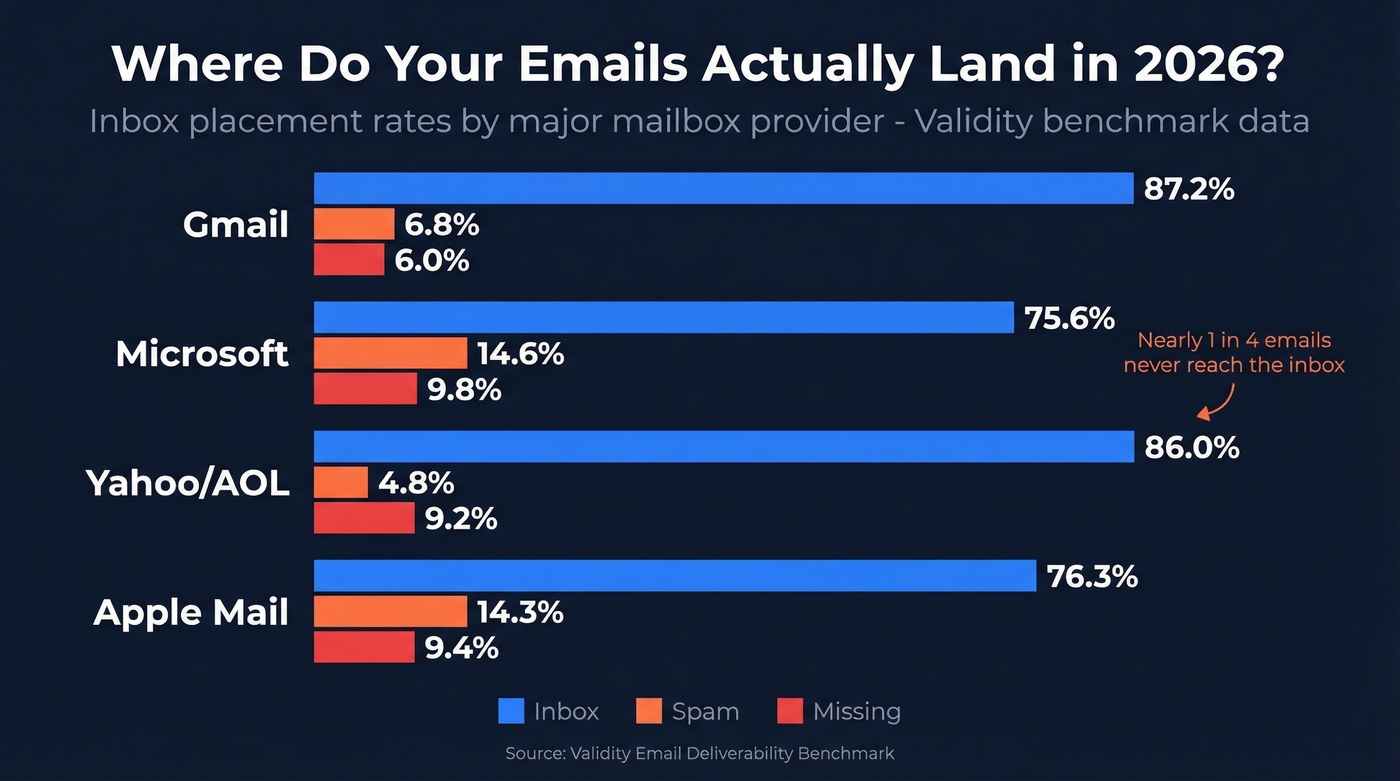
The inbox is harder to reach than it was two years ago. Validity's benchmark data shows the global inbox placement average sits around 84% - roughly one in six emails never reaches the inbox. The ISP-level breakdown tells a sharper story:
| Provider | Inbox | Spam | Missing |
|---|---|---|---|
| Gmail | 87.2% | 6.8% | 6.0% |
| Microsoft | 75.6% | 14.6% | 9.8% |
| Yahoo/AOL | 86.0% | 4.8% | 9.2% |
| Apple Mail | 76.3% | 14.3% | 9.4% |
Microsoft is brutal - nearly 1 in 4 emails don't hit the inbox. And enforcement keeps tightening. Gmail's late-2024 crackdown moved beyond spam-folder routing to rate limiting and SMTP-level rejection for non-compliant senders. Microsoft started outright rejecting non-compliant bulk email in May 2025.
Here's the part that catches people off guard: once you send 5,000+ messages per day to personal Gmail accounts, you're permanently designated a bulk sender. The 0.3% spam complaint threshold and authentication requirements apply indefinitely. There's no going back.
How to Diagnose a Blacklisted Domain
Don't start with tools. Start with your bounce messages.
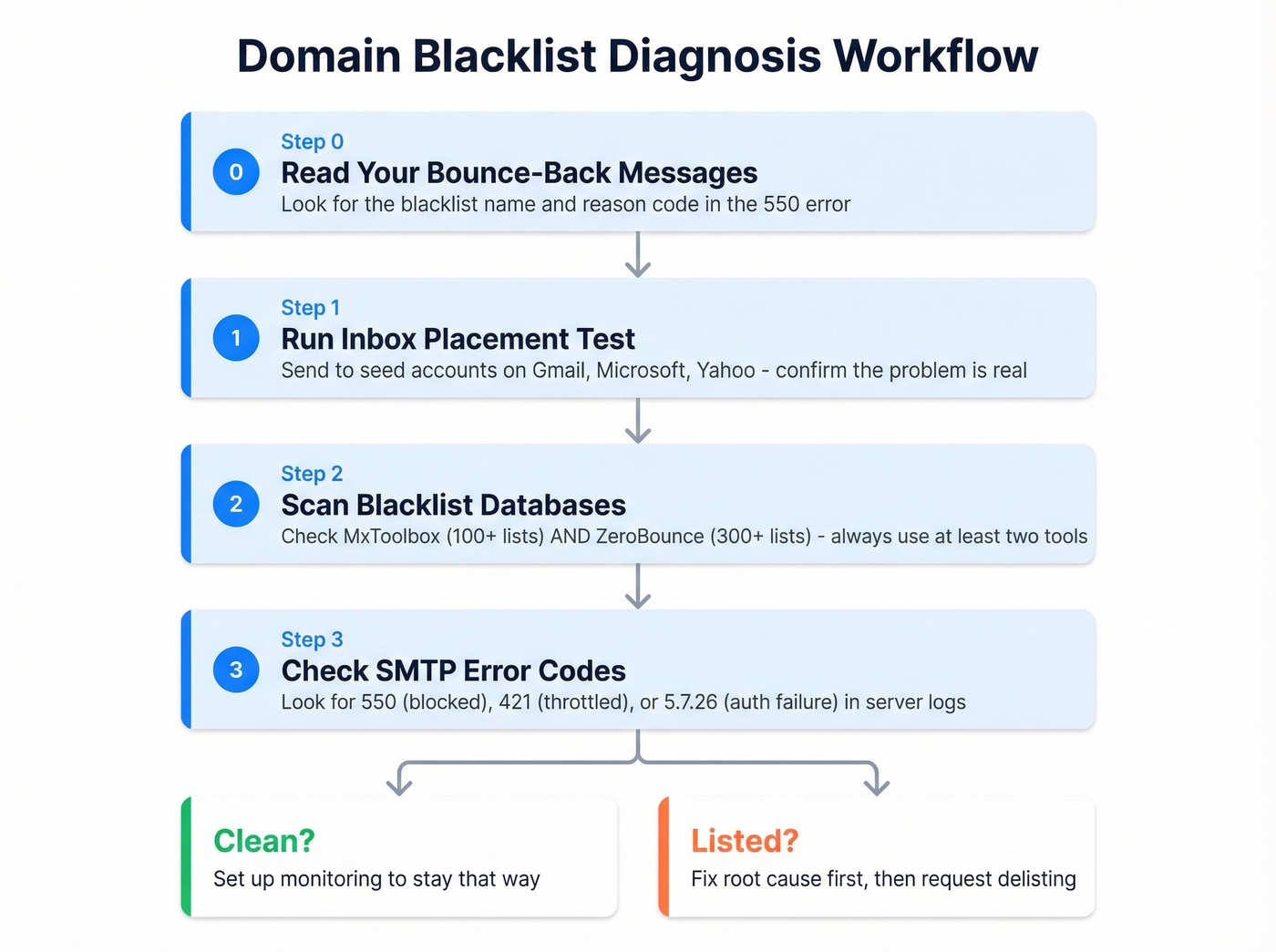
Step 0: Read the bounce-backs. When a blacklist blocks your email, the bounce message almost always names the specific list and reason:
550 5.7.1 Service unavailable; client [192.0.2.1] blocked using
Spamhaus SBL; https://www.spamhaus.org/query/ip/192.0.2.1
No tool required. That's your fastest diagnostic.
Step 1: Run an inbox placement test. Send test emails to seed accounts across Gmail, Microsoft, and Yahoo. If they're landing in spam or not arriving at all, you've confirmed the problem is real - not just one recipient's filter acting up.
Step 2: Scan blacklist databases. Run your sending IP and domain through MxToolbox (100+ DNSBLs), Spamhaus, and ZeroBounce (300+ lists). Different tools cover different lists, so check at least two.
Step 3: Check SMTP error codes. If you have access to your mail server logs, the error codes tell you exactly what's happening:
| SMTP Code | Meaning |
|---|---|
| 550 5.7.1 | Blocked - blacklist or spam policy |
| 554 5.7.1 | Message rejected by server |
| 421 4.7.0 | Temporary block, poor reputation |
| 5.7.26 | DMARC/authentication failure |
A 550 usually means you're listed somewhere. A 421 means the provider is throttling you - often a warning before a full block.

Most domain blacklistings trace back to one root cause: sending to bad email addresses. Prospeo's 5-step verification and 7-day data refresh cycle keep bounce rates under 4% - the same threshold Spamhaus uses to flag senders. 98% email accuracy means your domain stays clean.
Stop diagnosing blacklist damage. Start preventing it with verified data.
Best Free Spam Check Tools
| Tool | What It Checks | Coverage | Price | Best For |
|---|---|---|---|---|
| MxToolbox | IP blacklists | 100+ DNSBLs | Free / $129-$399/mo | Broadest free scan |
| Google Postmaster | Gmail reputation | Gmail only | Free | Ongoing monitoring |
| ZeroBounce | Domain + IP | 300+ lists | Free / from $49/mo | Deepest coverage |
| Mail-Tester | Spam score + auth | SpamAssassin-based | Free | Quick content check |
| Microsoft SNDS | Outlook reputation | Microsoft only | Free | Outlook monitoring |
| Yahoo Sender Hub | Yahoo/AOL reputation | Yahoo/AOL only | Free | Yahoo monitoring |

MxToolbox
The default starting point for any blacklist check. Enter your mail server IP, and MxToolbox queries over 100 DNSBLs in seconds. Don't know your mail server IP? Use their MX Lookup tool first or email ping@tools.mxtoolbox.com. The free tier handles basic checks; continuous monitoring through the Delivery Center plan runs $129/mo, with the Plus tier at $399/mo for full alerting and diagnostics. We've used MxToolbox as the first step in every domain health audit we've run - it catches the big lists fast.
Google Postmaster Tools
Free and essential for anyone sending to Gmail. Google retired the legacy V1 dashboards on Sept 30, 2025, so the current V2 interface centers on compliance status and spam rate dashboards. Setup takes five minutes: add your domain, grab the TXT record Google provides, drop it into your DNS, and verify. Once live, you'll see compliance checks for SPF, DKIM, DMARC alignment, PTR records, TLS, and one-click unsubscribe.
The critical limitation: GPT's spam rate only reflects manual "Report spam" clicks from recipients. It doesn't show you when Gmail automatically filters your mail to spam or promotions. You can have a 0.05% complaint rate in GPT and still be landing in spam folders - that's why inbox placement testing remains necessary alongside it. Expect to need roughly 100+ daily messages to unique Gmail recipients before data starts appearing consistently.
ZeroBounce
Covers 300+ blacklists - the broadest scan available. The free checker handles one-off lookups, and paid verification plans start at $49/mo for ongoing monitoring and list cleaning. Solid second-opinion tool after MxToolbox when you need to check domain spam status across less common lists.
Mail-Tester
Different approach entirely. You email a generated address, and Mail-Tester scores your message based on SpamAssassin checks, authentication verification, and blacklist lookups. Great for testing specific email content and templates before sending at scale. Free for occasional use.
Microsoft SNDS + Yahoo Sender Hub
Both free. Both take minutes to set up. Microsoft SNDS shows your IP reputation and complaint data for Outlook recipients. Yahoo Sender Hub does the same for Yahoo and AOL. Given that Microsoft only delivers 75.6% of email to the inbox, there's no excuse not to have SNDS running. GlockApps is also worth a look for paid inbox placement testing - the Essential plan is $59/month.
How to Read Your Results
Most blacklist hits don't matter.
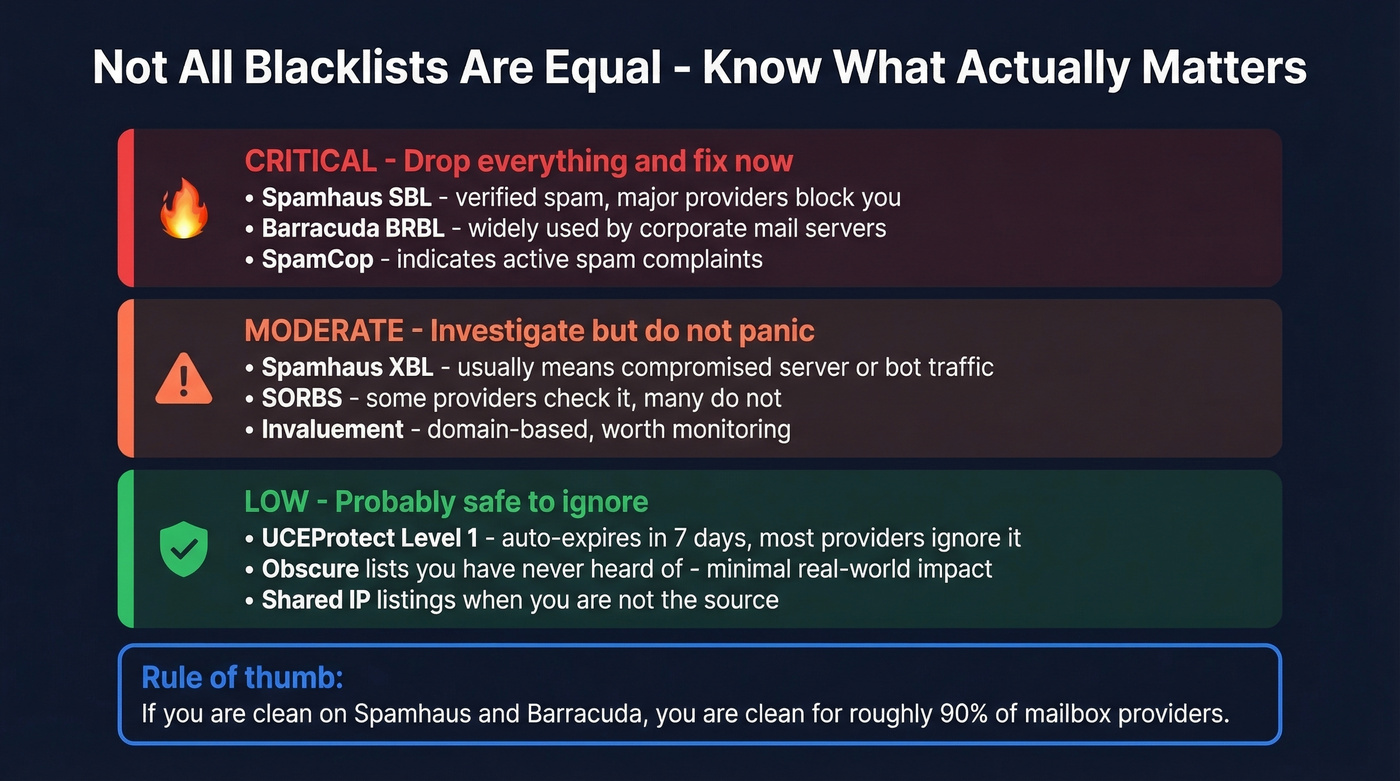
If you're clean on Spamhaus and Barracuda, you're clean for roughly 90% of mailbox providers. These two lists are the ones Gmail, Microsoft, and major ESPs actually query. Severity matters more than count - a Spamhaus SBL listing is a five-alarm fire, meaning your IP or domain was flagged for verified spam activity and major providers will block you. A UCEProtect Level 1 listing? That's a parking ticket. It auto-expires in seven days and most providers ignore it.
Panic if: you're on Spamhaus SBL, Barracuda BRBL, or SpamCop.
Don't panic if: you're on obscure lists you've never heard of, or UCEProtect L1.
False positives exist. Shared hosting environments and shared IP pools can get you listed through no fault of your own. In our experience, teams on shared IPs waste weeks fighting delisting requests when the real fix is moving to a dedicated sending IP. If you're on a shared IP and it keeps getting listed, stop fighting the symptom and switch.
How to Get Delisted
Fix the root cause before requesting delisting. If you delist without fixing the underlying problem - spam traps, complaints, bad authentication - you'll be re-listed within days. Every blacklist operator knows this pattern, and repeat offenders get longer bans.
| Blacklist | Process | Timeline |
|---|---|---|
| Spamhaus SBL | Removal form + identity + corrective measures | 24-48 hours |
| Spamhaus XBL | Delist via CBL after cleanup | Hours to 24h |
| Spamhaus PBL | Justify legitimate use or route through ISP relay | Varies |
| Barracuda BRBL | Lookup, request removal, email verification | 12-24 hours |
| SpamCop | Stop triggering reports; auto-delists | 24-48 hours |
| UCEProtect L1 | Wait it out | 7 days |
Start with Spamhaus and Barracuda - they have the broadest impact. SpamCop is self-healing: stop generating complaints and it drops you automatically within 48 hours. UCEProtect L1 just requires patience.
For Spamhaus SBL, the removal form asks for your identity, an explanation of what caused the listing, and what corrective measures you've taken. "We removed the bad addresses" isn't enough. They want to see that you've fixed your acquisition process so it doesn't happen again. Be specific about what changed: new verification steps, list hygiene protocols, volume controls.
Prevention - Stop Getting Blacklisted
The authentication checklist is table stakes. You need all three:
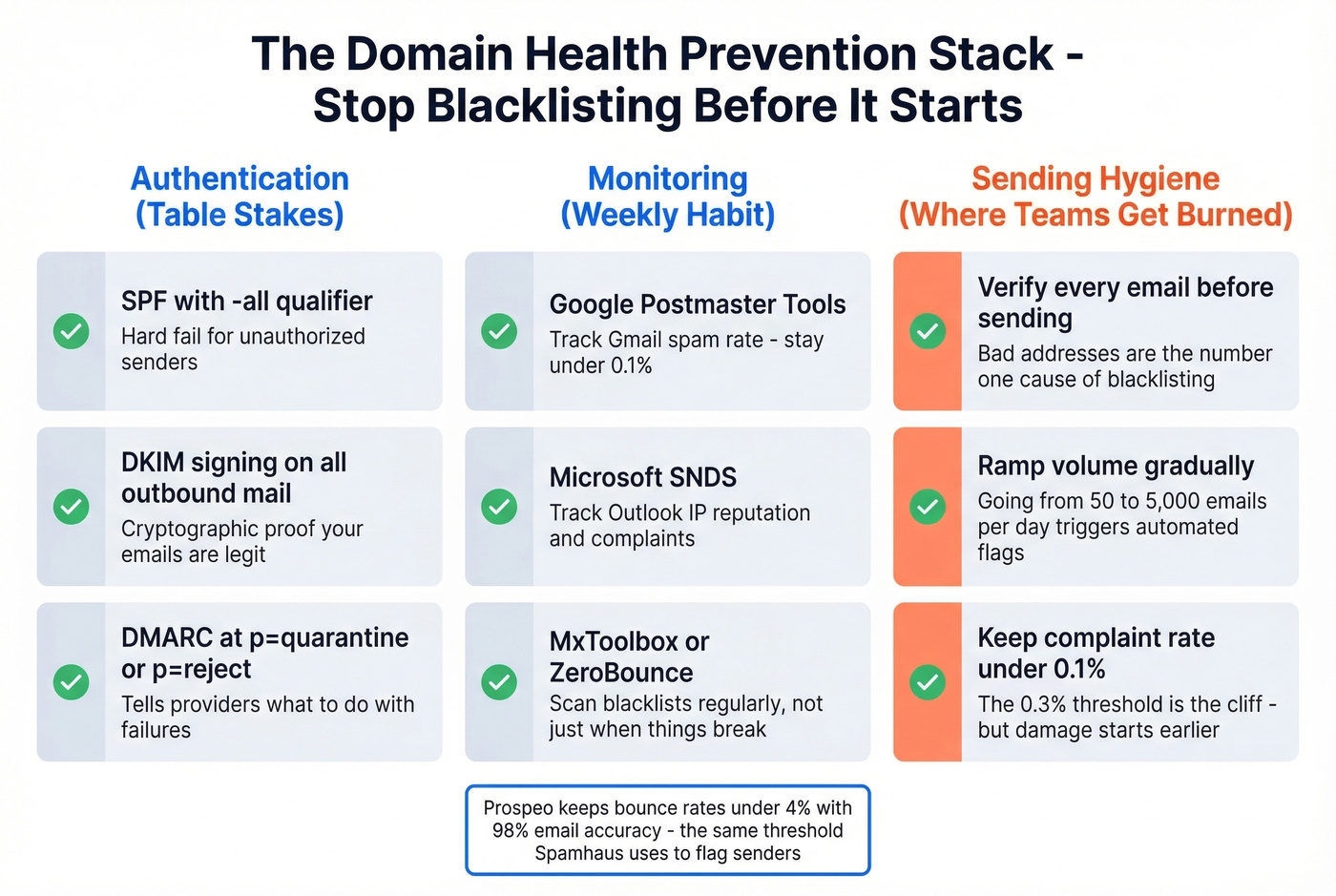
- SPF with a
-allqualifier (hard fail for unauthorized senders) - see SPF examples and syntax. - DKIM signing on all outbound mail - here’s how to verify DKIM is working.
- DMARC at minimum
p=none- thoughp=quarantineorp=rejectis where you should be heading - make sure you understand DMARC alignment.
Keep your spam complaint rate under 0.1% as a practical target. The 0.3% threshold is the line where Gmail and Microsoft start punishing you, but by that point you've already lost significant inbox placement. Monitor weekly through Google Postmaster Tools and Microsoft SNDS. Ramp sending volume gradually on new domains and IPs - sudden spikes from 50 to 5,000 emails/day trigger automated blacklist flags.
But here's where most outbound teams actually get burned: list quality.
You imported a "verified" list, sent 5,000 cold emails, and within 48 hours Barracuda flagged your domain. Turns out 12% of those addresses were spam traps. Bad prospect data is the root cause of most blacklistings - not missing SPF records, not sending volume spikes. The consensus on r/coldemail backs this up: threads about blacklisting almost always trace back to dirty lists, not technical misconfiguration. (If you’re already dealing with traps, use a dedicated spam trap removal playbook.)
Let's be honest - if you're running deals under $15k, you probably don't need enterprise-tier data. But you absolutely need verified data. Sending to unverified lists is the single fastest way to torch a domain, and no amount of SPF/DKIM/DMARC configuration will save you from a list full of spam traps. Prospeo's 5-step verification catches spam traps and honeypots before they reach your sending queue, with 98% email accuracy and a 7-day data refresh cycle. Stack Optimize built their agency to $1M ARR using that workflow - client deliverability stays above 94%, bounce rates under 3%, zero domain flags across all clients.

Stack Optimize built a $1M agency sending 4x the volume with sub-3% bounce rates and zero domain flags - all on Prospeo data. When every email is verified before it leaves your outbox, you never end up on MxToolbox searching for your own IP.
Clean data at $0.01/email beats delisting requests every time.
FAQ
How often should I run an email domain spam check?
Weekly if you're sending cold email at volume. Monthly minimum for marketing senders. Set up Google Postmaster Tools, Microsoft SNDS, and Yahoo Sender Hub for continuous, free monitoring between manual checks.
Can I check my domain for spam listings free?
Yes. MxToolbox scans 100+ DNSBLs, ZeroBounce covers 300+, and Spamhaus offers direct lookups - all free for one-off checks. Google Postmaster Tools and Microsoft SNDS provide free ongoing reputation monitoring.
What's the difference between IP and domain blacklists?
IP blacklists flag your sending server's address. Domain blacklists flag the domain in your From header. You can rotate IPs easily, but domain reputation is permanent and portable. Always check both when diagnosing deliverability drops.
How long does delisting take?
SpamCop auto-delists in 24-48 hours once complaints stop. Spamhaus SBL processes manual removal in 24-48 hours after you submit corrective measures. Barracuda handles requests in 12-24 hours. UCEProtect L1 expires automatically after 7 days.
Can bad prospect data cause blacklisting?
It's the number one cause for outbound teams. Sending to spam traps and honeypots triggers blacklist flags within hours. Verify every list before sending - skip this step and you're gambling your domain's reputation on data you didn't vet.