

Email Domains: Popular List, Setup & Authentication Guide
Most guides on email domains are either hosting company sales pages or forum threads with zero useful answers. Nobody combines actual volume data, authentication setup, and provider comparisons in one place. We're fixing that.
What Is an Email Domain?
An email domain is the part after the @ symbol. In john@yourcompany.com, the domain is yourcompany.com. That's it.
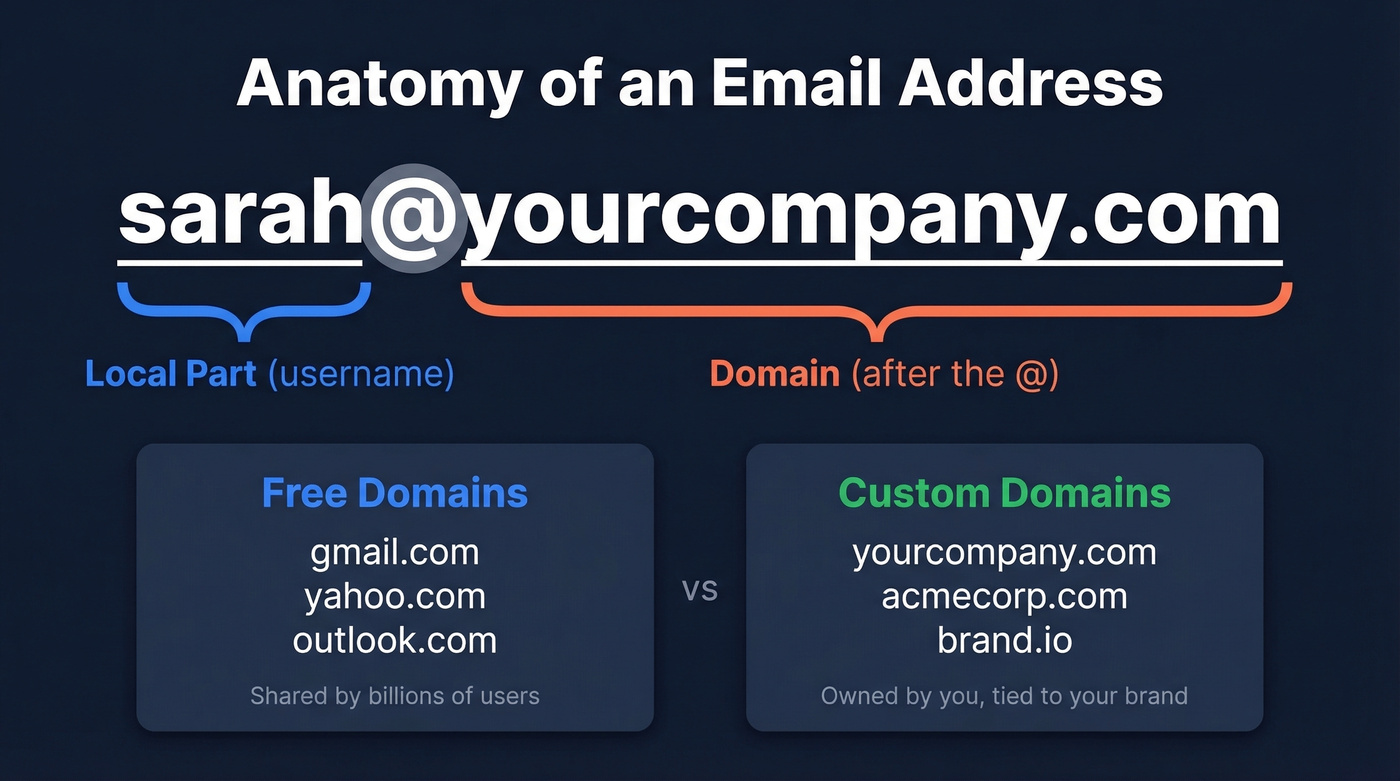
Every email address has two parts: the local part (the username before the @) and the domain, which is everything after it. The domain tells receiving servers where to route the message, and it tells the recipient who they're dealing with.
These fall into two buckets. Free domains like gmail.com, yahoo.com, and outlook.com are shared by billions of users. Custom domains like yourcompany.com are owned by you, tied to your brand, and configured to run through an email host of your choosing. The domain itself can double as your website domain - same name, different DNS records.
The distinction matters more than most people realize. A free domain says "individual." A custom domain says "business that plans to stick around."
Most Popular Email Domains in 2026
Top Providers by Volume
The best dataset we have comes from GMass, which analyzed 563,185,814 emails sent through their platform. Here are the top six:
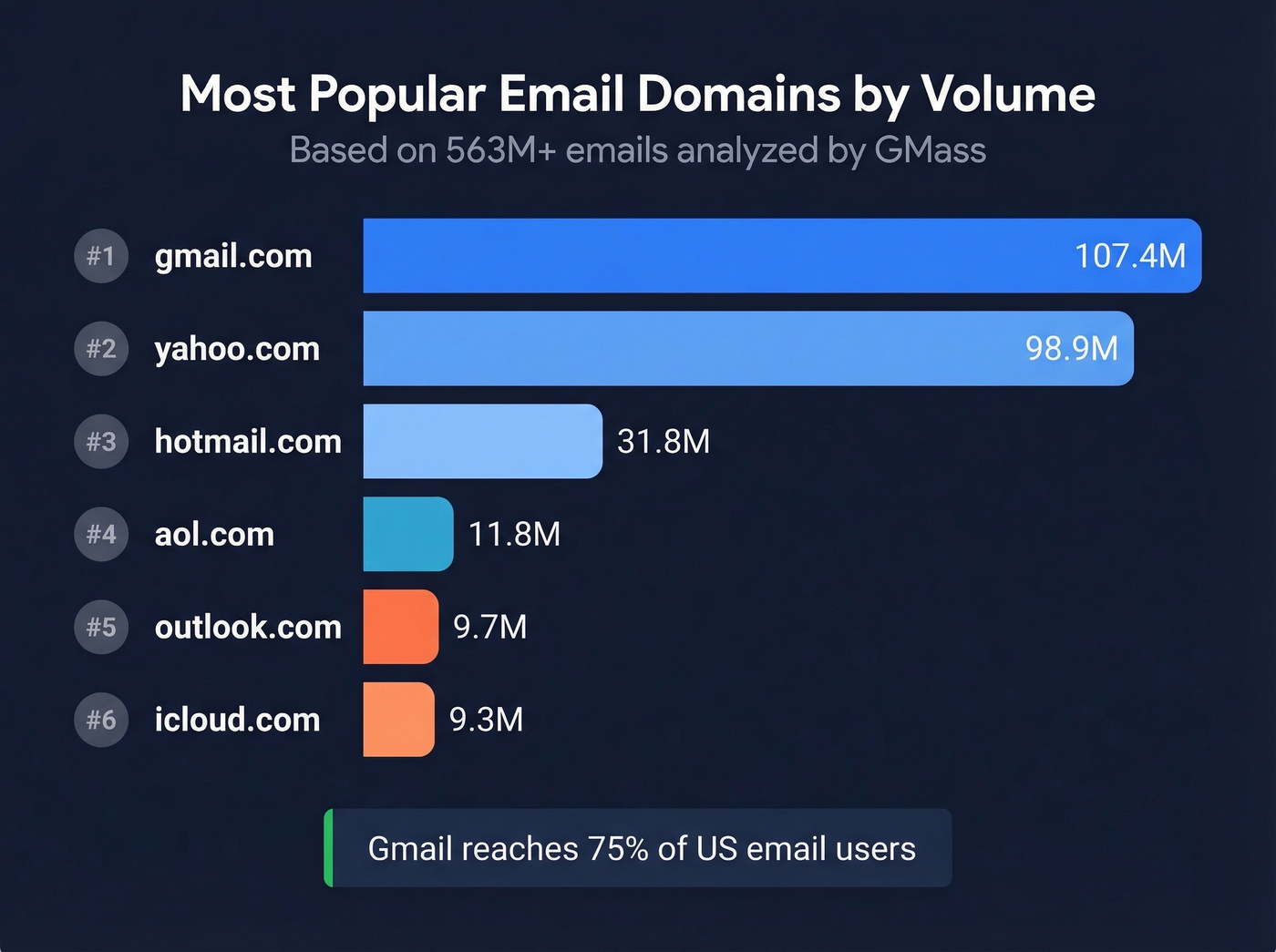
| Rank | Domain | Emails (GMass Dataset) |
|---|---|---|
| 1 | gmail.com | 107,413,999 |
| 2 | yahoo.com | 98,895,904 |
| 3 | hotmail.com | 31,839,178 |
| 4 | aol.com | 11,826,511 |
| 5 | outlook.com | 9,663,112 |
| 6 | icloud.com | 9,274,437 |
Gmail dominates by a wide margin. Yahoo hangs on at nearly 99M, which surprises people, but Yahoo's install base is massive and sticky - legacy users don't switch. Hotmail, despite being functionally absorbed into Outlook years ago, still accounts for 31M+ emails because legacy domains die slowly. In the US specifically, Gmail reaches 75% of email users, Yahoo sits at 31%, and Outlook/Hotmail covers 25%. Those numbers overlap because people use multiple providers.
Email Client vs. Domain Share
Here's where people get confused. Litmus tracks email client market share based on 1.1 billion opens, and their January 2026 numbers look very different from the domain list above:
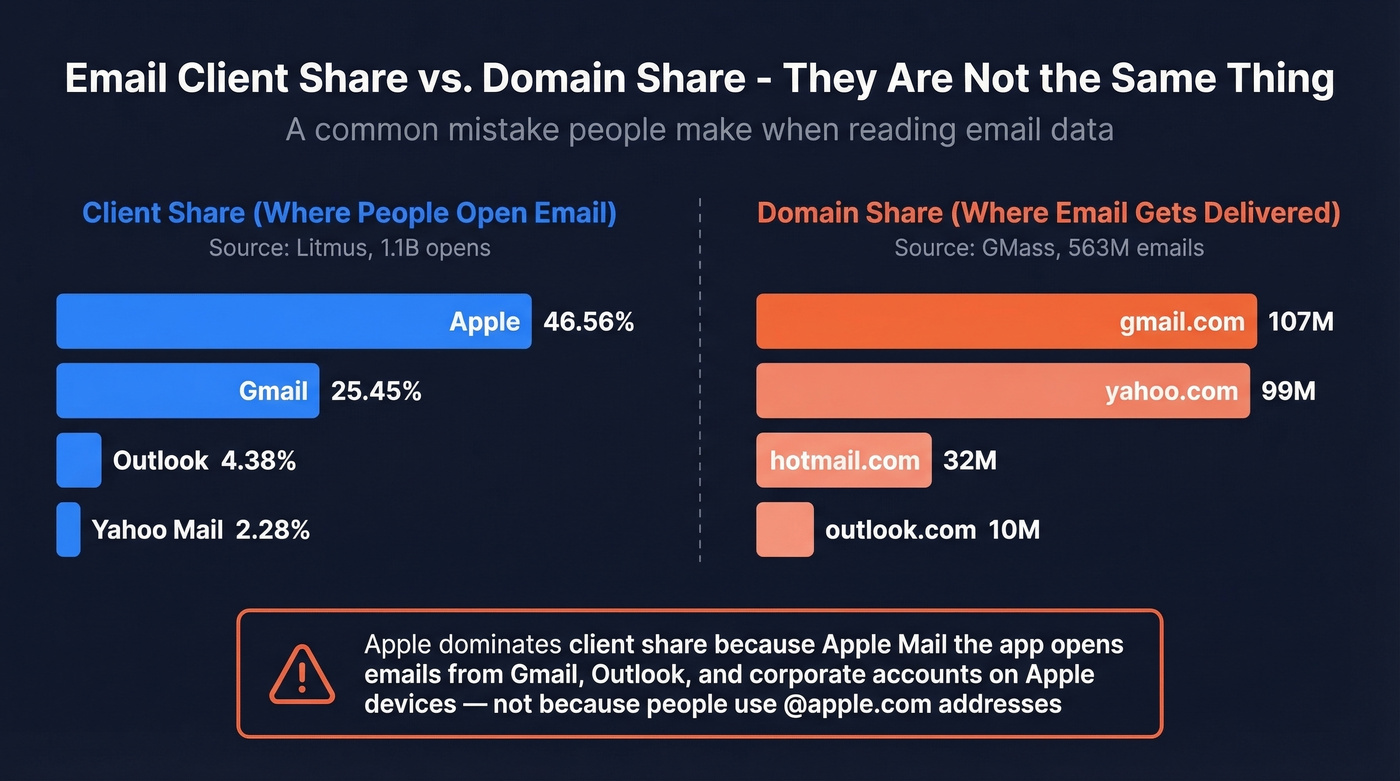
| Client | Share of Opens |
|---|---|
| Apple | 46.56% |
| Gmail | 25.45% |
| Outlook | 4.38% |
| Yahoo Mail | 2.28% |
Apple's dominance doesn't mean half the world uses @apple.com addresses. It means Apple Mail the app is the most popular way to read email - including Gmail, Outlook, and corporate accounts accessed through Apple devices. Apple's Mail Privacy Protection also inflates their share, since the "Apple" bucket includes pre-fetched opens from third-party accounts on Apple devices.
Client share measures where people open email. Domain share measures where email gets delivered. Most articles conflate them.
Regional Domains Worth Knowing
If you're sending internationally, a few domains pop up that don't appear on US-centric lists. qq.com and 163.com dominate in China. mail.ru covers much of Russia and the CIS. gmx.de and web.de are common across Germany. These matter if your outbound campaigns target those regions.
Beyond consumer domains, thousands of disposable and blacklisted domains exist for spam and throwaway signups - which is why email verification matters, and we'll get to that below.
Free vs. Custom Email Domains
Free works when you're running a personal project, testing an idea before committing to a brand, or freelancing where your portfolio matters more than your email address.
Go custom when you're running a business of any size, sending cold outreach or marketing emails, need multiple team members on the same domain, or care about inbox placement. The deliverability gap is real - email providers treat custom domains with proper authentication differently than shared free providers.
There's a credibility angle too. A thread on r/Domains captured the sentiment perfectly: uncommon TLDs and free addresses make recipients think "phishing attempt" before they even open the email. If you're sending a proposal from @gmail.com, you're already starting at a disadvantage.
Why Custom Domains Matter
Let's be honest: if you're still sending business email from a free provider, you're leaving credibility on the table.
Every email from a custom domain reinforces your company name. sarah@acmecorp.com carries more weight than sarah.acme2024@gmail.com in every inbox, and it's not even close. Custom domains also let you configure SPF, DKIM, and DMARC - the authentication trifecta that tells receiving servers your email is legitimate. Free providers share reputation with millions of other senders, including spammers.
Beyond branding and deliverability, custom domains give you centralized team management. Add and remove mailboxes as you hire. Set up role-based addresses like support@, billing@, and sales@ without workarounds. You also get compliance and security controls - data retention policies, access management, and audit trails that regulated industries require. And there's portability: switch email hosts and your address stays the same. Try that with @gmail.com.
The cost argument against custom domains evaporated years ago. You can run a professional setup for $1-7/user/month.
Here's our take: if you're a solo operator closing deals under five figures, @gmail.com won't kill you. But the moment you have a second team member or send any outbound at scale, a custom domain pays for itself in deliverability alone.

A custom email domain gets you in the door. Verified contact data fills your pipeline. Prospeo gives you 143M+ verified emails at 98% accuracy - so your new custom domain stays clean with bounce rates under 4%.
Protect your domain reputation with data that actually delivers.
Best Email Domain Providers
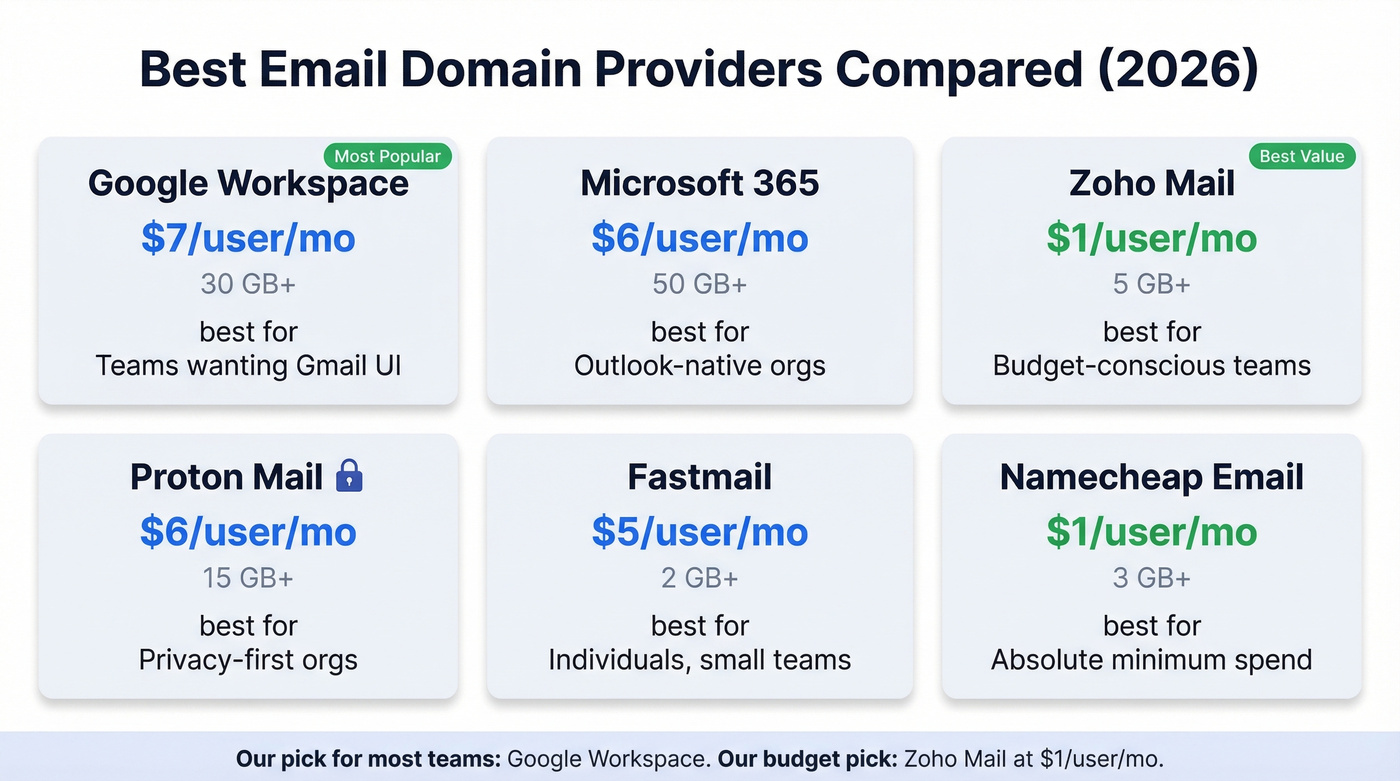
Provider Comparison
| Provider | Starting Price | Storage | Best For |
|---|---|---|---|
| Google Workspace | $7/user/mo | 30 GB+ | Teams wanting Gmail UI |
| Microsoft 365 | $6/user/mo | 50 GB+ | Outlook-native orgs |
| Zoho Mail | $1/user/mo | 5 GB+ | Budget-conscious teams |
| Proton Mail | ~$6/user/mo | 15 GB+ | Privacy-first orgs |
| Fastmail | $5/user/mo | 2 GB+ | Individuals, small teams |
| Namecheap Email | ~$1/user/mo | 3 GB+ | Absolute minimum spend |
Google Workspace is the default for a reason. You get the Gmail interface everyone already knows, solid spam filtering, and three clean pricing tiers at $7, $14, and $22/user/month on annual plans. Storage scales from 30 GB to 5 TB depending on the tier. For most teams, Business Starter at $7 is more than enough.
Microsoft 365 typically runs $6-22/user/month and makes sense if your team already lives in Outlook, Teams, and the Office suite. The email hosting itself is comparable to Google - the decision usually comes down to which ecosystem your company already uses.
The budget pick most people overlook: In our testing, Zoho Mail at $1/user/month handles basic business email surprisingly well. Clean interface, calendar, contacts, and a free tier for up to 5 users that's genuinely useful for early-stage businesses.
Proton Mail starts around $6/user/month and targets privacy-conscious organizations with end-to-end encryption. Fastmail at $5/user/month is a solid independent option for individuals and small teams who want clean email without the Google or Microsoft ecosystem. Rackspace also offers hosted email at $2-4/user/month for teams that want straightforward mailbox hosting without a full productivity suite.
Best Budget Options
For teams watching every dollar, a few options stand out. Zoho's free tier handles up to 5 users with 5 GB each - real email hosting, not a gimmick. Namecheap Private Email runs about $1/user/month and gets the job done for basic needs. On r/smallbusiness, owners consistently compare Zoho's free plan, Namecheap at ~$1/user, and Cloudflare forwarding as the go-to budget stack.
Cloudflare Email Routing deserves a mention: it's completely free and forwards email from your custom domain to any existing inbox. You don't get full hosting - no sending from the custom address natively - but for forwarding-only setups, it's hard to beat free. Porkbun offers email hosting at roughly $2/month and has a following among small business owners who want something simple and cheap.
Skip anything with an unusual TLD unless you have a specific brand reason. Stick with .com - it's the default people trust.
How to Set Up a Custom Email Domain
Setting up a custom email domain takes about 30-60 minutes. Here's the walkthrough.
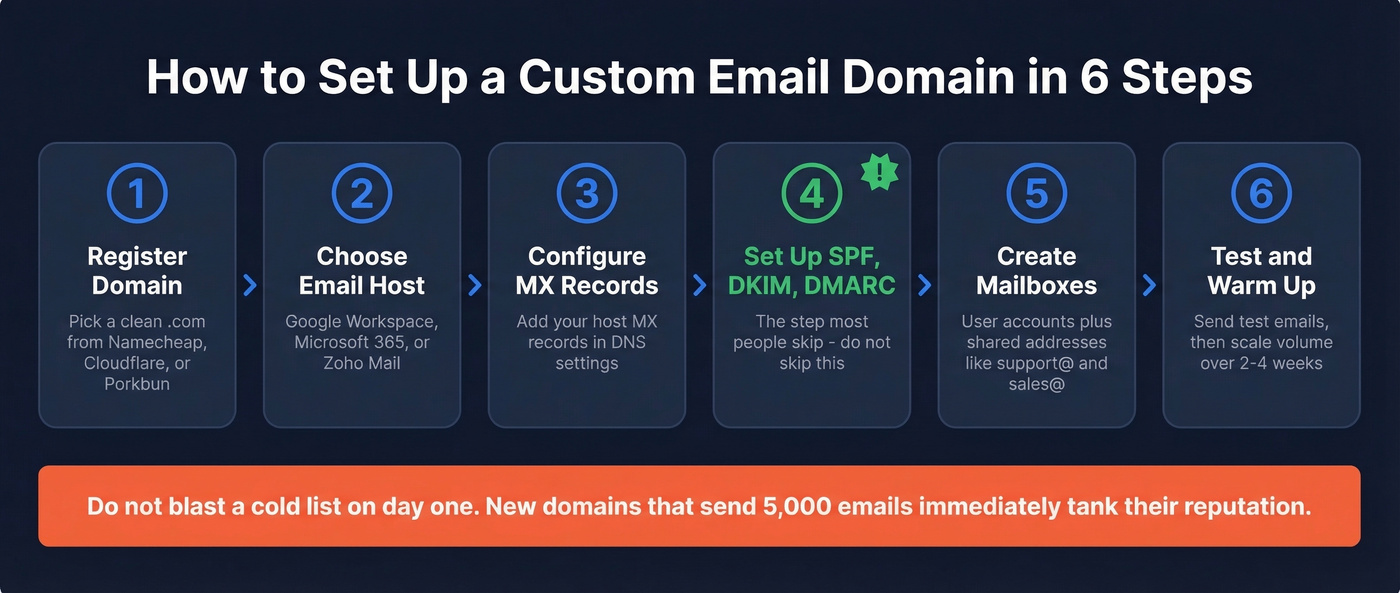
Step 1: Register your domain. Use a reputable registrar - Namecheap, Cloudflare, or Porkbun. Avoid bargain-bin registrars associated with spam. Pick a clean .com without hyphens or numbers.
Step 2: Choose your email host. Google Workspace, Microsoft 365, or Zoho Mail are the safe picks. Sign up and verify domain ownership by adding a TXT record to your DNS.
Step 3: Configure MX records. MX records tell the internet where to deliver email for your domain. Your email host provides the exact records - you add them in your registrar's DNS settings. For Google Workspace, that's typically five MX records pointing to aspmx.l.google.com and its backups.
Step 4: Set up SPF, DKIM, and DMARC. This is the step most people skip and then wonder why their emails land in spam. More on each protocol in the next section, but here's a quick SPF example for Google Workspace:
v=spf1 include:_spf.google.com ~all
Add this as a TXT record in your DNS. Your host will provide DKIM keys to add as well.
Step 5: Create mailboxes. Set up individual user accounts and any shared addresses you need (info@, support@, sales@). Configure aliases if needed.
Step 6: Test and warm up. Send test emails to Gmail, Outlook, and Yahoo accounts. Check that they don't land in spam. Then - and this is critical - don't blast a cold list on day one. Warm up your domain gradually. Start with small volumes to known contacts and scale over 2-4 weeks. We've seen brand-new domains tank their reputation in a single campaign because someone skipped this step and sent 5,000 cold emails on day one.
Common mistakes to avoid:
- Skipping DMARC entirely, which is the most common oversight
- Using hyphens in your domain name, which looks spammy
- Buying from a registrar with a bad reputation - your domain inherits neighborhood effects
- Forgetting to set up a DMARC reporting address so you can monitor authentication failures
Email Authentication Explained
SPF, DKIM, and DMARC
Authentication is the part of email domain setup that actually matters most - and the part most guides treat as an afterthought.
SPF (Sender Policy Framework, defined in RFC 7208) validates which servers are authorized to send email on behalf of your domain. It's a DNS TXT record that lists approved IP addresses and services. When a receiving server gets an email from your domain, it checks the SPF record to see if the sending server is on the list.
DKIM (DomainKeys Identified Mail, RFC 6376) adds a cryptographic signature to every outgoing email. The receiving server uses a public key published in your DNS to verify the signature hasn't been tampered with. Best practice is to rotate your DKIM keys every 6-12 months minimum, and Mailgun's research found 47.7% of senders only rotate after a security incident - which is way too late. (If you want to double-check your setup, see how to verify DKIM is working.)
DMARC (Domain-based Message Authentication, Reporting & Conformance, RFC 7489) ties SPF and DKIM together with an enforcement policy. It tells receiving servers what to do when authentication fails: nothing (monitor only), quarantine the message, or reject it outright. DMARC also sends you reports so you can see who's trying to send email as your domain. (More detail: DMARC alignment.)
BIMI builds on DMARC enforcement and lets you display a verified brand logo next to your emails in supporting inboxes. Not essential, but a nice trust signal once your DMARC is locked down.
The Enforcement Gap
Most businesses set up authentication once and then leave the door wide open. According to Mailgun's deliverability research, 66% of senders use both SPF and DKIM, and 53.8% report using DMARC - up from 42.6% the year prior.
But only 37% of DMARC users actually enforce with Reject or Quarantine policies. The rest run DMARC in monitor-only mode, collecting reports but not blocking spoofed emails. That's security theater. You've installed the alarm system but left it in "test mode" permanently.
If your DMARC policy is p=none, you're telling the world you have authentication but aren't willing to enforce it. Move to p=quarantine once you've confirmed your legitimate sending sources, then graduate to p=reject.
How to Verify Emails on Any Domain
You just invested time registering a domain, configuring DNS, setting up authentication, and warming up your sending reputation. Don't waste all of that by sending to bad addresses.
High bounce rates wreck deliverability fast - we're talking a single bad campaign can undo weeks of careful warmup. And it's not just invalid addresses. Disposable email domains like Guerrilla Mail and Temp Mail create the illusion of valid contacts that evaporate after one use, while spam traps sit silently in purchased lists waiting to flag your domain.
Prospeo handles this with a 5-step verification process covering catch-all domain handling, spam-trap removal, and honeypot filtering. With 143M+ verified emails and 98% accuracy, it's the fastest way to clean a list before you hit send. Upload a CSV, run bulk verification, and get results in minutes. The free tier gives you 75 email verifications per month - enough to test the workflow before committing. (If you're comparing tools, start with Bouncer alternatives.)
For outbound teams, verification isn't optional. It's the bridge between having a properly authenticated domain and actually maintaining its reputation over time. If you're seeing issues, use email reputation tools and follow a plan to improve sender reputation.
You just invested in a custom domain to boost credibility and deliverability. Don't waste it on bad data. Prospeo's 5-step email verification catches spam traps, honeypots, and catch-all domains before they torch your sender reputation.
Start with 75 free verified emails - no credit card, no contracts.
FAQ
What is the most popular email domain?
Gmail.com, by a wide margin. It accounts for 107M+ emails in the GMass dataset of 563M+ sends and reaches 75% of US email users. Yahoo.com ranks second at nearly 99M, followed by hotmail.com at 31.8M.
Can I get a custom email domain for free?
Yes, with limits. Zoho Mail offers a free tier for up to 5 users with 5 GB storage each - genuine hosting, not just forwarding. Cloudflare Email Routing provides free forwarding from a custom domain to any existing inbox, though you can't send from the custom address natively. For full hosting, expect $1/user/month minimum.
What's the difference between an email domain and a website domain?
They can be the same domain name. The difference is DNS configuration: a website uses A or CNAME records pointing to a web server, while an email domain requires MX records pointing to a mail host, plus SPF, DKIM, and DMARC records for authentication. Same name, different plumbing.
How do I check if an email domain is legitimate?
Look up its MX and SPF records using a DNS lookup tool - if a domain has no MX records, it can't receive email. For individual addresses, use a verification tool like Prospeo to confirm deliverability before sending. This catches invalid addresses, disposable domains, and spam traps that DNS checks alone miss.
What is a disposable email domain?
A disposable email domain is a temporary service - Guerrilla Mail, Temp Mail, and similar providers - that generates throwaway addresses for one-time use. These addresses self-destruct after minutes or hours. Sending to them inflates bounce rates and damages sender reputation. Any serious verification tool flags these automatically.