

"Email Not Found" - What It Means and How to Fix It
You sent an important email. Ten minutes later, a cryptic message from "Mail Delivery Subsystem" lands in your inbox telling you the address wasn't found. Your stomach drops - did anyone get it? Was your account hacked? Is this even real?
An "email not found" error is a catch-all message that covers at least a dozen different problems. It could be a simple typo, a deleted account, a full mailbox, a misconfigured domain, or a phishing scam disguised as a bounce notification. The fix depends entirely on which problem you're actually dealing with.
Quick Diagnosis
Run through this triage before anything else:
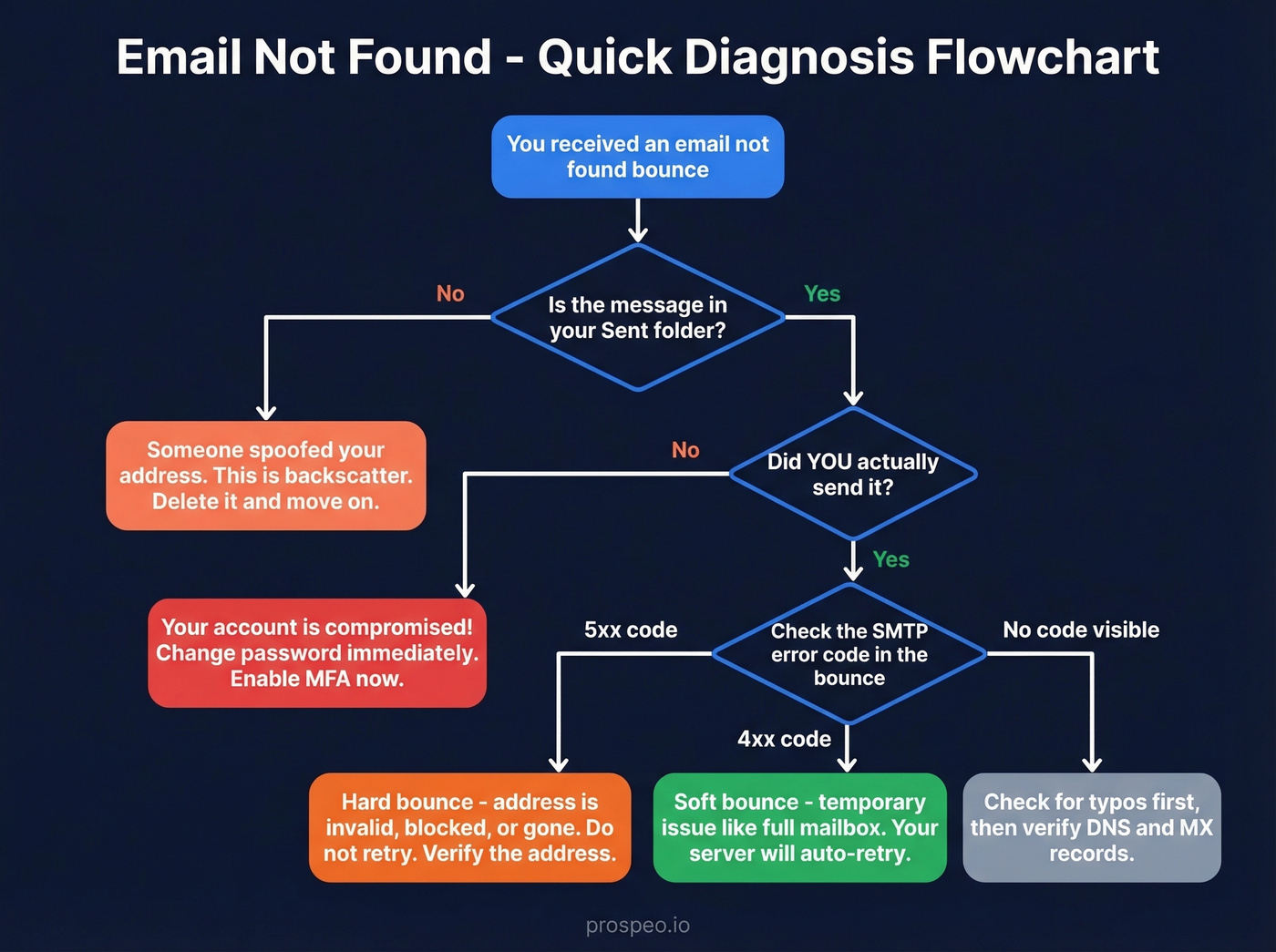
Did you send the message? Check your Sent folder. If the message is there and you sent it, the bounce is legitimate - the recipient's address has a problem. Jump to Common Causes below.
If the message is in Sent but you didn't send it, your account is compromised. Change your password immediately and enable MFA.
If nothing's in Sent, someone spoofed your address. The bounce is harmless backscatter. Delete it and move on.
If you did send it, read the bounce message carefully. The SMTP error code tells you exactly what went wrong - see the SMTP Bounce Codes table to decode yours.
Most address-not-found errors trace back to typos or stale auto-complete entries. Start there before investigating anything more exotic.
Common Causes Behind the Error
Not every bounce means the same thing. Here are the most frequent culprits, roughly ordered by how often we see them:
- Typo or misspelled address. The single most common cause. One wrong character -
@gmial.cominstead of@gmail.com- and the message has nowhere to go. Auto-complete makes this worse because it memorizes your mistakes. - Deleted or deactivated account. The person's mailbox no longer exists. They left the company, closed the account, or the domain expired. You'll typically see a
550 5.1.1code. - Full mailbox. The recipient's inbox hit its storage limit, triggering a
552 5.2.1error. The address exists, but it can't accept mail right now. This is a soft failure that usually resolves on its own. - Forwarding rules pointing to a dead address. This one catches people off guard. The recipient set up auto-forwarding to another mailbox that no longer exists, so your email technically reaches their server, then bounces when it tries to forward. Reddit threads are full of users panicking over this exact scenario.
- DNS or MX misconfiguration. The recipient's domain doesn't have valid mail exchange records. Common after domain migrations or when someone sets up a custom domain and skips the DNS step.
- App password or MFA blocking SMTP. If you're sending through a third-party client like Thunderbird or a mobile app, your provider might require an app-specific password. Without it, the connection fails before the message even leaves.
- Message too large. Many providers cap attachments around 20 MB. Exceed that and you'll get a bounce, though the error message isn't always clear about why.
- Spam or policy rejection (5.7.1). The recipient's server decided your message violates its security policy - an SPF/DKIM failure, content filtering, or the recipient's admin blocking your domain.
SMTP Bounce Codes
Every bounce message includes an SMTP status code. These codes are the fastest way to diagnose the problem:
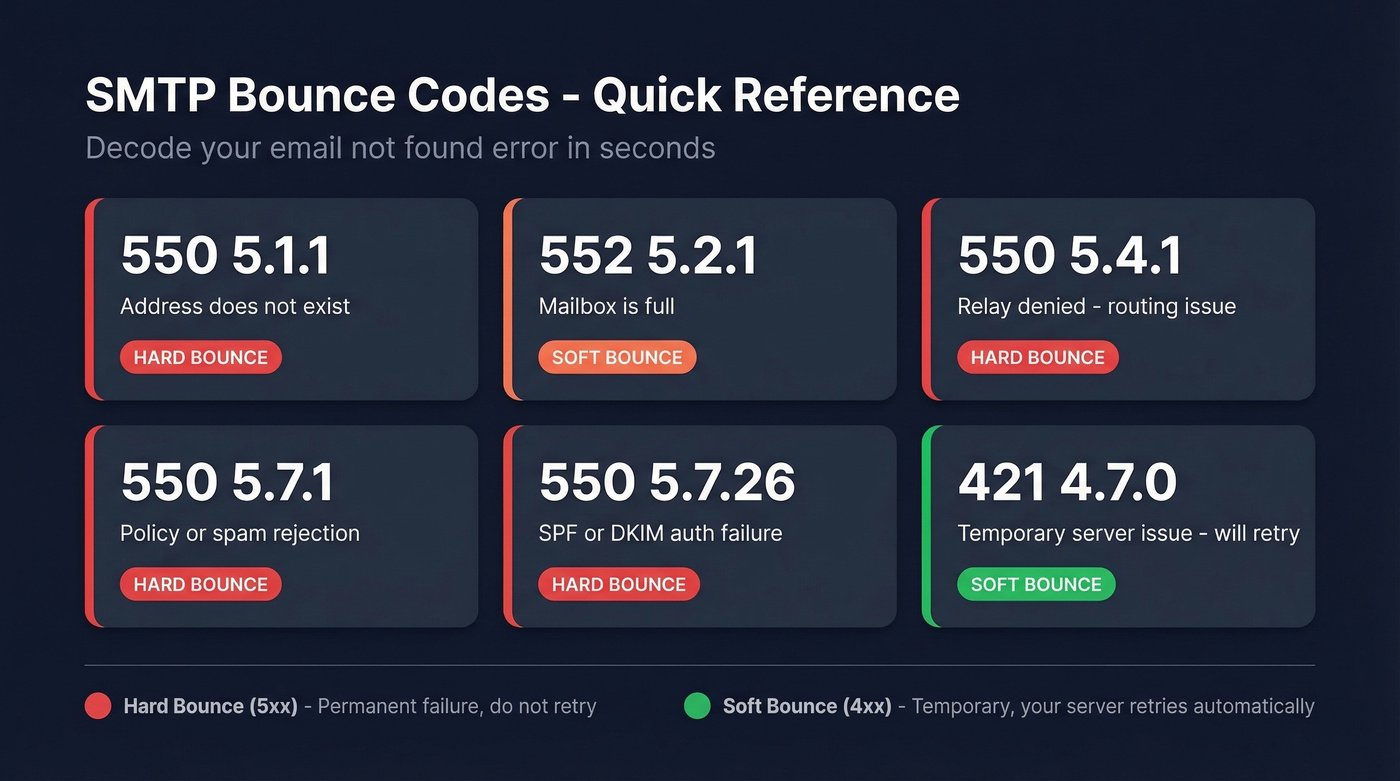
| Code | Enhanced Code | What It Means |
|---|---|---|
| 550 | 5.1.1 | Address doesn't exist |
| 552 | 5.2.1 | Mailbox full |
| 550 | 5.4.1 | Relay denied (routing issue) |
| 550 | 5.7.1 | Policy/spam rejection |
| 550 | 5.7.26 | SPF/DKIM auth failure |
| 421 | 4.7.0 | Temporary server issue (retry) |
Here's the thing: 5xx codes are hard bounces - permanent failures. The address is invalid, blocked, or unreachable, and retrying won't help. 4xx codes are soft bounces - temporary issues like a full mailbox or a server that's briefly down. Your mail server will automatically retry soft bounces for a few hours or days.
A typical bounce line looks like this: 550 5.1.1 Recipient address rejected: User unknown. The three-digit code gives you the category, the enhanced code narrows it down, and the human-readable text tells you what happened in plain English.

Tired of decoding bounce codes? Prospeo's 5-step verification catches bad addresses before you hit send - delivering 98% email accuracy across 143M+ verified contacts. Every record is refreshed every 7 days, so you never email a deleted or stale account again.
Stop diagnosing bounces. Start with emails that actually work.
How to Fix It - By Provider
Gmail
- Double-check the recipient's address. Open the bounce message and compare the address character by character against what you intended.
- Clear the auto-complete cache. Gmail memorizes addresses you've typed before - including wrong ones. Start composing a new email, type the first few letters, hover over the bad suggestion, and click the "X" to remove it.
- Check your forwarding rules. Go to Settings, then Forwarding and POP/IMAP. If you're forwarding to an address that no longer exists, every forwarded message will bounce back to the original sender.
- Verify SPF/DKIM for custom domains. If you're sending from a custom domain through Google Workspace, confirm your DNS records are properly configured. Missing SPF or DKIM records trigger 5.7.x rejections.
Microsoft 365 / Outlook
Outlook's nickname cache is notorious for storing old addresses - and it's the first thing to fix.
- Remove stale auto-complete entries. In Outlook desktop, start typing the recipient's name, highlight the wrong suggestion, and press Delete. In OWA, click the "X" next to the suggestion.
- Check accepted domains and MX records. If you're an admin, verify that your domain's MX records point to Exchange Online. Microsoft's NDR troubleshooting guide walks through the full 5.1.1-5.1.20 code range.
- Audit forwarding rules. Check whether the recipient has mail flow rules forwarding to an invalid external address - this is an admin-level check in Exchange Online.
Yahoo and Other Providers
Yahoo uses the same SMTP codes, so the diagnostic process is identical - but there are a few platform-specific gotchas.
If you're connecting through a third-party email client, generate an app password. Yahoo requires app-specific passwords when two-step verification is enabled, and failing to use one produces confusing "address not found" or authentication errors. Yahoo SMTP settings typically use port 465 (SSL) or 587 (TLS), so double-check these if your client throws connection errors.
On mobile, if you're getting "cannot get mail" errors, remove and re-add the account. Verify your IMAP/SMTP settings match the provider's current requirements.
Spotting Fake Bounce Emails
Not every bounce message is real.
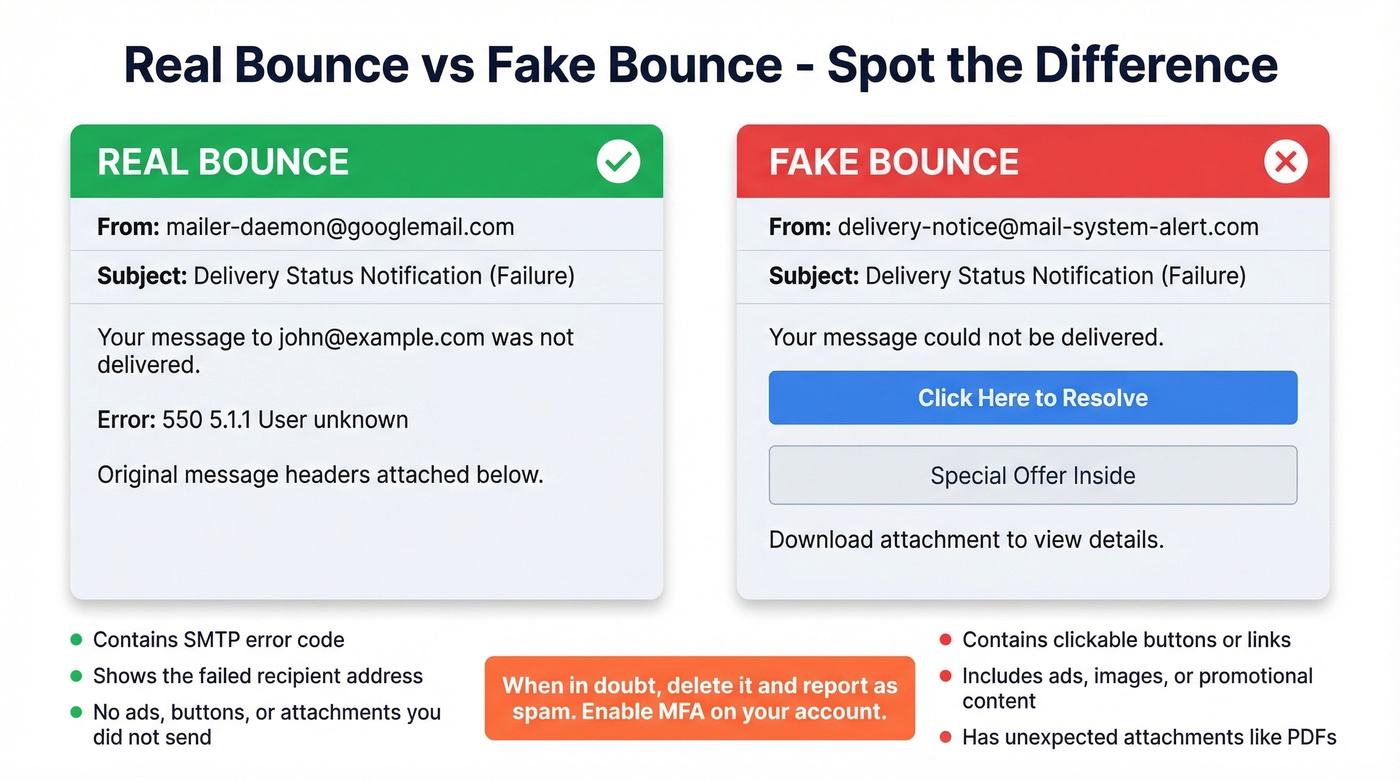
There's a well-documented phishing pattern where scammers send emails that look exactly like "Delivery Status Notification (Failure)" messages but contain malware links, promotional content, or credential-harvesting attachments. One Reddit user described getting daily bounce-backs after mistyping @google.com instead of @gmail.com - except the bounce messages contained shady ads. That's not a real bounce. That's spam exploiting the DSN format.
Real bounces never contain ads, promotional links, download buttons, or attachments you didn't send. A legitimate DSN includes the SMTP error code, the failed recipient address, and sometimes a copy of your original message headers. That's it. If there's anything else - a "click here to resolve" button, an image, a PDF attachment - delete it immediately and report it as spam. And if you haven't already, enable MFA on your email account.
How to Prevent Bounces for Good
If you mistyped an address once, the fix is simple: double-check before you hit send. But if you're running outbound campaigns, you've got a bigger problem. Say your SDR uploaded 500 prospects and dozens bounced - those bounces damage your domain reputation, and the damage compounds fast.
If you want a deeper breakdown of bounce types, benchmarks, and what to do next, see our guide on bounce rate.
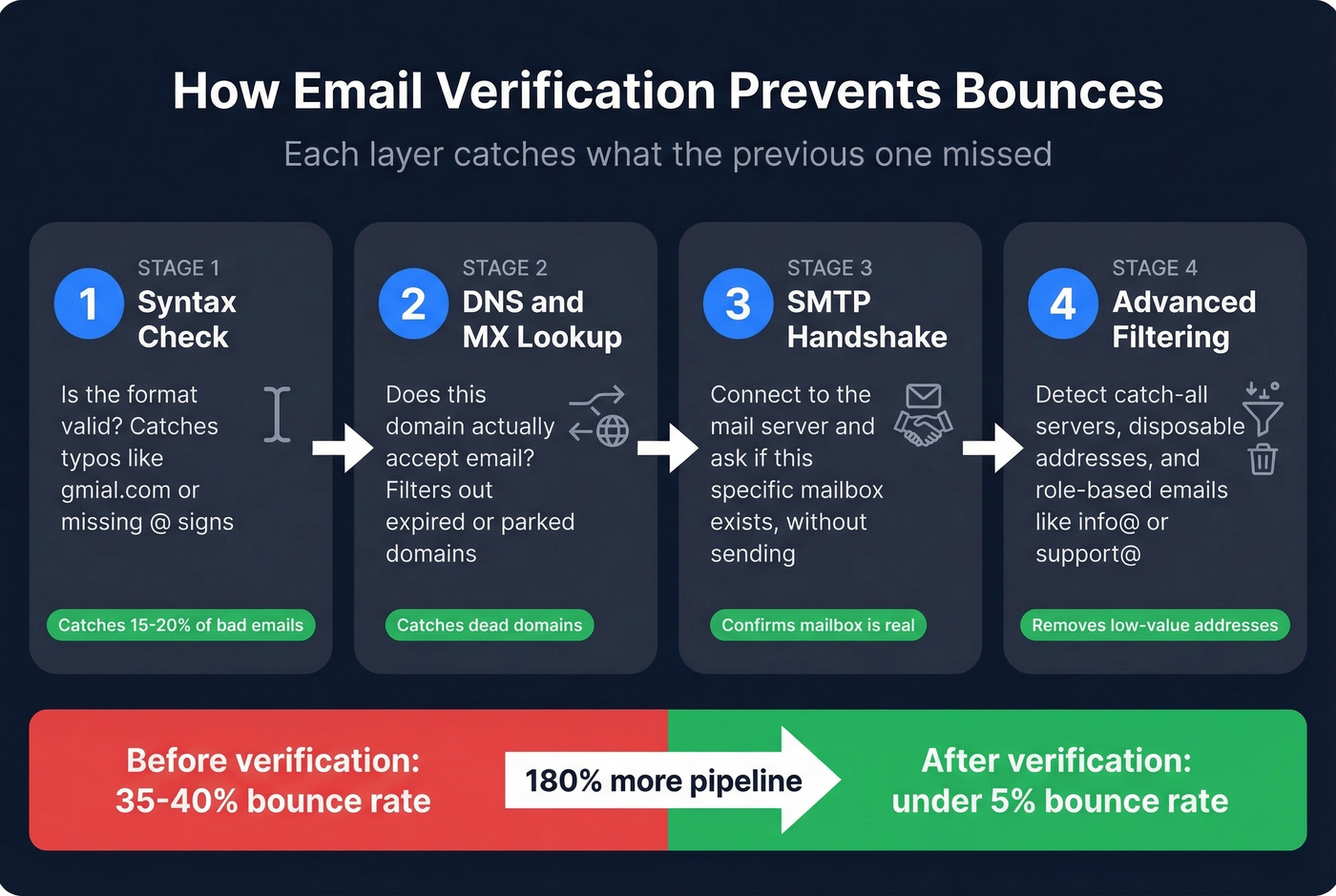
The solution is verifying addresses before you send. Professional email verification follows a layered approach: first, a syntax check confirms the format is valid; then a DNS/MX lookup verifies the domain accepts mail; next, an SMTP handshake up to RCPT TO confirms the mailbox exists; and finally, catch-all, disposable, and role-based address detection filters out the addresses that technically accept mail but will never convert.
If you're building lists, it also helps to understand name to email patterns and how email append works when you're enriching partial records.
Let's be honest - if you're doing any kind of outbound at scale, verification isn't a nice-to-have. It's table stakes. We've seen teams burn through two sending domains before they started verifying lists upfront. Once mailbox providers flag your domain, even your emails to valid addresses start landing in spam. If you're seeing that, use an email deliverability checklist and consider how to improve sender reputation before scaling volume again. You can also monitor issues with dedicated email reputation tools.
One of our customers, Snyk, went from a 35-40% bounce rate to under 5% just by verifying every address before sending - and their AE-sourced pipeline jumped 180%.

Most "email not found" errors come from outdated data. While competitors refresh every 6 weeks, Prospeo refreshes every 7 days - killing typos, dead accounts, and stale addresses at the source. At $0.01 per email, bad data is no longer worth the risk.
Replace your bounce-back headaches with 98% accurate contact data.
FAQ
If one recipient bounced, did the others get my email?
Yes. Mail servers deliver to each valid recipient independently. The bounce notification only applies to the specific address that failed - every other recipient on the thread received your message normally.
Does "email not found" mean I've been hacked?
Not usually. Check your Sent folder first. If the bounced message is there and you didn't send it, change your password immediately and enable MFA - your account was compromised. If it's not in Sent, someone spoofed your address. The bounce is harmless backscatter.
Why do I keep getting bounce-backs for emails I never sent?
A spammer spoofed your email address in the "From" field. These bounces (called backscatter) are annoying but harmless. To reduce them, strengthen your domain's SPF, DKIM, and DMARC records so receiving servers can identify spoofed messages and stop sending you the bounce-backs.
What's the difference between a hard bounce and a soft bounce?
A hard bounce (5xx code) is a permanent failure - the address doesn't exist or the server explicitly rejected you. Don't retry. A soft bounce (4xx code) is temporary - full mailbox, server briefly down - and your mail server will automatically retry for hours or days.
Can I verify an email address before sending?
Yes. Email verification tools run syntax checks, DNS/MX lookups, and SMTP handshakes to confirm an address is valid without sending an actual message. Prospeo's free tier includes 75 verifications per month at 98% accuracy - enough to validate a prospect list before any campaign goes out.