

Email Response Time: 2026 Benchmarks, Templates, and What "Fast" Actually Means
An Adobe study found the average professional spends 5 hours and 52 minutes per day on email. That's most of the workday. And yet nobody's ever handed you a clear number for what a good email response time actually looks like - or how to enforce one across your team.
Here's the short version: customers deserve a reply within 6 hours, hot leads within 1 hour, and colleagues within the same business day. 62% of companies never respond at all, which means the bar is embarrassingly low. Below, we'll break down the benchmarks, give you a copy-paste SLA template, and walk through 7 ways to actually get faster.
What's a Normal Response Time?
It depends on who measured it and how.
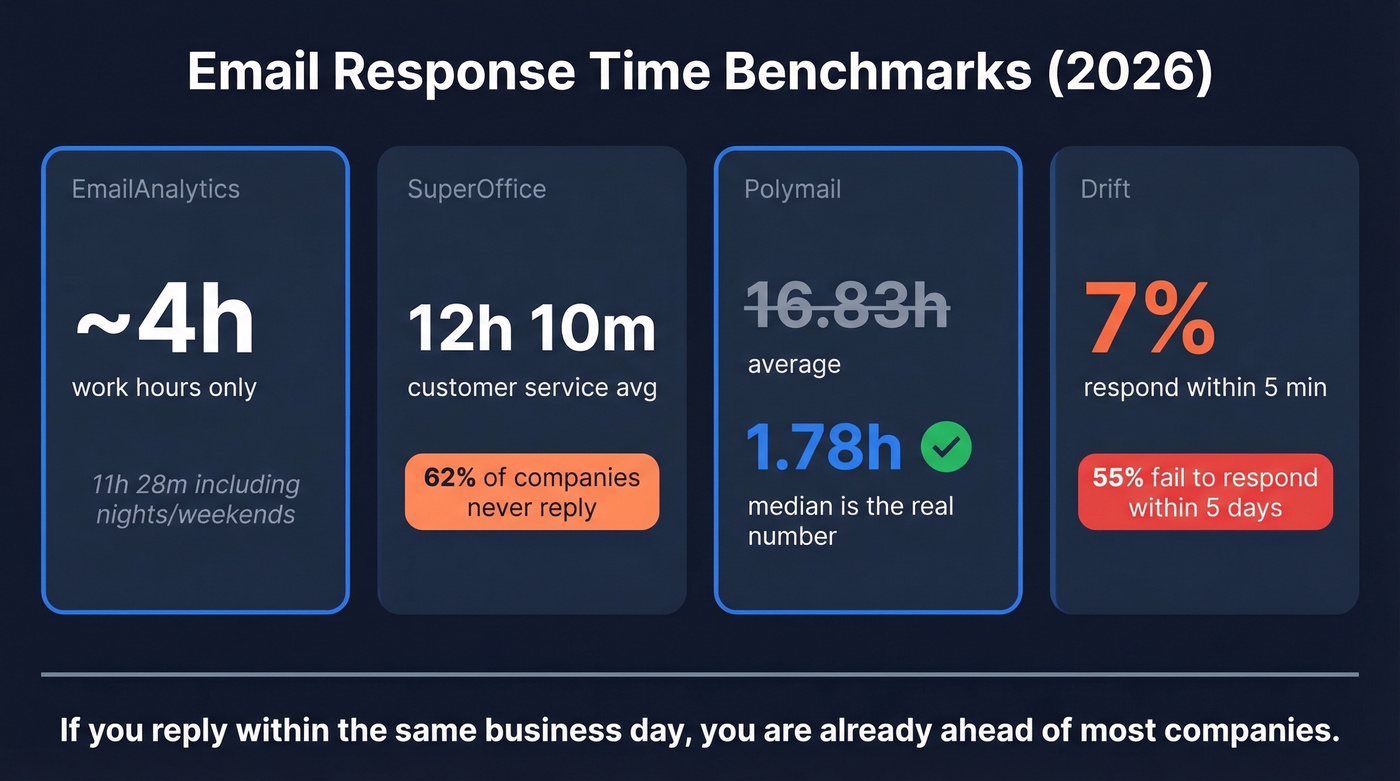
| Study | Sample | Avg Response Time | Key Takeaway |
|---|---|---|---|
| EmailAnalytics | Own dataset | ~4h (work hours) | 11h 28m including nights/weekends |
| SuperOffice | Customer service | 12h 10m | 62% of companies never reply |
| Polymail | 691K emails | 16.83h avg / 1.78h median | Median is far more useful |
| Drift | Form submissions | 7% respond within 5 min | 55% fail to respond within 5 days |
These benchmarks mix methodologies - some measure only work hours, others include nights, weekends, and emails that never get a response at all.
The spread is wild. That gap between Polymail's 1.78-hour median and 16.83-hour average tells you averages are skewed by the long tail of emails sitting unanswered for days. The median of 1.78 hours is the most realistic picture of how fast responsive teams actually move.
The Drift data is the real gut punch. Only 7% of companies respond to form submissions within 5 minutes, and more than half fail to respond within 5 business days. If you're replying within the same business day, you're already ahead of most. The "always reply within 24 hours" advice you see everywhere is lazy - a hot inbound lead and an internal FYI don't deserve the same response window, and pretending they do is how deals slip through the cracks.
Response Time Targets by Context
Here's what we recommend based on the benchmarks and what we've seen work across sales, support, and internal teams.
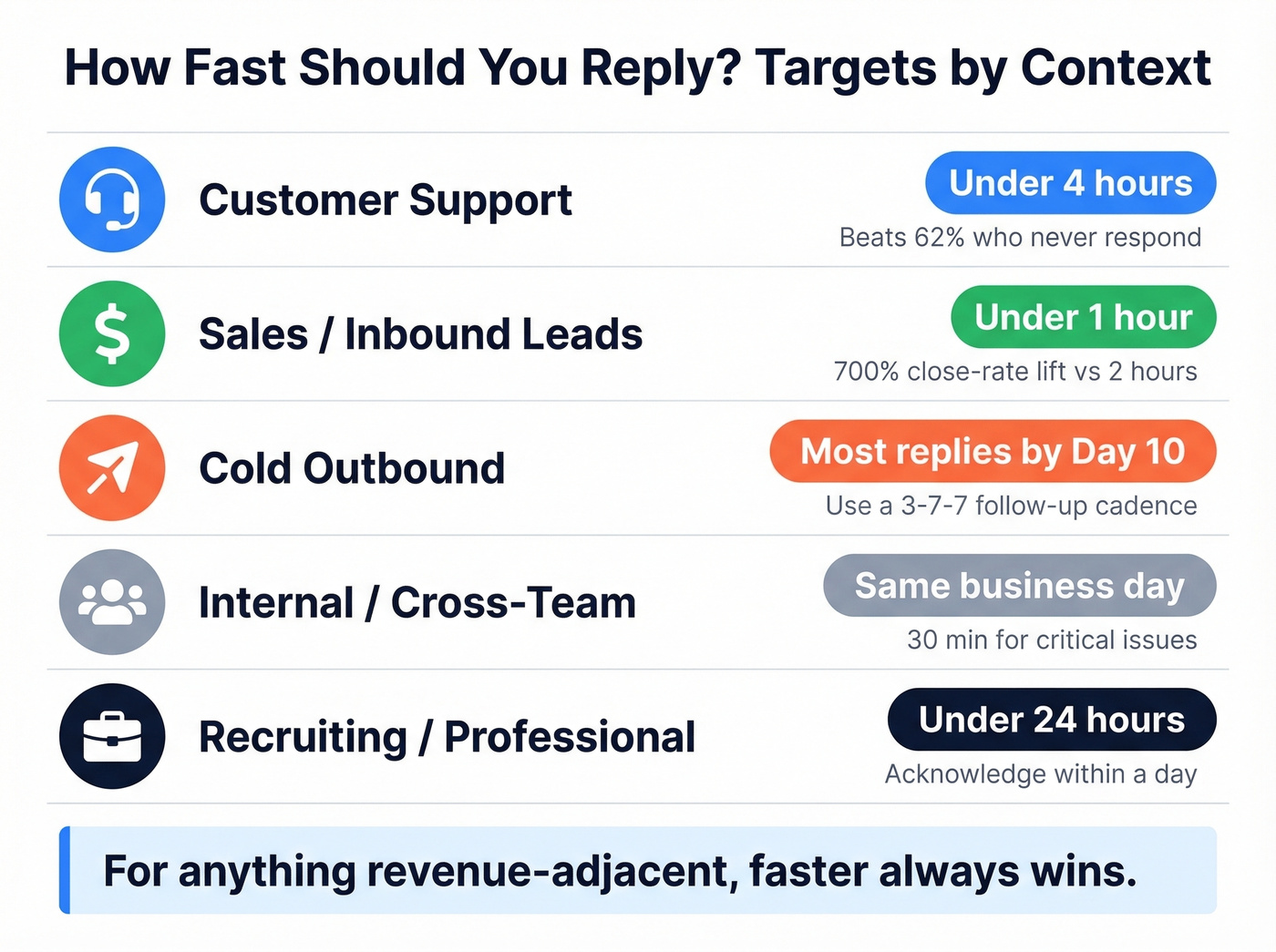
| Context | Target First Response | Why |
|---|---|---|
| Customer support | Under 4 hours | Already ahead of the 62% that never respond |
| Sales / inbound leads | Under 1 hour | 35-50% of sales go to the first responder |
| Cold outbound | Replies cluster early | 93% of replies arrive by Day 10 in the 3-7-7 cadence model |
| Internal / cross-team | Same business day | 30 min for critical issues |
| Recruiting / professional | Under 24 hours | Acknowledge within a day |
For sales teams, the speed-to-lead data is unambiguous. Responding within the first hour is associated with a 700% close-rate lift compared to waiting even two hours. A contact-form submission signals higher intent than a whitepaper download - adjust your response urgency accordingly. If you're running inbound, your reply-time policy should be measured in minutes, not hours.
In r/CustomerSuccess threads, practitioners commonly cite "end of next business day" for general inquiries, with real debate around whether a 2-hour acknowledgment is overkill or table stakes. The consensus lands where you'd expect: context matters more than a single magic number. But for anything revenue-adjacent, faster always wins.
For cold outbound, the calculus flips entirely. You're not responding - you're waiting for a response. Timeline-based hooks average a 10.01% reply rate, and most replies cluster in the first 10 days. Build your 3-7-7 follow-up cadence around that window. If you're wondering how long to wait for a reply from a prospect, 10 days of silence after your final follow-up is a reasonable cutoff before moving on.

35-50% of sales go to the first responder - but only if your email actually lands. Prospeo delivers 98% verified emails on a 7-day refresh cycle, so your speed-to-lead advantage doesn't die in a bounce folder.
Stop optimizing response time on emails that never arrive.
How to Set an Email Response Time Policy
If you can't measure your reply speed, you don't have a policy. You have a wish.
Channel-Specific SLA Benchmarks
Start with targets by channel, then adjust for your team's capacity.
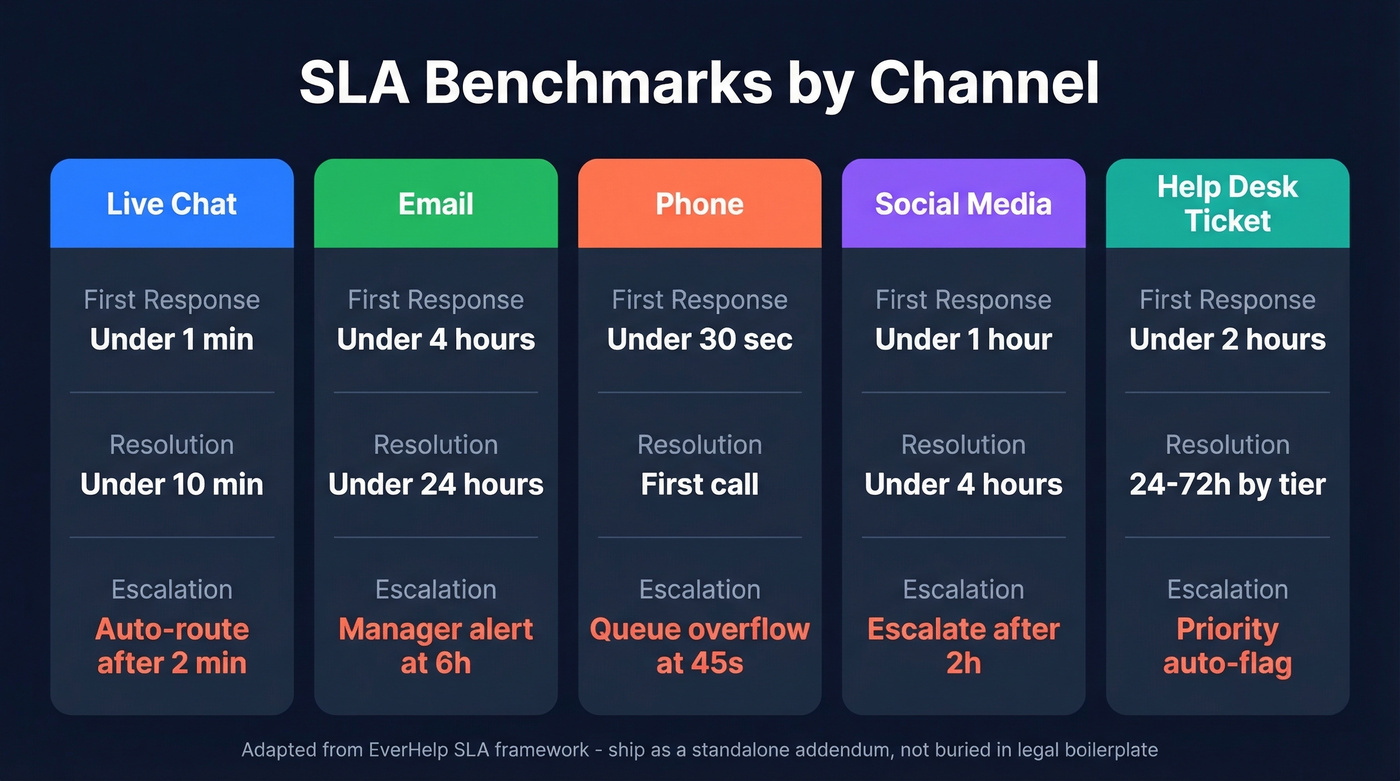
| Channel | First Response Target | Resolution Target | Escalation Rule |
|---|---|---|---|
| Live chat | Under 1 min | Under 10 min | Auto-route after 2 min |
| Under 4 hours | Under 24 hours | Manager alert at 6h | |
| Phone | Under 30 sec | First call | Queue overflow at 45s |
| Social media | Under 1 hour | Under 4 hours | Escalate after 2h |
| Help desk ticket | Under 2 hours | 24-72h by tier | Priority auto-flag |
These benchmarks are adapted from EverHelp's SLA framework. Ship them as a standalone addendum - if they're buried in legal boilerplate, nobody reads them.
Internal SLA Template
For cross-team email, use priority tiers. This template draws on Supportbench's internal SLA model.
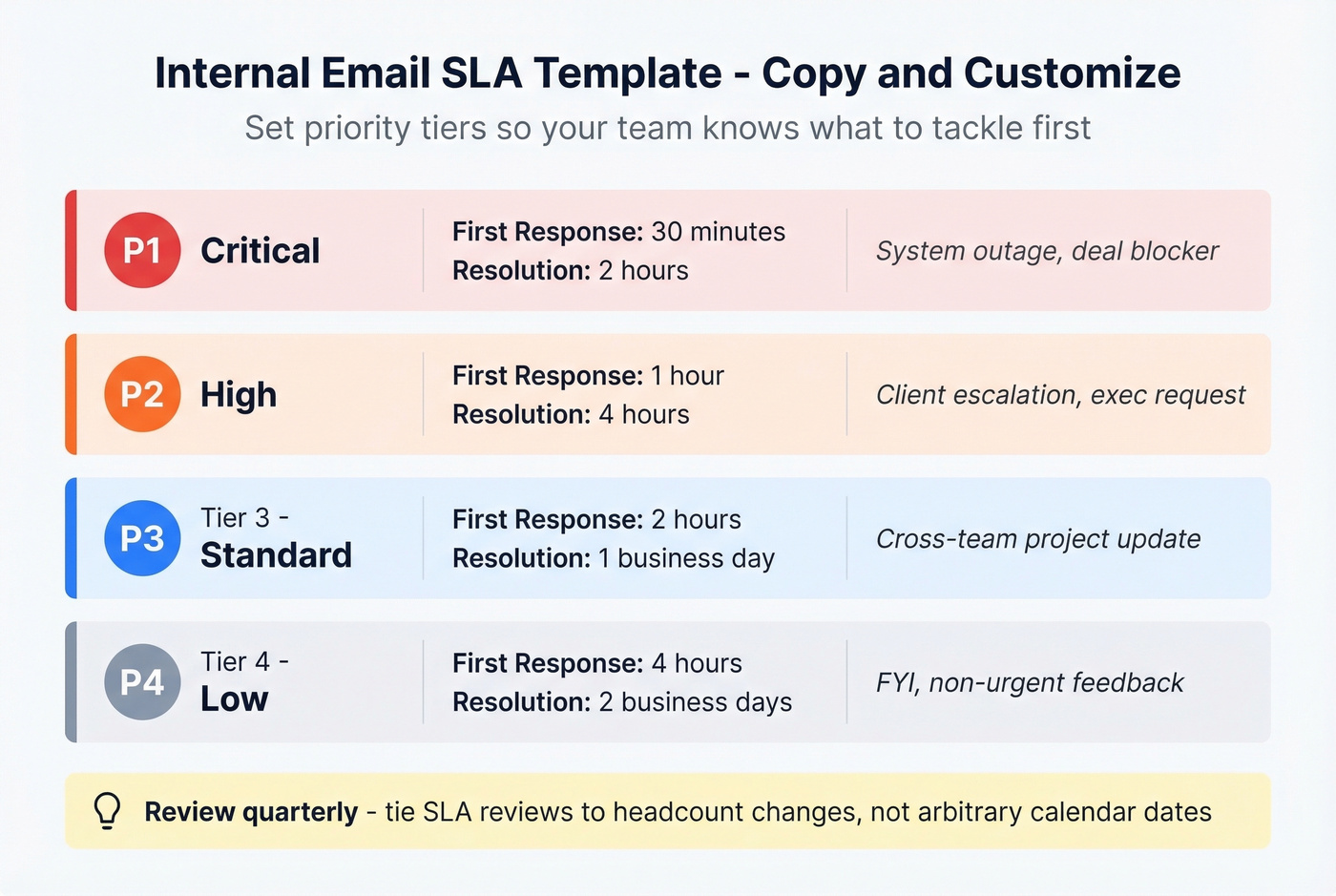
| Priority | First Response | Resolution Target | Example |
|---|---|---|---|
| Critical | 30 minutes | 2 hours | System outage, deal blocker |
| High | 1 hour | 4 hours | Client escalation, exec request |
| Standard | 2 hours | 1 business day | Cross-team project update |
| Low | 4 hours | 2 business days | FYI, non-urgent feedback |
Review these quarterly. Targets that made sense six months ago can be too loose - or unrealistically tight - as your team scales. We've found that tying SLA reviews to headcount changes works better than arbitrary calendar dates.
7 Ways to Improve Reply Speed
Most response-time advice focuses on replying faster. That matters. But for outbound teams, the bigger lever is making sure the email arrives in the first place. Keep both in mind.
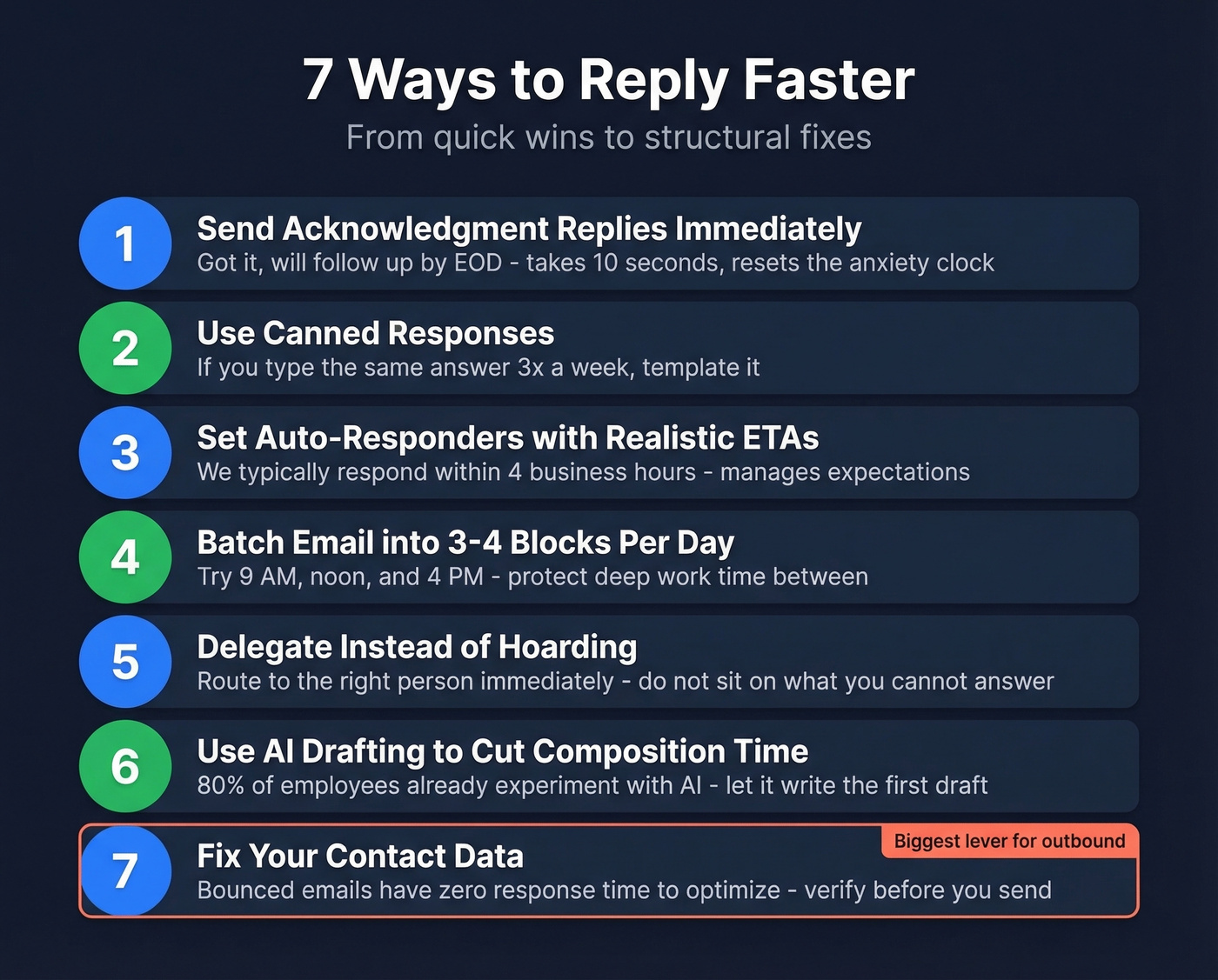
1. Send acknowledgment replies immediately. "Got it, will follow up by EOD" takes 10 seconds and resets the sender's anxiety clock. Brief replies keep your measured response time low and signal that you've seen the message.
2. Use canned responses for recurring questions. If you're typing the same answer three times a week, template it. Every email client supports this - there's no excuse for rewriting the same pricing breakdown from scratch each time.
3. Set auto-responders with realistic ETAs. "We typically respond within 4 business hours" manages expectations before frustration builds. This is especially useful when you're handling complex issues that need internal routing - an auto-reply buys your team time without leaving the sender in the dark.
4. Batch email into 3-4 dedicated blocks per day. Constant inbox monitoring kills deep work. Schedule email windows and protect the time between them. Our team blocks 9 AM, noon, and 4 PM - everything else waits.
5. Delegate instead of hoarding. Route emails to the right person immediately. Sitting on a message you can't answer doesn't help anyone, and it inflates your response time metrics for no reason.
6. Use AI drafting to cut composition time. 80% of employees already experiment with AI at work. Let it write the first draft - you edit and send. The bottleneck is usually composition, not decision-making. If you're standardizing messaging, pair this with email copywriting guidelines so drafts stay on-brand.
7. Fix your contact data. Here's the thing: if your outbound emails bounce because contact data is stale, there's no response to optimize. Prospeo verifies B2B emails with 98% accuracy on a 7-day refresh cycle, so your messages actually reach the inbox. Stale data doesn't just hurt deliverability - it makes your email response time metrics meaningless because you're measuring against a smaller, self-selected pool of recipients who happened to have valid addresses. If you're diagnosing deliverability, start with email bounce rate and then work backward into email deliverability.

62% of companies never respond. The ones using stale data never even get the chance. Prospeo refreshes 300M+ contacts every 7 days - not every 6 weeks - so every outbound email hits a real inbox at $0.01 per lead.
Replace dead contacts before your next send window.
FAQ
What's a good email response time for customer service?
Under 4 hours for first response, under 24 hours for resolution. The industry average sits at 12 hours 10 minutes, and 62% of companies never respond at all - so sub-4-hour puts you comfortably ahead of most competitors.
How long should you wait before following up on an email?
For a colleague or business contact, 24 hours is a reasonable window before following up. For a sales prospect, give it 3-7 days between touches. For customer support, anything beyond 4 hours without acknowledgment is a missed opportunity.
How do you calculate email response time?
Subtract the timestamp the email was received from the timestamp you sent your reply. For business contexts, count only working hours - if an email arrives at 11 PM, the clock starts at 9 AM the next business day. Most email analytics tools handle this automatically.
Does email data quality affect response rates?
It does, and teams underestimate this constantly. If outbound emails bounce because contact data is outdated, there's no response to measure. One Prospeo customer, Snyk, saw bounce rates drop from 35-40% to under 5% after switching to verified data - which meant their response-time metrics finally reflected reality instead of a filtered subset of valid addresses.