

Email Spoofing Protection: What Actually Works in 2026
Your CFO gets an email from "you" - your exact domain, your display name - asking to wire $47,000 to a new vendor account. It passes a quick glance test. It looks real because it came from your domain. Except you didn't send it. Someone spoofed your address, and your DNS records did nothing to stop it.
This isn't hypothetical. The FBI's IC3 logged $16.6B in reported losses across 859,532 complaints in 2024, with $2.77B attributed specifically to business email compromise. Spoofing - forging the "From" address so an email appears to come from a trusted domain - is the engine behind most of these attacks. The frustrating part? Effective email spoofing protection has existed for years. Most organizations just haven't configured it correctly.
Let's fix that.
The Whole Playbook, Condensed
If you're short on time:
- Implement SPF, DKIM, and DMARC at enforcement (
p=reject). Copy-paste DNS records are below. - Use a DMARC monitoring tool during rollout. PowerDMARC Basic starts at $8/mo; Red Sift OnDMARC starts at $9/mo.
- Protect your sender reputation on the outbound side. Verify your contact lists before sending campaigns - bad data tanks the same domain reputation you're trying to protect.
The rest of this guide walks through each step with real DNS examples, a phased rollout timeline, common mistakes, and a tool comparison.
Why Most DMARC Records Don't Protect You
Here's the thing: having a DMARC record and being protected by DMARC are two completely different states.
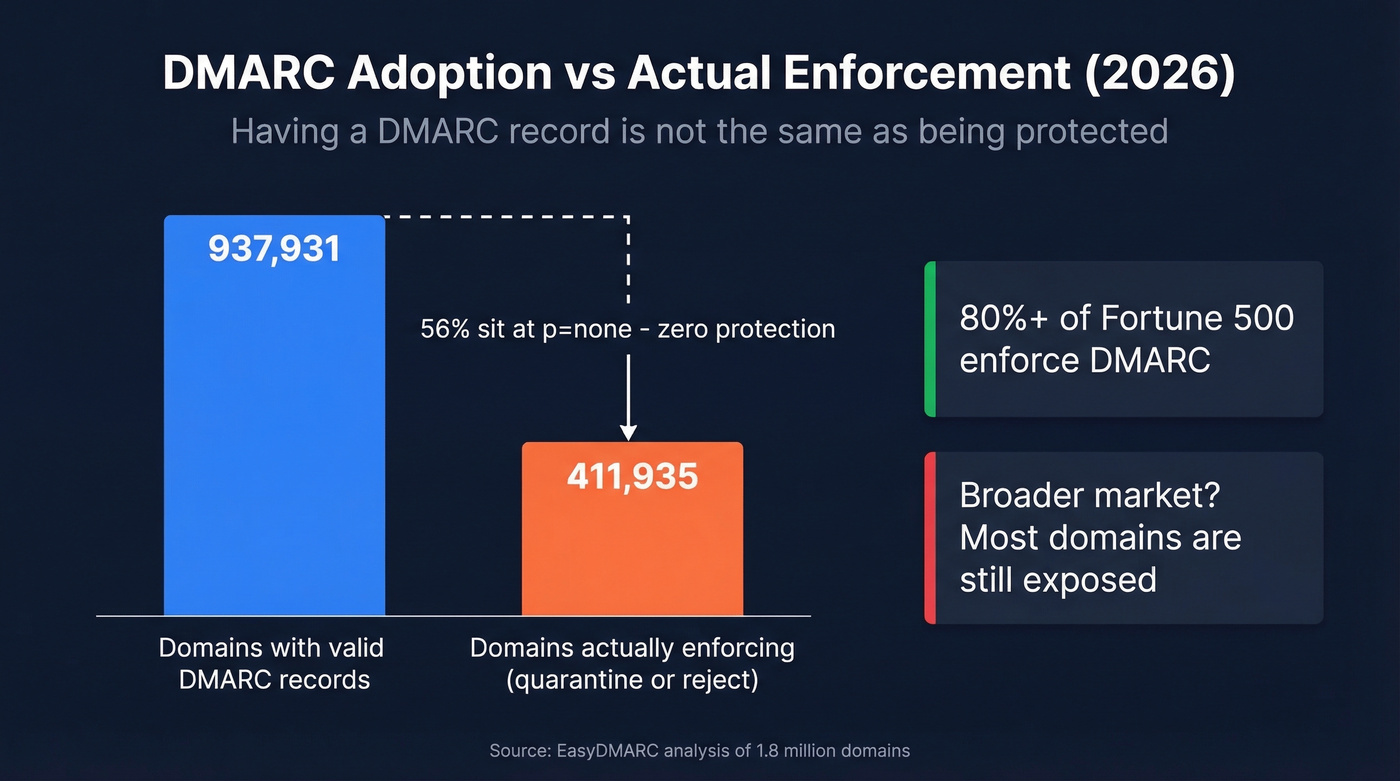
An EasyDMARC report analyzing 1.8 million domains found that valid DMARC records grew from 523,921 in 2023 to 937,931 in early 2026. Sounds great - until you see that only 411,935 of those domains actually enforce a protective policy (p=quarantine or p=reject). The rest sit at p=none, which means "monitor and report, but deliver everything anyway." That's not protection. That's a security blanket.
About 95% of the Fortune 500 have valid DMARC records, and 80%+ enforce them - but that still leaves dozens of the world's largest companies exposed. The broader market is far worse.
The pressure is mounting. Google and Yahoo's bulk sender authentication requirements rolled out with a gradual soft-enforcement period through 2024-2025, with stricter enforcement beginning in November 2025. If you're sending more than 5,000 emails per day and your DMARC and alignment aren't right, you're already losing deliverability. Google also requires bulk senders to keep spam complaint rates below 0.3% - ideally under 0.1%.
DMARC at p=none gives organizations a false sense of security that's arguably worse than having no record at all. At least without a record, you know you're unprotected. With p=none, you've done "the DMARC thing" and moved on - while spoofed emails sail through untouched.
How to Set Up SPF, DKIM, and DMARC
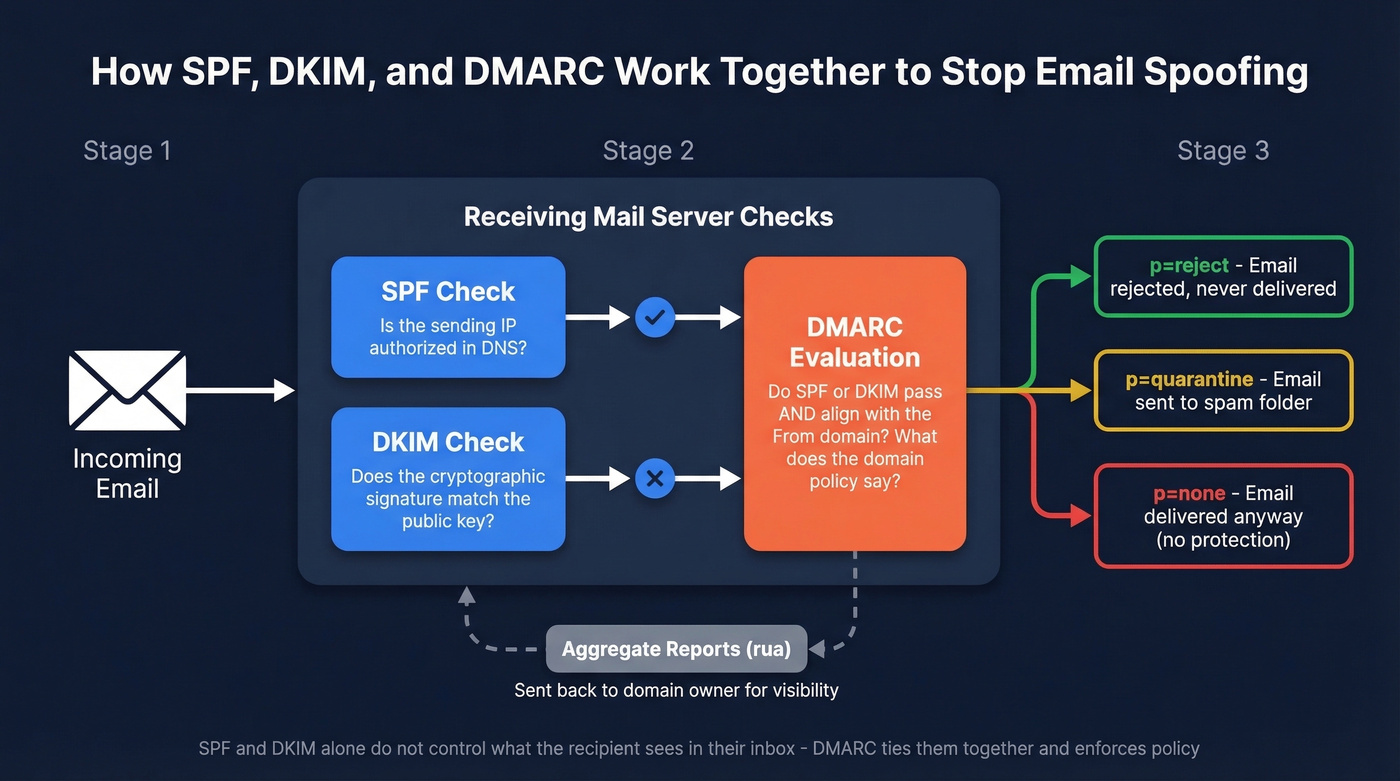
This is the core of any anti-spoofing strategy. Get these three records right and you've eliminated the vast majority of direct domain spoofing. Configure SPF and DKIM first, wait about 48 hours for DNS propagation, then publish your DMARC record.
SPF Record
SPF tells receiving mail servers which IP addresses and services are authorized to send email on behalf of your domain. You publish it as a single TXT record on your root domain.
v=spf1 ip4:192.168.1.0/24 include:_spf.google.com include:amazonses.com -all
Replace the IP range and include statements with your actual sending infrastructure. The -all at the end is critical - it tells receivers to reject anything not explicitly authorized. Don't use ~all (softfail) or +all in production. Those defeat the purpose.
One constraint you'll hit: SPF has a 10 DNS lookup limit. Every include, a, mx, and redirect mechanism counts as a lookup. Exceed 10 and SPF returns a permerror, which breaks your record entirely. If you're using multiple ESPs, you can hit this fast. Flatten your includes or consolidate senders.
You can only have one SPF record per domain. Multiple SPF TXT records cause validation failure per RFC 7208. If you find two, merge them.
For more syntax patterns and provider-specific examples, see our SPF record guide.
DKIM Record
DKIM adds a cryptographic signature to outgoing emails. The receiving server checks the signature against a public key published in your DNS. If it matches, the email hasn't been tampered with in transit.
Your ESP typically generates the key pair. You publish the public key as a TXT record:
s1._domainkey.yourdomain.com TXT "v=DKIM1; k=rsa; p=MIIBIjANBgkqhki..."
Use a 2048-bit key minimum - 1024-bit keys are considered weak in 2026. Rotate your DKIM keys every 6-12 months by publishing a new selector, switching your signing configuration, then retiring the old selector.
One common mistake: your ESP signs emails with its domain rather than yours. This causes DKIM alignment failure when DMARC checks whether the signing domain matches your From header domain. Configure custom DKIM signing in every ESP you use. If you want a quick validation checklist, use our guide on verify DKIM is working.
DMARC Record + Phased Rollout
DMARC ties SPF and DKIM together. It tells receiving servers what to do when an email fails both checks - and where to send reports about it. Without DMARC enforcement, SPF and DKIM alone can't stop an attacker from forging your visible From address, because neither protocol controls what the recipient actually sees in their inbox.
Start with monitoring mode:
_dmarc.yourdomain.com TXT "v=DMARC1; p=none; rua=mailto:dmarc@yourdomain.com; adkim=s; aspf=s; pct=100"
| Tag | Value | Meaning |
|---|---|---|
| v | DMARC1 | Protocol version |
| p | none/quarantine/reject | Policy for your domain |
| sp | none/quarantine/reject | Policy for subdomains |
| pct | 0-100 | % of failing mail the policy applies to |
| aspf | r or s | SPF alignment (relaxed/strict) |
| adkim | r or s | DKIM alignment (relaxed/strict) |
| rua | mailto:address | Aggregate report destination |
| ruf | mailto:address | Forensic report destination |
If you’re unsure why “alignment” matters (and why mail can pass SPF/DKIM but still fail DMARC), read our DMARC alignment breakdown.
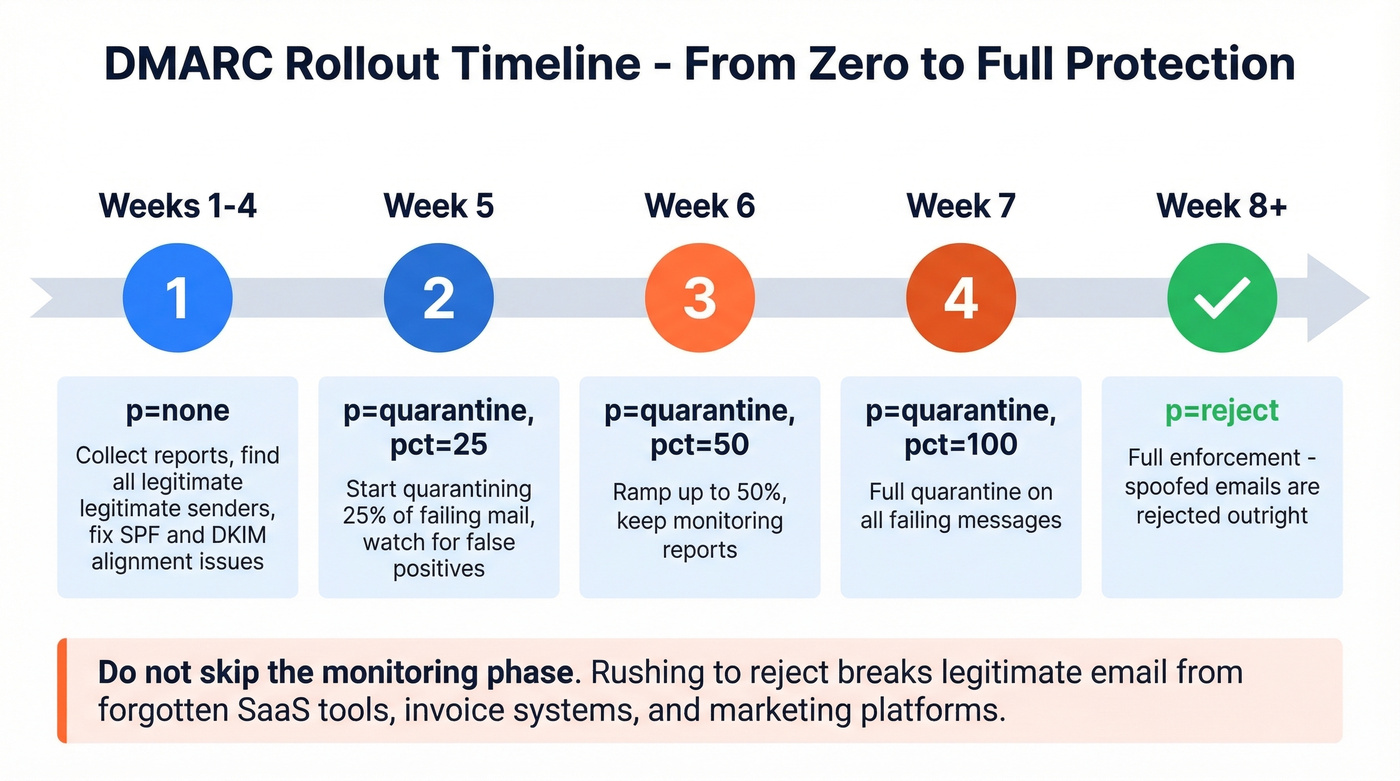
The phased rollout timeline:
- Weeks 1-4:
p=none- collect aggregate reports, identify legitimate senders that fail alignment, fix their SPF/DKIM configurations. - Week 5:
p=quarantine; pct=25- quarantine 25% of failing mail. Watch for false positives. - Week 6:
p=quarantine; pct=50- ramp up. - Week 7:
p=quarantine; pct=100- full quarantine. - Week 8+:
p=reject- full enforcement. Spoofed emails get rejected outright.
On r/cybersecurity, admins dealing with active spoofing campaigns consistently recommend starting with quarantine before moving to reject. We've seen teams rush straight to p=reject and break legitimate email flows from forgotten SaaS tools, invoice systems, or marketing platforms that nobody remembered were sending on behalf of the domain. The monitoring phase exists for a reason. Use it.
DMARC doesn't protect against account takeover via legacy protocols like POP3 or IMAP without MFA - that's a separate attack vector requiring its own controls.

DMARC enforcement protects your domain from impersonation. Bad contact data destroys it from the inside. Every bounced email chips away at the sender reputation you just spent weeks hardening. Prospeo's 5-step verification and 98% email accuracy keep your bounce rate under control - so your authentication work actually pays off.
Don't let dirty data undo your SPF and DKIM work.
Mistakes That Break Your Protection
Five configuration errors we see repeatedly:
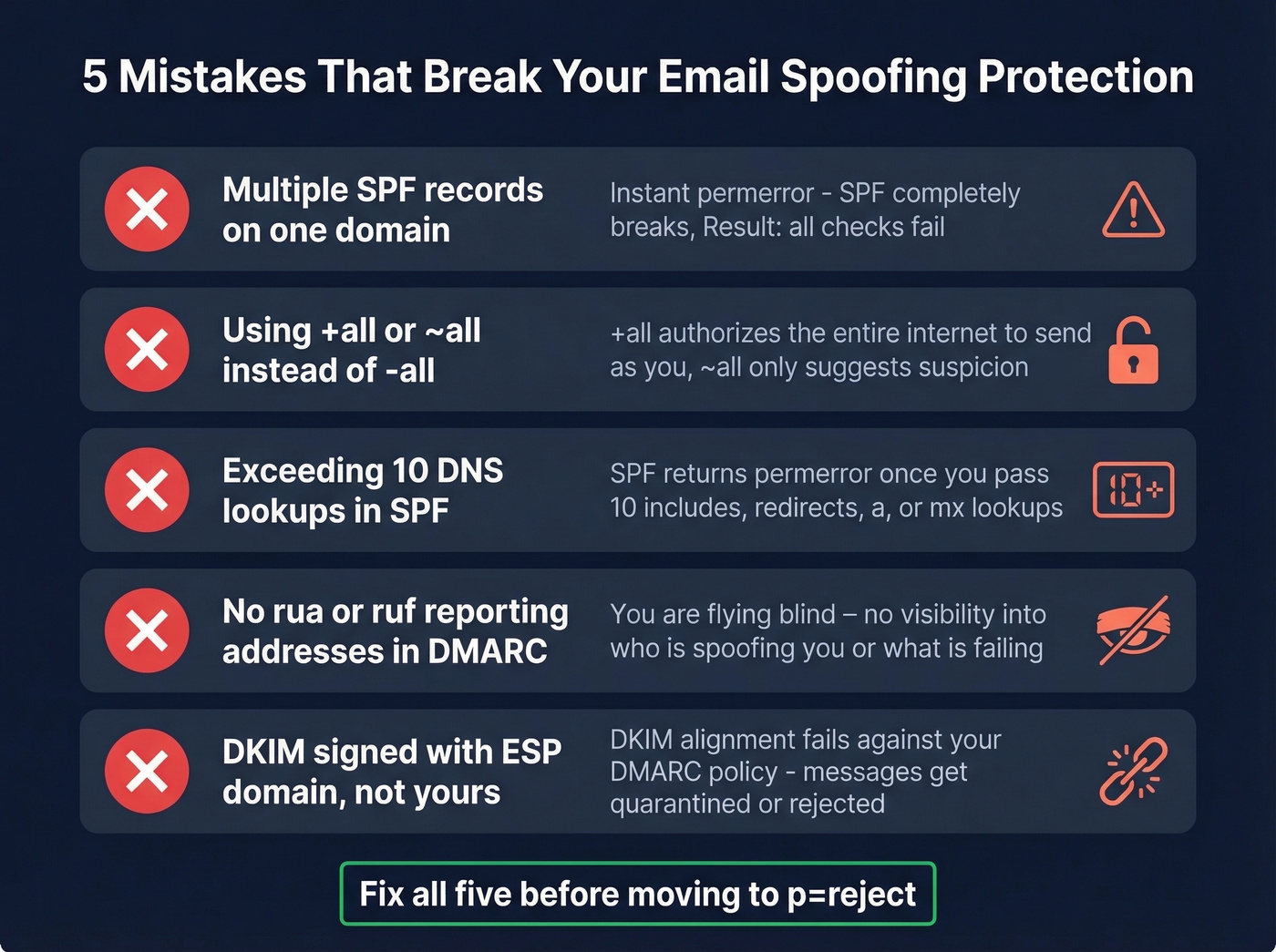
Multiple SPF records. Two TXT records starting with v=spf1 on the same domain = instant permerror. Merge them into one.
Using +all or ~all. The +all mechanism authorizes the entire internet to send as you. Even ~all only suggests suspicion rather than rejection. Use -all once you've confirmed your authorized senders.
Exceeding 10 DNS lookups. Each include and redirect in your SPF record counts toward the limit. Flatten nested includes or use an SPF macro service to stay under 10.
Missing rua/ruf reporting. Without aggregate and forensic report addresses in your DMARC record, you're flying blind. You won't know who's spoofing you or which legitimate senders are failing alignment.
DKIM signing with the ESP's domain. If your marketing platform signs emails as platform.com instead of yourdomain.com, DKIM alignment fails against your DMARC policy. Configure custom DKIM signing in every service that sends on your behalf.
Microsoft 365: Spoofed Emails Still Getting Through
Even with DMARC at p=reject, some Microsoft 365 tenants see spoofed emails landing in inboxes. The pattern on r/sysadmin is consistent: emails where the From and To fields are the same internal user, carrying phishing lures with QR codes or malicious attachments.
The culprit is often Direct Send - a feature that lets applications send email through your tenant without full authentication. In the thread, the poster says Microsoft support told them they'd "been seeing this for 2 months or so." The fix: disable Direct Send and route all mail through your gateway or connectors. One admin reported that after disabling it, "any Direct Send emails are just being rejected." Problem solved, but you shouldn't have to discover this through a Reddit thread.
If you're troubleshooting a suspected bypass, check the X-Forefront-Antispam-Report header and the compauth result code on the message. A compauth=fail with reason=000 is a strong indicator composite authentication failed - and Microsoft 365 doesn't automatically block on composite authentication failure alone because it uses a broader evaluation to reduce false positives.
Best DMARC Monitoring Tools (2026)
You need a monitoring tool during your DMARC rollout - and honestly, you should keep one running permanently. Raw DMARC XML reports are unreadable without a parser.
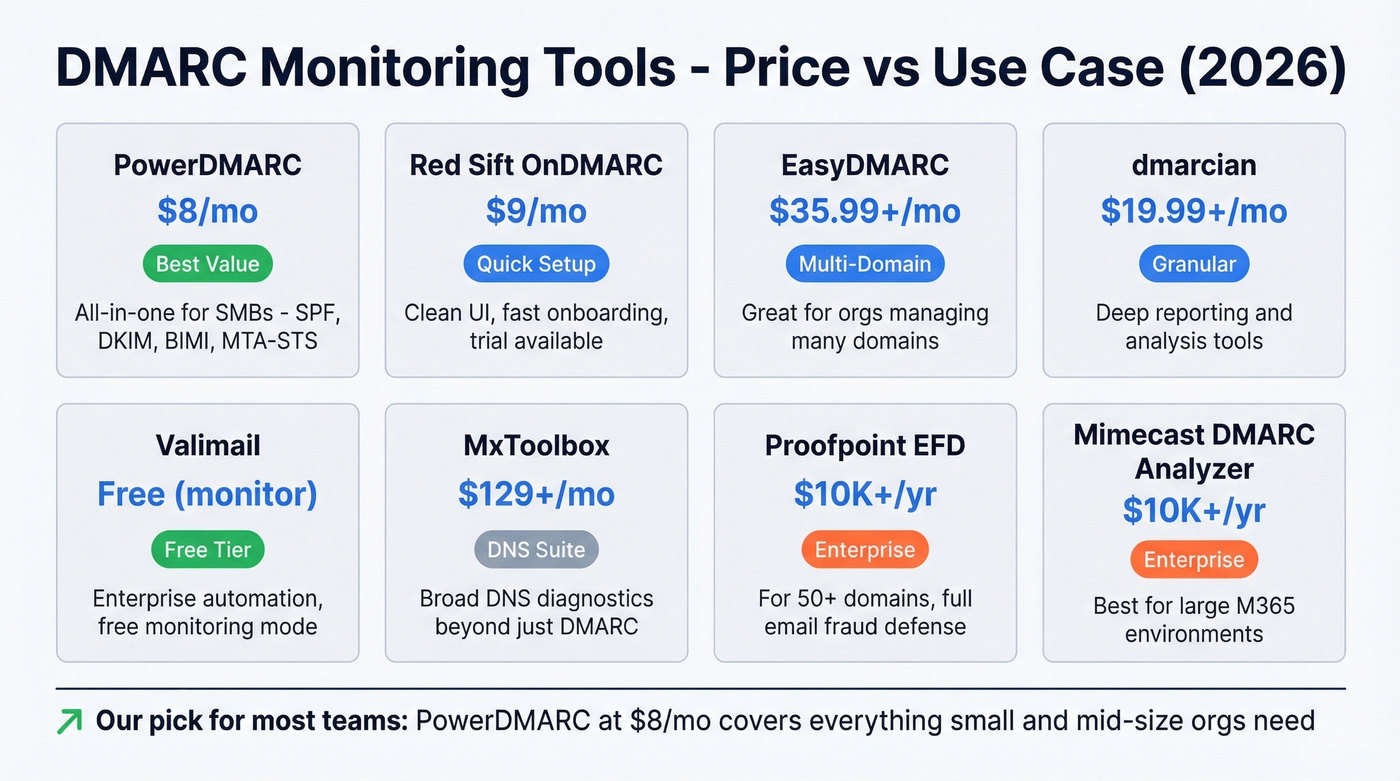
| Tool | Starting Price | Free Tier | Best For |
|---|---|---|---|
| PowerDMARC | $8/mo | Yes (10-day) | SMBs wanting all-in-one |
| Red Sift OnDMARC | $9/mo | Trial only | Fast setup, clean UI |
| EasyDMARC | $35.99+/mo | Yes | Multi-domain orgs |
| dmarcian | $19.99+/mo | No | Granular reporting |
| Valimail | Free (monitor) | Yes | Enterprise automation |
| MxToolbox | $129+/mo | Yes (basic) | DNS diagnostic suites |
| Proofpoint EFD | ~$10K+/yr | No | Enterprise, 50+ domains |
| Mimecast DMARC Analyzer | ~$10K+/yr | No | Enterprise, M365 shops |
PowerDMARC is the best value for small teams. At $8/mo you get DMARC, SPF, DKIM, BIMI, and MTA-STS monitoring in a single dashboard. The hosted DMARC feature means you don't need to manage report parsing infrastructure yourself, and the alerting catches configuration drift before it becomes a deliverability problem. For a sub-$10/mo tool, the coverage is impressive.
Red Sift OnDMARC at $9/mo has the cleanest UI we've tested. Setup takes minutes - you add your domain, it pulls your existing records, and you're looking at parsed reports within the hour. The guided workflow for moving from p=none to p=reject is genuinely useful for teams without a dedicated email security person. It also includes Dynamic SPF, which helps you stay under the 10-lookup limit automatically.
EasyDMARC is the pick for organizations managing multiple domains, starting at $35.99/month on annual billing. The multi-domain dashboard gives you a single view across all your properties, and the AI-powered source identification helps you figure out which third-party services are sending on your behalf. The free tier covers one domain with basic reporting.
dmarcian has been around longer than most competitors and it shows in the depth of its reporting. Starting at $19.99/month, the XML-to-human translation is the most granular in this list - you can drill into individual sending sources and trace alignment failures to specific mail flows. No free tier, but the detail justifies the price for teams doing serious troubleshooting.
Valimail offers free monitoring that's genuinely useful - not a crippled trial. The free tier parses your DMARC reports and identifies senders, which is enough for the monitoring phase. Where Valimail gets expensive is enforcement automation: Valimail Enforce Starter starts at $5K+/year, targeting enterprises that want hands-off policy management across hundreds of domains.
For quick checks, CanIBePhished runs an instant domain assessment, dnstwist.it scans for lookalike domains used in brand impersonation, and Google Postmaster Tools gives you a free compliance dashboard to check your sender status with Gmail. (If deliverability is a priority, keep an email reputation dashboard handy too.)
Protect Your Sender Reputation
Preventing spoofing is a two-sided problem. DMARC stops inbound forgery - someone pretending to be you. But your domain reputation also depends on what you send outbound. High bounce rates, spam trap hits, and complaints from bad contact data will tank your sender score just as effectively as a spoofing attack.

Look - you just spent weeks configuring SPF, DKIM, and DMARC to protect your domain. Don't let bad outbound data destroy the same reputation. We've watched teams nail their authentication setup and then torch their sender score by blasting unverified lists. Prospeo's email verification catches the junk before it ships - spam traps, honeypots, catch-all domains - with 98% accuracy across 143M+ verified addresses. Data refreshes every 7 days instead of the 6-week industry average, so you're not sending to addresses that went stale last month. The free tier handles 75 verifications per month, with paid plans from $39/mo and no contracts.
If you’re seeing deliverability issues already, start with bounce diagnostics and list hygiene in our email deliverability guide, then benchmark against a healthy email bounce rate.
Google rejects bulk senders with spam complaint rates above 0.3%. That means the outbound data you use matters as much as your DNS records. Prospeo refreshes 300M+ profiles every 7 days - not every 6 weeks - so you're never sending to stale, invalid, or recycled addresses that trigger spam traps and honeypots.
Protect your domain reputation on both sides of the inbox.
FAQ
What's the difference between email spoofing and phishing?
Spoofing is the technique - forging the sender address so a message appears to come from a trusted domain. Phishing is the goal - tricking the recipient into clicking a link, sharing credentials, or wiring money. Spoofing is one method used in phishing, but phishing can also use lookalike domains or compromised accounts.
Can SPF alone prevent domain spoofing?
No. SPF validates the envelope sender (return-path), not the visible From header recipients see. An attacker can pass SPF with their own infrastructure while displaying your domain in the From field. You need DMARC with alignment to close that gap.
How long does DMARC take to fully deploy?
Plan 6-8 weeks for a safe rollout. Spend 2-4 weeks at p=none collecting reports and fixing alignment issues, then ramp through p=quarantine at increasing percentages before moving to p=reject. Skip this timeline and you'll break legitimate mail flows you forgot existed.
What is BIMI and do I need it?
BIMI displays your brand logo next to authenticated emails in supported inboxes. It requires DMARC at enforcement plus a Verified Mark Certificate at around $1,500/year. It's a trust signal, not a security essential - prioritize reaching p=reject first.
How do I protect my domain reputation when sending outbound?
Verify your contact lists before every campaign. Invalid addresses, spam traps, and honeypots destroy sender scores fast. Tools like Prospeo remove these during verification, keeping bounce rates under control and your domain off blocklists.
SPF, DKIM, and DMARC at enforcement is the baseline for email spoofing protection. Get to p=reject, keep your monitoring tool running, and verify your outbound lists. That's the whole playbook - and it works.