

How to Email a Client to Schedule a Meeting (Templates That Actually Work)
It's Thursday afternoon. You need your client on a call before their renewal next week, you open Gmail, and your email to schedule a meeting with a client is about to compete with 120+ others sitting in their inbox. We've sent hundreds of these, and the pattern is always the same: 44% of reps send one email, get no reply, and give up. You don't need 25 templates. You need five - one for each scenario you'll actually face - backed by data from 5.5M emails.
The Essentials
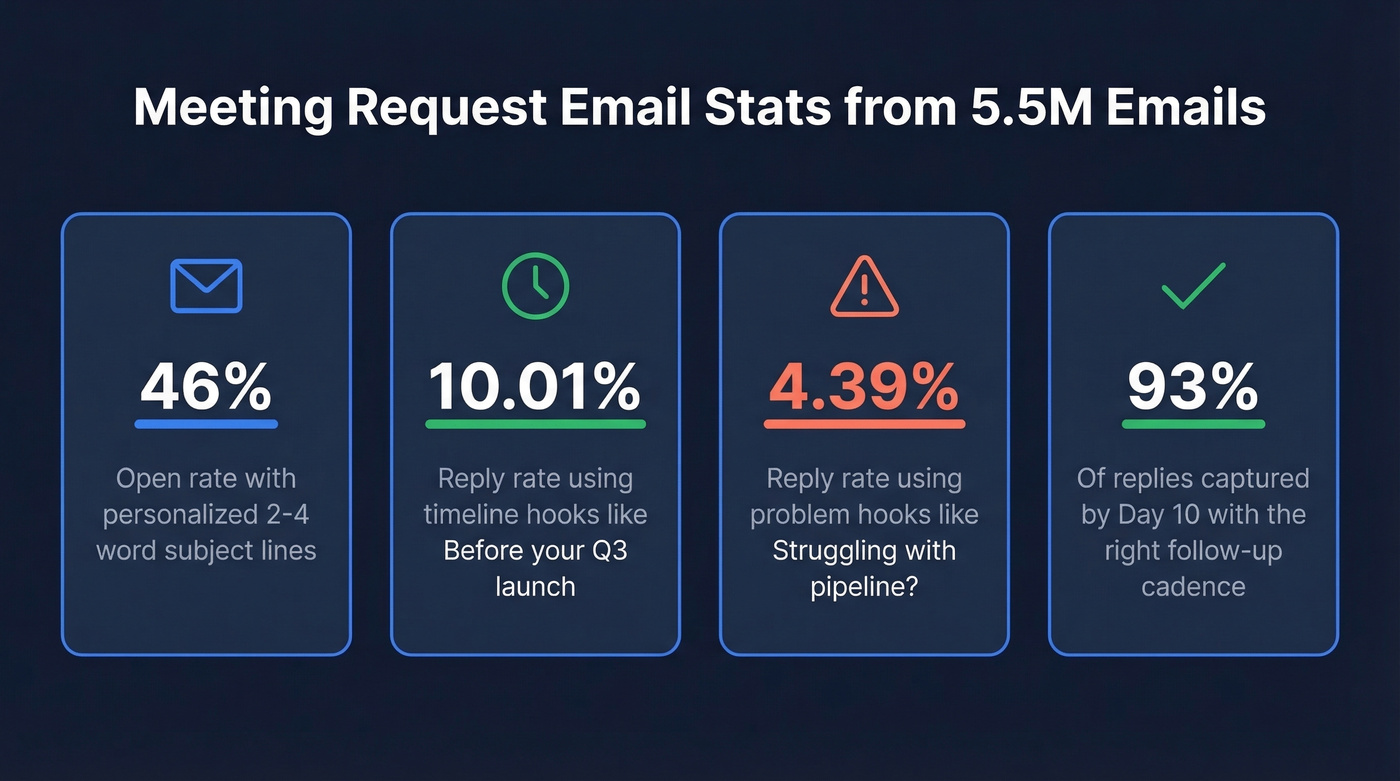
- Subject lines: 2-4 words, personalized. That combo hits 46% open rates across 5.5M emails.
- Propose 2-3 specific times. Never ask "when are you free?"
- Use a timeline hook, not a problem hook. Timeline hooks pull a 10.01% reply rate vs 4.39% for problem-based openers.
- Follow up on Day 3, Day 10, Day 17. That cadence captures 93% of replies by Day 10.
What Makes a Meeting Request Email Work
Your subject line matters more than your email body. Personalized subject lines hit 46% opens vs 35% without - and 7% reply rates vs 3%. The sweet spot is 2-4 words. Question-framed subject lines ("Quick sync Thursday?") also average 46% opens. Skip numbers in subject lines; they actually underperform slightly.
Inside the email, timeline hooks do the heavy lifting. "Before your Q3 launch" or "Ahead of your renewal on the 15th" generates a 10.01% reply rate, while problem hooks like "Struggling with pipeline?" land at just 4.39%. Timelines create natural urgency without sounding pushy, and since Apple Mail Privacy Protection inflates open rates anyway, replies are the metric that actually books meetings.
Stop asking "When are you free?" It shifts cognitive load to your client and delays the conversation. Whether you're writing a formal meeting request or a quick internal check-in, propose two or three specific windows with time zones included and let them pick or counter. Time zone confusion is the most common scheduling friction point we see, and it's entirely preventable.
5 Templates for Scheduling a Meeting
Quarterly Business Review
Subject: QBR before Q3?
Hi [Name],
Your Q3 numbers close in three weeks, and I've got insights from our side that'll help the exec readout. Can we do 30 minutes?
- Tuesday 7/15 at 2pm ET
- Wednesday 7/16 at 10am ET
- Thursday 7/17 at 3pm ET
I'll bring a one-page summary of usage trends and ROI metrics. Which works?
Best, [You]
Kickoff / Onboarding
Subject: Kickoff this week?
Hi [Name],
We're set to go live on [date], and I want to make sure your team has everything mapped out. Can we block 45 minutes?
- Wednesday at 11am ET
- Friday at 1pm ET
I'll walk through the implementation checklist and answer any open questions.
Renewal Check-In
Subject: Renewal sync [Month]
Hi [Name],
Your renewal is coming up on [date]. Before we get there, I'd love to walk through what's working, what isn't, and what next year could look like. Low-pressure, high-value - should take 30 minutes.
- Monday 8/4 at 10am ET
- Tuesday 8/5 at 2pm ET
- Thursday 8/7 at 11am ET
Which slot works?
New Point of Contact
Subject: Intro from [Company]
Hi [Name],
Congrats on taking over [role/account area] from [Previous Contact]. I've been managing the [Company] relationship on our side and want to make sure the transition is smooth. Can we grab 20 minutes? I'm open Tuesday at 3pm ET or Thursday at 10am ET - happy to adjust.
Escalation / Urgent Issue
Subject: Urgent - [Topic]
Hi [Name],
We've got a [brief issue description] that needs resolution before [deadline]. Can you do 4pm ET today? If not, I'm open at 9am ET tomorrow. Let me know and I'll send the invite.

You just crafted the perfect meeting request. But if that email bounces, your subject line, timeline hook, and follow-up cadence are all wasted. Prospeo delivers 98% email accuracy with a 7-day refresh cycle - so you're never scheduling a meeting with someone who left the company six months ago.
Stop perfecting emails that land in dead inboxes.
Follow-Up Cadence That Books Meetings
You sent the QBR email Monday. It's Friday. No reply. Here's the thing: 80% of sales require five or more follow-ups, and 44% of reps quit after one. Don't be that rep.
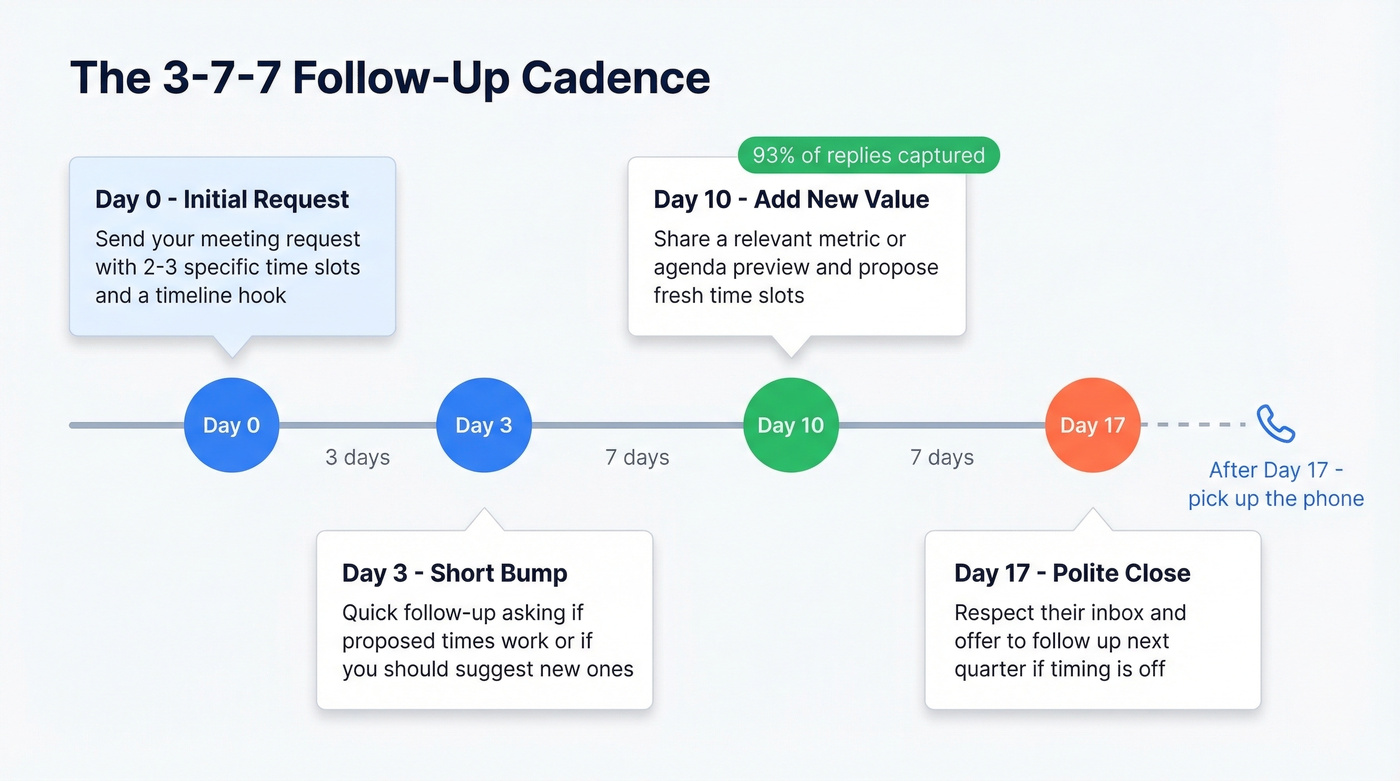
Use the 3-7-7 cadence:
- Day 0: Send the initial meeting request.
- Day 3: Short bump. "Circling back - do any of those times work, or should I propose new ones?"
- Day 10: Add new value. Share a relevant metric or agenda preview. Propose fresh times.
- Day 17: Final attempt. "I want to respect your inbox. If now isn't the right time, let me know and I'll follow up next quarter."
This cadence captures 93% of replies by Day 10. After Day 17, pick up the phone.
No reply after three follow-ups? Check whether the contact is still at the company - people change roles more often than you'd think. Prospeo's Chrome extension pulls verified contact data from any website in one click, so you're never emailing someone who left six months ago.
If you want more ready-to-send bumps, keep a few sales follow-up templates on hand.
Scheduling Links: Propose Times First
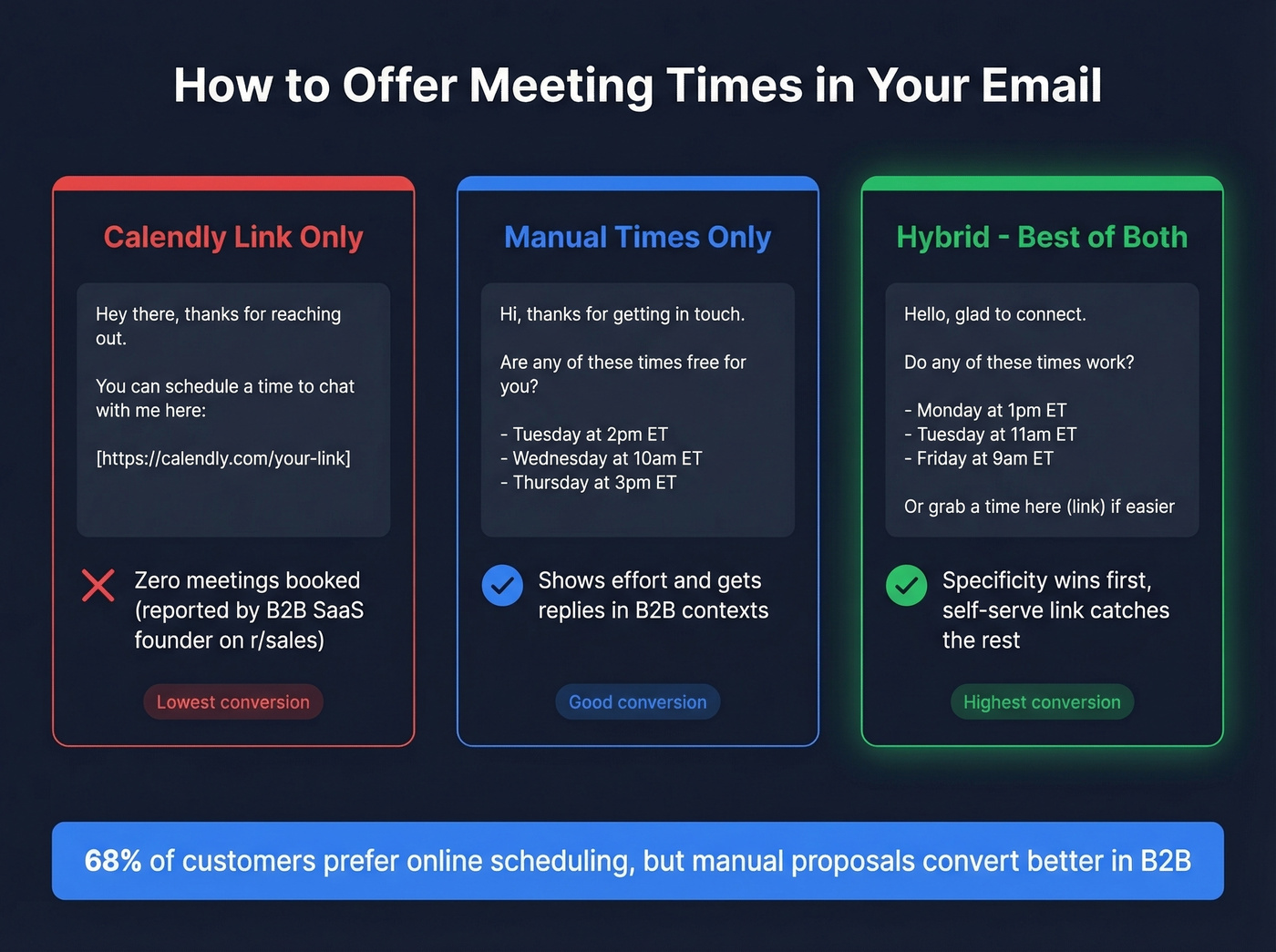
A B2B SaaS founder on r/sales reported zero meetings booked via Calendly link versus "a couple" when manually proposing times. Yet 68% of customers say they prefer online scheduling. The answer isn't one or the other - it's both. Propose specific times first, then add the link as a backup: "Do any of these work? Or grab a time here (link) if easier." This hybrid approach works whether you're sending cold outreach or a client check-in. Specificity always wins.
Verify Before You Send
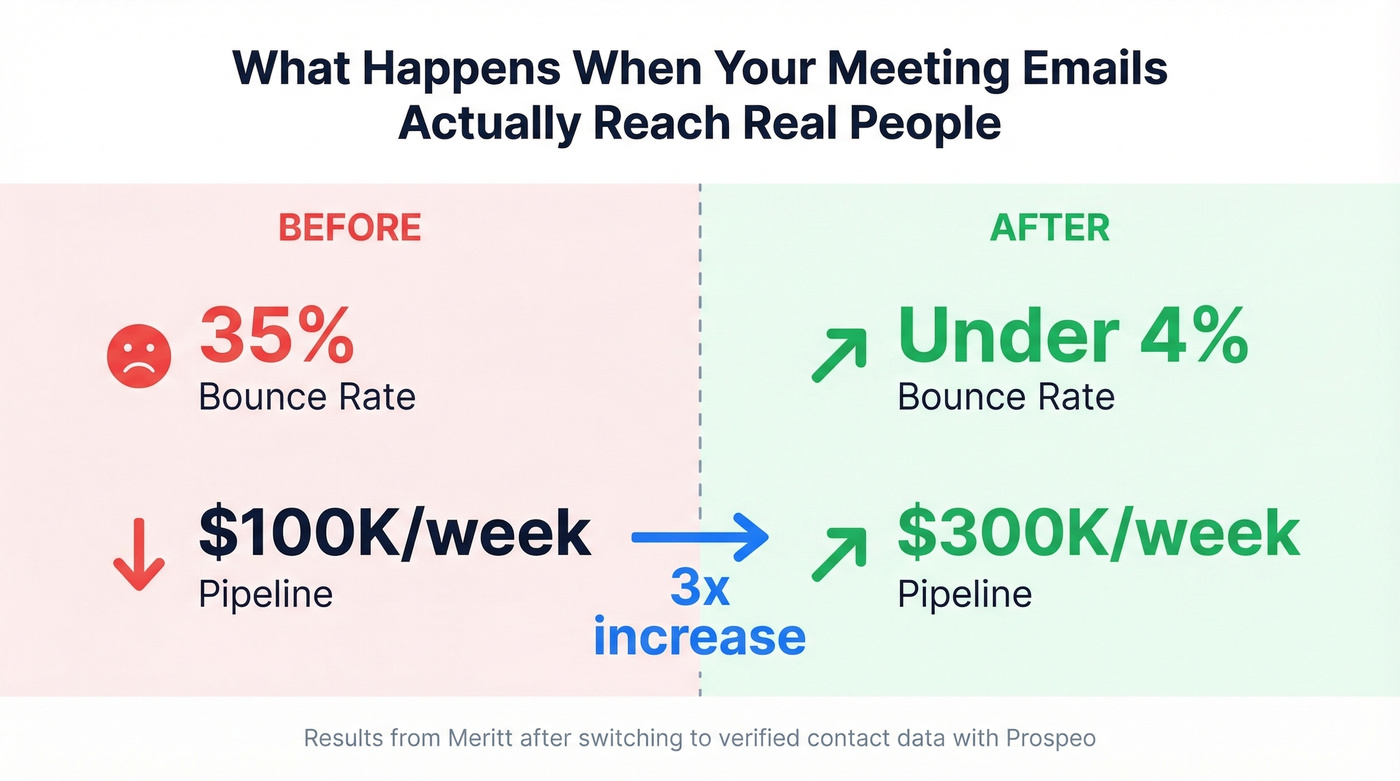
None of this matters if your email bounces. One customer, Meritt, saw their bounce rate drop from 35% to under 4% after switching to verified contact data through Prospeo - and their pipeline tripled from $100K to $300K per week. That's the difference between a meeting request that lands and one that quietly tanks your sender reputation.
Let's be honest: most teams overthink the email copy and underthink the data behind it. A mediocre meeting request sent to a verified address will always outperform a perfect email to a dead inbox.
If you're seeing bounces, start with email bounce rate benchmarks and fixes, then work through a full email deliverability guide to protect your domain.
FAQ
How many times should I propose in a scheduling email?
Two or three specific time slots with time zones. More than three creates decision fatigue; fewer than two feels like a demand. Always include a "happy to adjust" line so the client can counter without friction.
What's the best subject line for a meeting request?
Keep it to 2-4 personalized words. Question-framed lines like "Quick sync Thursday?" hit 46% open rates across 5.5M emails. Avoid generic phrases like "Meeting Request" - they underperform personalized alternatives by 11 percentage points.
How do I follow up if a client doesn't reply?
Follow up on Day 3 with a short bump, Day 10 with fresh value and new times, and Day 17 with a polite close. This cadence captures 93% of replies by Day 10. After three attempts with no response, verify the contact is still active before sending anything else.
Should I use a Calendly link or propose times manually?
Do both. Propose two or three specific slots first, then add a scheduling link as a fallback. Manual proposals show effort and convert better in B2B contexts, while the link catches people who prefer self-serve booking.
Meritt dropped their bounce rate from 35% to under 4% and tripled their pipeline to $300K/week - all because their meeting requests actually reached real people. Prospeo gives you 300M+ verified contacts at $0.01 per email, so every scheduling email you send has a live human on the other end.
Book more meetings by fixing the data, not the copy.