

Best Email Tracking Software in 2026: What Still Works (and What Doesn't)
You sent 500 cold emails last week. Your tracker says 68% opened. You got 2 replies. Something doesn't add up - and it's not your copy. It's your tracking data.
Apple Mail Privacy Protection affects over 55% of global email opens, preloading tracking pixels whether or not anyone reads your message. Your open rates are lying to you, and most email tracking software hasn't caught up. The tools that have adapted are worth knowing about. The ones that haven't are wasting your time and money.
Our Picks (TL;DR)
| Use Case | Tool | Why |
|---|---|---|
| Verify before you track | Prospeo | 98% email accuracy - tracking is useless if emails bounce |
| Cold email at scale | SalesHandy | No per-seat pricing, 6K+ emails/mo from $25/mo |
| Free Gmail tracking | Mailsuite | Simple open/click notifications, free tier available |
| Sales teams + CRM | HubSpot Sales Hub | Tracking baked into the CRM you already use |
We make Prospeo. We'll be upfront about where it fits and why it's here.
How Email Tracking Works
Every email tracker uses the same core trick: a 1x1 transparent image - a tracking pixel - embedded in the HTML of your email. When the recipient's email client loads that image, it pings the tracker's server and logs a few things:
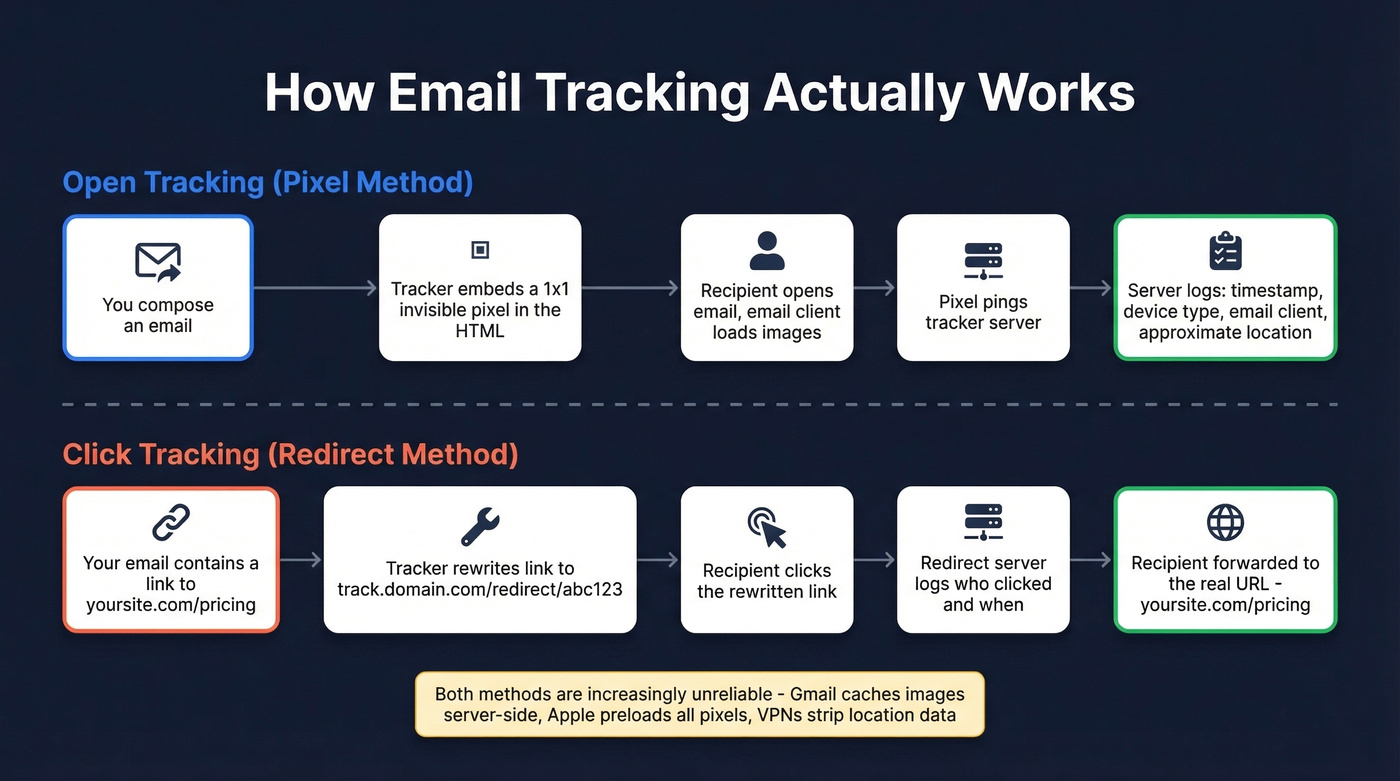
- Timestamp of when the image loaded
- Device type and email client
- Approximate location based on IP address
- Open count if the pixel fires multiple times
Click tracking works differently. The tool rewrites your links to route through a redirect server, logging who clicked what before forwarding them to the real URL. Think of it as read receipts for email, but invisible.
Both mechanisms are increasingly unreliable. Gmail caches images server-side, which means the pixel fires from Google's servers rather than the recipient's device - stripping location data and sometimes registering false opens. VPNs and proxies make location data meaningless. And then there's Apple.
Why Open Rates Are Broken in 2026
Apple Mail Privacy Protection preloads every image in every email - including tracking pixels - through Apple's proxy servers. The pixel fires whether the recipient reads your email, glances at it, or never touches it. Apple Mail accounts for roughly 49% of all email opens, so nearly half your "opens" are ghosts.
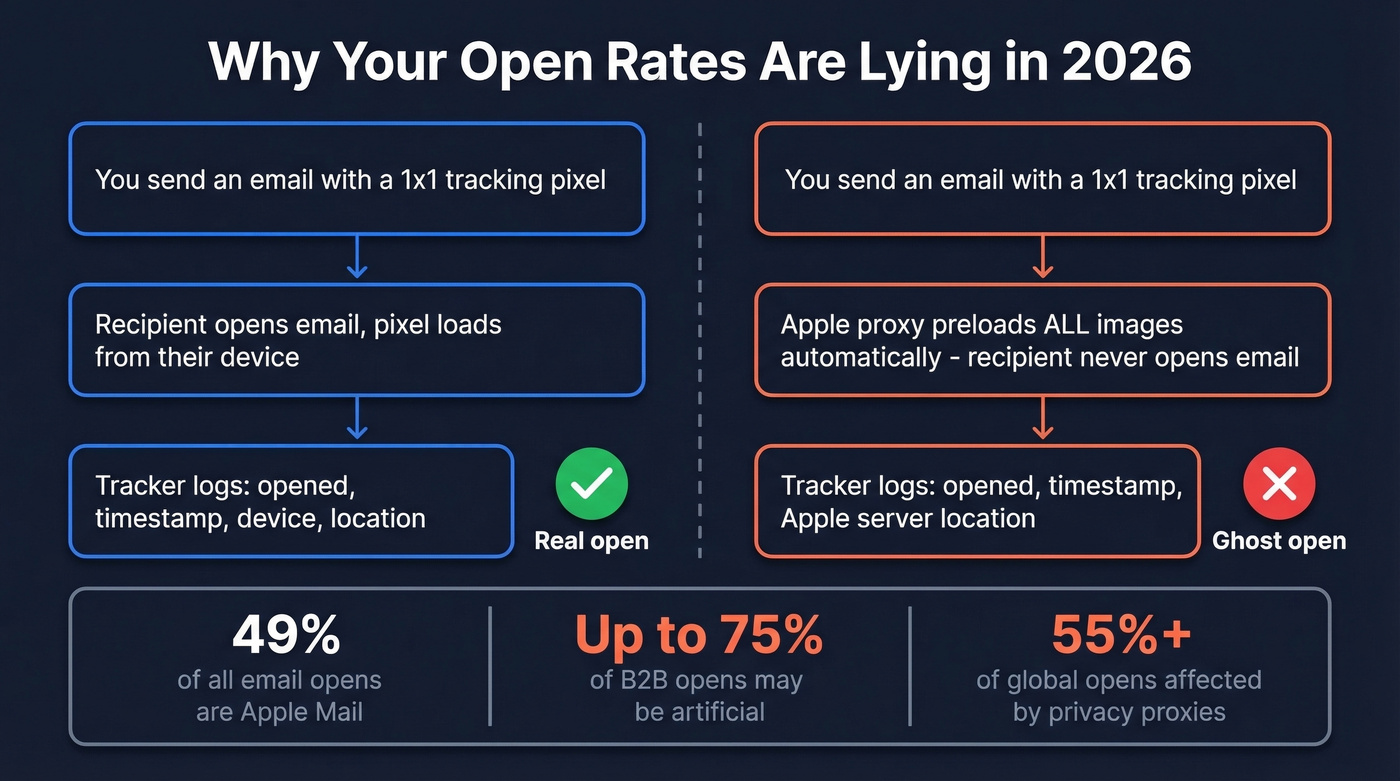
In B2B segments where Apple device usage skews high, up to 75% of reported opens are artificial. That's not a rounding error. It's a fundamentally broken metric. Some email analytics platforms now filter MPP-inflated opens automatically, but most trackers still report the raw, inflated numbers without any disclaimer.
Here's the thing: open rates aren't useless as a directional signal. If your open rate drops from 45% to 15% overnight, something changed - probably your subject line or your sender reputation. But treating opens as a reliable measure of engagement leads to bad decisions, full stop.
Our take: Most teams would make better decisions if they deleted their open rate column entirely and focused on reply rate. Opens feel like progress. Replies are progress.
What to measure instead: clicks, replies, conversions, and inbox placement rate. These require the recipient to actually do something, which makes them immune to proxy preloading.
Tracking Pixels and Deliverability
Most people don't realize that installing an email tracker can actively hurt their deliverability.
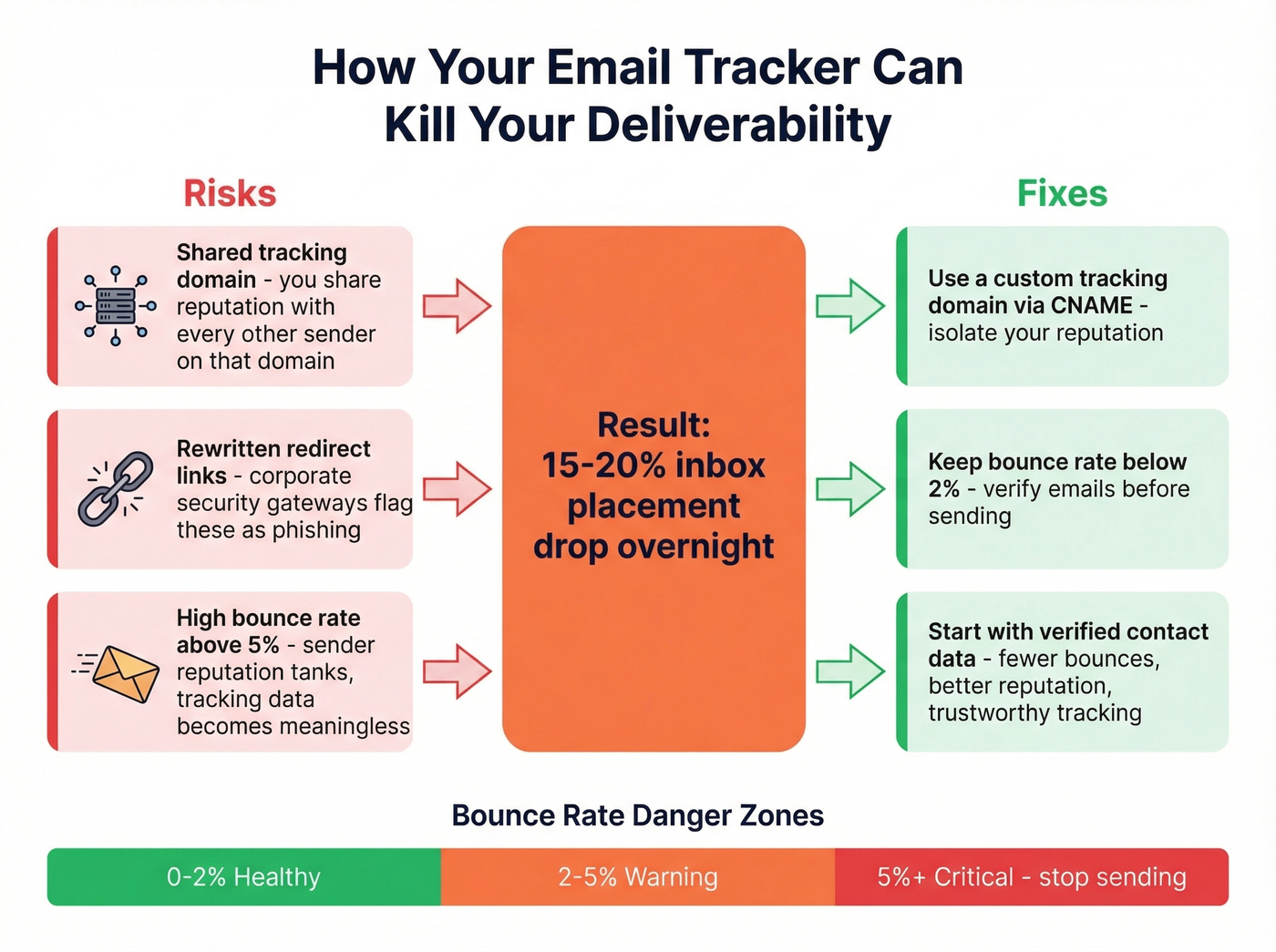
When your tracker embeds a pixel, that pixel calls a tracking domain. If you're on a shared tracking domain - which most free and low-tier plans use - you're sharing reputation with every other sender on that domain. If someone else gets flagged for spam, your emails suffer too. Guilt by association. We've seen teams lose 15-20% inbox placement overnight because of this, and they had no idea the tracker was the culprit.
Click tracking adds another risk. Rewritten links look like redirects, and some corporate security gateways treat redirects the same way they treat phishing URLs. Your carefully crafted email gets quarantined before anyone sees it.
The fix is straightforward: use a custom tracking domain - a subdomain you control via CNAME that isolates your reputation. And keep your bounce rate below 2%. Between 2-5% is a warning sign. Above 5% is critical, and at that point your tracking data is meaningless anyway because you're damaging your sender reputation with every send. Start with verified contact data. Fewer bounces mean better sender reputation, and tracking data you can actually trust.

Your email tracking data is only as good as your contact data. If 5%+ of your emails bounce, you're destroying sender reputation and every open rate metric is noise. Prospeo's 5-step verification delivers 98% email accuracy - so every pixel fires against a real inbox.
Stop tracking emails that never arrived. Start with verified contacts.
Compliance in 2026
GDPR treats individual-level email tracking - who opened, when, from where - as personal data processing. That requires explicit, informed consent. Not a buried checkbox. Real consent.
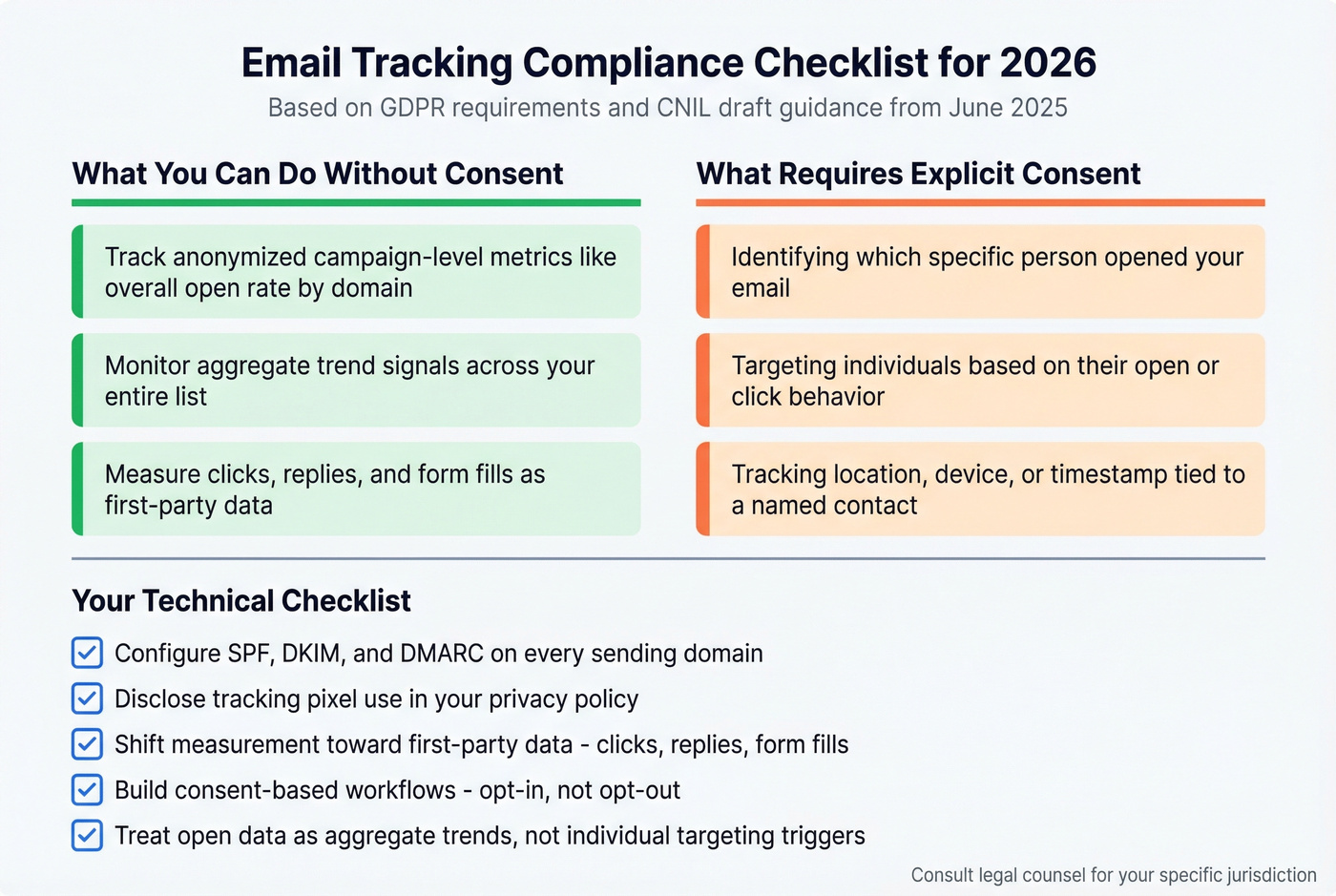
France's CNIL published draft guidance in June 2025 that draws a useful line: anonymized campaign-level metrics like overall open rate by domain are likely permissible without consent, but identifying which specific person opened your email, or targeting them based on that behavior, requires prior consent.
Practical checklist for staying compliant:
- Configure SPF, DKIM, and DMARC on every sending domain
- Disclose pixel use in your privacy policy
- Shift measurement toward first-party data like clicks, replies, and form fills
- Build consent-based marketing workflows - opt-in, not opt-out
- Treat open data as aggregate trend signals, not individual targeting triggers
Top Email Tracking Tools Compared
Mailsuite
Use it if you want dead-simple open and click tracking in Gmail without paying anything. Mailsuite's Chrome extension drops notifications right into your inbox when someone opens or clicks. The free tier works, the interface is minimal, and setup takes about 90 seconds.

Skip it if you need Outlook support (it's Gmail-only), you're sending cold email at volume, or you can't tolerate the Mailsuite branding appended to outgoing emails on the free plan. Paid plans start around $8-10/user/mo, and the Advanced tier is EUR14.99 per user/month.
In a r/EmailProspecting thread, Mailsuite gets called out as a popular free option - and that's exactly what it is. The right tool for freelancers, founders, and anyone who just wants to know if their email got opened. Don't expect campaign analytics or sequence automation.
SalesHandy
SalesHandy is the tool we'd recommend to any team running cold outbound at scale, and the reason is simple: no per-seat pricing. The Outreach Starter plan runs $36/mo (monthly) or $25/mo (annual) for 6,000 emails/month with unlimited email accounts, sender rotation across 10 accounts per sequence, and warm-up via TrulyInbox. Add your whole team without costs scaling per head.

Outreach Pro at $99/mo (monthly) or $69/mo (annual) jumps to 150,000 emails/month and 30,000 active prospects with Salesforce and HubSpot integrations. Outreach Scale at $199/mo (monthly) or $139/mo (annual) pushes to 240,000 emails/month with whitelabel options and inbox placement tests.
Skip it if you just need basic open tracking for a handful of emails. The UI has a learning curve, and the Starter plan caps you at 2,000 active prospects - fine for most SMBs, but something to plan around. SalesHandy is built for outbound machines, not casual email senders.
HubSpot Sales Hub
HubSpot's tracking works best when you're already living inside HubSpot CRM. Open and click notifications show up right in the contact timeline, which is genuinely useful for reps who need context before a follow-up call. The free tier gives you 200 email notifications per month - roughly one day of SDR activity, so it's really just a trial.
Paid plans start at $15/seat/mo and can reach $100/seat/mo for enterprise features, with enterprise tiers requiring a $1,500 onboarding fee. If you're already paying for HubSpot, adding tracking is a no-brainer. If you're not, don't buy HubSpot just for email tracking - that's like buying a house because you need a mailbox.
Yesware
Yesware is one of the few trackers with native Outlook support, which makes it a default choice for sales teams in Microsoft's ecosystem. The free tier tracks opens but limits history to 24 hours. Paid plans are $15, $35, and $65/user/mo, with Salesforce integration on higher tiers. Gmail-only teams have better options, but for Outlook plus Salesforce, Yesware is the path of least resistance.
Streak
Streak turns Gmail into a lightweight CRM with tracking baked in. The free plan tracks opens; paid plans are $15, $49, and $129/user/mo and add click tracking, pipelines, and mail merge. Ideal for solopreneurs and freelancers who want pipeline management without leaving their inbox. No Outlook support, and it starts to feel cramped once you have more than a couple of people on the account.
Mixmax
Mixmax bundles sequences, scheduling, and tracking into one platform. The Inbox Copilot plan starts at $29/user/mo on an annual contract ($34 monthly), and the Mixmax Suite runs $89/user/mo annually ($105 monthly). After the 14-day trial, you drop to Mixmax Free, which still includes basic tracking.
The consensus on r/coldemail is telling - users call it "overkill" for pure tracking. If you need sequences and scheduling alongside tracking, it's solid. If you just want open notifications, you're paying for features you won't touch.
GMass
Gmail campaign tool with tracking built in. Standard plan $25/mo, Premium $35/mo. Best for newsletter-style sends and mail merge campaigns from Gmail, not individual sales tracking.
Mailbutler
Supports both Outlook and Gmail - a rarity in this space. Free tier available, paid plans run $5-$37.95/user/mo depending on the tier. It's a lightweight productivity suite with tracking, scheduling, and email templates. Think of it as a Swiss Army knife rather than a dedicated tracker.
Right Inbox
Budget Gmail tracker. Free tier with limits, paid at $7.95/mo on an annual plan. Basic open and click tracking without the bells and whistles. Fine if tracking is literally all you need and you want to spend as little as possible.
Salesflare
CRM with built-in tracking starting at $29/mo. Salesflare earns points for deliverability design - they use a personalized tracking subdomain per customer, which isolates your sender reputation instead of pooling it with thousands of other users. Best for teams that want CRM and tracking in one tool without stitching platforms together.
Comparison Table
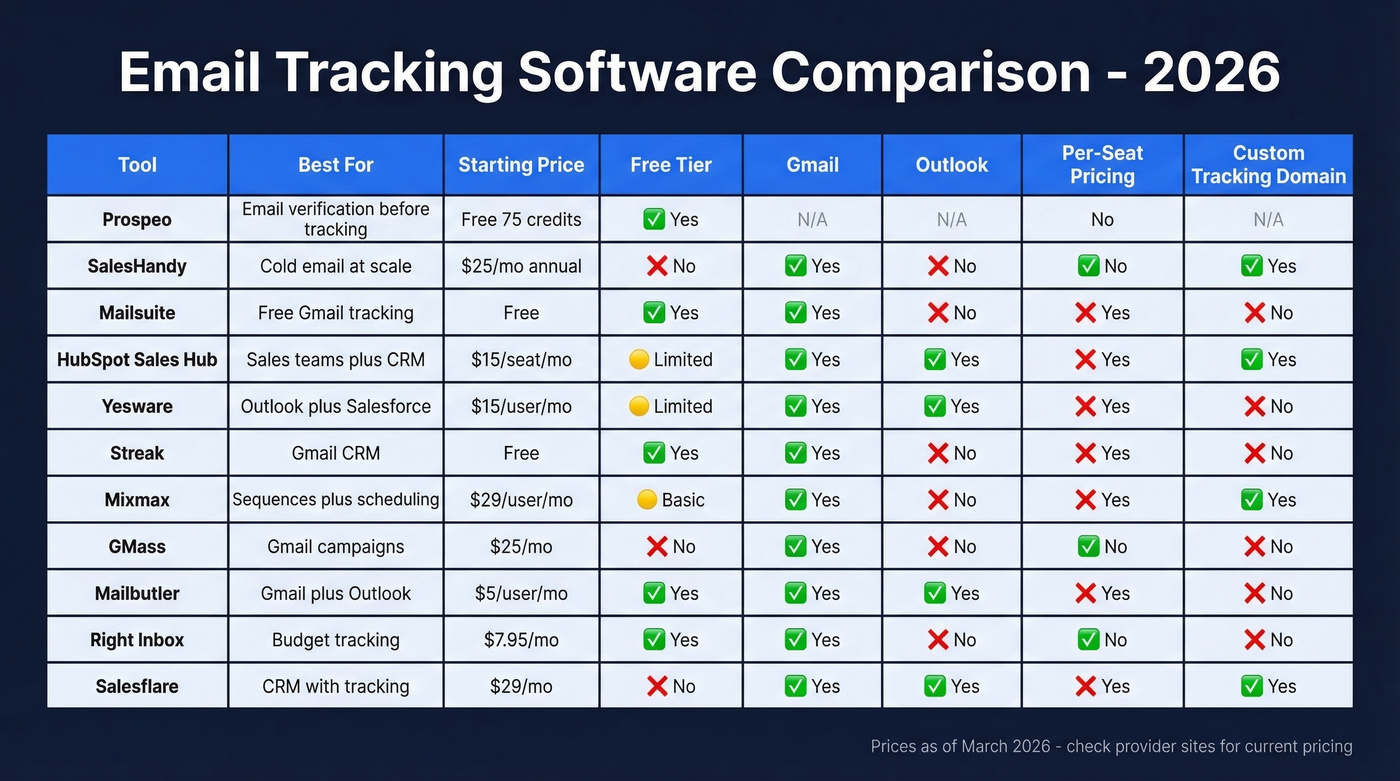
| Tool | Free Tier | Paid From | Email Client | Custom Domain |
|---|---|---|---|---|
| Mailsuite | Yes (branded) | ~$8/mo | Gmail | No |
| SalesHandy | No | $25/mo | Gmail + Outlook | No |
| HubSpot | Yes (200/mo) | $15/seat/mo | Gmail + Outlook | No |
| Yesware | Yes (24-hr) | $15/user/mo | Gmail + Outlook | No |
| Streak | Yes (opens) | $15/user/mo | Gmail | No |
| Mixmax | Yes (basic) | $29/user/mo | Gmail | Yes (Teams) |
| GMass | No | $25/mo | Gmail | No |
| Mailbutler | Yes | ~$5/user/mo | Gmail + Outlook | No |
| Right Inbox | Yes (limited) | $7.95/mo | Gmail | No |
| Salesflare | No | $29/mo | Gmail + Outlook | Yes |
Why "Custom Domain" matters: Tools with custom tracking domain support let you isolate your sender reputation. Shared tracking domains mean your deliverability depends on strangers. If you're sending more than a few hundred emails a month, this column should weigh heavily in your decision.
Best Trackers for Outlook
A lot of tracking tools are Gmail-first, which leaves Outlook users with fewer options. Here's what actually works:
Yesware is the strongest Outlook tracker with Salesforce integration. HubSpot Sales Hub gives you full CRM tracking in Outlook via add-in - best if you're already in HubSpot's ecosystem. Mailbutler offers lightweight tracking and productivity for both Outlook and Gmail. Salesflare bundles CRM tracking with Outlook support and strong deliverability design.
If your team runs Microsoft 365, Yesware or HubSpot are the serious options. The rest are supplementary.
How to Pick the Right Tool
Just want open notifications in Gmail? Mailsuite. Free, simple, done.
Sending cold email at scale? SalesHandy. No per-seat pricing, built for volume.
Bounce rate above 5%? Stop. Fix your data with Prospeo before installing any tracker. Tracking bounced emails is like putting a speedometer on a car with no engine.
For teams that need Outlook support, Yesware is the pick - especially paired with Salesforce. When CRM + tracking in one tool is the goal, HubSpot wins if you're already there, Streak if you want it inside Gmail. And if you need sequences, scheduling, and tracking bundled together, Mixmax is worth the price, but only if you'll use all three.
If you’re also tightening deliverability, start with an email deliverability guide and an email spam checker before you judge any tracker’s numbers.
Bounce rates above 2% tank deliverability and corrupt every metric your tracker reports. Teams switching to Prospeo cut bounce rates from 35%+ to under 4% - turning tracking data from fiction into something you can actually act on. 143M+ verified emails, refreshed every 7 days.
Clean data in, reliable tracking out. Everything else is guesswork.
FAQ
Does email tracking software still work in 2026?
Click tracking and reply tracking remain fully reliable, but open tracking is broken for over 55% of global email opens because Apple MPP preloads tracking pixels regardless of whether anyone reads the message. Focus on clicks, replies, and conversions - these require human action and can't be faked by a proxy server.
Is email tracking legal under GDPR?
Individual-level tracking constitutes personal data processing under GDPR and requires explicit consent before you send. Anonymized campaign-level metrics are likely permissible without consent, per CNIL's June 2025 draft guidance. Disclose pixel use in your privacy policy and default to consent-based workflows.
Can recipients tell I'm tracking their email?
Tracking pixels are visible in email source code, and some clients flag external image loading - but most recipients won't notice. Privacy-conscious users and corporate security gateways routinely block pixel loading, which means your tracking data has blind spots by default. Expect 10-30% of opens to go undetected.
What's the best free email tracker?
Mailsuite is the most popular free Gmail tracker (3M+ users), though it adds branding on the free plan. Yesware's free tier works but limits history to 24 hours. For zero-cost open and click notifications in Gmail, Mailsuite wins on simplicity.
Why do emails bounce even with a tracker installed?
Trackers don't verify addresses - they only monitor what happens after delivery. If your contact data is stale, emails bounce before tracking begins. Verifying emails before you send eliminates this at the source and makes every tracker on this list more reliable.